Add paying customers to a private Telegram group or channel when they subscribe or purchase, and remove them automatically when access ends.
The Telegram entitlement gives paying customers access to a private Telegram group or channel. The customer links their Telegram account in the Customer Portal, and the Dodo Payments Telegram bot sends them a join request link that it approves only for that account. When the grant is revoked, the bot removes the customer from the chat.
The grant is created in Pending. It stays Pending after the customer links their Telegram account and the bot issues the join request link.
In the Customer Portal, the customer clicks Connect, sends /start to the Dodo Payments bot to get their Telegram user ID, enters it, and clicks Link account.
The bot sends the customer a join request link in Telegram. When the customer requests to join, the bot approves the request for their linked account only.
On cancellation, refund, or manual revoke, the bot removes the customer from the chat and bans them. If they buy again, the bot lifts the ban before it sends a new link.
Common uses include private alpha channels, paid signal groups, and community-tier perks.
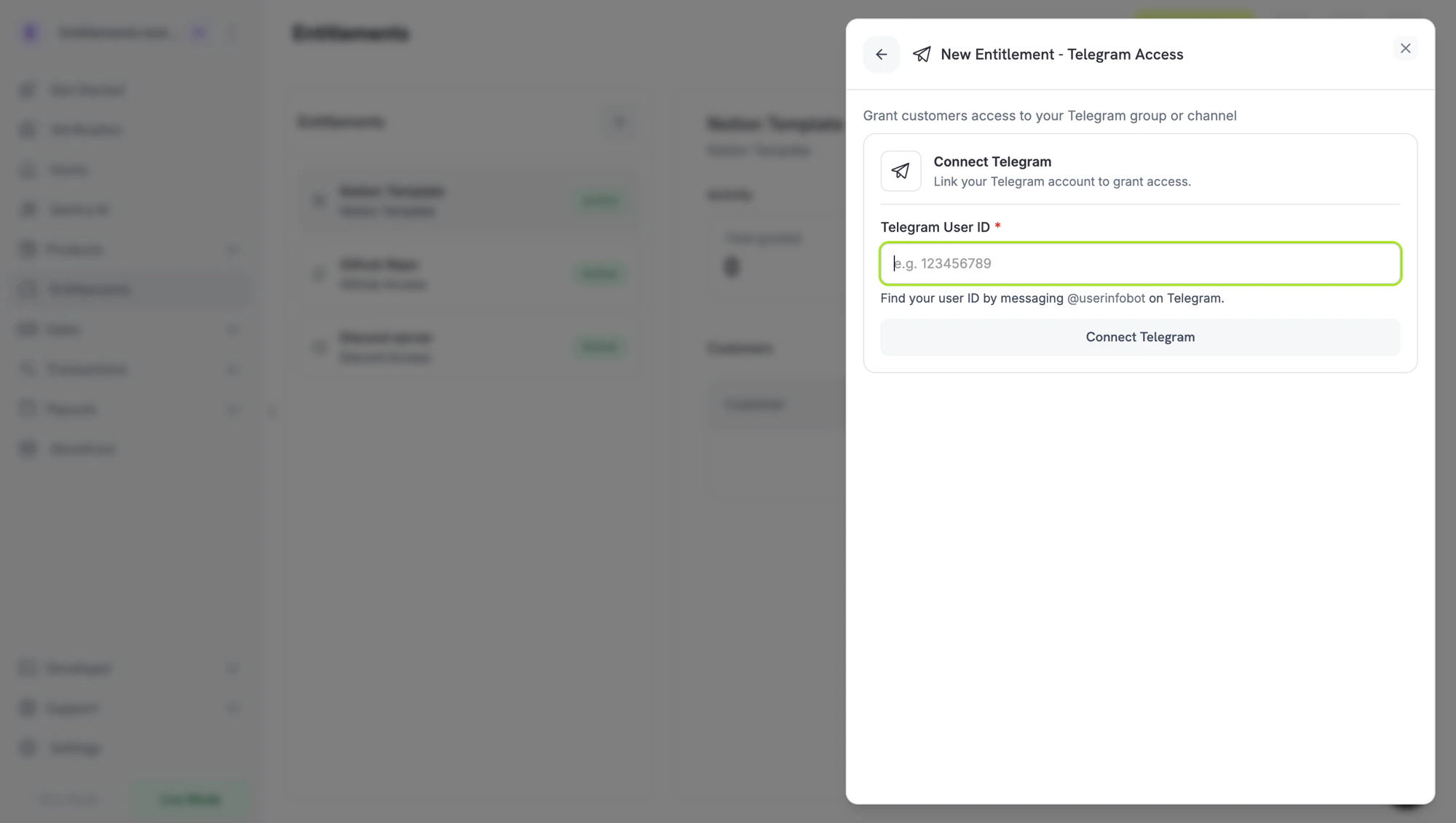
In the Dodo Payments dashboard, go to Entitlements and click +, then choose Telegram Access as the integration. The dashboard asks for your Telegram user ID, which links the chats you add the bot to with your business.
New Entitlement → Telegram Access. The dashboard needs your Telegram user ID before it lists chats.
The next two steps happen in Telegram, and you can do them in either order: get your user ID, and add the bot to your chat as an admin. When both are done, return to the dashboard for the final step.
2
Get Your Telegram User ID
In Telegram, send /start to:
@dodo_payments_bot if you’re using Live Mode
@DodoPaymentsTestBot if you’re using Test Mode
The bot replies with your numeric Telegram user ID. Copy it. You paste it into the dashboard in the last step.
3
Add the Bot to Your Chat as an Admin
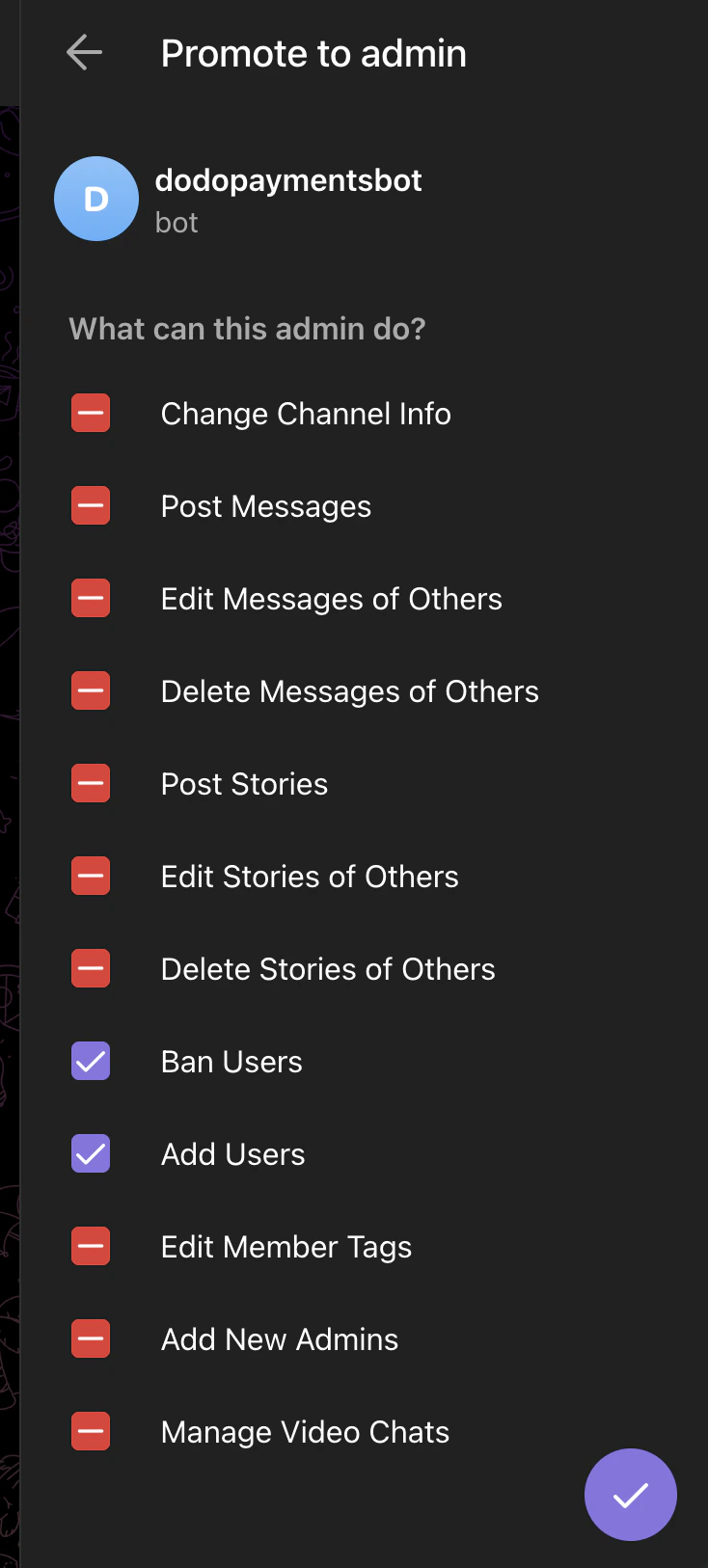
From the same Telegram account, open the group or channel you want to gate and add the same bot as an admin (@dodo_payments_bot for live mode, @DodoPaymentsTestBot for test mode). Enable these two permissions:
Ban Users: required to remove members on revocation.
Add Users: required to invite paying customers.
Leave every other admin permission off.
Telegram → Promote to admin. Only Ban Users and Add Users need to be enabled.
4
Connect Telegram and Pick the Chat
Back in the dashboard, paste the user ID from step 2 into Telegram User ID and click Connect Telegram. The Chat picker lists the groups and channels you added the bot to from that account. Pick the chat you want to gate, enter a Name for the entitlement, and click Create Entitlement.
Dodo Payments creates a Pending grant. No invite link exists yet.
The payment confirmation email lists the entitlement as Action Required and links to the Customer Portal. In the portal, the customer clicks Connect, sends /start to the bot, enters their Telegram user ID, and clicks Link account.
The bot sends the customer a join request link in Telegram. The customer opens the link and requests to join, and the bot approves the request.
On revocation, the bot removes the customer from the chat.
The bot approves join requests only from the Telegram account the customer linked. A forwarded link doesn’t give anyone else access. The linked account can’t be changed on an existing grant.
// client is a *dodopayments.Client, for example from// dodopayments.NewClient(option.WithEnvironmentTestMode()); ctx is a context.Context.client.Entitlements.New(ctx, dodopayments.EntitlementNewParams{ Name: dodopayments.F("Premium Signals Group"), IntegrationType: dodopayments.F(dodopayments.EntitlementIntegrationTypeTelegram), IntegrationConfig: dodopayments.F[dodopayments.IntegrationConfigUnionParam]( dodopayments.IntegrationConfigTelegramConfigParam{ ChatID: dodopayments.F("-1001234567890"), }, ),})
See entitlement_grant.* webhook events. Telegram grants arrive Pending and stay Pending after the customer links their Telegram account. If a customer with a delivered grant leaves the chat, Dodo Payments revokes the grant with revocation_reason: platform_external.
Add the Dodo Payments bot to the chat as an admin with Add Users enabled, from the Telegram account whose user ID you entered in the dashboard. The chat appears in the picker once the bot is an admin.
Customer says the invite link doesn't work
The bot approves join requests only from the linked Telegram account. Ask the customer to open the link from that account.Revoking a grant is final. You can’t reissue a revoked grant, so the customer needs a new purchase to get a new grant.
Customer cancelled but is still in the chat
The bot needs the Ban Users admin permission to remove members. Open the chat settings and confirm that both Ban Users and Add Users are enabled for the Dodo Payments bot.