Deliver license keys, downloadable files, feature flags, and access to Discord, GitHub, Telegram, Framer, and Notion automatically when customers pay.
Entitlements turn a successful payment or active subscription into access: a license key in your customer’s inbox, a feature flag your app checks, a Discord role, a GitHub repository, a Notion template, a Framer remix link, a Telegram chat invite, or a downloadable file bundle. Dodo Payments issues, tracks, and revokes that access automatically as the payment lifecycle changes.
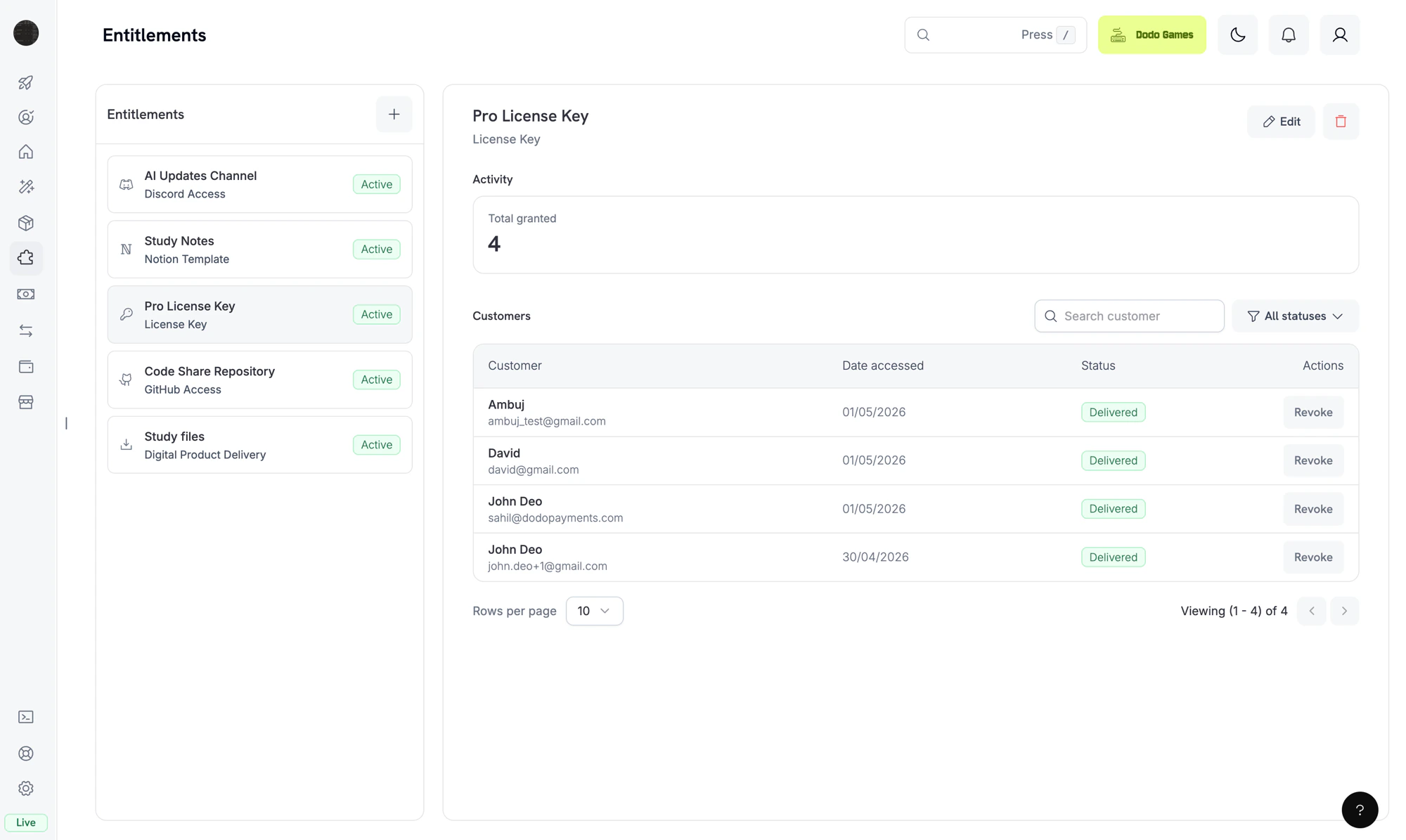
The Entitlements dashboard. Each entitlement is a reusable template; the right pane shows individual customer grants.
An entitlement is a reusable definition of something you deliver to a customer, such as a Pro license key, a “Patrons” Discord role, access to your private GitHub repository, or a downloadable e-book bundle. You attach entitlements to products, and Dodo Payments delivers them when a customer pays.When a customer buys the product, Dodo Payments creates a grant: one customer’s issuance of that entitlement. A grant has one of four statuses: Pending while delivery is in progress, Delivered once the customer has access, Failed if delivery couldn’t complete, and Revoked when access is withdrawn.
Entitlements gate fulfillment (does the customer have access?). Credits gate consumption (how much of it can they use?). You can attach both to the same product. See Credit-Based Billing for credits.
Grants follow the same payment and subscription events that you receive as webhooks. Dodo Payments creates and revokes grants for purchases automatically, based on the payment lifecycle, so you don’t call the grant API yourself.
Dodo Payments creates a grant when a payment completes or a subscription becomes active. Feature-flag grants start as Delivered. License-key grants also start as Delivered when the entitlement uses fulfillment_mode: auto (the default). Under fulfillment_mode: manual, the grant starts as Pending with no key until you supply one with Fulfill License Key Grant. Every other integration starts as Pending.OAuth-based integrations (Discord, GitHub, Notion) expose an oauth_url that the customer visits to give consent. Dodo Payments tries to generate this URL when it creates the grant. If that fails, the field stays null until the customer starts the accept flow from their delivery email or the Customer Portal. Platform-direct integrations (Telegram, Framer, Digital Files) stay Pending only while delivery is provisioned, then move to Delivered.
2
Delivered
When delivery completes, the grant moves to Delivered and delivered_at is set. Delivery is complete when the license key is generated, the role is assigned, the repository access is granted, the file links are resolved, or the OAuth flow is finished.
3
Failed
If the integration call returns a non-retryable error, such as a revoked OAuth token, a denied permission, or a file that no longer exists, the grant moves to Failed. The error_code and error_message fields record the reason.
4
Revoked
When access is withdrawn, for example because a subscription is cancelled, a refund is issued, or you revoke the grant, the grant moves to Revoked. The revocation_reason field records the trigger.
Each payment and subscription event changes grants as follows:
Event
Behavior
payment.succeeded (one-time payment)
Issues one grant per attached entitlement. A License Key entitlement issues one grant per key.
payment.succeeded (subscription-linked payment)
No change. The subscription events below drive these grants.
subscription.active
Issues grants for any attached entitlements that don’t have one yet, and re-grants grants previously revoked for the same subscription. Grants revoked with manual, refund, or platform_external aren’t re-granted.
subscription.renewed
No change. Existing grants persist across renewals.
subscription.past_due
No change. Grants stay delivered for the whole grace period.
subscription.on_hold
Revokes all delivered and pending grants with revocation_reason: subscription_on_hold.
subscription.paused
Revokes all delivered and pending grants with revocation_reason: SubscriptionPaused. Unlike the other subscription reasons, this value uses PascalCase, so match it exactly.
subscription.unpaused
Re-grants grants previously revoked for the same subscription, the same way subscription.active does.
subscription.cancelled
Revokes all grants with revocation_reason: subscription_cancelled.
subscription.expired
Revokes all grants with revocation_reason: subscription_expired.
subscription.plan_changed
Revokes all current grants with revocation_reason: plan_changed, then issues grants for the new plan’s entitlements.
refund.succeeded (one-time payment)
Revokes the grants for that payment with revocation_reason: refund.
Manual API revoke
Revokes the grant with revocation_reason: manual. Manual revokes aren’t re-granted automatically on subscription renewal.
License key disabled
For license-key grants, disabling the underlying key revokes the grant with revocation_reason: license_key_disabled. Re-enabling the key restores the grant automatically.
Platform drift detected
If the platform side of an integration drifts out of sync, such as a Discord role removed manually, the GitHub App losing repository access, or a reconciliation pass finding a missing target, Dodo Payments revokes the grant with revocation_reason: platform_external. It isn’t re-granted automatically on subscription renewal until the platform issue is resolved.
Subscription-driven grants are idempotent per (entitlement, customer, subscription), so renewals and re-activations don’t create duplicate grants. One-time grants are idempotent per (entitlement, customer, payment).
Go to Entitlements in the dashboard and click + to create an entitlement.
2
Pick an Integration
Choose the integration type: License Key, Digital Files, Feature Flag, Discord, GitHub, Telegram, Figma, Framer, or Notion. For a platform integration, connect your account first if you haven’t already.
3
Configure Delivery
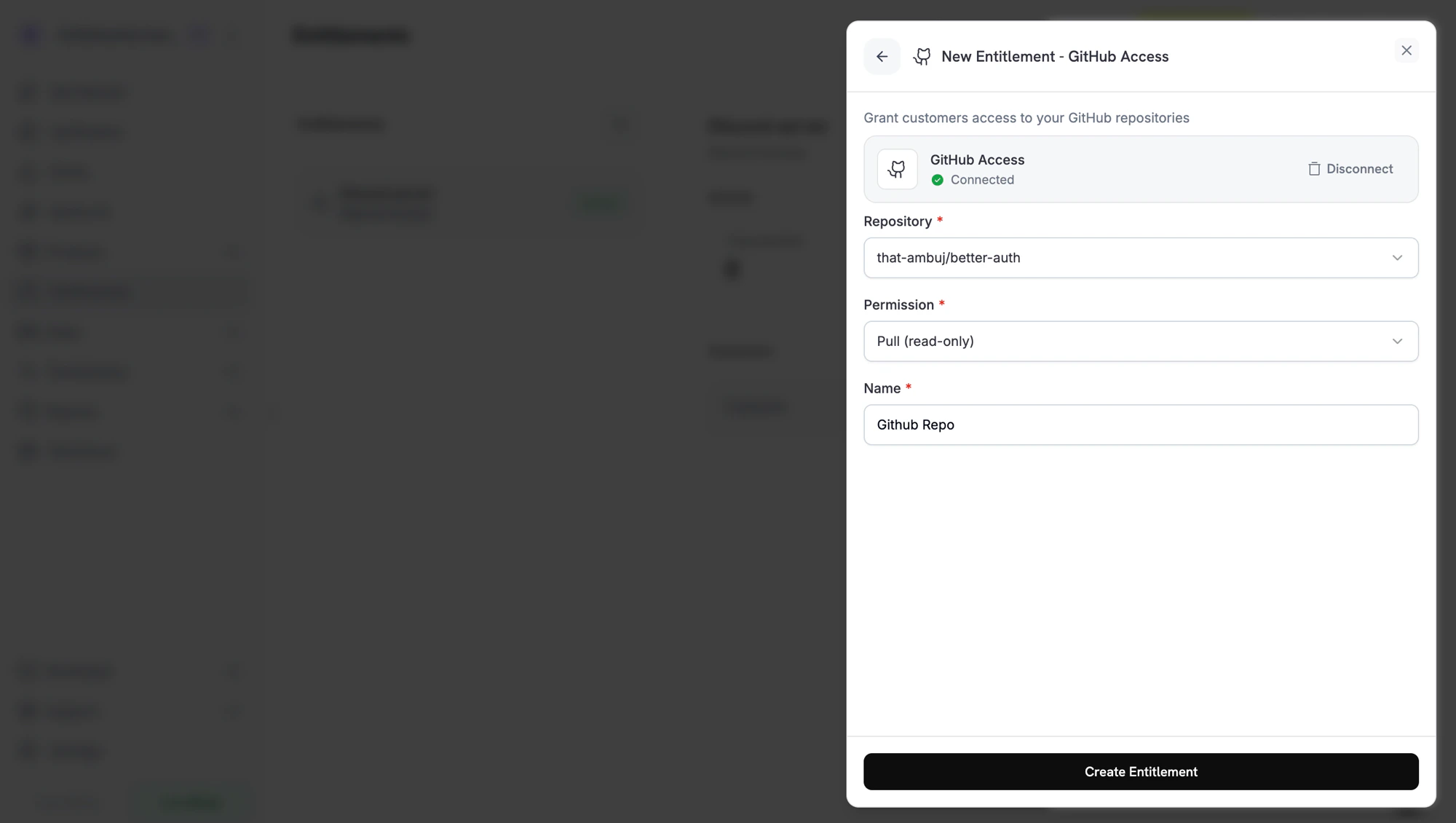
Fill in the fields for the integration. For example, GitHub asks for a repository and a permission level, Discord asks for a server and an optional role, and License Key asks for an activations limit and a license length.
Creating a GitHub entitlement. Each integration shows the fields it needs.
4
Save
Click Create Entitlement. You can now attach the entitlement to any product.
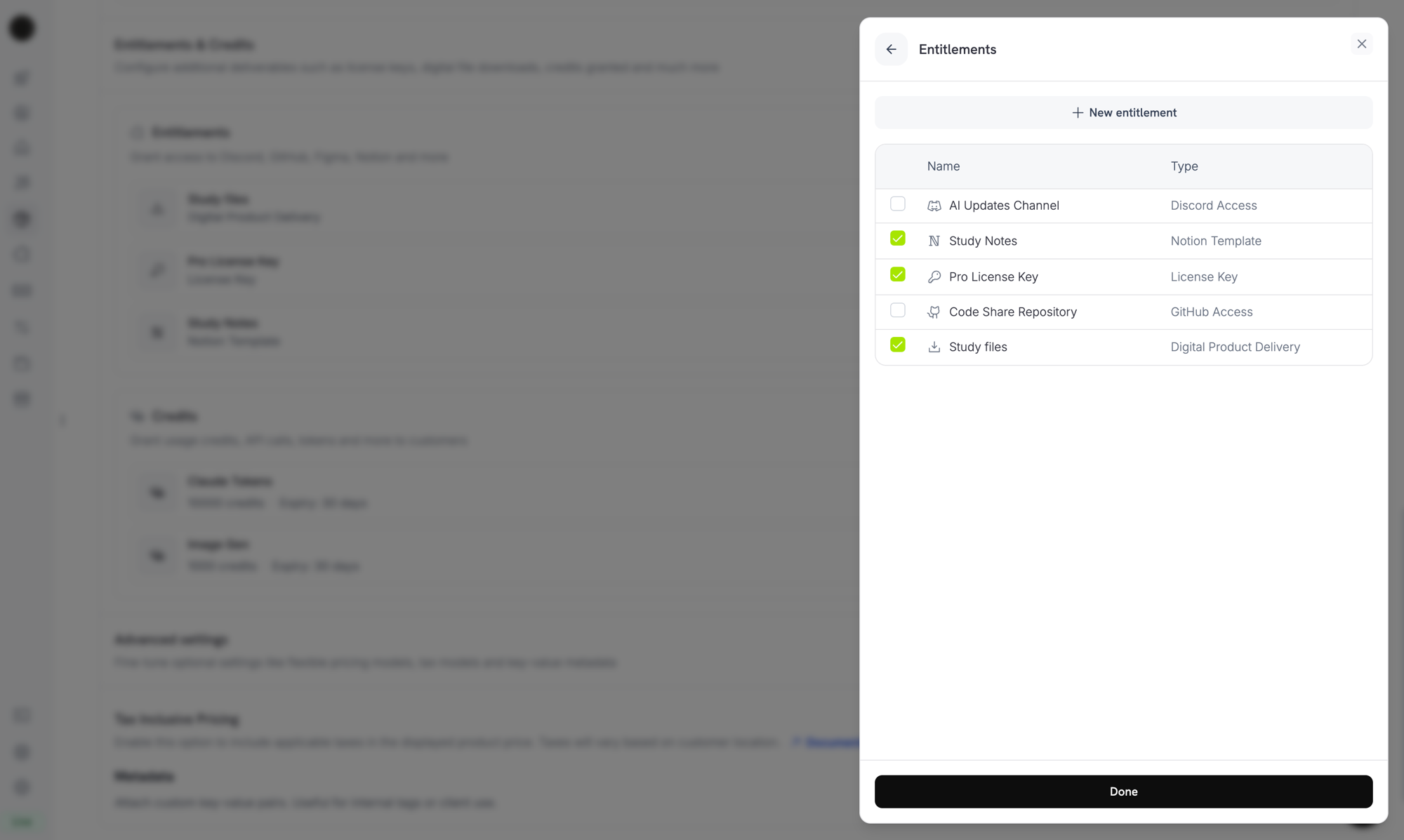
Open a product, go to its Entitlements section, and select the entitlements to deliver when the product is purchased. One product can deliver several entitlements at once. For example, a Pro plan can include a license key, GitHub access, and a Discord role.
Attaching entitlements to a product. Selected entitlements are delivered on every successful purchase or active subscription.
After a purchase, the customer receives a delivery email with the license key, download links, OAuth invitation links, or platform invite that applies to the entitlements on the product. The same details stay available in the Customer Portal, under their order history, while the grant is active.
Discord, GitHub, and Notion subscriber access requires the customer to authorize Dodo Payments to grant that access. These grants stay Pending until the customer completes the OAuth flow from the link in their email or the Customer Portal. After the customer authorizes, the grant moves to Delivered and Dodo Payments provisions the platform access.
When a grant is revoked, Dodo Payments removes the access on the platform: it removes the Discord role, removes the GitHub collaborator, or disables the license key. The customer sees the change in the Customer Portal.
For Digital Files, revocation stops new presigned download URLs, but it doesn’t invalidate copies that a customer has already downloaded. Plan your content gating with this in mind.
Open any entitlement from the dashboard to see its grants. The detail panel shows the total granted, a status filter, and one row per grant with the customer, the date accessed, the status, and a Revoke action.To manage grants programmatically, list them with the status filter and revoke a single grant by ID:
import DodoPayments from 'dodopayments';const client = new DodoPayments({ bearerToken: process.env['DODO_PAYMENTS_API_KEY'],});// List grants for an entitlementconst grants = await client.entitlements.grants.list('ent_abc123', { status: 'Delivered',});// Revoke a single grantawait client.entitlements.grants.revoke('entg_xyz789', { id: 'ent_abc123',});
Dodo Payments sends four webhook events for the grant lifecycle. Subscribe to them to keep your application in sync with what each customer can access.
Event
Fires when
entitlement_grant.created
A grant is created. Auto-fulfilled license-key grants and feature-flag grants arrive Delivered. Manually fulfilled license-key grants and every other integration arrive Pending, then move to Delivered once the platform call succeeds or, for OAuth-based integrations, once the customer authorizes.
entitlement_grant.delivered
An existing grant moves to Delivered, so the customer now has access. A grant that is Delivered on creation fires only created.
entitlement_grant.failed
The grant couldn’t be delivered. Inspect error_code and error_message.
entitlement_grant.revoked
Access has been withdrawn. Inspect revocation_reason.
Entitlement Grant Webhook Payloads
View the full payload schema, sample events, and revocation_reason reference.
Use one entitlement per delivery channel. Don’t share one Discord entitlement across products with different role intentions. Create one entitlement per role, so revocation stays clean.
Test in test mode first. Create the entitlement, attach it to a test product, run a checkout, and watch the grant move from Pending to Delivered. Then cancel the test subscription and confirm that the grant is revoked.
Listen to entitlement_grant.delivered, not payment.succeeded. A payment can succeed before fulfillment finishes, especially for OAuth flows. Wait for the grant to reach Delivered before you unlock dependent features in your own systems. A grant that is delivered on creation, such as an auto-fulfilled license key or a feature flag, arrives as entitlement_grant.created with status: "Delivered" instead.
Treat entitlement_grant.failed as actionable. A failed grant means a customer paid but didn’t get access. Surface these grants to your support team or trigger a re-grant.
Map revocation_reason to your retention flows. A subscription_on_hold revoke is recoverable, because the customer may update their card. A manual revoke is intentional. Treat them differently in customer messages.
Do not revoke access on subscription.past_due. That event opens a grace period, and the customer keeps access until the window ends. Wait for subscription.on_hold or subscription.cancelled.