Give paying customers the remix link of your Framer template, so they can remix it into their own Framer account after purchase.
The Framer entitlement gives paying customers the remix link of a Framer template. You register the template’s remix link in Dodo Payments and attach the entitlement to a product. Customers get the link in the Customer Portal and use it to remix the template into their own Framer account.
The remix link of the Framer template you registered. Every customer who buys the product receives the same link.
The customer opens the link from the Customer Portal and remixes the template into their own Framer workspace.
On cancellation or refund, the Customer Portal stops showing the link. The link itself keeps working in Framer, so anyone who saved it can still remix the template.
Common uses include paid Framer landing-page templates, portfolio kits, and component libraries.
Framer is connected implicitly the first time you create a template entitlement. There’s no separate OAuth step.
1
Open Entitlements
In the Dodo Payments dashboard, go to Entitlements and click +.
2
Pick Framer
Choose Framer Template as the integration.
3
Grab the Remix Link from Framer
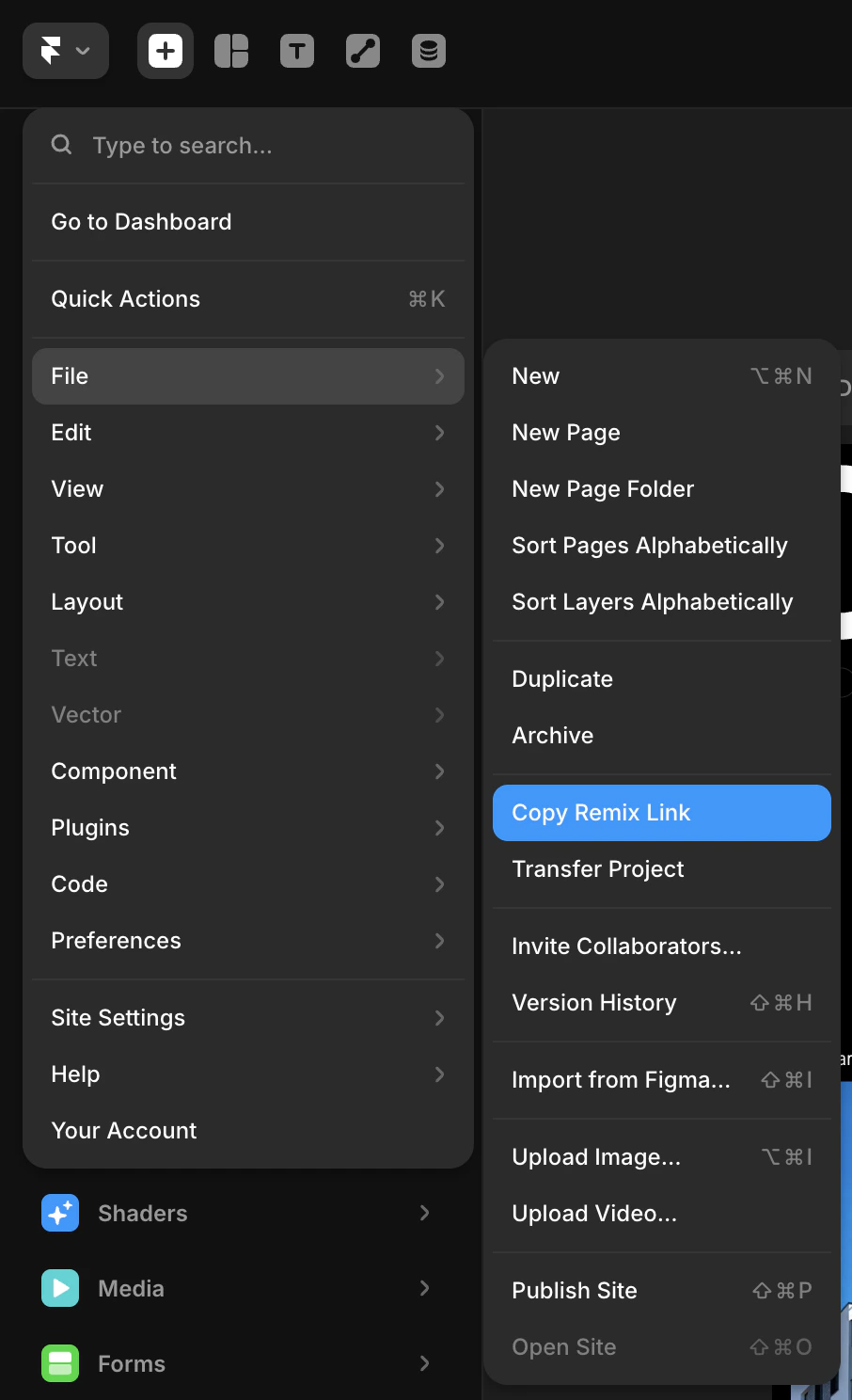
Open your Framer project. From the top-left menu, go to File → Copy Remix Link. This copies a public remix URL that lets anyone clone the project into their own Framer account. Dodo Payments shares this link with paying customers.
Framer File menu: click Copy Remix Link to copy the template's remix URL.
4
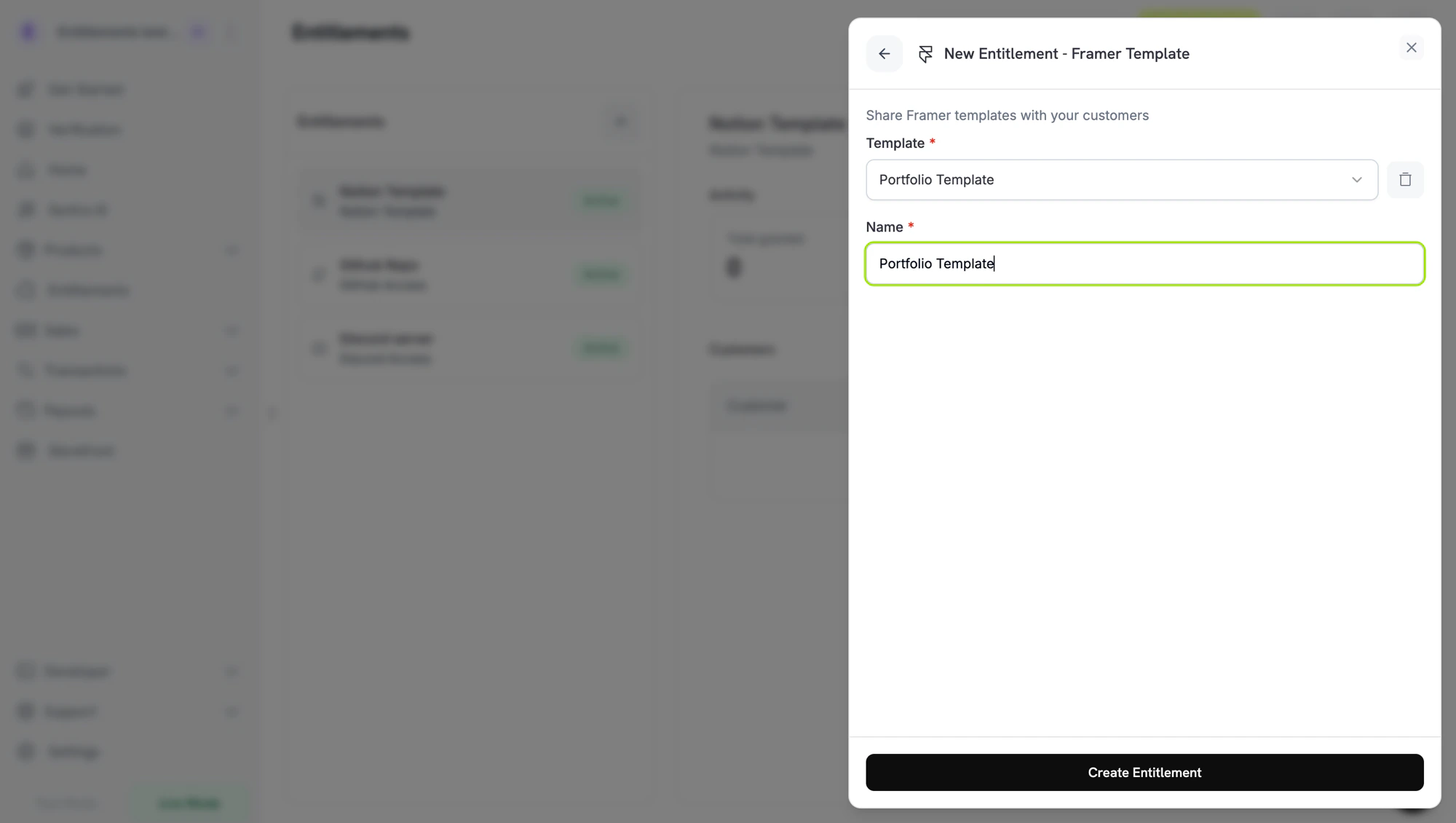
Add the Template and Create the Entitlement
Back in the Dodo Payments dashboard, select the template under Template. To register a new template, click + Create new template, enter a Template name, paste the link you copied into Remix link (it must be a framer.com URL), and click Create template. Enter a Name for the entitlement and click Create Entitlement.
Dodo Payments stores the registered template’s ID as framer_template_id in the entitlement’s integration_config, so you can reference it programmatically.
Dodo Payments creates a Pending grant and attaches the template’s remix link to it.
The grant moves to Delivered once the remix link is attached. The payment confirmation email links to the Customer Portal, where the customer finds the link on the entitlement.
The customer opens the link, signs in to Framer, and remixes the template.
On revocation, the Customer Portal stops showing the link. Copies already remixed into the customer’s Framer account remain, since Framer doesn’t expose a way to revoke them.
// client is a *dodopayments.Client, for example from// dodopayments.NewClient(option.WithEnvironmentTestMode()); ctx is a context.Context.client.Entitlements.New(ctx, dodopayments.EntitlementNewParams{ Name: dodopayments.F("Portfolio Kit"), IntegrationType: dodopayments.F(dodopayments.EntitlementIntegrationTypeFramer), IntegrationConfig: dodopayments.F[dodopayments.IntegrationConfigUnionParam]( dodopayments.IntegrationConfigFramerConfigParam{ FramerTemplateID: dodopayments.F("3f2b8c1e-7d4a-4e9b-a6c5-1d2e3f4a5b6c"), }, ),})
The remix link isn’t single-use or tied to one customer. Every customer receives the link you registered, and can open it again from the Customer Portal while the grant is Delivered. If the link fails, open it yourself to confirm the remix link is still valid in Framer.
Refunded customer still has a remixed copy
This is expected. Framer treats a remix as the customer’s own project once it’s cloned. Dodo Payments stops showing the link in the Customer Portal but can’t delete copies in the customer’s account, and can’t disable the remix link itself.