जब ग्राहक भुगतान करें, तो license keys, डाउनलोड करने योग्य फ़ाइलें, feature flags और Discord, GitHub, Telegram, Framer तथा Notion का access अपने-आप प्रदान करें।
Entitlements सफल भुगतान या active subscription को access में बदलते हैं: आपके customer के inbox में license key, जिसे आपका app जाँचता है ऐसा feature flag, Discord role, GitHub repository, Notion template, Framer remix link, Telegram chat invite या डाउनलोड करने योग्य file bundle। भुगतान lifecycle बदलने पर Dodo Payments उस access को अपने-आप जारी, track और revoke करता है।
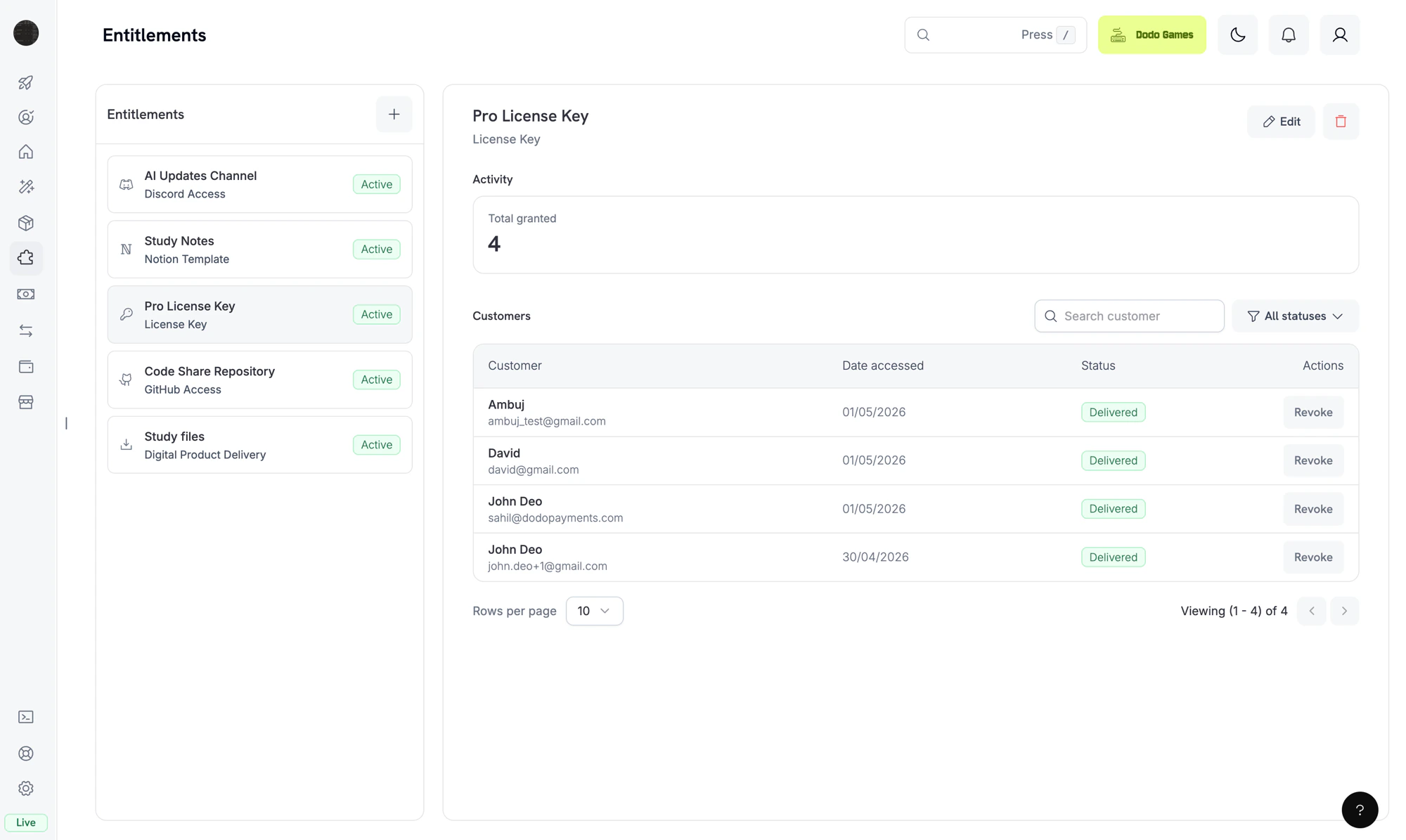
The Entitlements dashboard. Each entitlement is a reusable template; the right pane shows individual customer grants.
एक entitlement उस चीज़ की पुन: उपयोग योग्य परिभाषा है जिसे आप customer को प्रदान करते हैं, जैसे Pro license key, “Patrons” Discord role, आपकी private GitHub repository का access या डाउनलोड करने योग्य e-book bundle। आप entitlements को products से जोड़ते हैं और customer के भुगतान करने पर Dodo Payments उन्हें प्रदान करता है।जब कोई customer product खरीदता है, तो Dodo Payments एक grant बनाता है: उस entitlement को एक customer को जारी करना। Grant की चार में से एक status होती है: डिलीवरी जारी रहने के दौरान Pending, customer को access मिल जाने पर Delivered, डिलीवरी पूरी न हो पाने पर Failed, और access वापस लिए जाने पर Revoked।
Entitlements fulfillment को नियंत्रित करते हैं (क्या customer के पास access है?)। Credits consumption को नियंत्रित करते हैं (वे इसका कितना उपयोग कर सकते हैं?)। आप दोनों को एक ही product से जोड़ सकते हैं। Credits के लिए Credit-Based Billing देखें।
हर entitlement एक integration के माध्यम से डिलीवर होता है। आप जो बेचते हैं, उसके अनुरूप integration चुनें।
License Keys
Generate unique license keys with activation limits and expiry. Best for software, plugins, and CLIs.
Digital Files
E-books, templates और media जैसी डाउनलोड करने योग्य फ़ाइलें presigned download URLs और वैकल्पिक निर्देशों के साथ डिलीवर करें।
Feature Flags
Purchase के आधार पर अपने app में features को नियंत्रित करें। Creation के समय डिलीवर किया जाता है, API के माध्यम से जाँचा जाता है और cancellation पर revoke किया जाता है।
Discord
Customer के खरीदने पर उसे अपने Discord server में एक role दें। Cancellation पर role अपने-आप हटा दिया जाता है।
GitHub
Add customers as collaborators to a private repository at the permission level you choose.
Telegram
Add customers to a private Telegram chat or channel after purchase.
Framer
Unlock a Framer template remix link for paying customers.
Notion
Duplicate a Notion template into the customer’s workspace on purchase.
Grants उन्हीं payment और subscription events का अनुसरण करते हैं जो आपको webhooks के रूप में प्राप्त होते हैं। Dodo Payments payment lifecycle के आधार पर purchases के लिए grants अपने-आप बनाता और revoke करता है, इसलिए आपको grant API को स्वयं call करने की आवश्यकता नहीं है।
Dodo Payments payment पूरा होने या subscription active होने पर grant बनाता है। Feature-flag grants की शुरुआत Delivered से होती है। License-key grants की भी शुरुआत Delivered से होती है, जब entitlement में fulfillment_mode: auto (default) का उपयोग किया जाता है। fulfillment_mode: manual के अंतर्गत grant की शुरुआत Pending से होती है और तब तक कोई key नहीं होती जब तक आप Fulfill License Key Grant के माध्यम से एक key प्रदान नहीं करते। हर अन्य integration की शुरुआत Pending से होती है।OAuth-based integrations (Discord, GitHub, Notion) एक oauth_url उपलब्ध कराते हैं, जिस पर customer consent देने के लिए जाता है। Grant बनाते समय Dodo Payments इस URL को generate करने का प्रयास करता है। यदि यह विफल होता है, तो field null ही रहता है, जब तक customer अपनी delivery email या Customer Portal से accept flow शुरू नहीं करता। Platform-direct integrations (Telegram, Framer, Digital Files) केवल provisioning के दौरान Pending रहते हैं, फिर Delivered में बदल जाते हैं।
2
Delivered
डिलीवरी पूरी होने पर grant Delivered में बदल जाता है और delivered_at सेट हो जाता है। डिलीवरी तब पूरी मानी जाती है जब license key generate हो जाती है, role assign हो जाता है, repository access मिल जाता है, file links resolve हो जाते हैं या OAuth flow पूरा हो जाता है।
3
Failed
यदि integration call non-retryable error लौटाता है, जैसे revoked OAuth token, denied permission या ऐसी file जो अब मौजूद नहीं है, तो grant Failed में बदल जाता है। error_code और error_message fields कारण दर्ज करते हैं।
4
Revoked
जब access वापस लिया जाता है, उदाहरण के लिए subscription cancel होने, refund जारी होने या आपके द्वारा grant revoke करने पर, grant Revoked में बदल जाता है। revocation_reason field trigger दर्ज करता है।
हर payment और subscription event grants को इस प्रकार बदलता है:
Event
व्यवहार
payment.succeeded (one-time payment)
संलग्न प्रत्येक entitlement के लिए एक grant जारी करता है। License Key entitlement प्रत्येक key के लिए एक grant जारी करता है।
payment.succeeded (subscription-linked payment)
कोई बदलाव नहीं। नीचे दिए गए subscription events इन grants को संचालित करते हैं।
subscription.active
ऐसे संलग्न entitlements के लिए grants जारी करता है जिनके पास अभी कोई grant नहीं है, और उसी subscription के लिए पहले revoke किए गए grants को फिर से grant करता है। manual, refund या platform_external से revoke किए गए grants फिर से grant नहीं किए जाते।
subscription.renewed
कोई बदलाव नहीं। Existing grants renewals के दौरान बने रहते हैं।
subscription.past_due
कोई बदलाव नहीं। Grants पूरे grace period के दौरान delivered रहते हैं।
subscription.on_hold
revocation_reason: subscription_on_hold वाले सभी delivered और pending grants को revoke करता है।
subscription.paused
revocation_reason: SubscriptionPaused वाले सभी delivered और pending grants को revoke करता है। अन्य subscription reasons के विपरीत, यह value PascalCase का उपयोग करती है, इसलिए इसका ठीक-ठीक मिलान करें।
subscription.unpaused
उसी subscription के लिए पहले revoke किए गए grants को फिर से grant करता है, ठीक उसी तरह जैसे subscription.active करता है।
subscription.cancelled
revocation_reason: subscription_cancelled वाले सभी grants को revoke करता है।
subscription.expired
revocation_reason: subscription_expired वाले सभी grants को revoke करता है।
subscription.plan_changed
revocation_reason: plan_changed वाले सभी current grants को revoke करता है, फिर नए plan के entitlements के लिए grants जारी करता है।
refund.succeeded (one-time payment)
उस payment के grants को revocation_reason: refund के साथ revoke करता है।
Manual API revoke
revocation_reason: manual वाले grant को revoke करता है। Manual revokes subscription renewal पर अपने-आप फिर से grant नहीं किए जाते।
License key disabled
License-key grants के लिए, underlying key को disable करने पर grant revocation_reason: license_key_disabled के साथ revoke हो जाता है। Key को फिर से enable करने पर grant अपने-आप restore हो जाता है।
Platform drift detected
यदि integration का platform side sync से बाहर हो जाता है, जैसे Discord role को manually हटाना, GitHub App का repository access खो देना या reconciliation pass में missing target मिलना, तो Dodo Payments grant को revocation_reason: platform_external के साथ revoke करता है। Platform issue हल होने तक subscription renewal पर इसे अपने-आप फिर से grant नहीं किया जाता।
Subscription-driven grants प्रति (entitlement, customer, subscription) idempotent होते हैं, इसलिए renewals और re-activations duplicate grants नहीं बनाते। One-time grants प्रति (entitlement, customer, payment) idempotent होते हैं।
Dashboard में Entitlements पर जाएँ और entitlement बनाने के लिए + पर click करें।
2
Pick an Integration
Integration type चुनें: License Key, Digital Files, Feature Flag, Discord, GitHub, Telegram, Figma, Framer या Notion। Platform integration के लिए, यदि आपने पहले से connect नहीं किया है तो पहले अपना account connect करें।
3
Configure Delivery
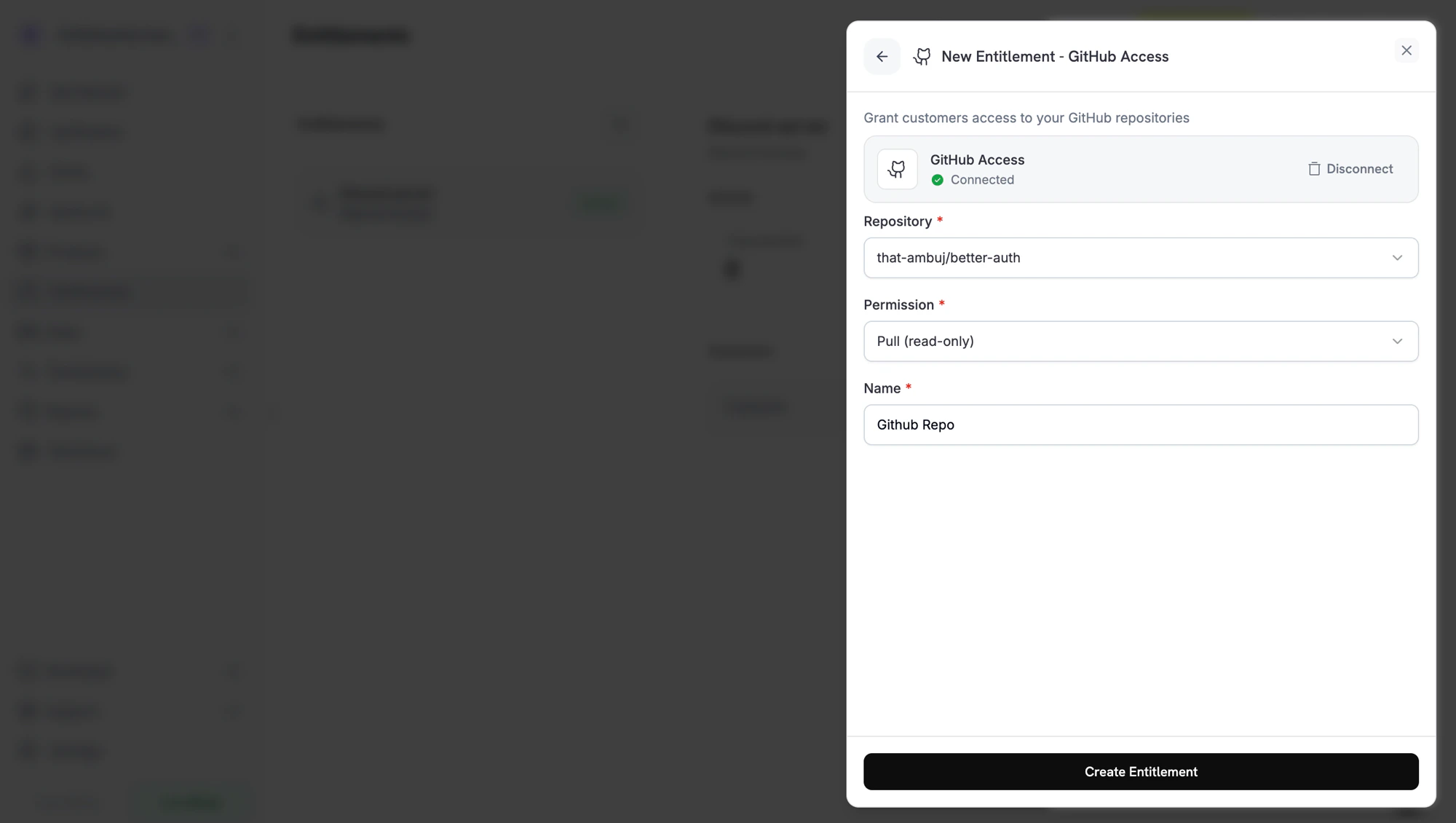
Integration के fields भरें। उदाहरण के लिए, GitHub repository और permission level माँगता है, Discord server और optional role माँगता है, और License Key activations limit तथा license length माँगता है।
Creating a GitHub entitlement. Each integration shows the fields it needs.
4
Save
Create Entitlement पर click करें। अब आप entitlement को किसी भी product से attach कर सकते हैं।
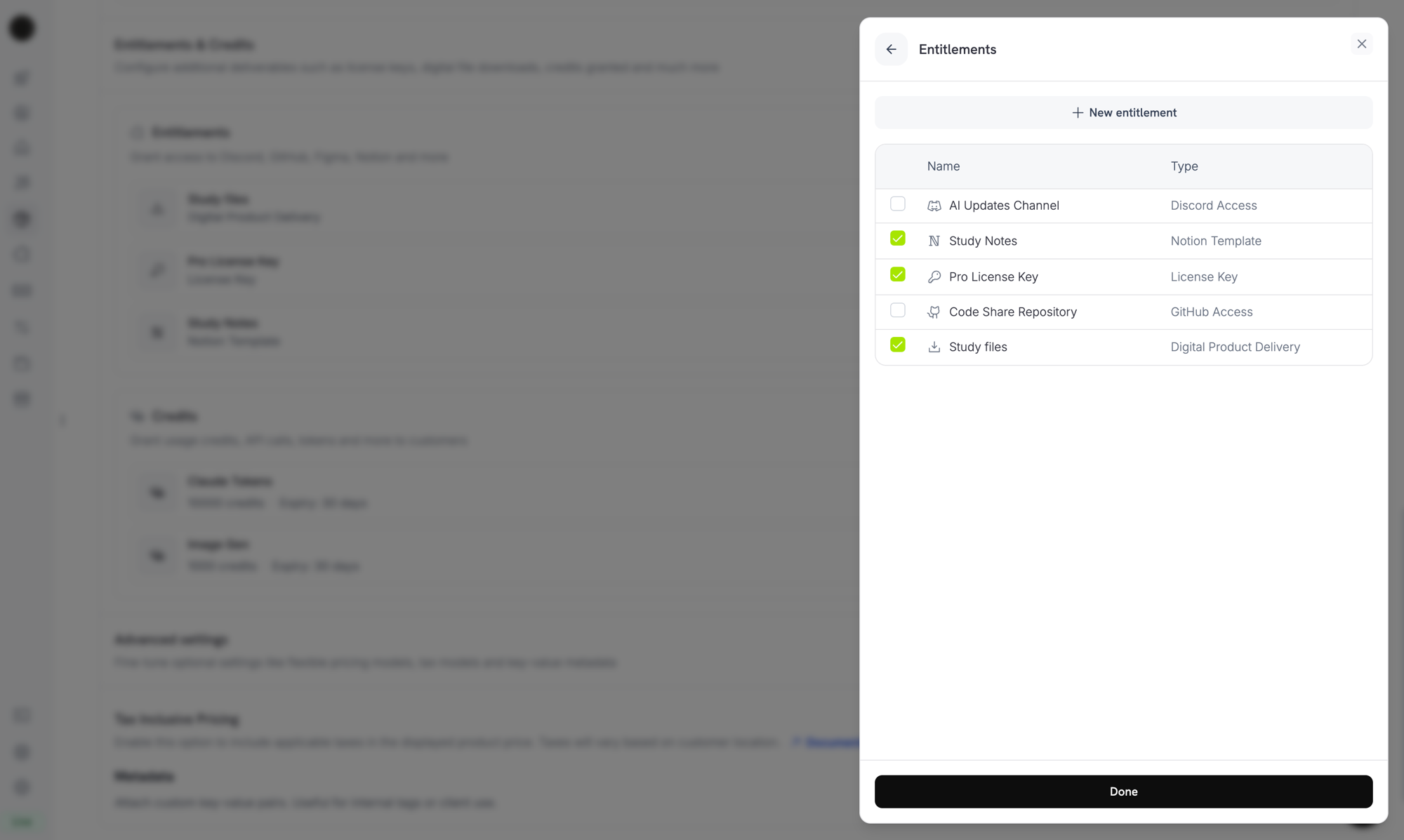
Product खोलें, उसके Entitlements section पर जाएँ और product खरीदे जाने पर डिलीवर किए जाने वाले entitlements चुनें। एक product एक साथ कई entitlements डिलीवर कर सकता है। उदाहरण के लिए, Pro plan में license key, GitHub access और Discord role शामिल हो सकते हैं।
Attaching entitlements to a product. Selected entitlements are delivered on every successful purchase or active subscription.
Purchase के बाद customer को delivery email मिलती है, जिसमें product के entitlements पर लागू license key, download links, OAuth invitation links या platform invite होता है। Grant active रहने तक यही विवरण Customer Portal में उनके order history के अंतर्गत भी उपलब्ध रहते हैं।
Discord, GitHub और Notion subscriber access के लिए customer को Dodo Payments को वह access देने की अनुमति देनी होती है। ये grants तब तक Pending रहते हैं जब तक customer अपनी email या Customer Portal के link से OAuth flow पूरा नहीं करता। Customer के authorize करने के बाद grant Delivered में बदल जाता है और Dodo Payments platform access provision करता है।
जब कोई grant revoke किया जाता है, तो Dodo Payments platform पर access हटा देता है: Discord role हटाता है, GitHub collaborator हटाता है या license key disable करता है। Customer को यह बदलाव Customer Portal में दिखाई देता है।
Digital Files के लिए, revocation नए presigned download URLs को रोकता है, लेकिन customer द्वारा पहले से download की गई copies को invalid नहीं करता। इसे ध्यान में रखते हुए अपने content gating की योजना बनाएँ।
किसी भी entitlement को dashboard से खोलकर उसके grants देखें। Detail panel में कुल grants, status filter और प्रत्येक grant के लिए customer, access की तारीख, status और Revoke action वाली एक row दिखाई देती है।Grants को programmatically manage करने के लिए उन्हें status filter के साथ list करें और ID से किसी एक grant को revoke करें:
import DodoPayments from 'dodopayments';const client = new DodoPayments({ bearerToken: process.env['DODO_PAYMENTS_API_KEY'],});// List grants for an entitlementconst grants = await client.entitlements.grants.list('ent_abc123', { status: 'Delivered',});// Revoke a single grantawait client.entitlements.grants.revoke('entg_xyz789', { id: 'ent_abc123',});
Dodo Payments grant lifecycle के लिए चार webhook events भेजता है। प्रत्येक customer को किस चीज़ का access है, इसके साथ अपने application को sync में रखने के लिए इन्हें subscribe करें।
Event
कब सक्रिय होता है
entitlement_grant.created
Grant बनाए जाने पर। Auto-fulfilled license-key grants और feature-flag grants Delivered आते हैं। Manually fulfilled license-key grants और हर अन्य integration Pending आते हैं, फिर platform call सफल होने पर या OAuth-based integrations के लिए customer के authorize करने पर Delivered में बदल जाते हैं।
entitlement_grant.delivered
कोई existing grant Delivered में बदलता है, इसलिए customer को अब access मिल जाता है। Creation के समय Delivered रहने वाला grant केवल created fire करता है।
entitlement_grant.failed
Grant डिलीवर नहीं किया जा सका। error_code और error_message देखें।
entitlement_grant.revoked
Access वापस ले लिया गया है। revocation_reason देखें।
Entitlement Grant Webhook Payloads
पूरा payload schema, sample events और revocation_reason reference देखें।
हर delivery channel के लिए एक entitlement का उपयोग करें। अलग-अलग role intentions वाले products के बीच एक Discord entitlement share न करें। प्रत्येक role के लिए एक entitlement बनाएँ, ताकि revocation साफ़-सुथरा रहे।
पहले test mode में परीक्षण करें। Entitlement बनाएँ, उसे test product से attach करें, checkout चलाएँ और grant को Pending से Delivered में बदलते देखें। फिर test subscription cancel करें और पुष्टि करें कि grant revoke हो गया है।
entitlement_grant.delivered को listen करें, payment.succeeded को नहीं। Fulfillment पूरा होने से पहले payment सफल हो सकता है, खासकर OAuth flows के लिए। अपने systems में dependent features unlock करने से पहले grant के Delivered तक पहुँचने की प्रतीक्षा करें। Creation के समय डिलीवर होने वाला grant, जैसे auto-fulfilled license key या feature flag, इसके बजाय entitlement_grant.created के रूप में status: "Delivered" के साथ आता है।
entitlement_grant.failed को actionable मानें। Failed grant का अर्थ है कि customer ने भुगतान किया लेकिन उसे access नहीं मिला। इन grants को अपनी support team को दिखाएँ या re-grant trigger करें।
revocation_reason को अपने retention flows से map करें।subscription_on_hold revoke recoverable होता है, क्योंकि customer अपना card update कर सकता है। manual revoke intentional होता है। Customer messages में इनके साथ अलग-अलग व्यवहार करें।
subscription.past_due पर access revoke न करें। यह event एक grace period शुरू करता है और window समाप्त होने तक customer access बनाए रखता है। subscription.on_hold या subscription.cancelled की प्रतीक्षा करें।
अंतिम संशोधन 26 सितंबर 2026
वाज़ दिस पेज हेल्पफुल
⌘I
{"docsConfig":{"theme":"maple","$schema":"https://mintlify.com/docs.json","name":"Dodo Payments Documentation","description":"Documentation for Dodo Payments — the all-in-one payments, billing, and merchant of record platform for SaaS, AI, and digital products.","colors":{"primary":"#779812","light":"#C6FE1E","dark":"#166534"},"logo":{"light":"https://mintcdn.com/dodopayments/nM_mJfYkri-OpC5M/logo/light.svg?fit=max\u0026auto=format\u0026n=nM_mJfYkri-OpC5M\u0026q=85\u0026s=23f7a052f7ecb9d6570b7c95ee359a97","dark":"https://mintcdn.com/dodopayments/nM_mJfYkri-OpC5M/logo/dark.svg?fit=max\u0026auto=format\u0026n=nM_mJfYkri-OpC5M\u0026q=85\u0026s=cd6c20238a54526436f21c43fee51b26"},"favicon":"https://mintcdn.com/dodopayments/doYQc9oUE-WNz0cs/favicon.svg?fit=max\u0026auto=format\u0026n=doYQc9oUE-WNz0cs\u0026q=85\u0026s=271c6cc8ce7d6bf4d7f2b9cca029e004","background":{"color":{"light":"#FFFFFF","dark":"#0D0D0D"}},"navbar":{"links":[{"icon":"link","href":"https://docs.dodopayments.com/llms-full.txt","label":"llms-full.txt"},{"icon":"discord","href":"https://discord.gg/bYqAp4ayYh","label":"Community"},{"icon":"house","href":"https://app.dodopayments.com/","label":"Dashboard"}]},"footer":{"socials":{"x":"https://x.com/dodopayments","linkedin":"https://linkedin.com/company/dodopayments","website":"https://dodopayments.com","discord":"https://discord.gg/bYqAp4ayYh","github":"https://github.com/dodopayments","instagram":"https://www.instagram.com/dodo.payments","facebook":"https://www.facebook.com/profile.php?id=61565515607280"}},"seo":{"metatags":{"og:site_name":"Dodo Payments Documentation","twitter:card":"summary_large_image"},"indexing":"navigable"},"fonts":{"heading":{"family":"ApfelGrotezk","weight":400,"source":"fonts/ApfelGrotezk-Regular.woff2","format":"woff2"},"body":{"family":"Inter","weight":400,"source":"fonts/Inter-Variable.woff2","format":"woff2"}},"contextual":{"options":["copy","view","chatgpt","claude","perplexity","cursor"],"display":"header"},"metadata":{"timestamp":true},"styling":{"latex":true},"navigation":{"languages":[{"language":"en","href":"introduction"},{"language":"es","href":"es/introduction"},{"language":"ar","href":"ar/introduction"},{"language":"fr","href":"fr/introduction"},{"language":"de","href":"de/introduction"},{"language":"id","href":"id/introduction"},{"language":"ja","href":"ja/introduction"},{"language":"ko","href":"ko/introduction"},{"language":"pt-BR","href":"pt-BR/introduction"},{"language":"vi","href":"vi/introduction"},{"language":"cn","href":"cn/introduction"},{"language":"hi","href":"hi/introduction"},{"language":"it","href":"it/introduction"},{"language":"sv","href":"sv/introduction"}]}},"deployment":{"deploymentMetadataValue":{"subdomain":"dodopayments","hasAudioNarration":false,"actualSubdomain":"dodopayments","customDomains":["docs.dodopayments.com"],"gitSource":{"type":"github","owner":"dodopayments","repo":"dodo-docs","deployBranch":"main","contentDirectory":"","isPrivate":true,"mountPath":"","label":""},"chroma":{"liveDeploymentHistoryId":"6ae4a48d737a5e6c8f11570f","collectionId":"7d1fdd95-d2f3-45f6-b7c1-915a4bc82be8","schemaVersion":"v3","latestBuiltDeploymentHistoryId":"6ae4a48d737a5e6c8f11570f"},"feedback":{"thumbs":true,"edits":false,"issues":false},"entitlements":{"AI_CHAT":{"status":"ENABLED"},"WEB_MCP":{"status":"ENABLED"},"NARRATION":{"status":"ENABLED"}},"buildId":"6ae4a48d737a5e6c8f11570f","clientVersion":"0.0.4044","searchFilterCounts":[{"language":"en","tag":"Docs","count":171},{"language":"en","tag":"API Reference","count":163},{"language":"ar","tag":"Docs","count":153},{"language":"cn","tag":"Docs","count":153},{"language":"de","tag":"Docs","count":153},{"language":"es","tag":"Docs","count":153},{"language":"fr","tag":"Docs","count":153},{"language":"hi","tag":"Docs","count":153},{"language":"id","tag":"Docs","count":153},{"language":"it","tag":"Docs","count":153},{"language":"ja","tag":"Docs","count":153},{"language":"ko","tag":"Docs","count":153},{"language":"pt-BR","tag":"Docs","count":153},{"language":"sv","tag":"Docs","count":153},{"language":"vi","tag":"Docs","count":153},{"language":"ar","tag":"API Reference","count":151},{"language":"cn","tag":"API Reference","count":151},{"language":"de","tag":"API Reference","count":151},{"language":"es","tag":"API Reference","count":151},{"language":"fr","tag":"API Reference","count":151},{"language":"hi","tag":"API Reference","count":151},{"language":"id","tag":"API Reference","count":151},{"language":"it","tag":"API Reference","count":151},{"language":"ja","tag":"API Reference","count":151},{"language":"ko","tag":"API Reference","count":151},{"language":"pt-BR","tag":"API Reference","count":151},{"language":"sv","tag":"API Reference","count":151},{"language":"vi","tag":"API Reference","count":151},{"language":"en","tag":"Features","count":82},{"language":"ar","tag":"Features","count":81},{"language":"cn","tag":"Features","count":81},{"language":"de","tag":"Features","count":81},{"language":"es","tag":"Features","count":81},{"language":"fr","tag":"Features","count":81},{"language":"hi","tag":"Features","count":81},{"language":"id","tag":"Features","count":81},{"language":"it","tag":"Features","count":81},{"language":"ja","tag":"Features","count":81},{"language":"ko","tag":"Features","count":81},{"language":"pt-BR","tag":"Features","count":81},{"language":"sv","tag":"Features","count":81},{"language":"vi","tag":"Features","count":81},{"language":"en","tag":"Integrate","count":73},{"language":"en","tag":"Changelog","count":65},{"language":"ar","tag":"Changelog","count":65},{"language":"cn","tag":"Changelog","count":65},{"language":"de","tag":"Changelog","count":65},{"language":"es","tag":"Changelog","count":65},{"language":"fr","tag":"Changelog","count":65},{"language":"hi","tag":"Changelog","count":65},{"language":"id","tag":"Changelog","count":65},{"language":"it","tag":"Changelog","count":65},{"language":"ja","tag":"Changelog","count":65},{"language":"ko","tag":"Changelog","count":65},{"language":"pt-BR","tag":"Changelog","count":65},{"language":"sv","tag":"Changelog","count":65},{"language":"vi","tag":"Changelog","count":65},{"language":"ar","tag":"Integrate","count":59},{"language":"cn","tag":"Integrate","count":59},{"language":"de","tag":"Integrate","count":59},{"language":"es","tag":"Integrate","count":59},{"language":"fr","tag":"Integrate","count":59},{"language":"hi","tag":"Integrate","count":59},{"language":"id","tag":"Integrate","count":59},{"language":"it","tag":"Integrate","count":59},{"language":"ja","tag":"Integrate","count":59},{"language":"ko","tag":"Integrate","count":59},{"language":"pt-BR","tag":"Integrate","count":59},{"language":"sv","tag":"Integrate","count":59},{"language":"vi","tag":"Integrate","count":59},{"language":"en","tag":"External Integrations","count":33},{"language":"ar","tag":"External Integrations","count":30},{"language":"cn","tag":"External Integrations","count":30},{"language":"de","tag":"External Integrations","count":30},{"language":"es","tag":"External Integrations","count":30},{"language":"fr","tag":"External Integrations","count":30},{"language":"hi","tag":"External Integrations","count":30},{"language":"id","tag":"External Integrations","count":30},{"language":"it","tag":"External Integrations","count":30},{"language":"ja","tag":"External Integrations","count":30},{"language":"ko","tag":"External Integrations","count":30},{"language":"pt-BR","tag":"External Integrations","count":30},{"language":"sv","tag":"External Integrations","count":30},{"language":"vi","tag":"External Integrations","count":30},{"language":"en","tag":"Webhooks","count":23},{"language":"ar","tag":"Webhooks","count":23},{"language":"cn","tag":"Webhooks","count":23},{"language":"de","tag":"Webhooks","count":23},{"language":"es","tag":"Webhooks","count":23},{"language":"fr","tag":"Webhooks","count":23},{"language":"hi","tag":"Webhooks","count":23},{"language":"id","tag":"Webhooks","count":23},{"language":"it","tag":"Webhooks","count":23},{"language":"ja","tag":"Webhooks","count":23},{"language":"ko","tag":"Webhooks","count":23},{"language":"pt-BR","tag":"Webhooks","count":23},{"language":"sv","tag":"Webhooks","count":23},{"language":"vi","tag":"Webhooks","count":23},{"language":"en","tag":"Guides","count":22},{"language":"ar","tag":"Guides","count":22},{"language":"cn","tag":"Guides","count":22},{"language":"de","tag":"Guides","count":22},{"language":"es","tag":"Guides","count":22},{"language":"fr","tag":"Guides","count":22},{"language":"hi","tag":"Guides","count":22},{"language":"id","tag":"Guides","count":22},{"language":"it","tag":"Guides","count":22},{"language":"ja","tag":"Guides","count":22},{"language":"ko","tag":"Guides","count":22},{"language":"pt-BR","tag":"Guides","count":22},{"language":"sv","tag":"Guides","count":22},{"language":"vi","tag":"Guides","count":22},{"language":"en","tag":"Entitlements","count":20},{"language":"ar","tag":"Entitlements","count":20},{"language":"cn","tag":"Entitlements","count":20},{"language":"de","tag":"Entitlements","count":20},{"language":"es","tag":"Entitlements","count":20},{"language":"fr","tag":"Entitlements","count":20},{"language":"hi","tag":"Entitlements","count":20},{"language":"id","tag":"Entitlements","count":20},{"language":"it","tag":"Entitlements","count":20},{"language":"ja","tag":"Entitlements","count":20},{"language":"ko","tag":"Entitlements","count":20},{"language":"pt-BR","tag":"Entitlements","count":20},{"language":"sv","tag":"Entitlements","count":20},{"language":"vi","tag":"Entitlements","count":20},{"language":"en","tag":"Customers","count":16},{"language":"ar","tag":"Customers","count":16},{"language":"cn","tag":"Customers","count":16},{"language":"de","tag":"Customers","count":16},{"language":"es","tag":"Customers","count":16},{"language":"fr","tag":"Customers","count":16},{"language":"hi","tag":"Customers","count":16},{"language":"id","tag":"Customers","count":16},{"language":"it","tag":"Customers","count":16},{"language":"ja","tag":"Customers","count":16},{"language":"ko","tag":"Customers","count":16},{"language":"pt-BR","tag":"Customers","count":16},{"language":"sv","tag":"Customers","count":16},{"language":"vi","tag":"Customers","count":16}]},"assistantConfig":{"deflection":{"enabled":false,"email":"support@dodopayments.com","showHelpButton":true}},"basePath":"","hasChatPermissions":false,"hasWebMcpPermissions":true,"toggles":[{"name":"kill-isr","enabled":true,"variant":{"name":"disabled","enabled":false,"feature_enabled":true},"impressionData":false},{"name":"agent-mintlify-slack","enabled":true,"variant":{"name":"disabled","enabled":false,"feature_enabled":true},"impressionData":false},{"name":"agent-integrations-settings","enabled":true,"variant":{"name":"disabled","enabled":false,"feature_enabled":true},"impressionData":false},{"name":"automations-pr-grouping","enabled":true,"variant":{"name":"disabled","enabled":false,"feature_enabled":true},"impressionData":false},{"name":"custom-prefix","enabled":true,"variant":{"name":"disabled","enabled":false,"feature_enabled":true},"impressionData":false},{"name":"analytics-v7","enabled":true,"variant":{"name":"disabled","enabled":false,"feature_enabled":true},"impressionData":false},{"name":"user-flows-analytics","enabled":true,"variant":{"name":"disabled","enabled":false,"feature_enabled":true},"impressionData":false},{"name":"no-publish-flow","enabled":true,"variant":{"name":"disabled","enabled":false,"feature_enabled":true},"impressionData":false},{"name":"workos-onboarding","enabled":true,"variant":{"name":"disabled","enabled":false,"feature_enabled":true},"impressionData":false},{"name":"llms-txt-v2","enabled":true,"variant":{"name":"disabled","enabled":false,"feature_enabled":true},"impressionData":false},{"name":"snapshot-serving-live","enabled":true,"variant":{"name":"disabled","enabled":false,"feature_enabled":true},"impressionData":false},{"name":"stripTemperatureMiddleware","enabled":true,"variant":{"name":"disabled","enabled":false,"feature_enabled":true},"impressionData":false},{"name":"support-platform-pylon-zendesk","enabled":true,"variant":{"name":"disabled","enabled":false,"feature_enabled":true},"impressionData":false},{"name":"snapshot-serving","enabled":true,"variant":{"name":"disabled","enabled":false,"feature_enabled":true},"impressionData":false},{"name":"instant-rollback","enabled":true,"variant":{"name":"disabled","enabled":false,"feature_enabled":true},"impressionData":false},{"name":"granular-notifications-server","enabled":true,"variant":{"name":"disabled","enabled":false,"feature_enabled":true},"impressionData":false},{"name":"granular-notifications","enabled":true,"variant":{"name":"disabled","enabled":false,"feature_enabled":true},"impressionData":false},{"name":"automations-fable","enabled":true,"variant":{"name":"disabled","enabled":false,"feature_enabled":true},"impressionData":false},{"name":"fixed-ai-action-pricing","enabled":true,"variant":{"name":"disabled","enabled":false,"feature_enabled":true},"impressionData":false},{"name":"automation-resolve-merge-conflict","enabled":true,"variant":{"name":"disabled","enabled":false,"feature_enabled":true},"impressionData":false},{"name":"scoped-publishing","enabled":true,"variant":{"name":"disabled","enabled":false,"feature_enabled":true},"impressionData":false},{"name":"mintql","enabled":true,"variant":{"name":"disabled","enabled":false,"feature_enabled":true},"impressionData":false},{"name":"page-level-analytics","enabled":true,"variant":{"name":"disabled","enabled":false,"feature_enabled":true},"impressionData":false},{"name":"editor-version-history-v2","enabled":true,"variant":{"name":"disabled","enabled":false,"feature_enabled":true},"impressionData":false},{"name":"billing-page-v2","enabled":true,"variant":{"name":"disabled","enabled":false,"feature_enabled":true},"impressionData":false},{"name":"full-page-search","enabled":true,"variant":{"name":"disabled","enabled":false,"feature_enabled":true},"impressionData":false},{"name":"workspace-projects","enabled":true,"variant":{"name":"disabled","enabled":false,"feature_enabled":true},"impressionData":false},{"name":"assistant-v5","enabled":true,"variant":{"name":"disabled","enabled":false,"feature_enabled":true},"impressionData":false},{"name":"byok-sep-25","enabled":true,"variant":{"name":"disabled","enabled":false,"feature_enabled":true},"impressionData":false},{"name":"fork-pr-previews","enabled":true,"variant":{"name":"disabled","enabled":false,"feature_enabled":true},"impressionData":false},{"name":"revalidation-jwt","enabled":true,"variant":{"name":"disabled","enabled":false,"feature_enabled":true},"impressionData":false},{"name":"vite-origin","enabled":true,"variant":{"name":"disabled","enabled":false,"feature_enabled":true},"impressionData":false},{"name":"billing-updated-9-15","enabled":true,"variant":{"name":"disabled","enabled":false,"feature_enabled":true},"impressionData":false},{"name":"workos-sso-scim","enabled":true,"variant":{"name":"disabled","enabled":false,"feature_enabled":true},"impressionData":false},{"name":"hobby-abuse-scan","enabled":true,"variant":{"name":"disabled","enabled":false,"feature_enabled":true},"impressionData":false},{"name":"dashboard-inbox","enabled":true,"variant":{"name":"disabled","enabled":false,"feature_enabled":true},"impressionData":false},{"name":"workos-signup","enabled":true,"variant":{"name":"disabled","enabled":false,"feature_enabled":true},"impressionData":false},{"name":"turbopuffer-dual-write","enabled":true,"variant":{"name":"disabled","enabled":false,"feature_enabled":true},"impressionData":false},{"name":"workos-enabled","enabled":true,"variant":{"name":"disabled","enabled":false,"feature_enabled":true},"impressionData":false},{"name":"approve-review-flow","enabled":true,"variant":{"name":"disabled","enabled":false,"feature_enabled":true},"impressionData":false},{"name":"sso-setup-deadline-banner","enabled":true,"variant":{"name":"disabled","enabled":false,"feature_enabled":true},"impressionData":false}],"googleFontsInlined":false},"customCss":[{"filePath":"styles.css","content":"#content-area{max-width:60rem}h1,h2,h3,h4,h5,h6{letter-spacing:.05em!important}.welcome-page .card-group{margin:3rem auto 8rem;max-width:70rem;padding-left:1.25rem;padding-right:1.25rem}.welcome-page .card-group .card{padding:1rem}.welcome-hero{display:flex;flex-direction:column;align-items:center;justify-content:center;min-height:20vh;text-align:center;margin-top:3rem;margin-bottom:2.5rem}.welcome-hero h1{font-size:2.5rem;font-weight:700;margin-bottom:1rem;line-height:1.2;color:#fff;color:rgb(41 42 37/1)}.welcome-hero p{font-size:1.25rem;max-width:600px;margin:0 auto;color:rgb(83 85 79/1)}.dark .welcome-hero h1{color:rgb(255 255 255/1)}.dark .welcome-hero p{color:rgb(162 164 158/1)}"}],"page":{"pagePath":"hi/features/entitlements/introduction","slug":"/hi/features/entitlements/introduction","pageMetadata":{"title":"Introduction","sidebarTitle":"Introduction","description":"जब ग्राहक भुगतान करें, तो license keys, डाउनलोड करने योग्य फ़ाइलें, feature flags और Discord, GitHub, Telegram, Framer तथा Notion का access अपने-आप प्रदान करें।","icon":"box-archive","keywords":["Dodo Payments","entitlements","fulfillment","license keys","digital delivery","platform access"],"href":"/hi/features/entitlements/introduction"},"description":{"compiledSource":"\"use strict\";\nconst {jsx: _jsx} = arguments[0];\nconst {useMDXComponents: _provideComponents} = arguments[0];\nfunction _createMdxContent(props) {\n const _components = {\n p: \"p\",\n ..._provideComponents(),\n ...props.components\n };\n return _jsx(_components.p, {\n children: \"जब ग्राहक भुगतान करें, तो license keys, डाउनलोड करने योग्य फ़ाइलें, feature flags और Discord, GitHub, Telegram, Framer तथा Notion का access अपने-आप प्रदान करें।\"\n });\n}\nfunction MDXContent(props = {}) {\n const {wrapper: MDXLayout} = {\n ..._provideComponents(),\n ...props.components\n };\n return MDXLayout ? _jsx(MDXLayout, {\n ...props,\n children: _jsx(_createMdxContent, {\n ...props\n })\n }) : _createMdxContent(props);\n}\nreturn {\n default: MDXContent\n};\n","frontmatter":{},"scope":{}},"pageType":"default","mdx":{"mdxSource":{"compiledSource":"\"use strict\";const{Fragment:_Fragment,jsx:_jsx,jsxs:_jsxs}=arguments[0];const{useMDXComponents:_provideComponents}=arguments[0];function _createMdxContent(props){const _components={a:`a`,code:`code`,hr:`hr`,li:`li`,p:`p`,pre:`pre`,span:`span`,strong:`strong`,tbody:`tbody`,td:`td`,th:`th`,thead:`thead`,tr:`tr`,ul:`ul`,..._provideComponents(),...props.components},{Card,CardGroup,CodeBlock,CodeGroup,Frame,Heading,Info,Note,OptimizedImage,Step,Steps,Table,Tip,Warning}=_components;if(!Card)_missingMdxReference(`Card`,true);if(!CardGroup)_missingMdxReference(`CardGroup`,true);if(!CodeBlock)_missingMdxReference(`CodeBlock`,true);if(!CodeGroup)_missingMdxReference(`CodeGroup`,true);if(!Frame)_missingMdxReference(`Frame`,true);if(!Heading)_missingMdxReference(`Heading`,true);if(!Info)_missingMdxReference(`Info`,true);if(!Note)_missingMdxReference(`Note`,true);if(!OptimizedImage)_missingMdxReference(`OptimizedImage`,true);if(!Step)_missingMdxReference(`Step`,true);if(!Steps)_missingMdxReference(`Steps`,true);if(!Table)_missingMdxReference(`Table`,true);if(!Tip)_missingMdxReference(`Tip`,true);if(!Warning)_missingMdxReference(`Warning`,true);return _jsxs(_Fragment,{children:[_jsx(Info,{children:_jsx(_components.p,{children:`Entitlements सफल भुगतान या active subscription को access में बदलते हैं: आपके customer के inbox में license key, जिसे आपका app जाँचता है ऐसा feature flag, Discord role, GitHub repository, Notion template, Framer remix link, Telegram chat invite या डाउनलोड करने योग्य file bundle। भुगतान lifecycle बदलने पर Dodo Payments उस access को अपने-आप जारी, track और revoke करता है।`})}),`\n`,_jsx(Frame,{caption:`The Entitlements dashboard. Each entitlement is a reusable template; the right pane shows individual customer grants.`,children:_jsx(OptimizedImage,{src:`https://mintcdn.com/dodopayments/do-W-dMDGVB_xzr_/images/entitlements/list.png?fit=max\u0026auto=format\u0026n=do-W-dMDGVB_xzr_\u0026q=85\u0026s=12a326205f64d1e71485bce46114d296`,alt:`Entitlements dashboard with a list of entitlements on the left and grant activity on the right`,style:{maxHeight:`500px`,width:`auto`},\"data-og-width\":`2000`,width:`2000`,\"data-og-height\":`1195`,height:`1195`,\"data-path\":`images/entitlements/list.png`,\"data-optimize\":`true`,\"data-opv\":`3`,srcset:`https://mintcdn.com/dodopayments/do-W-dMDGVB_xzr_/images/entitlements/list.png?w=280\u0026fit=max\u0026auto=format\u0026n=do-W-dMDGVB_xzr_\u0026q=85\u0026s=d12b37e6f3daedbb84e544d08513207e 280w, https://mintcdn.com/dodopayments/do-W-dMDGVB_xzr_/images/entitlements/list.png?w=560\u0026fit=max\u0026auto=format\u0026n=do-W-dMDGVB_xzr_\u0026q=85\u0026s=70afcf57fcdd38039179d3054a5eb73f 560w, https://mintcdn.com/dodopayments/do-W-dMDGVB_xzr_/images/entitlements/list.png?w=840\u0026fit=max\u0026auto=format\u0026n=do-W-dMDGVB_xzr_\u0026q=85\u0026s=b1cb6ba70f564db87c9bd19f50b21f44 840w, https://mintcdn.com/dodopayments/do-W-dMDGVB_xzr_/images/entitlements/list.png?w=1100\u0026fit=max\u0026auto=format\u0026n=do-W-dMDGVB_xzr_\u0026q=85\u0026s=463a9ba560357d16a43e39c23ea5a042 1100w, https://mintcdn.com/dodopayments/do-W-dMDGVB_xzr_/images/entitlements/list.png?w=1650\u0026fit=max\u0026auto=format\u0026n=do-W-dMDGVB_xzr_\u0026q=85\u0026s=8b695099d64c9bc75bef9fa1bef28541 1650w, https://mintcdn.com/dodopayments/do-W-dMDGVB_xzr_/images/entitlements/list.png?w=2500\u0026fit=max\u0026auto=format\u0026n=do-W-dMDGVB_xzr_\u0026q=85\u0026s=9e86c8dff013279ce9c94de2b5d48338 2500w`})}),`\n`,_jsx(Heading,{level:`2`,id:`entitlements-क्या-हैं`,children:`Entitlements क्या हैं?`}),`\n`,_jsxs(_components.p,{children:[`एक `,_jsx(_components.strong,{children:`entitlement`}),` उस चीज़ की पुन: उपयोग योग्य परिभाषा है जिसे आप customer को प्रदान करते हैं, जैसे Pro license key, “Patrons” Discord role, आपकी private GitHub repository का access या डाउनलोड करने योग्य e-book bundle। आप entitlements को products से जोड़ते हैं और customer के भुगतान करने पर Dodo Payments उन्हें प्रदान करता है।`]}),`\n`,_jsxs(_components.p,{children:[`जब कोई customer product खरीदता है, तो Dodo Payments एक `,_jsx(_components.strong,{children:`grant`}),` बनाता है: उस entitlement को एक customer को जारी करना। Grant की चार में से एक status होती है: डिलीवरी जारी रहने के दौरान `,_jsx(_components.code,{children:`Pending`}),`, customer को access मिल जाने पर `,_jsx(_components.code,{children:`Delivered`}),`, डिलीवरी पूरी न हो पाने पर `,_jsx(_components.code,{children:`Failed`}),`, और access वापस लिए जाने पर `,_jsx(_components.code,{children:`Revoked`}),`।`]}),`\n`,_jsx(Tip,{children:_jsxs(_components.p,{children:[`Entitlements `,_jsx(_components.strong,{children:`fulfillment`}),` को नियंत्रित करते हैं (क्या customer के पास access है?)। Credits `,_jsx(_components.strong,{children:`consumption`}),` को नियंत्रित करते हैं (वे इसका कितना उपयोग कर सकते हैं?)। आप दोनों को एक ही product से जोड़ सकते हैं। Credits के लिए `,_jsx(_components.a,{href:`/features/credit-based-billing`,children:`Credit-Based Billing`}),` देखें।`]})}),`\n`,_jsx(Heading,{level:`2`,id:`available-integrations`,children:`Available Integrations`}),`\n`,_jsx(_components.p,{children:`हर entitlement एक integration के माध्यम से डिलीवर होता है। आप जो बेचते हैं, उसके अनुरूप integration चुनें।`}),`\n`,_jsxs(CardGroup,{cols:2,children:[_jsx(Card,{title:`License Keys`,icon:`key`,href:`/features/license-keys`,children:_jsx(_components.p,{children:`Generate unique license keys with activation limits and expiry. Best for software, plugins, and CLIs.`})}),_jsx(Card,{title:`Digital Files`,icon:`download`,href:`/features/digital-product-delivery`,children:_jsx(_components.p,{children:`E-books, templates और media जैसी डाउनलोड करने योग्य फ़ाइलें presigned download URLs और वैकल्पिक निर्देशों के साथ डिलीवर करें।`})}),_jsx(Card,{title:`Feature Flags`,icon:`flag`,href:`/features/entitlements/feature-flags`,children:_jsx(_components.p,{children:`Purchase के आधार पर अपने app में features को नियंत्रित करें। Creation के समय डिलीवर किया जाता है, API के माध्यम से जाँचा जाता है और cancellation पर revoke किया जाता है।`})}),_jsx(Card,{title:`Discord`,icon:`discord`,href:`/features/entitlements/discord`,children:_jsx(_components.p,{children:`Customer के खरीदने पर उसे अपने Discord server में एक role दें। Cancellation पर role अपने-आप हटा दिया जाता है।`})}),_jsx(Card,{title:`GitHub`,icon:`github`,href:`/features/entitlements/github`,children:_jsx(_components.p,{children:`Add customers as collaborators to a private repository at the permission level you choose.`})}),_jsx(Card,{title:`Telegram`,icon:`telegram`,href:`/features/entitlements/telegram`,children:_jsx(_components.p,{children:`Add customers to a private Telegram chat or channel after purchase.`})}),_jsx(Card,{title:`Framer`,icon:`puzzle-piece`,href:`/features/entitlements/framer`,children:_jsx(_components.p,{children:`Unlock a Framer template remix link for paying customers.`})}),_jsx(Card,{title:`Notion`,icon:`book`,href:`/features/entitlements/notion`,children:_jsx(_components.p,{children:`Duplicate a Notion template into the customer’s workspace on purchase.`})})]}),`\n`,_jsx(_components.hr,{}),`\n`,_jsx(Heading,{level:`2`,id:`how-grants-work`,children:`How Grants Work`}),`\n`,_jsx(_components.p,{children:`Grants उन्हीं payment और subscription events का अनुसरण करते हैं जो आपको webhooks के रूप में प्राप्त होते हैं। Dodo Payments payment lifecycle के आधार पर purchases के लिए grants अपने-आप बनाता और revoke करता है, इसलिए आपको grant API को स्वयं call करने की आवश्यकता नहीं है।`}),`\n`,_jsx(Heading,{level:`3`,id:`grant-lifecycle`,children:`Grant Lifecycle`}),`\n`,_jsx(_components.p,{children:`Grant इन statuses से होकर गुजरता है:`}),`\n`,_jsxs(Steps,{children:[_jsxs(Step,{title:`Created`,children:[_jsxs(_components.p,{children:[`Dodo Payments payment पूरा होने या subscription active होने पर grant बनाता है। Feature-flag grants की शुरुआत `,_jsx(_components.code,{children:`Delivered`}),` से होती है। License-key grants की भी शुरुआत `,_jsx(_components.code,{children:`Delivered`}),` से होती है, जब entitlement में `,_jsx(_components.code,{children:`fulfillment_mode: auto`}),` (default) का उपयोग किया जाता है। `,_jsx(_components.code,{children:`fulfillment_mode: manual`}),` के अंतर्गत grant की शुरुआत `,_jsx(_components.code,{children:`Pending`}),` से होती है और तब तक कोई key नहीं होती जब तक आप `,_jsx(_components.a,{href:`/api-reference/entitlements/fulfill-license-key`,children:`Fulfill License Key Grant`}),` के माध्यम से एक key प्रदान नहीं करते। हर अन्य integration की शुरुआत `,_jsx(_components.code,{children:`Pending`}),` से होती है।`]}),_jsxs(_components.p,{children:[`OAuth-based integrations (Discord, GitHub, Notion) एक `,_jsx(_components.code,{children:`oauth_url`}),` उपलब्ध कराते हैं, जिस पर customer consent देने के लिए जाता है। Grant बनाते समय Dodo Payments इस URL को generate करने का प्रयास करता है। यदि यह विफल होता है, तो field `,_jsx(_components.code,{children:`null`}),` ही रहता है, जब तक customer अपनी delivery email या Customer Portal से accept flow शुरू नहीं करता। Platform-direct integrations (Telegram, Framer, Digital Files) केवल provisioning के दौरान `,_jsx(_components.code,{children:`Pending`}),` रहते हैं, फिर `,_jsx(_components.code,{children:`Delivered`}),` में बदल जाते हैं।`]})]}),_jsx(Step,{title:`Delivered`,children:_jsxs(_components.p,{children:[`डिलीवरी पूरी होने पर grant `,_jsx(_components.code,{children:`Delivered`}),` में बदल जाता है और `,_jsx(_components.code,{children:`delivered_at`}),` सेट हो जाता है। डिलीवरी तब पूरी मानी जाती है जब license key generate हो जाती है, role assign हो जाता है, repository access मिल जाता है, file links resolve हो जाते हैं या OAuth flow पूरा हो जाता है।`]})}),_jsx(Step,{title:`Failed`,children:_jsxs(_components.p,{children:[`यदि integration call non-retryable error लौटाता है, जैसे revoked OAuth token, denied permission या ऐसी file जो अब मौजूद नहीं है, तो grant `,_jsx(_components.code,{children:`Failed`}),` में बदल जाता है। `,_jsx(_components.code,{children:`error_code`}),` और `,_jsx(_components.code,{children:`error_message`}),` fields कारण दर्ज करते हैं।`]})}),_jsx(Step,{title:`Revoked`,children:_jsxs(_components.p,{children:[`जब access वापस लिया जाता है, उदाहरण के लिए subscription cancel होने, refund जारी होने या आपके द्वारा grant revoke करने पर, grant `,_jsx(_components.code,{children:`Revoked`}),` में बदल जाता है। `,_jsx(_components.code,{children:`revocation_reason`}),` field trigger दर्ज करता है।`]})})]}),`\n`,_jsx(Heading,{level:`3`,id:`event-के-अनुसार-grant-का-व्यवहार`,children:`Event के अनुसार Grant का व्यवहार`}),`\n`,_jsx(_components.p,{children:`हर payment और subscription event grants को इस प्रकार बदलता है:`}),`\n`,_jsxs(Table,{children:[_jsx(_components.thead,{children:_jsxs(_components.tr,{children:[_jsx(_components.th,{children:`Event`}),_jsx(_components.th,{children:`व्यवहार`})]})}),_jsxs(_components.tbody,{children:[_jsxs(_components.tr,{children:[_jsxs(_components.td,{children:[_jsx(_components.code,{children:`payment.succeeded`}),` (one-time payment)`]}),_jsx(_components.td,{children:`संलग्न प्रत्येक entitlement के लिए एक grant जारी करता है। License Key entitlement प्रत्येक key के लिए एक grant जारी करता है।`})]}),_jsxs(_components.tr,{children:[_jsxs(_components.td,{children:[_jsx(_components.code,{children:`payment.succeeded`}),` (subscription-linked payment)`]}),_jsx(_components.td,{children:`कोई बदलाव नहीं। नीचे दिए गए subscription events इन grants को संचालित करते हैं।`})]}),_jsxs(_components.tr,{children:[_jsx(_components.td,{children:_jsx(_components.code,{children:`subscription.active`})}),_jsxs(_components.td,{children:[`ऐसे संलग्न entitlements के लिए grants जारी करता है जिनके पास अभी कोई grant नहीं है, और उसी subscription के लिए पहले revoke किए गए grants को फिर से grant करता है। `,_jsx(_components.code,{children:`manual`}),`, `,_jsx(_components.code,{children:`refund`}),` या `,_jsx(_components.code,{children:`platform_external`}),` से revoke किए गए grants फिर से grant नहीं किए जाते।`]})]}),_jsxs(_components.tr,{children:[_jsx(_components.td,{children:_jsx(_components.code,{children:`subscription.renewed`})}),_jsx(_components.td,{children:`कोई बदलाव नहीं। Existing grants renewals के दौरान बने रहते हैं।`})]}),_jsxs(_components.tr,{children:[_jsx(_components.td,{children:_jsx(_components.code,{children:`subscription.past_due`})}),_jsxs(_components.td,{children:[`कोई बदलाव नहीं। Grants पूरे `,_jsx(_components.a,{href:`/features/subscription#grace-period`,children:`grace period`}),` के दौरान delivered रहते हैं।`]})]}),_jsxs(_components.tr,{children:[_jsx(_components.td,{children:_jsx(_components.code,{children:`subscription.on_hold`})}),_jsxs(_components.td,{children:[_jsx(_components.code,{children:`revocation_reason: subscription_on_hold`}),` वाले सभी delivered और pending grants को revoke करता है।`]})]}),_jsxs(_components.tr,{children:[_jsx(_components.td,{children:_jsx(_components.code,{children:`subscription.paused`})}),_jsxs(_components.td,{children:[_jsx(_components.code,{children:`revocation_reason: SubscriptionPaused`}),` वाले सभी delivered और pending grants को revoke करता है। अन्य subscription reasons के विपरीत, यह value PascalCase का उपयोग करती है, इसलिए इसका ठीक-ठीक मिलान करें।`]})]}),_jsxs(_components.tr,{children:[_jsx(_components.td,{children:_jsx(_components.code,{children:`subscription.unpaused`})}),_jsxs(_components.td,{children:[`उसी subscription के लिए पहले revoke किए गए grants को फिर से grant करता है, ठीक उसी तरह जैसे `,_jsx(_components.code,{children:`subscription.active`}),` करता है।`]})]}),_jsxs(_components.tr,{children:[_jsx(_components.td,{children:_jsx(_components.code,{children:`subscription.cancelled`})}),_jsxs(_components.td,{children:[_jsx(_components.code,{children:`revocation_reason: subscription_cancelled`}),` वाले सभी grants को revoke करता है।`]})]}),_jsxs(_components.tr,{children:[_jsx(_components.td,{children:_jsx(_components.code,{children:`subscription.expired`})}),_jsxs(_components.td,{children:[_jsx(_components.code,{children:`revocation_reason: subscription_expired`}),` वाले सभी grants को revoke करता है।`]})]}),_jsxs(_components.tr,{children:[_jsx(_components.td,{children:_jsx(_components.code,{children:`subscription.plan_changed`})}),_jsxs(_components.td,{children:[_jsx(_components.code,{children:`revocation_reason: plan_changed`}),` वाले सभी current grants को revoke करता है, फिर नए plan के entitlements के लिए grants जारी करता है।`]})]}),_jsxs(_components.tr,{children:[_jsxs(_components.td,{children:[_jsx(_components.code,{children:`refund.succeeded`}),` (one-time payment)`]}),_jsxs(_components.td,{children:[`उस payment के grants को `,_jsx(_components.code,{children:`revocation_reason: refund`}),` के साथ revoke करता है।`]})]}),_jsxs(_components.tr,{children:[_jsx(_components.td,{children:`Manual API revoke`}),_jsxs(_components.td,{children:[_jsx(_components.code,{children:`revocation_reason: manual`}),` वाले grant को revoke करता है। Manual revokes subscription renewal पर अपने-आप फिर से grant नहीं किए जाते।`]})]}),_jsxs(_components.tr,{children:[_jsx(_components.td,{children:`License key disabled`}),_jsxs(_components.td,{children:[`License-key grants के लिए, underlying key को disable करने पर grant `,_jsx(_components.code,{children:`revocation_reason: license_key_disabled`}),` के साथ revoke हो जाता है। Key को फिर से enable करने पर grant अपने-आप restore हो जाता है।`]})]}),_jsxs(_components.tr,{children:[_jsx(_components.td,{children:`Platform drift detected`}),_jsxs(_components.td,{children:[`यदि integration का platform side sync से बाहर हो जाता है, जैसे Discord role को manually हटाना, GitHub App का repository access खो देना या reconciliation pass में missing target मिलना, तो Dodo Payments grant को `,_jsx(_components.code,{children:`revocation_reason: platform_external`}),` के साथ revoke करता है। Platform issue हल होने तक subscription renewal पर इसे अपने-आप फिर से grant नहीं किया जाता।`]})]})]})]}),`\n`,_jsx(Note,{children:_jsxs(_components.p,{children:[`Subscription-driven grants प्रति `,_jsx(_components.code,{children:`(entitlement, customer, subscription)`}),` idempotent होते हैं, इसलिए renewals और re-activations duplicate grants नहीं बनाते। One-time grants प्रति `,_jsx(_components.code,{children:`(entitlement, customer, payment)`}),` idempotent होते हैं।`]})}),`\n`,_jsx(_components.hr,{}),`\n`,_jsx(Heading,{level:`2`,id:`अपना-पहला-entitlement-बनाएँ`,children:`अपना पहला Entitlement बनाएँ`}),`\n`,_jsxs(Steps,{children:[_jsx(Step,{title:`Open Entitlements`,children:_jsxs(_components.p,{children:[`Dashboard में `,_jsx(_components.strong,{children:`Entitlements`}),` पर जाएँ और entitlement बनाने के लिए `,_jsx(_components.strong,{children:`+`}),` पर click करें।`]})}),_jsx(Step,{title:`Pick an Integration`,children:_jsx(_components.p,{children:`Integration type चुनें: License Key, Digital Files, Feature Flag, Discord, GitHub, Telegram, Figma, Framer या Notion। Platform integration के लिए, यदि आपने पहले से connect नहीं किया है तो पहले अपना account connect करें।`})}),_jsxs(Step,{title:`Configure Delivery`,children:[_jsx(_components.p,{children:`Integration के fields भरें। उदाहरण के लिए, GitHub repository और permission level माँगता है, Discord server और optional role माँगता है, और License Key activations limit तथा license length माँगता है।`}),_jsx(Frame,{caption:`Creating a GitHub entitlement. Each integration shows the fields it needs.`,children:_jsx(OptimizedImage,{src:`https://mintcdn.com/dodopayments/do-W-dMDGVB_xzr_/images/entitlements/github/create.png?fit=max\u0026auto=format\u0026n=do-W-dMDGVB_xzr_\u0026q=85\u0026s=722e925ec5158a5d16c58213132ccb9d`,alt:`Integration selector और configuration fields वाला New Entitlement form`,style:{maxHeight:`500px`,width:`auto`},\"data-og-width\":`2000`,width:`2000`,\"data-og-height\":`1130`,height:`1130`,\"data-path\":`images/entitlements/github/create.png`,\"data-optimize\":`true`,\"data-opv\":`3`,srcset:`https://mintcdn.com/dodopayments/do-W-dMDGVB_xzr_/images/entitlements/github/create.png?w=280\u0026fit=max\u0026auto=format\u0026n=do-W-dMDGVB_xzr_\u0026q=85\u0026s=27f80ec98d393359ca3136524a0ad9d8 280w, https://mintcdn.com/dodopayments/do-W-dMDGVB_xzr_/images/entitlements/github/create.png?w=560\u0026fit=max\u0026auto=format\u0026n=do-W-dMDGVB_xzr_\u0026q=85\u0026s=6cf0a907fa86298b9ad896b1a604fa0b 560w, https://mintcdn.com/dodopayments/do-W-dMDGVB_xzr_/images/entitlements/github/create.png?w=840\u0026fit=max\u0026auto=format\u0026n=do-W-dMDGVB_xzr_\u0026q=85\u0026s=a34a563dad17160d3c13067e3a349f3c 840w, https://mintcdn.com/dodopayments/do-W-dMDGVB_xzr_/images/entitlements/github/create.png?w=1100\u0026fit=max\u0026auto=format\u0026n=do-W-dMDGVB_xzr_\u0026q=85\u0026s=fc893072e5f07d021b962b0bdd87933c 1100w, https://mintcdn.com/dodopayments/do-W-dMDGVB_xzr_/images/entitlements/github/create.png?w=1650\u0026fit=max\u0026auto=format\u0026n=do-W-dMDGVB_xzr_\u0026q=85\u0026s=222cfaf3c0ac63f69d8494d7387d3e22 1650w, https://mintcdn.com/dodopayments/do-W-dMDGVB_xzr_/images/entitlements/github/create.png?w=2500\u0026fit=max\u0026auto=format\u0026n=do-W-dMDGVB_xzr_\u0026q=85\u0026s=f6b547a74f61c76b6735d3e92c4960d8 2500w`})})]}),_jsx(Step,{title:`Save`,children:_jsxs(_components.p,{children:[_jsx(_components.strong,{children:`Create Entitlement`}),` पर click करें। अब आप entitlement को किसी भी product से attach कर सकते हैं।`]})})]}),`\n`,_jsx(Heading,{level:`2`,id:`products-से-entitlements-attach-करें`,children:`Products से Entitlements Attach करें`}),`\n`,_jsxs(_components.p,{children:[`Product खोलें, उसके `,_jsx(_components.strong,{children:`Entitlements`}),` section पर जाएँ और product खरीदे जाने पर डिलीवर किए जाने वाले entitlements चुनें। एक product एक साथ कई entitlements डिलीवर कर सकता है। उदाहरण के लिए, Pro plan में license key, GitHub access और Discord role शामिल हो सकते हैं।`]}),`\n`,_jsx(Frame,{caption:`Attaching entitlements to a product. Selected entitlements are delivered on every successful purchase or active subscription.`,children:_jsx(OptimizedImage,{src:`https://mintcdn.com/dodopayments/do-W-dMDGVB_xzr_/images/entitlements/attach-to-product.png?fit=max\u0026auto=format\u0026n=do-W-dMDGVB_xzr_\u0026q=85\u0026s=965ad78262791fa8dbb712b4fdf89538`,alt:`Product entitlement selection panel showing checkboxes for each available entitlement`,style:{maxHeight:`500px`,width:`auto`},\"data-og-width\":`2000`,width:`2000`,\"data-og-height\":`1197`,height:`1197`,\"data-path\":`images/entitlements/attach-to-product.png`,\"data-optimize\":`true`,\"data-opv\":`3`,srcset:`https://mintcdn.com/dodopayments/do-W-dMDGVB_xzr_/images/entitlements/attach-to-product.png?w=280\u0026fit=max\u0026auto=format\u0026n=do-W-dMDGVB_xzr_\u0026q=85\u0026s=4b98785a408414890f3247f318c96740 280w, https://mintcdn.com/dodopayments/do-W-dMDGVB_xzr_/images/entitlements/attach-to-product.png?w=560\u0026fit=max\u0026auto=format\u0026n=do-W-dMDGVB_xzr_\u0026q=85\u0026s=64f89fb68e337ec53ff48c75f0c4dc4e 560w, https://mintcdn.com/dodopayments/do-W-dMDGVB_xzr_/images/entitlements/attach-to-product.png?w=840\u0026fit=max\u0026auto=format\u0026n=do-W-dMDGVB_xzr_\u0026q=85\u0026s=2c289e402cf161b27d7c0f90b81ccd6f 840w, https://mintcdn.com/dodopayments/do-W-dMDGVB_xzr_/images/entitlements/attach-to-product.png?w=1100\u0026fit=max\u0026auto=format\u0026n=do-W-dMDGVB_xzr_\u0026q=85\u0026s=0632a046cb6d1c5e6529f3d63911f5d8 1100w, https://mintcdn.com/dodopayments/do-W-dMDGVB_xzr_/images/entitlements/attach-to-product.png?w=1650\u0026fit=max\u0026auto=format\u0026n=do-W-dMDGVB_xzr_\u0026q=85\u0026s=7e9d6f96690fcd3e53eebef77df2d279 1650w, https://mintcdn.com/dodopayments/do-W-dMDGVB_xzr_/images/entitlements/attach-to-product.png?w=2500\u0026fit=max\u0026auto=format\u0026n=do-W-dMDGVB_xzr_\u0026q=85\u0026s=adbc6c5a189350107f9faf43b2a47224 2500w`})}),`\n`,_jsx(_components.hr,{}),`\n`,_jsx(Heading,{level:`2`,id:`customer-experience`,children:`Customer Experience`}),`\n`,_jsx(Heading,{level:`3`,id:`email-और-customer-portal`,children:`Email और Customer Portal`}),`\n`,_jsxs(_components.p,{children:[`Purchase के बाद customer को delivery email मिलती है, जिसमें product के entitlements पर लागू license key, download links, OAuth invitation links या platform invite होता है। Grant active रहने तक यही विवरण `,_jsx(_components.a,{href:`/features/customer-portal`,children:`Customer Portal`}),` में उनके order history के अंतर्गत भी उपलब्ध रहते हैं।`]}),`\n`,_jsx(Heading,{level:`3`,id:`oauth-based-delivery`,children:`OAuth-Based Delivery`}),`\n`,_jsxs(_components.p,{children:[`Discord, GitHub और Notion subscriber access के लिए customer को Dodo Payments को वह access देने की अनुमति देनी होती है। ये grants तब तक `,_jsx(_components.code,{children:`Pending`}),` रहते हैं जब तक customer अपनी email या Customer Portal के link से OAuth flow पूरा नहीं करता। Customer के authorize करने के बाद grant `,_jsx(_components.code,{children:`Delivered`}),` में बदल जाता है और Dodo Payments platform access provision करता है।`]}),`\n`,_jsx(Heading,{level:`3`,id:`revocation`,children:`Revocation`}),`\n`,_jsx(_components.p,{children:`जब कोई grant revoke किया जाता है, तो Dodo Payments platform पर access हटा देता है: Discord role हटाता है, GitHub collaborator हटाता है या license key disable करता है। Customer को यह बदलाव Customer Portal में दिखाई देता है।`}),`\n`,_jsx(Warning,{children:_jsx(_components.p,{children:`Digital Files के लिए, revocation नए presigned download URLs को रोकता है, लेकिन customer द्वारा पहले से download की गई copies को invalid नहीं करता। इसे ध्यान में रखते हुए अपने content gating की योजना बनाएँ।`})}),`\n`,_jsx(_components.hr,{}),`\n`,_jsx(Heading,{level:`2`,id:`grants-manage-करें`,children:`Grants Manage करें`}),`\n`,_jsxs(_components.p,{children:[`किसी भी entitlement को dashboard से खोलकर उसके grants देखें। Detail panel में कुल grants, status filter और प्रत्येक grant के लिए customer, access की तारीख, status और `,_jsx(_components.strong,{children:`Revoke`}),` action वाली एक row दिखाई देती है।`]}),`\n`,_jsxs(_components.p,{children:[`Grants को programmatically manage करने के लिए उन्हें `,_jsx(_components.code,{children:`status`}),` filter के साथ list करें और ID से किसी एक grant को revoke करें:`]}),`\n`,_jsxs(CodeGroup,{children:[_jsx(CodeBlock,{filename:`TypeScript`,expandable:`true`,numberOfLines:`15`,language:`typescript`,children:_jsx(_components.pre,{className:`shiki shiki-themes github-light-default dark-plus`,style:{backgroundColor:`#ffffff`,\"--shiki-dark-bg\":`#0B0C0E`,color:`#1f2328`,\"--shiki-dark\":`#D4D4D4`},language:`typescript`,children:_jsxs(_components.code,{language:`typescript`,numberOfLines:`15`,children:[_jsxs(_components.span,{className:`line`,children:[_jsx(_components.span,{style:{color:`#CF222E`,\"--shiki-dark\":`#C586C0`},children:`import`}),_jsx(_components.span,{style:{color:`#1F2328`,\"--shiki-dark\":`#9CDCFE`},children:` DodoPayments`}),_jsx(_components.span,{style:{color:`#CF222E`,\"--shiki-dark\":`#C586C0`},children:` from`}),_jsx(_components.span,{style:{color:`#0A3069`,\"--shiki-dark\":`#CE9178`},children:` 'dodopayments'`}),_jsx(_components.span,{style:{color:`#1F2328`,\"--shiki-dark\":`#D4D4D4`},children:`;`})]}),`\n`,_jsx(_components.span,{className:`line`}),`\n`,_jsxs(_components.span,{className:`line`,children:[_jsx(_components.span,{style:{color:`#CF222E`,\"--shiki-dark\":`#569CD6`},children:`const`}),_jsx(_components.span,{style:{color:`#0550AE`,\"--shiki-dark\":`#4FC1FF`},children:` client`}),_jsx(_components.span,{style:{color:`#CF222E`,\"--shiki-dark\":`#D4D4D4`},children:` =`}),_jsx(_components.span,{style:{color:`#CF222E`,\"--shiki-dark\":`#569CD6`},children:` new`}),_jsx(_components.span,{style:{color:`#8250DF`,\"--shiki-dark\":`#DCDCAA`},children:` DodoPayments`}),_jsx(_components.span,{style:{color:`#1F2328`,\"--shiki-dark\":`#D4D4D4`},children:`({`})]}),`\n`,_jsxs(_components.span,{className:`line`,children:[_jsx(_components.span,{style:{color:`#1F2328`,\"--shiki-dark\":`#9CDCFE`},children:` bearerToken:`}),_jsx(_components.span,{style:{color:`#1F2328`,\"--shiki-dark\":`#9CDCFE`},children:` process`}),_jsx(_components.span,{style:{color:`#1F2328`,\"--shiki-dark\":`#D4D4D4`},children:`.`}),_jsx(_components.span,{style:{color:`#1F2328`,\"--shiki-dark\":`#9CDCFE`},children:`env`}),_jsx(_components.span,{style:{color:`#1F2328`,\"--shiki-dark\":`#D4D4D4`},children:`[`}),_jsx(_components.span,{style:{color:`#0A3069`,\"--shiki-dark\":`#CE9178`},children:`'DODO_PAYMENTS_API_KEY'`}),_jsx(_components.span,{style:{color:`#1F2328`,\"--shiki-dark\":`#D4D4D4`},children:`],`})]}),`\n`,_jsx(_components.span,{className:`line`,children:_jsx(_components.span,{style:{color:`#1F2328`,\"--shiki-dark\":`#D4D4D4`},children:`});`})}),`\n`,_jsx(_components.span,{className:`line`}),`\n`,_jsx(_components.span,{className:`line`,children:_jsx(_components.span,{style:{color:`#6E7781`,\"--shiki-dark\":`#6A9955`},children:`// List grants for an entitlement`})}),`\n`,_jsxs(_components.span,{className:`line`,children:[_jsx(_components.span,{style:{color:`#CF222E`,\"--shiki-dark\":`#569CD6`},children:`const`}),_jsx(_components.span,{style:{color:`#0550AE`,\"--shiki-dark\":`#4FC1FF`},children:` grants`}),_jsx(_components.span,{style:{color:`#CF222E`,\"--shiki-dark\":`#D4D4D4`},children:` =`}),_jsx(_components.span,{style:{color:`#CF222E`,\"--shiki-dark\":`#C586C0`},children:` await`}),_jsx(_components.span,{style:{color:`#1F2328`,\"--shiki-dark\":`#9CDCFE`},children:` client`}),_jsx(_components.span,{style:{color:`#1F2328`,\"--shiki-dark\":`#D4D4D4`},children:`.`}),_jsx(_components.span,{style:{color:`#1F2328`,\"--shiki-dark\":`#9CDCFE`},children:`entitlements`}),_jsx(_components.span,{style:{color:`#1F2328`,\"--shiki-dark\":`#D4D4D4`},children:`.`}),_jsx(_components.span,{style:{color:`#1F2328`,\"--shiki-dark\":`#9CDCFE`},children:`grants`}),_jsx(_components.span,{style:{color:`#1F2328`,\"--shiki-dark\":`#D4D4D4`},children:`.`}),_jsx(_components.span,{style:{color:`#8250DF`,\"--shiki-dark\":`#DCDCAA`},children:`list`}),_jsx(_components.span,{style:{color:`#1F2328`,\"--shiki-dark\":`#D4D4D4`},children:`(`}),_jsx(_components.span,{style:{color:`#0A3069`,\"--shiki-dark\":`#CE9178`},children:`'ent_abc123'`}),_jsx(_components.span,{style:{color:`#1F2328`,\"--shiki-dark\":`#D4D4D4`},children:`, {`})]}),`\n`,_jsxs(_components.span,{className:`line`,children:[_jsx(_components.span,{style:{color:`#1F2328`,\"--shiki-dark\":`#9CDCFE`},children:` status:`}),_jsx(_components.span,{style:{color:`#0A3069`,\"--shiki-dark\":`#CE9178`},children:` 'Delivered'`}),_jsx(_components.span,{style:{color:`#1F2328`,\"--shiki-dark\":`#D4D4D4`},children:`,`})]}),`\n`,_jsx(_components.span,{className:`line`,children:_jsx(_components.span,{style:{color:`#1F2328`,\"--shiki-dark\":`#D4D4D4`},children:`});`})}),`\n`,_jsx(_components.span,{className:`line`}),`\n`,_jsx(_components.span,{className:`line`,children:_jsx(_components.span,{style:{color:`#6E7781`,\"--shiki-dark\":`#6A9955`},children:`// Revoke a single grant`})}),`\n`,_jsxs(_components.span,{className:`line`,children:[_jsx(_components.span,{style:{color:`#CF222E`,\"--shiki-dark\":`#C586C0`},children:`await`}),_jsx(_components.span,{style:{color:`#1F2328`,\"--shiki-dark\":`#9CDCFE`},children:` client`}),_jsx(_components.span,{style:{color:`#1F2328`,\"--shiki-dark\":`#D4D4D4`},children:`.`}),_jsx(_components.span,{style:{color:`#1F2328`,\"--shiki-dark\":`#9CDCFE`},children:`entitlements`}),_jsx(_components.span,{style:{color:`#1F2328`,\"--shiki-dark\":`#D4D4D4`},children:`.`}),_jsx(_components.span,{style:{color:`#1F2328`,\"--shiki-dark\":`#9CDCFE`},children:`grants`}),_jsx(_components.span,{style:{color:`#1F2328`,\"--shiki-dark\":`#D4D4D4`},children:`.`}),_jsx(_components.span,{style:{color:`#8250DF`,\"--shiki-dark\":`#DCDCAA`},children:`revoke`}),_jsx(_components.span,{style:{color:`#1F2328`,\"--shiki-dark\":`#D4D4D4`},children:`(`}),_jsx(_components.span,{style:{color:`#0A3069`,\"--shiki-dark\":`#CE9178`},children:`'entg_xyz789'`}),_jsx(_components.span,{style:{color:`#1F2328`,\"--shiki-dark\":`#D4D4D4`},children:`, {`})]}),`\n`,_jsxs(_components.span,{className:`line`,children:[_jsx(_components.span,{style:{color:`#1F2328`,\"--shiki-dark\":`#9CDCFE`},children:` id:`}),_jsx(_components.span,{style:{color:`#0A3069`,\"--shiki-dark\":`#CE9178`},children:` 'ent_abc123'`}),_jsx(_components.span,{style:{color:`#1F2328`,\"--shiki-dark\":`#D4D4D4`},children:`,`})]}),`\n`,_jsx(_components.span,{className:`line`,children:_jsx(_components.span,{style:{color:`#1F2328`,\"--shiki-dark\":`#D4D4D4`},children:`});`})}),`\n`]})})}),_jsx(CodeBlock,{filename:`Python`,expandable:`true`,numberOfLines:`10`,language:`python`,children:_jsx(_components.pre,{className:`shiki shiki-themes github-light-default dark-plus`,style:{backgroundColor:`#ffffff`,\"--shiki-dark-bg\":`#0B0C0E`,color:`#1f2328`,\"--shiki-dark\":`#D4D4D4`},language:`python`,children:_jsxs(_components.code,{language:`python`,numberOfLines:`10`,children:[_jsx(_components.span,{className:`line`,children:_jsx(_components.span,{style:{color:`#6E7781`,\"--shiki-dark\":`#6A9955`},children:`# Assumes client = DodoPayments(bearer_token=os.environ[\"DODO_PAYMENTS_API_KEY\"])`})}),`\n`,_jsxs(_components.span,{className:`line`,children:[_jsx(_components.span,{style:{color:`#1F2328`,\"--shiki-dark\":`#D4D4D4`},children:`grants `}),_jsx(_components.span,{style:{color:`#CF222E`,\"--shiki-dark\":`#D4D4D4`},children:`=`}),_jsx(_components.span,{style:{color:`#1F2328`,\"--shiki-dark\":`#D4D4D4`},children:` client.entitlements.grants.list(`})]}),`\n`,_jsxs(_components.span,{className:`line`,children:[_jsx(_components.span,{style:{color:`#0A3069`,\"--shiki-dark\":`#CE9178`},children:` \"ent_abc123\"`}),_jsx(_components.span,{style:{color:`#1F2328`,\"--shiki-dark\":`#D4D4D4`},children:`,`})]}),`\n`,_jsxs(_components.span,{className:`line`,children:[_jsx(_components.span,{style:{color:`#953800`,\"--shiki-dark\":`#9CDCFE`},children:` status`}),_jsx(_components.span,{style:{color:`#CF222E`,\"--shiki-dark\":`#D4D4D4`},children:`=`}),_jsx(_components.span,{style:{color:`#0A3069`,\"--shiki-dark\":`#CE9178`},children:`\"Delivered\"`}),_jsx(_components.span,{style:{color:`#1F2328`,\"--shiki-dark\":`#D4D4D4`},children:`,`})]}),`\n`,_jsx(_components.span,{className:`line`,children:_jsx(_components.span,{style:{color:`#1F2328`,\"--shiki-dark\":`#D4D4D4`},children:`)`})}),`\n`,_jsx(_components.span,{className:`line`}),`\n`,_jsx(_components.span,{className:`line`,children:_jsx(_components.span,{style:{color:`#1F2328`,\"--shiki-dark\":`#D4D4D4`},children:`client.entitlements.grants.revoke(`})}),`\n`,_jsxs(_components.span,{className:`line`,children:[_jsx(_components.span,{style:{color:`#0A3069`,\"--shiki-dark\":`#CE9178`},children:` \"entg_xyz789\"`}),_jsx(_components.span,{style:{color:`#1F2328`,\"--shiki-dark\":`#D4D4D4`},children:`,`})]}),`\n`,_jsxs(_components.span,{className:`line`,children:[_jsx(_components.span,{style:{color:`#953800`,\"--shiki-dark\":`#9CDCFE`},children:` id`}),_jsx(_components.span,{style:{color:`#CF222E`,\"--shiki-dark\":`#D4D4D4`},children:`=`}),_jsx(_components.span,{style:{color:`#0A3069`,\"--shiki-dark\":`#CE9178`},children:`\"ent_abc123\"`}),_jsx(_components.span,{style:{color:`#1F2328`,\"--shiki-dark\":`#D4D4D4`},children:`,`})]}),`\n`,_jsx(_components.span,{className:`line`,children:_jsx(_components.span,{style:{color:`#1F2328`,\"--shiki-dark\":`#D4D4D4`},children:`)`})}),`\n`]})})}),_jsx(CodeBlock,{filename:`Go`,expandable:`true`,numberOfLines:`13`,language:`go`,children:_jsx(_components.pre,{className:`shiki shiki-themes github-light-default dark-plus`,style:{backgroundColor:`#ffffff`,\"--shiki-dark-bg\":`#0B0C0E`,color:`#1f2328`,\"--shiki-dark\":`#D4D4D4`},language:`go`,children:_jsxs(_components.code,{language:`go`,numberOfLines:`13`,children:[_jsx(_components.span,{className:`line`,children:_jsx(_components.span,{style:{color:`#6E7781`,\"--shiki-dark\":`#6A9955`},children:`// Assumes client := dodopayments.NewClient() and ctx := context.Background().`})}),`\n`,_jsxs(_components.span,{className:`line`,children:[_jsx(_components.span,{style:{color:`#1F2328`,\"--shiki-dark\":`#9CDCFE`},children:`grants`}),_jsx(_components.span,{style:{color:`#1F2328`,\"--shiki-dark\":`#D4D4D4`},children:`, `}),_jsx(_components.span,{style:{color:`#1F2328`,\"--shiki-dark\":`#9CDCFE`},children:`err`}),_jsx(_components.span,{style:{color:`#CF222E`,\"--shiki-dark\":`#D4D4D4`},children:` :=`}),_jsx(_components.span,{style:{color:`#1F2328`,\"--shiki-dark\":`#9CDCFE`},children:` client`}),_jsx(_components.span,{style:{color:`#1F2328`,\"--shiki-dark\":`#D4D4D4`},children:`.`}),_jsx(_components.span,{style:{color:`#1F2328`,\"--shiki-dark\":`#9CDCFE`},children:`Entitlements`}),_jsx(_components.span,{style:{color:`#1F2328`,\"--shiki-dark\":`#D4D4D4`},children:`.`}),_jsx(_components.span,{style:{color:`#1F2328`,\"--shiki-dark\":`#9CDCFE`},children:`Grants`}),_jsx(_components.span,{style:{color:`#1F2328`,\"--shiki-dark\":`#D4D4D4`},children:`.`}),_jsx(_components.span,{style:{color:`#8250DF`,\"--shiki-dark\":`#DCDCAA`},children:`List`}),_jsx(_components.span,{style:{color:`#1F2328`,\"--shiki-dark\":`#D4D4D4`},children:`(`})]}),`\n`,_jsxs(_components.span,{className:`line`,children:[_jsx(_components.span,{style:{color:`#1F2328`,\"--shiki-dark\":`#9CDCFE`},children:` ctx`}),_jsx(_components.span,{style:{color:`#1F2328`,\"--shiki-dark\":`#D4D4D4`},children:`, `}),_jsx(_components.span,{style:{color:`#0A3069`,\"--shiki-dark\":`#CE9178`},children:`\"ent_abc123\"`}),_jsx(_components.span,{style:{color:`#1F2328`,\"--shiki-dark\":`#D4D4D4`},children:`,`})]}),`\n`,_jsxs(_components.span,{className:`line`,children:[_jsx(_components.span,{style:{color:`#953800`,\"--shiki-dark\":`#4EC9B0`},children:` dodopayments`}),_jsx(_components.span,{style:{color:`#1F2328`,\"--shiki-dark\":`#D4D4D4`},children:`.`}),_jsx(_components.span,{style:{color:`#953800`,\"--shiki-dark\":`#4EC9B0`},children:`EntitlementGrantListParams`}),_jsx(_components.span,{style:{color:`#1F2328`,\"--shiki-dark\":`#D4D4D4`},children:`{`})]}),`\n`,_jsxs(_components.span,{className:`line`,children:[_jsx(_components.span,{style:{color:`#1F2328`,\"--shiki-dark\":`#9CDCFE`},children:` Status`}),_jsx(_components.span,{style:{color:`#1F2328`,\"--shiki-dark\":`#D4D4D4`},children:`: `}),_jsx(_components.span,{style:{color:`#1F2328`,\"--shiki-dark\":`#9CDCFE`},children:`dodopayments`}),_jsx(_components.span,{style:{color:`#1F2328`,\"--shiki-dark\":`#D4D4D4`},children:`.`}),_jsx(_components.span,{style:{color:`#8250DF`,\"--shiki-dark\":`#DCDCAA`},children:`F`}),_jsx(_components.span,{style:{color:`#1F2328`,\"--shiki-dark\":`#D4D4D4`},children:`(`}),_jsx(_components.span,{style:{color:`#1F2328`,\"--shiki-dark\":`#9CDCFE`},children:`dodopayments`}),_jsx(_components.span,{style:{color:`#1F2328`,\"--shiki-dark\":`#D4D4D4`},children:`.`}),_jsx(_components.span,{style:{color:`#1F2328`,\"--shiki-dark\":`#9CDCFE`},children:`EntitlementGrantListParamsStatusDelivered`}),_jsx(_components.span,{style:{color:`#1F2328`,\"--shiki-dark\":`#D4D4D4`},children:`),`})]}),`\n`,_jsx(_components.span,{className:`line`,children:_jsx(_components.span,{style:{color:`#1F2328`,\"--shiki-dark\":`#D4D4D4`},children:` },`})}),`\n`,_jsx(_components.span,{className:`line`,children:_jsx(_components.span,{style:{color:`#1F2328`,\"--shiki-dark\":`#D4D4D4`},children:`)`})}),`\n`,_jsxs(_components.span,{className:`line`,children:[_jsx(_components.span,{style:{color:`#CF222E`,\"--shiki-dark\":`#C586C0`},children:`if`}),_jsx(_components.span,{style:{color:`#1F2328`,\"--shiki-dark\":`#9CDCFE`},children:` err`}),_jsx(_components.span,{style:{color:`#CF222E`,\"--shiki-dark\":`#D4D4D4`},children:` !=`}),_jsx(_components.span,{style:{color:`#0550AE`,\"--shiki-dark\":`#569CD6`},children:` nil`}),_jsx(_components.span,{style:{color:`#1F2328`,\"--shiki-dark\":`#D4D4D4`},children:` {`})]}),`\n`,_jsxs(_components.span,{className:`line`,children:[_jsx(_components.span,{style:{color:`#8250DF`,\"--shiki-dark\":`#DCDCAA`},children:` panic`}),_jsx(_components.span,{style:{color:`#1F2328`,\"--shiki-dark\":`#D4D4D4`},children:`(`}),_jsx(_components.span,{style:{color:`#1F2328`,\"--shiki-dark\":`#9CDCFE`},children:`err`}),_jsx(_components.span,{style:{color:`#1F2328`,\"--shiki-dark\":`#D4D4D4`},children:`.`}),_jsx(_components.span,{style:{color:`#8250DF`,\"--shiki-dark\":`#DCDCAA`},children:`Error`}),_jsx(_components.span,{style:{color:`#1F2328`,\"--shiki-dark\":`#D4D4D4`},children:`())`})]}),`\n`,_jsx(_components.span,{className:`line`,children:_jsx(_components.span,{style:{color:`#1F2328`,\"--shiki-dark\":`#D4D4D4`},children:`}`})}),`\n`,_jsxs(_components.span,{className:`line`,children:[_jsx(_components.span,{style:{color:`#1F2328`,\"--shiki-dark\":`#9CDCFE`},children:`fmt`}),_jsx(_components.span,{style:{color:`#1F2328`,\"--shiki-dark\":`#D4D4D4`},children:`.`}),_jsx(_components.span,{style:{color:`#8250DF`,\"--shiki-dark\":`#DCDCAA`},children:`Println`}),_jsx(_components.span,{style:{color:`#1F2328`,\"--shiki-dark\":`#D4D4D4`},children:`(`}),_jsx(_components.span,{style:{color:`#8250DF`,\"--shiki-dark\":`#DCDCAA`},children:`len`}),_jsx(_components.span,{style:{color:`#1F2328`,\"--shiki-dark\":`#D4D4D4`},children:`(`}),_jsx(_components.span,{style:{color:`#1F2328`,\"--shiki-dark\":`#9CDCFE`},children:`grants`}),_jsx(_components.span,{style:{color:`#1F2328`,\"--shiki-dark\":`#D4D4D4`},children:`.`}),_jsx(_components.span,{style:{color:`#1F2328`,\"--shiki-dark\":`#9CDCFE`},children:`Items`}),_jsx(_components.span,{style:{color:`#1F2328`,\"--shiki-dark\":`#D4D4D4`},children:`))`})]}),`\n`,_jsx(_components.span,{className:`line`}),`\n`,_jsxs(_components.span,{className:`line`,children:[_jsx(_components.span,{style:{color:`#1F2328`,\"--shiki-dark\":`#9CDCFE`},children:`_`}),_jsx(_components.span,{style:{color:`#1F2328`,\"--shiki-dark\":`#D4D4D4`},children:`, `}),_jsx(_components.span,{style:{color:`#1F2328`,\"--shiki-dark\":`#9CDCFE`},children:`err`}),_jsx(_components.span,{style:{color:`#CF222E`,\"--shiki-dark\":`#D4D4D4`},children:` =`}),_jsx(_components.span,{style:{color:`#1F2328`,\"--shiki-dark\":`#9CDCFE`},children:` client`}),_jsx(_components.span,{style:{color:`#1F2328`,\"--shiki-dark\":`#D4D4D4`},children:`.`}),_jsx(_components.span,{style:{color:`#1F2328`,\"--shiki-dark\":`#9CDCFE`},children:`Entitlements`}),_jsx(_components.span,{style:{color:`#1F2328`,\"--shiki-dark\":`#D4D4D4`},children:`.`}),_jsx(_components.span,{style:{color:`#1F2328`,\"--shiki-dark\":`#9CDCFE`},children:`Grants`}),_jsx(_components.span,{style:{color:`#1F2328`,\"--shiki-dark\":`#D4D4D4`},children:`.`}),_jsx(_components.span,{style:{color:`#8250DF`,\"--shiki-dark\":`#DCDCAA`},children:`Revoke`}),_jsx(_components.span,{style:{color:`#1F2328`,\"--shiki-dark\":`#D4D4D4`},children:`(`}),_jsx(_components.span,{style:{color:`#1F2328`,\"--shiki-dark\":`#9CDCFE`},children:`ctx`}),_jsx(_components.span,{style:{color:`#1F2328`,\"--shiki-dark\":`#D4D4D4`},children:`, `}),_jsx(_components.span,{style:{color:`#0A3069`,\"--shiki-dark\":`#CE9178`},children:`\"ent_abc123\"`}),_jsx(_components.span,{style:{color:`#1F2328`,\"--shiki-dark\":`#D4D4D4`},children:`, `}),_jsx(_components.span,{style:{color:`#0A3069`,\"--shiki-dark\":`#CE9178`},children:`\"entg_xyz789\"`}),_jsx(_components.span,{style:{color:`#1F2328`,\"--shiki-dark\":`#D4D4D4`},children:`)`})]}),`\n`]})})})]}),`\n`,_jsx(_components.hr,{}),`\n`,_jsx(Heading,{level:`2`,id:`api-management`,children:`API Management`}),`\n`,_jsxs(CardGroup,{cols:2,children:[_jsx(Card,{title:`Create Entitlement`,icon:`plus`,href:`/api-reference/entitlements/create-entitlement`,children:_jsx(_components.p,{children:`किसी भी integration type का entitlement बनाएँ।`})}),_jsx(Card,{title:`List Entitlements`,icon:`list`,href:`/api-reference/entitlements/list-entitlements`,children:_jsx(_components.p,{children:`Integration type के अनुसार filtered entitlements की सूची बनाएँ।`})}),_jsx(Card,{title:`Get Entitlement`,icon:`magnifying-glass`,href:`/api-reference/entitlements/get-entitlement`,children:_jsx(_components.p,{children:`किसी entitlement और उसके resolved configuration को retrieve करें।`})}),_jsx(Card,{title:`Update Entitlement`,icon:`pen`,href:`/api-reference/entitlements/update-entitlement`,children:_jsx(_components.p,{children:`नाम, description या integration configuration update करें।`})}),_jsx(Card,{title:`Delete Entitlement`,icon:`trash`,href:`/api-reference/entitlements/delete-entitlement`,children:_jsx(_components.p,{children:`किसी entitlement को soft-delete करें। Existing grants revoke नहीं किए जाते, लेकिन Dodo Payments अब उन्हें manage नहीं करता।`})}),_jsx(Card,{title:`Upload File`,icon:`upload`,href:`/api-reference/entitlements/upload-file`,children:_jsx(_components.p,{children:`Digital Files entitlement में अधिकतम 500 MiB की file upload करें।`})}),_jsx(Card,{title:`List Grants`,icon:`users`,href:`/api-reference/entitlements/list-grants`,children:_jsx(_components.p,{children:`Status और customer के अनुसार filtered entitlement के grants की सूची बनाएँ।`})}),_jsx(Card,{title:`Revoke Grant`,icon:`ban`,href:`/api-reference/entitlements/revoke-grant`,children:_jsx(_components.p,{children:`किसी एक grant को manually revoke करें।`})})]}),`\n`,_jsx(_components.hr,{}),`\n`,_jsx(Heading,{level:`2`,id:`webhooks`,children:`Webhooks`}),`\n`,_jsx(_components.p,{children:`Dodo Payments grant lifecycle के लिए चार webhook events भेजता है। प्रत्येक customer को किस चीज़ का access है, इसके साथ अपने application को sync में रखने के लिए इन्हें subscribe करें।`}),`\n`,_jsxs(Table,{children:[_jsx(_components.thead,{children:_jsxs(_components.tr,{children:[_jsx(_components.th,{children:`Event`}),_jsx(_components.th,{children:`कब सक्रिय होता है`})]})}),_jsxs(_components.tbody,{children:[_jsxs(_components.tr,{children:[_jsx(_components.td,{children:_jsx(_components.code,{children:`entitlement_grant.created`})}),_jsxs(_components.td,{children:[`Grant बनाए जाने पर। Auto-fulfilled license-key grants और feature-flag grants `,_jsx(_components.code,{children:`Delivered`}),` आते हैं। Manually fulfilled license-key grants और हर अन्य integration `,_jsx(_components.code,{children:`Pending`}),` आते हैं, फिर platform call सफल होने पर या OAuth-based integrations के लिए customer के authorize करने पर `,_jsx(_components.code,{children:`Delivered`}),` में बदल जाते हैं।`]})]}),_jsxs(_components.tr,{children:[_jsx(_components.td,{children:_jsx(_components.code,{children:`entitlement_grant.delivered`})}),_jsxs(_components.td,{children:[`कोई existing grant `,_jsx(_components.code,{children:`Delivered`}),` में बदलता है, इसलिए customer को अब access मिल जाता है। Creation के समय `,_jsx(_components.code,{children:`Delivered`}),` रहने वाला grant केवल `,_jsx(_components.code,{children:`created`}),` fire करता है।`]})]}),_jsxs(_components.tr,{children:[_jsx(_components.td,{children:_jsx(_components.code,{children:`entitlement_grant.failed`})}),_jsxs(_components.td,{children:[`Grant डिलीवर नहीं किया जा सका। `,_jsx(_components.code,{children:`error_code`}),` और `,_jsx(_components.code,{children:`error_message`}),` देखें।`]})]}),_jsxs(_components.tr,{children:[_jsx(_components.td,{children:_jsx(_components.code,{children:`entitlement_grant.revoked`})}),_jsxs(_components.td,{children:[`Access वापस ले लिया गया है। `,_jsx(_components.code,{children:`revocation_reason`}),` देखें।`]})]})]})]}),`\n`,_jsx(Card,{title:`Entitlement Grant Webhook Payloads`,icon:`bell`,href:`/developer-resources/webhooks/intents/entitlement-grant`,children:_jsxs(_components.p,{children:[`पूरा payload schema, sample events और `,_jsx(_components.code,{children:`revocation_reason`}),` reference देखें।`]})}),`\n`,_jsx(_components.hr,{}),`\n`,_jsx(Heading,{level:`2`,id:`best-practices`,children:`Best Practices`}),`\n`,_jsxs(_components.ul,{children:[`\n`,_jsxs(_components.li,{children:[_jsx(_components.strong,{children:`हर delivery channel के लिए एक entitlement का उपयोग करें।`}),` अलग-अलग role intentions वाले products के बीच एक Discord entitlement share न करें। प्रत्येक role के लिए एक entitlement बनाएँ, ताकि revocation साफ़-सुथरा रहे।`]}),`\n`,_jsxs(_components.li,{children:[_jsx(_components.strong,{children:`पहले test mode में परीक्षण करें।`}),` Entitlement बनाएँ, उसे test product से attach करें, checkout चलाएँ और grant को `,_jsx(_components.code,{children:`Pending`}),` से `,_jsx(_components.code,{children:`Delivered`}),` में बदलते देखें। फिर test subscription cancel करें और पुष्टि करें कि grant revoke हो गया है।`]}),`\n`,_jsxs(_components.li,{children:[_jsxs(_components.strong,{children:[_jsx(_components.code,{children:`entitlement_grant.delivered`}),` को listen करें, `,_jsx(_components.code,{children:`payment.succeeded`}),` को नहीं।`]}),` Fulfillment पूरा होने से पहले payment सफल हो सकता है, खासकर OAuth flows के लिए। अपने systems में dependent features unlock करने से पहले grant के `,_jsx(_components.code,{children:`Delivered`}),` तक पहुँचने की प्रतीक्षा करें। Creation के समय डिलीवर होने वाला grant, जैसे auto-fulfilled license key या feature flag, इसके बजाय `,_jsx(_components.code,{children:`entitlement_grant.created`}),` के रूप में `,_jsx(_components.code,{children:`status: \"Delivered\"`}),` के साथ आता है।`]}),`\n`,_jsxs(_components.li,{children:[_jsxs(_components.strong,{children:[_jsx(_components.code,{children:`entitlement_grant.failed`}),` को actionable मानें।`]}),` Failed grant का अर्थ है कि customer ने भुगतान किया लेकिन उसे access नहीं मिला। इन grants को अपनी support team को दिखाएँ या re-grant trigger करें।`]}),`\n`,_jsxs(_components.li,{children:[_jsxs(_components.strong,{children:[_jsx(_components.code,{children:`revocation_reason`}),` को अपने retention flows से map करें।`]}),` `,_jsx(_components.code,{children:`subscription_on_hold`}),` revoke recoverable होता है, क्योंकि customer अपना card update कर सकता है। `,_jsx(_components.code,{children:`manual`}),` revoke intentional होता है। Customer messages में इनके साथ अलग-अलग व्यवहार करें।`]}),`\n`,_jsxs(_components.li,{children:[_jsxs(_components.strong,{children:[_jsx(_components.code,{children:`subscription.past_due`}),` पर access revoke न करें।`]}),` यह event एक `,_jsx(_components.a,{href:`/features/subscription#grace-period`,children:`grace period`}),` शुरू करता है और window समाप्त होने तक customer access बनाए रखता है। `,_jsx(_components.code,{children:`subscription.on_hold`}),` या `,_jsx(_components.code,{children:`subscription.cancelled`}),` की प्रतीक्षा करें।`]}),`\n`]})]})}function MDXContent(props={}){const{wrapper:MDXLayout}={..._provideComponents(),...props.components};return MDXLayout?_jsx(MDXLayout,{...props,children:_jsx(_createMdxContent,{...props})}):_createMdxContent(props)}return{default:MDXContent};function _missingMdxReference(id,component){throw new Error(`Expected `+(component?`component`:`object`)+\" `\"+id+\"` to be defined: you likely forgot to import, pass, or provide it.\")}","frontmatter":{},"scope":{"config":{},"pageMetadata":{"title":"Introduction","sidebarTitle":"Introduction","description":"जब ग्राहक भुगतान करें, तो license keys, डाउनलोड करने योग्य फ़ाइलें, feature flags और Discord, GitHub, Telegram, Framer तथा Notion का access अपने-आप प्रदान करें।","icon":"box-archive","keywords":["Dodo Payments","entitlements","fulfillment","license keys","digital delivery","platform access"],"href":"/hi/features/entitlements/introduction"}}},"mdxSourceWithNoJs":null},"mdxExtracts":{"tableOfContents":[{"title":"Entitlements क्या हैं?","slug":"entitlements-क्या-हैं","depth":2,"children":[]},{"title":"Available Integrations","slug":"available-integrations","depth":2,"children":[]},{"title":"How Grants Work","slug":"how-grants-work","depth":2,"children":[{"title":"Grant Lifecycle","slug":"grant-lifecycle","depth":3,"children":[]},{"title":"Event के अनुसार Grant का व्यवहार","slug":"event-के-अनुसार-grant-का-व्यवहार","depth":3,"children":[]}]},{"title":"अपना पहला Entitlement बनाएँ","slug":"अपना-पहला-entitlement-बनाएँ","depth":2,"children":[]},{"title":"Products से Entitlements Attach करें","slug":"products-से-entitlements-attach-करें","depth":2,"children":[]},{"title":"Customer Experience","slug":"customer-experience","depth":2,"children":[{"title":"Email और Customer Portal","slug":"email-और-customer-portal","depth":3,"children":[]},{"title":"OAuth-Based Delivery","slug":"oauth-based-delivery","depth":3,"children":[]},{"title":"Revocation","slug":"revocation","depth":3,"children":[]}]},{"title":"Grants Manage करें","slug":"grants-manage-करें","depth":2,"children":[]},{"title":"API Management","slug":"api-management","depth":2,"children":[]},{"title":"Webhooks","slug":"webhooks","depth":2,"children":[]},{"title":"Best Practices","slug":"best-practices","depth":2,"children":[]}],"codeExamples":{}},"jsLinks":["/_mintlify/custom/dodopayments/0ee82a08f7b65bcb/seo.js","/_mintlify/custom/dodopayments/6f88c9bbee313616/assistant-loader.js"],"subdomain":"dodopayments","siteName":"Dodo Payments Documentation","title":"Introduction - Dodo Payments Documentation","navMaps":{"firstHrefInVersion":{},"firstHrefInLanguage":{"en":{"href":"/features/entitlements/introduction","matchLevel":1},"es":{"href":"/es/features/entitlements/introduction","matchLevel":1},"ar":{"href":"/ar/features/entitlements/introduction","matchLevel":1},"fr":{"href":"/fr/features/entitlements/introduction","matchLevel":1},"de":{"href":"/de/features/entitlements/introduction","matchLevel":1},"id":{"href":"/id/features/entitlements/introduction","matchLevel":1},"ja":{"href":"/ja/features/entitlements/introduction","matchLevel":1},"ko":{"href":"/ko/features/entitlements/introduction","matchLevel":1},"pt-BR":{"href":"/pt-BR/features/entitlements/introduction","matchLevel":1},"vi":{"href":"/vi/features/entitlements/introduction","matchLevel":1},"cn":{"href":"/cn/features/entitlements/introduction","matchLevel":1},"hi":{"href":"/hi/features/entitlements/introduction","matchLevel":0},"it":{"href":"/it/features/entitlements/introduction","matchLevel":1},"sv":{"href":"/sv/features/entitlements/introduction","matchLevel":1}}},"lastModified":"2026-09-26T16:06:32.510Z","gitLastModified":"2026-09-26T16:03:47.000Z","originalFileLocation":"hi/features/entitlements/introduction.mdx","locale":"hi"},"headHtml":"\u003cscript data-mint-head>(function(){var d=document.documentElement,p=null;if(!p){try{p=localStorage.getItem(\"isDarkMode\")}catch(e){}if(p==='true')p='dark';else if(p==='false')p='light';if(p!=='light'\u0026\u0026p!=='dark'\u0026\u0026p!=='system')p=\"system\"}var r=p==='system'?(matchMedia(\"(prefers-color-scheme: dark)\").matches?'dark':'light'):p;d.classList.remove(r==='dark'?'light':'dark');d.classList.add(r);d.setAttribute(\"data-theme-preference\",p)})();\u003c/script>\u003cmeta data-mint-head name=\"description\" content=\"जब ग्राहक भुगतान करें, तो license keys, डाउनलोड करने योग्य फ़ाइलें, feature flags और Discord, GitHub, Telegram, Framer तथा Notion का access अपने-आप प्रदान करें।\">\u003cmeta data-mint-head name=\"application-name\" content=\"Dodo Payments Documentation\">\u003cmeta data-mint-head name=\"generator\" content=\"Mintlify\">\u003clink data-mint-head rel=\"icon\" type=\"image/png\" sizes=\"192x192\" href=\"/mintlify-assets/_mintlify/favicons/dodopayments/KuV_TozyHuGHOyyc/_generated/favicon/android-chrome-192x192.png\" media=\"(prefers-color-scheme: light)\">\u003clink data-mint-head rel=\"apple-touch-icon\" type=\"image/png\" sizes=\"180x180\" href=\"/mintlify-assets/_mintlify/favicons/dodopayments/KuV_TozyHuGHOyyc/_generated/favicon/apple-touch-icon.png\">\u003clink data-mint-head rel=\"icon\" type=\"image/png\" sizes=\"16x16\" href=\"/mintlify-assets/_mintlify/favicons/dodopayments/KuV_TozyHuGHOyyc/_generated/favicon/favicon-16x16.png\" media=\"(prefers-color-scheme: light)\">\u003clink data-mint-head rel=\"icon\" type=\"image/png\" sizes=\"32x32\" href=\"/mintlify-assets/_mintlify/favicons/dodopayments/KuV_TozyHuGHOyyc/_generated/favicon/favicon-32x32.png\" media=\"(prefers-color-scheme: light)\">\u003clink data-mint-head rel=\"shortcut icon\" type=\"image/x-icon\" href=\"/mintlify-assets/_mintlify/favicons/dodopayments/KuV_TozyHuGHOyyc/_generated/favicon/favicon.ico\" media=\"(prefers-color-scheme: light)\">\u003clink data-mint-head rel=\"icon\" type=\"image/png\" sizes=\"192x192\" href=\"/mintlify-assets/_mintlify/favicons/dodopayments/KuV_TozyHuGHOyyc/_generated/favicon-dark/android-chrome-192x192.png\" media=\"(prefers-color-scheme: dark)\">\u003clink data-mint-head rel=\"icon\" type=\"image/png\" sizes=\"16x16\" href=\"/mintlify-assets/_mintlify/favicons/dodopayments/KuV_TozyHuGHOyyc/_generated/favicon-dark/favicon-16x16.png\" media=\"(prefers-color-scheme: dark)\">\u003clink data-mint-head rel=\"icon\" type=\"image/png\" sizes=\"32x32\" href=\"/mintlify-assets/_mintlify/favicons/dodopayments/KuV_TozyHuGHOyyc/_generated/favicon-dark/favicon-32x32.png\" media=\"(prefers-color-scheme: dark)\">\u003clink data-mint-head rel=\"shortcut icon\" type=\"image/x-icon\" href=\"/mintlify-assets/_mintlify/favicons/dodopayments/KuV_TozyHuGHOyyc/_generated/favicon-dark/favicon.ico\" media=\"(prefers-color-scheme: dark)\">\u003cmeta data-mint-head property=\"og:title\" content=\"Introduction - Dodo Payments Documentation\">\u003cmeta data-mint-head property=\"og:description\" content=\"जब ग्राहक भुगतान करें, तो license keys, डाउनलोड करने योग्य फ़ाइलें, feature flags और Discord, GitHub, Telegram, Framer तथा Notion का access अपने-आप प्रदान करें।\">\u003cmeta data-mint-head property=\"og:site_name\" content=\"Dodo Payments Documentation\">\u003cmeta data-mint-head property=\"og:url\" content=\"https://docs.dodopayments.com/hi/features/entitlements/introduction\">\u003cmeta data-mint-head property=\"og:type\" content=\"website\">\u003cmeta data-mint-head property=\"og:image\" content=\"https://dodopayments.mintlify.app/_mintlify/api/og/v2?division=Entitlements\u0026amp;title=Introduction\u0026amp;description=%E0%A4%9C%E0%A4%AC+%E0%A4%97%E0%A5%8D%E0%A4%B0%E0%A4%BE%E0%A4%B9%E0%A4%95+%E0%A4%AD%E0%A5%81%E0%A4%97%E0%A4%A4%E0%A4%BE%E0%A4%A8+%E0%A4%95%E0%A4%B0%E0%A5%87%E0%A4%82%2C+%E0%A4%A4%E0%A5%8B+license+keys%2C+%E0%A4%A1%E0%A4%BE%E0%A4%89%E0%A4%A8%E0%A4%B2%E0%A5%8B%E0%A4%A1+%E0%A4%95%E0%A4%B0%E0%A4%A8%E0%A5%87+%E0%A4%AF%E0%A5%8B%E0%A4%97%E0%A5%8D%E0%A4%AF+%E0%A4%AB%E0%A4%BC%E0%A4%BE%E0%A4%87%E0%A4%B2%E0%A5%87%E0%A4%82%2C+feature+flags+%E0%A4%94%E0%A4%B0+Discord%2C+GitHub%2C+Telegram%2C+Framer+%E0%A4%A4%E0%A4%A5%E0%A4%BE+Notion+%E0%A4%95%E0%A4%BE+access+%E0%A4%85%E0%A4%AA%E0%A4%A8%E0%A5%87-%E0%A4%86%E0%A4%AA+%E0%A4%AA%E0%A5%8D%E0%A4%B0%E0%A4%A6%E0%A4%BE%E0%A4%A8+%E0%A4%95%E0%A4%B0%E0%A5%87%E0%A4%82%E0%A5%A4\u0026amp;theme=7deaaa10b0ab3bbb6a23be51\u0026amp;signature=ea5ed66db728538db8ed5d6e8747034ef64f569b719a1857fe9a79ab14981e1d\">\u003cmeta data-mint-head property=\"og:image:width\" content=\"1200\">\u003cmeta data-mint-head property=\"og:image:height\" content=\"630\">\u003cmeta data-mint-head name=\"twitter:card\" content=\"summary_large_image\">\u003cmeta data-mint-head name=\"twitter:title\" content=\"Introduction - Dodo Payments Documentation\">\u003cmeta data-mint-head name=\"twitter:description\" content=\"जब ग्राहक भुगतान करें, तो license keys, डाउनलोड करने योग्य फ़ाइलें, feature flags और Discord, GitHub, Telegram, Framer तथा Notion का access अपने-आप प्रदान करें।\">\u003cmeta data-mint-head name=\"twitter:image\" content=\"https://dodopayments.mintlify.app/_mintlify/api/og/v2?division=Entitlements\u0026amp;title=Introduction\u0026amp;description=%E0%A4%9C%E0%A4%AC+%E0%A4%97%E0%A5%8D%E0%A4%B0%E0%A4%BE%E0%A4%B9%E0%A4%95+%E0%A4%AD%E0%A5%81%E0%A4%97%E0%A4%A4%E0%A4%BE%E0%A4%A8+%E0%A4%95%E0%A4%B0%E0%A5%87%E0%A4%82%2C+%E0%A4%A4%E0%A5%8B+license+keys%2C+%E0%A4%A1%E0%A4%BE%E0%A4%89%E0%A4%A8%E0%A4%B2%E0%A5%8B%E0%A4%A1+%E0%A4%95%E0%A4%B0%E0%A4%A8%E0%A5%87+%E0%A4%AF%E0%A5%8B%E0%A4%97%E0%A5%8D%E0%A4%AF+%E0%A4%AB%E0%A4%BC%E0%A4%BE%E0%A4%87%E0%A4%B2%E0%A5%87%E0%A4%82%2C+feature+flags+%E0%A4%94%E0%A4%B0+Discord%2C+GitHub%2C+Telegram%2C+Framer+%E0%A4%A4%E0%A4%A5%E0%A4%BE+Notion+%E0%A4%95%E0%A4%BE+access+%E0%A4%85%E0%A4%AA%E0%A4%A8%E0%A5%87-%E0%A4%86%E0%A4%AA+%E0%A4%AA%E0%A5%8D%E0%A4%B0%E0%A4%A6%E0%A4%BE%E0%A4%A8+%E0%A4%95%E0%A4%B0%E0%A5%87%E0%A4%82%E0%A5%A4\u0026amp;theme=7deaaa10b0ab3bbb6a23be51\u0026amp;signature=ea5ed66db728538db8ed5d6e8747034ef64f569b719a1857fe9a79ab14981e1d\">\u003cmeta data-mint-head name=\"twitter:image:width\" content=\"1200\">\u003cmeta data-mint-head name=\"twitter:image:height\" content=\"630\">\u003cmeta data-mint-head name=\"msapplication-config\" content=\"/mintlify-assets/_mintlify/favicons/dodopayments/KuV_TozyHuGHOyyc/_generated/favicon/browserconfig.xml\">\u003cmeta data-mint-head name=\"apple-mobile-web-app-title\" content=\"Dodo Payments Documentation\">\u003cmeta data-mint-head name=\"msapplication-TileColor\" content=\"#779812\">\u003clink data-mint-head rel=\"canonical\" href=\"https://docs.dodopayments.com/hi/features/entitlements/introduction\">\u003clink data-mint-head rel=\"alternate\" type=\"application/xml\" href=\"/sitemap.xml\">\u003clink data-mint-head rel=\"alternate\" type=\"text/markdown\" href=\"/hi/features/entitlements/introduction.md\">\u003clink data-mint-head rel=\"alternate\" hreflang=\"hi\" href=\"https://docs.dodopayments.com/hi/features/entitlements/introduction\">\u003clink data-mint-head rel=\"alternate\" hreflang=\"en\" href=\"https://docs.dodopayments.com/features/entitlements/introduction\">\u003clink data-mint-head rel=\"alternate\" hreflang=\"es\" href=\"https://docs.dodopayments.com/es/features/entitlements/introduction\">\u003clink data-mint-head rel=\"alternate\" hreflang=\"ar\" href=\"https://docs.dodopayments.com/ar/features/entitlements/introduction\">\u003clink data-mint-head rel=\"alternate\" hreflang=\"fr\" href=\"https://docs.dodopayments.com/fr/features/entitlements/introduction\">\u003clink data-mint-head rel=\"alternate\" hreflang=\"de\" href=\"https://docs.dodopayments.com/de/features/entitlements/introduction\">\u003clink data-mint-head rel=\"alternate\" hreflang=\"id\" href=\"https://docs.dodopayments.com/id/features/entitlements/introduction\">\u003clink data-mint-head rel=\"alternate\" hreflang=\"ja\" href=\"https://docs.dodopayments.com/ja/features/entitlements/introduction\">\u003clink data-mint-head rel=\"alternate\" hreflang=\"ko\" href=\"https://docs.dodopayments.com/ko/features/entitlements/introduction\">\u003clink data-mint-head rel=\"alternate\" hreflang=\"pt-BR\" href=\"https://docs.dodopayments.com/pt-BR/features/entitlements/introduction\">\u003clink data-mint-head rel=\"alternate\" hreflang=\"vi\" href=\"https://docs.dodopayments.com/vi/features/entitlements/introduction\">\u003clink data-mint-head rel=\"alternate\" hreflang=\"zh\" href=\"https://docs.dodopayments.com/cn/features/entitlements/introduction\">\u003clink data-mint-head rel=\"alternate\" hreflang=\"it\" href=\"https://docs.dodopayments.com/it/features/entitlements/introduction\">\u003clink data-mint-head rel=\"alternate\" hreflang=\"sv\" href=\"https://docs.dodopayments.com/sv/features/entitlements/introduction\">\u003clink data-mint-head rel=\"alternate\" hreflang=\"x-default\" href=\"https://docs.dodopayments.com/features/entitlements/introduction\">\u003cscript data-mint-head type=\"application/ld+json\">{\"@context\":\"https://schema.org\",\"@graph\":[{\"@type\":\"Organization\",\"@id\":\"https://docs.dodopayments.com/#organization\",\"name\":\"Dodo Payments Documentation\",\"url\":\"https://docs.dodopayments.com\",\"logo\":{\"@type\":\"ImageObject\",\"url\":\"https://mintcdn.com/dodopayments/nM_mJfYkri-OpC5M/logo/light.svg?fit=max\u0026auto=format\u0026n=nM_mJfYkri-OpC5M\u0026q=85\u0026s=23f7a052f7ecb9d6570b7c95ee359a97\"}},{\"@type\":\"WebSite\",\"@id\":\"https://docs.dodopayments.com#website\",\"name\":\"Dodo Payments Documentation\",\"url\":\"https://docs.dodopayments.com\",\"publisher\":{\"@id\":\"https://docs.dodopayments.com/#organization\"}},{\"@type\":\"WebPage\",\"@id\":\"https://docs.dodopayments.com/hi/features/entitlements/introduction#webpage\",\"url\":\"https://docs.dodopayments.com/hi/features/entitlements/introduction\",\"name\":\"Introduction\",\"description\":\"जब ग्राहक भुगतान करें, तो license keys, डाउनलोड करने योग्य फ़ाइलें, feature flags और Discord, GitHub, Telegram, Framer तथा Notion का access अपने-आप प्रदान करें।\",\"dateModified\":\"2026-09-26T16:03:47.000Z\",\"isPartOf\":{\"@id\":\"https://docs.dodopayments.com#website\"},\"breadcrumb\":{\"@id\":\"https://docs.dodopayments.com/hi/features/entitlements/introduction#breadcrumb\"}},{\"@type\":\"BreadcrumbList\",\"@id\":\"https://docs.dodopayments.com/hi/features/entitlements/introduction#breadcrumb\",\"itemListElement\":[{\"@type\":\"ListItem\",\"position\":1,\"name\":\"Features\",\"item\":\"https://docs.dodopayments.com/hi/features/products\"},{\"@type\":\"ListItem\",\"position\":2,\"name\":\"Introduction\",\"item\":\"https://docs.dodopayments.com/hi/features/entitlements/introduction\"}]},{\"@type\":[\"Article\",\"TechArticle\"],\"@id\":\"https://docs.dodopayments.com/hi/features/entitlements/introduction#article\",\"headline\":\"Introduction\",\"name\":\"Introduction\",\"description\":\"जब ग्राहक भुगतान करें, तो license keys, डाउनलोड करने योग्य फ़ाइलें, feature flags और Discord, GitHub, Telegram, Framer तथा Notion का access अपने-आप प्रदान करें।\",\"url\":\"https://docs.dodopayments.com/hi/features/entitlements/introduction\",\"mainEntityOfPage\":{\"@id\":\"https://docs.dodopayments.com/hi/features/entitlements/introduction#webpage\"},\"dateModified\":\"2026-09-26T16:03:47.000Z\",\"keywords\":\"Dodo Payments, entitlements, fulfillment, license keys, digital delivery, platform access\",\"publisher\":{\"@id\":\"https://docs.dodopayments.com/#organization\"},\"isPartOf\":{\"@id\":\"https://docs.dodopayments.com#website\"}}]}\u003c/script>\u003cscript data-mint-head type=\"application/ld+json\">{\"@context\":\"https://schema.org\",\"@type\":\"WebSite\",\"name\":\"Dodo Payments Documentation\",\"creator\":{\"@type\":\"Organization\",\"name\":\"Mintlify\",\"url\":\"https://mintlify.com\"}}\u003c/script>","siteName":"Dodo Payments Documentation","nav":{"global":null,"languages":[{"language":"en","pages":[{"title":"en","href":"/features/entitlements/introduction"}]},{"language":"es","pages":[{"title":"es","href":"/es/features/entitlements/introduction"}]},{"language":"ar","pages":[{"title":"ar","href":"/ar/features/entitlements/introduction"}]},{"language":"fr","pages":[{"title":"fr","href":"/fr/features/entitlements/introduction"}]},{"language":"de","pages":[{"title":"de","href":"/de/features/entitlements/introduction"}]},{"language":"id","pages":[{"title":"id","href":"/id/features/entitlements/introduction"}]},{"language":"ja","pages":[{"title":"ja","href":"/ja/features/entitlements/introduction"}]},{"language":"ko","pages":[{"title":"ko","href":"/ko/features/entitlements/introduction"}]},{"language":"pt-BR","pages":[{"title":"pt-BR","href":"/pt-BR/features/entitlements/introduction"}]},{"language":"vi","pages":[{"title":"vi","href":"/vi/features/entitlements/introduction"}]},{"language":"cn","pages":[{"title":"cn","href":"/cn/features/entitlements/introduction"}]},{"language":"hi","tabs":[{"tab":"Docs","icon":"book","groups":[{"group":"Getting Started","pages":[{"title":"Dodo Payments में आपका स्वागत है","sidebarTitle":"परिचय","icon":"rocket","href":"/hi/introduction"},{"title":"AI Coding Agents के साथ बनाएँ","sidebarTitle":"AI Coding Agents","icon":"robot","href":"/hi/developer-resources/build-with-ai-coding-agents"},{"title":"Dodo Payments में माइग्रेट करें","icon":"arrow-right-arrow-left","href":"/hi/migrate-to-dodo"},{"title":"Account Verification","icon":"id-card","href":"/hi/miscellaneous/verification-process"}]},{"group":"Features","pages":[{"sidebarTitle":"Products","title":"Products","icon":"box","href":"/hi/features/products"},{"sidebarTitle":"उत्पाद संग्रह","title":"उत्पाद संग्रह","icon":"layer-group","href":"/hi/features/product-collections"},{"sidebarTitle":"एकमुश्त भुगतान","title":"एकमुश्त भुगतान","icon":"credit-card","href":"/hi/features/one-time-payment-products"},{"group":"Subscriptions","icon":"infinity","pages":[{"sidebarTitle":"Subscriptions","title":"Subscriptions","icon":"repeat","href":"/hi/features/subscription"},{"sidebarTitle":"Add-ons","title":"Add-ons for Subscriptions","icon":"puzzle","href":"/hi/features/addons"},{"title":"ऑन-डिमांड सब्सक्रिप्शन","icon":"bolt","href":"/hi/developer-resources/ondemand-subscriptions"}]},{"group":"Usage Based Billing","icon":"arrow-trend-up","pages":[{"sidebarTitle":"परिचय","title":"Usage-Based Billing","icon":"box","href":"/hi/features/usage-based-billing/introduction"},{"sidebarTitle":"मीटर","title":"मीटर","icon":"sliders","href":"/hi/features/usage-based-billing/meters"},{"sidebarTitle":"इवेंट इनजेशन","title":"इवेंट इनजेशन","icon":"bolt","href":"/hi/features/usage-based-billing/event-ingestion"},{"group":"Ingestion Blueprints","icon":"copy","pages":[{"sidebarTitle":"परिचय","title":"इनजेशन ब्लूप्रिंट्स","icon":"box","href":"/hi/features/usage-based-billing/ingestion-blueprints"},{"title":"LLM Blueprint","icon":"brain-circuit","href":"/hi/developer-resources/ingestion-blueprints/llm"},{"title":"API गेटवे ब्लूप्रिंट","icon":"cloud","href":"/hi/developer-resources/ingestion-blueprints/api-gateway"},{"title":"ऑब्जेक्ट स्टोरेज ब्लूप्रिंट","icon":"box-archive","href":"/hi/developer-resources/ingestion-blueprints/object-storage"},{"title":"स्ट्रीम ब्लूप्रिंट","icon":"tower-broadcast","href":"/hi/developer-resources/ingestion-blueprints/stream"},{"title":"समय सीमा ब्लूप्रिंट","icon":"clock","href":"/hi/developer-resources/ingestion-blueprints/time-range"}]}]},{"sidebarTitle":"क्रेडिट-आधारित Billing","title":"क्रेडिट-आधारित Billing","icon":"coins","tag":"NEW","href":"/hi/features/credit-based-billing"},{"sidebarTitle":"Seat-Based Billing","title":"Seat-Based Billing","icon":"users","href":"/hi/features/seat-based-billing"},{"sidebarTitle":"हाइब्रिड Billing","title":"हाइब्रिड Billing Models","icon":"layer-group","href":"/hi/features/hybrid-billing"},{"title":"Upsells \u0026 Downsells","icon":"arrow-up-right-dots","href":"/hi/features/upsells-and-downsells"},{"group":"Customers","icon":"user-group","pages":[{"title":"ग्राहक प्रबंधन","icon":"user-group","href":"/hi/features/customers"},{"sidebarTitle":"ग्राहक पोर्टल","title":"ग्राहक पोर्टल","icon":"id-card","href":"/hi/features/customer-portal"},{"title":"Customer Wallets","icon":"wallet","tag":"NEW","href":"/hi/features/customer-wallet"},{"sidebarTitle":"भेजे गए ईमेल","title":"ग्राहक ईमेल लॉग","icon":"envelope","tag":"NEW","href":"/hi/features/email-logs"},{"sidebarTitle":"Customer Blocklist","title":"Customer Blocklist","icon":"user-slash","tag":"NEW","href":"/hi/features/customer-blocklist"}]},{"sidebarTitle":"छूट","title":"छूट","icon":"percent","href":"/hi/features/discount-codes"},{"group":"Recovery","icon":"rotate","tag":"NEW","pages":[{"sidebarTitle":"अवलोकन","title":"राजस्व पुनर्प्राप्ति","icon":"rotate","href":"/hi/features/recovery/overview"},{"sidebarTitle":"परित्यक्त कार्ट पुनर्प्राप्ति","title":"परित्यक्त कार्ट पुनर्प्राप्ति","icon":"cart-shopping","href":"/hi/features/recovery/abandoned-cart-recovery"},{"sidebarTitle":"सब्सक्रिप्शन डनिंग","title":"सब्सक्रिप्शन डनिंग","icon":"repeat","href":"/hi/features/recovery/subscription-dunning"},{"sidebarTitle":"सब्सक्रिप्शन भुगतान पुनः प्रयास","title":"सब्सक्रिप्शन भुगतान पुनः प्रयास","icon":"arrow-rotate-right","href":"/hi/features/recovery/payment-retries"},{"sidebarTitle":"मैन्युअल Retry","title":"मैन्युअल Payment Retry","icon":"hand-pointer","tag":"NEW","href":"/hi/features/recovery/manual-retry"}]},{"group":"Transactions","icon":"credit-card","pages":[{"title":"भुगतान","icon":"money-bill-transfer","href":"/hi/features/transactions/payments"},{"title":"रिफंड","icon":"rotate-left","href":"/hi/features/transactions/refunds"},{"title":"Disputes","description":"Transactions पेज से disputes देखें और उनका जवाब दें, और Visa RDR, Ethoca alerts और deflections के साथ chargebacks दर्ज होने से पहले रोकें।","icon":"circle-exclamation","href":"/hi/features/transactions/disputes"}]},{"group":"Entitlements","icon":"gift","tag":"NEW","pages":[{"title":"Introduction","sidebarTitle":"Introduction","icon":"box-archive","href":"/hi/features/entitlements/introduction"},{"title":"License Keys","description":"License Key entitlement के माध्यम से activation limits और expiry के साथ license keys जारी करें, फिर उन्हें अपने software से activate, validate और deactivate करें।","icon":"key","href":"/hi/features/license-keys"},{"title":"Digital Product Delivery","sidebarTitle":"Digital Products","icon":"download","href":"/hi/features/digital-product-delivery"},{"title":"Feature Flag Entitlement","sidebarTitle":"Feature Flags","icon":"flag","tag":"NEW","href":"/hi/features/entitlements/feature-flags"},{"title":"Discord अधिकार","sidebarTitle":"Discord","icon":"discord","href":"/hi/features/entitlements/discord"},{"title":"GitHub अधिकार","sidebarTitle":"GitHub","icon":"github","href":"/hi/features/entitlements/github"},{"title":"टेलीग्राम इन्टाइटलमेंट","sidebarTitle":"टेलीग्राम","icon":"telegram","href":"/hi/features/entitlements/telegram"},{"title":"Framer अधिकार","sidebarTitle":"Framer","icon":"puzzle-piece","href":"/hi/features/entitlements/framer"},{"title":"Notion अधिकार","sidebarTitle":"Notion","icon":"book","href":"/hi/features/entitlements/notion"}]},{"group":"Payouts and Balances","icon":"wallet","pages":[{"title":"भुगतान प्रक्रिया","icon":"money-bill","href":"/hi/features/payouts/payout-structure"},{"title":"बैलेंस","icon":"file-invoice-dollar","href":"/hi/features/account-summary-payout-wallet"}]},{"group":"Account Management","icon":"user","pages":[{"sidebarTitle":"व्यवसाय को आर्काइव करें","title":"व्यवसाय को आर्काइव करना","icon":"box-archive","tag":"NEW","href":"/hi/features/archive-business"},{"title":"मल्टी-ब्रांड सेटअप","icon":"building-columns","href":"/hi/features/multi-brands"},{"title":"इनवॉइस प्रबंधन","icon":"file-invoice-dollar","href":"/hi/features/invoice-generation"},{"title":"टीम सदस्य","icon":"user-gear","href":"/hi/features/team"},{"title":"Communication Preferences","sidebarTitle":"Communication Preferences","icon":"bell","tag":"NEW","href":"/hi/features/communication-preferences"},{"title":"मेरा खाता","icon":"user-gear","href":"/hi/miscellaneous/accounts"}]},{"group":"Pricing","icon":"dollar-sign","pages":[{"sidebarTitle":"कर समावेशी मूल्य निर्धारण","title":"कर समावेशी मूल्य निर्धारण","icon":"file-invoice","href":"/hi/features/tax-inclusive-pricing"},{"sidebarTitle":"आप जो चाहें वह भुगतान करें","title":"आप जो चाहें वह भुगतान करें मूल्य निर्धारण","icon":"dollar-sign","href":"/hi/features/pay-what-you-want"},{"title":"B2B भुगतान","icon":"money-bills","href":"/hi/features/b2b-payments"},{"title":"स्थानीयकृत मूल्य निर्धारण","sidebarTitle":"स्थानीयकृत मूल्य निर्धारण","icon":"earth-americas","href":"/hi/features/localized-pricing"},{"sidebarTitle":"Purchasing Power Parity","title":"Purchasing Power Parity","tag":"NEW","icon":"money-bill-trend-up","href":"/hi/features/purchasing-power-parity"},{"sidebarTitle":"Charm Pricing","title":"Charm Pricing","tag":"NEW","icon":"tag","href":"/hi/features/charm-pricing"}]},{"sidebarTitle":"चेकआउट","title":"चेकआउट सुविधाएँ","icon":"cart-shopping","href":"/hi/features/checkout"},{"sidebarTitle":"डिज़ाइन","title":"डिज़ाइन और थीम अनुकूलन","icon":"palette","tag":"NEW","href":"/hi/features/design"},{"group":"Payment Methods","icon":"money-bill-wave","pages":[{"title":"Payment Methods","sidebarTitle":"Overview","icon":"layer-group","href":"/hi/features/payment-methods"},{"title":"क्रेडिट और डेबिट कार्ड","sidebarTitle":"कार्ड","icon":"credit-card","href":"/hi/features/payment-methods/cards"},{"title":"Digital Wallets","sidebarTitle":"Digital Wallets","icon":"wallet","href":"/hi/features/payment-methods/digital-wallets"},{"title":"Buy Now Pay Later (BNPL)","sidebarTitle":"BNPL","icon":"calendar-days","href":"/hi/features/payment-methods/bnpl"},{"title":"ACH Direct Debit","sidebarTitle":"ACH Direct Debit","icon":"building-columns","href":"/hi/features/payment-methods/ach"},{"title":"भारत भुगतान विधियाँ","sidebarTitle":"भारत","icon":"indian-rupee-sign","href":"/hi/features/payment-methods/india"},{"title":"यूरोपीय भुगतान विधियाँ","sidebarTitle":"यूरोप","icon":"euro-sign","href":"/hi/features/payment-methods/europe"},{"title":"दक्षिण कोरिया भुगतान विधियाँ","sidebarTitle":"दक्षिण कोरिया","icon":"won-sign","href":"/hi/features/payment-methods/south-korea"},{"title":"एशिया-प्रशांत भुगतान विधियाँ","sidebarTitle":"एशिया-प्रशांत","icon":"earth-asia","href":"/hi/features/payment-methods/asia-pacific"},{"title":"Pix","sidebarTitle":"Pix","icon":"brazilian-real-sign","href":"/hi/features/payment-methods/pix"},{"title":"Stablecoins","sidebarTitle":"Stablecoins","icon":"dollar-sign","href":"/hi/features/payment-methods/stablecoins"},{"title":"WeChat Pay","sidebarTitle":"WeChat Pay","icon":"comment-dollar","href":"/hi/features/payment-methods/wechat"}]},{"title":"तृतीय-पक्ष Analytics","sidebarTitle":"तृतीय-पक्ष Analytics","icon":"chart-line","tag":"NEW","href":"/hi/features/analytics"},{"sidebarTitle":"अनुकूलन मुद्रा","title":"अनुकूलन मुद्रा","icon":"money-bill-transfer","href":"/hi/features/adaptive-currency"},{"group":"BYOP","icon":"shuffle","tag":"BETA","pages":[{"title":"अपना Processor लाएँ (BYOP)","sidebarTitle":"अवलोकन","tag":"BETA","icon":"boxes-stacked","href":"/hi/features/byop"},{"title":"Stripe - Connect और Raw Card API Access","sidebarTitle":"Stripe","icon":"stripe","href":"/hi/features/byop/stripe"},{"title":"Adyen - Connect \u0026 Raw Card API Access","sidebarTitle":"Adyen","icon":"https://mintlify.s3.us-west-1.amazonaws.com/dodopayments/images/logos/adyen.svg","href":"/hi/features/byop/adyen"}]},{"title":"स्टोरफ्रंट","icon":"store","href":"/hi/features/storefront"},{"title":"संबद्ध","icon":"users-line","href":"/hi/features/affiliates"},{"title":"Moderation API","icon":"shield-check","tag":"NEW","href":"/hi/features/moderation"},{"title":"iOS पर डिजिटल सामान बेचना","icon":"mobile","href":"/hi/features/appstore-digital-goods"},{"title":"डैशबोर्ड एनालिटिक्स","sidebarTitle":"डैशबोर्ड एनालिटिक्स","icon":"chart-line","href":"/hi/features/analytics-and-reporting"},{"title":"रिपोर्ट","sidebarTitle":"रिपोर्ट","icon":"file-invoice","href":"/hi/features/reports"}]},{"group":"Integrate","pages":[{"group":"SDKs","icon":"box-open","pages":[{"sidebarTitle":"अवलोकन","title":"आधिकारिक SDKs","icon":"box","href":"/hi/developer-resources/dodo-payments-sdks"},{"title":"TypeScript","icon":"js","href":"/hi/developer-resources/sdks/typescript"},{"title":"Python","icon":"python","href":"/hi/developer-resources/sdks/python"},{"title":"Go","icon":"golang","href":"/hi/developer-resources/sdks/go"},{"title":"Ruby","icon":"gem","href":"/hi/developer-resources/sdks/ruby"},{"title":"जावा","icon":"java","href":"/hi/developer-resources/sdks/java"},{"title":"Kotlin","icon":"k","href":"/hi/developer-resources/sdks/kotlin"},{"title":"PHP","icon":"php","href":"/hi/developer-resources/sdks/php"},{"title":"C#","icon":"c","href":"/hi/developer-resources/sdks/csharp"},{"title":"Rust","icon":"rust","href":"/hi/developer-resources/sdks/rust"}]},{"group":"Mobile Checkout SDKs","icon":"mobile","pages":[{"title":"Mobile Integration Guide","sidebarTitle":"Integration Guide","icon":"mobile","href":"/hi/developer-resources/mobile-integration"},{"title":"Android","sidebarTitle":"Android","tag":"NEW","icon":"android","href":"/hi/developer-resources/sdks/android"},{"title":"iOS","sidebarTitle":"iOS","tag":"NEW","icon":"apple","href":"/hi/developer-resources/sdks/ios"},{"title":"React Native","sidebarTitle":"React Native","tag":"NEW","icon":"react","href":"/hi/developer-resources/sdks/react-native"},{"title":"Flutter","sidebarTitle":"Flutter","tag":"NEW","icon":"layer-group","href":"/hi/developer-resources/sdks/flutter"}]},{"group":"Framework Adaptors","icon":"frame","pages":[{"sidebarTitle":"अवलोकन","title":"Framework Adaptors का अवलोकन","icon":"box","href":"/hi/developer-resources/framework-adaptors"},{"title":"Next.js एडाप्टर","icon":"code-merge","href":"/hi/developer-resources/nextjs-adaptor"},{"title":"Better Auth Adaptor","icon":"code-merge","href":"/hi/developer-resources/better-auth-adaptor"},{"title":"Convex Component","icon":"code-merge","href":"/hi/developer-resources/convex-component"},{"title":"TanStack Adaptor","icon":"code-merge","href":"/hi/developer-resources/tanstack-adaptor"},{"title":"Nuxt Adaptor","icon":"code-merge","href":"/hi/developer-resources/nuxt-adaptor"},{"title":"एक्सप्रेस एडाप्टर","icon":"code-merge","href":"/hi/developer-resources/express-adaptor"},{"title":"Astro Adaptor","icon":"code-merge","href":"/hi/developer-resources/astro-adaptor"},{"title":"SvelteKit एडाप्टर","icon":"code-merge","href":"/hi/developer-resources/sveltekit-adaptor"},{"title":"Hono अडैप्टर","icon":"code-merge","href":"/hi/developer-resources/hono-adaptor"},{"title":"Remix Adaptor","icon":"code-merge","href":"/hi/developer-resources/remix-adaptor"},{"title":"Fastify Adaptor","icon":"code-merge","href":"/hi/developer-resources/fastify-adaptor"},{"title":"Bun Adaptor","icon":"code-merge","href":"/hi/developer-resources/bun-adaptor"}]},{"group":"Webhooks","icon":"webhook","pages":[{"sidebarTitle":"Overview","title":"Webhooks","icon":"webhook","href":"/hi/developer-resources/webhooks"},{"title":"Webhook Events Guide","icon":"bell","href":"/hi/developer-resources/webhooks/intents/webhook-events-guide"},{"group":"Webhook Payloads","icon":"code","pages":[{"title":"भुगतान","icon":"credit-card","href":"/hi/developer-resources/webhooks/intents/payment"},{"sidebarTitle":"सदस्यता","title":"सदस्यता Webhooks","icon":"repeat","href":"/hi/developer-resources/webhooks/intents/subscription"},{"title":"रिफंड","icon":"rotate-left","href":"/hi/developer-resources/webhooks/intents/refund"},{"sidebarTitle":"विवाद","title":"Dispute Webhooks","icon":"circle-exclamation","href":"/hi/developer-resources/webhooks/intents/dispute"},{"title":"लाइसेंस कुंजी","icon":"key","href":"/hi/developer-resources/webhooks/intents/license-key"},{"title":"प्राधिकार अनुदान","icon":"gift","href":"/hi/developer-resources/webhooks/intents/entitlement-grant"},{"sidebarTitle":"क्रेडिट-आधारित बिलिंग","title":"क्रेडिट-आधारित बिलिंग Webhooks","icon":"coins","href":"/hi/developer-resources/webhooks/intents/credit"},{"title":"Recovery","icon":"rotate","href":"/hi/developer-resources/webhooks/intents/recovery"},{"sidebarTitle":"भुगतान","title":"भुगतान वेबहुक","icon":"money-bill-transfer","href":"/hi/developer-resources/webhooks/intents/payout"}]},{"group":"Deploy to Cloud","icon":"rocket","pages":[{"title":"Vercel Functions","icon":"triangle","href":"/hi/developer-resources/webhooks/examples/vercel-example"},{"title":"Cloudflare Workers","icon":"cloud","href":"/hi/developer-resources/webhooks/examples/cloudflare-example"},{"title":"Supabase Edge Functions","icon":"bolt","href":"/hi/developer-resources/webhooks/examples/supabase-example"},{"title":"Netlify Functions","icon":"diamond","href":"/hi/developer-resources/webhooks/examples/netlify-example"}]}]},{"group":"Testing \u0026 Demo Tools","icon":"flask","pages":[{"title":"टेस्ट मोड बनाम लाइव मोड","icon":"toggle-on","href":"/hi/miscellaneous/test-mode-vs-live-mode"},{"title":"Testing Process","icon":"flask","href":"/hi/miscellaneous/testing-process"},{"title":"एटलस डेमो उत्पाद","icon":"palette","href":"/hi/features/atlas-demo-website"}]},{"group":"Boilerplates","icon":"box-open","pages":[{"sidebarTitle":"Expo","title":"Expo Boilerplate","icon":"https://mintlify.s3.us-west-1.amazonaws.com/dodopayments/images/logos/expo.svg","tag":"NEW","href":"/hi/developer-resources/expo-boilerplate"},{"sidebarTitle":"Supabase","title":"Supabase Boilerplate","icon":"https://mintlify.s3.us-west-1.amazonaws.com/dodopayments/images/logos/supabase.svg","href":"/hi/developer-resources/supabase-boilerplate"},{"sidebarTitle":"Figma प्लगइन","title":"Figma प्लगइन","icon":"https://mintlify.s3.us-west-1.amazonaws.com/dodopayments/images/logos/figma.svg","href":"/hi/integrations/figma-plugin"},{"sidebarTitle":"Next.js","title":"Next.js न्यूनतम बुनियाद","icon":"https://mintlify.s3.us-west-1.amazonaws.com/dodopayments/images/logos/nextjs.svg","href":"/hi/developer-resources/nextjs-boilerplate"},{"sidebarTitle":"Astro","title":"Astro Minimal Boilerplate","icon":"https://mintlify.s3.us-west-1.amazonaws.com/dodopayments/images/logos/astro.svg","href":"/hi/developer-resources/astro-boilerplate"},{"sidebarTitle":"FastAPI","title":"FastAPI Boilerplate","icon":"https://mintlify.s3.us-west-1.amazonaws.com/dodopayments/images/logos/fastapi.svg","tag":"NEW","href":"/hi/developer-resources/fastapi-boilerplate"},{"sidebarTitle":"Go","title":"Go Boilerplate","icon":"golang","tag":"NEW","href":"/hi/developer-resources/go-boilerplate"}]},{"title":"Dodo CLI","icon":"terminal","tag":"NEW","href":"/hi/developer-resources/sdks/cli"},{"title":"ओवरले चेकआउट","icon":"cart-shopping","href":"/hi/developer-resources/overlay-checkout"},{"title":"इनलाइन चेकआउट","icon":"credit-card","href":"/hi/developer-resources/inline-checkout"},{"title":"बिलिंग SDK","icon":"boxes-stacked","href":"/hi/developer-resources/billingsdk"},{"title":"Dodo Payments MCP Server","icon":"server","href":"/hi/developer-resources/mcp-server"},{"title":"Agent Skills","icon":"wand-magic-sparkles","href":"/hi/developer-resources/agent-skills"},{"sidebarTitle":"Database Sync","title":"अपने डेटाबेस के साथ सिंक करें","icon":"database","href":"/hi/developer-resources/dodo-sync"},{"sidebarTitle":"सदस्यता माइग्रेशन","title":"Dodo Payments के लिए सदस्यता माइग्रेशन","icon":"file-import","href":"/hi/miscellaneous/subscription-migration"}]},{"group":"Merchant of Record","pages":[{"sidebarTitle":"MoR क्या है?","title":"परिचय","icon":"building-columns","href":"/hi/features/mor-introduction"},{"title":"MoR बनाम PG","icon":"scale-balanced","href":"/hi/features/mor-vs-pg"},{"title":"Merchant Acceptance के लिए पात्र देश","icon":"globe","href":"/hi/miscellaneous/accepted-countries-and-territories"},{"title":"समीक्षा और निगरानी नीति","icon":"magnifying-glass","href":"/hi/miscellaneous/review-monitoring-policy"},{"sidebarTitle":"App Store शुल्कों को दरकिनार करना","title":"Dodo Payments का उपयोग करके App Store और Play Store शुल्क से बचना","icon":"shield-check","href":"/hi/features/bypassing-app-store-fees"}]},{"group":"Miscellaneous","pages":[{"group":"Support Channels","icon":"headset","pages":[{"title":"सहायता और समर्थन","icon":"headset","href":"/hi/miscellaneous/help-support"},{"title":"विशेषता अनुरोध और रोडमैप","icon":"lightbulb","href":"/hi/features/feature-request"}]},{"title":"मोबाइल और डेस्कटॉप ऐप्स","icon":"mobile","href":"/hi/features/mobile-app"},{"title":"सुरक्षा रिपोर्टिंग नीति","icon":"shield","href":"/hi/miscellaneous/security-policy"}]}]},{"tab":"Guides","icon":"compass","pages":[{"title":"Guides","href":"/hi/developer-resources/integration-guide"}]},{"tab":"API Reference","icon":"rectangle-code","pages":[{"title":"API Reference","href":"/hi/api-reference/introduction"}]},{"tab":"External Integrations","icon":"plug","pages":[{"title":"External Integrations","href":"/hi/integrations/introduction"}]},{"tab":"Changelog","icon":"calendar-days","pages":[{"title":"Changelog","href":"/hi/changelog/introduction"}]},{"tab":"Community Projects","icon":"users","pages":[{"title":"Community Projects","href":"/hi/community/overview"}]}]},{"language":"it","pages":[{"title":"it","href":"/it/features/entitlements/introduction"}]},{"language":"sv","pages":[{"title":"sv","href":"/sv/features/entitlements/introduction"}]}]},"basePath":"","title":"Introduction - Dodo Payments Documentation","buildId":"dpl_DeHjVRGfFnhYQwHnfC2pjeXXv8h9","deploymentId":"dpl_DeHjVRGfFnhYQwHnfC2pjeXXv8h9","dynamics":["07c022d89b","a74be98ba7"],"chunks":["Frame-DXXFP6nH.js","DynamicMarkdown-B54_zNBF.js","zoom-image-lightbox-BG6oD64b.js","lightbox-handle-r17bVUz3.js"]}