

समर्थित और प्रतिबंधित product categories तथा स्वीकार किए जाने वाले business locations के लिए Merchant Acceptance Policy देखें।
Account Verification
आपके dashboard का Verification section आपको चार steps के माध्यम से मार्गदर्शन करता है: account type, product information, identity verification और payout details।Account Type
शुरू करने से पहले चुनें कि आप Individual हैं या Registered Entity।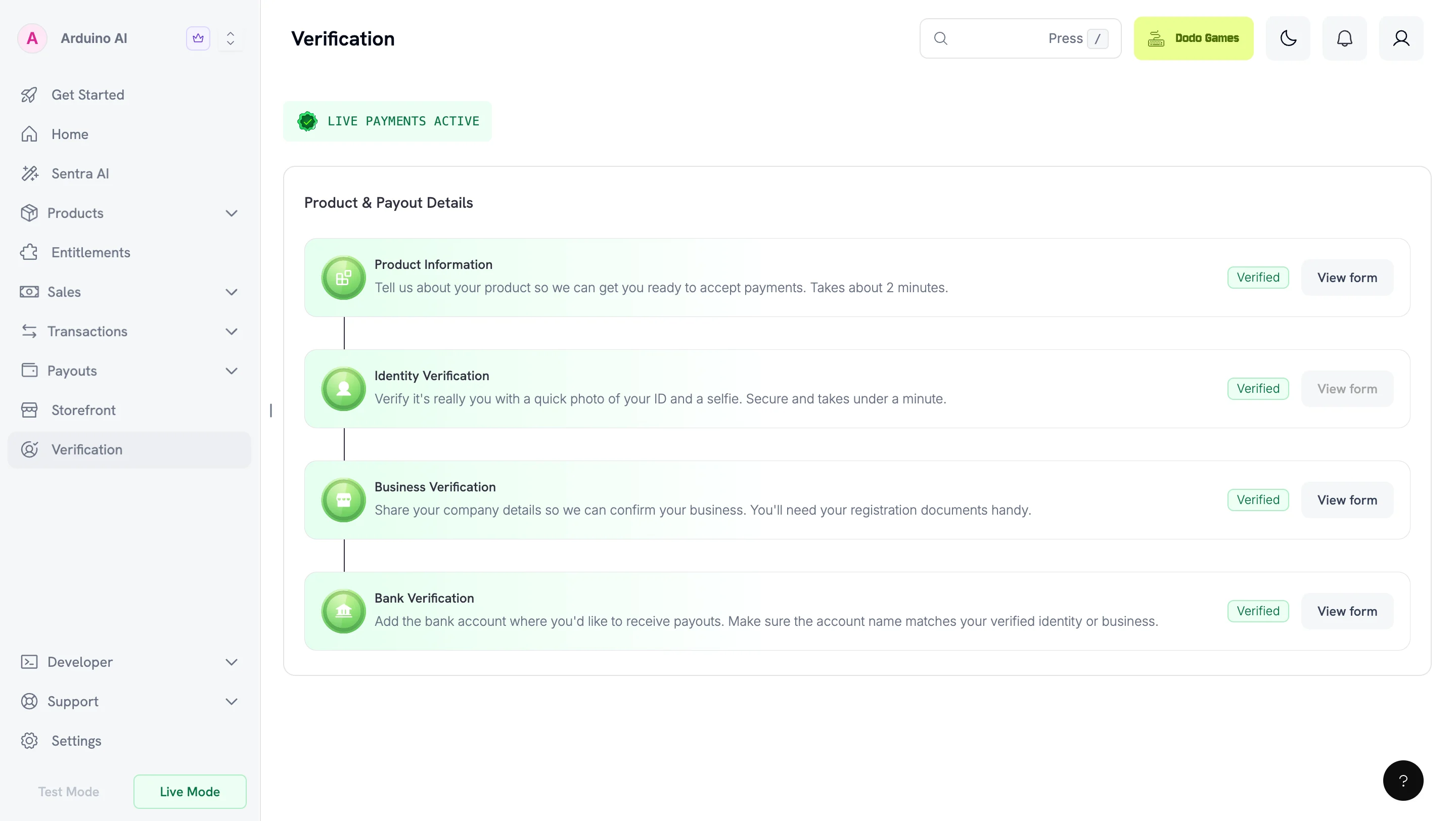
Verification Steps
1
Choose your account type
आपके काम करने के तरीके के आधार पर Individual या Registered Entity चुनें।
2
Submit product information
Product Information Form पूरा करें। Submit करने से पहले अपनी website publish करें और जाँचें कि वह आपके द्वारा दर्ज की गई जानकारी से मेल खाती है। Preparing Your Website देखें।
3
Verify your identity
Government-issued ID के साथ identity verification (KYC) पूरा करें। Registered entities को business verification (KYB) भी पूरा करना होगा।
4
Submit payout details
अपने bank account की जानकारी दें। Forms क्रमिक रूप से unlock होते हैं — अगला form दिखाई देने से पहले प्रत्येक form पूरा करें।
अधिकांश reviews 1–3 business days में पूरे हो जाते हैं।
Required Forms
Forms क्रमिक रूप से unlock होते हैं। अगला form दिखाई देने से पहले प्रत्येक form पूरा करें।
UK registered entities को W-8BEN-E tax form भी submit करना होगा।
Changing Your Account Type
जब तक सभी forms review में हैं, आप अपना account type बदल सकते हैं। किसी भी form के approve, fail या on hold होने के बाद आपकी choice स्थायी हो जाती है। यदि bank form submit करने के बाद, forms के review में रहते हुए, आप अपना account type बदलते हैं, तो आपका bank verification on hold हो जाएगा और आपको फिर से submit करना होगा। Individual से Registered Entity पर switch करने के लिए Business Verification form भी आवश्यक है। आपका Product Information और Identity Verification सुरक्षित रहता है।Product Information Form
सभी merchants यह form पूरा करते हैं। इसे बाद में पूरा करने के लिए Save as Draft चुनें। Save as Draft विकल्प Bank Verification और Business Verification forms पर भी उपलब्ध है। Form में ये जानकारी ली जाती है:- Product website or landing page — जहाँ customers आपके product के बारे में जान सकते हैं या उसे खरीद सकते हैं
- Product description — यह बताने वाला एक वाक्य कि product क्या करता है
- Product category — SaaS, digital content, services, marketplace या physical goods
- Delivery method — instant access, email, subscriptions, manual fulfillment आदि
- Level of automation — fully automated, partially automated या human-driven
- Compliance-sensitive areas — कोई regulated, restricted या higher-risk product type
- Integration method — payment links, checkout sessions, APIs, SDKs आदि
- Product stage and customer acquisition — maturity और go-to-market approach
- Social media presence — आपके product या founder profiles के links
- Confirmation — जानकारी के accurate और policy-compliant होने की स्वीकृति
Preparing Your Website
आपके live website के आधार पर आपके form की review की जाती है। Submit करने से पहले अपनी site publish करें। Review team जिस URL को खोल नहीं सकती, वह hold का एक सामान्य कारण है। Submit करने से पहले सुनिश्चित करें कि बिना account वाला visitor आपकी site पर पहुँच सके और उसे ये जानकारी मिल सके:- Pricing — आप कितना charge करते हैं, recurring plans के billing interval सहित
- Terms of Service — खरीदारी करते समय customers जिस agreement को स्वीकार करते हैं
- Privacy Policy — आप customer data कैसे collect, store और use करते हैं
- Refund and Cancellation Policy — customers refund कैसे माँग सकते हैं या subscriptions cancel कैसे कर सकते हैं
- Contact route — monitored support address या contact form
Identity Verification (KYC)
हम आपके government-issued ID को verify करने और selfie के माध्यम से liveness confirm करने के लिए global verification provider Persona का उपयोग करते हैं। यह process कुछ ही मिनटों में पूरा हो जाता है। आपकी ID हमारे accepted countries list में शामिल किसी country द्वारा जारी की गई होनी चाहिए। यह आप पर individual के रूप में और registered entity के प्रत्येक director तथा beneficial owner पर लागू होता है, चाहे entity कहीं भी incorporated हो।Camera Access Issues
यदि आपको “Can’t access your camera” दिखाई देता है, तो अपने device और browser के लिए camera permissions enable करें:- Chrome: Browser settings के माध्यम से enable करें (Desktop, iPhone & iPad या Android)
- Safari: Desktop — preferences के माध्यम से enable करें। Mobile — Settings → Safari → Camera में जाकर “Ask” या “Allow” चुनें
- iOS Apps: Settings → Apps → [Your App] → Allow Camera permissions। सुनिश्चित करें कि Lockdown Mode app को block नहीं कर रहा है
- Android Apps: Settings → Apps → [Your App] → Allow Camera permissions
If Identity Verification Fails
Genuine documents होने पर भी verification fail हो सकती है, यदि capture में Persona के लिए पर्याप्त जानकारी उपलब्ध न हो। सामान्य कारण:- आपकी photo अब आपकी ID से match नहीं करती। पुरानी ID आपकी वर्तमान appearance से selfie check के लिए पर्याप्त रूप से match नहीं कर सकती।
- आपने screen या photocopy से capture किया है। Original physical document का उपयोग करें।
- Capture blurry, cropped या glare वाला है। प्रत्येक edge दिखाई देनी चाहिए और पूरा text readable होना चाहिए।
- आपके document की अवधि समाप्त हो चुकी है।
- आपकी ID unsupported country से है। Accepted countries list देखें।
Business Verification (KYB) — Registered Entities Only
यह केवल registered entities के लिए आवश्यक है। इसे Bank Verification से पहले पूरा करें।Required Details
Company Registration Number
Company Registration Number
अपना Company Registration Number और supporting document दें (अपने jurisdiction के लिए Certificate of Incorporation या equivalent)।
Tax ID (Optional)
Tax ID (Optional)
यदि tax benefits के लिए payout invoices पर अपना tax number चाहते हैं, तो valid Tax ID और documents दें। उदाहरण: EIN, CRN, VAT ID, GSTIN।
Directors and Beneficial Owners
Directors and Beneficial Owners
सभी directors और beneficial owners की details दें।Beneficial Owner(s): ऐसा कोई भी natural person जो 10% या अधिक shares, capital या profits का owner हो या उसका हकदार हो, अथवा अन्य माध्यमों से control रखता हो (जिसमें majority of directors नियुक्त करने या management अथवा policy decisions को control करने का अधिकार भी शामिल है)। यदि कई beneficial owners हैं, तो सभी के documents दें।Business Director(s): local laws के अनुसार वर्तमान में board पर directors के रूप में कार्य कर रहे individuals। सभी directors के government-issued IDs दें।
Bank Verification
अपने bank account details और contact information दें। Bank account details verified identity या registered entity name से match होने चाहिए। Individuals के लिए account holder का नाम आपके Identity Verification document से match होना चाहिए। Registered entities के लिए यह आपकी company के legal name से match होना चाहिए। Dodo Payments mismatched या third-party accounts को payouts process नहीं कर सकता।W-8BEN-E for UK Entities
UK registered entities को international tax reporting regulations का पालन करने के लिए W-8BEN-E form submit करना होगा। इससे smooth payout processing और accurate tax documentation सुनिश्चित होती है।Download W-8BEN-E Form
What is W-8BEN-E?
W-8BEN-E एक IRS form है जिसे foreign businesses tax purposes के लिए अपने country of residence को verify करने और कम tax withholding rate के लिए eligible होने का certification देने हेतु file करते हैं।How to Fill Out W-8BEN-E
Part I – Identification of Beneficial Owner
Part I – Identification of Beneficial Owner
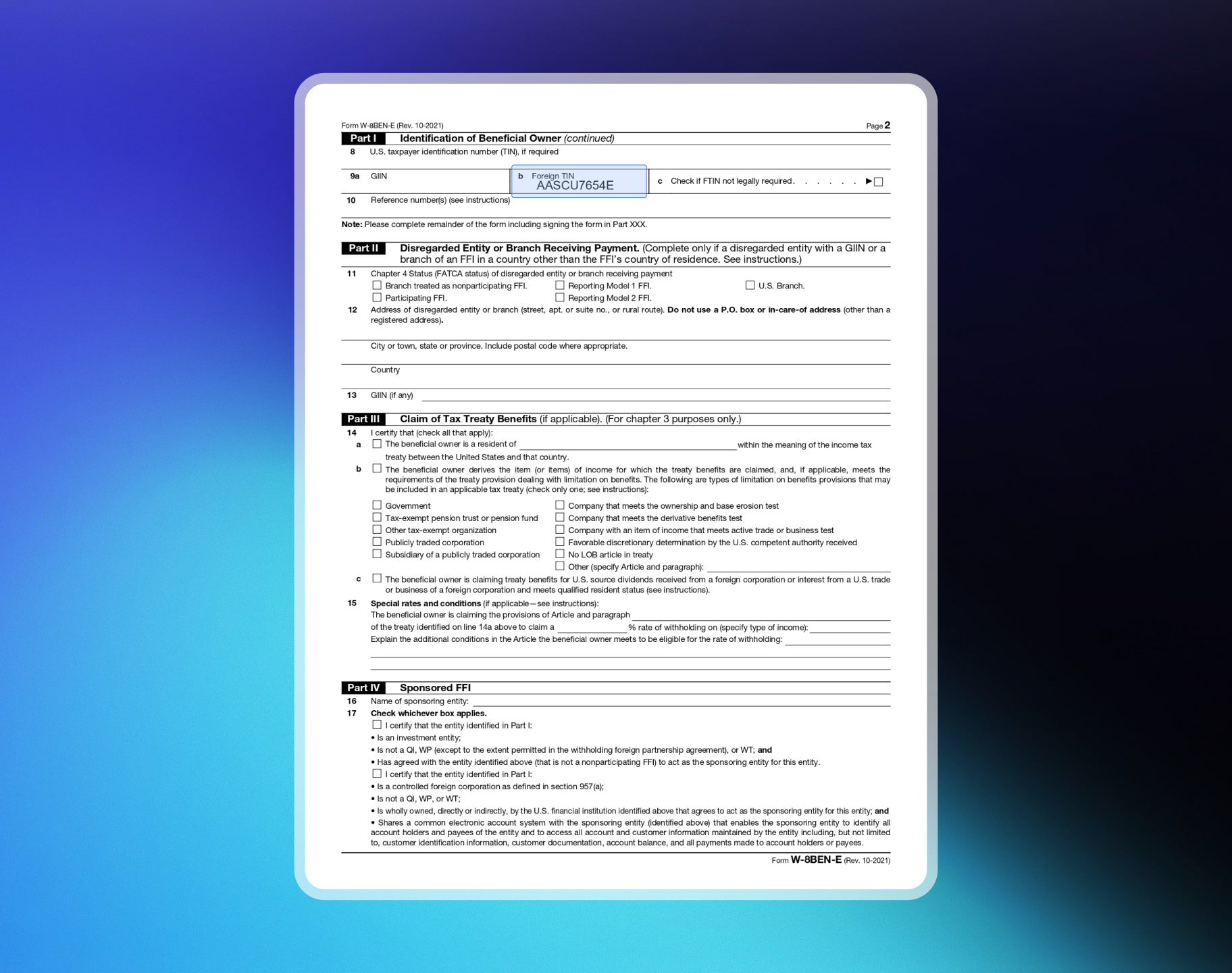
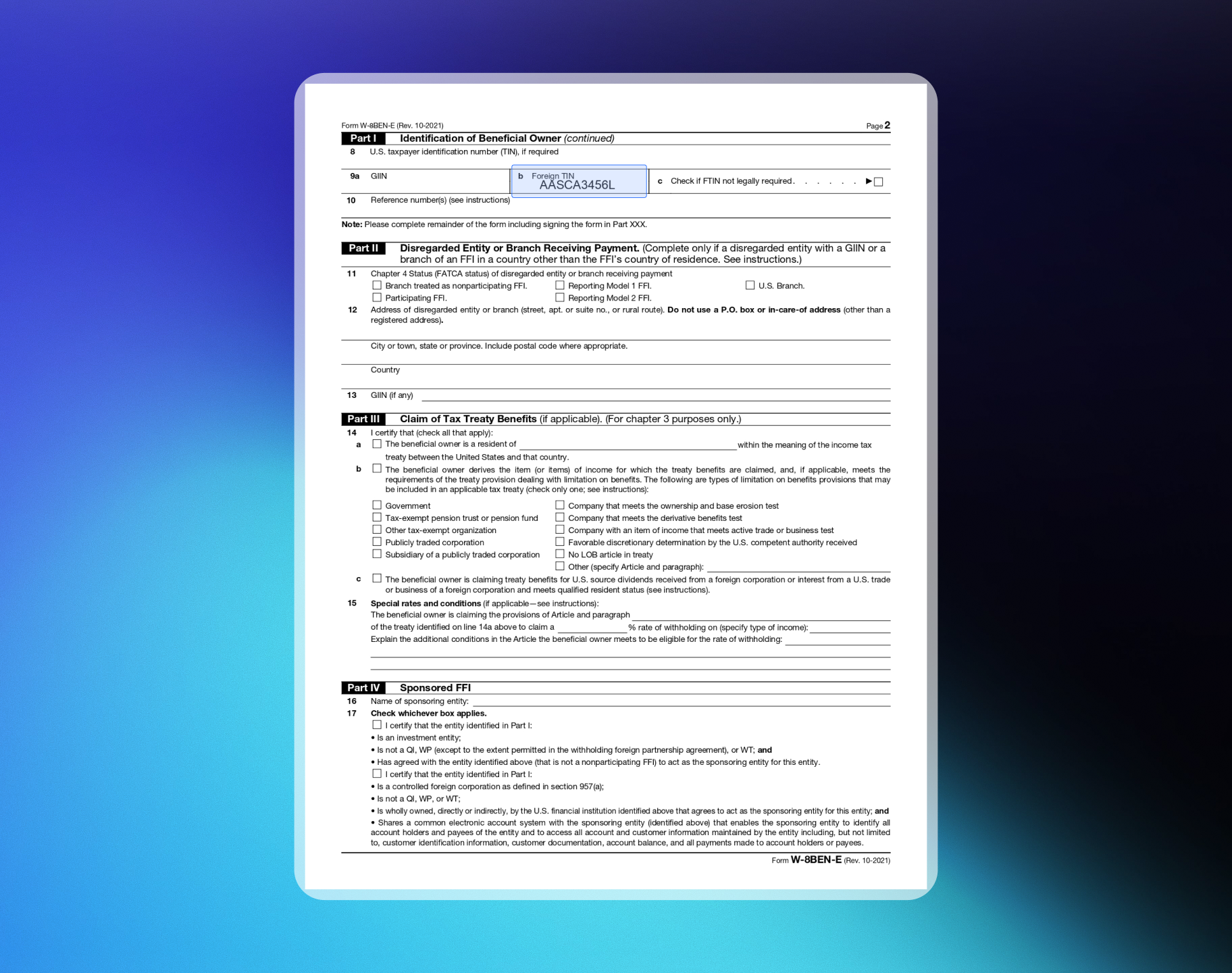
1. Name of Organizationआपकी entity का नाम।2. Country of Incorporation or Organizationवह country जहाँ आपका business registered है। Corporation के लिए incorporation का country। अन्य entity types के लिए वह country जिसके laws के अंतर्गत आप created, organized या governed हैं।3. Chapter 3 Statusआमतौर पर “Corporation” या “Partnership”। Private Limited company के लिए Corporation चुनें। Limited Liability Partnership के लिए Partnership चुनें।4. Chapter 4 Status (FATCA Status)SaaS/Digital Products के लिए “Active NFFE” (Active Non-Financial Foreign Entity) चुनें।5. Permanent Residence Addressउस country में आपके business का permanent resident address जहाँ आप tax residence का दावा करते हैं।8-10. Tax Identification InformationTreaty benefits के लिए line 9b पर अपना FTIN दें (यदि आपके tax residence jurisdiction ने जारी किया है)।
Part XXV – Active NFFE
Part XXV – Active NFFE
Certify करने के लिए box 39 पर check करें:
- Entity एक foreign entity है जो bank या financial institution नहीं है।
- पिछले calendar year की gross income का 50% से कम passive income है।
- 50% से कम assets passive income उत्पन्न करते हैं या उसके production के लिए रखे गए हैं।
Part XXX – Certification
Part XXX – Certification
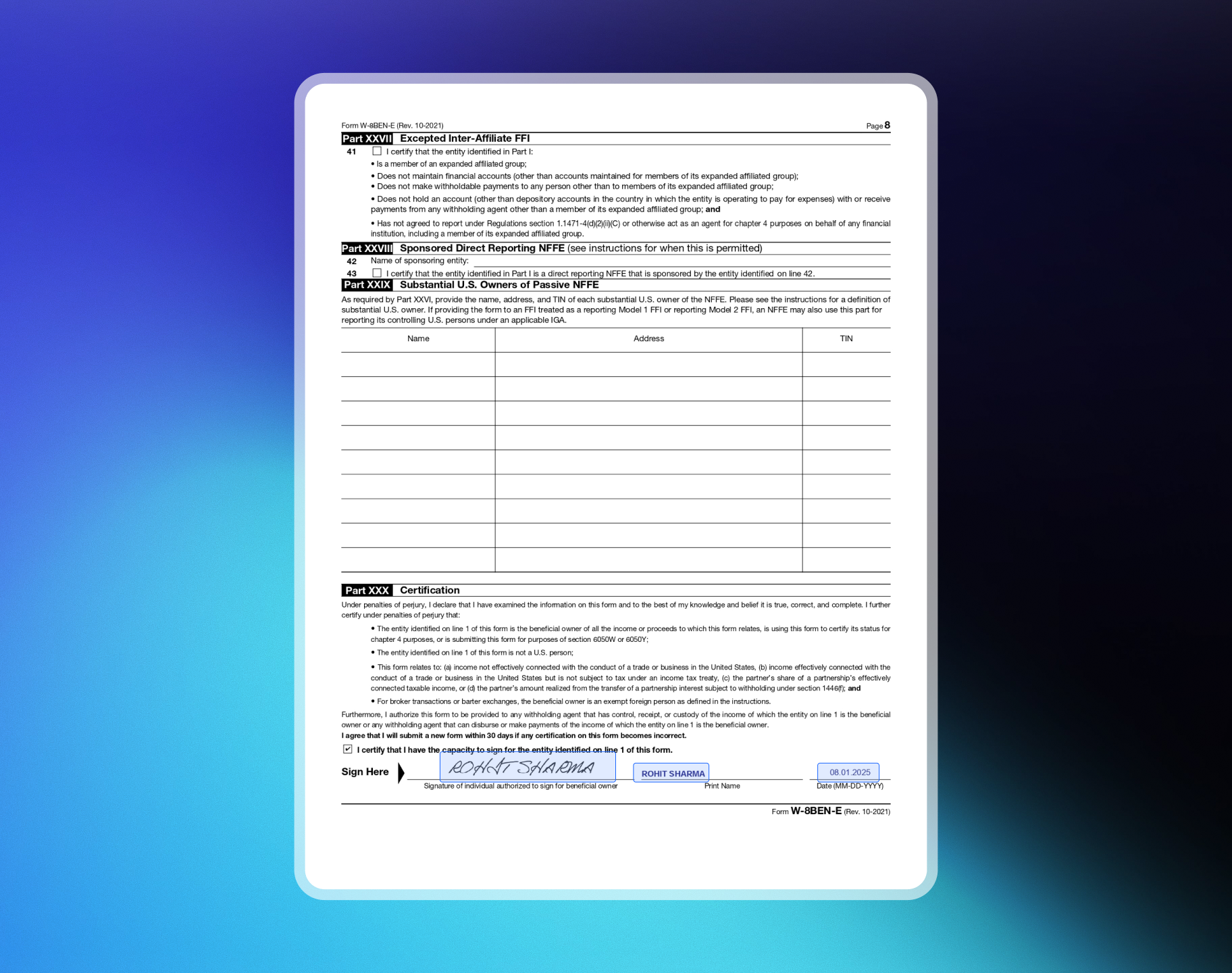
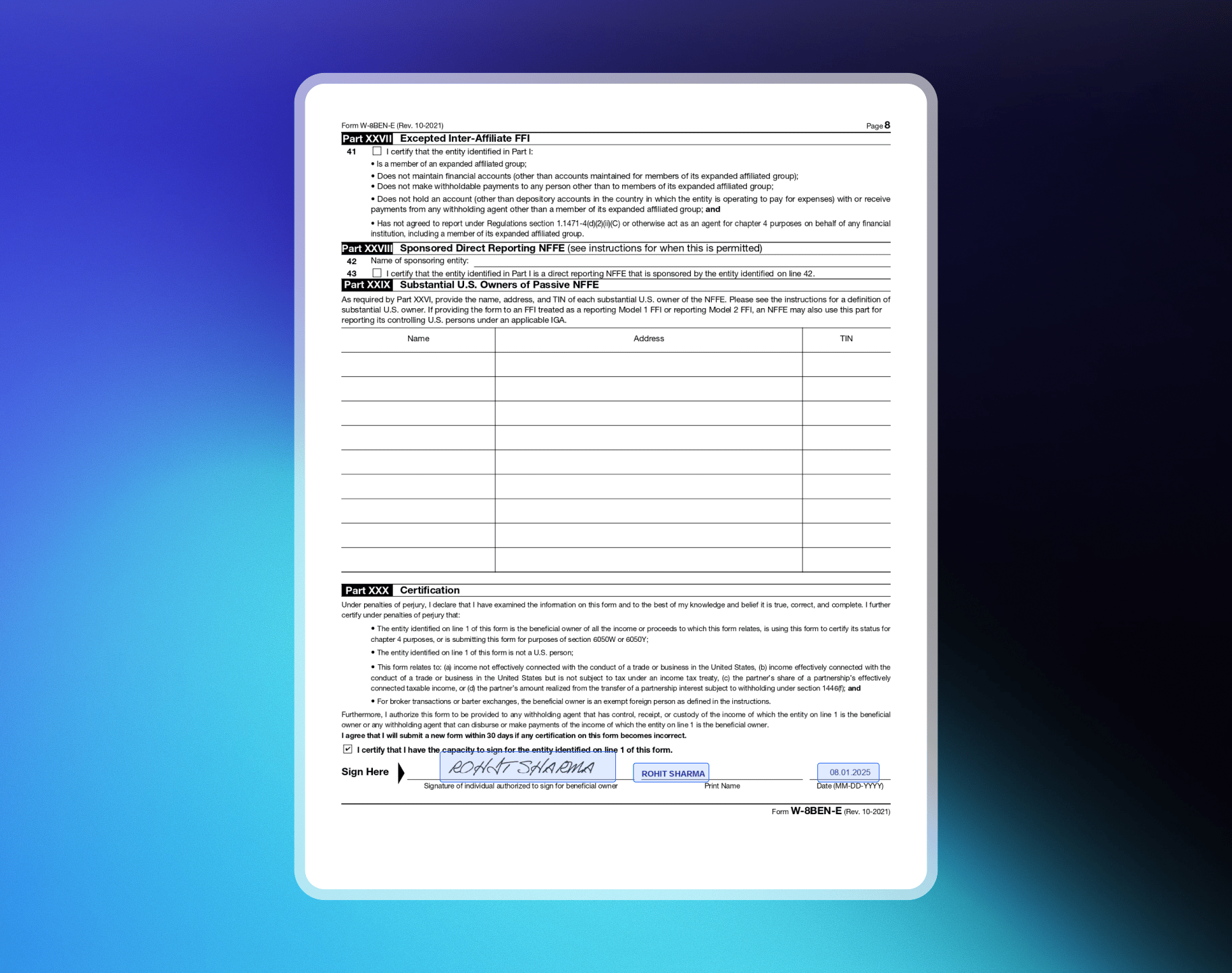
Form पर sign और date करें। Sign करने वाला व्यक्ति beneficial owner की ओर से sign करने के लिए authorized होना चाहिए।
Sample W-8BEN-E Forms
Private Limited Company
Private Limited Company
Example: ABC Technologies PVT LTD, SaaS / Digital Products, India, TIN: PANPage 1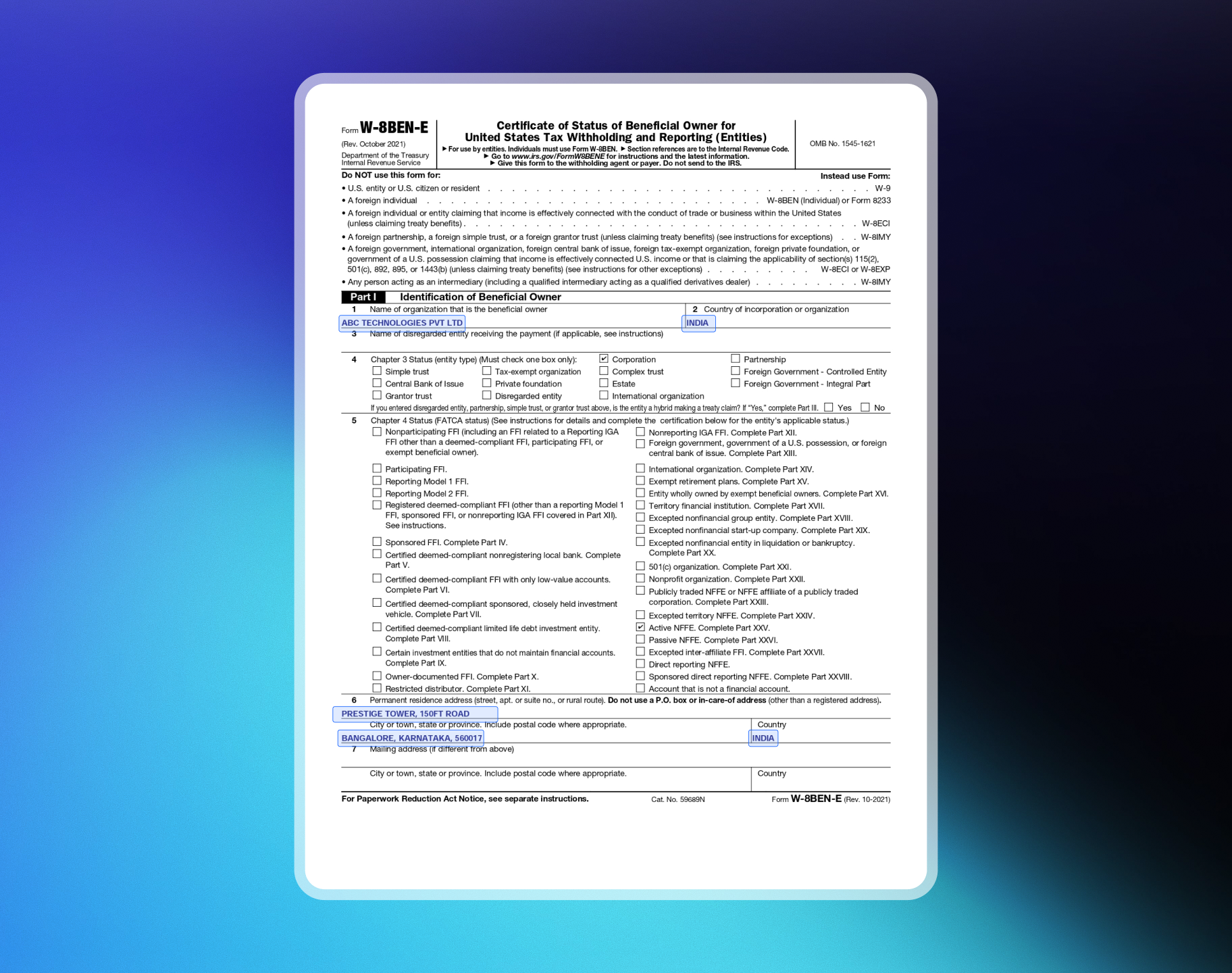
Limited Liability Partnership (LLP)
Limited Liability Partnership (LLP)
Example: ABC Technologies LLP, SaaS / Digital Products, India, TIN: PANPage 1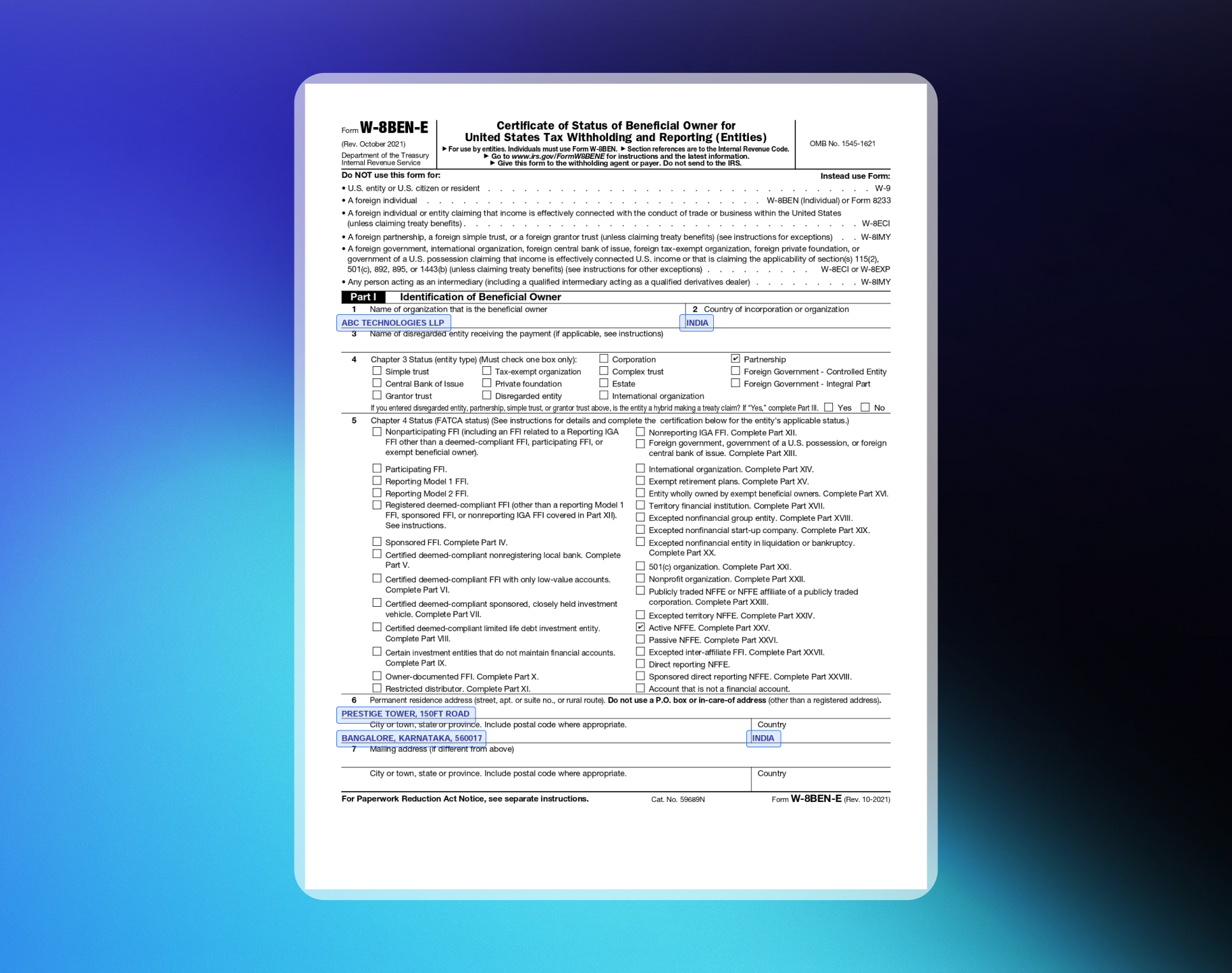
Compliance Review
आपके payout details approve होने के बाद, हमारी compliance team Review & Monitoring Policy के अनुसार Monitoring Review करती है। यह सभी merchants के लिए एक standard check है। हम जाँच करते हैं:- Merchant Acceptance Policy का compliance
- Card-network rules और AML regulations
- संभावित fraud indicators या unusual activity patterns
Live Payments vs. Payouts
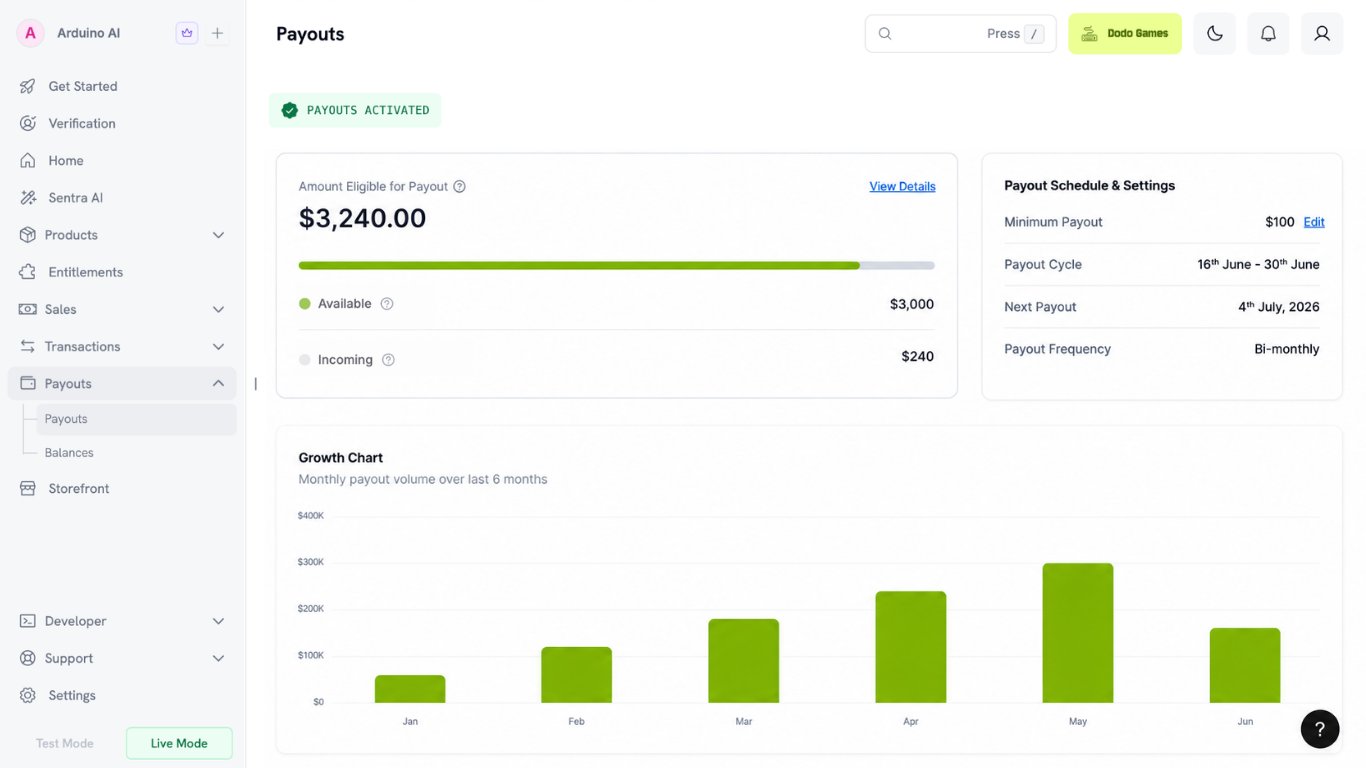
Live payments और payouts अलग-अलग चालू होते हैं। Payouts inactive रहते हुए live payments स्वीकार करना सामान्य है। Live payments के लिए आपके account type के सभी आवश्यक forms approve होने चाहिए। Required Forms देखें। Payouts के लिए आवश्यक है:- Bank Verification सहित सभी आवश्यक forms approve हों
- Monitoring Review पूरा हो
Ongoing Monitoring
Dodo Payments accounts को समय के साथ compliant बनाए रखने के लिए समय-समय पर ongoing monitoring करता है। यदि आपका business compliant रहता है, तो आप बिना चिंता के काम जारी रख सकते हैं। यदि हमें concerns हों, तो Review & Monitoring Policy के अनुसार आवश्यक action लिया जाता है।Additional Information Requests
Ongoing monitoring के हिस्से के रूप में हमारी compliance team additional information का request कर सकती है। ये requests dashboard से पूरी की जाती हैं और payments या payouts को block नहीं करतीं, लेकिन इन्हें submit न करने पर processing pauses, further reviews या account restrictions हो सकते हैं। Details के लिए Review Monitoring Policy देखें।Timeline and Support
- सामान्य verification time: 1–3 business days (weekends और public holidays शामिल नहीं)
- यदि additional review आवश्यक हो, तो आपको email और dashboard के माध्यम से notify किया जाएगा
- सहायता के लिए support@dodopayments.com पर email करें
Resubmitting Documents
यदि Verification Team को आपके documents में issues मिलते हैं, तो वे resubmission का request करेंगे। अपने dashboard में Resubmit option का उपयोग करें। Form submit करने के बाद आप उसे स्वयं edit या resubmit नहीं कर सकते। Resubmit option केवल Verification Team द्वारा enable किए जाने के बाद दिखाई देता है।If a Form Is Placed On Hold
On Hold का अर्थ है कि review पूरा करने से पहले हमारी compliance team को अधिक जानकारी चाहिए। यह rejection नहीं है — आपका application open रहता है। जब कोई form on hold होता है, तो हम आपको email करते हैं और Verification section में एक additional verification form उपलब्ध कराते हैं। Hold का उत्तर देने के लिए उस form को पूरा करें, Resubmit option को नहीं। आपके dashboard पर resubmissions के temporarily paused होने का संदेश दिख सकता है। यह आपके original form को दर्शाता है, जो locked रहता है। यदि additional verification form उपलब्ध कराया गया है, तो उसे पूरा करें।1
Open the Verification section
On Hold के रूप में चिह्नित form खोजें। कारण उसके साथ दिखाया जाता है।
2
Fix the underlying issue first
उत्तर देने से पहले hold का कारण दूर करें। सबसे सामान्य कारण यह है कि review team आपकी website खोल नहीं सकी — checklist के लिए Preparing Your Website देखें।
3
Complete the additional verification form
Additional verification form भरकर submit करें। केवल original details को बिना बदले resubmit करने के बजाय उठाए गए specific question का उत्तर दें।
If a Form Is Marked Failed
Failed status resubmission request के समान नहीं है। Resubmission अपने-आप reopen नहीं होती, इसलिए आमतौर पर Resubmit option नहीं होता। Identity Verification इसका exception है — इसमें आपको तीन attempts मिलते हैं। If Identity Verification Fails देखें। Failed form के लिए Verification section से appeal करें:1
Read the failure reason
यह देखने के लिए Verification section खोलें कि form क्यों fail हुआ।
2
Fix the underlying issue first
Appeal करने से पहले failure का कारण दूर करें। उदाहरण के लिए, अपने product URL को login screen के बजाय public landing page पर point करें या सुनिश्चित करें कि आपकी live website form में दिए गए विवरण से match करती है।
3
File your appeal
Detailed explanation के साथ appeal submit करें। One-line response से outcome बदलने की संभावना कम है।
When Resubmission Is Requested
Resubmission इन कारणों से requested हो सकती है:- Missing or incomplete information — identification numbers, business name या अन्य key data
- Document mismatch — documents दिए गए business या personal information से match नहीं करते
- Unreadable or expired documents — unclear, illegible या expired uploads
- Additional clarification needed — identity या business information स्पष्ट करने के लिए further documentation
How to Resubmit
1
Check your dashboard
Resubmission request खोजें (आपको email notification भी प्राप्त होगी)।
2
Access the resubmit option
Verification team Resubmit option enable करेगी।
3
Upload correct documents
Verification section पर जाएँ और सही documents upload करें।
4
Submit for review
Submit for Review पर click करें।