


Checkout Sessions
होस्टेड चेकआउट के दौरान इनलाइन कोड
discount_codesGet Discount
इसकी स्थिति और प्रतिबंधों की जाँच करने के लिए उसकी ID से discount प्राप्त करें।
Get Discount by Code
कोड नाम (जैसे, “SAVE20”) का उपयोग करके किसी डिस्काउंट को खोजें और सत्यापित करें।
Create Discount (API)
प्रोग्राम द्वारा नए डिस्काउंट कोड बनाएं।
List & Update Discounts
मौजूदा डिस्काउंट ब्राउज़ करें और प्रबंधित करें; आवश्यकतानुसार अपडेट या हटाएं।
Plan Change Discounts
सब्सक्रिप्शन योजनाओं को अपग्रेड या डाउंग्रेड करते समय डिस्काउंट कोड लागू करें।
डिस्काउंट कोड क्या हैं?
डिस्काउंट कोड प्रचारात्मक टोकन होते हैं जो Checkout पर ऑर्डर के कुल योग को कम करते हैं। इनका उपयोग मौसमी अभियानों, पहली खरीद के प्रोत्साहनों, ग्राहकों को वापस लाने वाले ऑफ़र या बातचीत से तय B2B मूल्य निर्धारण के लिए करें। कोड प्रतिशत-आधारित (जैसे, 15% की छूट) या निश्चित राशि वाले (जैसे, $5 की छूट) होते हैं। आप प्रत्येक Checkout, payment या subscription में अधिकतम 20 कोड एक साथ लागू कर सकते हैं, इसलिए ग्राहक एक ही transaction में welcome offer और campaign code दोनों redeem कर सकता है। कोड को विशिष्ट उत्पादों तक सीमित करें, प्रत्येक ग्राहक द्वारा उनके उपयोग की संख्या सीमित करें, expiration dates निर्धारित करें और यह नियंत्रित करें कि कौन उन्हें redeem करने के लिए eligible है।प्रमुख लाभ
- लचीले डिस्काउंट: प्रतिशत-आधारित या निश्चित राशि वाले डिस्काउंट
- एक साथ लागू किए जा सकने वाले कोड: प्रत्येक Checkout, payment या subscription में अधिकतम 20 कोड लागू करें
- लक्षित नियंत्रण: उत्पाद, subscription cycles और customer eligibility के आधार पर सीमित करें
- अभियान प्रबंधन: निर्धारित start dates, expiration dates और कुल तथा प्रति-ग्राहक usage limits
- प्रति-currency pricing: प्रत्येक currency के लिए flat deduction, amount cap और minimum subtotal निर्धारित करें
डिस्काउंट कोड बनाना
अपने डोडो पेमेंट्स डैशबोर्ड में डिस्काउंट कोड बनाएं, फिर उन्हें होस्टेड चेकआउट या एपीआई के माध्यम से लागू करें।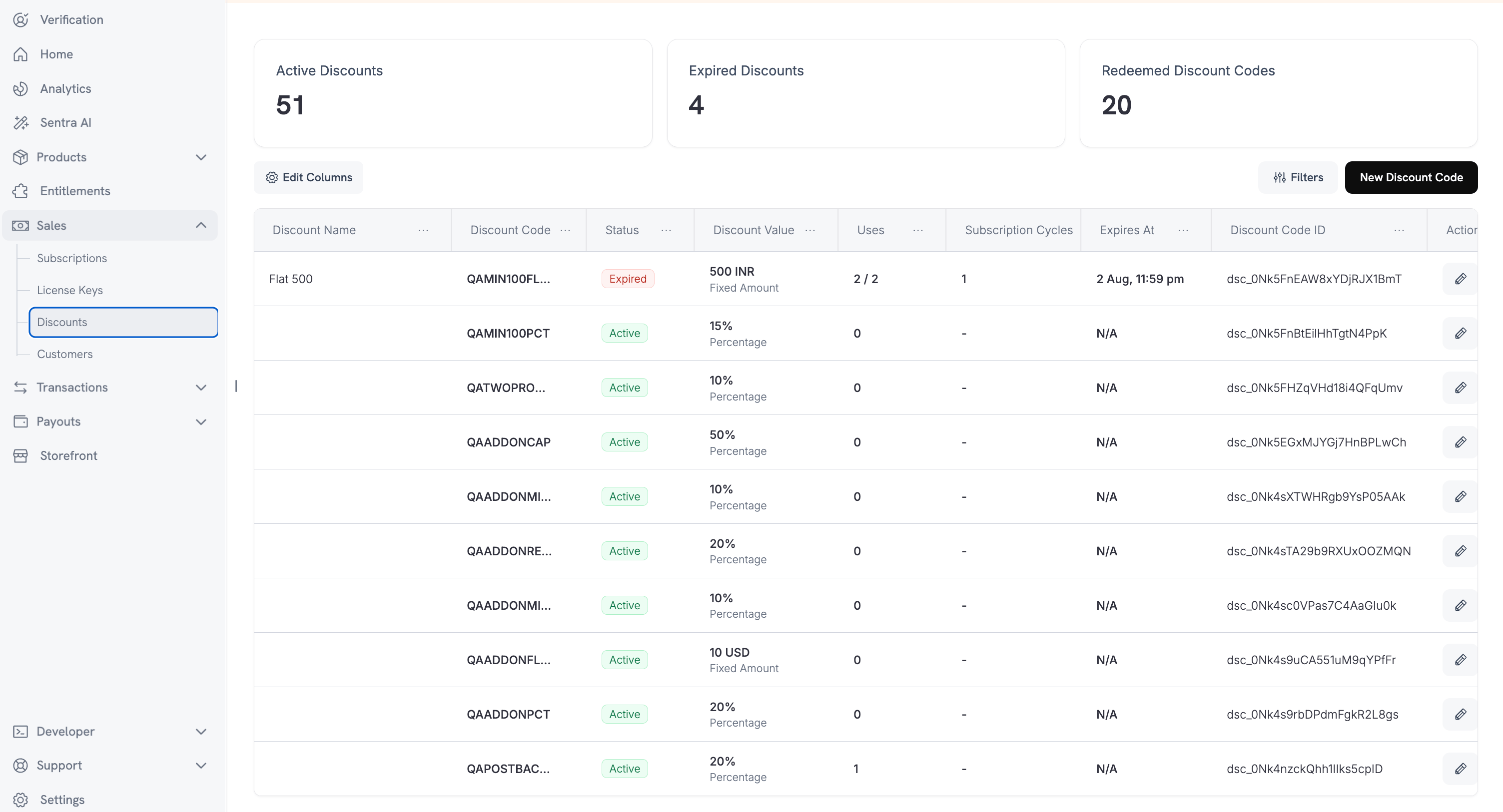
Dashboard सेटअप
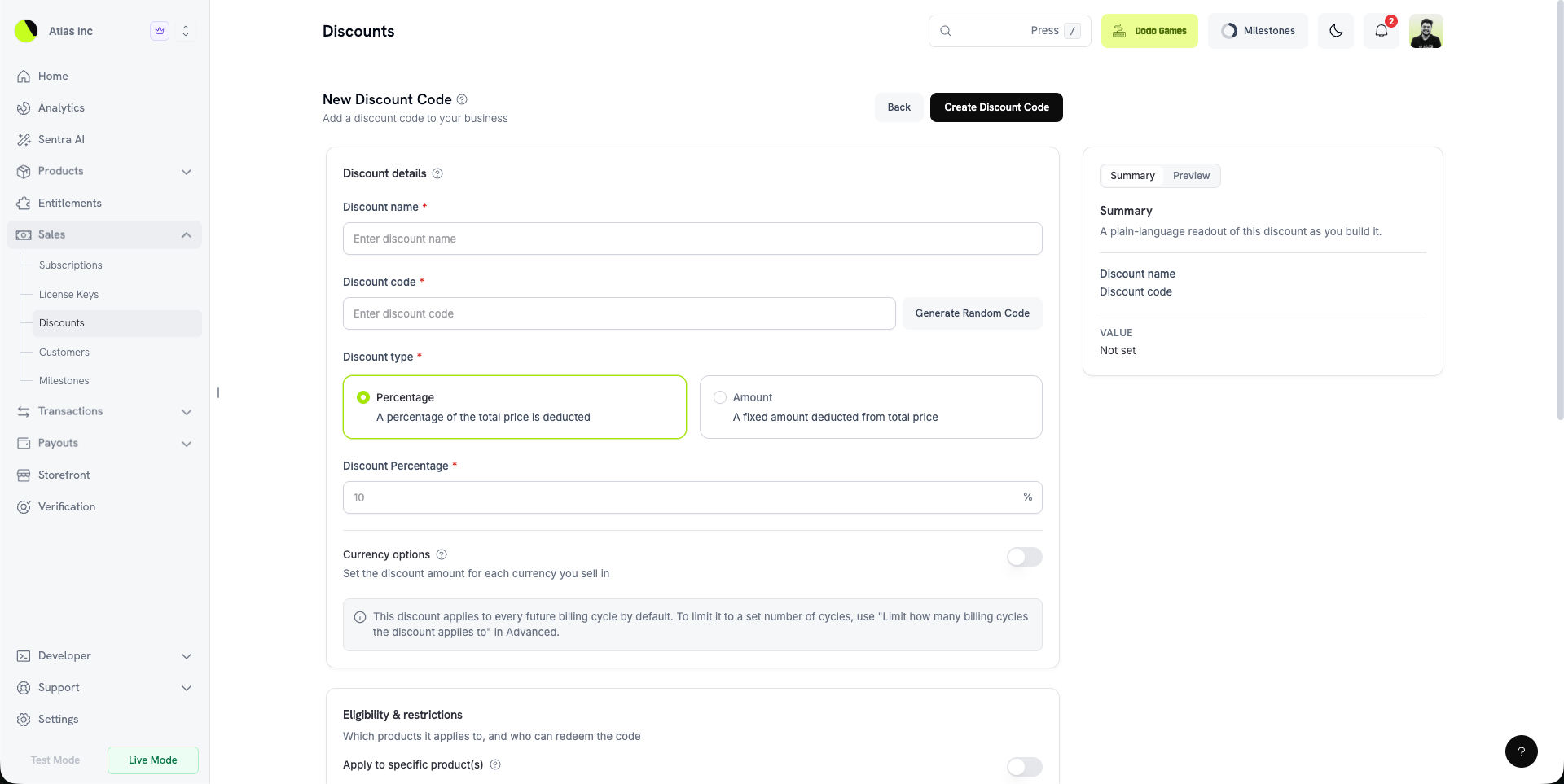
- Discount Name (required): Dashboard के लिए आंतरिक लेबल।
- Code (required): वह string जिसे ग्राहक checkout के समय दर्ज करते हैं। कोई random code generate करें या अपना code दर्ज करें (न्यूनतम 3 characters, अपने-आप uppercase में बदल दिया जाता है)।
- Type (required): Percentage (प्रतिशत छूट) या Amount (एक निश्चित कटौती)।
- Amount (required): Percentage के लिए, dashboard में छूट का प्रतिशत (जैसे 15% के लिए
15)। API के माध्यम से, यही value basis points में होती है (1500)। Amount के लिए, code की default currency में निश्चित कटौती। - Start Date (optional): Code को भविष्य की किसी तारीख पर activate करने के लिए schedule करें। तुरंत activate करने के लिए खाली छोड़ें।
- Expiration Date (optional): वह तारीख जिसके बाद code redeem नहीं किया जा सकेगा।
- Usage Limit (optional, Advanced के अंतर्गत): सभी customers के लिए अधिकतम कुल redemptions। एक multi-subscription cart को एक redemption माना जाता है।
- Per-Customer Usage Limit (optional, Advanced के अंतर्गत): किसी एक customer द्वारा किए जा सकने वाले अधिकतम redemptions। दोनों सेट होने पर यह overall usage limit से कम या उसके बराबर होना चाहिए।
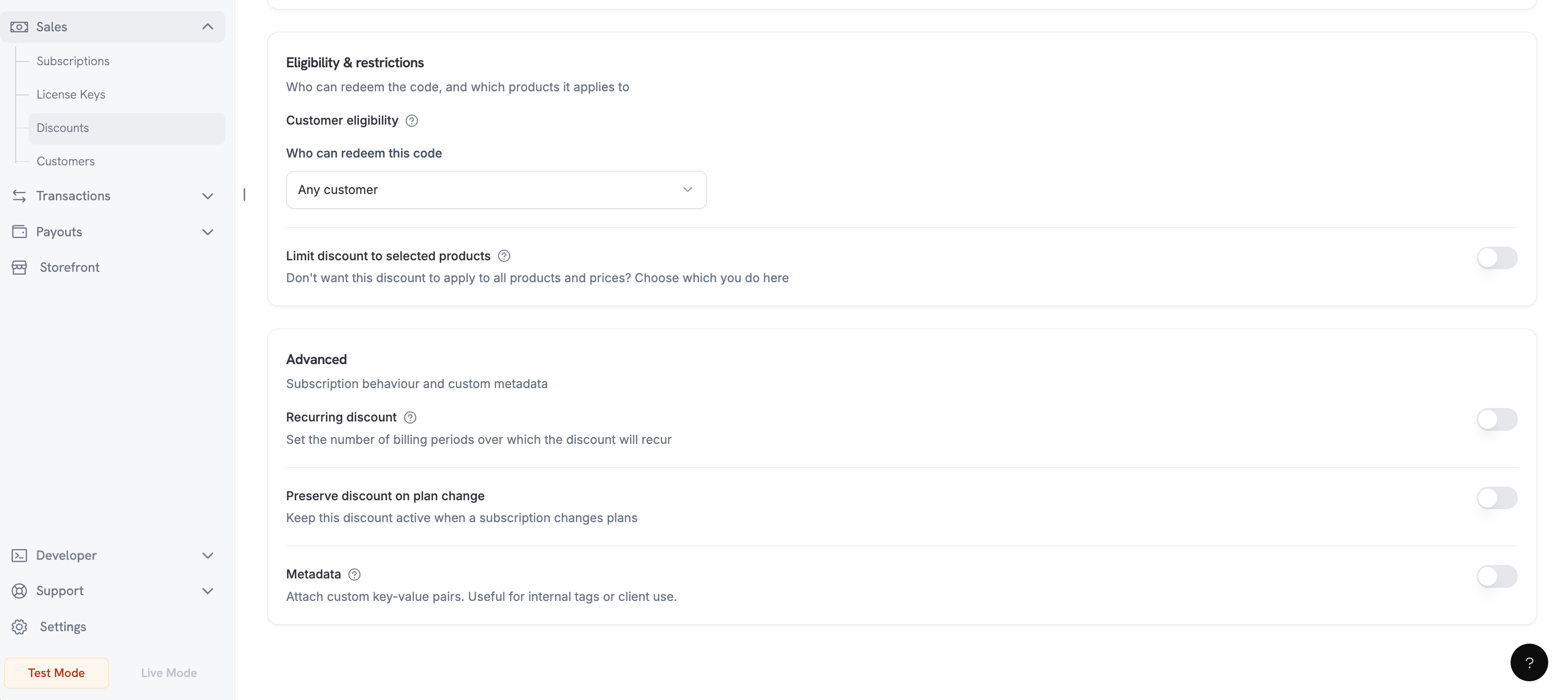
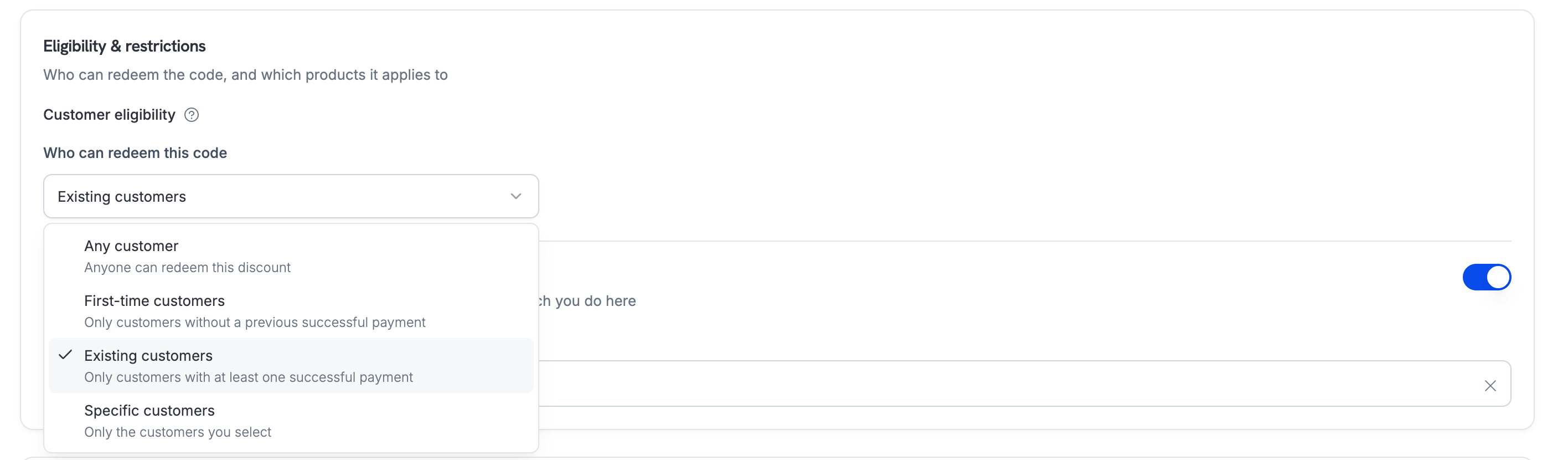
- Customer Eligibility (optional): यह सीमित करें कि कौन redeem कर सकता है — सभी customers, पहली बार आने वाले customers, existing customers या चुनी हुई सूची।
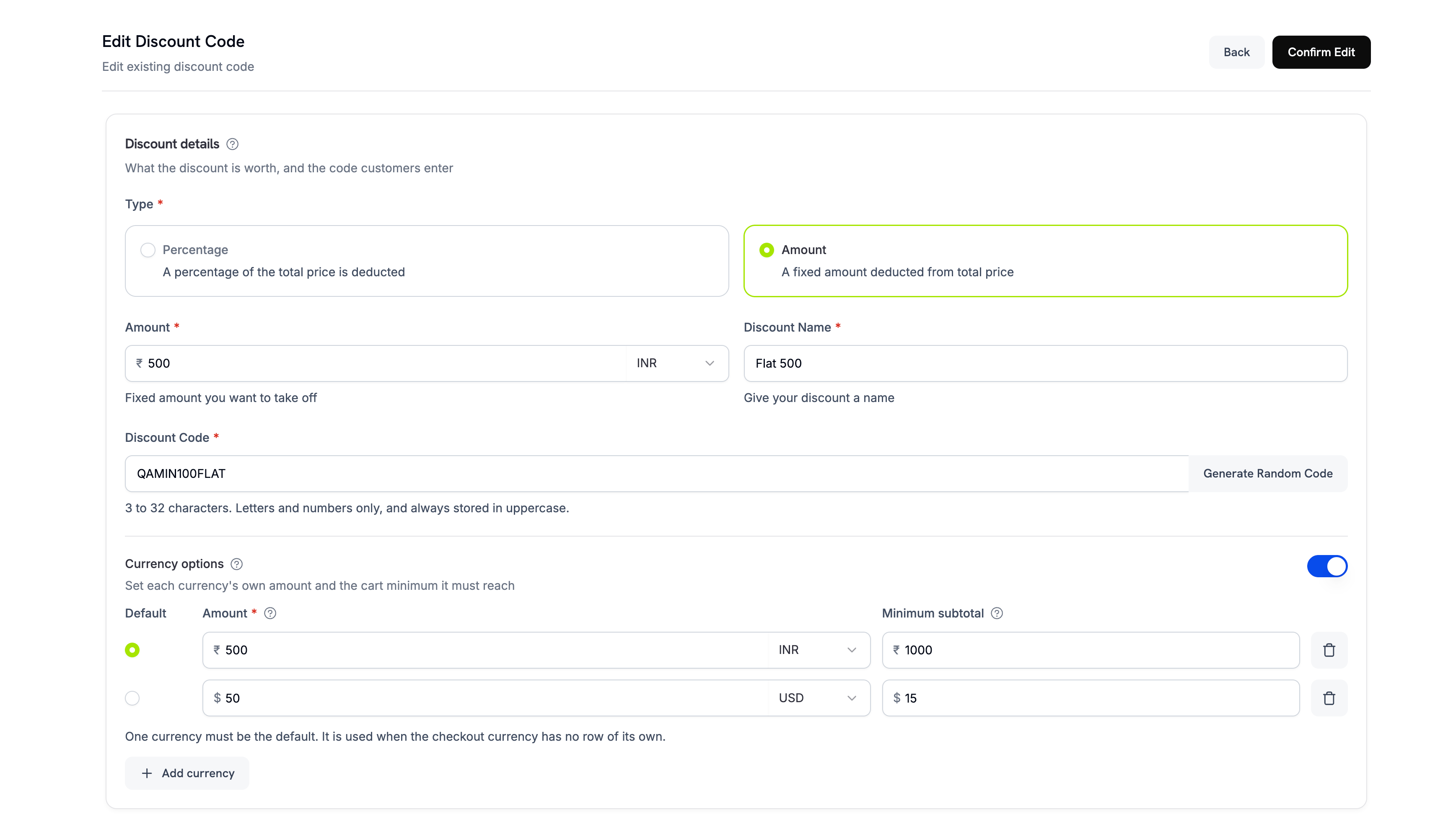
- Currency Options (optional): आपके द्वारा बेची जाने वाली प्रत्येक currency के लिए discount amount। Per-Currency Options देखें।
- Product Restriction (optional): Code को specific products तक सीमित करें।
- Subscription Cycle Limit (optional, Advanced के अंतर्गत): discount लागू होने वाले billing cycles की संख्या। अनिश्चित अवधि के लिए खाली छोड़ें।
- Preserve on Plan Change (optional): Subscription के plans बदलने पर discount को active रखें (
preserve_on_plan_change)। - Metadata (optional): Internal tracking के लिए custom key–value pairs संलग्न करें।
- Require a minimum order value (optional, Advanced के अंतर्गत): Code लागू होने के लिए न्यूनतम cart subtotal (प्रति currency)।
एक percentage
amount को API पर basis points में व्यक्त किया जाता है — 1500 का अर्थ 15% है। एक flat amount एक money value है और code के currency options में निर्धारित होती है।Discount Types
दोनों types को एक ही
discount_codes array में stack किया जा सकता है और array order में लागू किया जाता है।
Customer Eligibility
कौन code redeem कर सकता है, इसे नियंत्रित करने के लिएcustomer_eligibility सेट करें:
Per-Currency Options
जब आप कई currencies में बेचते हैं, तो प्रत्येक code के लिए per-currency behavior निर्धारित करें। Currency options के अंतर्गत, प्रत्येक entry यह निर्दिष्ट करती है:- Amount — Amount discount के लिए उस currency में flat deduction; Percentage discount के लिए maximum discount cap। API में
max_amount_possibleसे map होता है। - Default — एक currency को default के रूप में mark करें। Configure न की गई currencies इसी default से convert होती हैं।
- Minimum subtotal — code तभी लागू होता है जब cart उस currency में इस subtotal तक पहुँचता है।
0का अर्थ है कि कोई minimum नहीं है।
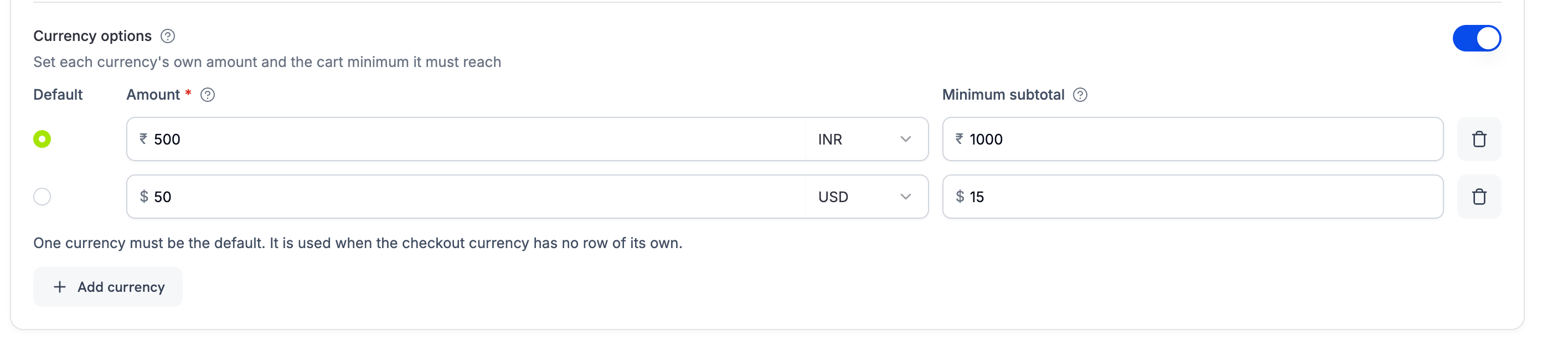
न्यूनतम subtotal हमेशा cart की original prices के आधार पर मापा जाता है, stack में पहले लागू किए गए discounts के बाद के running total के आधार पर नहीं। Stacking order इस बात को कभी नहीं बदलता कि minimum पूरा हुआ है या नहीं।Subscription के लिए, minimum को product और उसके add-ons को मिलाकर एक बार check किया जाता है। उदाहरण के लिए, $0 का product और $5 का add-on मिलकर $4 का minimum पूरा करते हैं। Amount (
flat) code केवल subscription product पर लागू होता है, उसके add-ons पर नहीं।Checkout Experience
Customers checkout field में discount codes दर्ज करते हैं। Eligible codes तुरंत लागू हो जाते हैं और totals update हो जाते हैं।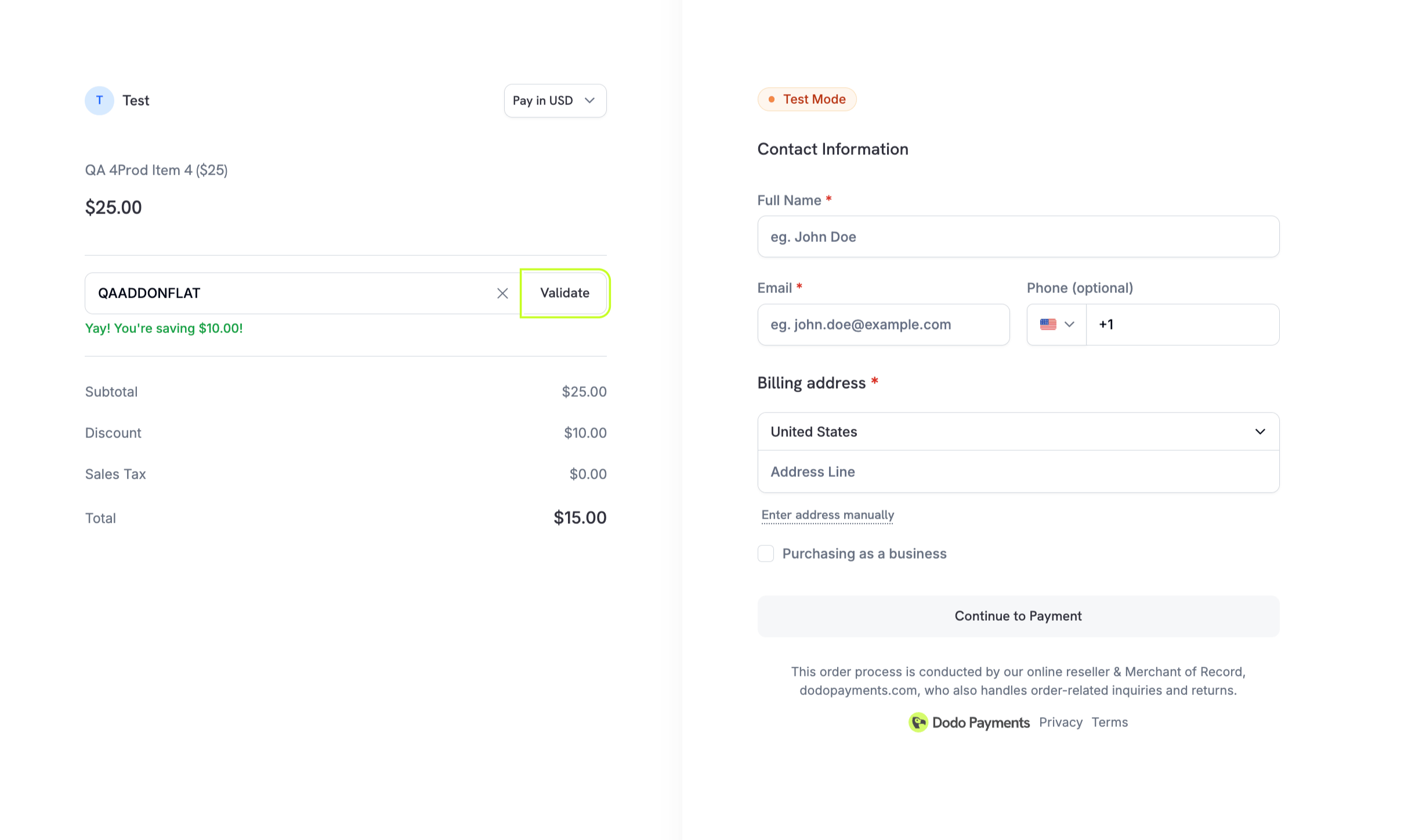
Checkout Sessions में एक या अधिक codes को पहले से लागू करने के लिए
discount_codes (एक array) पास करें। Discount input field default रूप से दिखाई जाती है। इसे छिपाने के लिए feature_flags.allow_discount_code को false पर सेट करें। Codes array order में लागू होते हैं, अधिकतम 20 तक।Stacking Discount Codes
Checkout sessions, payments और subscriptions,discount_codes array के माध्यम से अधिकतम 20 stacked codes स्वीकार करते हैं। Codes array order में लागू होते हैं: पहला eligible code starting price को कम करता है, अगला पहले से discounted price को कम करता है, और इसी तरह आगे। जब Purchasing Power Parity enabled हो, तो starting price PPP-adjusted amount होता है। Response में discount_ids (payments/subscriptions पर) और discounts (अधिक विस्तृत per-discount detail, जिसमें position और remaining subscription cycles शामिल हैं) आते हैं।
Singular
discount_code field deprecated है, लेकिन backward compatibility के लिए पूरी तरह supported है। इसे उसी request में discount_codes के साथ combine नहीं किया जा सकता। Stacking और richer response का लाभ लेने के लिए discount_codes (array form) पर migrate करें।Card-Optional at Zero Price के साथ Card-Optional at Zero Price enabled subscription price पर, codes का ऐसा stack जो आज देय amount को पूरी तरह
0 तक कम कर देता है, card requirement को भी skip कर देता है — customer बिना किसी payment method on file के checkout करता है, ठीक native 0 price की तरह।API Management
Create discounts
Create discounts
Type और amount के साथ discount codes programmatically create करें।
API Reference
Create discount API देखें।
List and retrieve
List and retrieve
Management और auditing के लिए सभी discounts की सूची देखें या उनकी details retrieve करें।
API Reference
Listing और retrieval APIs ब्राउज़ करें।
Get discount by code
Get discount by code
Internal ID के बजाय human-readable code (जैसे “SAVE20”) का उपयोग करके discount खोजें।
API Reference
Code name के आधार पर discount retrieve करें।
Update discounts
Update discounts
Amount, expiration या restrictions जैसी discount configuration modify करें।
API Reference
Discount details update करने का तरीका जानें।
Retrieve a discount
Retrieve a discount
Discount लागू करने से पहले उसका status, usage count और restrictions देखने के लिए उसे ID द्वारा fetch करें।
API Reference
ID द्वारा discount प्राप्त करें।
Delete discounts
Delete discounts
जिन discounts की अब आवश्यकता नहीं है, उन्हें deactivate या remove करें।
API Reference
Discount delete करें।
Manage the customer allow list
Manage the customer allow list
customer_eligibility को specific पर सेट किए गए discount के लिए, उन customers को manage करें जो इसे redeem कर सकते हैं:GET /discounts/{discount_id}/customers— attached customers की सूची दें (paginated, प्रत्येक page पर अधिकतम 100)।POST /discounts/{discount_id}/customers— ID द्वारा customers attach करें। यह call idempotent है और अधिकतम 1000 IDs स्वीकार करती है; ये सभी आपके business में पहले से मौजूद होने चाहिए। Response केवल उस request में submit किए गए IDs को echo करता है, इसलिए पूरी allow list पढ़ने के लिए endpoint को list करें।DELETE /discounts/{discount_id}/customers/{customer_id}— किसी एक customer को detach करें।
Common Use Cases
- Intro offers: नए products के लिए सीमित अवधि के launch promotions
- Bulk or B2B: चुने हुए product sets के लिए contracted discounts
- Retention plays: churn-prevention workflows में win-back codes
- Seasonal campaigns: holiday या event-based promotions
Integration Examples
Create a Discount with Metadata
Internal tracking के लिए custom key–value pairs संलग्न करें।Apply Discounts in Checkout Sessions
एक या अधिक stacked discounts को पहले से लागू करें और code input UI दिखाएँ।Apply Discounts During Plan Changes
Customers के subscription को upgrade या downgrade करने पर promotional pricing offer करें।discount_codes parameter यह नियंत्रित करता है कि discounts को कैसे handle किया जाए:
Response में subscription के
discounts array से सभी applied discounts पढ़ें। प्रत्येक entry में discount_id, position, cycles_remaining और original code शामिल होते हैं।Hide the Discount Code Field
Discount input default रूप से दिखाई जाती है। इसे छिपाने के लिएallow_discount_code को false पर सेट करें।
Best Practices
- Name clearly: ऐसे recognizable codes का उपयोग करें जो campaign names से मेल खाते हों।
- Time-box: Urgency बढ़ाने और misuse रोकने के लिए expirations जोड़ें।
- Scope wisely: Margin leakage से बचने के लिए specific products तक सीमित करें।
- Validate early: Checkout confirm करने से पहले code applicability check करें।
- Monitor impact: Campaign के अनुसार usage और conversion track करें।