

Get Customer Wallets
Create Ledger Entry
List Ledger Entries
Customer Wallets क्या हैं?
Customer Wallet में ग्राहक के लिए वास्तविक धनराशि रखी जाती है, जिसमें हर करेंसी के लिए एक बैलेंस होता है। Wallets का उपयोग इन कार्यों के लिए करें:- भविष्य के सब्सक्रिप्शन भुगतान के लिए प्रीपेड फंड रखें
- रिफंड संभालें और कार्ड पर रिफंड करने के बजाय उसे वॉलेट बैलेंस के रूप में दें
- प्रमोशनल बैलेंस जारी करें, जैसे स्वागत बोनस या लॉयल्टी रिवॉर्ड
- सब्सक्रिप्शन शुल्क में वॉलेट फंड लागू करें और इसे बिलिंग के समय अपने-आप करें
- हर लेन-देन को ट्रैक करें और बैलेंस से पहले तथा बाद की राशि लेजर में रखें
आप खुद wallets नहीं बनाते। किसी करेंसी के लिए ग्राहक का wallet उस करेंसी में पहली बार लेजर एंट्री जोड़ने पर शून्य बैलेंस के साथ बनाया जाता है। तब तक, Get Customer Wallets उस करेंसी के लिए कोई एंट्री नहीं लौटाता।
यह कैसे काम करता है
जब कोई सब्सक्रिप्शन रिन्यू होता है या प्लान में बदलाव से कोई शुल्क बनता है, तो Dodo Payments पहले उस करेंसी में ग्राहक का वॉलेट बैलेंस लागू करता है और फिर बाकी राशि के लिए भुगतान विधि से शुल्क लेता है। यदि बैलेंस शुल्क का केवल कुछ भाग कवर करता है, तो वॉलेट उतना ही भाग भुगतान करता है।Automatic Setup
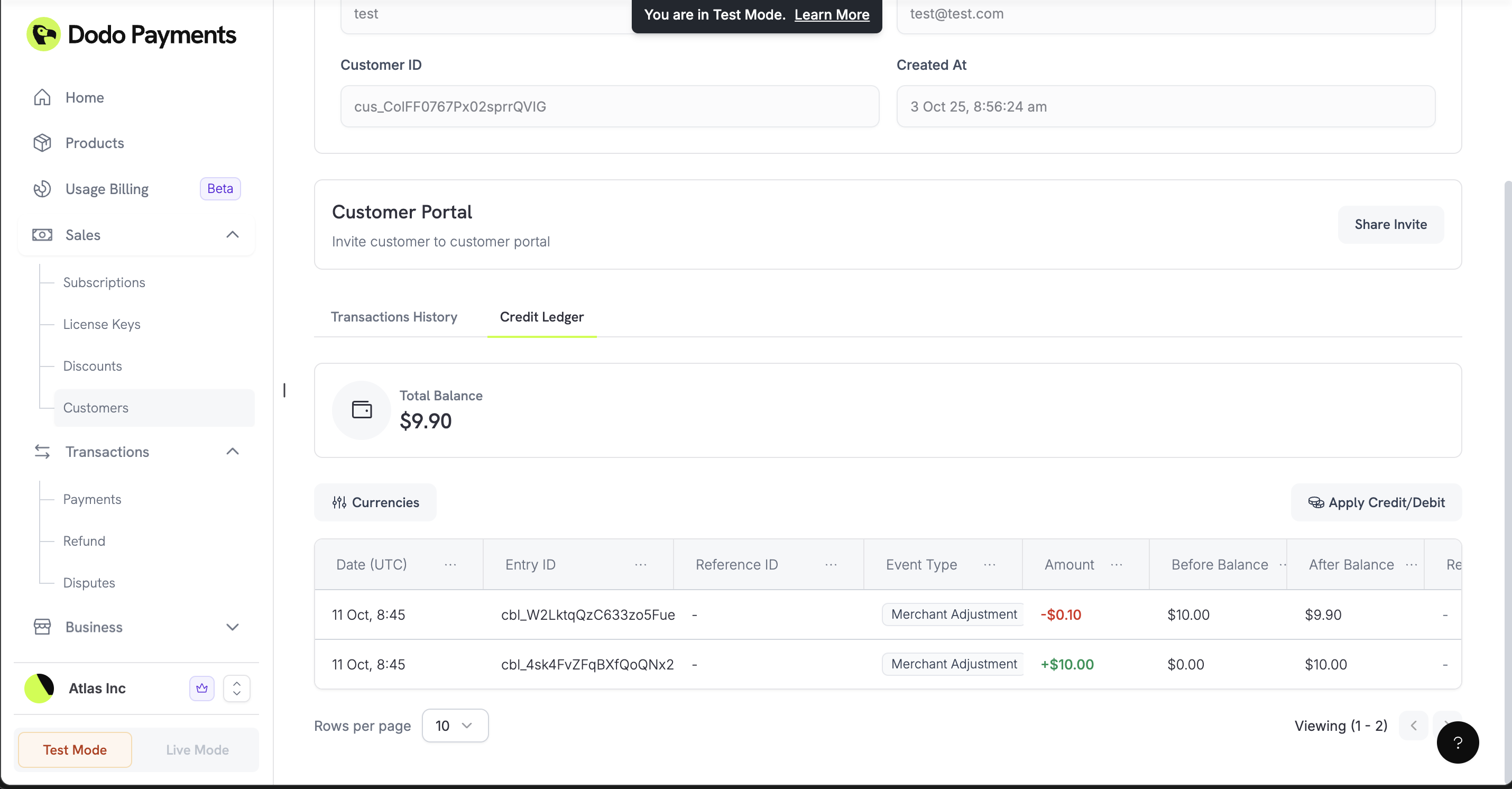
आपको कुछ भी सेट अप करने की आवश्यकता नहीं है। API के माध्यम से लेजर एंट्री जोड़ें या डैशबोर्ड में ग्राहक के Wallets टैब पर Apply Credit/Debit पर क्लिक करें, और उस करेंसी का वॉलेट उपयोग के लिए तैयार हो जाएगा।Multi-Currency Support
हर करेंसी का अपना बैलेंस होता है। Get Customer Wallets response में प्रत्येक wallet मेंcurrency और balance होते हैं, जो सबसे छोटी करेंसी इकाई में दिए जाते हैं, और response में total_balance_usd भी होता है, जो सभी बैलेंस को USD में परिवर्तित करके उनका योग है। लेजर एंट्री इन currencies को स्वीकार करती हैं:
integer
US Dollars में balance (cents में स्टोर किया जाता है)
integer
Euros में balance (cents में संग्रहीत)
integer
Pounds Sterling में balance (pence में संग्रहीत)
Customer wallets में USD, EUR और GBP बैलेंस रखे जाते हैं। Payout Structure में वर्णित बंद किया गया INR native wallet आपका merchant payout wallet है, customer wallet नहीं। INR अभी भी UPI, RuPay और Indian-card subscriptions के लिए transaction currency के रूप में समर्थित है।
Wallets के साथ काम करना
Customer Balances की जाँच करें
प्रत्येक करेंसी में ग्राहक का बैलेंस प्राप्त करें, उदाहरण के लिए खरीदारी से पहले बैलेंस की पुष्टि करने या उसे अपने ऐप में दिखाने के लिए।Get Customer Wallet Balances
Funds जोड़ें या घटाएँ
वेलकम बोनस या रिफंड बैलेंस जैसी धनराशि जोड़ें, या मैन्युअल शुल्क जैसी धनराशि घटाएँ।entry_type, currency और amount आवश्यक हैं। amount सबसे छोटी करेंसी इकाई में एक धनात्मक integer है। अपने audit trail के लिए एक reason (अधिकतम 500 characters) जोड़ें और duplicates रोकने के लिए एक idempotency_key जोड़ें। response updated wallet होता है।
वॉलेट में धनराशि जोड़ने के लिए
entry_type 'credit' है और उससे धनराशि घटाने के लिए 'debit' है। बैलेंस से अधिक debit 400 के साथ विफल हो जाता है।Create Customer Wallet Ledger Entry
Transaction History देखें
ग्राहक के लिए प्रत्येक credit और debit को pagination तथा वैकल्पिकcurrency filter के साथ सूचीबद्ध करें। प्रत्येक entry में एक event_type (payment, payment_reversal, refund, refund_reversal, dispute, dispute_reversal या merchant_adjustment), amount, और before_balance तथा after_balance होते हैं। खातों का मिलान करने और ग्राहकों के प्रश्नों का उत्तर देने के लिए लेजर का उपयोग करें।
List Customer Wallet Ledger Entries
वास्तविक दुनिया के उदाहरण
उदाहरण TypeScript SDK का उपयोग करते हैं।client एक DodoPayments client है, जिसे Integration Guide में बताए अनुसार बनाया गया है।
वॉलेट में रिफंड
ग्राहक को कार्ड पर वापस रिफंड करने के बजाय वॉलेट बैलेंस के रूप में रिफंड देने के लिए credit entry के साथ राशि जोड़ें। यह धनराशि ग्राहक की अगली खरीदारी के लिए आपके व्यवसाय के पास रहती है।लेजर credit से मूल भुगतान का रिफंड नहीं होता। जब आप Refunds API के माध्यम से भुगतान का रिफंड करते हैं, तो Dodo Payments उस भुगतान के वॉलेट द्वारा भुगतान किए गए किसी भी भाग को अपने-आप वॉलेट में लौटा देता है।
वेलकम बोनस / प्रमोशनल बैलेंस
नए ग्राहकों को उनकी पहली खरीदारी के लिए प्रोत्साहित करने हेतु वेलकम बोनस दें।वॉलेट से सब्सक्रिप्शन भुगतान
अपने द्वारा बिल किए गए शुल्क का भुगतान करने के लिए वॉलेट से धनराशि घटाएँ। रिन्यूअल के लिए इस चरण की आवश्यकता नहीं होती, क्योंकि Dodo Payments बैलेंस को उन पर अपने-आप लागू करता है।प्रीपेड बिलिंग सिस्टम
ग्राहकों को अपने खाते में पहले से धनराशि जमा करने दें और समय के साथ उस बैलेंस से राशि घटाएँ।customerId, paymentId और purchaseId ग्राहक, deposit और purchase के लिए आपके अपने identifiers हैं।
1
Add Initial Funds
ग्राहक द्वारा deposit करने पर उसके wallet में धनराशि जोड़ें।
2
Apply Balance to Purchases
ग्राहक द्वारा आपकी सेवाओं का उपयोग करने पर बैलेंस से धनराशि घटाएँ।
3
Monitor Balances
जाँचें कि ग्राहक की धनराशि कम तो नहीं हो रही है और उसे top-up करने के लिए कहें।
Multi-Currency Support
अलग-अलग क्षेत्रों के ग्राहकों के लिए अलग बैलेंस रखें।US Customers
US Customers
US-based customers के लिए USD funds प्रबंधित करें।
European Customers
European Customers
Europe-based customers के लिए EUR funds प्रबंधित करें।
UK Customers
UK Customers
UK-based customers के लिए GBP funds प्रबंधित करें।
सर्वोत्तम प्रक्रियाएँ
डुप्लिकेट लेन-देन रोकें
एंट्री कराने वाली event से प्राप्तidempotency_key भेजें, जैसे order या payment ID, ताकि retry होने पर धनराशि दो बार न जोड़ी या घटाई जाए। यदि आप उसी key के साथ request दोहराते हैं, तो Dodo Payments कोई नई entry नहीं बनाता और current wallet लौटाता है।
शुल्क लेने से पहले बैलेंस जाँचें
वॉलेट से बड़ी राशि घटाने से पहले पुष्टि करें कि बैलेंस उसे कवर करता है।आगे क्या आ रहा है
Customer wallets इन features का समर्थन नहीं करते:- Balance Expiration: वॉलेट फंड expire नहीं होते।
- Analytics: खर्च की reports या balance trends उपलब्ध नहीं हैं। अपना स्वयं का सिस्टम बनाने के लिए ledger का उपयोग करें।
- Webhooks: बैलेंस बदलने पर कोई webhook fire नहीं होता और low-balance alerts भी नहीं हैं। बदलावों को ट्रैक करने के लिए ledger entries की सूची बनाएँ।