

Customer Portal एक hosted site है जहाँ आपके ग्राहक support से संपर्क किए बिना अपनी subscriptions manage कर सकते हैं, invoices देख और download कर सकते हैं, तथा license keys प्राप्त कर सकते हैं।
Create Portal Session (API)
Subscriptions
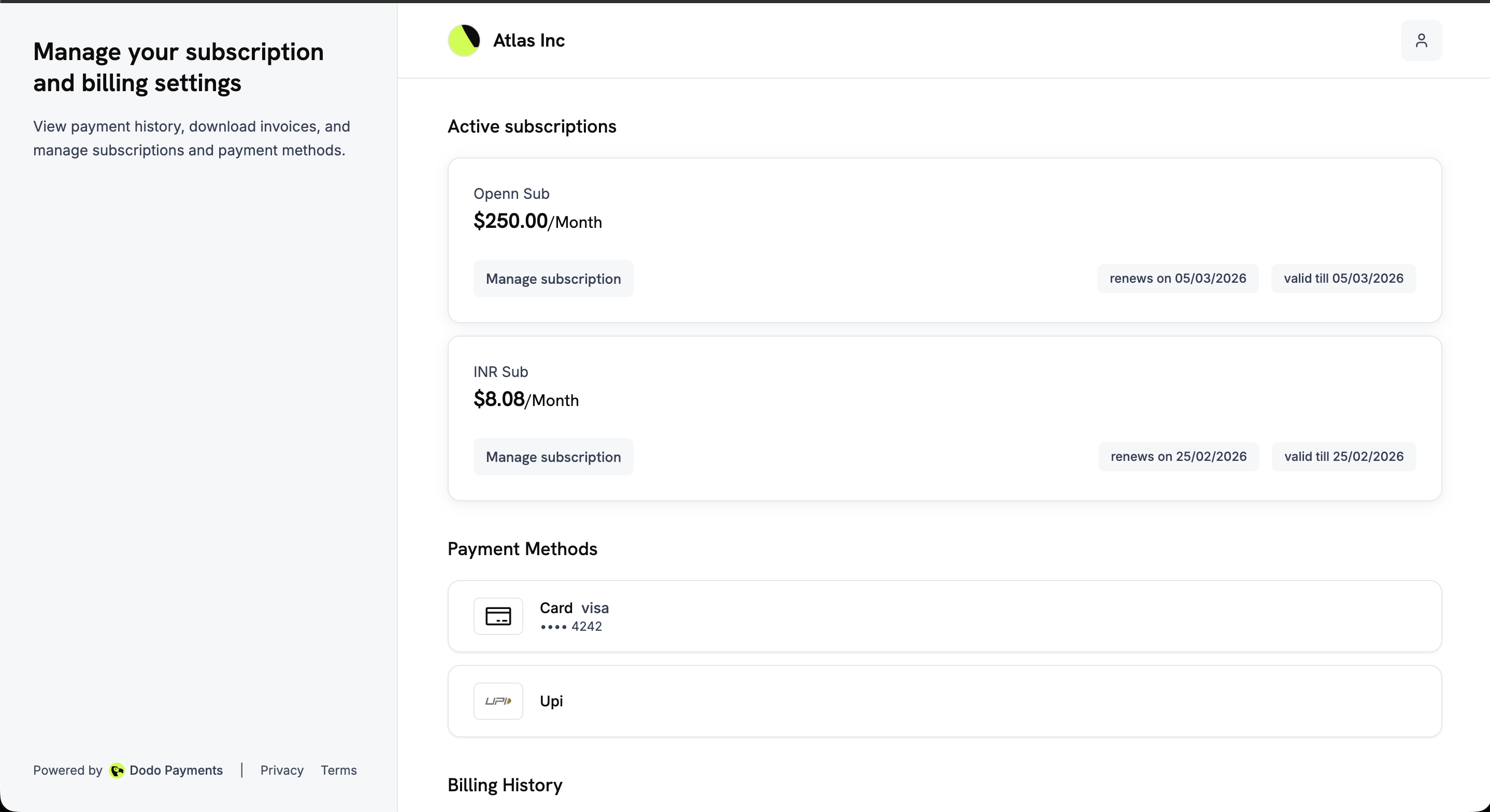
Customer Portal क्या है?
यह portal आपके business के नाम से branded एक self-service site है, जहाँ ग्राहक ये काम कर सकते हैं:- Billing history access करें: पिछले payments देखें और invoices download करें।
- Subscriptions manage करें: Subscription details देखें, subscription pause और resume करें, तथा आपकी settings के अनुसार उसे तुरंत या अगली billing date पर cancel करें।
- Payment methods update करें: किसी subscription का payment method बदलें या hold पर मौजूद subscription को reactivate करें।
- License keys प्राप्त करें: अपनी purchases से जुड़ी license keys देखें।
- अपने app पर लौटें: जब आप
return_urlपास करते हैं, तो portal आपके business का back link दिखाता है। Mobile पर header में मौजूद back arrow portal overview पर लौटाता है।
यदि आप किसी customer को block करते हैं, तो उसका portal read-only हो जाता है। वह sign in करके invoices, subscriptions और license keys देख सकता है, लेकिन subscription cancel, pause या resume नहीं कर सकता, plans बदल नहीं सकता और payment method update नहीं कर सकता। Portal profile
read_only: true लौटाता है, ताकि custom integration अपने controls disable कर सके।मुख्य लाभ
- Support volume कम: ग्राहक billing से जुड़े सामान्य requests स्वयं संभालते हैं।
- तेज़ access: Sign in करते ही ग्राहकों को invoices और license keys मिल जाती हैं।
- Churn risk कम: Charge किए जाने से पहले ग्राहक renewal dates और plan details देख लेते हैं।
- Signed, expiring links: हर sign-in link signed होता है और 24 घंटे बाद expire हो जाता है।
- Localized experience: Portal 21 भाषाओं में उपलब्ध है और customer के browser settings से एक भाषा चुनता है।
Access Methods
ग्राहक portal तक static link या dynamic link के माध्यम से पहुँचते हैं।Static Link (Email-Based Access)
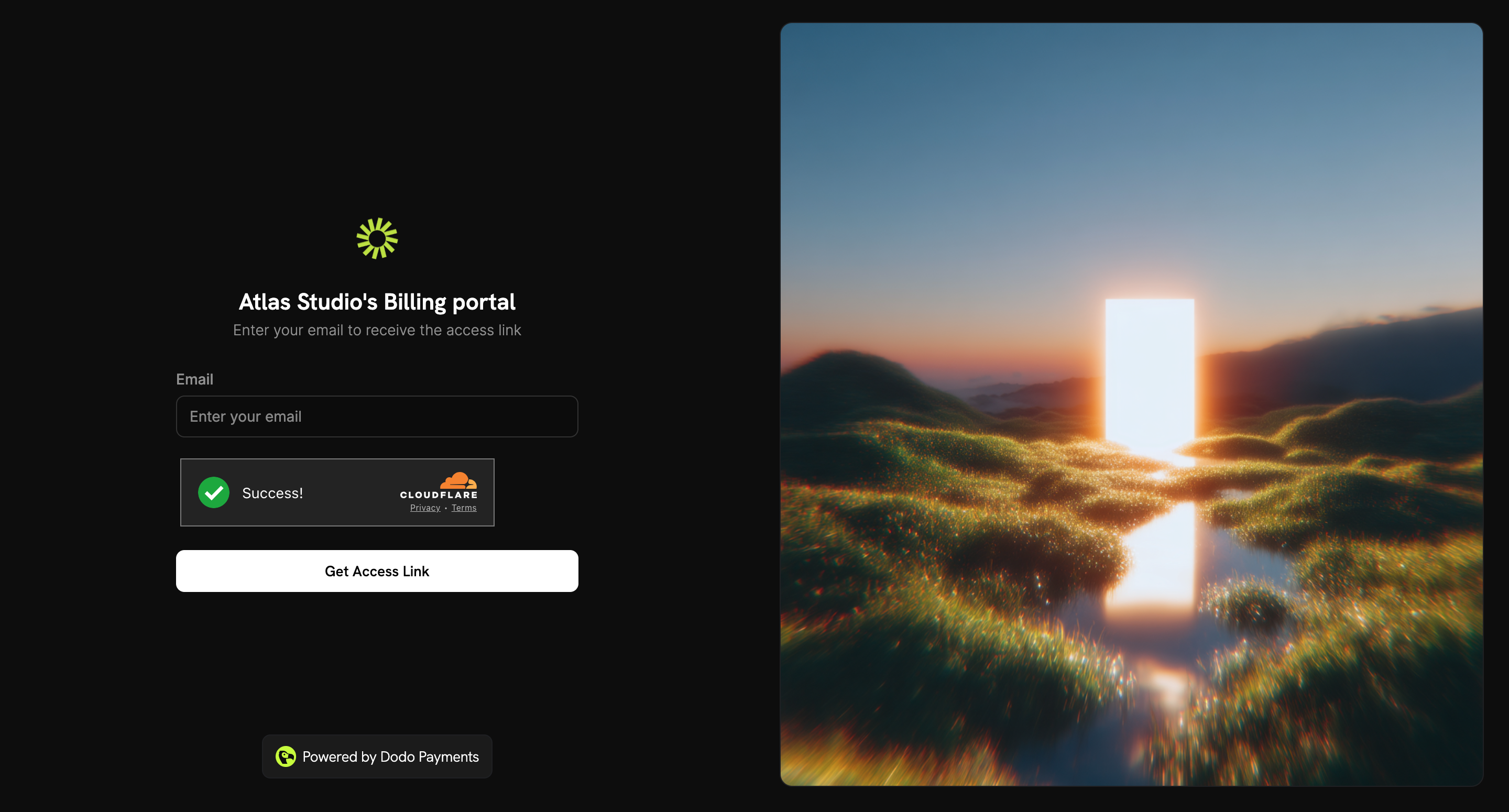
Static link कभी expire नहीं होता। ग्राहक इसे खोलकर अपना email address दर्ज करता है और email द्वारा sign-in link प्राप्त करता है। Static link environment पर निर्भर करता है: Test Mode (testing और development के लिए):{business_id} को अपने business ID से replace करें, फिर link अपने ग्राहकों के साथ share करें। Share Invite dialog में मौजूद Static Link में यह पहले से शामिल होता है।
1
Merchant Flow
- Sales → Customers पर जाएँ और customer खोलें, या list में Invite column का उपयोग करें।
- Share Invite पर click करें।
- Static Link copy करके customer के साथ share करें।
2
Customer Flow
- Static link खोलें।
- Purchase के समय उपयोग किया गया email address दर्ज करें और Get Access Link पर click करें।
- Email में भेजा गया sign-in link खोलें। यह 24 घंटे तक मान्य रहता है।
Page हमेशा वही confirmation दिखाता है। Dodo Payments link केवल तब email करता है जब address आपके business के customer का हो, इसलिए page यह प्रकट नहीं करता कि आपके ग्राहक कौन हैं।
Test mode में sign-in emails नहीं भेजे जाते। Test mode portal खोलने के लिए Dynamic Link का उपयोग करें या API के माध्यम से session बनाएँ।
Dynamic Link (Magic Link)
Dynamic link किसी customer को email step के बिना सीधे portal में sign in कराता है। इसे बनाए जाने के 24 घंटे बाद यह expire हो जाता है।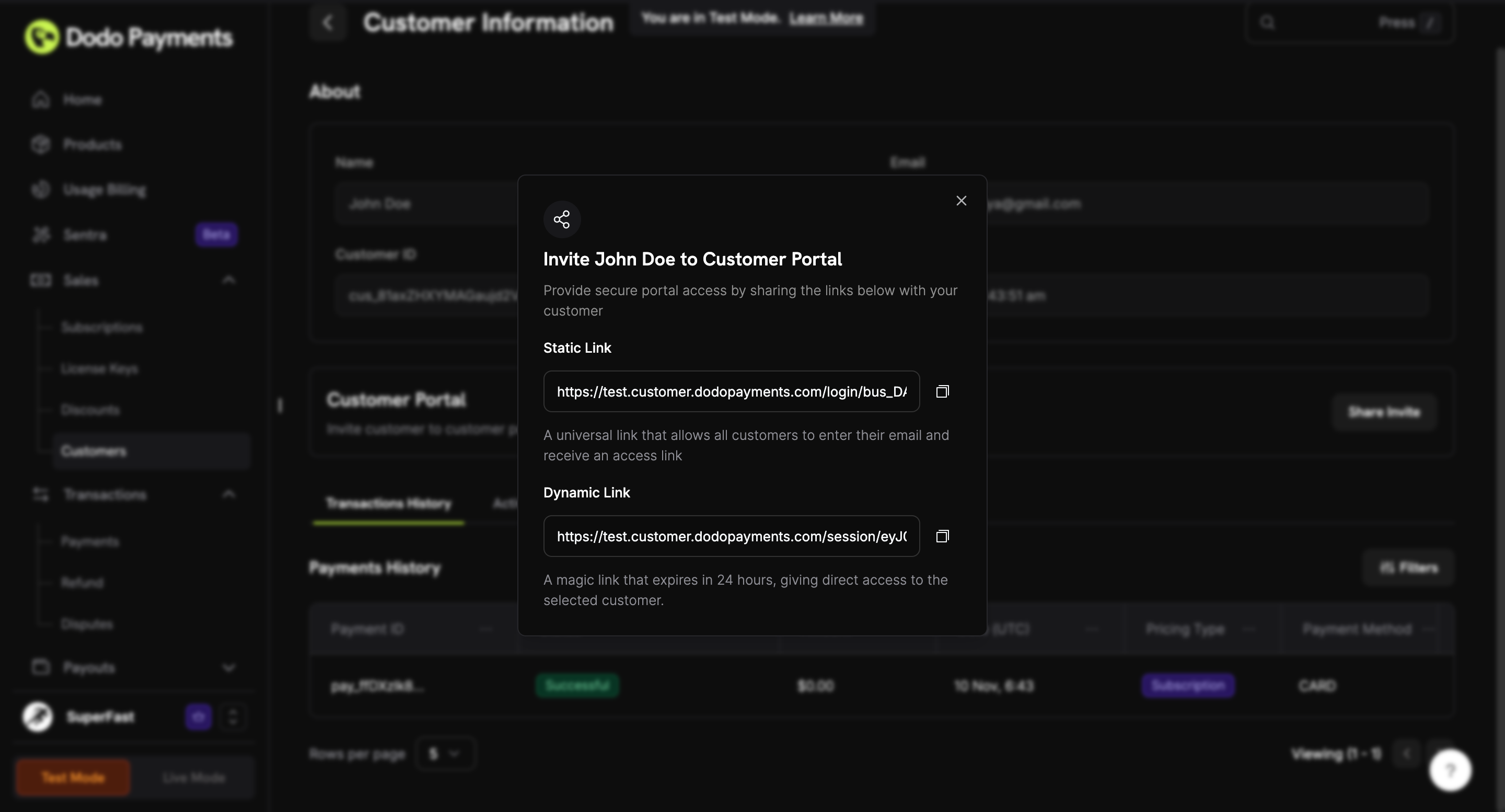
1
Merchant Flow
- Sales → Customers पर जाएँ और customer खोलें।
- Share Invite पर click करें।
- Dynamic Link copy करके customer के साथ share करें।
2
Customer Flow
- Dynamic link खोलें।
- Customer Portal बिना email address के सीधे खुल जाता है।
Portal Features
Portal overview एक single page है। Desktop पर बाईं ओर का panel portal का विवरण देता है। Main area में customer की subscriptions, payment methods और billing history की सूची होती है।Active Subscriptions
Payment Methods
Billing History
Billing Information
Portal Overview
Overview page active subscriptions, saved payment methods और billing history को एक scrollable view में दिखाता है।Payment Methods & Billing History
Page के नीचे saved payment methods और billing history होती है, जिसमें हर payment का status और हर invoice के लिए download link होता है।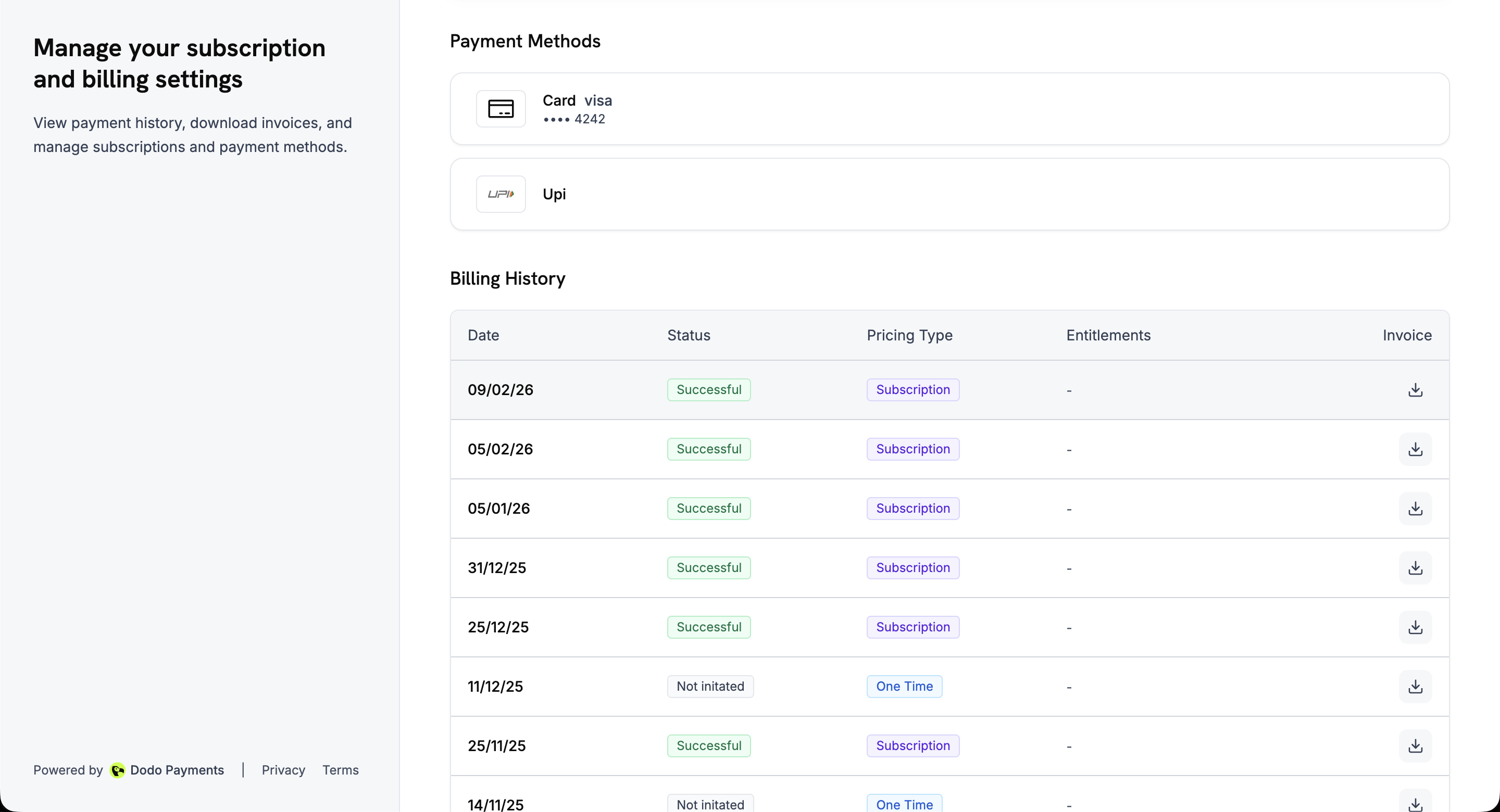
Language Support
Customer Portal 21 भाषाओं में उपलब्ध है, इसलिए ग्राहक अपनी भाषा में subscriptions, payment methods और billing history manage कर सकते हैं।Language Selection कैसे काम करता है
- Automatic detection: पहली visit पर portal browser से preferred language पढ़ता है और supported होने पर उसे load करता है। अन्यथा यह English का उपयोग करता है।
- Manual override: ग्राहक desktop और mobile पर page के bottom-right corner में language selector से किसी भी समय language बदल सकते हैं।
- Persisted preference: Portal choice को
NEXT_LOCALEcookie में एक वर्ष तक store करता है, इसलिए visits के बीच language याद रहती है।
Supported Languages
Plan Changes (Upgrade/Downgrade)
ग्राहक portal से एक ही Product Collection में मौजूद products के बीच upgrade या downgrade कर सकते हैं।Available Actions
Plan Changes कैसे काम करते हैं
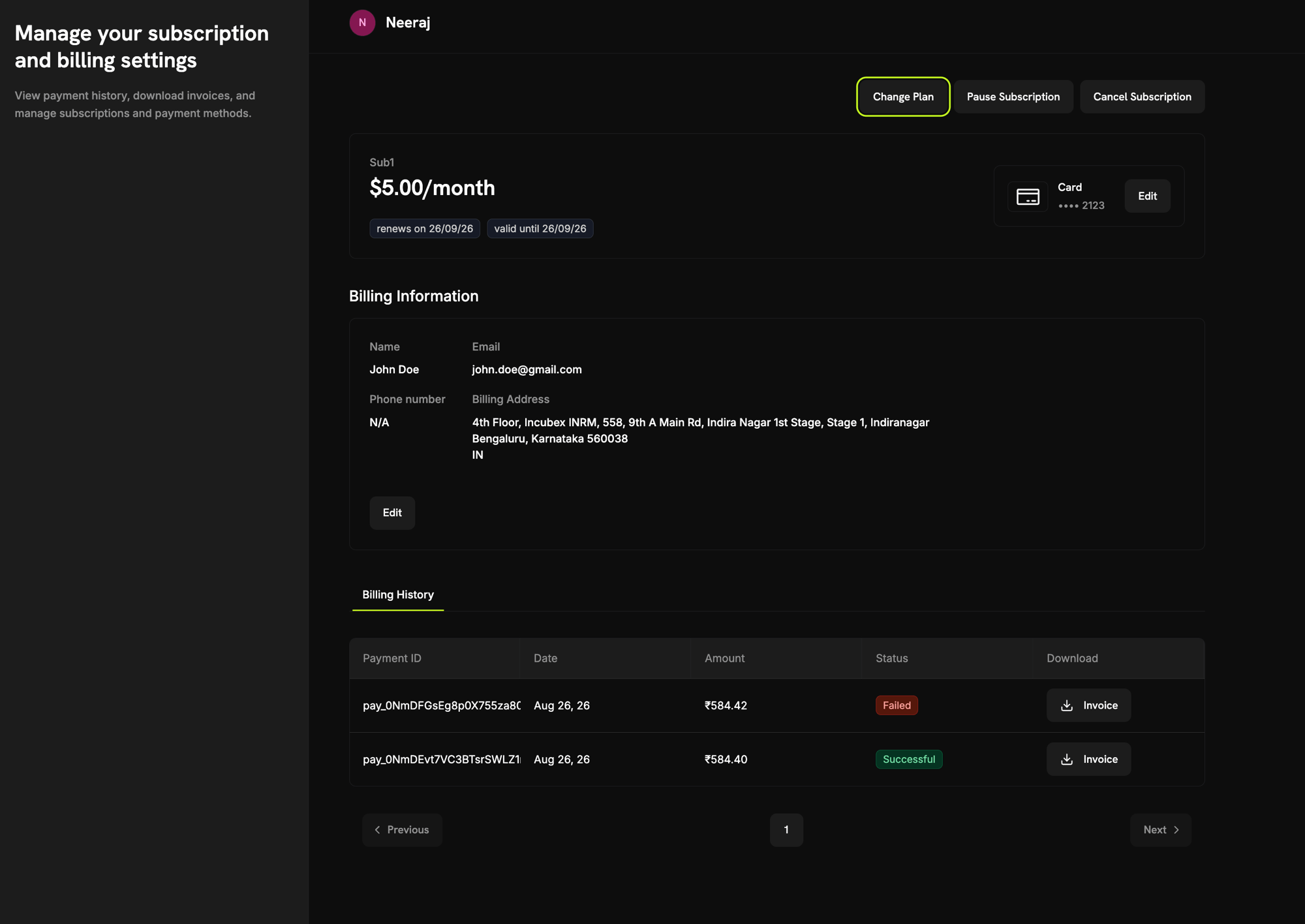
- Customer subscription details page पर Change Plan click करता है।
- Portal product collection में मौजूद अन्य plans की सूची दिखाता है।
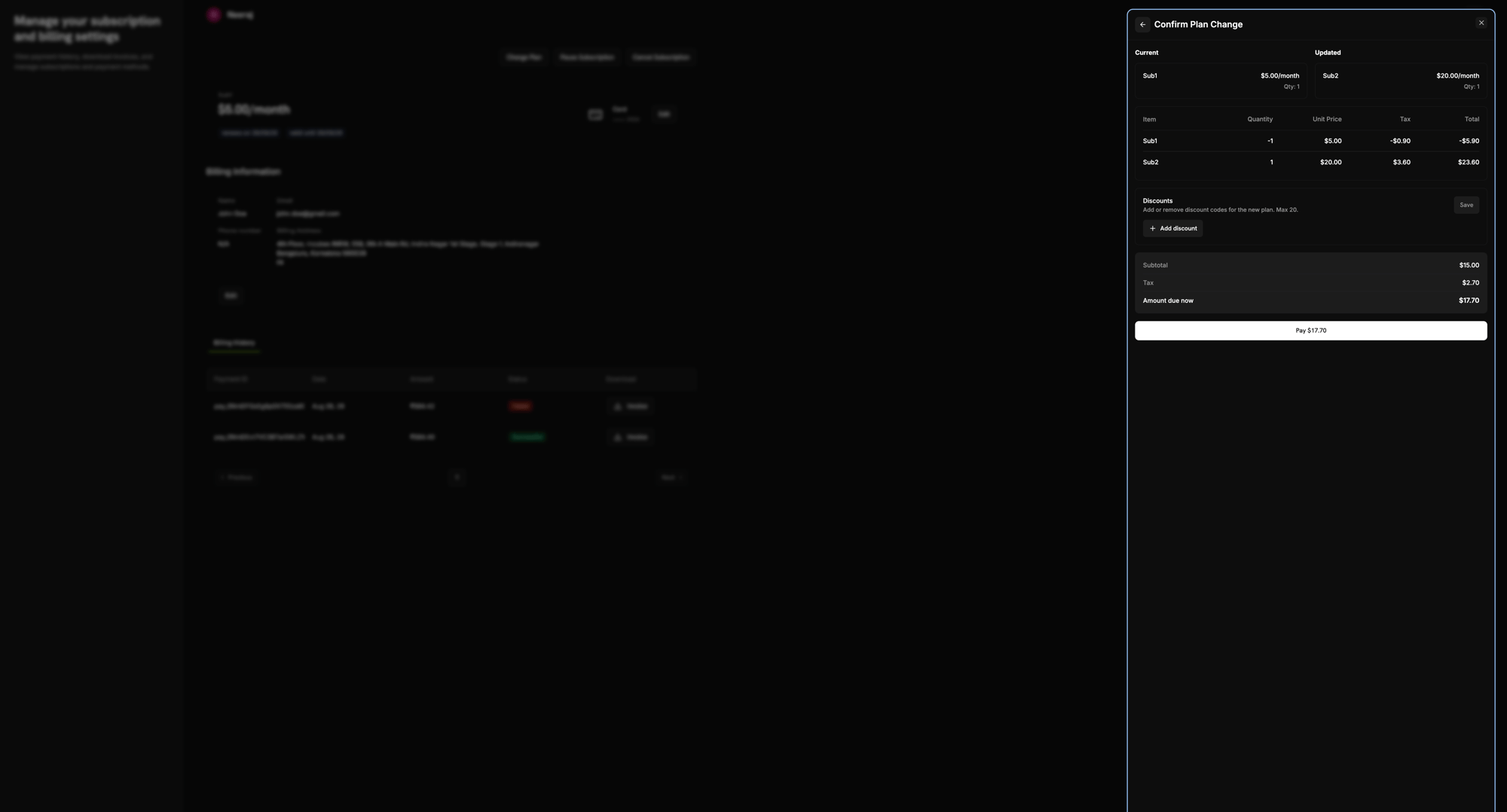
- Customer एक plan चुनता है। Confirm Plan Change panel में current और updated plan, line-item breakdown (पुराने plan का credit और नए plan का charge), tax और अभी देय amount दिखता है। Customer यहाँ discount code भी दर्ज कर सकता है।
- Customer Pay button से confirmation करता है, जिसमें देय amount दिखता है।
- Dodo Payments proration calculate करता है और charge collect करता है—या तो saved payment method से, या hosted checkout page पर, यदि आप plan-change payments payment link से collect करते हैं (देखें Collecting Plan Change Payments by Payment Link)।
- Subscription नए plan पर चली जाती है। यह तुरंत होगा या charge सफल होने के बाद, यह आपकी payment failure handling पर निर्भर करता है। Payment link से paid plan change हमेशा payment का इंतज़ार करता है।
Plan changes केवल उसी collection में मौजूद products के बीच काम करते हैं, और target product subscription या usage-based product होना चाहिए। One-time products अस्वीकार कर दिए जाते हैं।
Payment Link से Plan Change Payments Collect करना
डिफ़ॉल्ट रूप से immediate plan change customer के saved payment method से charge करता है। Collect Plan Change Payments by Payment Link चालू होने पर portal इसके बजाय नए tab में hosted Dodo Payments checkout page खोलता है और customer वहीं payment करता है। यह उन upgrades और downgrades पर लागू होता है जिनसे charge बनता है।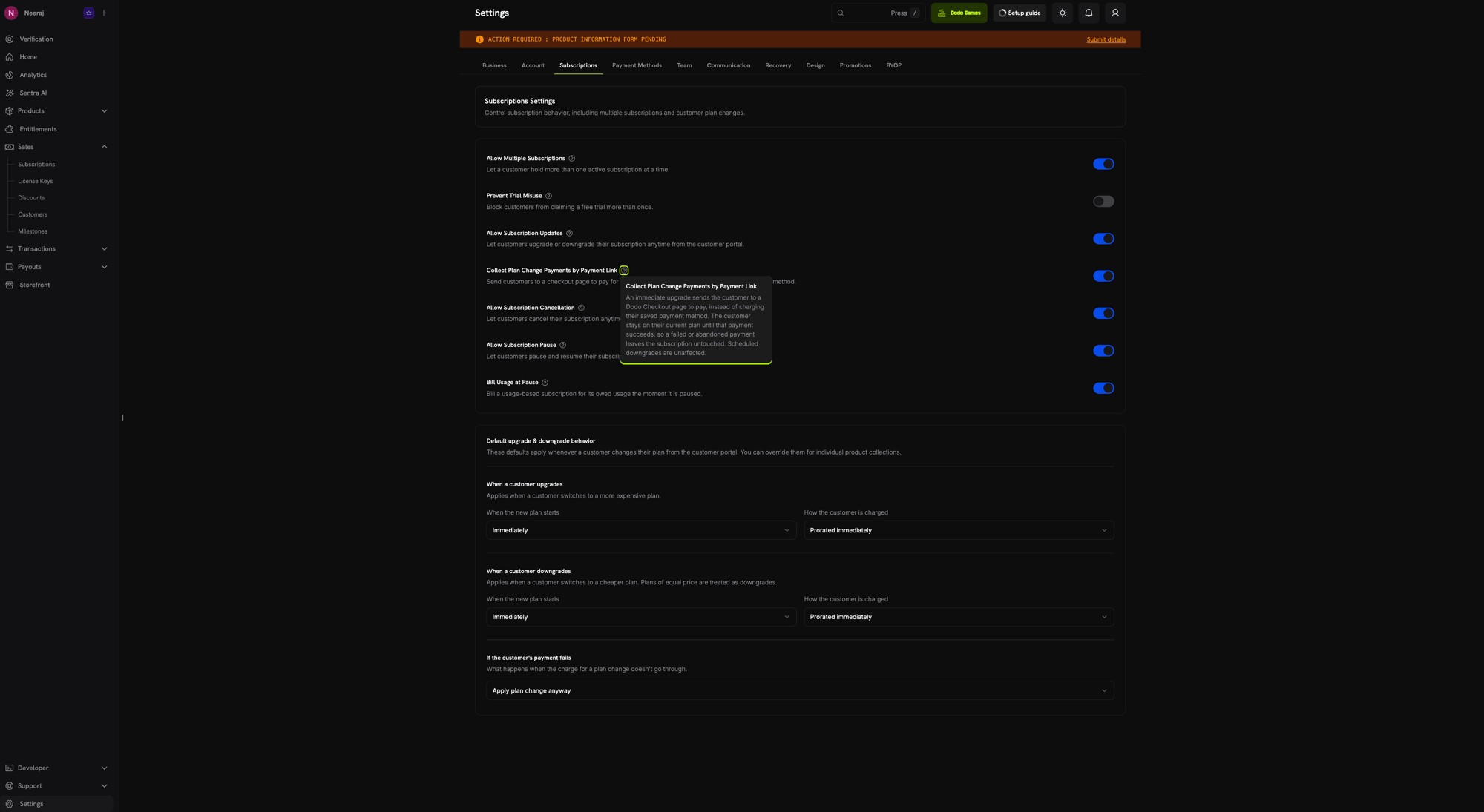
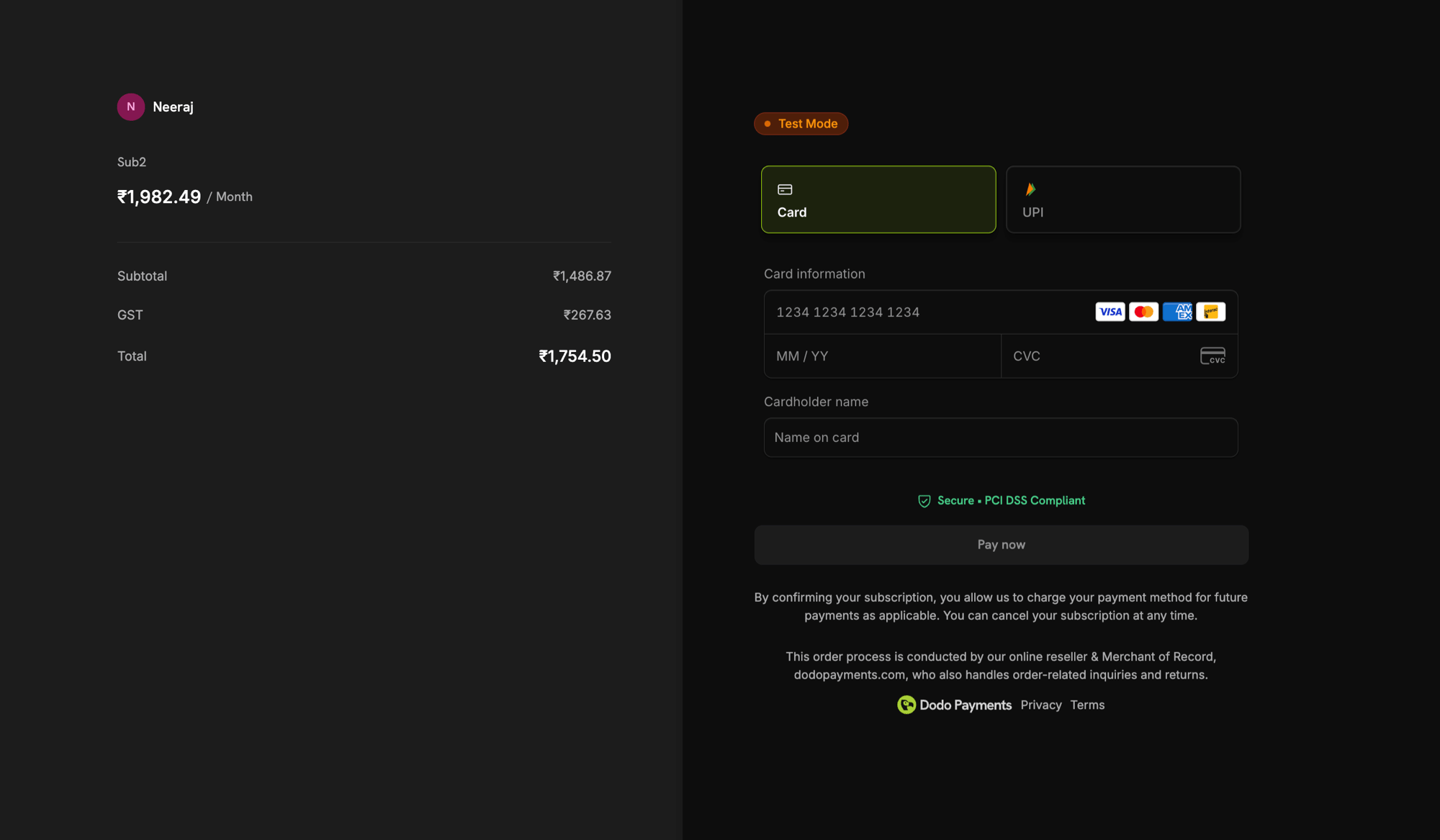
checkout payment सफल होने तक subscription अपने current plan पर बनी रहती है। विफल या छोड़ा गया payment subscription में कोई बदलाव नहीं करता। अस्वीकृत payment के बाद, नया checkout link पाने के लिए customer Customer Portal से plan change फिर से शुरू करता है। Scheduled downgrades (
effective_at: next_billing_date) checkout से नहीं गुजरते; वे हमेशा की तरह अगली billing date पर लागू होते हैं।Plan Change via Payment Link (API)
Business Controls
Settings → Subscriptions के अंतर्गत configure करें कि ग्राहक अपनी subscriptions के साथ क्या कर सकते हैं:- Allow Subscription Updates: ग्राहकों को upgrade या downgrade करने देता है। डिफ़ॉल्ट रूप से बंद।
- Allow Immediate Cancellation: ग्राहकों को subscription समाप्त करने और तुरंत access खोने देता है। डिफ़ॉल्ट रूप से चालू।
- Allow Cancellation at Next Billing Date: ग्राहकों को paid period के अंत में cancel करने देता है। डिफ़ॉल्ट रूप से चालू।
- Allow Subscription Pause: ग्राहकों को अपनी subscriptions pause और resume करने देता है। डिफ़ॉल्ट रूप से बंद।
- Collect Plan Change Payments by Payment Link: immediate plan change के लिए saved payment method charge करने के बजाय ग्राहकों को payment करने हेतु checkout page पर भेजता है। डिफ़ॉल्ट रूप से बंद।
Product Collections
Subscription Details
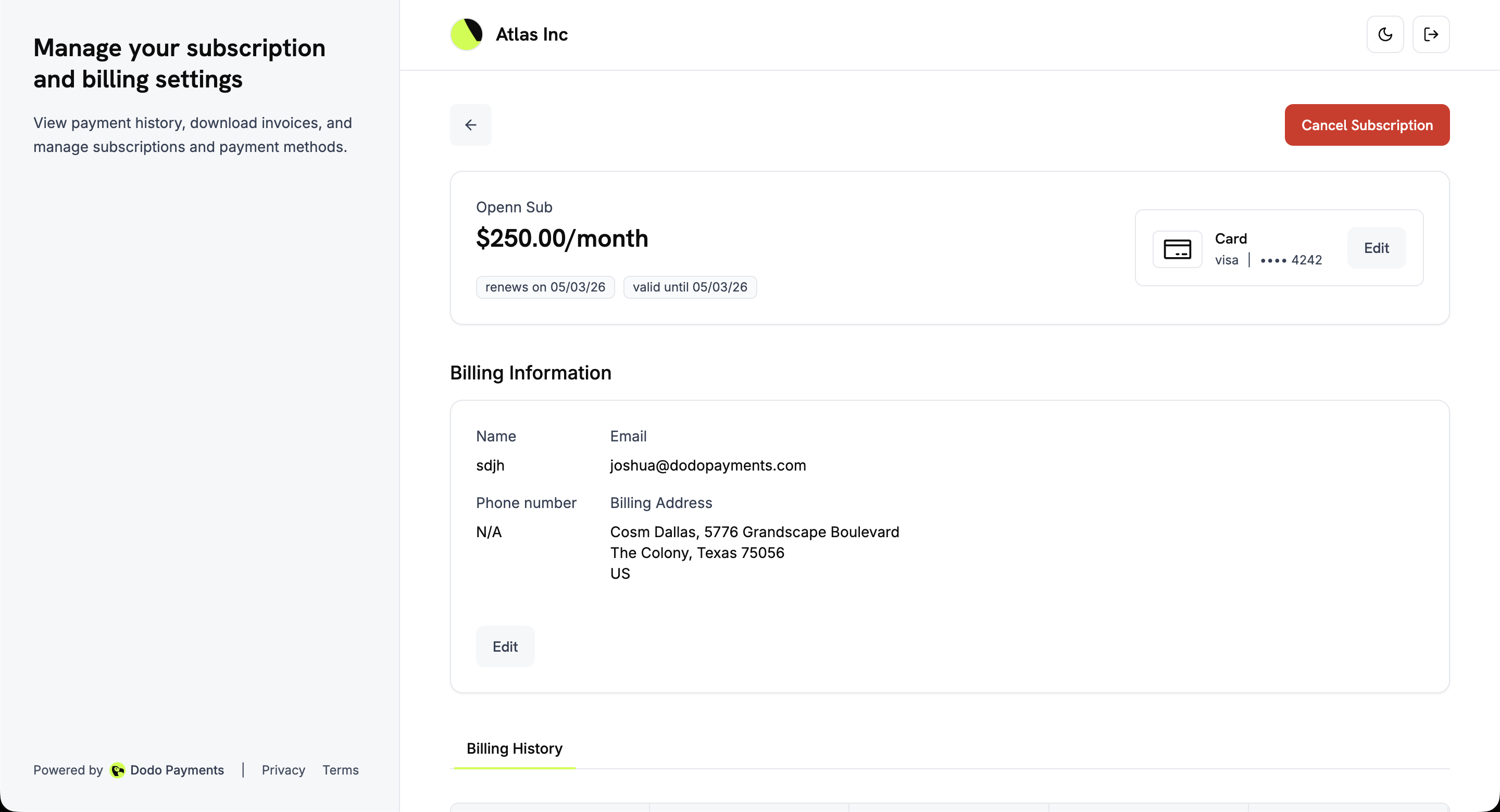
किसी भी active subscription पर Manage subscription उसके details page को खोलता है, जहाँ ये दिखाई देते हैं:- Plan details: Subscription name, price, renewal date और validity period।
- Payment method: Subscription का payment method, जिसमें Edit button होता है।
- Billing information: Name, email, phone number और billing address, जिसमें name और billing address के लिए Edit button होता है।
- Billing history: इस subscription के सभी payments की table।
- Pause Subscription: जब self-service pause की अनुमति हो।
- Cancel Subscription: Cancellation dialog खोलता है।
Subscription Cancel करना
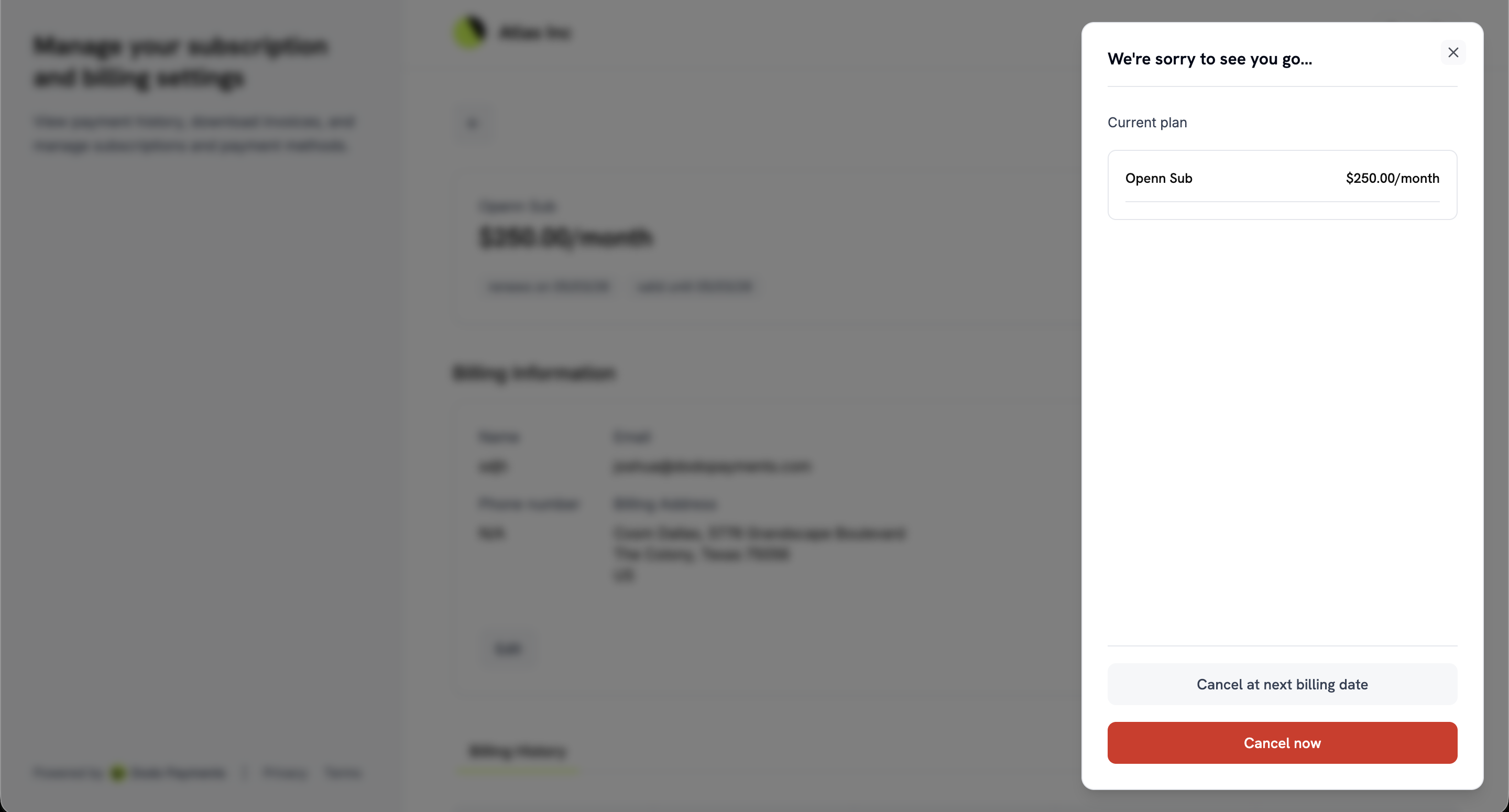
ग्राहक subscription details page से cancel करते हैं। Cancel Subscription दो options वाला dialog खोलता है:- Cancel at next billing date: Current billing period समाप्त होने तक subscription active रहती है, फिर cancel हो जाती है।
- Cancel now: Subscription तुरंत cancel हो जाती है।
Settings → Subscriptions के अंतर्गत दो settings इन options को अलग-अलग control करती हैं: Allow Immediate Cancellation और Allow Cancellation at Next Billing Date। दोनों डिफ़ॉल्ट रूप से चालू हैं। एक को बंद करने पर केवल वही option हटता है, इसलिए आप दूसरे को उपलब्ध रख सकते हैं। दोनों बंद होने पर Cancel Subscription disabled रहता है और उसका tooltip customer को आपसे संपर्क करने के लिए कहता है। जिस customer की cancellation पहले से scheduled है, उसे Revoke Cancellation दिखाई देता है, ताकि वह subscription जारी रख सके, और Cancel immediately, जो Cancel now जैसा ही action है। ये settings आपके द्वारा स्वयं की गई cancellations को प्रभावित नहीं करतीं।
Cancellation Reasons
Confirm करने से पहले customer को fixed list से reason चुनकर Why are you cancelling? का उत्तर देना होगा। वह Additional comments के अंतर्गत अधिकतम 500 characters की optional comment भी जोड़ सकता है। Dodo Payments दोनों को subscription पर store करता है और webhook payloads तथा API में लौटाता है, ताकि आप ग्राहकों के जाने का कारण analyze कर सकें और win-back messages को अनुकूलित कर सकें।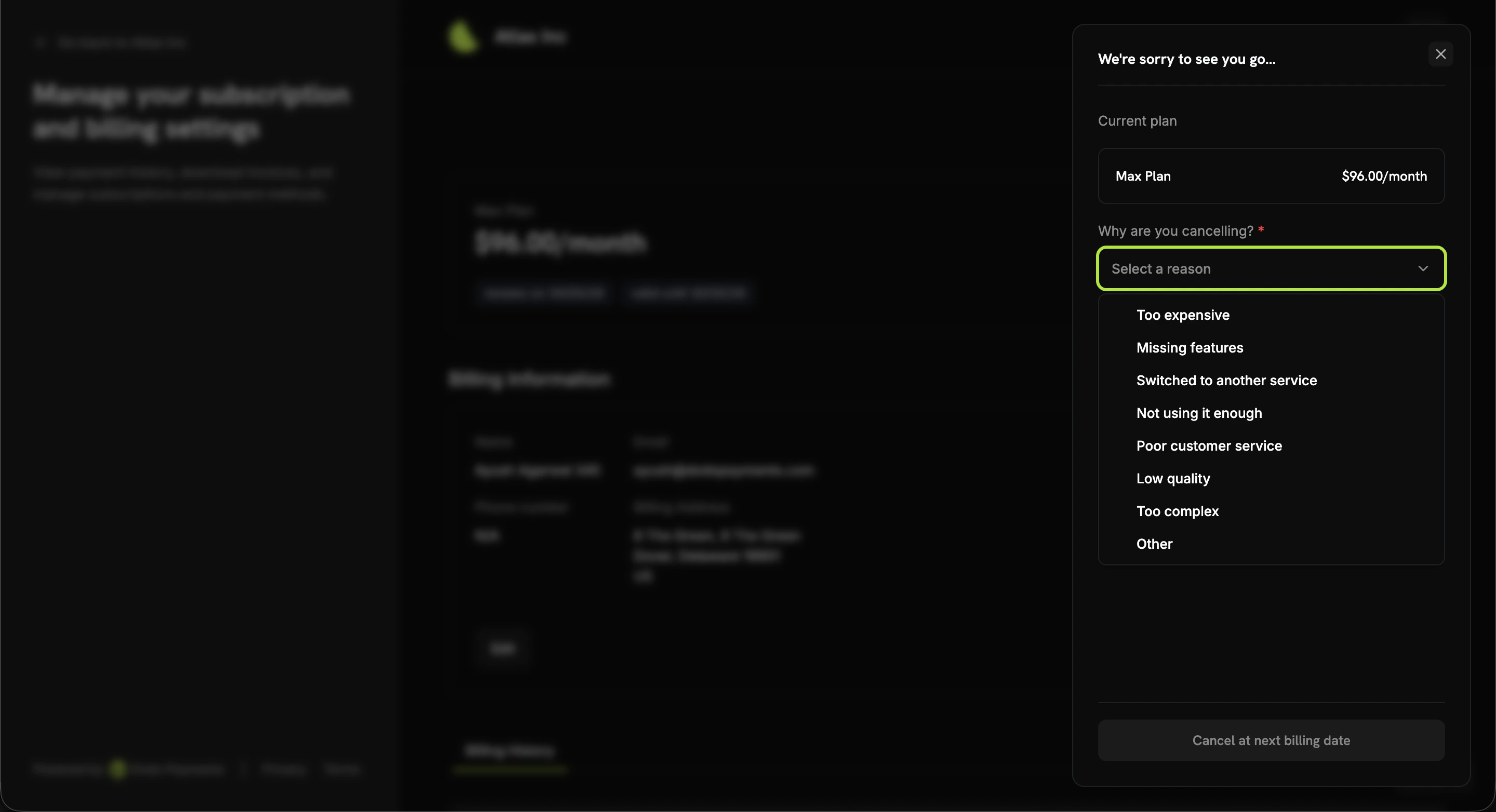
Reason subscription के
cancellation_feedback field में और comment cancellation_comment में store होता है।
subscription.cancelled webhook payload में भी मौजूद होते हैं। इन्हें स्वयं set करने के लिए API के माध्यम से cancellation cancel या schedule करते समय इन्हें PATCH /subscriptions/{subscription_id} में pass करें।
Subscription Pause करना
Pause करने से ग्राहकों को subscription जारी रखने और cancel करने के बीच एक विकल्प मिलता है। Paused subscription billing रोकती है, लेकिन अपना plan और history बनाए रखती है, इसलिए customer दोबारा खरीदने के बजाय बाद में उसे resume कर सकता है। ग्राहक subscription details page से Pause your subscription dialog खोलते हैं। Dialog current plan दिखाता है, चेतावनी देता है कि access तुरंत समाप्त हो जाएगा और बताता है कि billing dates कैसे आगे बढ़ेंगी। Customer Pause subscription से confirmation करता है।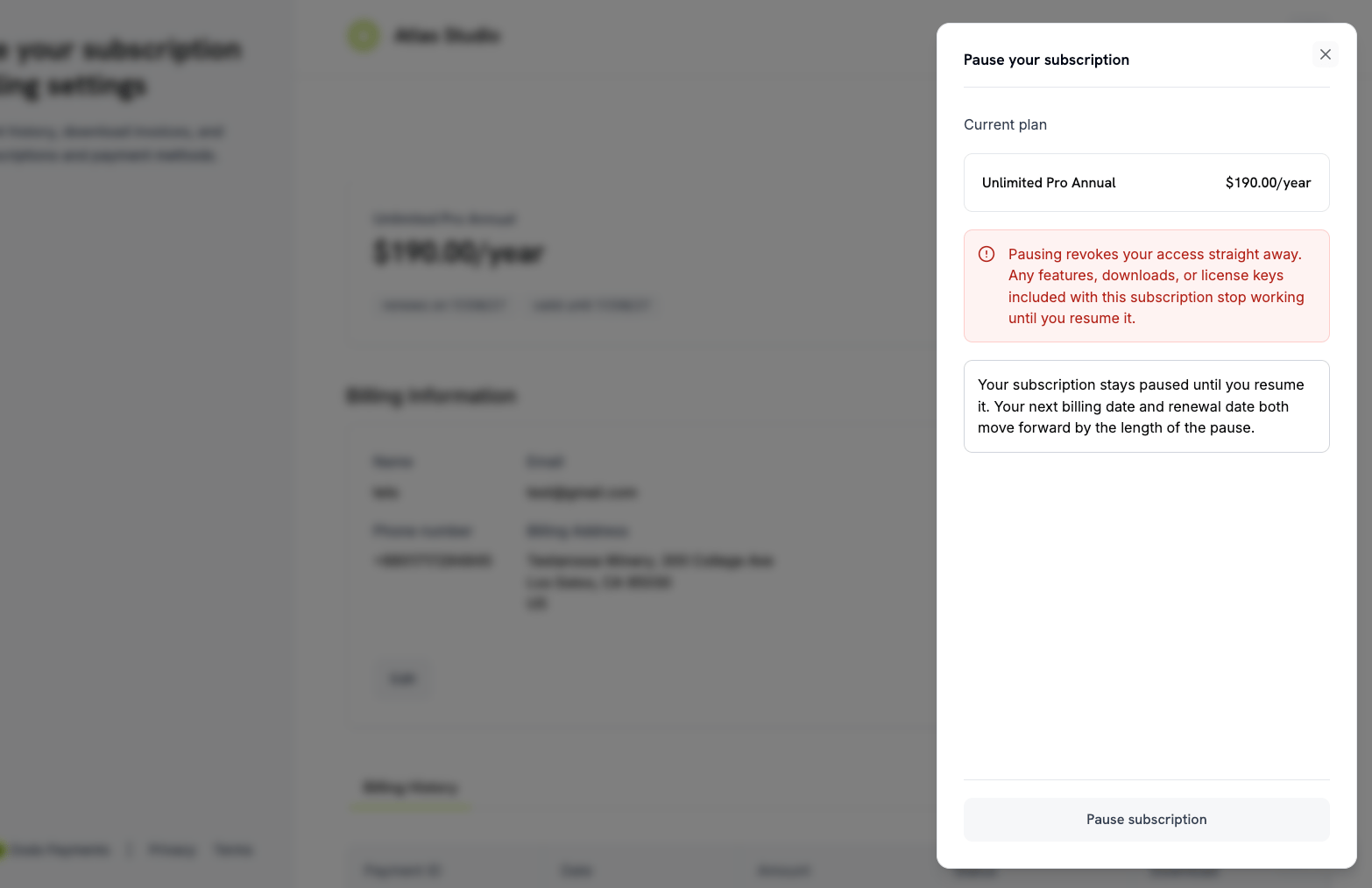
- Access तुरंत बंद हो जाता है। Subscription के साथ शामिल features, downloads और license keys तब तक काम नहीं करते जब तक subscription resume नहीं होती।
- Pause की कोई end date नहीं होती। Customer के resume करने तक subscription paused रहती है।
- Paid time नष्ट नहीं होता। अगली billing date और renewal date, दोनों pause की अवधि जितनी आगे बढ़ जाती हैं।
active पर लौट आती है और access restore हो जाता है।
Settings → Subscriptions के अंतर्गत Allow Subscription Pause setting self-service pause को control करती है और यह डिफ़ॉल्ट रूप से बंद है। इसके बंद रहने पर ग्राहक नया pause शुरू नहीं कर सकते, लेकिन कोई customer अपने द्वारा शुरू किए गए pause को resume कर सकता है। Dashboard से आपके द्वारा शुरू किए गए pauses प्रभावित नहीं होते।
How Pausing Works
Payment Methods अपडेट करना
ग्राहक subscription details page पर payment method के पास Edit से subscription का payment method बदलते हैं। Failed payment के बाद hold पर मौजूद subscription को reactivate करने का भी यही तरीका है।Hold पर मौजूद Subscriptions को Reactivate करना
Payment fail होने पर subscriptionon_hold पर चली जाती है। Portal Your subscription is currently on hold दिखाता है और customer से payment method update करने को कहता है। ऐसा करने पर Dodo Payments:
- Charge बनाता है शेष dues के लिए
- Invoice generate करता है charge के लिए
- Payment collect करता है नए payment method से
- Subscription reactivate करता है payment सफल होने पर
activeपर
जब
on_hold subscription के बकाए का भुगतान कर दिया जाता है, तो subscription फिर से active बन जाती है।Grace Period में Subscriptions को Reactivate करना
यदि आप grace period set करते हैं, तो failed renewal subscription कोon_hold के बजाय past_due पर ले जाती है। Deadline तक customer access बनाए रखता है।
Recovery इसी तरह काम करता है: customer payment method update करता है और subscription active पर लौट आती है। यदि वह कुछ नहीं करता, तो deadline पर subscription आपकी configuration के अनुसार on_hold या cancelled पर चली जाती है और access समाप्त हो जाता है।
Payment Method Update Flow
1
Access Subscription Details
Portal overview से subscription पर Manage subscription click करें।
2
Click Edit on Payment Method
Payment method के पास Edit click करें।
3
Select or Add Payment Method
Saved payment method चुनें या Add Payment Method click करके नए details दर्ज करें।
4
Confirm Changes
Update confirm करें।
on_hold subscription के लिए इससे शेष dues का charge बनता है।5
Complete Payment (If On Hold)
यदि subscription hold पर है, तो customer को शेष dues का payment करने के लिए redirect किया जाता है। Payment सफल होने पर subscription reactivate हो जाती है।
6
Confirmation
Portal पुष्टि करता है कि payment method update हो गया है और on-hold subscription के लिए यह फिर active है।
जब कोई बकाया राशि नहीं होती, तो card बदलने पर नए card को verify करने के लिए zero-amount payment बनाया जाता है। Customer को इसके लिए payment receipt email नहीं मिलता, लेकिन
payment.succeeded webhook फिर भी fire होता है। ऐसा card update जिसमें outstanding dues का payment भी शामिल हो, सामान्य receipt भेजता है।Integration Examples
Customer को अपने app से portal पर भेजने के लिए, अपने server पर portal session बनाएं और customer को लौटाए गएlink पर redirect करें। Link 24 घंटे तक valid रहता है।
send_email: true पास करें।
Unified Customer Portal
आपके business के portal के अलावा, Dodo Payments customer.dodopayments.com पर Unified Customer Portal चलाता है। यहां customers उन सभी businesses से की गई अपनी purchases और subscriptions देख और manage कर सकते हैं, जो Dodo Payments के माध्यम से बेचते हैं।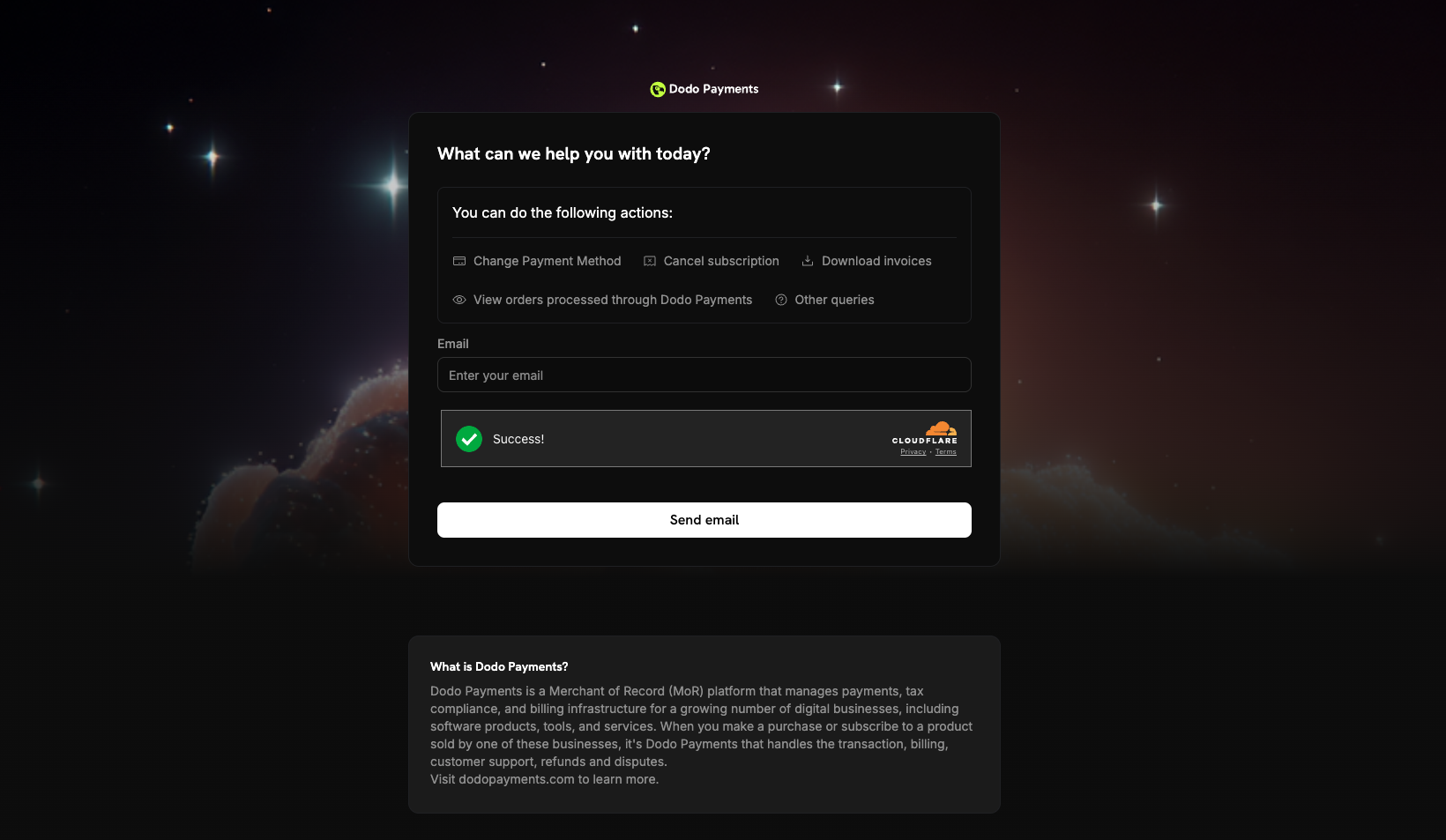
Unified Portal Features
- Cross-business visibility: एक ही स्थान पर Dodo Payments के हर merchant से की गई purchases और subscriptions देखें।
- Centralized management: एक ही site से अलग-अलग businesses के साथ subscriptions manage करें।
- Unified billing history: सभी purchases के invoices और payment history access करें।
- Single sign-in: सभी Dodo Payments merchants की purchases तक पहुंचने के लिए email address से एक बार sign in करें।
Troubleshooting
- Link expired: नया dynamic link generate करके customer को भेजें।
- Email not recognized: Customer से अपनी purchase में इस्तेमाल किया गया email address उपयोग करने को कहें। ऐसे address के लिए कोई sign-in email नहीं भेजा जाता जो आपके business का customer नहीं है।
- Subscription on hold: Customer portal में अपना payment method update करता है। Payment सफल होने पर Dodo Payments शेष dues charge करता है और subscription को reactivate करता है।
- Payment method update failed:
on_holdsubscription को update करते समय payment विफल होने पर subscription on hold रहती है। Customer किसी अलग payment method के साथ फिर से प्रयास कर सकता है।