

अवलोकन
Customers पेज उन सभी लोगों की सूची दिखाता है जिन्होंने आपके business से खरीदारी की है। किसी customer के पेज से आप उनके payments और subscriptions की समीक्षा कर सकते हैं, उनके wallet balances देख और समायोजित कर सकते हैं, उन्हें Customer Portal का link भेज सकते हैं और उन्हें block कर सकते हैं। यही customer records API के ज़रिए भी उपलब्ध हैं।Customer Dashboard
Customer Wallets
Customer Portal
API Management
ग्राहकों के पृष्ठ तक पहुंचना
1
Navigate to Customers
Dashboard में Sales → Customers पर जाएँ।
2
View Customer List
यह पेज आपके business के सभी वर्तमान और पिछले customers की सूची दिखाता है।
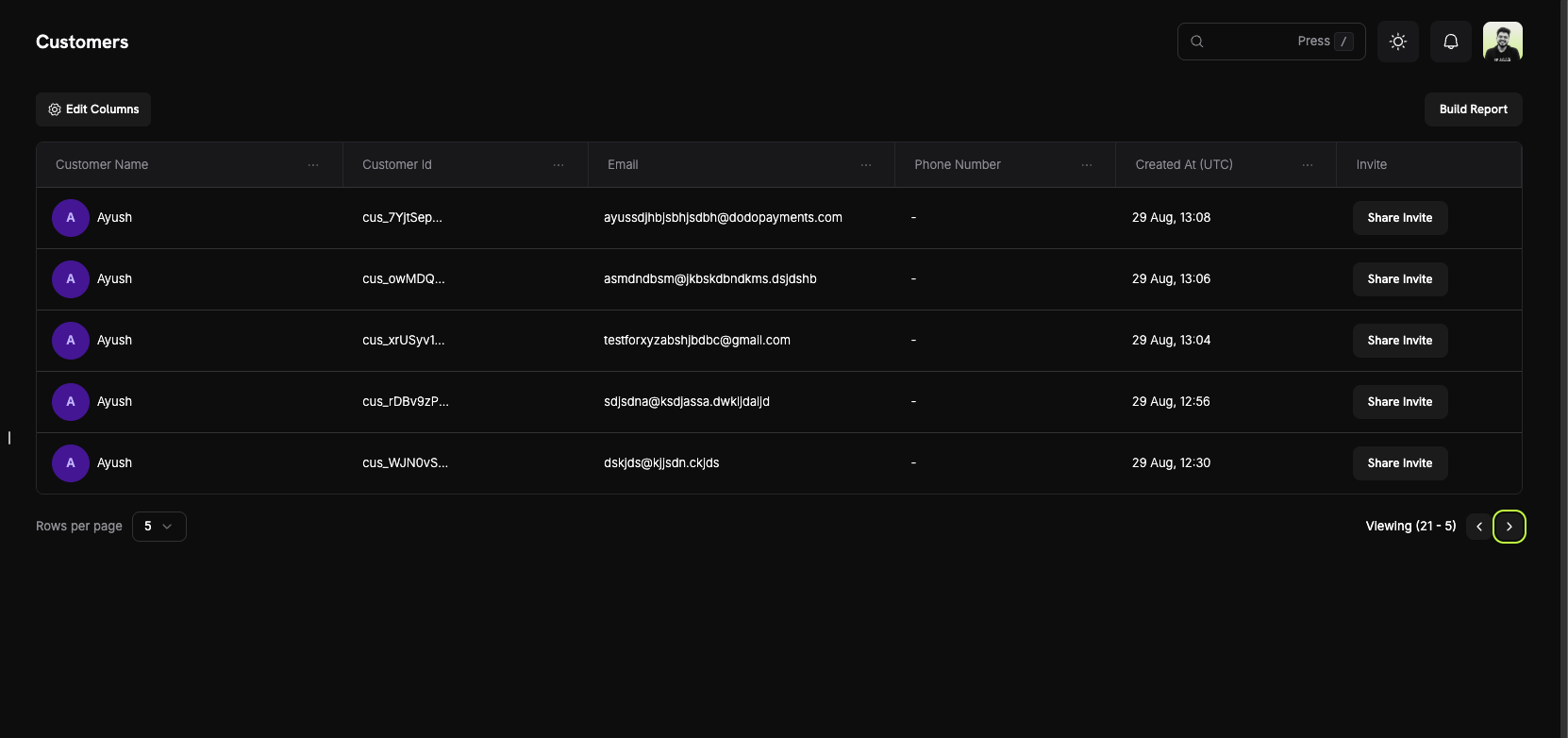
ग्राहक जानकारी
Customer table में प्रत्येक customer के लिए एक row होती है, जिसमें नीचे दिए गए columns होते हैं।ग्राहक सूची कॉलम
- Customer Name: Customer का पूरा नाम और avatar।
- Customer Id: विशिष्ट identifier, जो
cus_से शुरू होता है। इसे API calls में उपयोग करें। - Email: Customer का email address। Customer इसका उपयोग Customer Portal में sign in करने के लिए करता है।
- Phone Number: Customer का phone number, यदि दिया गया हो।
- Created At: Customer record बनाए जाने का समय। UTC में समय देखने के लिए value पर hover करें।
- Invite: Share Invite button, जो इस customer के Customer Portal links खोलता है।
पृष्ठ सुविधाएँ
- Column visibility: चुनें कि table में कौन से columns दिखें।
- Filters: Name या Email Address से customers खोजें।
- Pagination: सूची में आगे-पीछे जाएँ और Rows per page की संख्या निर्धारित करें।
ग्राहक विवरण पृष्ठ
किसी customer पर click करके उनका Customer Information पेज खोलें: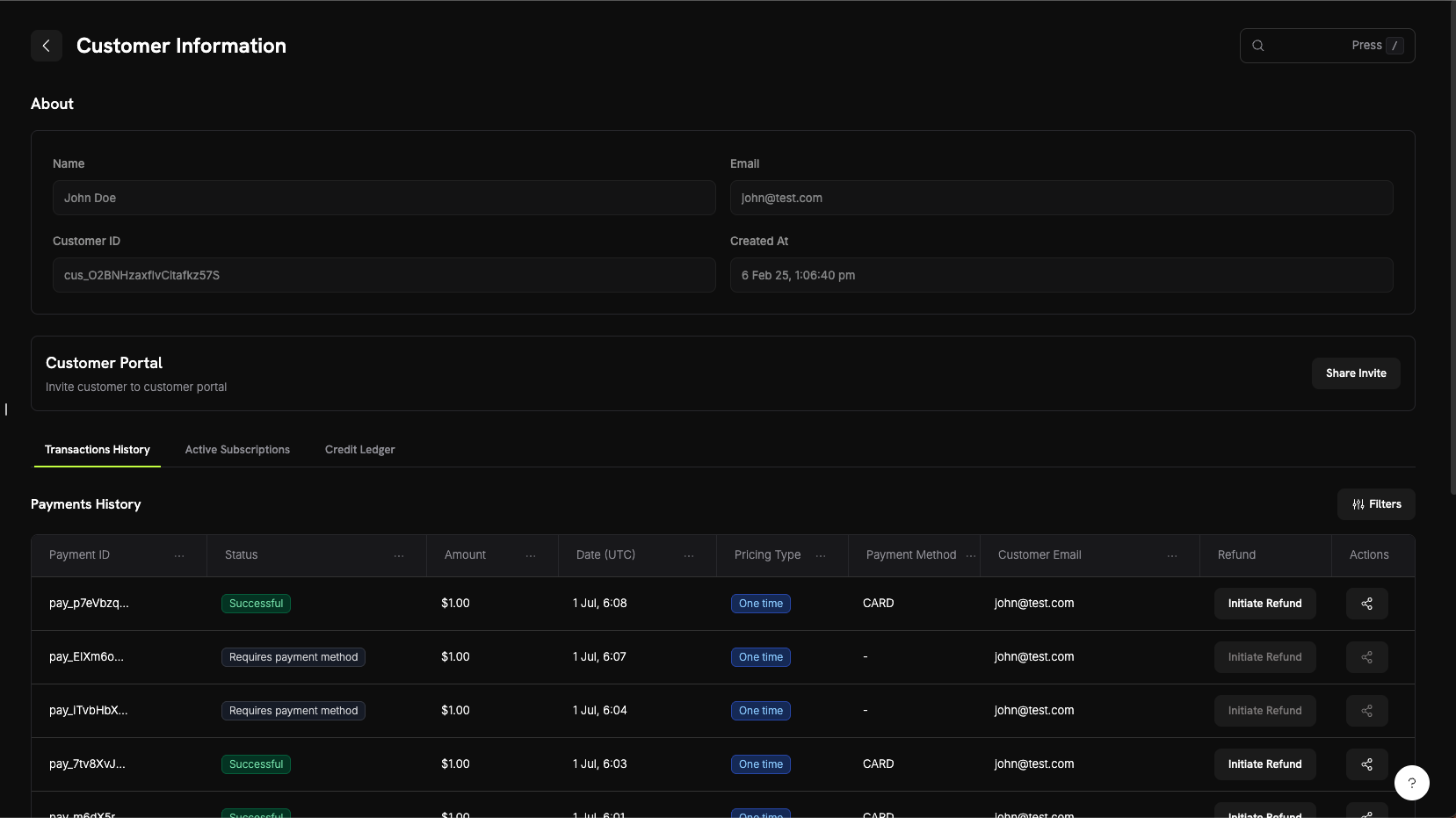
बारे में अनुभाग
पेज के शीर्ष पर customer का मुख्य विवरण दिखता है:- Name: Customer का पूरा नाम।
- Email: Customer का email address।
- Customer ID: API और support requests में उपयोग किया जाने वाला identifier।
- Created At: Customer record बनाए जाने का समय।
Customer Activity Tabs
विवरण के नीचे दिए गए tabs customer की activity दिखाते हैं। मुख्य tabs का विवरण यहाँ दिया गया है। पेज में Credits, Entitlements और Sent Emails tabs भी होते हैं; Sent Emails के लिए Customer Email Logs देखें।- Transactions History
- Active Subscriptions
- Wallets
Customer के payments, refunds और disputes। Payments table में ये details दिखाई जाती हैं:
- Payment ID: Payment का identifier, जो
pay_से शुरू होता है। - Status: Payment status, जैसे Successful, Failed या Refunded।
- Amount: Payment amount।
- Date: Payment बनाए जाने की तारीख।
- Pricing Type: One-time या subscription।
- Payment Method: उपयोग की गई payment method, जैसे card या UPI।
- Customer Email: Payment में दिया गया email address।
- Refund: Initiate Refund button।
- Actions: Payment के लिए अन्य options।
Wallets tab customer के wallet में हुए हर बदलाव को दिखाता है, ताकि आप पता लगा सकें कि current balance कैसे बना।
Customer को Block करना
जो customer fraud करता है या refunds का दुरुपयोग करता है उसे block करें, ताकि वह दोबारा आपके साथ checkout न कर सके। किसी customer को block करने पर उसकी live subscriptions cancel हो जाती हैं और उसका Customer Portal read-only हो जाता है। Block किए गए customer के पेज पर Blocked badge, Unblock Customer button और block का कारण बताने वाले notes का Activity Log दिखता है। सभी blocks को Settings → Blocklist से manage करें।Customer Blocklist
Customer Portal
Customer Portal एक hosted self-service site है जहाँ आपके customers support से संपर्क किए बिना अपनी subscriptions manage कर सकते हैं, billing history देख सकते हैं और license keys प्राप्त कर सकते हैं।Portal Capabilities
Portal में customers ये काम कर सकते हैं:- View Billing History: पिछले payments देखें और invoices download करें।
- Manage Subscriptions: अपनी settings के अनुसार details देखें, plan बदलें, pause करें या cancel करें।
- Retrieve License Keys: अपनी purchases से जुड़ी license keys देखें।
- Update Billing Details: Subscription का name, billing address और payment method बदलें। Email address और phone number portal में दिखते हैं, लेकिन इन्हें edit नहीं किया जा सकता।
Learn More About Customer Portal
Customer Wallets
Customer Wallets में customer के लिए prepaid money रखी जाती है, जिसमें प्रत्येक currency का एक balance होता है। Dodo Payments customer की payment method से charge लेने से पहले wallet balance को उसकी subscription charges पर लागू करता है। आप ledger entry के ज़रिए funds जोड़ या घटा सकते हैं, उदाहरण के लिए refund को wallet balance या promotional bonus के रूप में जारी करने के लिए।Key Features
- Multi-Currency Support: प्रत्येक currency का अपना balance होता है।
- Prepaid Balances: Funds को future subscription renewals और plan-change charges पर लागू किया जाता है।
- Transaction History: Ledger में हर fund addition और deduction दर्ज होता है।
- API-First Design: API के ज़रिए या Wallets tab से balances check करें और funds जोड़ें या घटाएँ।
Learn More About Customer Wallets
API Management
Customers API से आप customers को create, retrieve और update कर सकते हैं, filters के साथ उनकी सूची बना सकते हैं और उनके saved payment methods manage कर सकते हैं।Available API Endpoints
Create Customer
List Customers
Get Customer Details
Update Customer
Delete Payment Method
Create Portal Session
प्रत्येक endpoint के लिए आपकी API key आवश्यक है। API को अपने server से call करें और key को client-side code में कभी expose न करें।