

New Features
1. Multi-Subscription Checkout
One checkout can now sell several subscriptions at once. Add two or more subscription products toproduct_cart and the customer pays for all of them in a single payment, with one invoice.
Each product becomes its own subscription and renews on its own schedule, so plans with different billing intervals or trials can share a cart. The checkout page shows a Total due today, then one row per subscription with its trial, its renewal amount, and the next billing date.
A cart holds at most 20 products. A cart with more than one subscription can’t also hold one-time products.
The payment records the whole purchase: is_multi_subscription is true and subscription_ids lists every subscription created, while subscription_id is null.
Learn more: Multi-Subscription Cart
2. Moderation API
Screen text and images before they reach your product. Send content toPOST /moderation/screen and get back a verdict of allow, flag, or deny, with the categories that triggered it.
Requests accept up to 8,000 characters of text, an image of up to 5 MiB, or both. Track what you have screened with GET /moderation/usage. Screens in test mode are free and return mock verdicts you can trigger on demand, so you can test every branch of your integration.
Learn more: Moderation API
3. GCash, AlipayHK, FPS, and Touch ‘n Go
Four new local payment methods reach customers in Southeast Asia and Hong Kong:
The customer scans a QR code in their wallet or banking app to pay. All four are on by default and can be turned off under Settings → Payment Methods. They work for one-time payments only and don’t appear on subscription checkouts. Each method appears only when the billing country and currency match and Adaptive Currency is enabled.
Learn more: Asia-Pacific Payment Methods
4. Apple Pay in India
Customers in India can now pay with Apple Pay. Apple Pay subscriptions billed in INR run on RBI mandates, like other Indian-issued cards. Learn more: Apple Pay in India5. Ethoca Alerts
Stop chargebacks on Mastercard and other non-Visa cards before they are filed. When a card issuer sends an Ethoca alert, Dodo Payments refunds the payment automatically, so the dispute never becomes a chargeback and does not count against your chargeback ratio. Ethoca alerts are opt-in. Enroll from the Ethoca Alerts card under Settings → Dispute Resolution, next to Visa RDR. Your business needs live payments and a statement descriptor first, and a fee applies for each alert. Enrollment takes 2 to 4 business days to confirm. Learn more: Ethoca Alerts6. Customer Email Log
Every customer now has a Sent Emails tab under Sales → Customers, listing the emails Dodo Payments sent them in the last 180 days. Each entry shows the subject, category, and delivery status — Sent, Delivered, Failed, Marked as spam, or Not sent — and a failed email tells you why it failed. Open any email to read exactly what the customer received, and send it again, to the original address or a new one, up to three times. The same log is available over the API atGET /customers/{customer_id}/emails.
Learn more: Email Logs
7. Test Mode Emails
Customer emails now send in test mode, so you can check the full email experience before going live. Test emails go to the real recipient, and every subject starts with[TEST MODE].
The Test Mode Emails switch under Settings → Communication → Email controls this, and it is on by default. A business can send up to 100 test mode emails per week. Live mode emails are not affected.
Learn more: Test Mode Emails
8. Right-to-Left Checkout
Checkout now renders right to left in Arabic and Hebrew. The whole page mirrors — layout, navigation, and the order summary — while email addresses, codes, and phone numbers keep their natural reading order.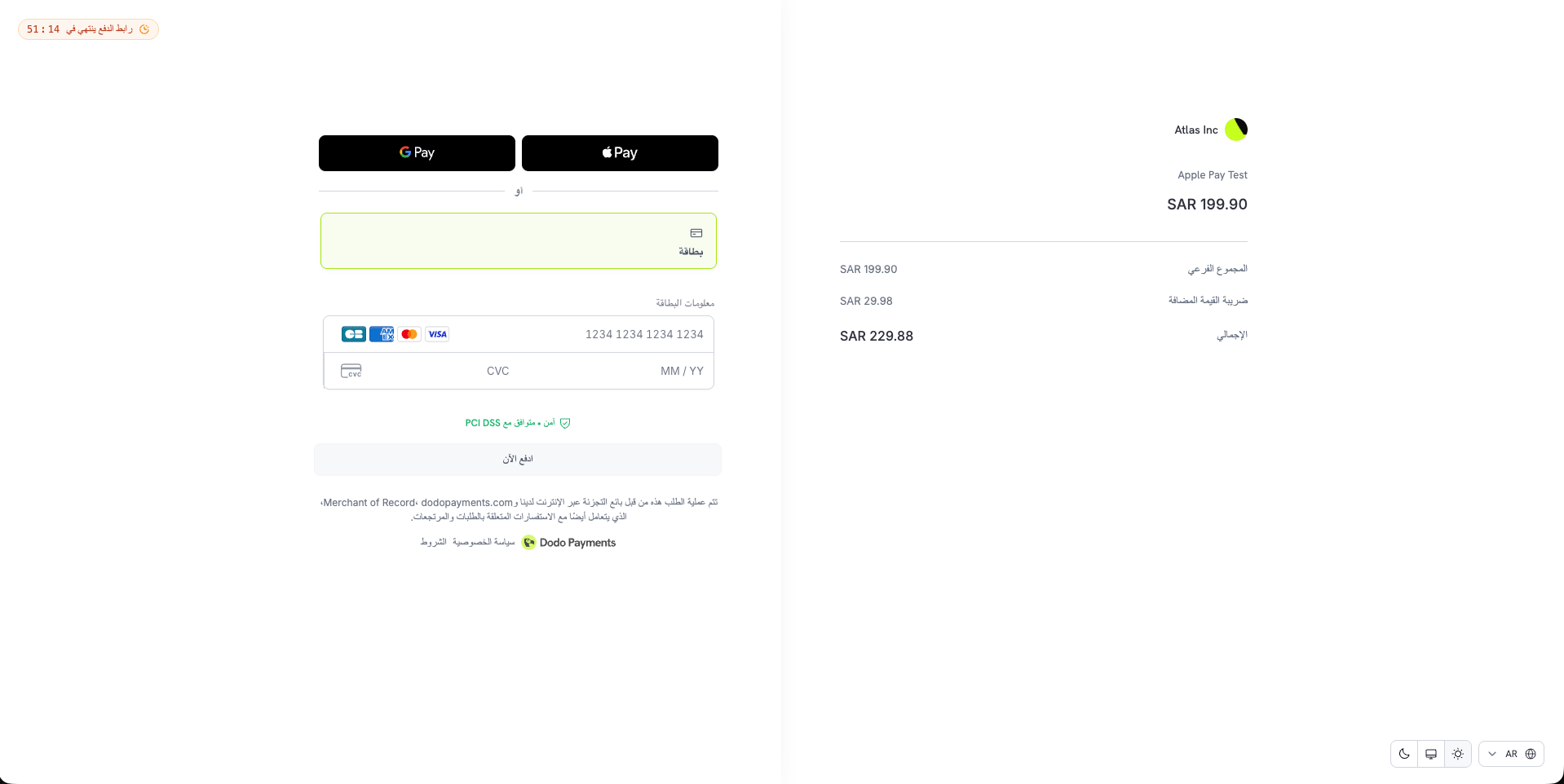
9. Required Cardholder Name
Setfeature_flags.require_cardholder_name to true on a checkout session to make customers enter the name on their card. The field appears above the card number. The flag defaults to false. Other payment methods ignore it, though Apple Pay and Google Pay already collect the payer name.
Learn more: Checkout Sessions
10. Who Cancelled a Subscription
Subscriptions now carry acancelled_by object that records who cancelled them. Its actor_type is one of customer, merchant_user, api_key, or dodo_team, and for a customer or a dashboard user it also includes their name and email.
The field appears on the subscription in API responses and in every subscription.* webhook payload. It covers both immediate and scheduled cancellations, and is null when no caller is known, such as a cancellation made by the system.
Learn more: Get Subscription
11. Payout Settings and Reserved Balance
Payouts have a new home under Settings → Payouts, reached from Manage on the Payouts page. Change your payout frequency to a less frequent cycle, set your minimum payout, and manage your linked bank accounts in one place. The Payouts page now shows the actual next payout date, which skips weekends and bank holidays, and tells you when a payout date moves. If part of your settled payments is held as a reserve, a Reserved row appears on the Payout Balance card. That amount is still yours and is released back into your balance automatically. Learn more: Payout Structure12. A Simpler Verification Flow
Account verification is now one checklist with a single button that moves you forward — Start Verification, Continue Verification, or Submit for Review. Each form saves as a draft when you click Save and Continue, so you can fill everything in at your own pace and submit all your forms for review together. Identity verification opens in a secure window on the same page. When the team needs more information, an Action required banner shows what is needed and by when. Learn more: Account Verification13. A Redesigned Dashboard
Settings is now a single page of cards grouped into Your Profile, Business Settings, and Payments & Commerce, each opening its own section. Tracking Integrations, Pricing, Dispute Resolution, and Payouts have their own pages, and Storefront moved from the sidebar into Settings. Old links redirect to the new pages. Search now sits in the header, along with a support chat icon. Sign out moves to the business switcher. Every country, phone number, and currency dropdown in the dashboard is now searchable — by name, ISO code, or dialing code.14. Dodo Sync 1.0
Dodo Sync, the open-source package that copies your payments, customers, subscriptions, and licenses into your own database, reaches version 1.0.- Faster syncs. Each page of records is now written in one batch operation instead of one query per record, on MongoDB, PostgreSQL, MySQL, and ClickHouse.
- Safe on serverless.
run()now waits for every database write before it resolves, so a sync on Vercel or AWS Lambda no longer loses records when the function ends. Call the newdisconnect()method in afinallyblock to close the database connection. - Your own MongoDB database. Records are written to the database named in your connection URI. If the URI names no database, Dodo Sync uses
dodopayments_syncas before. - Masked secrets in the CLI. Interactive mode now masks your database URI and API key as you type them.