Documentation Index
Fetch the complete documentation index at: https://docs.dodopayments.com/llms.txt
Use this file to discover all available pages before exploring further.
New Features
1. Entitlements
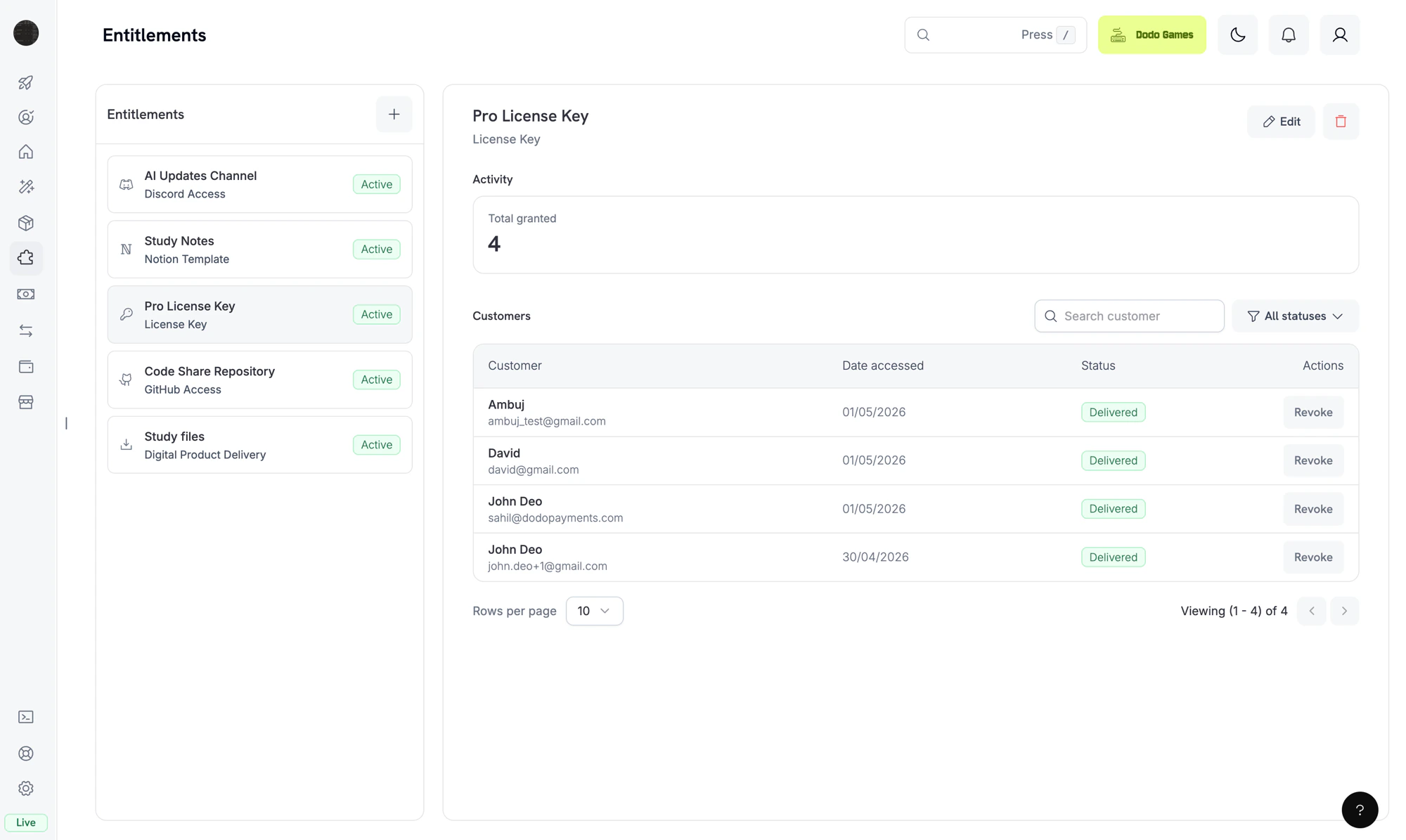
Dodo Payments now ships with unified Entitlements — a single layer powering automatic delivery for every fulfilment integration. A single product can deliver multiple entitlements on every successful purchase or active subscription.
Five new platform integrations
Until now, Dodo Payments delivered license keys and digital files automatically on purchase. Entitlements extend that scope to five additional platforms — so paying customers can be granted access to your community, your code, or your content the moment payment succeeds, with no manual fulfilment on your side:
| Integration | What it delivers | Revoke behavior |
|---|
| Discord | Assigns a chosen role in your Discord server after the customer completes OAuth | Role removed on cancel/refund |
| GitHub | Adds the customer as a collaborator to a private repository at the permission level you choose | Collaborator removed on cancel/refund |
| Telegram | Issues a one-time join-request invite link for a private chat or channel via your Telegram bot | Customer kicked from the chat on cancel/refund |
| Framer | Unlocks a Framer template remix link gated by an access code | Access code deactivated on cancel/refund |
| Notion | Duplicates a Notion template page into the customer’s workspace after they authorise via OAuth | Delivered page archived on cancel/refund |
| Capability | Description |
|---|
| Reusable templates | Define an entitlement once (activation limits, file bundles, Discord role, repo permission, etc.) and attach it to any product |
| Automatic grants | Issued on payment.succeeded and subscription.active, idempotent across renewals and re-activations |
| Lifecycle-aware revocation | Revoked on subscription.cancelled, subscription.on_hold, subscription.expired, refund.succeeded, subscription.plan_changed, or manual API/dashboard revoke — with a populated revocation_reason |
| OAuth + platform-direct flows | OAuth for Discord, GitHub, and Notion subscriber consent; direct platform calls for Telegram, Framer, and Digital Files |
| Drift detection | Detects when a Discord role, GitHub collaborator, or Notion page goes out of sync at the platform level and revokes with revocation_reason: platform_external |
| Encryption at rest | All platform tokens (OAuth, bot, app installations) stored with AES-256-GCM |
| Event | Fires when |
|---|
entitlement_grant.created | A new grant is created for a customer |
entitlement_grant.delivered | Customer access provisioned |
entitlement_grant.failed | Delivery could not complete; inspect error_code and error_message |
entitlement_grant.revoked | Access withdrawn; inspect revocation_reason |
For new integrations, listen to entitlement_grant.delivered rather than payment.succeeded. Payment success doesn’t mean delivery is finished, especially for OAuth-based integrations.
2. Subscription Cancellation Reasons in the Customer Portal
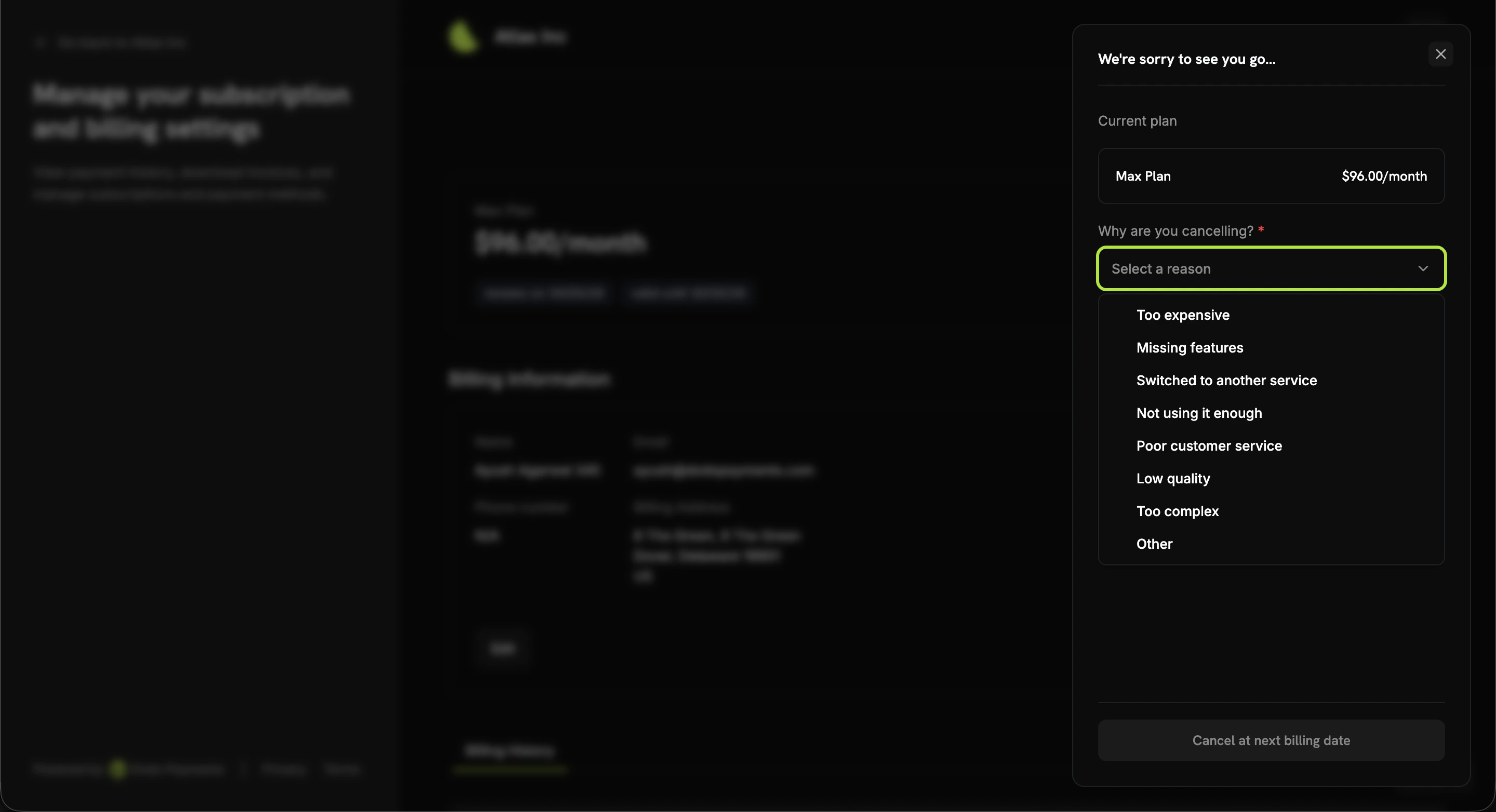
When customers cancel a subscription from the Customer Portal, they’re now prompted to share why they’re cancelling before confirming. The captured reason is stored on the subscription as cancellation_feedback, surfaced in the API and webhook payloads, and available in the dashboard so you can spot churn patterns at a glance.
Reason options
| Value | Customer-facing label |
|---|
too_expensive | Too expensive |
missing_features | Missing features |
switched_service | Switched to another service |
unused | Not using it enough |
customer_service | Poor customer service |
low_quality | Low quality |
too_complex | Too complex |
other | Other |
- Subscription object: New
cancellation_feedback field (one of the values above) and cancellation_comment (optional free-text), populated when the customer cancels
subscription.cancelled webhook: Both fields are included in the payload- API: Pass
cancellation_feedback and cancellation_comment to PATCH /subscriptions/{id} when scheduling or executing a cancellation programmatically
// Reading the captured feedback
const subscription = await client.subscriptions.retrieve('sub_123');
console.log(subscription.cancellation_feedback); // e.g., "too_expensive"
console.log(subscription.cancellation_comment);  // e.g., "Switching to a competitor"
Combine cancellation_feedback with Subscription Dunning to tailor your win-back emails — e.g., send a discount code to too_expensive cancellers and a “what’s missing?” survey to missing_features cancellers. 3. Configurable Mandate Minimum Amount for INR E-Mandates
You can now configure the mandate floor for INR e-mandates on Indian-card recurring subscriptions. Previously, every Indian-card subscription below ₹15,000 used a fixed ₹15,000 on-demand mandate. Now you can override this floor at the merchant level — and per checkout session or subscription if needed.
The mandate amount registered with the customer’s bank is max(mandate_min_amount_inr_paise, billing_amount), so this value acts as the customer-facing authorization ceiling whenever billing is lower than the floor.
// Per-subscription override
const subscription = await client.subscriptions.create({
  product_id: 'prod_inr_monthly',
  customer: { email: 'customer@example.in' },
  billing: { country: 'IN' /* ... */ },
  mandate_min_amount_inr_paise: 2_000_000 // ₹20,000 ceiling for this subscription
});

// Or via a checkout session
const session = await client.checkoutSessions.create({
  product_cart: [{ product_id: 'prod_inr_monthly', quantity: 1 }],
  mandate_min_amount_inr_paise: 2_000_000,
  return_url: 'https://yoursite.com/return'
});
- Per-request override (
mandate_min_amount_inr_paise on the checkout session, payment, or subscription)
- Merchant-level setting in business settings
- System default of ₹15,000 (1,500,000 paise)
| Field | Type | Range | Applies to |
|---|
mandate_min_amount_inr_paise | integer (INR paise) | >= 1 | Indian-card INR subscriptions on non-Airwallex connectors |
This setting only affects e-mandates registered for Indian-issued cards (Visa, Mastercard, RuPay) on INR subscriptions. UPI subscriptions follow their own AutoPay flow and are unaffected.
4. Adaptive Currency Fees Inclusive Business Setting
Adaptive Currency is the feature that lets you charge customers in their local currency. By default, the 2–4% adaptive currency fee is borne by the customer and added on top of your displayed price. With the new Fees Inclusive setting, you can flip this: keep the displayed price unchanged for the customer and absorb the fee yourself.
Where to configure
Go to Settings → Business, ensure Adaptive Pricing is enabled, and toggle Fees Inclusive in the Adaptive Currency section.
Per-request override
You can also override the merchant default for individual checkouts, payments, and on-demand subscriptions using the adaptive_currency_fees_inclusive boolean:
const session = await client.checkoutSessions.create({
  product_cart: [{ product_id: 'prod_abc', quantity: 1 }],
  adaptive_currency_fees_inclusive: true, // override business default
  return_url: 'https://yoursite.com/return'
});
| Mode | Customer sees | Merchant settles |
|---|
| Exclusive (default) | Local price + 2–4% fee on top | Full base price |
| Inclusive | Local price (unchanged) | Base price minus the 2–4% fee |
INR → INR transactions are always treated as inclusive regardless of the business setting or per-request override.
5. Dodo Payments Desktop App
The official Dodo Payments Desktop app is now generally available for macOS, Windows, and Linux. Run your payments dashboard as a fast, native app — no browser tab required.
| Platform | Download |
|---|
| macOS (Apple Silicon) | Dodo.Payments_<version>_aarch64.dmg |
| macOS (Intel) | Dodo.Payments_<version>_x64.dmg |
| Windows | Dodo.Payments_<version>_x64-setup.exe (or .msi) |
| Linux (Debian/Ubuntu) | Dodo.Payments_<version>_amd64.deb |
| Linux (Fedora/RHEL) | Dodo.Payments-<version>-1.x86_64.rpm |
| Linux (AppImage, auto-update) | Dodo.Payments_<version>_amd64.AppImage |
- Tiny native binary — built with Tauri on the system’s native webview, ~5 MB total (no bundled Chromium)
- Signed and notarized — macOS builds are signed with Apple Developer ID and notarized, so no Gatekeeper warnings
- Auto-update — checks every 4 hours and applies signed updates automatically from GitHub Releases (works on macOS, Windows, and Linux AppImage)
- System tray + menu bar — hide-to-tray on macOS, full File/Edit/View/Help menus with keyboard shortcuts (
⌘⇧H go to dashboard, ⌘L copy current URL, ⌘⌥I dev tools)
- Deep-link support — magic-link authentication links open straight in the app
- Multi-window — open multiple dashboards side by side
6. Stablecoin Payments (USDC, USDP, USDG)
Accept stablecoin payments globally with USD settlement. Customers pay from their preferred stablecoin wallet on the network of their choice; you receive fiat USD with no exposure to crypto volatility, no chargebacks, and no banking infrastructure required on the customer’s side.
Supported currencies and networks
| Stablecoin | Networks |
|---|
| USDC | Ethereum, Solana, Polygon, Base |
| USDP | Ethereum, Solana |
| USDG | Ethereum |
| Detail | Value |
|---|
| Billing currency | USD |
| Supported countries | Global (excluding India) |
| Subscriptions | Not supported (one-time payments only) |
| Minimum amount | $0.50 |
| Settlement | USD |
crypto in allowed_payment_method_types when creating a checkout session:
const session = await client.checkoutSessions.create({
  product_cart: [{ product_id: 'prod_123', quantity: 1 }],
  allowed_payment_method_types: ['crypto', 'credit', 'debit'],
  return_url: 'https://example.com/success'
});
payment.succeeded webhook fires and the customer is redirected to your success page.
Stablecoin payments are irreversible by design — there are no chargebacks. We recommend always offering credit and debit as fallback methods for customers without a stablecoin wallet.
7. Import Existing License Keys
You can now import license keys from another system into Dodo Payments using the Create License Key API. This unlocks zero-disruption migration from any external license-key provider, so your existing customers can continue activating, validating, and deactivating their keys against Dodo Payments without re-issuance.
const licenseKey = await client.licenseKeys.create({
  customer_id: 'cus_abc123',
  product_id: 'prod_456',
  key: 'YOUR-EXISTING-LICENSE-KEY',
  activations_limit: 5,
  expires_at: '2026-12-31T23:59:59Z',
});
source: "import" (vs. source: "auto" for keys generated automatically on payment), so you can distinguish migrated inventory from organically issued keys when querying GET /license_keys. The payment_id on imported keys is null because they aren’t tied to a Dodo Payments transaction.
License keys created or updated through the API do not trigger email notifications to customers. If you need to notify customers about an imported key, handle that separately in your application.
Migrating from Polar.sh or Lemon Squeezy? The dodo-migrate CLI automates bulk imports of products, customers, discounts, and license keys in a single command. 8. require_phone_number for Checkout Sessions
Force customers to provide a phone number during checkout by setting feature_flags.require_phone_number: true when creating a checkout session. Phone number becomes a required field on the checkout form, with form validation surfacing “Phone number is required” if the customer leaves it blank.
const session = await client.checkoutSessions.create({
  product_cart: [{ product_id: 'prod_abc', quantity: 1 }],
  feature_flags: {
    allow_phone_number_collection: true,
    require_phone_number: true
  },
  return_url: 'https://yoursite.com/return'
});
| Flag | Default | Behavior |
|---|
allow_phone_number_collection | true | Shows the phone number field on checkout |
require_phone_number | false | Makes the phone number field required |
require_phone_number: true requires allow_phone_number_collection: true. The API rejects sessions where require_phone_number is true while phone collection is disabled.
Useful for B2B SaaS, regulated industries, or any flow where you need a verified contact channel for support, fraud review, or compliance.
Bug Fixes & Improvements
- Minor bug fixes and stability improvements across the platform