

New Features
1. Product Collections
Group related products together for unified checkout experiences, plan selection, and seamless upgrade/downgrade paths within the Customer Portal.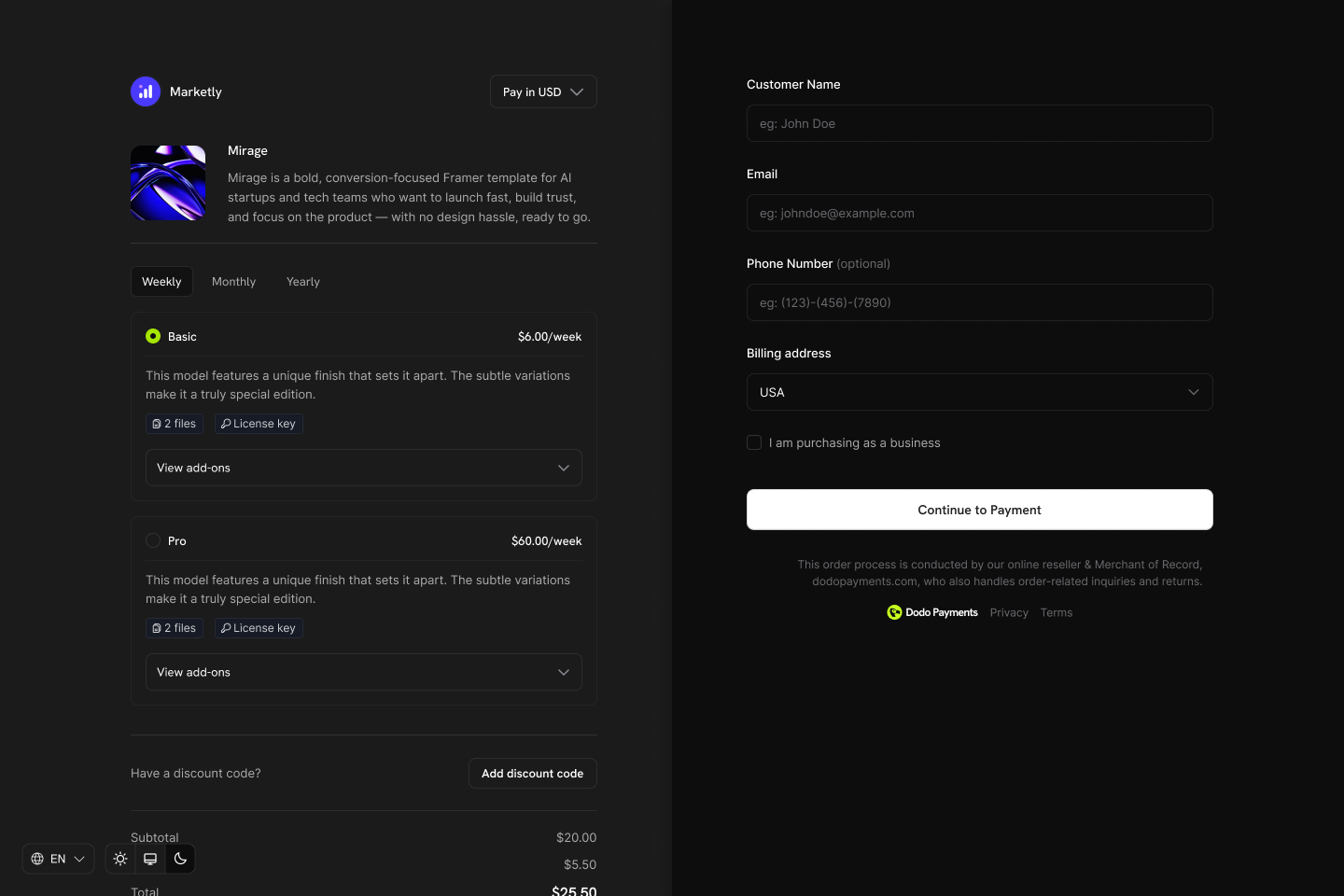
- Collection-based checkout: Display all products from a collection in one checkout view, letting customers compare and choose their preferred plan
- Organized product management: Group related products (e.g., Starter, Pro, Enterprise) under a single collection
- Customer Portal integration: Enable customers to upgrade or downgrade between products within the same collection
- Merchant control: Enable, disable, and reorder products within each collection
Result: A unified checkout experience where customers can view and select from all available products in your collection.
Collection checkout is ideal for subscription businesses where you want customers to compare plans side-by-side before purchasing.
2. RevolutPay & Billie Payment Methods for GBP Currency
Expanded payment options with RevolutPay and Billie now available globally for GBP one-time payment transactions, giving your customers more flexibility in how they pay. New Payment Methods| Payment Method | Supported Countries | Currency | Subscription Support |
|---|---|---|---|
| RevolutPay | Global | GBP | No (one-time only) |
| Billie | Global | GBP | No (one-time only) |
- RevolutPay – Fast and seamless payments for Revolut users globally
- Billie – B2B Buy Now Pay Later solution enabling businesses to offer flexible payment terms to their customers
These payment methods are automatically available for GBP transactions. No additional configuration is required.
3. Checkout Session Preview
Preview checkout sessions before creating them to calculate accurate pricing, taxes, discounts, and totals. Display real pricing to customers before they proceed to checkout. How It Works- Custom pricing displays: Show accurate totals including tax before checkout
- Discount validation: Verify discount codes and show savings to customers
- Multi-currency support: Preview pricing in different currencies
- Cart summaries: Build custom cart UIs with real-time pricing
Preview API Reference
View the complete preview endpoint documentation.
4. Metadata Support in Change Plan Requests
Pass custom metadata when changing subscription plans, enabling better tracking and integration with your internal systems during plan transitions.- Track upgrade/downgrade reasons: Store why customers changed plans
- Link to CRM records: Associate plan changes with sales activities
- Internal categorization: Tag plan changes for reporting and analytics
- Audit trails: Maintain records of who initiated plan changes
Metadata is included in webhook events, making it easy to process plan changes with your custom data.
5. invoice_url Field in Payment Response and Payment Link Response
The Payment Response and Payment Link Response now include an invoice_url field, providing direct access to the invoice associated with each payment.
- Customer communication: Send invoice links directly to customers
- Accounting integration: Link payments to invoices in your accounting software
- Self-service portals: Allow customers to access their invoices easily
- Record keeping: Maintain direct references to invoice documents
Get Payment API
View the Payment Response schema.
6. Validate Discount by Code Name Endpoint
New API endpoint to validate and retrieve discount codes by their code name (e.g., “SAVE20”) instead of using the internal discount ID. Verify discount eligibility before applying them at checkout.- Pre-checkout validation: Verify discount codes before creating checkout sessions
- Real-time feedback: Show customers if their code is valid
- Error handling: Catch invalid or expired codes early
- Custom discount UIs: Build discount code input fields with instant validation
Get Discount by Code API
View the complete endpoint documentation.
7. Enhanced Filtering Capabilities for Customers, Discounts, and License Keys
New API filters for listing Customers, Discounts, and License Keys, making it easier to find and manage your data programmatically. Customers API Filters| Filter | Description |
|---|---|
email | Filter by customer email |
name | Filter by customer name (partial match, case-insensitive) |
created_at_gte | Filter customers created on or after this timestamp |
created_at_lte | Filter customers created on or before this timestamp |
| Filter | Description |
|---|---|
code | Filter by discount code (partial match, case-insensitive) |
discount_type | Filter by discount type (percentage) |
active | Filter by active status (true = not expired, false = expired) |
product_id | Filter by product restriction (only discounts that apply to this product) |
| Filter | Description |
|---|---|
customer_id | Filter by customer ID |
status | Filter by license key status (active, expired, disabled) |
product_id | Filter by product ID |
created_at_gte | Filter license keys created on or after this timestamp |
created_at_lte | Filter license keys created on or before this timestamp |
List Customers API
View the complete Customers API documentation.
List Discounts API
View the complete Discounts API documentation.
List License Keys API
View the complete License Keys API documentation.
8. UI/UX Improvements in Dashboard
This release includes numerous UI/UX improvements across the dashboard for a more intuitive and polished experience. Highlights- Improved navigation and layout consistency
- Enhanced data table interactions
- Better loading states and feedback
- Refined visual design elements
- Improved mobile responsiveness