

Manual Retry, आपके कहने पर, payment की detail page या API के माध्यम से विफल subscription renewal payment को फिर से आज़माता है। यह subscription पर saved payment method से charge करता है और automatic Payment Retries schedule से स्वतंत्र रूप से चलता है।
Manual Retry क्या है?
जब renewal payment विफल होता है, subscriptionon_hold में चला जाता है। यदि आपने Payment Retries चालू किया है, तो वे back-off schedule के अनुसार charge को फिर से आज़माते हैं। कभी-कभी आपको पता होता है कि payment अभी सफल हो जाएगा: customer ने अपने account में funds जोड़ने की पुष्टि की है, या आपकी support team उससे call पर है। Manual Retry तुरंत एक attempt भेजता है, बजाय इसके कि अगले scheduled attempt के लिए घंटों या दिनों तक प्रतीक्षा की जाए।
- केवल Renewal payments: Manual Retry subscription renewal invoices पर लागू होता है, जब subscription
on_holdहो। First payments, one-time payments, plan-change charges और on-demand charges eligible नहीं हैं। - Customer action आवश्यक नहीं: Charge subscription पर पहले से saved payment method पर भेजा जाता है।
- Automatic retries से स्वतंत्र: Manual retry automatic schedule के किसी attempt का उपयोग नहीं करता, अगले scheduled retry को आगे नहीं बढ़ाता और Payment Retries बंद होने पर भी काम करता है।
- Payment नहीं, invoice को retry करता है: विफल payment केवल entry point है। Dodo Payments उसके पीछे मौजूद open renewal invoice को ढूँढकर उस debt को charge करता है, इसलिए invoice पर मौजूद किसी भी विफल payment से retry करने पर कोई अंतर नहीं पड़ता।
Dashboard से Retry करना
केवल Owner या Editor role वाले users manual retry भेज सकते हैं।1
Open the failed payment
Transactions → Payments पर जाएँ और विफल renewal payment पर click करके उसका Transaction details page खोलें।
2
Click Retry Payment Manually
ऊपरी-दाएँ कोने में Retry Payment Manually पर click करें। यह button केवल तब उपलब्ध होता है जब payment eligible हो।
3
Check the result
Dodo Payments इस attempt के लिए नया payment बनाता है और वह Activity Log में दिखाई देता है। यदि charge सफल होता है, तो subscription
active में लौट जाता है और अगली billing date सफल retry के एक billing period बाद हो जाती है। यदि payment processor ने अभी charge settle नहीं किया है, तो payment in progress दिखाई देता है, जब तक कि payment.succeeded या payment.failed webhook परिणाम की सूचना न दे दे।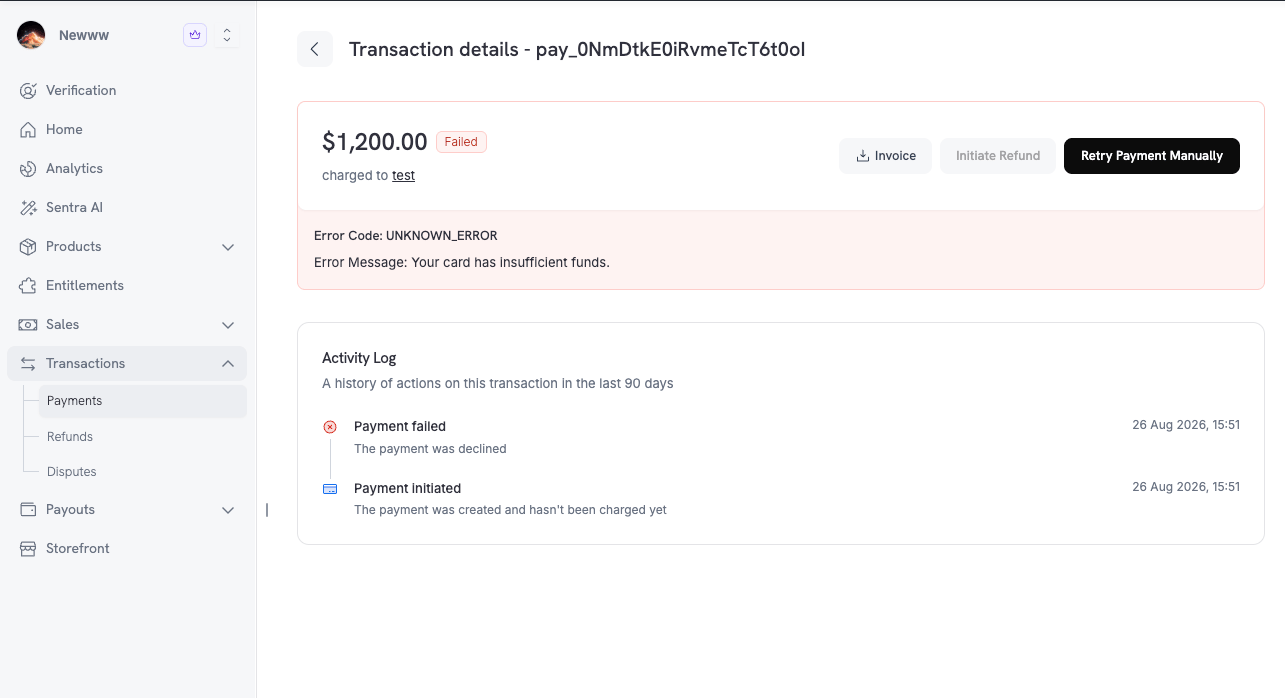
Retry Payment Manually on the transaction details page of a failed renewal
Eligibility
Dodo Payments manual retry तभी भेजता है जब इस table की हर जाँच सफल हो। Reason code column में API द्वारा लौटाया गया मान होता है:GET /payments/{payment_id}/retry पर reason में और POST /payments/{payment_id}/retry पर error code के रूप में।
Manual Retry एक मामले में automatic retries से अधिक सीमित है: इसके लिए subscription का
on_hold होना आवश्यक है। Grace period में मौजूद past_due subscription यह जाँच विफल कर देता है। अन्य non-active statuses के लिए automatic retries चलते रहते हैं। Subscription Status Transitions देखें।Retry Limits
प्रत्येक renewal invoice में 3 manual retries की अनुमति होती है और इनके बीच cooldown रहता है:
ये limits test mode और live mode दोनों में लागू होती हैं। जब limit retry को अस्वीकार करती है, तो API
MANUAL_RETRY_LIMIT_REACHED (HTTP 429) लौटाता है और error body में केवल code तथा message होते हैं। अगला retry कब खुलेगा, यह जानने के लिए retry state जाँचें और retry_available_at पढ़ें। सभी तीन retries समाप्त होने पर यह null होता है।
Automatic retries इस limit में नहीं गिने जाते और manual retries automatic schedule के 8 attempts में नहीं गिने जाते।
Manual vs. Automatic Retries
दोनों retry paths इन तरीकों से अलग हैं:API के माध्यम से Retry करना
पहले eligibility जाँचें, फिर retry भेजें। दोनों endpoints विफल payment की ID लेते हैं।जाँचें कि Payment को Retry किया जा सकता है या नहीं
GET /payments/{payment_id}/retry किसी ineligible payment के लिए error नहीं लौटाता। इसके बजाय यह reason code के साथ can_retry: false लौटाता है, ताकि आपका अपना dashboard या support tooling Dodo Payments dashboard जैसी ही स्थिति दिखा सके। इसके लिए Viewer role आवश्यक है।
Response
Manual Retry भेजें
POST /payments/{payment_id}/retry नया payment बनाता है और saved payment method से charge करता है। इसके लिए Editor role आवश्यक है। SDK examples पिछले example के client का पुनः उपयोग करते हैं।
Response
Error Responses
जब retry की अनुमति नहीं होती, तबPOST इनमें से एक HTTP status लौटाता है:
Error Codes reference में प्रत्येक code का विवरण है।
Webhooks
Manual retry एक सामान्य payment बनाता है, इसलिए वही webhooks fire होते हैं जो किसी भी renewal attempt के लिए होते हैं:
इन events के payment object में
retry_attempt 1 या उससे अधिक होता है और subscription_id set होता है, ठीक automatic retry की तरह। Payment object में manual attempt को चिह्नित करने वाला कोई field नहीं है, इसलिए यदि आपको manual attempt को scheduled attempt से अलग पहचानना हो, तो retry response से payment_id सुरक्षित रखें।
Payment Webhook Payloads
Payment events के full payload schemas।
संबंधित
Subscription Payment Retries
Manual retries के साथ चलने वाला automatic back-off schedule।
Subscription Dunning
Hard decline के बाद customer को अपना payment method update करने के लिए email करें।
Handle Payment Failures
Decline codes पढ़ें और तय करें कि retry करना कब उपयोगी है।
Error Codes
हर
MANUAL_RETRY_* code, उसका trigger और उसका message।