

Payment Retries re-charge failed subscription renewal payments automatically, on the standard schedule or on waits you choose. When a retry succeeds, the subscription returns to
active, with no customer action and no integration work.What Are Payment Retries?
When a subscription renewal payment fails, the subscription moves toon_hold, or to past_due if you set a grace period. With Payment Retries on, Dodo Payments re-charges the customer’s saved payment method on a schedule until a charge succeeds or the schedule runs out.
Retries recover revenue lost to temporary failures, such as a temporary hold on the card, insufficient funds that the customer tops up later, or a transient network error. The customer gets no email and doesn’t need to change anything.
Payment Retries apply only to subscription renewal payments. The first payment of a subscription (mandate setup), one-time payments, plan-change charges, and on-demand charges are not retried.
How Payment Retries Work
1
Renewal fails
A subscription renewal payment fails, and the subscription moves to
on_hold, or to past_due during a grace period.2
Retryability check
Dodo Payments checks the failure’s error code. Soft declines, such as insufficient funds, a generic decline, or a processing or network error, are retryable. Hard declines end the retry chain, because another attempt won’t change the outcome. A failure without an error code counts as a hard decline.
3
Scheduled retry
If the decline is retryable and your retry schedule has another attempt left, Dodo Payments schedules it. Each retry is an off-session charge to the customer’s saved payment method, and each wait counts from the previous failure.
4
Recovery
On the first successful retry, the subscription returns to
active, and the next billing date moves to one billing period after the successful retry. If the schedule runs out before any retry succeeds, retries stop and the subscription keeps its status, such as on_hold.Configuring Payment Retries
Turn on and configure Payment Retries in Settings → Recovery in your dashboard.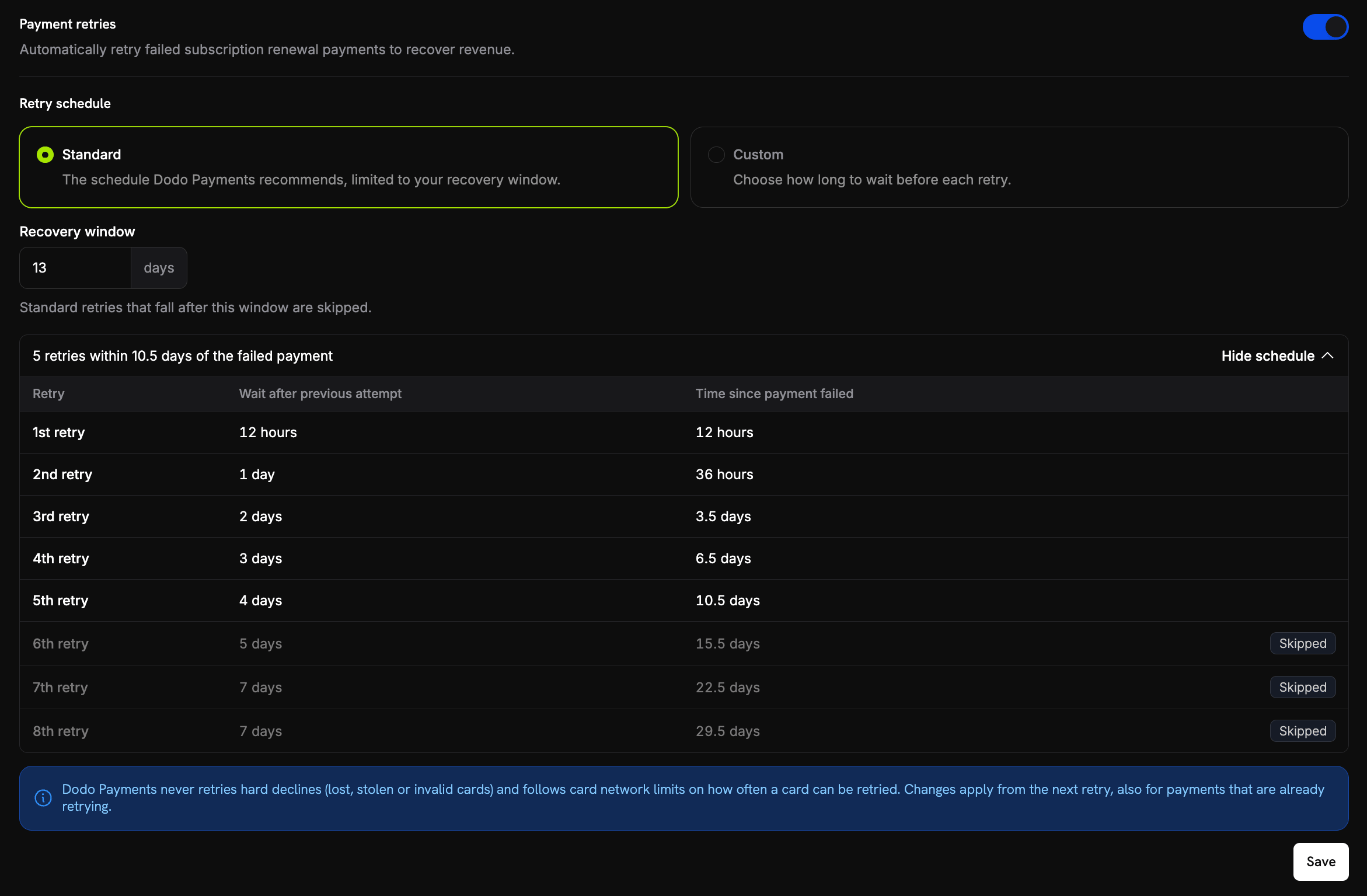
Payment Retries settings under Settings → Recovery
The Payment retries toggle saves as soon as you switch it. The Retry schedule settings appear only while the toggle is on, and changes to them take effect when you click Save.
The recovery window starts when the invoice for the failed renewal is created. With the Standard schedule, Dodo Payments schedules an attempt only if the sum of all waits up to that attempt fits inside the window, and only while the window is still open.
Changing the Schedule During a Retry Chain
Dodo Payments reads your settings each time it schedules the next retry, so a change also applies to payments that are already being retried:- A retry that is already queued keeps its time. Your new settings decide the wait before the retry after it.
- When you switch between Standard and Custom, the chain continues at the same retry number. For example, if the 3rd retry fails after the switch, the next one is the 4th retry of the new schedule.
- If the new schedule has no retry with that number, the chain ends. This happens when you switch to a Custom schedule with fewer retries, or when you remove custom retries.
- When you switch to Standard, the recovery window applies again. If the next retry doesn’t fit in the window, or the window has already closed, the chain ends.
Retry Schedule
Choose the schedule under Retry schedule on the same settings page. In both modes, Dodo Payments does not retry a hard decline. To see when the next automatic retry runs for a failed payment, open the payment’s Transaction details page. It shows Next automatic retry with the date and the retry number, for example Retry 2 of 5. The total counts the retries that your current schedule plans for the invoice, so it changes when you change the schedule.Standard Schedule
Retries back off progressively. Dodo Payments makes up to 8 attempts, as long as each one fits in your recovery window. The settings page shows how many retries fit in your window. Click View schedule to see each retry, with the ones outside the window marked Skipped:Custom Schedule
Select Custom to set your own waits. Each row is one retry, and its wait counts from the previous attempt. The first time you select Custom, the rows are 12 hours, 1 day, and 2 days. The rules are:- Add 1 to 8 retries. Click Add retry to add a row with the longest wait that still fits. The button is hidden at 8 retries, or when less than 12 hours of the 30 days are left.
- To remove a retry, click × next to its row. The other rows renumber. The last row can’t be removed.
- Each wait is 12 hours, or 1, 2, 3, 4, 5, or 7 days.
- The waits must add up to 30 days or less. Options that would push the total past 30 days are disabled.
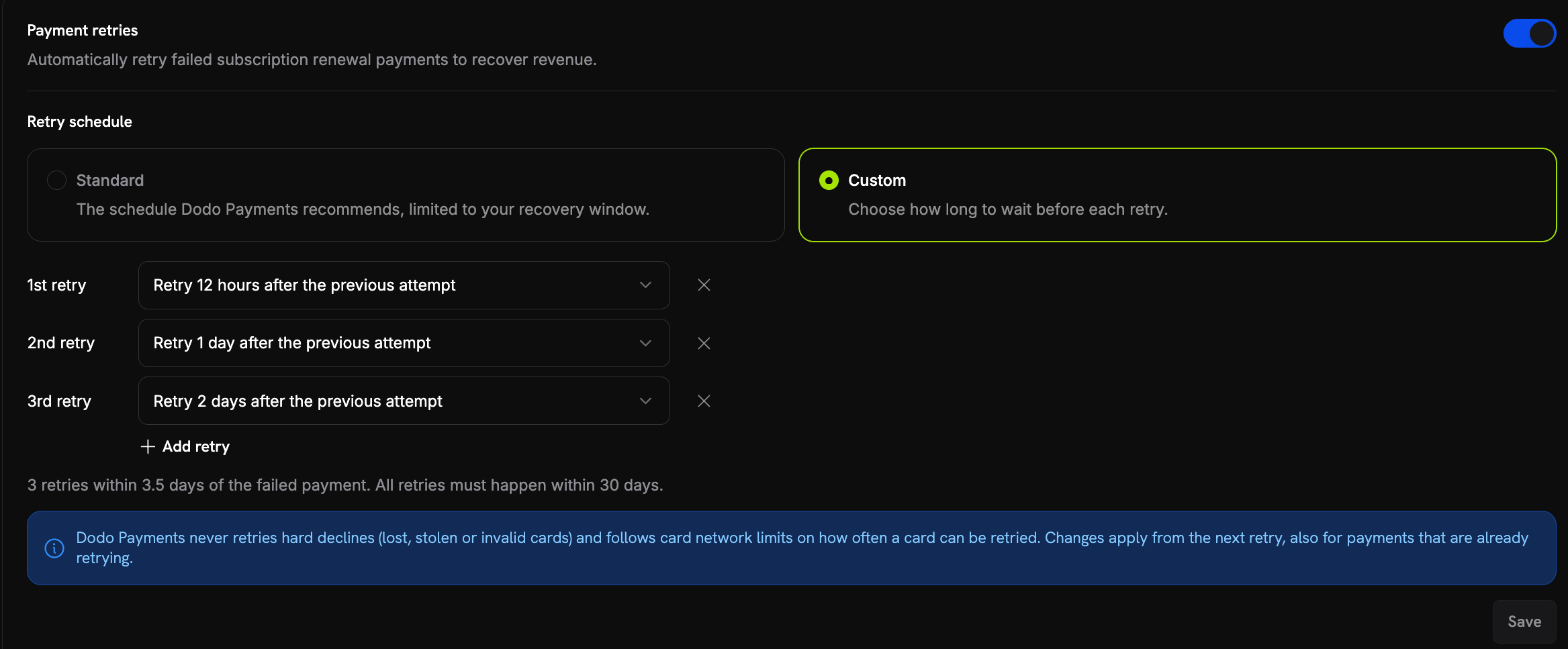
A custom retry schedule under Settings → Recovery
Subscription Status Transitions
Retries move the subscription between these statuses:When a subscription is cancelled, its retry chain ends and no further attempts are made. Every other status (
on_hold, past_due, expired, pending, failed) keeps retrying, because the open renewal invoice is a debt for a period the customer already used. Retries also stop when the invoice is paid another way, for example after the customer updates their payment method, or when you add the customer to your blocklist.Subscription Webhook Payloads
Retryable vs. Non-Retryable Failures
The error code of the most recent failure decides whether the chain continues:Retrying a hard decline won’t change the outcome, so the chain ends as soon as a hard decline occurs. Pair Payment Retries with Subscription Dunning to ask the customer for a new payment method in those cases. For the type of every code, see Transaction Failures.
Retrying on Demand
You don’t have to wait for the next scheduled attempt. While a subscription ison_hold, you can send a retry from the failed payment’s detail page in the dashboard, or with POST /payments/{payment_id}/retry. Manual retries run independently of the schedule: they don’t use up or move an automatic attempt, and they work even when Payment Retries are off. See Manual Payment Retry.
When Payment Retries are on, your customers can also retry a failed renewal themselves with Retry Payment in the Customer Portal, while the subscription is on_hold or past_due. See Customer Retries from the Portal.
Payment Retries vs. Dunning
Payment Retries and Subscription Dunning recover different kinds of failure:
Turn on both for the widest coverage: automatic retries catch transient failures, and dunning brings back customers whose payment method needs replacing.