

Subscription Dunning उन ग्राहकों को email भेजता है जिनका subscription असफल payment के बाद समाप्त हो गया है या जिन्होंने उसे रद्द कर दिया है, और उनसे अपनी payment method अपडेट करने या दोबारा खरीदारी करने के लिए कहता है। इसे चालू करने के बाद यह अपने आप चलता है।
सब्सक्रिप्शन डनिंग क्या है?
Dunning यह पहचानता है कि कोई subscription कब पुनर्प्राप्त किए जा सकने वाले state में प्रवेश करता है और ग्राहक से कार्रवाई करने के लिए email sequence भेजता है। तीन states से sequence शुरू होता है:- On Hold subscriptions: Renewal payment विफल हो गया, उदाहरण के लिए अपर्याप्त funds या expired card के कारण।
- Past Due subscriptions: Renewal payment विफल हो गया, जबकि grace period खुला है।
- Cancelled subscriptions: ग्राहक ने Customer Portal से इसे रद्द किया।
डनिंग कैसे काम करती है
1
Trigger
एक subscription इन तीन states में से किसी एक में प्रवेश करता है:
- On Hold: Renewal payment विफल हो गया।
- Past Due: Renewal payment विफल हो गया, जबकि grace period खुला है।
- Cancelled: ग्राहक ने Customer Portal से अपना subscription रद्द किया।
dunning.started webhook भेजता है। जब संबंधित sequence में कोई enabled email नहीं होता, तो कोई attempt शुरू नहीं होता और किसी subscription पर एक समय में अधिकतम एक active attempt होता है।2
Grace Period
यदि आप grace period सेट करते हैं, तो असफल renewal subscription को
past_due में ले जाता है, न कि on_hold में।On-hold email sequence उस अवधि के दौरान चलता है, इसलिए ग्राहक से तब payment करने के लिए कहा जाता है जब उसके पास अभी भी access हो।एक असफल payment से एक sequence शुरू होता है। अवधि समाप्त होने पर दूसरा sequence शुरू नहीं होता। यदि अवधि subscription के on hold रहने पर समाप्त होती है, तो sequence में बचे हुए email फिर भी भेजे जाते हैं। यदि यह subscription के cancelled होने पर समाप्त होती है, तो attempt को exhausted चिह्नित किया जाता है।Dunning attempt में past_due trigger state दर्ज होता है। Dunning analytics पढ़ते समय past_due और on_hold, दोनों पर filter करें।3
Email Sequence
Trigger state के आधार पर, Dodo Payments आपके द्वारा configure किए गए delays पर अधिकतम 4 dunning email भेजता है। प्रत्येक email Customer Portal से link होता है, जहाँ ग्राहक अपनी payment method अपडेट कर सकता है, या ऐसे checkout से जहाँ वह cancelled subscription को दोबारा खरीद सकता है।
4
Recovery
जब ग्राहक Customer Portal में अपनी payment method अपडेट करता है, तो Dodo Payments बाकी बकाया राशि अपने आप charge करता है। यदि payment सफल होता है, तो subscription फिर से सक्रिय हो जाता है और dunning attempt को
recovered चिह्नित किया जाता है।Status Lifecycle
प्रत्येक dunning attempt की इनमें से एक status होती है:जब किसी dunning attempt को
exhausted चिह्नित किया जाता है, तो Dodo Payments subscription में कोई बदलाव नहीं करता। यह अपनी वर्तमान state (past due, on hold, या cancelled) में रहता है।Configuring Dunning
अपने dashboard में Settings → Recovery के अंतर्गत Dunning चालू और configure करें। Dunning default रूप से बंद रहता है।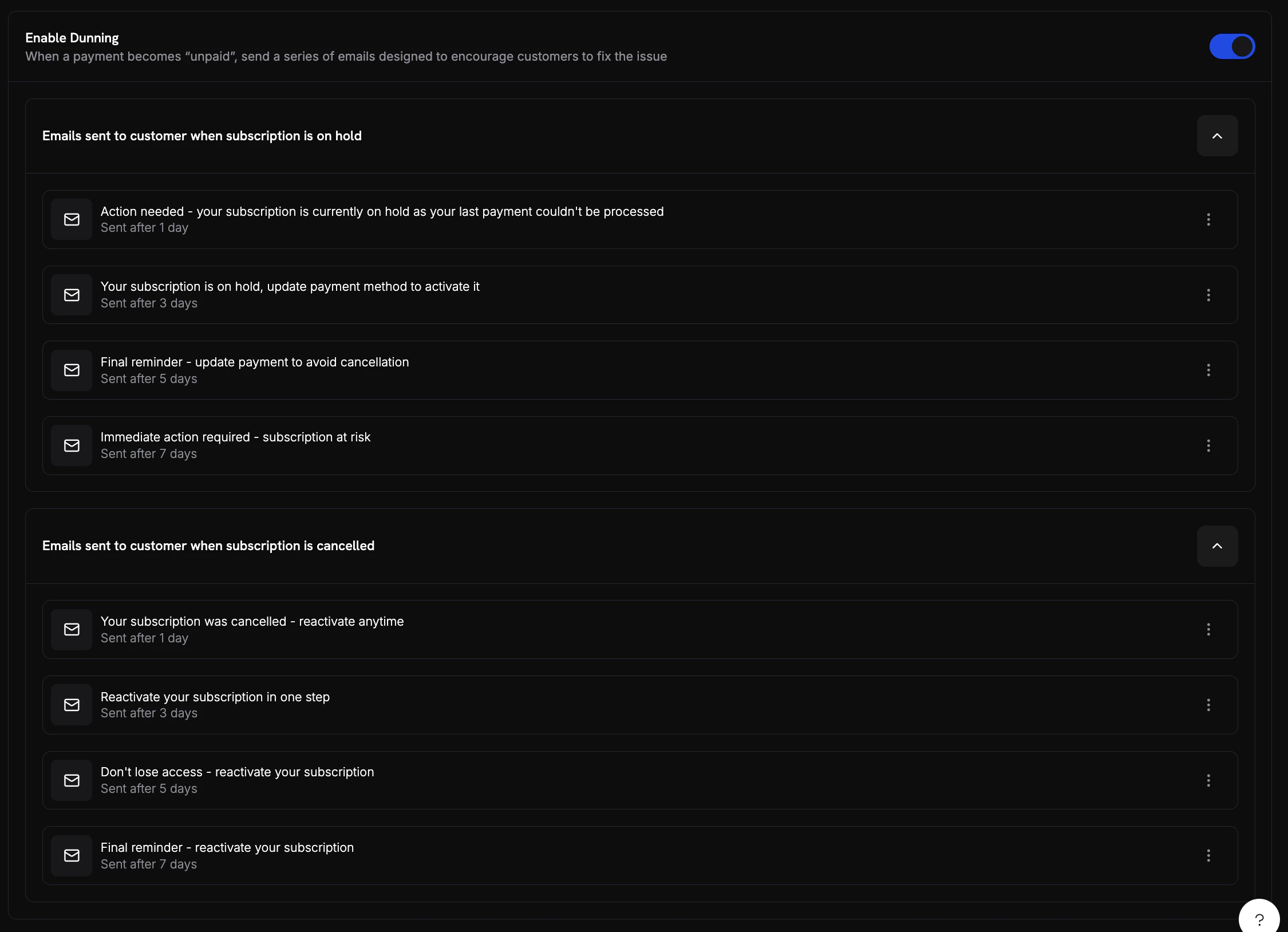
Dunning settings in the dashboard showing enable toggle, on-hold sequence, and cancelled sequence
Email Sequences
Dunning में दो email sequences होते हैं, On Hold और Cancelled, जिनमें प्रत्येक में अधिकतम 4 email होते हैं। Dashboard में इन्हें Emails sent to customer when subscription is on hold और Emails sent to customer when subscription is cancelled के रूप में सूचीबद्ध किया जाता है।past_due attempt में On Hold sequence का उपयोग होता है।
प्रत्येक email में ये settings होती हैं:
Subject Line में Dodo Payments इन placeholders को replace करता है:
{store_name}, {store_owner_name}, {store_contact_email}, {subscription_id}, {failure_reason}, और {payment_form_link}।
Default delays ये हैं:
Example Dunning Emails
Dunning प्रत्येक subscription state के लिए अलग email भेजता है। ये examples दिखाते हैं कि ग्राहक को क्या दिखाई देता है।- On Hold
- Cancelled
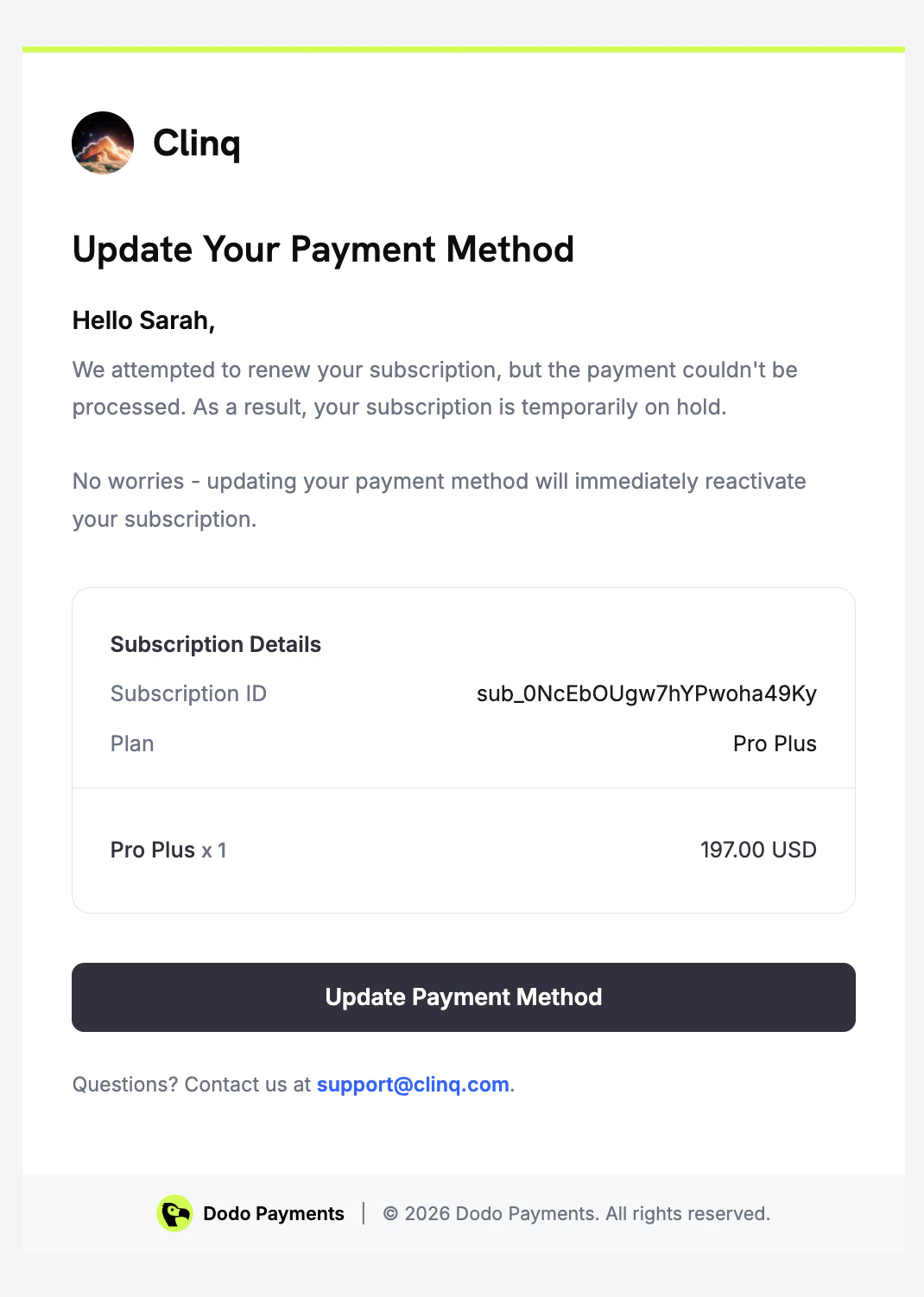
Dunning email sent when a renewal payment fails and the subscription is on hold
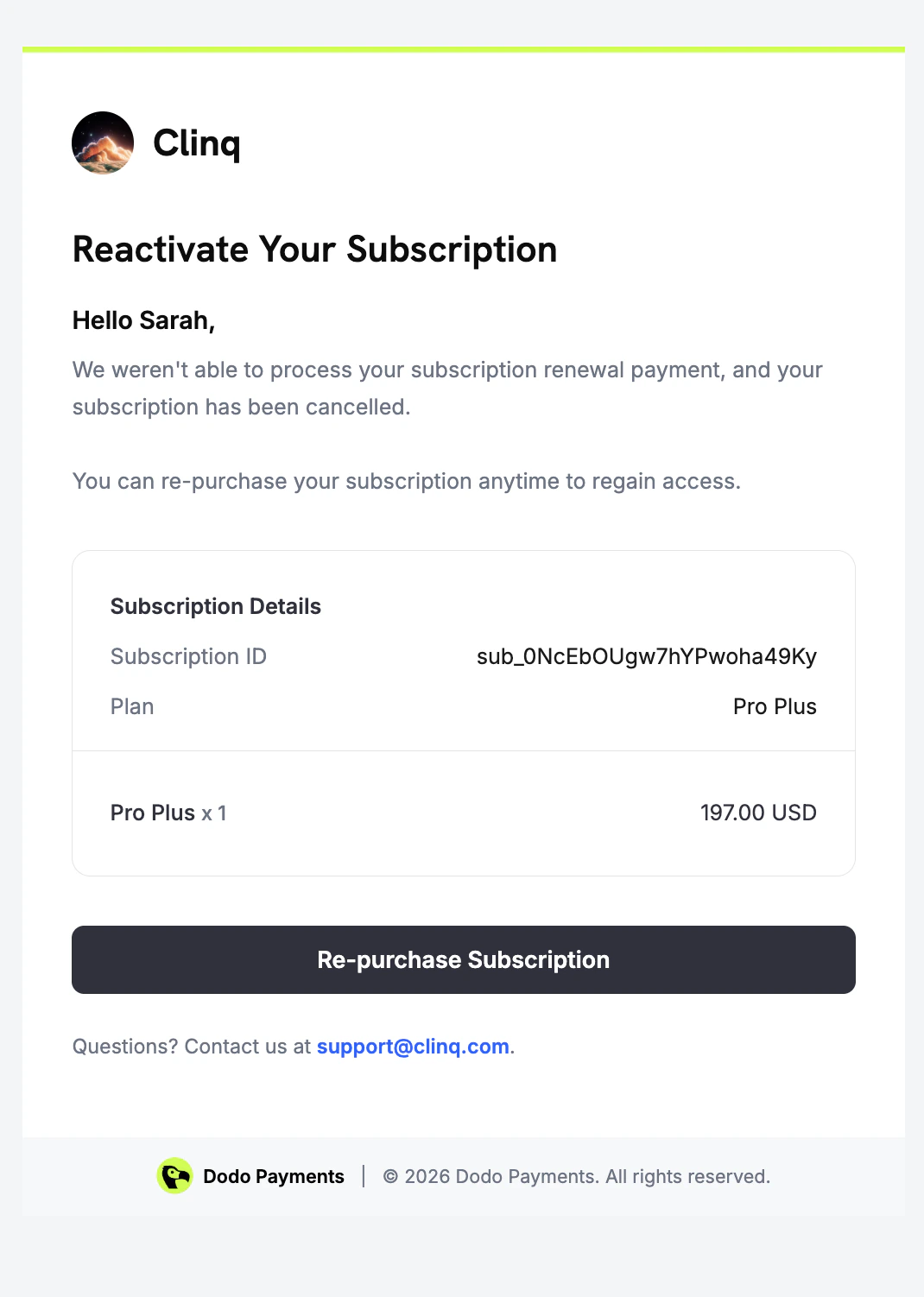
Customer Recovery Experience
जब ग्राहक on-hold dunning email में दिए गए link पर click करता है, तो Customer Portal उसके subscription पर खुलता है। वहाँ वह subscription status देख सकता है और अपनी payment method अपडेट कर सकता है।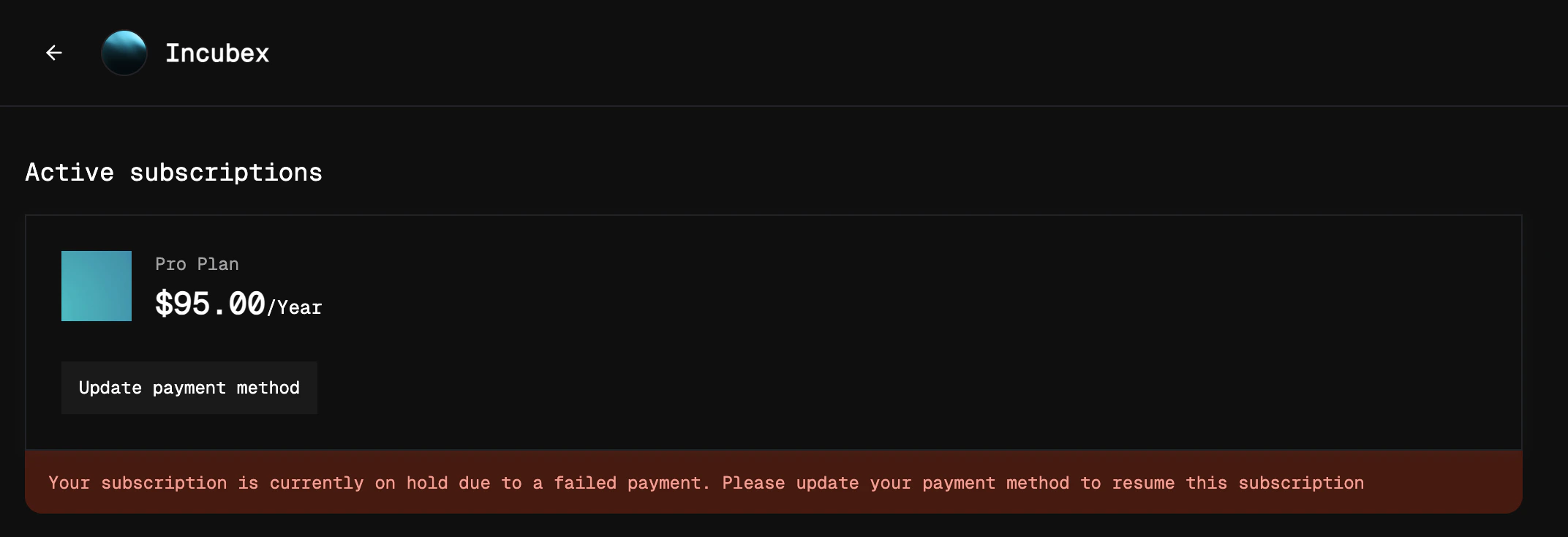
Customer portal showing an on-hold subscription with option to update payment method
active में वापस आ जाता है।
Cancelled subscription के लिए, link checkout page खोलता है जिसमें subscription का product पहले से cart में होता है।
Analytics
अपने dashboard में Analytics → Recovery के अंतर्गत Dunning performance track करें।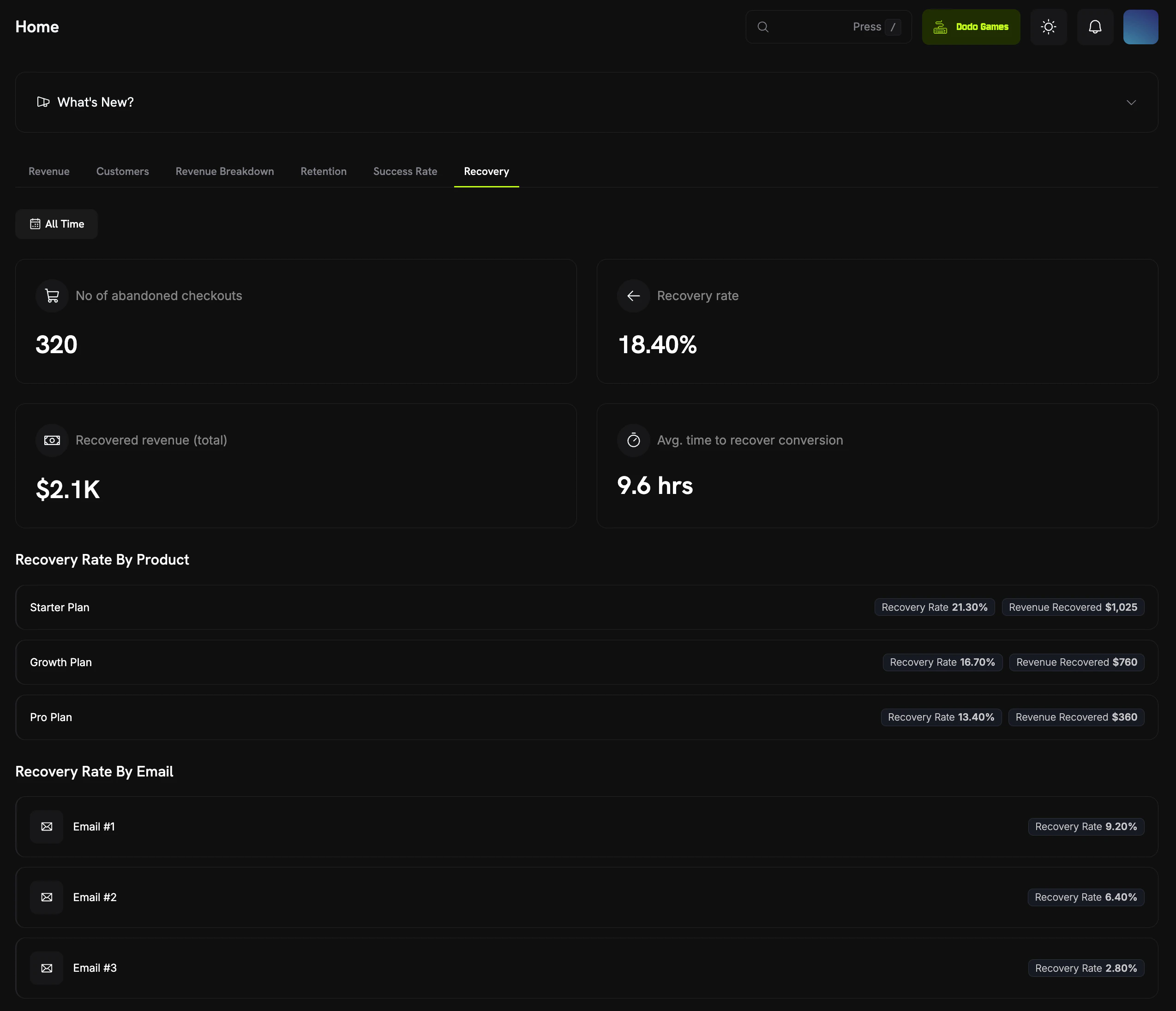
Recovery analytics dashboard showing ACR and dunning metrics
Webhook Events
Dunning दो webhook events भेजता है:Recovery Webhook Payloads
Edge Cases
Dunning इन cases को अपने आप handle करता है:Best Practices
- Defaults से शुरुआत करें: Default delays (1, 3, 5 और 7 दिन) email को एक सप्ताह में फैलाते हैं, इसलिए ग्राहकों को बहुत अधिक email नहीं मिलते, लेकिन उन्हें लगातार reminder मिलता रहता है।
- Recovery rates monitor करें: यह देखने के लिए Recovery rate by email जाँचें कि कौन सा email सबसे अधिक recoveries कराता है। यदि बाद वाले email लगभग कुछ भी recover नहीं करते, तो उन्हें बंद कर दें।
- Support के साथ coordinate करें: अपनी support team को बताएं कि dunning email भेजे जा रहे हैं, ताकि वे reply करने वाले ग्राहकों की सहायता कर सकें।
- Subscription states की समीक्षा करें: पूरे subscription lifecycle को track करने के लिए dunning को
subscription.on_holdऔरsubscription.cancelledwebhooks के साथ उपयोग करें।
Dunning Customer Portal में मौजूद मौजूदा on-hold और reactivation flows के साथ काम करता है। इसे चालू करने के बाद यह बिना किसी integration work के अपने आप चलता है।