

What Is Charm Pricing?
Adaptive Currency converts your base price at live exchange rates. The result is an accurate number, but rarely an attractive one: a $47.00 product can show as €43.12 today and €43.47 tomorrow. Charm Pricing takes that converted amount and moves it to the nearest clean ending. The customer sees €49.99, not €43.12. The ending stays stable while exchange rates move. You do not set a price per market. You choose one rounding rule, and it applies to every currency.Charm Pricing requires Adaptive Currency. Turn on Adaptive Currency first.
Key Benefits
- Clean prices in every currency — One rule covers all markets. You do not maintain a price list.
- Stable endings — The ending does not change when the exchange rate moves a few percent.
- No conversion artifacts — Customers never see 43.12 or 1043.87.
- Automatic for new markets — A currency you never priced still gets a clean number.
To set an exact price for one market by hand, use Localized Pricing instead. A localized price always wins over Charm Pricing on that product.
Enable Charm Pricing
1
Enable Adaptive Currency
Go to Settings → Business. In Business Settings, turn on Adaptive Currency. Charm Pricing does nothing without it.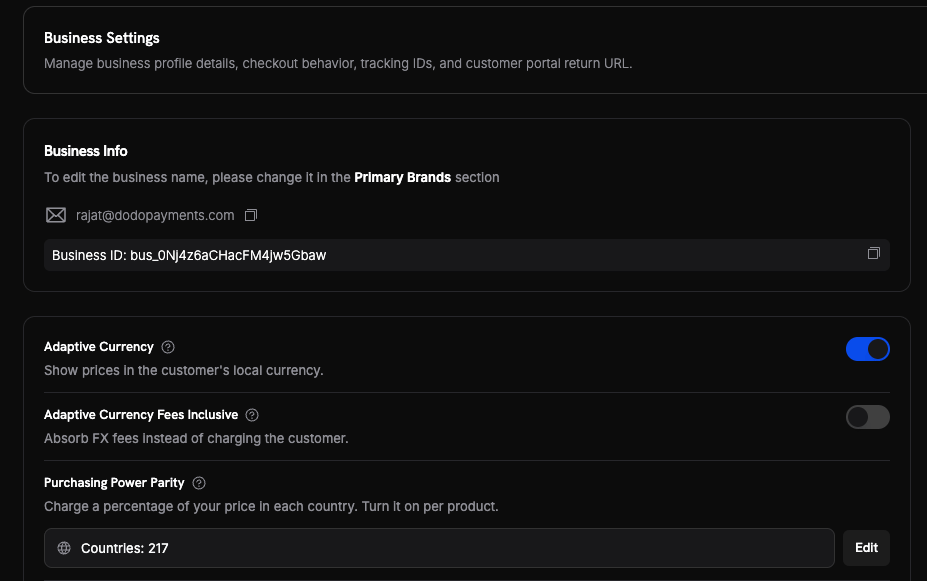
2
Turn on Charm Pricing
In the same Business Settings section, turn on Charm Pricing — “Round prices to cleaner, more appealing numbers”. The current rounding type appears below the toggle.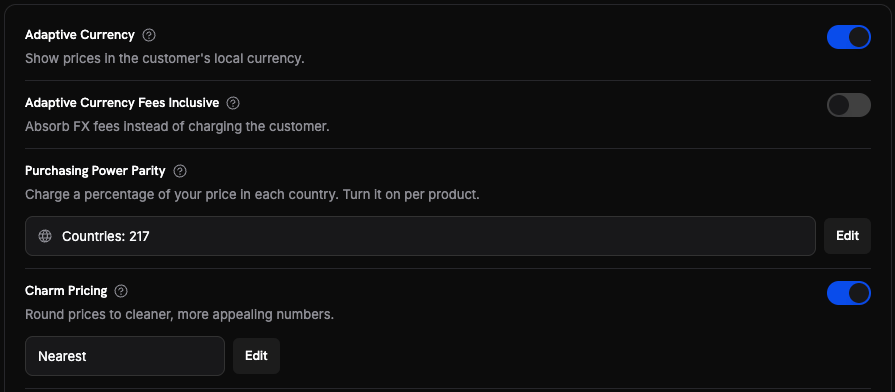
3
Set the rounding type and steps
Click Edit to open Set up Charm Pricing. Choose a Rounding type, then adjust the Rounding step for any price range. Click Save Changes.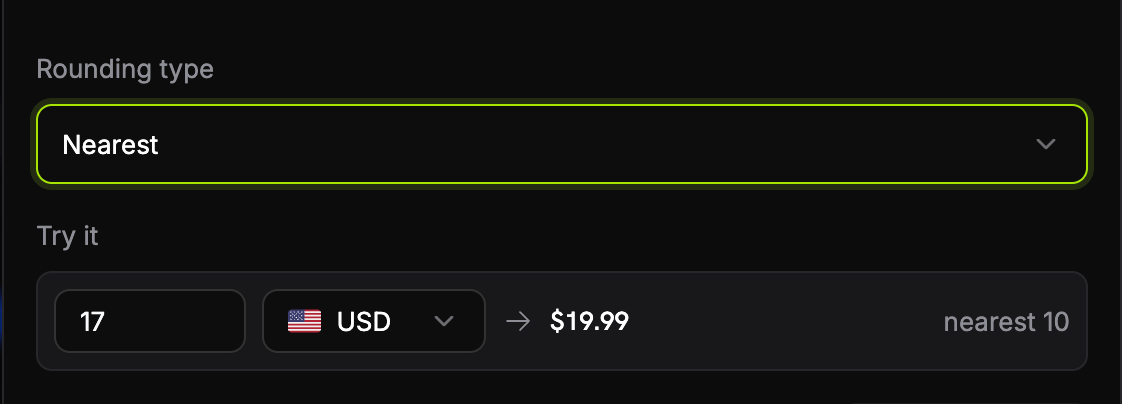
4
Confirm at checkout
Open a test checkout with a billing country in another currency. Confirm the price shows the ending you expect.
How the Price Is Calculated
Dodo Payments charms the per-unit list price, after currency conversion and before any discount, and before tax. A discount is then deducted from the charmed list price — see Discounts and Charm Pricing.- Find the step. The list price selects a step from the rounding-step table. A $47 price falls in the 10–99 range, so the step is 10. The step is chosen by the list price, so a product lands in the same band whatever discount code the customer holds.
- Pick the target. The step gives two candidates, 40 and 50. The rounding type picks one. With Nearest, 47 is closer to 50.
- Shave the ending. Dodo Payments subtracts one thousandth of the step, so 50 becomes 49.99. The shave is never less than one minor unit. Whole skips this step.
Rounding Types
Rounding Steps
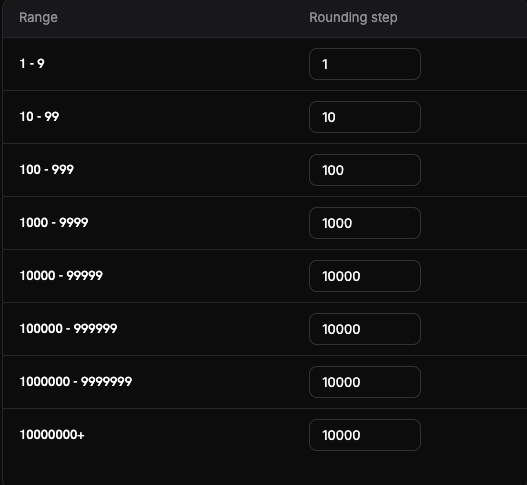
The step depends on the size of the price, in the currency’s main unit. These are the defaults. You can change the Rounding step for any range. You cannot change the ranges themselves.
The step stops growing at 10,000. This keeps the change small for large amounts, and it matters for currencies with many units per dollar, such as IDR and VND.
A large step moves a price a long way. With the default step of 1,000, a converted price of $1,234 becomes $999.00. Lower the step for that range if the change is too big for your catalogue.
Worked Examples
Currencies with no decimal places, such as JPY, have no fractional endings: the shave is the step divided by 1,000, rounded to whole units, with a minimum of one unit. The ending is ¥4,999, not ¥4,999.99.
When Charm Does Not Apply
Dodo Payments keeps the converted price unchanged in these cases:- The step is wider than the price. The price cannot move by less than one full step.
- The result would be zero or less.
- No step matches the amount.
How It Applies at Checkout
Charm Pricing sets the price the customer sees before any discount is deducted. For a product with no localized price, the order is:- Base price — the price you set on the product.
- Purchasing Power Parity — if the product opted in, the country percentage applies.
- Currency conversion — the amount converts to the customer’s currency at the live rate.
- Charm rounding — the converted list price moves to the clean ending. This is the price the customer sees as the subtotal.
- Discounts — any product discount and discount code is deducted from the charmed list price.
- Tax — calculated from the amount after the discount. See Tax-Inclusive Pricing.
Discounts and Charm Pricing
Charm Pricing owns the price tag, and a discount is a deduction from that tag. On a $199.00/month plan with a step of 100 and Nearest rounding:A discounted line does not land on a charm ending. The charmed list price carries the
.99 or .90 ending; a percentage taken off it has no reason to. In the example above the customer is charged $179.91, not a charmed number.Subscriptions
A subscription records its rounding step and rounding type when the customer subscribes. Dodo Payments repeats that same decision at every renewal. What is frozen: the rounding step and the rounding type. If you edit a step, or change the rounding type, an existing subscription is not repriced. The customer keeps the rule they agreed to. What can move: the amount. Each renewal converts the price at the current exchange rate, then applies the frozen rule. A large rate movement can change the renewal amount, even though the rule did not change.Important Behaviors
Best Practices
- Start with Nearest. It moves the price the least. Use Floor only when you accept the discount it creates.
- Check your largest and smallest products. The step changes with the price range, so a $5 product and a $1,200 product behave differently.
- Review the step for high-unit currencies. IDR, VND, and KRW prices land in the top ranges, where the step is fixed at 10,000.
- Price your subscriptions before you launch. Editing a step later does not reprice existing subscribers.
- Account for the conversion fee. A charmed line is fees-inclusive, so the fee comes out of your revenue.