

Manual Retry re-attempts a failed subscription renewal payment when you ask, from the payment’s detail page or through the API. It charges the payment method saved on the subscription, and it runs independently of the automatic Payment Retries schedule.
What Is Manual Retry?
When a renewal payment fails, the subscription moves toon_hold. If you turned on Payment Retries, they re-attempt the charge on your retry schedule. Sometimes you know the payment will go through now: the customer has confirmed they topped up their account, or your support team is on a call with them. Manual Retry sends one attempt immediately, instead of waiting hours or days for the next scheduled one.
- Renewal payments only: Manual Retry applies to subscription renewal invoices while the subscription is
on_hold. First payments, one-time payments, plan-change charges, and on-demand charges are not eligible. - No customer action: The charge goes to the payment method already saved on the subscription.
- Independent of automatic retries: A manual retry doesn’t use up an attempt from the automatic schedule, doesn’t move the next scheduled retry, and works even when Payment Retries are off.
- Retries the invoice, not the payment: The failed payment is only the entry point. Dodo Payments finds the open renewal invoice behind it and charges that debt, so it doesn’t matter which failed payment on the invoice you retry from.
Retrying from the Dashboard
Only team members whose role has Write access to Payments can send a manual retry, for example the Owner or the Admin role. See Team Members.1
Open the failed payment
Go to Transactions → Payments and click the failed renewal payment to open its Transaction details page.
2
Click Retry Payment Manually
Click Retry Payment Manually in the top-right corner. The button is available only while the payment is eligible.
3
Check the result
Dodo Payments creates a new payment for the attempt, and it appears in the Activity Log. If the charge succeeds, the subscription returns to
active, and the next billing date moves to one billing period after the successful retry. If the payment processor hasn’t settled the charge yet, the payment shows as in progress until the payment.succeeded or payment.failed webhook reports the outcome.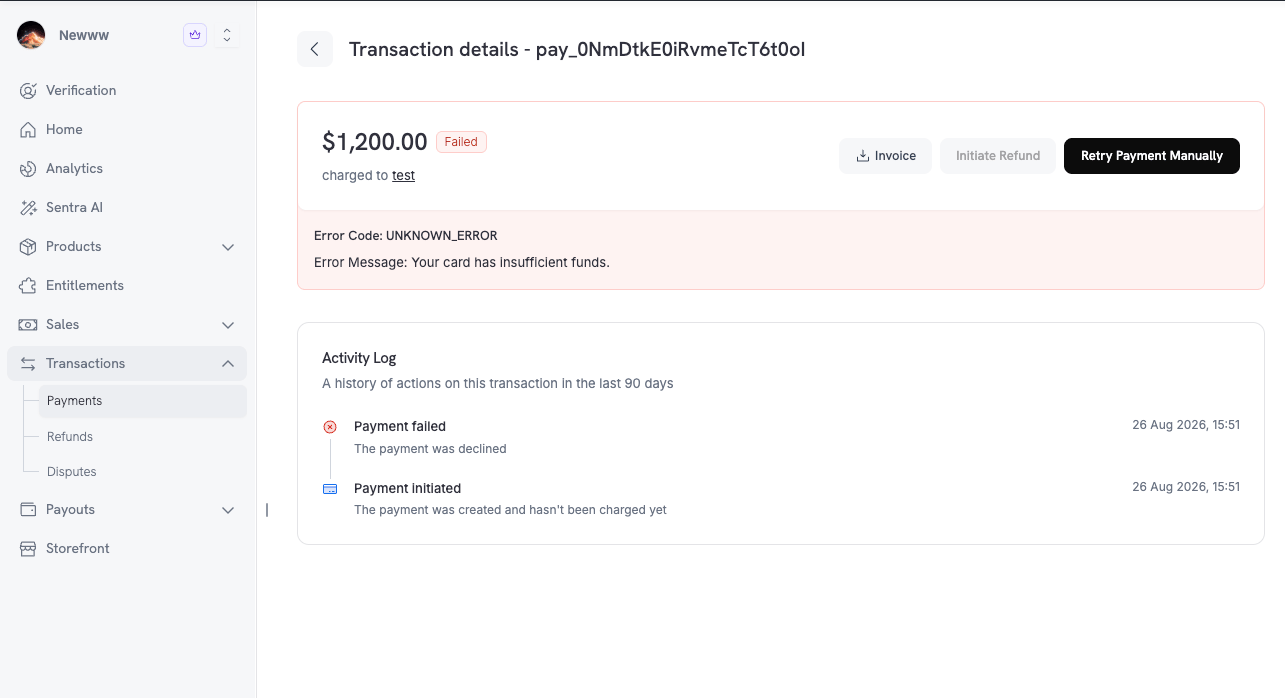
Retry Payment Manually on the transaction details page of a failed renewal
Eligibility
Dodo Payments sends a manual retry only when every check in this table passes. The Reason code column is what the API returns: inreason on GET /payments/{payment_id}/retry, and as the error code on POST /payments/{payment_id}/retry.
Manual Retry is narrower than automatic retries in one place: it requires the subscription to be
on_hold. A past_due subscription in a grace period fails this check. Automatic retries keep running for other non-active statuses. See Subscription Status Transitions.Retry Limits
Each renewal invoice allows 3 manual retries, with a cooldown between them:
The limits apply in both test mode and live mode. When the limit refuses a retry, the API returns
MANUAL_RETRY_LIMIT_REACHED (HTTP 429), and the error body carries only code and message. To learn when the next retry opens, check the retry state and read retry_available_at. It is null once all three retries are spent.
Automatic retries don’t count toward this limit, and manual retries don’t count toward the attempts of the automatic schedule.
Customer Retries from the Portal
Your customers can retry a failed renewal themselves. In the Customer Portal, a subscription with a failed renewal shows a Retry Payment button. It charges the open renewal invoice again with the saved payment method, using the same engine as a manual retry from your dashboard. A customer retry differs from yours in these ways:
Because the limit is shared, a retry the customer sends uses one of the three manual retries on the invoice. When the customer can’t retry, for example after a hard decline, the portal asks them to update their payment method instead.
Manual vs. Automatic Retries
The two retry paths differ in these ways:Retrying via the API
Check eligibility first, then send the retry. Both endpoints take the ID of a failed payment.Check Whether a Payment Can Be Retried
GET /payments/{payment_id}/retry doesn’t return an error for an ineligible payment. It returns can_retry: false with the reason code instead, so your own dashboard or support tooling can show the same state as the Dodo Payments dashboard. It requires read access to Payments (payments:read).
Response
The three automatic retry fields are
null together when no automatic retry is queued for the invoice. They are also null when Payment Retries are off, when the invoice is no longer open or is not a subscription renewal, and when the most recent failure is a hard decline or has no error code. The dashboard shows the same values on the payment’s Transaction details page, as Next automatic retry.
Send a Manual Retry
POST /payments/{payment_id}/retry creates a new payment and charges the saved payment method. It requires write access to Payments (payments:write). The SDK examples reuse the client from the previous example.
Response
Error Responses
When a retry is not allowed,POST returns one of these HTTP statuses:
The Error Codes reference describes every code.
Webhooks
A manual retry creates an ordinary payment, so the same webhooks fire as for any renewal attempt:
On the payment object in these events,
retry_attempt is 1 or higher and subscription_id is set, the same as for an automatic retry. The payment object has no field that marks a manual attempt, so keep the payment_id from the retry response if you need to tell a manual attempt apart from a scheduled one.