

Subscriptions tự động hóa doanh thu định kỳ. Tạo chu kỳ thanh toán linh hoạt, thời gian dùng thử miễn phí hoặc có tính phí, thay đổi gói có phân bổ theo tỷ lệ và tiện ích bổ sung. Khách hàng sẽ tự động gia hạn cho đến khi hủy hoặc thời hạn kết thúc.
Upgrade & Downgrade
On‑Demand Subscriptions
Customer Portal
Subscription Webhooks
What Are Subscriptions?
Subscription là một sản phẩm định kỳ tính phí khách hàng theo lịch. Phù hợp cho SaaS, gói thành viên, nội dung số và các gói hỗ trợ.- SaaS licenses: Apps, APIs, or platform access
- Memberships: Communities, programs, or clubs
- Digital content: Courses, media, or premium content
- Support plans: SLAs, success packages, or maintenance
Key Benefits
- Doanh thu có thể dự đoán: Thanh toán định kỳ với gia hạn tự động
- Chu kỳ linh hoạt: Hàng tháng, hàng năm, khoảng thời gian tùy chỉnh và thời gian dùng thử
- Linh hoạt về gói: Phân bổ theo tỷ lệ khi nâng cấp và hạ cấp
- Tiện ích bổ sung và số lượng chỗ: Gắn các nâng cấp tùy chọn có thể định lượng
- Checkout được lưu trữ: Các trang Checkout và Customer Portal
- Ưu tiên nhà phát triển: API rõ ràng để tạo, thay đổi và theo dõi mức sử dụng
Creating Subscriptions
Tạo sản phẩm subscription trong dashboard Dodo Payments, sau đó bán chúng thông qua checkout hoặc API của bạn. Việc tách sản phẩm khỏi các subscription đang hoạt động cho phép bạn quản lý phiên bản giá, gắn tiện ích bổ sung và theo dõi hiệu suất độc lập.Tạo sản phẩm Subscription
Configure the fields in the dashboard to define how your subscription sells, renews, and bills. The sections below map directly to what you see in the creation form.Thông tin sản phẩm
- Tên sản phẩm (bắt buộc): Tên hiển thị trong checkout, Customer Portal và hóa đơn.
- Mô tả sản phẩm (tùy chọn): Nội dung nêu rõ giá trị, xuất hiện trong checkout và hóa đơn.
- Hình ảnh sản phẩm (tùy chọn): PNG/JPG/WebP tối đa 3 MB. Được sử dụng trong checkout và hóa đơn.
- Thương hiệu: Liên kết sản phẩm với một thương hiệu cụ thể để áp dụng giao diện và email.
- Danh mục thuế (bắt buộc): Chọn danh mục (ví dụ: SaaS) để xác định các quy tắc thuế.
Pricing
- Loại giá: Chọn Gói đăng ký (hướng dẫn này). Các lựa chọn thay thế là Thanh toán một lần và Tính phí theo mức sử dụng.
- Giá (bắt buộc): Giá định kỳ cơ bản kèm đơn vị tiền tệ. Giá khác 0 phải đáp ứng mức tối thiểu của gói đăng ký đối với đơn vị tiền tệ mà khách hàng thanh toán: $1.00 cho USD. Đối với các đơn vị tiền tệ ngoài USD, EUR và GBP, giá cũng phải có giá trị ít nhất là $1.00. Ví dụ: một gói đăng ký bằng AED cần khoảng 3.70 AED, không phải mức tối thiểu 2.00 AED được liệt kê. EUR và GBP sử dụng mức tối thiểu riêng được liệt kê. Xem Số tiền tối thiểu. Không hỗ trợ các mức giá thấp hơn mức tối thiểu. Giá chính xác $0 là một trường hợp riêng được hỗ trợ; xem Tùy chọn không cần thẻ khi giá bằng 0.
- Mức chiết khấu áp dụng (%): Phần trăm chiết khấu tùy chọn được áp dụng cho giá cơ bản; được phản ánh trong checkout và hóa đơn. Bạn có thể nhập tối đa hai chữ số thập phân, chẳng hạn như
10.5. Trong API, sử dụngdiscount_bps(đơn vị điểm cơ bản, vì vậy1050tương đương 10.5%). - Lặp lại thanh toán mỗi (bắt buộc): Khoảng thời gian gia hạn, ví dụ mỗi 1 Tháng. Chọn chu kỳ (tháng hoặc năm) và số lượng.
- Thời hạn gói đăng ký (bắt buộc): Tổng thời hạn gói đăng ký duy trì trạng thái hoạt động (ví dụ 10 Năm). Sau khi thời hạn này kết thúc, việc gia hạn sẽ dừng trừ khi được kéo dài.
- Số ngày dùng thử (bắt buộc): Đặt thời lượng dùng thử theo ngày. Sử dụng 0 để tắt thời gian dùng thử. Khoản phí đầu tiên sẽ tự động được tính khi thời gian dùng thử kết thúc.
- Số tiền dùng thử: Khoản phí trả trước tùy chọn cho thời gian dùng thử có tính phí. Để trống nếu muốn dùng thử miễn phí. Xem Dùng thử có tính phí.
- Tùy chọn không cần thẻ khi giá bằng $0: Cho phép khách hàng bắt đầu gói đăng ký mà không cần thêm thẻ khi giá bằng $0 hoặc chiết khấu khiến số tiền phải trả hôm nay bằng 0. Thời gian dùng thử miễn phí có checkbox Bắt đầu dùng thử mà không cần thẻ riêng. Xem Tùy chọn không cần thẻ khi giá bằng 0.
- Chọn tiện ích bổ sung: Đính kèm tối đa 10 tiện ích bổ sung mà khách hàng có thể mua cùng gói cơ bản.
Tiện ích bổ sung phù hợp cho các phần mở rộng có thể định lượng như số lượng chỗ hoặc dung lượng lưu trữ. Bạn có thể kiểm soát số lượng được phép và cách phân bổ theo tỷ lệ khi khách hàng thay đổi chúng.
Cài đặt nâng cao
- Giá đã bao gồm thuế: Hiển thị giá đã bao gồm các khoản thuế áp dụng. Việc tính thuế cuối cùng vẫn thay đổi tùy theo vị trí của khách hàng.
- Khóa cấp phép (trong Quyền lợi): Cấp một khóa duy nhất cho mỗi khách hàng sau khi mua. Xem hướng dẫn Khóa cấp phép.
- Tệp kỹ thuật số (trong Quyền lợi): Tự động cung cấp tệp hoặc nội dung sau khi mua. Tìm hiểu thêm về Phân phối sản phẩm kỹ thuật số.
- Siêu dữ liệu: Đính kèm các cặp khóa–giá trị tùy chỉnh để gắn thẻ nội bộ hoặc tích hợp với client. Xem Siêu dữ liệu.
Subscription Trials
Thời gian dùng thử cho phép khách hàng đánh giá subscription trước khi thanh toán toàn bộ giá định kỳ. Thời gian dùng thử có thể miễn phí (không tính phí cho đến khi kết thúc) hoặc có tính phí (một khoản giảm giá được thu trước). Sau thời gian dùng thử, giá đầy đủ sẽ được thu vào lần gia hạn đầu tiên.Cấu hình Trial
Đặt Trial Period Days trong phần định giá của sản phẩm (dùng0 để tắt). Ghi đè giá trị này khi tạo subscription:
Paid Trials
Thu một khoản phí giảm giá trả trước cho thời gian dùng thử. Đặt Trial Amount trên giá của sản phẩm. Giá định kỳ đầy đủ sẽ được thu vào lần gia hạn đầu tiên.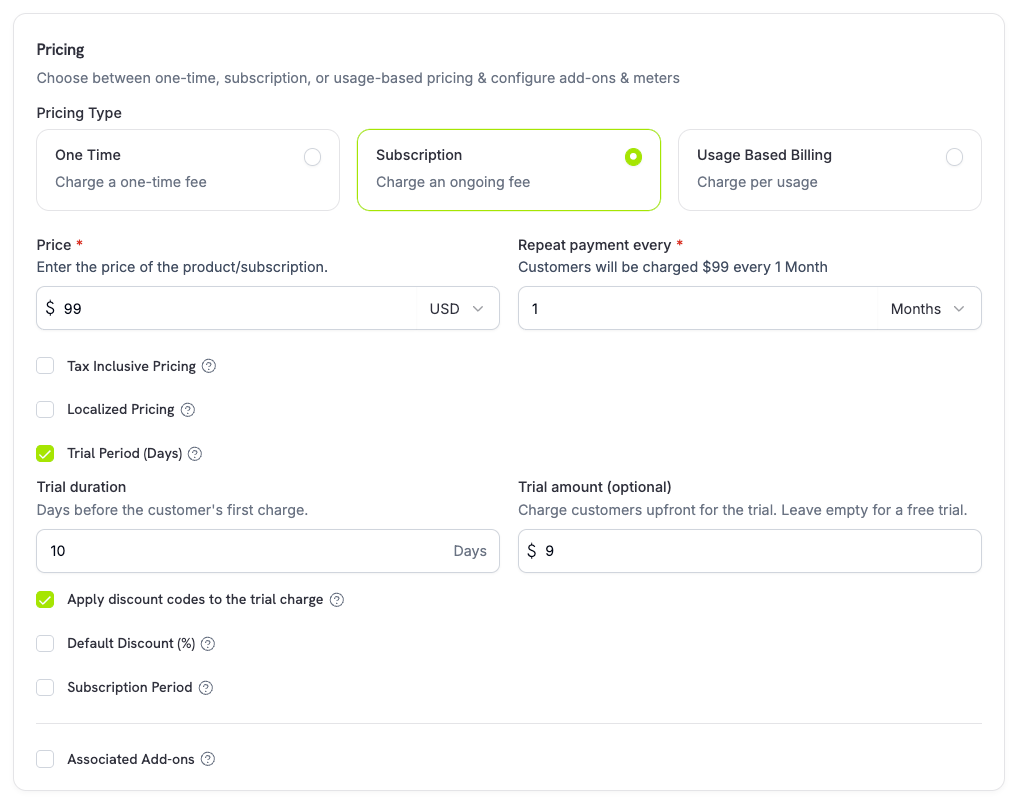
trial_amount và trial_period_days để bạn có thể hiển thị số tiền phải trả hôm nay trước khi tạo subscription.
Card-Optional at Zero Price
Cho phép khách hàng bắt đầu subscription mà không cần thêm payment method khi hôm nay không có khoản nào phải trả. Bật tùy chọn này theo từng mức giá trong phần định giá sản phẩm, với một checkbox cho mỗi trường hợp bên dưới.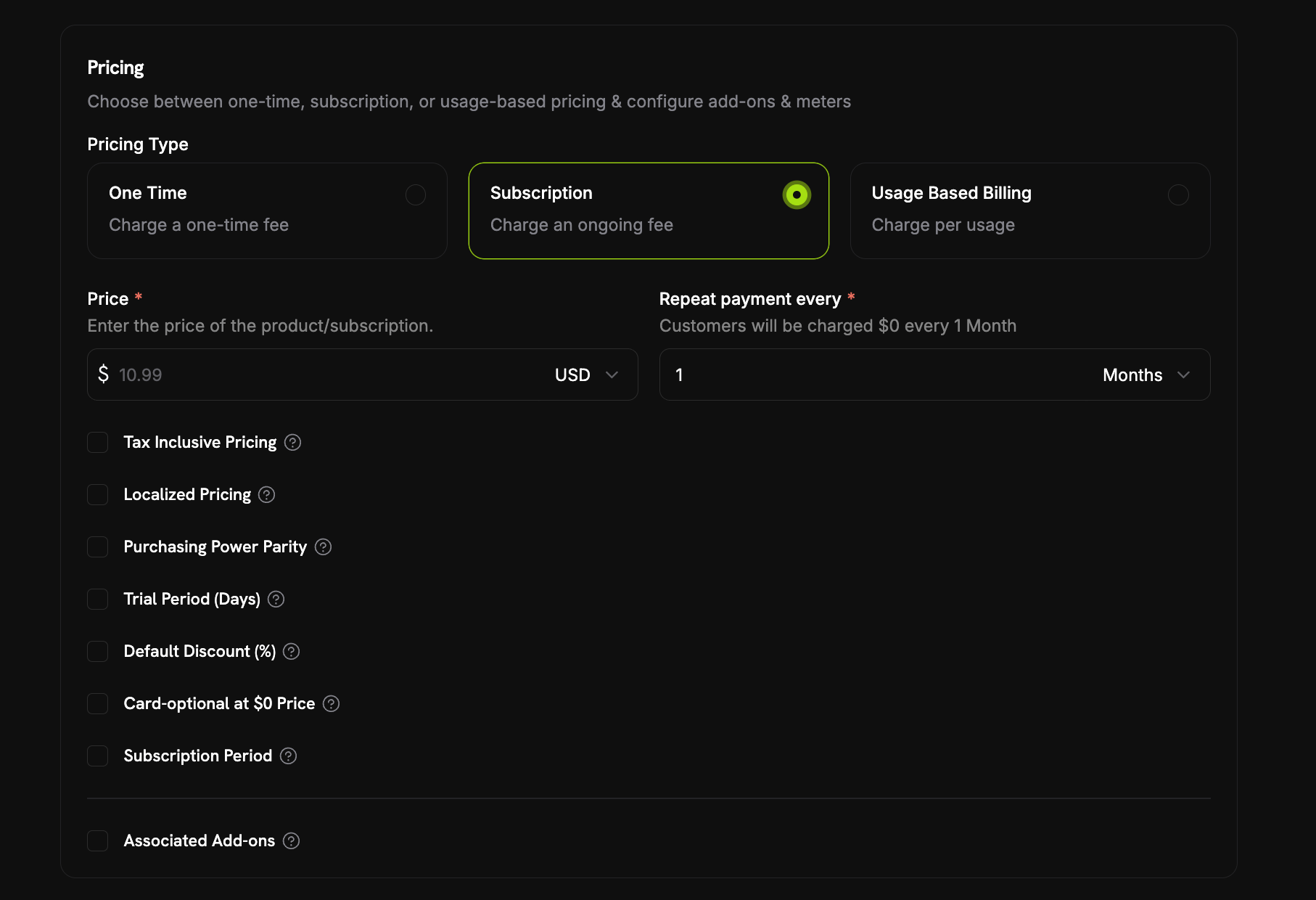
- Thời gian dùng thử miễn phí:
trial_period_daysđược đặt nhưng không cótrial_amount, vì vậy khoản phí đầu tiên là $0 trong thời gian dùng thử. Chọn Start the trial without a card bên dưới Trial Period (Days). - Giá định kỳ $0: Giá tự thân là $0 hoặc một khoản giảm giá đưa giá xuống $0 (mục Default Discount (%) của sản phẩm hoặc mã giảm giá được áp dụng tại checkout). Chọn Card-optional at $0 Price.
Mỗi checkbox tương ứng với một trường API riêng:
trial_payment_method_optional (trường hợp dùng thử miễn phí) và zero_amount_payment_method_optional (trường hợp giá $0). Bạn có thể bật từng tùy chọn riêng lẻ.Trong API, checkbox duy nhất trên dashboard này ánh xạ tới hai field độc lập trên mức giá:
trial_payment_method_optional (cho trường hợp free trial) và zero_amount_payment_method_optional (cho trường hợp giá 0 đã giảm giá riêng lại không yêu cầu thẻ.Điều gì xảy ra khi không có thẻ
Subscription không yêu cầu thẻ được tạo và kích hoạt ngay lập tức, vớipayment_method_required: false trong response và không có payment method được lưu. Từ đó:
- Email nhắc nhở được gửi trước khi bắt đầu tính phí thực tế. Số ngày nhắc trước được thiết lập trên toàn doanh nghiệp tại Payment Method Reminder trong Settings → Subscriptions — xem Subscription Settings. Email Add Payment Method Reminder của khách hàng (xem Customer Emails) dẫn trực tiếp đến Customer Portal để thêm thẻ.
- Nếu không thêm thẻ kịp thời, subscription sẽ chuyển sang
on_holdkhi trial kết thúc hoặc thời gian giảm giá hết hạn và khoản phí thực tế đến hạn — cùng trạng tháion_holdmà mọi subscription đều có thể chuyển sang, nhưng lần này là do chưa từng thêm payment method. Khách hàng sẽ nhận email Subscription On Hold, No Payment Method. - Thêm payment method sẽ kích hoạt lại subscription, đúng như mô tả trong Reactivating from On Hold — một khoản phí được tạo cho số tiền hiện đến hạn và subscription trở về
activesau khi thanh toán thành công.
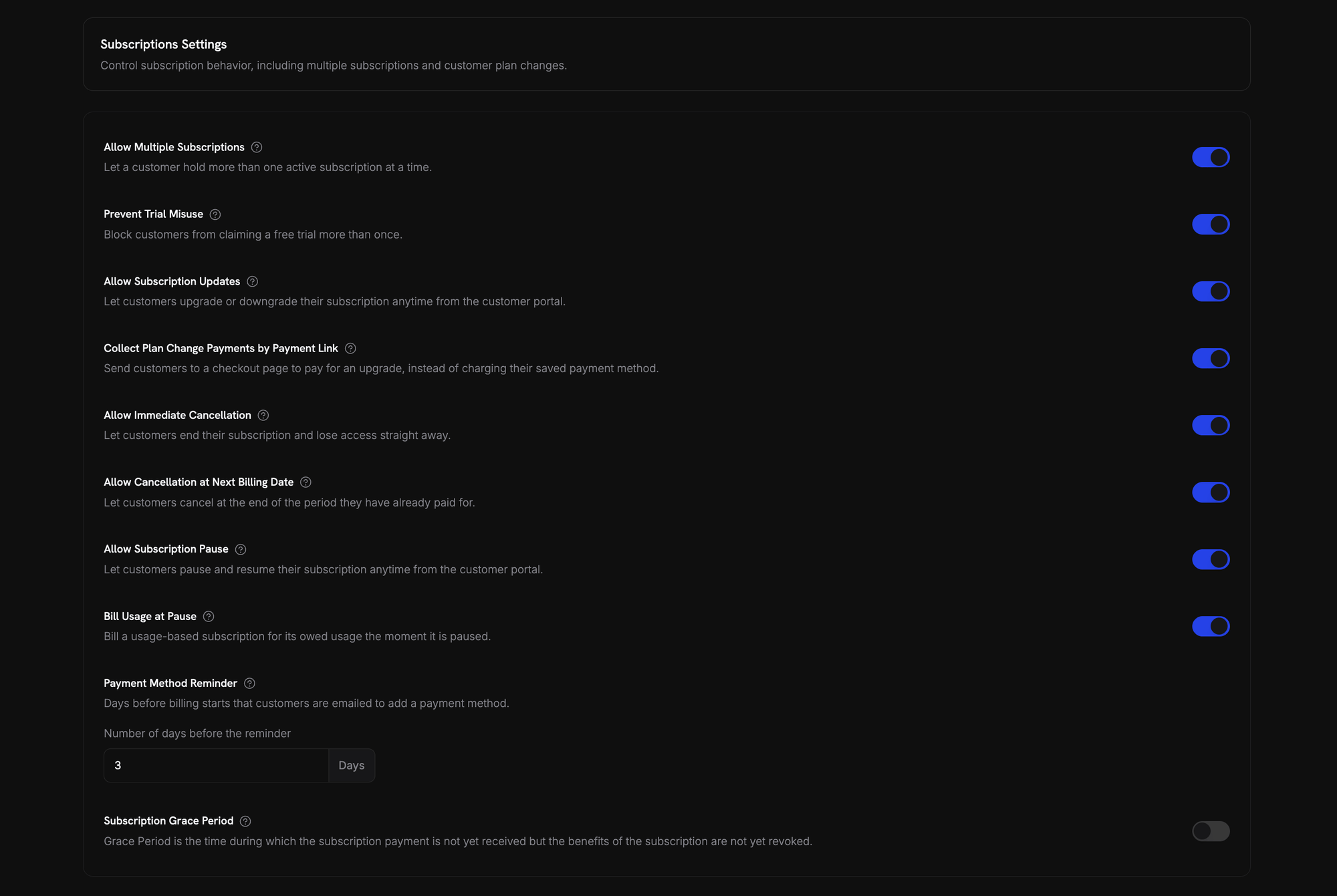
Thẻ được thêm trước khi trial hoặc thời gian giảm giá kết thúc sẽ ngăn hoàn toàn trạng thái on hold — lần gia hạn tiếp theo chỉ tính phí vào thẻ đó, không khác bất kỳ subscription nào khác.
Thay đổi Subscription Plan
Thay đổi plan cho phép bạn nâng cấp hoặc hạ cấp subscription, điều chỉnh số lượng hoặc chuyển sang sản phẩm khác. Tùy theo proration mode được chọn, thay đổi có thể tạo khoản phí ngay lập tức, tạo credit hoặc không điều chỉnh billing.Product Collections
Proration Modes
Chọn cách tính phí cho khách hàng khi thay đổi plan:So sánh nhanh bốn proration mode:
prorated_immediately
Tính phí theo tỷ lệ dựa trên thời gian còn lại trong chu kỳ billing hiện tại. Phù hợp nhất cho cách tính phí công bằng, có tính đến thời gian chưa sử dụng.
difference_immediately
Thu phần chênh lệch giá ngay lập tức (khi nâng cấp) hoặc cộng credit cho các lần gia hạn trong tương lai (khi hạ cấp). Phù hợp nhất cho các trường hợp nâng cấp/hạ cấp đơn giản.
Credit từ việc hạ cấp bằng
difference_immediately được giới hạn trong subscription và tự động áp dụng cho các lần gia hạn trong tương lai. Chúng khác với các quyền lợi của Credit-Based Billing.difference_immediately, giá trị chưa sử dụng trở thành credit giới hạn trong subscription và tự động bù trừ cho các lần gia hạn trong tương lai:
full_immediately
Thu toàn bộ số tiền của plan mới ngay lập tức, bỏ qua thời gian còn lại. Phù hợp nhất để đặt lại chu kỳ billing.
do_not_bill
Chuyển sang plan mới mà không điều chỉnh billing. Không có phí proration và không có credit — khách hàng chỉ cần chuyển sang plan mới. Phù hợp nhất cho việc chuyển đổi hỗ trợ đặc biệt, chuyển đổi plan miễn phí hoặc các trường hợp bạn muốn tự chịu phần chênh lệch chi phí.
Example: Prorated upgrade calculation
Example: Prorated upgrade calculation
Tình huống: Khách hàng đang dùng Basic (80/tháng) vào ngày thứ 16 của chu kỳ 30 ngày bằng Lần gia hạn tiếp theo vào 15 tháng 2 (16 tháng 1 + 30 ngày): $80.00/tháng.
prorated_immediately.Example: Downgrade credit calculation
Example: Downgrade credit calculation
Tình huống: Khách hàng đang dùng Pro (20/tháng) bằng Credit $60 tự động được áp dụng cho các lần gia hạn trong tương lai:
difference_immediately.- Lần gia hạn 1: 20 (credit) = **40 credit)
- Lần gia hạn 2: 20 (credit) = **20 credit)
- Lần gia hạn 3: 20 (credit) = $0.00 (credit đã hết)
- Lần gia hạn 4: $20.00 (giá đầy đủ)
Tìm hiểu thêm về cách quản lý credit trong Upgrade & Downgrade Guide.
Thay đổi Plan với Add-on
Điều chỉnh add-on khi thay đổi plan. Add-on được đưa vào các phép tính proration:Theo mặc định (
effective_at: 'immediately'), các thay đổi gói sẽ kích hoạt khoản phí ngay lập tức. Truyền effective_at: 'next_billing_date' để lên lịch thay đổi vào ngày thanh toán tiếp theo — thay đổi đang chờ sẽ được trả về trên subscription dưới dạng scheduled_change, và bạn có thể hủy thay đổi đó bằng Hủy thay đổi gói đã lên lịch. Các khoản phí thất bại có thể chuyển subscription sang trạng thái on_hold, trừ khi bạn truyền on_payment_failure: 'prevent_change', tùy chọn này giữ subscription ở gói hiện tại cho đến khi thanh toán thành công. Theo dõi các thay đổi thông qua các webhook event subscription.plan_changed.Xem trước thay đổi Plan
Trước khi xác nhận thay đổi plan, hãy xem trước khoản phí chính xác và subscription sau thay đổi:Preview Change Plan API
Tạm dừng và tiếp tục Subscription
Tạm dừng sẽ đóng băng subscription thay vì kết thúc subscription. Việc lập hóa đơn dừng lại, quyền truy cập bị thu hồi, còn subscription vẫn giữ nguyên plan và lịch sử để customer có thể tiếp tục chính xác từ nơi họ đã dừng. Hãy sử dụng tính năng này như một lựa chọn giữ chân customer thay cho việc hủy. Mở bất kỳ subscription đang active nào trong Sales → Subscriptions rồi nhấp Pause subscription. Trạng thái sẽ chuyển thànhpaused và các lần gia hạn sẽ dừng cho đến khi subscription được tiếp tục.
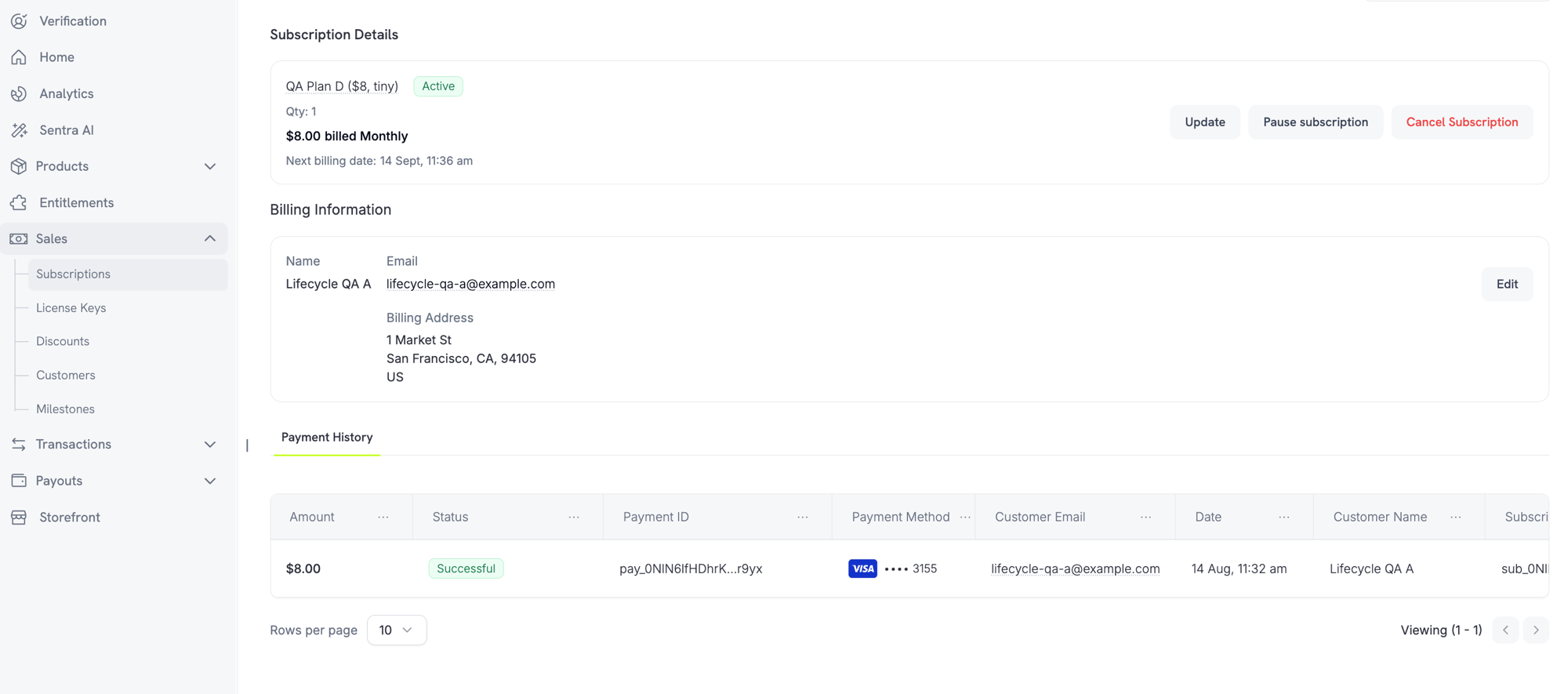
Điều gì xảy ra khi bạn tạm dừng
- Các lần gia hạn dừng lại. Không có invoice nào được tạo và không có khoản phí gia hạn nào được thực hiện trong khi subscription bị tạm dừng.
- Quyền truy cập bị thu hồi ngay lập tức. Việc tạm dừng sẽ thu hồi mọi entitlement grant đã cấp và đang chờ cấp trên subscription, vô hiệu hóa license keys và ngừng cấp URL tải xuống digital product mới. Khi tiếp tục, các quyền này sẽ được cấp lại, giống như khi khôi phục từ
on_hold. - Đồng hồ billing đóng băng.
next_billing_datevàexpires_atđều tiến về sau chính xác bằng thời lượng tạm dừng, để customer giữ được khoảng thời gian họ đã thanh toán. - Không có giới hạn về thời lượng tạm dừng. Subscription bị tạm dừng sẽ tiếp tục ở trạng thái đó cho đến khi có người tiếp tục. Bạn không cần đặt trước thời lượng tạm dừng.
active và khôi phục các entitlement. Vì đồng hồ đã bị đóng băng, lần gia hạn tiếp theo sẽ diễn ra muộn hơn lịch ban đầu một khoảng bằng thời lượng tạm dừng — subscription bị tạm dừng 12 ngày sẽ gia hạn muộn 12 ngày.
Tạm dừng Subscription tính phí theo usage
Một subscription tính phí theo usage có thể có usage đã được ghi nhận nhưng chưa được lập hóa đơn tại thời điểm bị tạm dừng. Tùy chọn Bill Usage at Pause trong Settings → Subscriptions quyết định cách xử lý usage đó:
Chỉ usage được đo lường mới được quyết toán theo cách này — recurring base fee không bao giờ bị tính tại thời điểm tạm dừng. Subscription Standard và on-demand không có khoản nào cần quyết toán, nên setting này không ảnh hưởng đến chúng.
Bill Usage at Pause được ghi nhận theo từng billing cycle. Việc thay đổi tùy chọn giữa cycle không thay đổi cách cycle đang diễn ra được quyết toán; giá trị mới sẽ áp dụng từ cycle tiếp theo.
Tiếp tục subscription là một cách hợp lệ để thoát khỏi trạng thái hold này — bạn không cần thu settlement invoice trước. Tuy nhiên, cần lưu ý rằng việc tiếp tục sẽ miễn khoản usage còn nợ thay vì chuyển khoản đó sang kỳ sau.
Cho phép Customer tự tạm dừng Subscription
Allow Subscription Pause trong Settings → Subscriptions kiểm soát việc customer có thể tạm dừng và tiếp tục từ Customer Portal hay không. Tùy chọn này tắt theo mặc định, vì vậy tính năng tự tạm dừng cần được chủ động bật.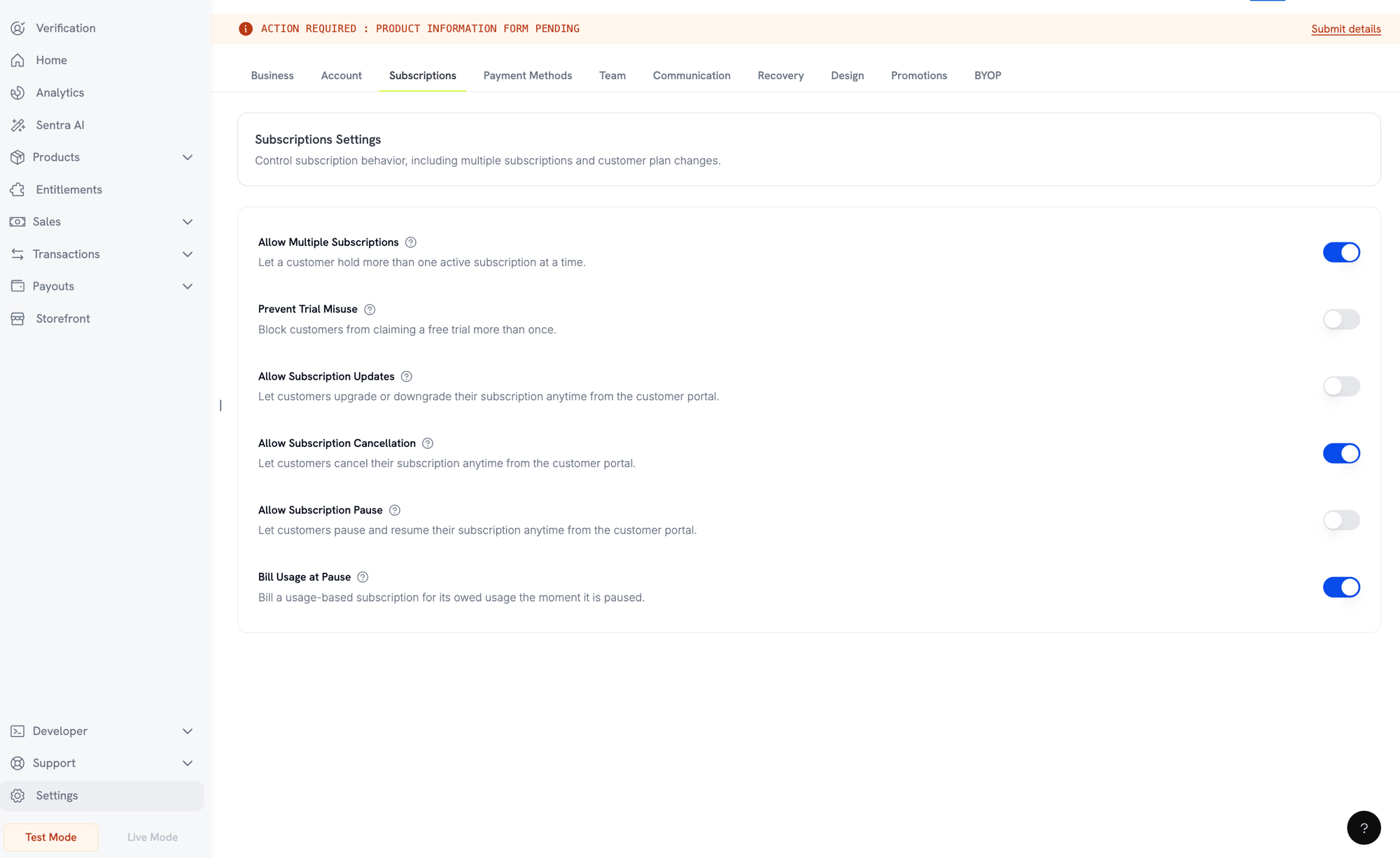
Pausing from the Customer Portal
Tạm dừng qua API
Tạm dừng và tiếp tục được thực hiện thông qua trườngstatus trên endpoint cập nhật subscription. Không có endpoint tạm dừng riêng.
subscription.paused và tiếp tục phát ra subscription.unpaused. Cả hai đều chứa subscription object đầy đủ, với paused_at được đặt trong thời gian tạm dừng và null sau khi tiếp tục.
Tạm dừng và các thao tác Subscription khác
- Việc hủy vẫn hoạt động. Bạn có thể hủy subscription bị tạm dừng giống hệt subscription đang active. Mọi settlement invoice đang mở từ lần tạm dừng sẽ bị void khi bạn thực hiện việc này.
- Các thay đổi plan đã lên lịch bị trì hoãn, không bị loại bỏ. Plan change được lên lịch vào ngày billing tiếp theo sẽ giữ nguyên trong khi subscription bị tạm dừng, sau đó được áp dụng vào ngày billing đã dịch chuyển khi subscription tiếp tục.
scheduled_change.effective_atcủa thay đổi là snapshot tại thời điểm lên lịch và không được điều chỉnh theo thời gian tạm dừng, nên có thể hiển thị một ngày trong quá khứ — hãy hiểu đó là “đã được lên lịch vào”, không phải ngày được đảm bảo. Để loại bỏ thay đổi thay vì tiếp tục áp dụng, hãy sử dụng Cancel Scheduled Plan Change.
Các trạng thái Subscription
Một subscription sẽ đi qua một tập hợp status được xác định trong suốt vòng đời. Bảng này là tài liệu tham chiếu cho mọi status, nguyên nhân tạo ra status đó và cách (hoặc liệu có thể) khôi phục hay không.on_hold và paused cũng khác nhau. on_hold là trạng thái ngoài ý muốn — một payment đã thất bại. paused là trạng thái chủ động — bạn hoặc customer đã chọn đóng băng subscription và không có lần gia hạn nào được thực hiện trong thời gian subscription bị tạm dừng. Subscription tính phí theo usage vẫn có thể còn một settlement invoice cần thanh toán tại thời điểm bị tạm dừng; xem Tạm dừng Subscription tính phí theo usage.State Machine
Trạng thái On Hold
Subscription chuyển sang trạng tháion_hold khi:
- Payment gia hạn thất bại (không đủ tiền, thẻ hết hạn, v.v.)
- Phí thay đổi plan thất bại
- Việc ủy quyền payment method thất bại
- Pause settlement invoice của subscription tính phí theo usage không được thanh toán
Kích hoạt lại từ trạng thái On Hold
Để kích hoạt lại subscription từ trạng tháion_hold, hãy cập nhật payment method. Thao tác này sẽ tự động:
- Tạo khoản charge cho các khoản còn nợ
- Tạo invoice
- Xử lý payment bằng payment method mới
- Đưa subscription về trạng thái
activesau khi payment thành công
Ngoại lệ duy nhất là trạng thái hold do pause settlement invoice chưa thanh toán. Việc thanh toán invoice đó sẽ đưa subscription về
paused, không phải active, vì subscription đang ở trạng thái tạm dừng trước khi payment thất bại. Hãy tiếp tục subscription một cách rõ ràng sau khi invoice được quyết toán.Sau khi cập nhật payment method thành công cho subscription
on_hold, bạn sẽ nhận được các webhook event payment.succeeded rồi đến subscription.active.Webhook Event theo Transition
Mỗi transition sẽ phát ra một webhook để bạn có thể triển khai logic entitlement mà không cần polling:Subscription Webhook Payloads
Quản lý API
Create subscriptions
Create subscriptions
Sử dụng
POST /checkouts để tạo subscription theo cách lập trình từ các product, cùng với trial tùy chọn (subscription_data.trial_period_days) và add-on (product_cart[].addons).API Reference
Update subscriptions
Update subscriptions
Sử dụng
PATCH /subscriptions/{subscription_id} để hủy vào ngày billing tiếp theo, gia hạn subscription, cập nhật thông tin billing hoặc chỉnh sửa metadata. Để thay đổi quantity, hãy sử dụng Change Plan API — PATCH không chấp nhận quantity.API Reference
Pause and resume subscriptions
Pause and resume subscriptions
Tạm dừng và tiếp tục được thực hiện thông qua cùng endpoint
PATCH /subscriptions/{subscription_id}, sử dụng trường status: status: paused sẽ tạm dừng một subscription đang hoạt động và status: active sẽ tiếp tục subscription đó. Không giá trị nào trong hai giá trị này có thể được kết hợp với bất kỳ trường nào khác trong cùng request. Để biết đầy đủ về hành vi, ảnh hưởng đến hoạt động lập hóa đơn và các cài đặt business liên quan, hãy xem Pausing and Resuming Subscriptions.API Reference
Change plans (proration)
Change plans (proration)
Thay đổi product đang active và quantity với các tùy chọn proration.
API Reference
On‑demand charges
On‑demand charges
Đối với subscription on-demand, hãy tính các amount cụ thể theo nhu cầu.
API Reference
List and retrieve
List and retrieve
Sử dụng
GET /subscriptions để liệt kê tất cả subscription và GET /subscriptions/{id} để truy xuất một subscription.API Reference
Usage history
Usage history
Lấy usage đã ghi nhận cho các mô hình pricing metered hoặc hybrid.
API Reference
Update payment method
Update payment method
Cập nhật payment method cho subscription. Đối với subscription đang active, thao tác này cập nhật payment method cho các lần gia hạn trong tương lai. Đối với subscription ở trạng thái
on_hold, thao tác này kích hoạt lại subscription bằng cách tạo charge cho các khoản còn nợ.Khi tạo payment-method link mới (request type New), bạn có thể truyền allowed_payment_method_types để giới hạn các payment method mà customer nhìn thấy trên trang đó. Customer sẽ không bao giờ thấy method không có trong danh sách, dù việc đưa một method vào danh sách không đảm bảo method đó sẽ xuất hiện (khả dụng vẫn phụ thuộc vào các yếu tố như vị trí của customer và business settings của bạn).API Reference
Các trường hợp sử dụng phổ biến
- SaaS và API: Quyền truy cập theo tier với add-on cho seat hoặc usage
- Content và media: Quyền truy cập hàng tháng với trial giới thiệu
- Plan hỗ trợ B2B: Hợp đồng hàng năm với add-on hỗ trợ cao cấp
- Tools và plugin: License key và các bản phát hành theo version
Ví dụ Integration
Checkout Sessions (subscription)
Khi tạo checkout session, hãy thêm subscription product và các add-on tùy chọn:Thay đổi plan với proration
Nâng cấp hoặc hạ cấp subscription và kiểm soát behavior của proration:Hủy vào ngày billing tiếp theo
Lên lịch hủy có hiệu lực vào cuối billing period hiện tại:Gia hạn thời hạn Subscription
Kéo dài thời gian subscription hoạt động bằng cách truyềnsubscription_period_count và subscription_period_interval mới vào PATCH /subscriptions/{subscription_id}. Thời điểm hết hạn của subscription được tính lại từ count và interval mới — ví dụ, để cấp thêm thời gian cho customer trong plan hiện tại:
Thời hạn của subscription chỉ có thể được tăng, không thể rút ngắn.
Subscription on-demand
Tạo subscription on-demand và tính phí sau khi cần:Cập nhật payment method cho Subscription đang active
Cập nhật payment method cho subscription đang active:Kích hoạt lại Subscription từ on_hold
Kích hoạt lại subscription bị chuyển sang on hold do payment thất bại:Subscription với Mandate tuân thủ RBI
Subscription UPI và Indian card hoạt động theo quy định RBI (Reserve Bank of India), với các yêu cầu mandate cụ thể:Giới hạn Mandate
Loại và amount của mandate phụ thuộc vào recurring charge của subscription:- Charge thấp hơn mandate floor (mặc định ₹15,000): Chúng tôi tạo on-demand mandate với amount bằng floor. Amount subscription được tính định kỳ theo tần suất subscription, tối đa bằng mandate limit.
- Charge bằng hoặc cao hơn mandate floor: Chúng tôi tạo subscription mandate (hoặc on-demand mandate) với amount subscription chính xác.
mandate_min_amount_inr_paise (INR paise). Amount được đăng ký với ngân hàng là max(mandate_floor, billing_amount) — vì vậy floor trở thành authorization ceiling mà customer nhìn thấy mỗi khi billing thấp hơn.
Để biết thông tin chi tiết về mandate tuân thủ RBI và mandate floor có thể cấu hình cho các payment method của Ấn Độ, hãy xem trang India Payment Methods.
Lưu ý khi Nâng cấp và Hạ cấp
Quan trọng: Khi nâng cấp hoặc hạ cấp subscription, hãy cân nhắc cẩn thận các mandate limit:- Nếu việc nâng cấp/hạ cấp tạo ra amount charge vượt quá Rs 15,000 và vượt existing on-demand payment limit, transaction charge có thể thất bại.
- Trong trường hợp này, customer có thể cần cập nhật payment method hoặc thay đổi subscription lần nữa để thiết lập mandate mới với limit phù hợp.
Authorization cho Charge có Giá trị Cao
Với charge subscription từ Rs 15,000 trở lên:- Ngân hàng sẽ yêu cầu customer authorize transaction.
- Nếu customer không authorize transaction, transaction sẽ thất bại và subscription sẽ được chuyển sang on hold.
Độ trễ Xử lý 48 giờ
Processing Timeline: Recurring charge trên Indian card và subscription UPI tuân theo quy trình xử lý đặc biệt:- Charge được initiated vào ngày đã lên lịch theo tần suất subscription.
- Khoản deduction thực tế từ tài khoản của customer chỉ diễn ra sau 48 giờ kể từ khi payment được initiated.
- Khoảng thời gian 48 giờ này có thể kéo dài thêm 2-3 giờ tùy thuộc vào phản hồi từ bank API.
Khoảng thời gian Hủy Mandate
Trong processing window 48 giờ:- Customer có thể hủy mandate qua banking app của họ.
- Nếu customer hủy mandate trong khoảng thời gian này, subscription vẫn active (đây là edge case chỉ áp dụng cho Indian card và subscription UPI AutoPay).
- Tuy nhiên, deduction thực tế có thể thất bại và trong trường hợp đó, chúng tôi sẽ chuyển subscription sang on hold.
- Trì hoãn việc kích hoạt benefit cho đến khi payment được xác nhận
- Triển khai grace period hoặc quyền truy cập tạm thời
- Theo dõi subscription status để phát hiện việc hủy mandate
- Xử lý trạng thái subscription hold trong application logic
Best Practices
- Bắt đầu với các tier rõ ràng: 2–3 plan có khác biệt dễ nhận biết
- Truyền đạt pricing rõ ràng: Hiển thị tổng tiền, proration và lần gia hạn tiếp theo
- Sử dụng trial có cân nhắc: Chuyển đổi bằng onboarding, không chỉ bằng thời gian
- Tận dụng add-on: Giữ base plan đơn giản và upsell các tiện ích bổ sung
- Kiểm thử các thay đổi: Xác thực plan change và proration trong test mode
Subscription là nền tảng linh hoạt cho doanh thu định kỳ. Hãy bắt đầu đơn giản, kiểm thử kỹ lưỡng và cải tiến dựa trên các chỉ số adoption, churn và expansion.
Plan changes with proration
Upgrade or downgrade a subscription and control proration behavior:Cancel at next billing date
Schedule a cancellation that takes effect at the end of the current billing period:Extend the subscription period
Extend how long a subscription runs by passing a newsubscription_period_count and subscription_period_interval to PATCH /subscriptions/{subscription_id}. The subscription’s expiry is recomputed from the new count and interval — for example, to grant a customer extra time on their current plan:
A subscription’s period can only be increased, never shortened.
On‑demand subscriptions
Create an on‑demand subscription and charge later as needed:Update payment method for active subscription
Update the payment method for an active subscription:Reactivate subscription from on_hold
Reactivate a subscription that went on hold due to failed payment:Subscriptions with RBI-Compliant Mandates
UPI and Indian card subscriptions operate under RBI (Reserve Bank of India) regulations with specific mandate requirements: Đối với một gói đăng ký từ giỏ hàng nhiều gói đăng ký, phương thức thanh toán mới cũng được chuyển sang các gói đăng ký khác trong giỏ hàng đó có cùng đơn vị tiền tệ quyết toán và đơn vị tiền tệ thanh toán. Mọi gói đăng ký trong một giỏ hàng đều bắt đầu với cùng một cặp đơn vị tiền tệ. Nếu một thay đổi về sau, chẳng hạn như thay đổi gói, khiến một trong các gói đăng ký chuyển sang đơn vị tiền tệ quyết toán hoặc đơn vị tiền tệ thanh toán khác, hãy cập nhật riêng gói đăng ký đó.Kích hoạt lại gói đăng ký từ trạng thái on_hold
Kích hoạt lại gói đăng ký đã chuyển sang trạng thái tạm ngưng do thanh toán thất bại:Gói đăng ký với mandate tuân thủ RBI
Gói đăng ký UPI và thẻ Ấn Độ hoạt động theo các quy định của RBI (Reserve Bank of India) với những yêu cầu cụ thể đối với mandate.Giới hạn mandate
Loại và số tiền mandate phụ thuộc vào khoản phí định kỳ của gói đăng ký:- Các khoản phí thấp hơn mức sàn mandate (mặc định ₹15,000): Chúng tôi tạo một mandate theo nhu cầu với số tiền bằng mức sàn. Số tiền gói đăng ký được tính định kỳ theo tần suất gói đăng ký, tối đa bằng giới hạn mandate.
- Các khoản phí bằng hoặc cao hơn mức sàn mandate: Chúng tôi tạo một subscription mandate (hoặc mandate theo nhu cầu) cho đúng số tiền gói đăng ký.
mandate_min_amount_inr_paise (paise INR). Số tiền được đăng ký với ngân hàng là max(mandate_floor, billing_amount) — vì vậy, mức sàn về cơ bản trở thành hạn mức ủy quyền hiển thị với khách hàng bất cứ khi nào số tiền thanh toán thấp hơn.
Xem Phương thức thanh toán tại Ấn Độ để biết thông tin chi tiết về mandate tuân thủ RBI và mức sàn mandate có thể cấu hình.
Lưu ý khi nâng cấp và hạ cấp
Khi nâng cấp hoặc hạ cấp gói đăng ký, hãy lưu ý các giới hạn mandate:- Nếu việc nâng cấp/hạ cấp dẫn đến số tiền phí vượt quá mức sàn mandate (mặc định ₹15,000) và vượt qua giới hạn thanh toán theo nhu cầu hiện tại, giao dịch có thể thất bại.
- Khách hàng có thể cần cập nhật phương thức thanh toán hoặc thay đổi lại gói đăng ký để thiết lập mandate mới với giới hạn chính xác.
Ủy quyền cho các khoản phí có giá trị cao
Đối với các khoản phí gói đăng ký từ ₹15,000 trở lên:- Ngân hàng sẽ yêu cầu khách hàng ủy quyền cho giao dịch.
- Nếu khách hàng không ủy quyền, giao dịch sẽ thất bại và gói đăng ký sẽ chuyển sang trạng thái tạm ngưng.
Thời gian xử lý chậm 48 giờ
Các khoản phí định kỳ trên thẻ Ấn Độ và gói đăng ký UPI tuân theo quy trình xử lý đặc biệt:- Các khoản phí được khởi tạo vào ngày đã lên lịch theo tần suất gói đăng ký.
- Khoản tiền thực tế chỉ được trừ khỏi tài khoản của khách hàng sau 48 giờ kể từ khi khởi tạo thanh toán.
- Khoảng thời gian 48 giờ này có thể kéo dài thêm 2-3 giờ tùy thuộc vào phản hồi từ API ngân hàng.
Khoảng thời gian hủy mandate
Trong khoảng thời gian xử lý 48 giờ:- Khách hàng có thể hủy mandate thông qua ứng dụng ngân hàng.
- Nếu khách hàng hủy mandate trong khoảng thời gian này, gói đăng ký vẫn duy trì trạng thái hoạt động (trường hợp đặc biệt chỉ áp dụng cho gói đăng ký thẻ Ấn Độ và UPI AutoPay).
- Tuy nhiên, khoản tiền thực tế có thể không được trừ và trong trường hợp đó, chúng tôi sẽ chuyển gói đăng ký sang trạng thái tạm ngưng.
- Trì hoãn việc kích hoạt quyền lợi cho đến khi xác nhận thanh toán
- Triển khai thời gian gia hạn hoặc quyền truy cập tạm thời
- Theo dõi trạng thái gói đăng ký để phát hiện việc hủy mandate
- Xử lý các trạng thái tạm ngưng của gói đăng ký trong logic ứng dụng của bạn
Thực tiễn tốt nhất
- Bắt đầu với các cấp gói rõ ràng: 2-3 gói có khác biệt dễ nhận thấy
- Truyền đạt thông tin về giá: Hiển thị tổng tiền, phân bổ theo tỷ lệ và ngày gia hạn tiếp theo
- Sử dụng thời gian dùng thử một cách hợp lý: Tăng tỷ lệ chuyển đổi bằng quy trình onboarding, không chỉ bằng thời gian
- Tận dụng tiện ích bổ sung: Giữ các gói cơ bản đơn giản và bán thêm các tính năng bổ sung
- Kiểm thử các thay đổi: Xác thực việc thay đổi gói và phân bổ theo tỷ lệ trong chế độ kiểm thử
Gói đăng ký là nền tảng linh hoạt cho doanh thu định kỳ. Hãy bắt đầu đơn giản, kiểm thử kỹ lưỡng và lặp lại dựa trên các chỉ số về mức độ sử dụng, tỷ lệ rời bỏ và mức độ mở rộng.