

Introduction
Rekomi is an affiliate tracking and management platform with a native Dodo Payments integration. An affiliate shares a link, and Rekomi records the click. When that visitor buys, Dodo Payments sends the sale to Rekomi, which credits the right affiliate. Rekomi calculates the commission and pays your affiliates for you, in 150+ countries, tax forms included. To connect, you paste one Dodo Payments API key with write access into Rekomi. Rekomi validates the key, creates the webhook endpoint in your Dodo Payments account, and fetches the endpoint’s signing secret. You don’t fill in a webhook form or paste anything back into Dodo Payments.Rekomi credits a sale to an affiliate when a referred customer completes a one-time payment, starts a paid subscription, or pays a renewal. Refunds and disputes claw the commission back automatically.
How It Works
Dodo Payments hosts checkout on its own domain, so the affiliate referral travels into the sale as checkout metadata:- A visitor clicks an affiliate link and lands on your site, where the Rekomi script stores the referral in their browser.
- At checkout, you attach that referral to the payment as
rekomi_refmetadata. - Dodo Payments processes the payment and sends a signed
payment.succeededwebhook to the endpoint Rekomi created. - Rekomi matches the referral to the affiliate, calculates the commission on the pre-tax sale amount, and records it.
Prerequisites
Before you set up this integration, you need:- A Dodo Payments account in live mode
- A Rekomi account
- A Dodo Payments API key with Write access, because a key with only Read access can’t create webhooks
Getting Started
1
Create an API Key with Write Access
In the Dodo Payments dashboard, go to Developer → API Keys and click Create New Key. Name the key
Rekomi, then use Select all and choose Write. For details, see Authentication.2
Paste the Key into Rekomi
In Rekomi, open Setup → Connect payment processor, choose Dodo Payments, and paste the key. Rekomi validates it, creates the webhook endpoint in your account, and fetches the endpoint’s signing secret.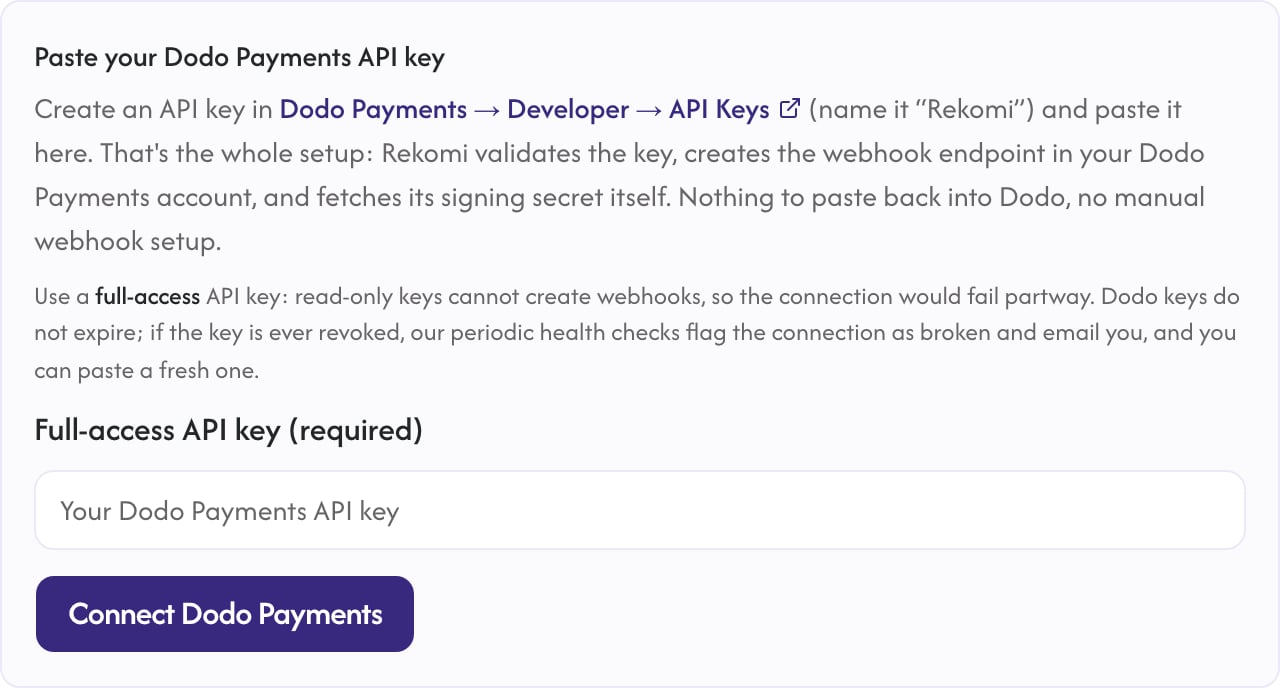
After you connect, Rekomi uses the key only to manage the webhook endpoint and run periodic health checks. Your sales arrive through the signed webhook, not through the API.
3
Install the Rekomi Script
Add the Rekomi tracking script to your marketing site to capture affiliate clicks. Rekomi shows your snippet, with the program ID filled in, under Setup → Install.
4
Pass the Referral into Checkout
Attach the captured referral to each payment as
rekomi_ref metadata. The Implementation Guide shows how for each checkout type.5
Done
Sales, renewals, refunds, and disputes now credit and claw back affiliate commissions automatically, and Rekomi pays your affiliates.
Implementation Guide
Checkout Sessions via the API
On your frontend, read the referral withwindow.Rekomi.getReferral() and send it to your backend with the checkout request. On the backend, set it in metadata:
Node.js
metadata.rekomi_ref field works on subscription products, so the first charge and every renewal credit the same affiliate.
Payments API
The example below uses
POST /payments, which is deprecated. It still works for existing integrations. New integrations should use Checkout Sessions (POST /checkouts), which take metadata the same way.Node.js
Static Payment Links
Add the referral to the link as a flatmetadata_rekomi_ref query parameter, not the bracket form:
metadata_* query parameters to the payment’s metadata, where Rekomi reads them.
What Gets Tracked
Rekomi handles each type of sale event as follows:Important Notes
- Rekomi registers the webhook endpoint with exactly the events it needs. Don’t edit that endpoint’s event list in the Dodo Payments dashboard: Rekomi’s health checks flag the connection if events are removed.
- A free trial creates no payment until the trial ends, so no commission exists until the first charge. A paid trial charges the trial amount upfront.
- Disconnecting in Rekomi deletes the webhook endpoint from your Dodo Payments account.
Additional Resources
Rekomi's Dodo Payments Guide
The full setup walkthrough, troubleshooting, and security details in Rekomi’s docs.
Affiliates Feature Guide
All affiliate integration options for Dodo Payments.
For help with the integration, contact Rekomi support at support@rekomi.com or Dodo Payments support at support@dodopayments.com.