Introduction
Payouts ページには、手数料、返金、税金を差し引いた、次回の支払いで送金される収益が表示されます。また、支払いスケジュール、最低支払いしきい値、リンク済みの銀行口座、支払い履歴も確認できます。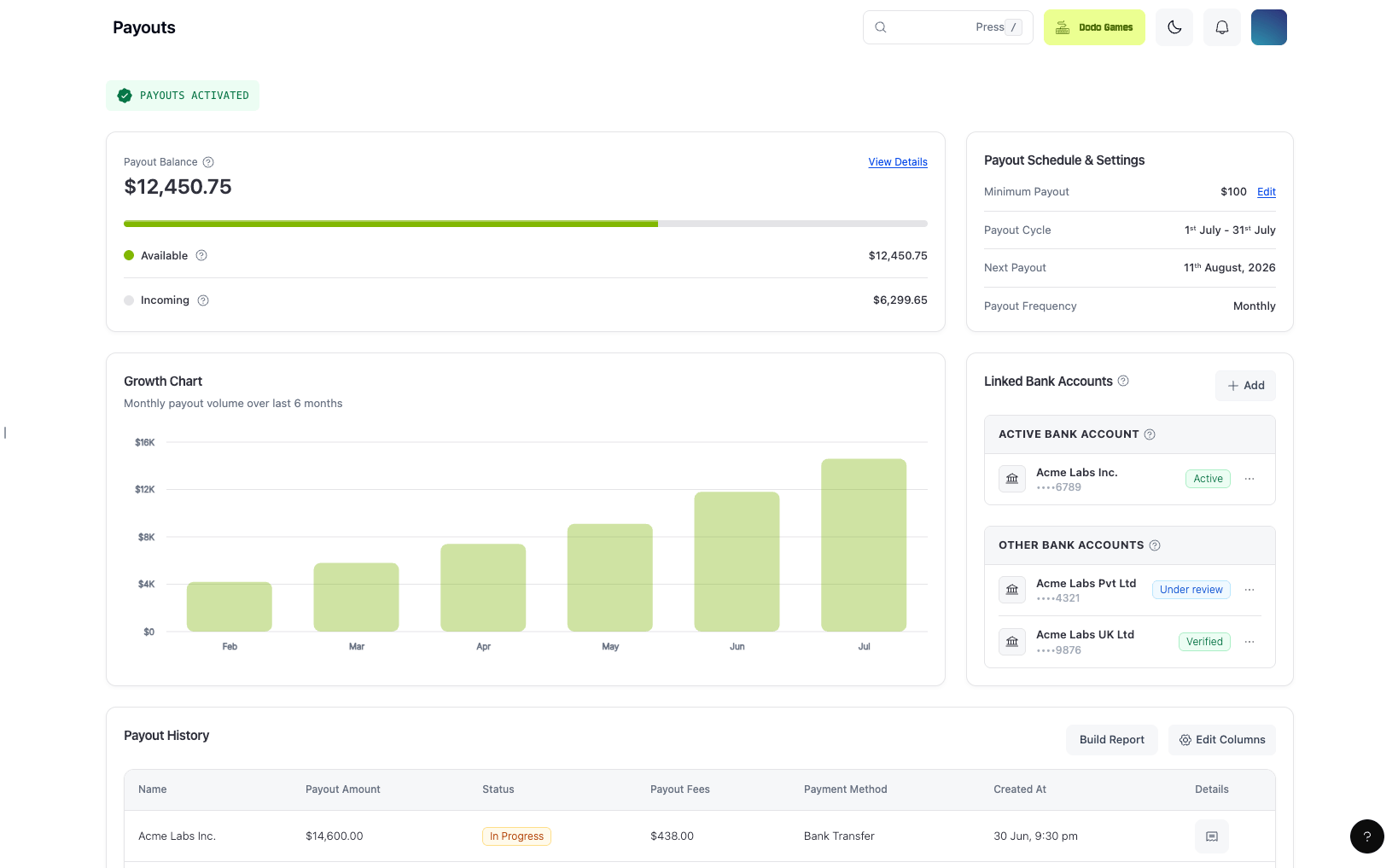
Key Features
- Payout Balanceカードには、次回のpayoutの対象となる残高がUSDで表示され、AvailableとIncomingに分けられます。残高の一部がreserveとして保留されている場合、カードにはReserved行も表示されます。Reserved Balanceを参照してください。
- GBPおよびEURの残高は、表示時にUSDへ換算されます。
- Payout Schedule & Settingsカードには、Minimum Payout、Payout Cycle(現在の請求期間)、Payout Frequency、およびNext Payoutの日付が表示されます。Settings → Payoutsでpayout frequencyとminimum payoutを変更するには、Manageをクリックします。
- Next Payoutは、週末と銀行休業日を除外するpayout scheduleから算出されます。payoutの予定がない場合(残高がminimum payoutを下回っている場合など)は、
-と表示されます。日付が過去になることはありません。予定日に実行されず、なお実行待ちのpayoutは、今日の日付で表示され、次回のpayout実行日に処理されます。
表示額は参考値にすぎません。最終的な支払い額は、送金時点の為替レートによって異なります。ご利用の銀行または中継銀行による手数料によって、入金額がさらに減少する場合があります。Payout Currency and Bank Conversion を参照してください。
Payout Cycles
各支払いサイクルには、固定された請求期間と支払日があります。1
Bi-Monthly (Default)
Billing Period 1: 1st to 15th of the month
Payout Date 1: 18th of the same monthBilling Period 2: 16th to the end of the month
Payout Date 2: 4th of the following month
Payout Date 1: 18th of the same monthBilling Period 2: 16th to the end of the month
Payout Date 2: 4th of the following month
2
Weekly
Billing Period 1: 1st to 7th
Payout Date 1: 11th of the same monthBilling Period 2: 8th to 14th
Payout Date 2: 18th of the same monthBilling Period 3: 15th to 21st
Payout Date 3: 25th of the same monthBilling Period 4: 22nd to the end of the month
Payout Date 4: 4th of the following month
Payout Date 1: 11th of the same monthBilling Period 2: 8th to 14th
Payout Date 2: 18th of the same monthBilling Period 3: 15th to 21st
Payout Date 3: 25th of the same monthBilling Period 4: 22nd to the end of the month
Payout Date 4: 4th of the following month
3
Monthly
Billing Period: 1st to the end of the month
Payout Date: 11th of the following month
Payout Date: 11th of the following month
- payoutは、すべてのverificationが承認され、請求期間における支払い可能残高がpayout thresholdを満たした場合にのみ開始されます。
- すべてのbusinessesのデフォルトのpayout cycleはbi-monthlyです。現在のcycleは、PayoutsページのPayout Frequencyに表示されます。
- transaction volumeが多いbusinessesは、support@dodopayments.comに連絡してweekly payoutをリクエストできます。
- 一部のhigh-risk businessesは、当社の判断によりmonthly payout cycleに設定される場合があります。
Payout Cycleの変更
ダッシュボードから、payout cycleをless frequentなcycleに変更できます。その後、現在のcycleや、より頻度の高いcycleに戻すことはできません。1
Open Payout Settings
Settings → Payoutsに移動するか、PayoutsページのPayout Schedule & SettingsカードでManageをクリックします。
2
Select a New Frequency
Customise PayoutsでPayout Frequencyリストを開きます。変更可能なcycleのみが表示されます。1つ選択してSaveをクリックします。
3
Confirm the Change
**Change payout frequency?**ダイアログで、Changeをクリックします。
Viewer roleのteam membersには、payout settingsが読み取り専用で表示されます。
PayoutがInactiveと表示される理由
ダッシュボードにPayouts Inactiveと表示されている場合、アカウントがその状態にある間は、payout cycleにpayoutが予定されません。これは、予定されているもののまだ送信されていないpayoutとは異なります。Payoutsページには、次のバナーも表示されます。「Payouts to your bank account are currently inactive. Review our Merchant Acceptance Policy to understand what might be affecting your account.」バナーはMerchant Acceptance Policyにリンクしていますが、具体的な理由は示しません。 多くの場合、payoutがまだ有効化されていません。Live paymentsとpayoutsは別々に有効化されるため、アカウントでLive paymentsを受け付けていても、payoutsはinactiveのままになることがあります。payoutsには、承認済みのBank Verification、登録済みentityの場合は承認済みのBusiness Verification、および完了済みのMonitoring Reviewも必要です。1
Check Your Verification Forms
ダッシュボードのVerificationセクションを開きます。通常、formがdraft、under review、またはon holdの状態であることが原因です。formを完了して、アカウントの手続きを進めてください。各状態の意味と、on holdになったformへの対応方法については、Verification Processを参照してください。
2
Check the Threshold and the Cycle
payoutsがactiveの場合、eligible balanceがpayout thresholdを満たし、次回のpayout日になるとpayoutが開始されます。thresholdを下回る残高は、次のcycleに繰り越されます。
3
Contact Support If Every Form Is Approved
すべてのformが承認済みであるにもかかわらずpayoutsがinactiveのままの場合は、登録済みのメールアドレスからsupport@dodopayments.comにメールしてください。
Active payoutsは、payoutがsentされたことを意味しません。threshold未満の残高しかないactiveなアカウントや、次回のpayout日にまだ達していないアカウントでは、予定されたpayoutは表示されません。
以前はPayoutsがActiveだった場合
実行されていたpayoutsがinactiveに戻ることがあります。ダッシュボードには同じPayouts Inactiveラベルが表示されるため、アカウントが有効化されたことがないと判断する前にverification statusを確認してください。通常の理由は次のとおりです。- 未対応のinformation request。 継続的なmonitoringの一環として、compliance teamから追加情報を求められる場合があります。requestに回答しないと、回答するまでpayout processingが停止されることがあります。Additional Information Requestsを参照してください。
- Review in progress。 Review and Monitoring Policyに従い、アカウントのcompliance reviewが完了するまでpayoutsが保留されることがあります。
Payout ProcessingとBank Timelines
- 上記のpayout datesはinitiation datesです。その日付の00:00 UTCにpayoutが作成されます。
- payoutが送信された後、銀行口座に到着するまでの時間は、受取銀行とpayout railによって異なります。
- payout dateが週末またはUS Federal Reserveのbank holidayにあたる場合、payoutは次のbusiness dayに移動します。billing periodは変わりません。PayoutsページのNext Payout dateには、すでにこの移動が反映されています。
Payout Dateが移動する場合
bank holiday calendarによって次回のpayout dateが移動すると、Dodo Paymentsは、両方の日付を示すPayout date movedのin-app notificationを送信します。例:「Payouts scheduled for 2026-10-05 now run on 2026-10-06。」- 通知の対象はnext payout dateのみで、それ以降の日付は対象外です。
- 通知は、payoutsがactiveの間のみ送信されます。
- Communication Preferencesのpayout notification settingsに従い、in-app notificationsを有効にしているすべてのteam memberに送信されます。
- 新しい日付が以前の日付より後になる場合、通知を閉じるまでPayoutsページに移動を示すバナーが表示され、Homeのnext payout cardにはその下に「Moved to」の注記が表示されます。
PayoutがSuccessと表示されているのに到着していない場合
statusがSuccessのpayoutは、銀行に送信済みです。InitiatedまたはIn Progressと表示されるpayoutは、まだ送信されていません。Payout Statusを参照してください。payoutの送信後、資金が表示されるタイミングは受取銀行とpayout railによって決まり、cross-border transferでは最初にintermediary banksを経由する場合があります。 Successと表示されているものの、アカウントに入金されていないpayoutを確認するには、次の手順を行います。1
Check Which Account Received It
Payoutsページで、Active Bank Accountを確認します。最近active accountを変更した場合、変更前に処理されたpayoutは以前のaccountに入金されます。
2
Ask Your Bank to Trace the Transfer
銀行にpayout amount、currency、payout dateを伝えてください。銀行は、まだアカウントに入金されていないincomingおよびpending transfersを検索できます。
3
Contact Support If Your Bank Can't Find It
登録済みのメールアドレスからsupport@dodopayments.comにメールしてください。payout amount、payout date、および分かる場合はpayout IDを記載してください。Payout IDsは
pyt_で始まります。Payout CurrencyとBank Conversion
Payout balancesは、USD、GBP、EURのwalletsに保持されます。transferがDodo Paymentsを離れた後、当社の管理外で、アカウントに入金される金額を変える可能性があるものが2つあります。- 銀行によるconversion。 アカウントに入金されるcurrencyがtransferの送信時のcurrencyと異なる場合、銀行は到着時に独自のexchange rateでtransferを換算します。独自の受取手数料やconversion chargesが適用される場合もあります。
- Intermediary bank charges。 Cross-border transfersはcorrespondent banksを経由することがあり、独自のchargesが差し引かれる場合があります。
Payout routesとcurrenciesは国によって異なります。銀行口座をlinkする前に、payoutの送信方法と入金方法を確認するにはsupport@dodopayments.comに連絡してください。
Minimum Payout Threshold
payable balanceがthresholdを満たさない場合、次のpayout cycleに繰り越されます。
Flexible Minimum Payout Threshold
Dodo Paymentsがpayoutを開始する前に蓄積する必要がある残高を設定できます。thresholdはUSDで設定します。 Configuration:- Allowed values: $50以上の任意の金額
- Effective from: 現在のpayout cycle
- Note: そのcycleですでに予定されているpayoutには、既存の金額が適用されます
Thresholdの編集方法
1
Navigate to Payout Settings
Settings → Payoutsに移動するか、PayoutsページのPayout Schedule & SettingsカードでManageをクリックします。
2
Enter New Threshold
Customise Payoutsで、Minimum Payoutに50 or moreの値を入力します(例:
250)。3
Save Changes
Saveをクリックします。ダッシュボードにMinimum payout updatedと表示され、更新が確認されます。
thresholdは、USD、EUR、GBPのwallet balancesをUSDに換算した合算額と比較されます。
Payout Accounts
PayoutsページのLinked Bank Accountsカードには、payoutを受け取る銀行口座が一覧表示されます。accountを追加、activate、または削除するには、Manage AccountsをクリックしてSettings → Payoutsを開きます。最大three payout accountsをlinkできます。各accountは、currencyとtransfer methodに登録されます。- 支払いを受けたいcurrencyとtransfer methodを選択し、Add Bank AccountでAdd an accountします。
- すべての詳細をすぐに用意できない場合はSave a draftし、後でsubmissionを完了できます。submit後はaccountを編集できません。
- on holdになったaccountはResubmitできます。holdまたはfailureの理由がaccountに表示されるため、修正内容を確認できます。
- first approved account is activated automatically。payoutsは常にActive Bank Accountに送信されます。
- 一覧にない銀行の場合はChoose Other for an unlisted bank. Otherを選択して銀行名を入力します。
Settings → Payoutsで、承認済みaccountのメニューを開き、Set As Activeをクリックすると、同じcurrencyのactive accountを置き換えられます。次のpayout cycleから新しいaccountにpayoutが送られ、すでに処理済みのpayoutは以前のaccountに入金されます。activeではないaccountはDeleteできます。
business onboarding中のBank verificationでは同じpayout accounts flowが使用されるため、onboarding中にsubmitしたaccountが、最初のpayout accountとしてPayoutsページに表示されます。Account Verificationを参照してください。
使用できるAccount
accountは、Dodo Payments accountのverified individualまたはregistered entityである本人に属している必要があります。このルールの範囲内で、利用できる選択肢は多くあります。- accountのcountryはIDのcountryと一致している必要はありません。 onboardingの可否は、identity documentを発行したcountryによって決まります。payout accountは、自分名義で保有している限り、別のcountryにあっても構いません。How Your Eligible Country Is Determinedを参照してください。
- joint personal accountもeligibleです。 named account holdersの1人であり、nameがidentity verificationと一致していれば、joint accountでpayoutを受け取れます。承認前に、bank confirmation letterや、account holdersとaccount identifiersが記載された最近のstatementなど、supporting documentsの提出を求められる場合があります。
- registered entityはentityのaccountを使用する必要があります。 registered entityとしてonboardした場合、payoutはdirectorのpersonal accountではなく、companyのlegal nameのaccountに送られます。
Transfer MethodがCurrencyとCostに与える影響
payout accountは、特定のcurrency and transfer methodに登録されます。この選択によって、銀行が入金するcurrencyと、per-wire feeが差し引かれるかどうかが決まります。USD SWIFT accountであっても、USDを保持できるとは限りません。受取accountがUSDを保持できない場合、銀行は到着時に独自のrateでtransferを換算します。- local currencyで支払いを受けるには、local bank detailsを使い、SwiftではなくLocal transfer methodでaccountを登録します。これによりwire feeを回避できます。
- **USDを保持するには、**USDを受け取り保持できるUSD accountを登録します。これにより銀行が到着時にtransferを換算する理由がなくなります。
- **Payoneerは通常のbank accountとして扱われます。**他のaccountと同様に、bank formに詳細を入力してください。個別のPayoneer integrationはありません。
現在のpayoutおよびUSD SWIFT wire feesについては、pricing pageを参照してください。Swift transfersでは、intermediaryおよびbeneficiary bank feesが適用され、payout amountから差し引かれる場合があります。Payout Currency and Bank Conversionを参照してください。
利用可能なtransfer methodsはcountryによって異なり、すべてのaccountですべてのmethodが提供されるわけではありません。accountを追加するときに、ダッシュボードに利用可能なmethodsが表示されます。どのoptionが自分のsetupに適しているか分からない場合は、accountをlinkする前にsupport@dodopayments.comに連絡してください。
Reserved Balance
Dodo Paymentsは、settled paymentsの一部を、一定期間reserveとして保留することがあります。reserveが保留されている場合、PayoutsページのPayout Balanceカードに、Incomingの下にReserved行が表示されます。- reserved amountも引き続きあなたの資金です。feeではありません。
- 残高へ自動的に戻されます。
- すでにAvailableおよびIncoming amountsから除外されているため、payoutから二重に差し引かれることはありません。
Payout Deductions
次のamountsは、payout前にsalesから差し引かれます。 Taxes: 各paymentに対して計算されたtaxは、sales amountから差し引かれます。Dodo Paymentsがtax authorityへ送金します。 Fees: Dodo Payments transaction feesは各paymentから差し引かれます。payout feeは各payoutから差し引かれます。standard pricingでは、$1,000未満(またはGBPもしくはEUR相当額)のpayoutに対するpayout feeは$5です。 Refunds and Disputes: refunded amounts、disputed amounts、およびそれらのfeesは、発生時に残高から差し引かれます。各ledger entryについてはBalancesを参照してください。ご自身の銀行またはintermediary banksによるchargesは、ここでは差し引かれず、payout invoiceにも表示されません。Payout Currency and Bank Conversionを参照してください。
Payout Status
Payout Historyには、各payoutについて次のいずれかのstatusが表示されます。
すべてのstatus changeでwebhookが発生するため、pollingを行わずに独自のsystemsでpayoutsをreconcileできます。payloadとdelivery detailsについてはPayout Webhooksを参照してください。同じ変更についてemailまたはin-app notificationsを受け取るには、Communication Preferencesを参照してください。
Payout Invoice
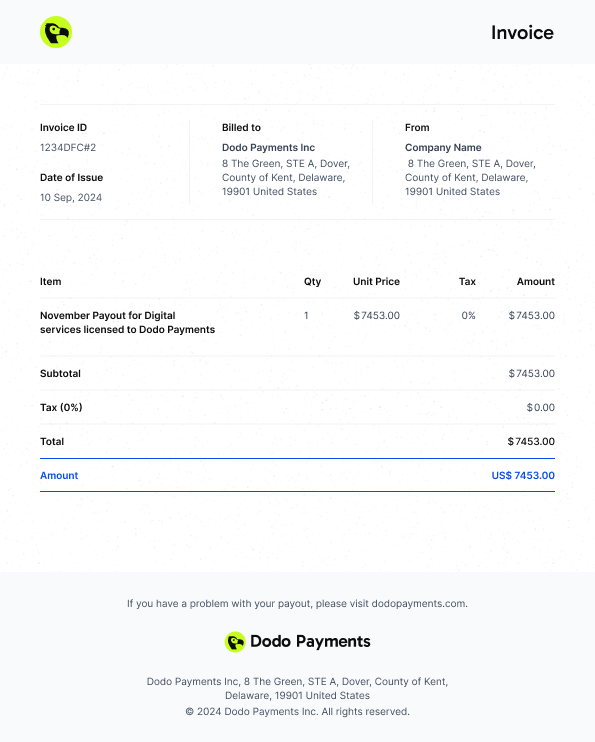
各payoutには、Dodo Paymentsがbusinessに支払うamountを記録したself-billed invoiceがあります。businessはBilled Fromに、Dodo Payments payout entityはBilled toに表示されます。payoutが成功するとinvoiceにはPaidと表示され、それまではUnpaidと表示されます。 ダウンロードするには、Payout Historyを開き、Details列のpayoutをクリックして、Payout DetailsパネルでDownload → Download Invoiceをクリックします。 Payout Detailsパネルには、Payments、Tax Deducted、Payment Feesなど、ledger entry typeごとのpayoutの内訳も表示されます。payoutがsettleするentriesの合計がpayout amountと一致しない場合、差額はUnattributed Balanceとして、totalの直上に最後の項目として表示されます。正のamountは、以前のperiodから繰り越されたbalanceをpayoutが使用したことを意味します。負のamountは、entriesの合計がpayoutを上回り、残額が後続のpayoutに充当されることを意味します。Invoice Structure