

Overview
Customersページには、ビジネスから購入したすべての顧客が一覧表示されます。顧客ページでは、支払いとサブスクリプションの確認、ウォレット残高の確認と調整、Customer Portalリンクの送信、顧客のブロックができます。同じ顧客レコードはAPIでも利用できます。Customer Dashboard
Customer Wallets
Customer Portal
API Management
Accessing the Customers Page
1
Navigate to Customers
ダッシュボードで Sales → Customers に移動します。
2
View Customer List
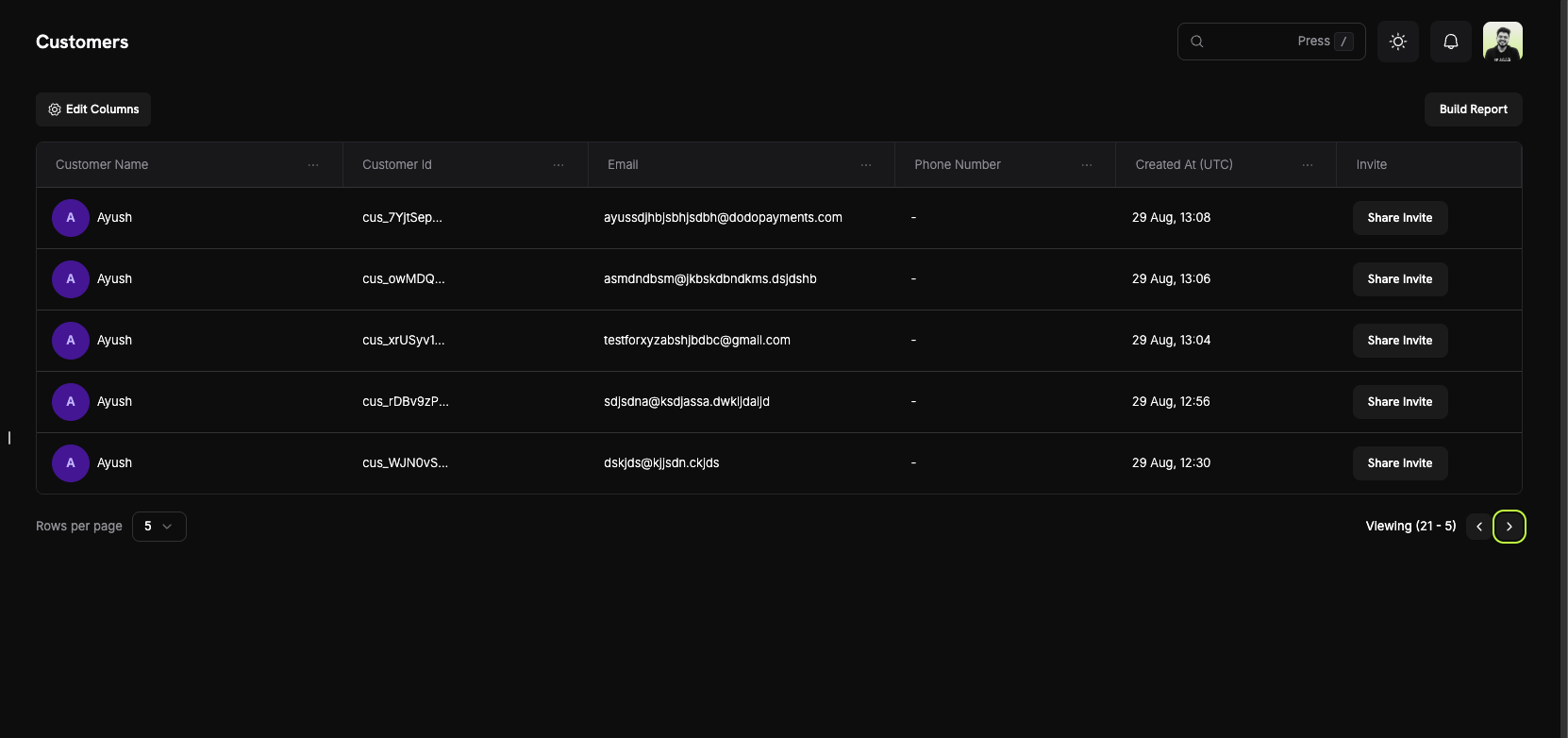
このページには、ビジネスの現在および過去のすべての顧客が一覧表示されます。
Customer Information
顧客テーブルには顧客ごとに1行が表示され、以下の列が含まれます。Customer List Columns
- Customer Name: アバター付きの顧客の氏名。
- Customer Id:
cus_で始まる一意の識別子。API呼び出しで使用します。 - Email: 顧客のメールアドレス。顧客はこのアドレスを使ってCustomer Portalにサインインします。
- Phone Number: 提供されている場合は、顧客の電話番号。
- Created At: 顧客レコードが作成された日時。値にカーソルを合わせるとUTCでの時刻を確認できます。
- Invite: この顧客のCustomer Portalリンクを開く Share Invite ボタン。
Page Features
- Column visibility: テーブルに表示する列を選択します。
- Filters: Name または Email Address で顧客を検索します。
- Pagination: リストを移動し、Rows per page の件数を設定します。
Customer Details Page
顧客をクリックして Customer Information ページを開きます。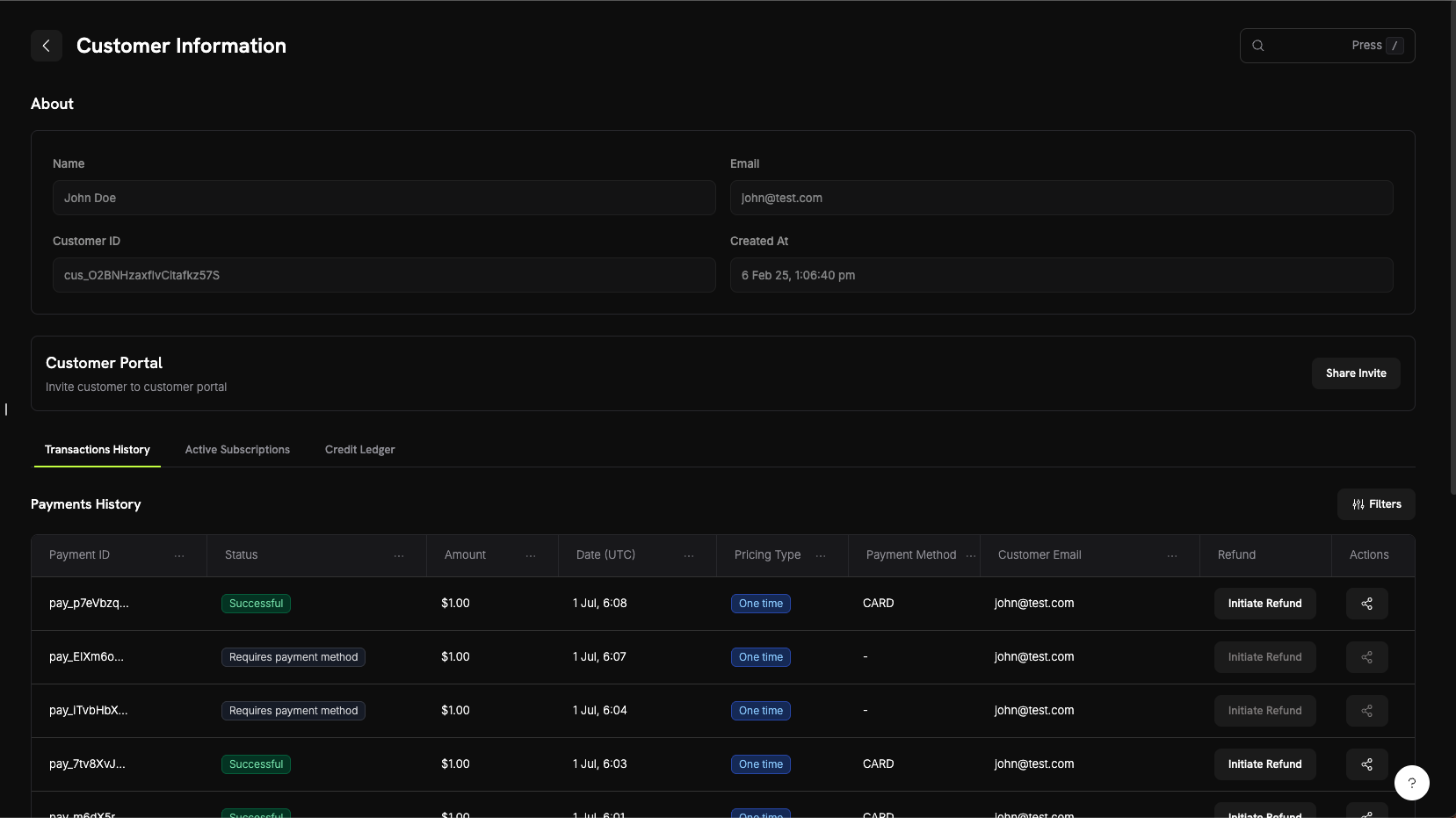
About Section
ページ上部には、顧客の基本情報が表示されます。- Name: 顧客の氏名。
- Email: 顧客のメールアドレス。
- Customer ID: APIおよびサポートリクエストで使用する識別子。
- Created At: 顧客レコードが作成された日時。
顧客アクティビティタブ
詳細情報の下にあるタブには、顧客のアクティビティが表示されます。主なタブについては以下で説明します。このページには Credits、Entitlements、Sent Emails タブもあります。Sent Emails については、Customer Email Logsを参照してください。- Transactions History
- Active Subscriptions
- Wallets
顧客の支払い、返金、異議申し立て。支払いテーブルには以下が表示されます。
- Payment ID:
pay_で始まる支払いの識別子。 - Status: 支払いステータス。例: Successful、Failed、Refunded。
- Amount: 支払い金額。
- Date: 支払いが作成された日時。
- Pricing Type: 一回限りまたはサブスクリプション。
- Payment Method: カードやUPIなど、使用された支払い方法。
- Customer Email: 支払いに登録されているメールアドレス。
- Refund: Initiate Refund ボタン。
- Actions: 支払いに関するその他のオプション。
Wallets タブには顧客のウォレットに対するすべての変更が表示されるため、現在の残高に至った経緯を追跡できます。
顧客のブロック
不正行為や返金の悪用を行う顧客をブロックすると、その顧客は再びあなたのサービスでチェックアウトできなくなります。ブロックすると、顧客の有効なサブスクリプションがキャンセルされ、Customer Portalが読み取り専用になります。ブロックされた顧客のページには Blocked バッジ、Unblock Customer ボタン、ブロックの理由を説明するメモの Activity Log が表示されます。すべてのブロックは Settings → Blocklist から管理します。Customer Blocklist
Customer Portal
Customer Portalは、顧客がサポートに問い合わせることなく、サブスクリプションの管理、請求履歴の確認、ライセンスキーの取得を行えるホスト型セルフサービスサイトです。ポータルの機能
ポータルでは、顧客は次の操作を行えます。- View Billing History: 過去の支払いを確認し、請求書をダウンロードします。
- Manage Subscriptions: 設定に応じて、詳細の確認、プラン変更、一時停止、キャンセルを行います。
- Retrieve License Keys: 購入に紐付けられたライセンスキーを確認します。
- Update Billing Details: サブスクリプションの名前、請求先住所、支払い方法を変更します。メールアドレスと電話番号は表示されますが、ポータルでは編集できません。
Learn More About Customer Portal
顧客ウォレット
Customer Walletsは顧客の前払い資金を保持し、通貨ごとに1つの残高を管理します。Dodo Paymentsは、支払い方法に請求する前に、顧客のサブスクリプション料金へウォレット残高を充当します。台帳エントリを使用して資金を追加または減額します。たとえば、返金をウォレット残高やプロモーションボーナスとして付与できます。主な機能
- Multi-Currency Support: 通貨ごとに固有の残高を持ちます。
- Prepaid Balances: 今後のサブスクリプション更新やプラン変更時の料金に資金が充当されます。
- Transaction History: 台帳にはすべての資金の追加と減額が記録されます。
- API-First Design: APIまたは Wallets タブから残高を確認し、資金を追加または減額します。
Learn More About Customer Wallets
API管理
Customers APIでは、顧客の作成、取得、更新、フィルターを使った一覧表示、保存済みの支払い方法の管理を行えます。利用可能なAPIエンドポイント
Create Customer
List Customers
Get Customer Details
Update Customer
Delete Payment Method
Create Portal Session
すべてのエンドポイントでAPIキーが必要です。APIはサーバーから呼び出し、クライアント側のコードにキーを決して公開しないでください。