

Get Customer Wallets
Create Ledger Entry
List Ledger Entries
Customer Wallets とは?
Customer Wallets は顧客のために実際の資金を保持し、通貨ごとに1つの残高を持ちます。ウォレットは次の用途に使用できます。- 将来のサブスクリプション支払い用に前払い資金を保管する
- カードへの返金の代わりに、ウォレット残高として返金を処理する
- ウェルカムボーナスやロイヤルティ報酬などのプロモーション残高を付与する
- 請求時にウォレット資金をサブスクリプション料金へ自動的に適用する
- 残高の適用前後を含むすべての取引を台帳で追跡する
ウォレットを自分で作成する必要はありません。ある通貨で初めて台帳エントリを追加すると、その通貨の顧客ウォレットが残高0で作成されます。それまでは、Get Customer Wallets はその通貨のエントリを返しません。
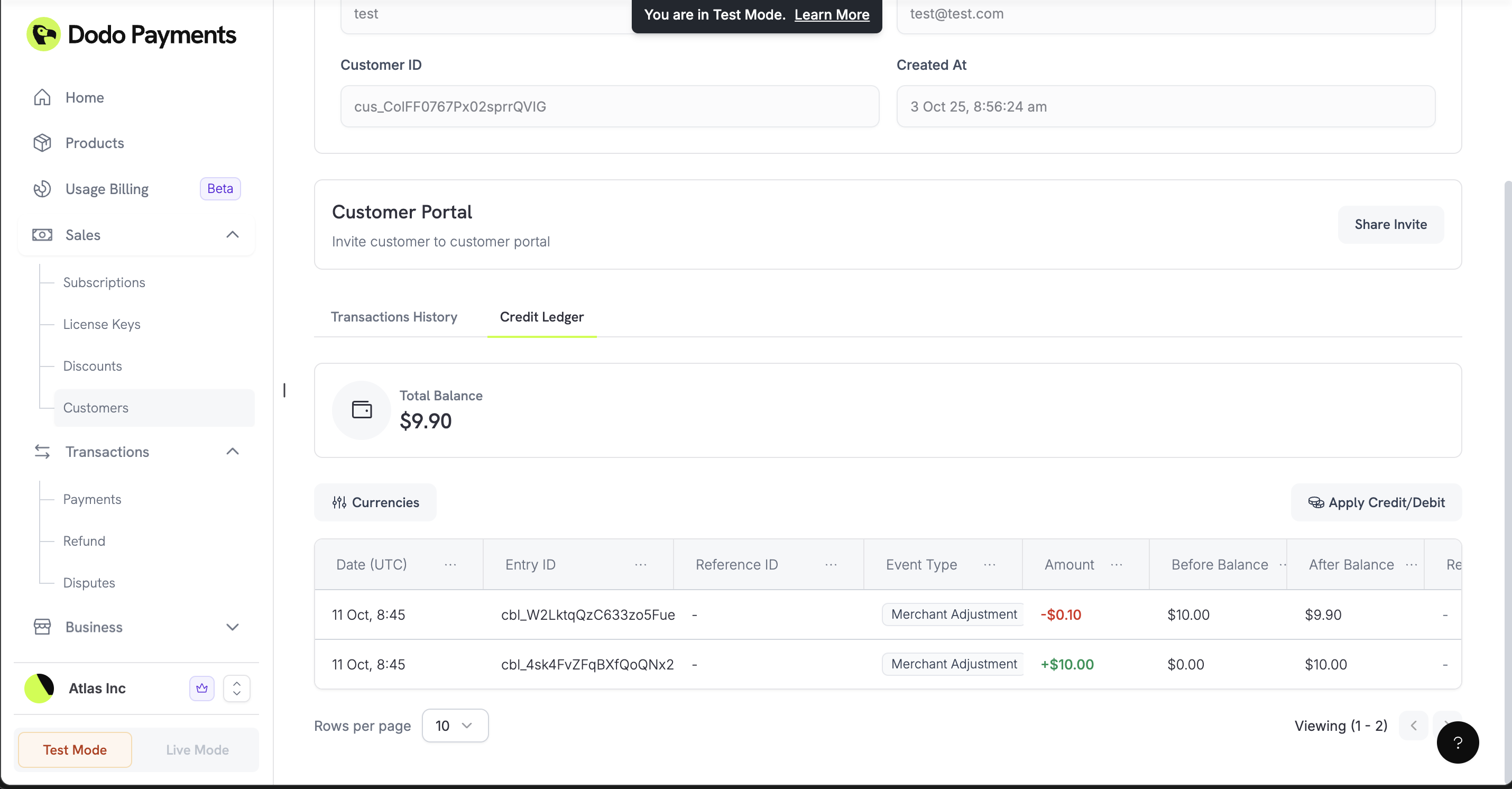
仕組み
サブスクリプションが更新されるか、プラン変更によって料金が発生すると、Dodo Payments はまずその通貨での顧客のウォレット残高を適用し、残りを支払い方法に請求します。残高が料金の一部しかカバーしない場合、ウォレットからその一部が支払われます。自動セットアップ
設定は必要ありません。API で台帳エントリを追加するか、ダッシュボードの顧客の Wallets タブで Apply Credit/Debit をクリックすると、その通貨のウォレットを使用できるようになります。マルチ通貨対応
通貨ごとに残高は異なります。Get Customer Wallets のレスポンスに含まれる各ウォレットには、最小通貨単位でのcurrency と balance があり、すべての残高を USD に換算した合計である total_balance_usd も含まれます。台帳エントリでは次の通貨を使用できます。
integer
米ドルでの残高(セント単位で保存)
integer
ユーロの残高(セント単位で保存)
integer
英ポンドの残高(ペンス単位で保存)
Customer Wallets は USD、EUR、GBP の残高を保持します。Payout Structure に記載されている廃止済みの INR ネイティブウォレットは、顧客ウォレットではなく、マーチャントの出金ウォレットです。INR は引き続き、UPI、RuPay、インドのカードを使用するサブスクリプションの取引通貨としてサポートされています。
ウォレットの操作
顧客残高の確認
購入前に残高を確認したり、アプリに表示したりするために、すべての通貨で顧客の残高を取得します。Get Customer Wallet Balances
資金の追加または差し引き
ウェルカムボーナスや返金残高などの資金を追加したり、手動請求などの資金を差し引いたりします。entry_type、currency、amount は必須です。amount は、最小通貨単位で指定する正の整数です。監査証跡用に reason(最大500文字)を追加し、重複を防ぐために idempotency_key を追加します。レスポンスには更新後のウォレットが含まれます。
entry_type はウォレットへの資金追加では 'credit'、資金の差し引きでは 'debit' です。残高を超えるデビットは 400 で失敗します。Create Customer Wallet Ledger Entry
取引履歴の表示
顧客のすべてのクレジットとデビットを、ページネーションおよび任意のcurrency フィルター付きで一覧表示します。各エントリには event_type(payment、payment_reversal、refund、refund_reversal、dispute、dispute_reversal、または merchant_adjustment)、amount、before_balance、after_balance が含まれます。台帳を使用してアカウントを照合し、顧客からの問い合わせに回答してください。
List Customer Wallet Ledger Entries
実際の使用例
例では TypeScript SDK を使用しています。client は、Integration Guide の手順で作成した DodoPayments クライアントです。
ウォレットへの返金
顧客のカードへ返金する代わりにウォレット残高として返金するには、クレジットエントリで金額を追加します。資金は顧客の次回購入に備えてビジネス側に保持されます。台帳へのクレジット追加では、元の支払いは返金されません。Refunds API を通じて支払いを返金すると、ウォレットが支払った金額のうち該当する部分は Dodo Payments が自動的にウォレットへ返します。
ウェルカムボーナス / プロモーション残高
新規顧客にウェルカムボーナスを付与して、初回購入を促します。ウォレットからのサブスクリプション支払い
自分で請求する料金の支払いにウォレットから資金を差し引きます。更新時には Dodo Payments が残高を自動的に適用するため、この手順は必要ありません。前払い請求システム
顧客が事前にアカウントへ入金し、その残高を時間の経過とともに使用できるようにします。customerId、paymentId、purchaseId は、それぞれ顧客、入金、購入を識別する独自の ID です。
1
Add Initial Funds
顧客が入金したら、顧客のウォレットに資金を追加します。
2
Apply Balance to Purchases
顧客がサービスを利用するたびに、残高から差し引きます。
3
Monitor Balances
顧客の資金が不足しそうか確認し、チャージを促します。
複数通貨のサポート
異なる地域の顧客について、通貨ごとに別々の残高を保持します。US Customers
US Customers
米国を拠点とする顧客の USD 資金を管理します。
European Customers
European Customers
欧州を拠点とする顧客の EUR 資金を管理します。
UK Customers
UK Customers
英国を拠点とする顧客の GBP 資金を管理します。
ベストプラクティス
重複する取引を防ぐ
エントリの原因となったイベント(注文 ID や支払い ID など)から生成したidempotency_key を渡し、リトライによって資金が二重に追加または差し引きされないようにします。同じキーでリクエストを再実行した場合、Dodo Payments は新しいエントリを作成せず、現在のウォレットを返します。
請求前に残高を確認する
ウォレットから多額の資金を差し引く前に、残高がその金額をカバーできることを確認してください。今後の予定
Customer Wallets は次の機能をサポートしていません。- 残高の有効期限:ウォレット資金に有効期限はありません。
- 分析:支出レポートや残高の推移はありません。台帳を使用して独自に作成してください。
- Webhooks:残高が変更されても Webhook は発生せず、残高不足のアラートもありません。変更を追跡するには、台帳エントリを一覧表示してください。