Kirim license keys, file yang dapat diunduh, feature flags, serta akses ke Discord, GitHub, Telegram, Framer, dan Notion secara otomatis saat pelanggan membayar.
Entitlement mengubah pembayaran yang berhasil atau subscription aktif menjadi akses: license key di inbox pelanggan, feature flag yang diperiksa oleh aplikasi Anda, role Discord, repository GitHub, template Notion, link remix Framer, undangan chat Telegram, atau kumpulan file yang dapat diunduh. Dodo Payments menerbitkan, melacak, dan mencabut akses tersebut secara otomatis saat lifecycle pembayaran berubah.
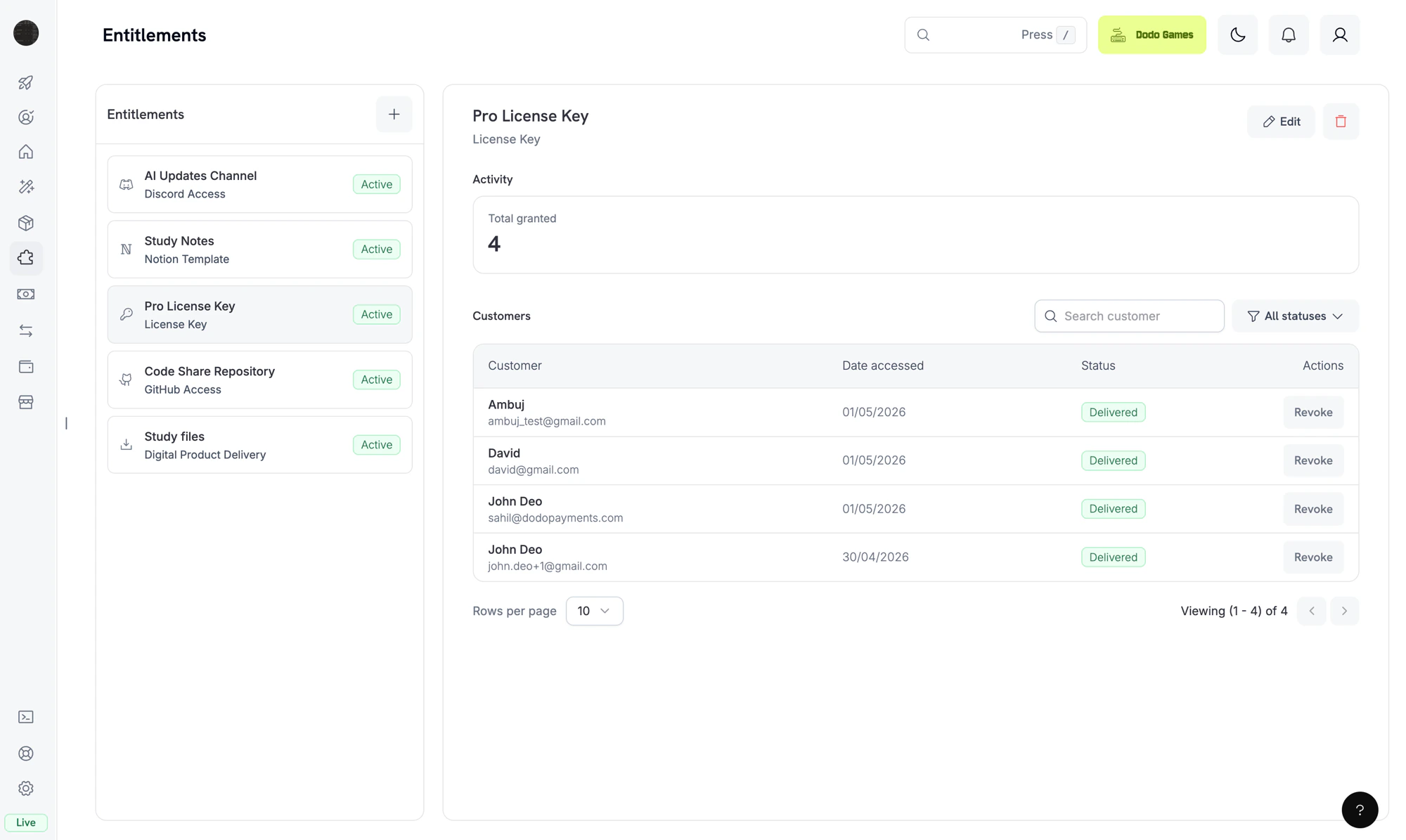
The Entitlements dashboard. Each entitlement is a reusable template; the right pane shows individual customer grants.
Entitlement adalah definisi yang dapat digunakan kembali untuk sesuatu yang Anda berikan kepada pelanggan, seperti license key Pro, role Discord “Patrons”, akses ke repository GitHub privat, atau kumpulan e-book yang dapat diunduh. Anda mengaitkan entitlement ke produk, lalu Dodo Payments mengirimkannya saat pelanggan membayar.Saat pelanggan membeli produk, Dodo Payments membuat grant: penerbitan entitlement tersebut untuk satu pelanggan. Grant memiliki salah satu dari empat status: Pending saat delivery sedang berlangsung, Delivered setelah pelanggan mendapatkan akses, Failed jika delivery tidak dapat diselesaikan, dan Revoked saat akses dicabut.
Entitlement mengatur fulfillment (apakah pelanggan memiliki akses?). Credits mengatur consumption (berapa banyak yang dapat mereka gunakan?). Anda dapat mengaitkan keduanya ke produk yang sama. Lihat Credit-Based Billing untuk credits.
Grant mengikuti event pembayaran dan subscription yang sama dengan yang Anda terima sebagai webhook. Dodo Payments membuat dan mencabut grant untuk pembelian secara otomatis berdasarkan lifecycle pembayaran, sehingga Anda tidak perlu memanggil grant API sendiri.
Dodo Payments membuat grant saat pembayaran selesai atau subscription menjadi aktif. Grant feature flag dimulai sebagai Delivered. Grant license key juga dimulai sebagai Delivered saat entitlement menggunakan fulfillment_mode: auto (default). Dalam fulfillment_mode: manual, grant dimulai sebagai Pending tanpa key sampai Anda memberikannya melalui Fulfill License Key Grant. Setiap integration lainnya dimulai sebagai Pending.Integration berbasis OAuth (Discord, GitHub, Notion) menyediakan oauth_url yang dikunjungi pelanggan untuk memberikan persetujuan. Dodo Payments mencoba membuat URL ini saat membuat grant. Jika gagal, field tetap null sampai pelanggan memulai accept flow dari email delivery atau Customer Portal. Integration platform-direct (Telegram, Framer, Digital Files) tetap Pending hanya selama delivery disiapkan, lalu berpindah ke Delivered.
2
Delivered
Saat delivery selesai, grant berpindah ke Delivered dan delivered_at ditetapkan. Delivery selesai saat license key dibuat, role ditetapkan, akses repository diberikan, link file ditemukan, atau OAuth flow selesai.
3
Failed
Jika pemanggilan integration menghasilkan error yang tidak dapat dicoba ulang, seperti token OAuth yang dicabut, izin yang ditolak, atau file yang sudah tidak ada, grant berpindah ke Failed. Field error_code dan error_message mencatat alasannya.
4
Revoked
Saat akses dicabut, misalnya karena subscription dibatalkan, refund diterbitkan, atau Anda mencabut grant, grant berpindah ke Revoked. Field revocation_reason mencatat pemicunya.
Tidak ada perubahan. Event subscription di bawah ini mengatur grant tersebut.
subscription.active
Menerbitkan grant untuk setiap entitlement terkait yang belum memilikinya, serta menerbitkan kembali grant yang sebelumnya dicabut untuk subscription yang sama. Grant yang dicabut dengan manual, refund, atau platform_external tidak diterbitkan kembali.
subscription.renewed
Tidak ada perubahan. Grant yang ada tetap bertahan selama renewal.
subscription.past_due
Tidak ada perubahan. Grant tetap terkirim selama grace period.
subscription.on_hold
Mencabut semua grant yang telah dikirim dan yang masih tertunda dengan revocation_reason: subscription_on_hold.
subscription.paused
Mencabut semua grant yang telah dikirim dan yang masih tertunda dengan revocation_reason: SubscriptionPaused. Tidak seperti alasan subscription lainnya, nilai ini menggunakan PascalCase, jadi cocokkan persis.
subscription.unpaused
Menerbitkan kembali grant yang sebelumnya dicabut untuk subscription yang sama, dengan cara yang sama seperti subscription.active.
subscription.cancelled
Mencabut semua grant dengan revocation_reason: subscription_cancelled.
subscription.expired
Mencabut semua grant dengan revocation_reason: subscription_expired.
subscription.plan_changed
Mencabut semua grant saat ini dengan revocation_reason: plan_changed, lalu menerbitkan grant untuk entitlement pada plan baru.
refund.succeeded (pembayaran satu kali)
Mencabut grant untuk pembayaran tersebut dengan revocation_reason: refund.
Pencabutan API manual
Mencabut grant dengan revocation_reason: manual. Pencabutan manual tidak diterbitkan kembali secara otomatis saat subscription diperbarui.
License key dinonaktifkan
Untuk grant license key, menonaktifkan key yang mendasarinya mencabut grant dengan revocation_reason: license_key_disabled. Mengaktifkan kembali key akan memulihkan grant secara otomatis.
Drift platform terdeteksi
Jika sisi platform dari suatu integration tidak lagi sinkron, misalnya role Discord dihapus secara manual, GitHub App kehilangan akses repository, atau proses rekonsiliasi menemukan target yang hilang, Dodo Payments mencabut grant dengan revocation_reason: platform_external. Grant tidak diterbitkan kembali secara otomatis saat subscription diperbarui sampai masalah platform diselesaikan.
Grant yang digerakkan oleh subscription bersifat idempotent berdasarkan (entitlement, customer, subscription), sehingga renewal dan reaktivasi tidak membuat grant duplikat. Grant satu kali bersifat idempotent berdasarkan (entitlement, customer, payment).
Buka Entitlements di dashboard lalu klik + untuk membuat entitlement.
2
Pick an Integration
Pilih jenis integration: License Key, Digital Files, Feature Flag, Discord, GitHub, Telegram, Figma, Framer, atau Notion. Untuk integration platform, hubungkan akun Anda terlebih dahulu jika belum melakukannya.
3
Configure Delivery
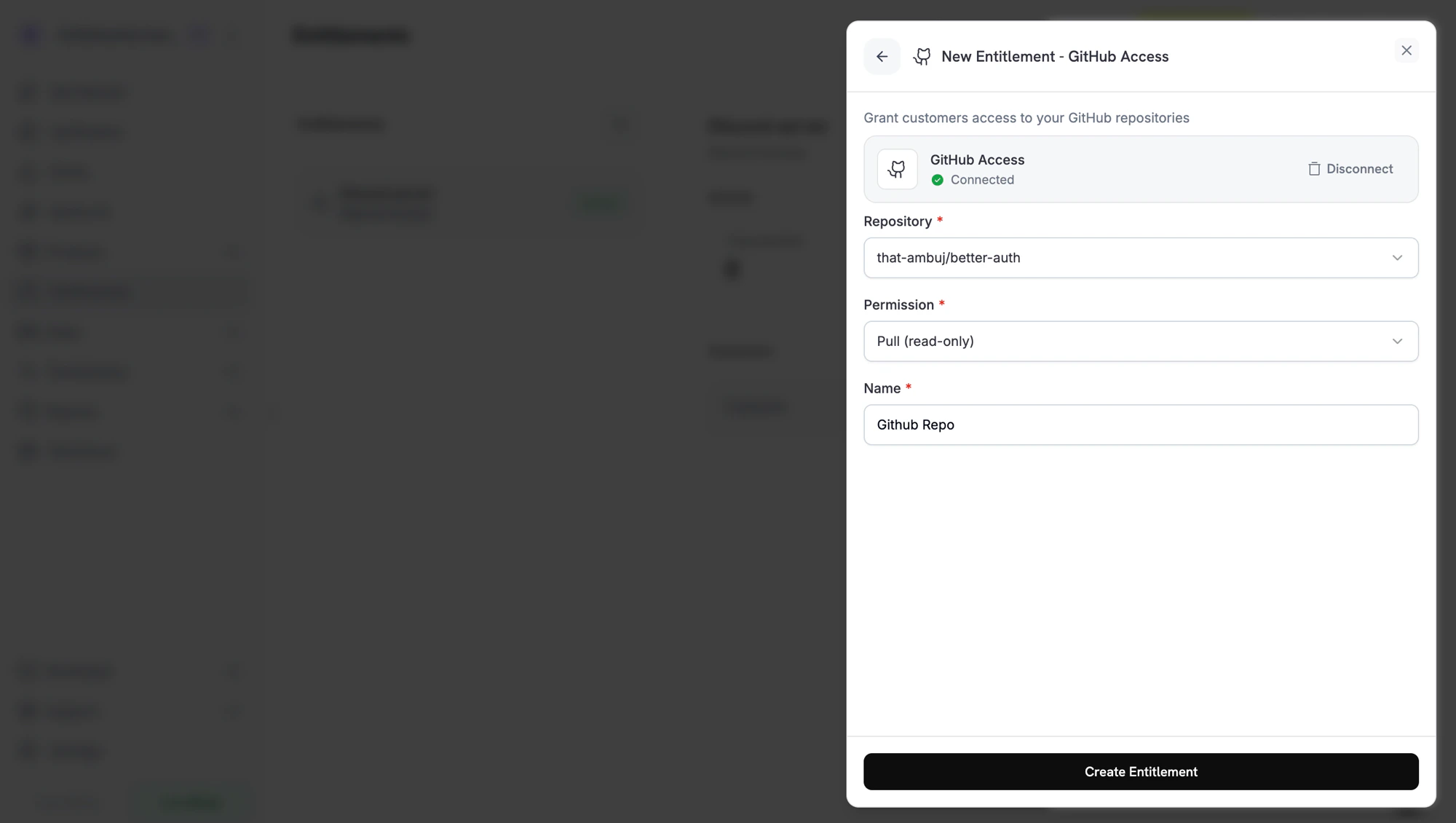
Isi field untuk integration tersebut. Misalnya, GitHub meminta repository dan tingkat izin, Discord meminta server dan role opsional, sedangkan License Key meminta batas aktivasi dan durasi license.
Creating a GitHub entitlement. Each integration shows the fields it needs.
4
Save
Klik Create Entitlement. Sekarang Anda dapat mengaitkan entitlement ke produk apa pun.
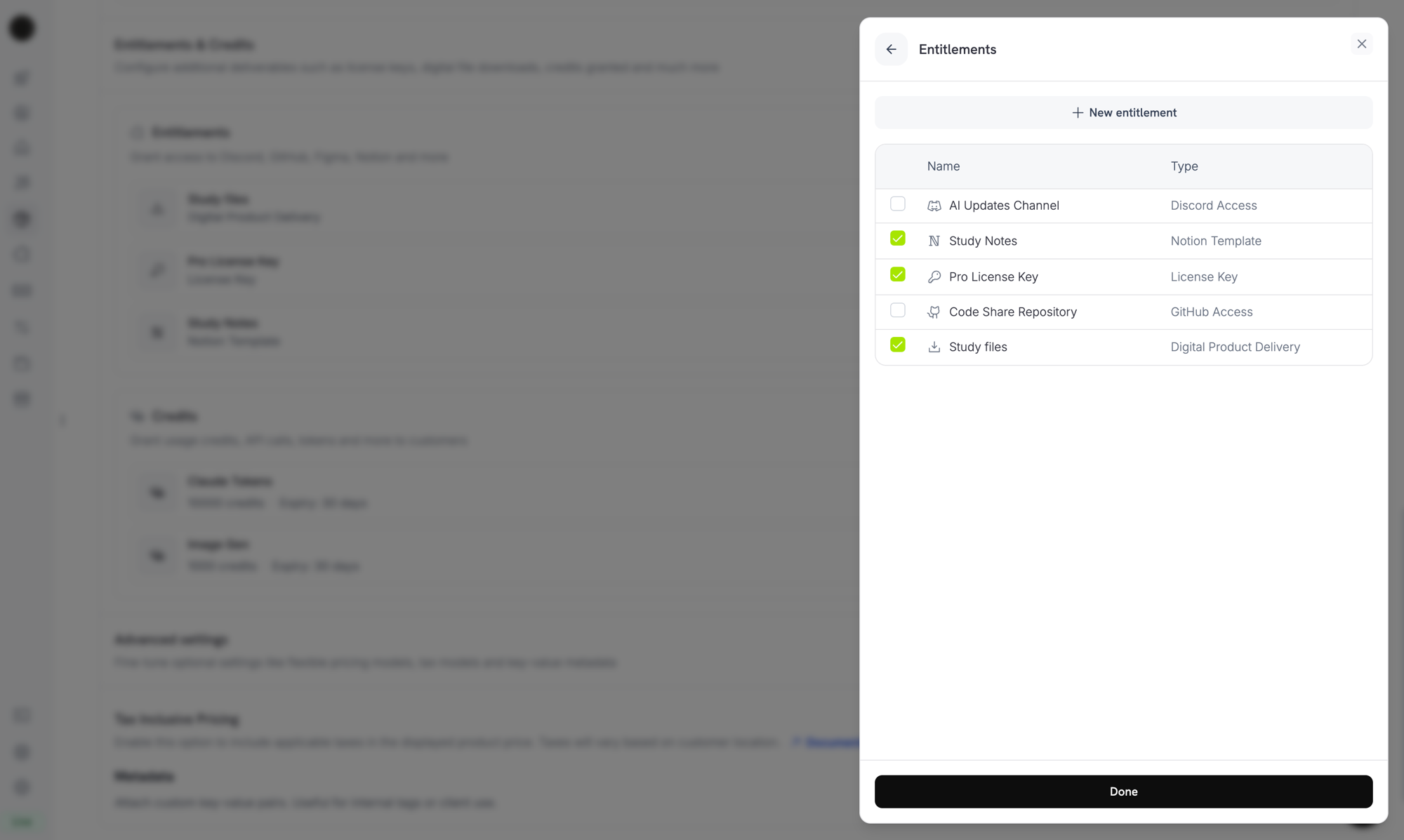
Buka produk, masuk ke bagian Entitlements, lalu pilih entitlement yang akan dikirim saat produk dibeli. Satu produk dapat mengirim beberapa entitlement sekaligus. Misalnya, plan Pro dapat mencakup license key, akses GitHub, dan role Discord.
Attaching entitlements to a product. Selected entitlements are delivered on every successful purchase or active subscription.
Setelah pembelian, pelanggan menerima email delivery berisi license key, link download, link undangan OAuth, atau undangan platform yang berlaku untuk entitlement pada produk. Detail yang sama tetap tersedia di Customer Portal, di bagian riwayat pesanan mereka, selama grant masih aktif.
Akses subscriber Discord, GitHub, dan Notion mengharuskan pelanggan mengotorisasi Dodo Payments untuk memberikan akses tersebut. Grant ini tetap Pending sampai pelanggan menyelesaikan OAuth flow dari link di email atau Customer Portal. Setelah pelanggan memberikan otorisasi, grant berpindah ke Delivered dan Dodo Payments menyediakan akses platform.
Saat grant dicabut, Dodo Payments menghapus akses di platform: menghapus role Discord, menghapus collaborator GitHub, atau menonaktifkan license key. Pelanggan melihat perubahan tersebut di Customer Portal.
Untuk Digital Files, pencabutan menghentikan URL download baru yang telah ditandatangani, tetapi tidak membatalkan salinan yang sudah diunduh pelanggan. Rencanakan pembatasan konten Anda dengan mempertimbangkan hal ini.
Buka entitlement apa pun dari dashboard untuk melihat grant-nya. Panel detail menampilkan jumlah total yang diberikan, filter status, dan satu baris untuk setiap grant berisi pelanggan, tanggal akses, status, serta tindakan Revoke.Untuk mengelola grant secara programatis, buat daftar grant dengan filter status dan cabut satu grant berdasarkan ID:
import DodoPayments from 'dodopayments';const client = new DodoPayments({ bearerToken: process.env['DODO_PAYMENTS_API_KEY'],});// List grants for an entitlementconst grants = await client.entitlements.grants.list('ent_abc123', { status: 'Delivered',});// Revoke a single grantawait client.entitlements.grants.revoke('entg_xyz789', { id: 'ent_abc123',});
Dodo Payments mengirim empat event webhook untuk lifecycle grant. Subscribe ke event tersebut agar aplikasi Anda tetap sinkron dengan hal yang dapat diakses setiap pelanggan.
Event
Terjadi saat
entitlement_grant.created
Grant dibuat. Grant license key yang dipenuhi otomatis dan grant feature flag tiba dalam status Delivered. Grant license key yang dipenuhi secara manual dan setiap integration lainnya tiba dalam status Pending, lalu berpindah ke Delivered setelah pemanggilan platform berhasil atau, untuk integration berbasis OAuth, setelah pelanggan memberikan otorisasi.
entitlement_grant.delivered
Grant yang ada berpindah ke Delivered, sehingga pelanggan kini memiliki akses. Grant yang berstatus Delivered saat dibuat hanya memicu created.
entitlement_grant.failed
Grant tidak dapat dikirim. Periksa error_code dan error_message.
entitlement_grant.revoked
Akses telah dicabut. Periksa revocation_reason.
Entitlement Grant Webhook Payloads
Lihat schema payload lengkap, contoh event, dan referensi revocation_reason.
Gunakan satu entitlement untuk setiap channel delivery. Jangan gunakan satu entitlement Discord bersama beberapa produk dengan tujuan role yang berbeda. Buat satu entitlement untuk setiap role agar pencabutan tetap rapi.
Uji terlebih dahulu dalam test mode. Buat entitlement, kaitkan ke produk pengujian, lakukan checkout, lalu amati grant berpindah dari Pending ke Delivered. Kemudian batalkan subscription pengujian dan pastikan grant dicabut.
Dengarkan entitlement_grant.delivered, bukan payment.succeeded. Pembayaran dapat berhasil sebelum fulfillment selesai, terutama untuk OAuth flow. Tunggu hingga grant mencapai Delivered sebelum membuka feature yang bergantung padanya di sistem Anda sendiri. Grant yang dikirim saat pembuatan, seperti license key yang dipenuhi otomatis atau feature flag, tiba sebagai entitlement_grant.created dengan status: "Delivered".
Anggap entitlement_grant.failed sebagai tindakan yang perlu ditangani. Grant yang gagal berarti pelanggan sudah membayar tetapi belum mendapatkan akses. Tampilkan grant ini kepada tim support Anda atau picu penerbitan ulang grant.
Petakan revocation_reason ke flow retensi Anda. Pencabutan subscription_on_hold dapat dipulihkan karena pelanggan mungkin memperbarui kartunya. Pencabutan manual disengaja. Perlakukan keduanya secara berbeda dalam pesan kepada pelanggan.
Jangan cabut akses pada subscription.past_due. Event tersebut membuka grace period, dan pelanggan tetap memiliki akses sampai periode tersebut berakhir. Tunggu subscription.on_hold atau subscription.cancelled.