Entregue chaves de licença, arquivos para download, feature flags e acesso ao Discord, GitHub, Telegram, Framer e Notion automaticamente quando os clientes pagarem.
Entitlements transformam um pagamento bem-sucedido ou uma assinatura ativa em acesso: uma chave de licença na caixa de entrada do seu cliente, uma feature flag que seu aplicativo verifica, uma função no Discord, um repositório do GitHub, um template do Notion, um link de remix do Framer, um convite para um chat do Telegram ou um pacote de arquivos para download. O Dodo Payments emite, acompanha e revoga esse acesso automaticamente conforme o ciclo de vida do pagamento muda.
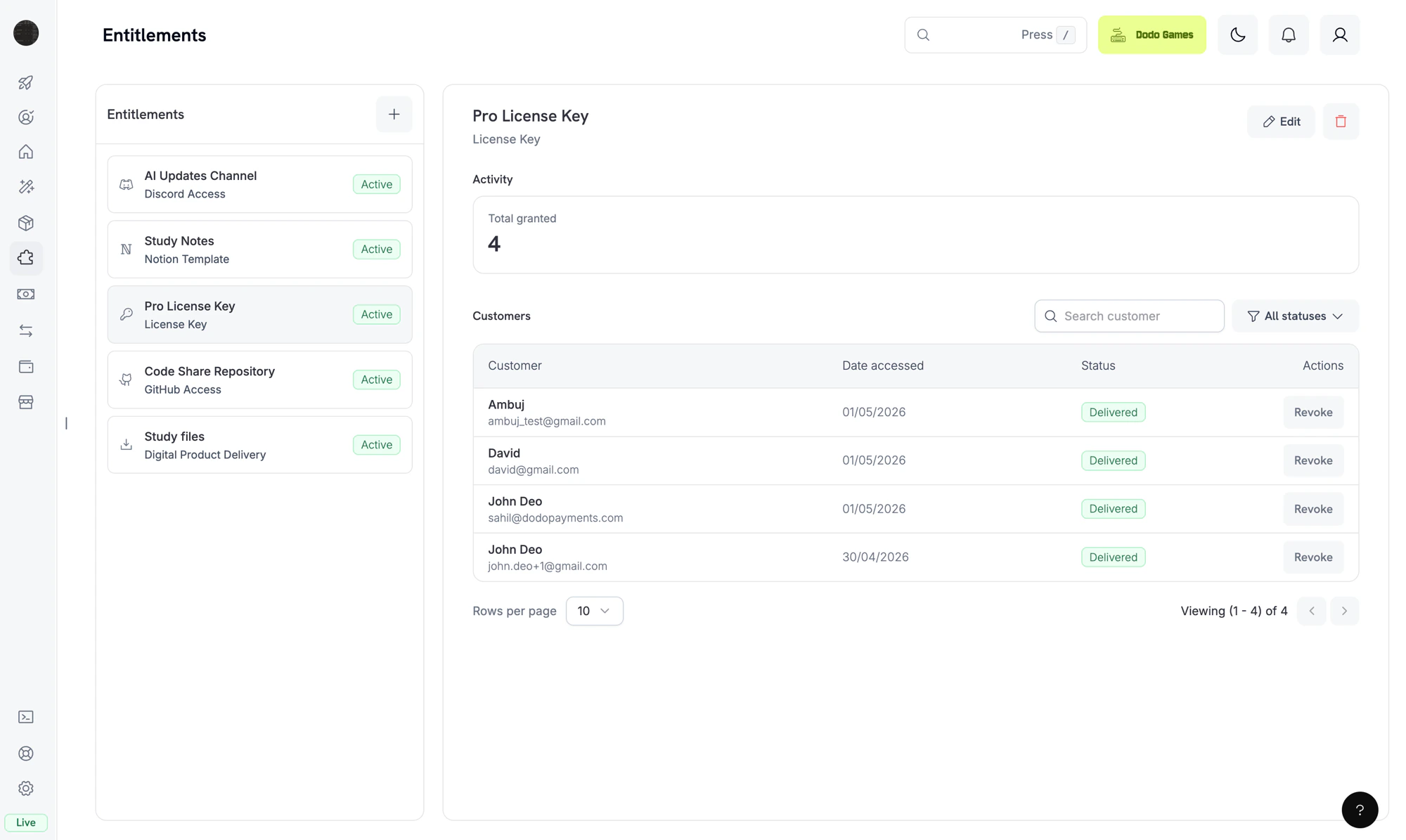
The Entitlements dashboard. Each entitlement is a reusable template; the right pane shows individual customer grants.
Um entitlement é uma definição reutilizável de algo que você entrega a um cliente, como uma chave de licença Pro, uma função “Patrons” no Discord, acesso ao seu repositório privado do GitHub ou um pacote de e-books para download. Você associa entitlements a produtos, e o Dodo Payments os entrega quando um cliente paga.Quando um cliente compra o produto, o Dodo Payments cria um grant: a emissão desse entitlement para um cliente. Um grant tem um de quatro status: Pending enquanto a entrega está em andamento, Delivered quando o cliente obtém acesso, Failed se a entrega não puder ser concluída e Revoked quando o acesso é retirado.
Entitlements controlam o fulfillment (o cliente tem acesso?). Credits controlam o consumption (quanto o cliente pode usar?). Você pode associar ambos ao mesmo produto. Consulte Credit-Based Billing para saber mais sobre credits.
Os grants seguem os mesmos eventos de pagamento e assinatura que você recebe como webhooks. O Dodo Payments cria e revoga grants automaticamente para compras, com base no ciclo de vida do pagamento, portanto você não precisa chamar a grant API por conta própria.
O Dodo Payments cria um grant quando um pagamento é concluído ou quando uma assinatura se torna ativa. Grants de feature flags começam como Delivered. Grants de chaves de licença também começam como Delivered quando o entitlement usa fulfillment_mode: auto (o padrão). Em fulfillment_mode: manual, o grant começa como Pending sem uma chave, até que você forneça uma usando Fulfill License Key Grant. Todas as outras integrações começam como Pending.Integrações baseadas em OAuth (Discord, GitHub, Notion) expõem um oauth_url que o cliente acessa para dar consentimento. O Dodo Payments tenta gerar essa URL quando cria o grant. Se falhar, o campo permanece como null até que o cliente inicie o fluxo de aceitação pelo e-mail de entrega ou pelo Customer Portal. Integrações diretas da plataforma (Telegram, Framer, Digital Files) permanecem como Pending apenas enquanto a entrega é provisionada e depois passam para Delivered.
2
Delivered
Quando a entrega é concluída, o grant passa para Delivered e delivered_at é definido. A entrega é concluída quando a chave de licença é gerada, a função é atribuída, o acesso ao repositório é concedido, os links dos arquivos são resolvidos ou o fluxo OAuth é finalizado.
3
Failed
Se a chamada da integração retornar um erro que não pode ser repetido, como um token OAuth revogado, uma permissão negada ou um arquivo que não existe mais, o grant passará para Failed. Os campos error_code e error_message registram o motivo.
4
Revoked
Quando o acesso é retirado, por exemplo porque uma assinatura foi cancelada, um reembolso foi emitido ou você revogou o grant, o grant passa para Revoked. O campo revocation_reason registra o gatilho.
Cada evento de pagamento e assinatura altera os grants da seguinte forma:
Evento
Comportamento
payment.succeeded (pagamento único)
Emite um grant para cada entitlement associado. Um entitlement de License Key emite um grant por chave.
payment.succeeded (pagamento associado a uma assinatura)
Nenhuma alteração. Os eventos de assinatura abaixo controlam esses grants.
subscription.active
Emite grants para quaisquer entitlements associados que ainda não tenham um e reemite grants anteriormente revogados para a mesma assinatura. Grants revogados com manual, refund ou platform_external não são reemitidos.
subscription.renewed
Nenhuma alteração. Os grants existentes persistem entre as renovações.
subscription.past_due
Nenhuma alteração. Os grants permanecem entregues durante todo o período de carência.
subscription.on_hold
Revoga todos os grants entregues e pendentes com revocation_reason: subscription_on_hold.
subscription.paused
Revoga todos os grants entregues e pendentes com revocation_reason: SubscriptionPaused. Diferentemente dos outros motivos de assinatura, esse valor usa PascalCase; portanto, corresponda a ele exatamente.
subscription.unpaused
Reemite grants anteriormente revogados para a mesma assinatura, da mesma forma que subscription.active.
subscription.cancelled
Revoga todos os grants com revocation_reason: subscription_cancelled.
subscription.expired
Revoga todos os grants com revocation_reason: subscription_expired.
subscription.plan_changed
Revoga todos os grants atuais com revocation_reason: plan_changed e emite grants para os entitlements do novo plano.
refund.succeeded (pagamento único)
Revoga os grants desse pagamento com revocation_reason: refund.
Revogação manual pela API
Revoga o grant com revocation_reason: manual. Revogações manuais não são reemitidas automaticamente na renovação da assinatura.
Chave de licença desativada
Para grants de chaves de licença, desativar a chave subjacente revoga o grant com revocation_reason: license_key_disabled. Reativar a chave restaura o grant automaticamente.
Drift da plataforma detectado
Se o lado da plataforma de uma integração ficar dessincronizado, como quando uma função do Discord é removida manualmente, o GitHub App perde acesso ao repositório ou uma etapa de reconciliação encontra um destino ausente, o Dodo Payments revoga o grant com revocation_reason: platform_external. Ele não é reemitido automaticamente na renovação da assinatura até que o problema da plataforma seja resolvido.
Grants controlados por assinatura são idempotentes por (entitlement, customer, subscription), portanto renovações e reativações não criam grants duplicados. Grants únicos são idempotentes por (entitlement, customer, payment).
Acesse Entitlements no dashboard e clique em + para criar um entitlement.
2
Pick an Integration
Escolha o tipo de integração: License Key, Digital Files, Feature Flag, Discord, GitHub, Telegram, Figma, Framer ou Notion. Para uma integração de plataforma, conecte sua conta primeiro, caso ainda não tenha feito isso.
3
Configure Delivery
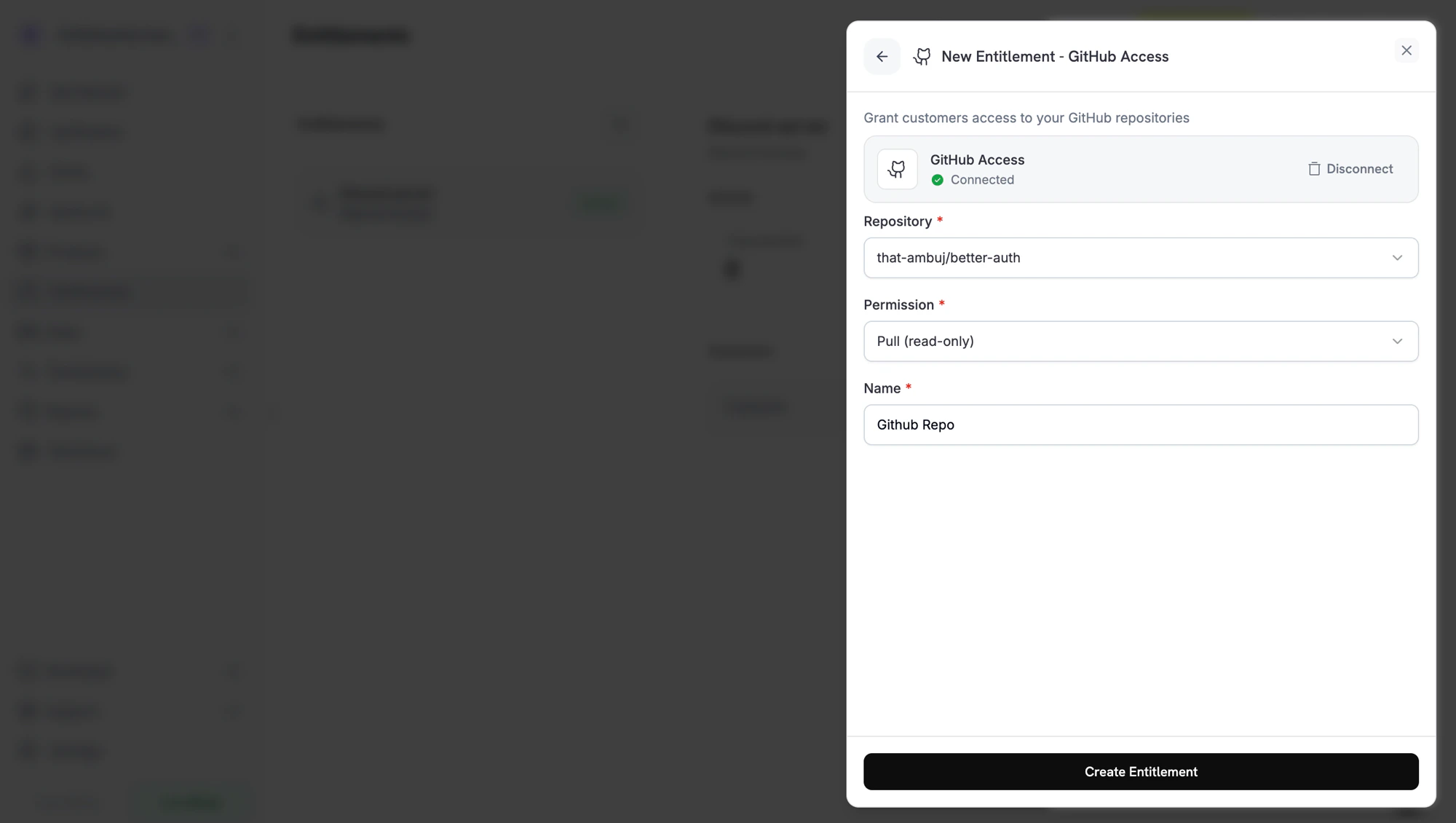
Preencha os campos da integração. Por exemplo, o GitHub solicita um repositório e um nível de permissão, o Discord solicita um servidor e uma função opcional, e License Key solicita um limite de ativações e uma duração da licença.
Creating a GitHub entitlement. Each integration shows the fields it needs.
4
Save
Clique em Create Entitlement. Agora você pode associar o entitlement a qualquer produto.
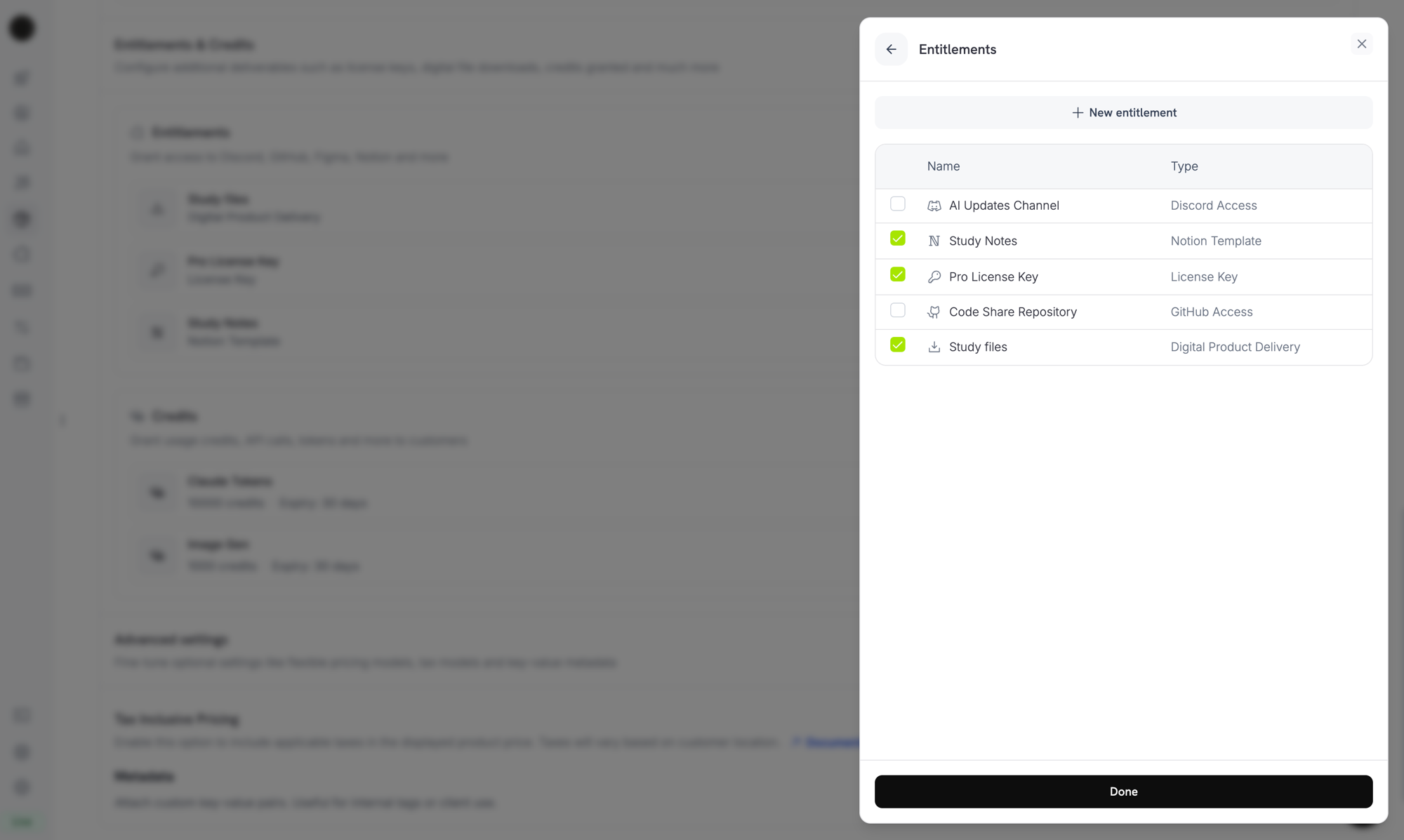
Abra um produto, acesse a seção Entitlements e selecione os entitlements a serem entregues quando o produto for comprado. Um produto pode entregar vários entitlements ao mesmo tempo. Por exemplo, um plano Pro pode incluir uma chave de licença, acesso ao GitHub e uma função no Discord.
Attaching entitlements to a product. Selected entitlements are delivered on every successful purchase or active subscription.
Após uma compra, o cliente recebe um e-mail de entrega com a chave de licença, links para download, links de convite OAuth ou o convite da plataforma aplicável aos entitlements do produto. Os mesmos detalhes continuam disponíveis no Customer Portal, no histórico de pedidos, enquanto o grant estiver ativo.
O acesso de assinantes ao Discord, GitHub e Notion exige que o cliente autorize o Dodo Payments a conceder esse acesso. Esses grants permanecem como Pending até que o cliente conclua o fluxo OAuth pelo link no e-mail ou no Customer Portal. Depois que o cliente autoriza, o grant passa para Delivered e o Dodo Payments provisiona o acesso à plataforma.
Quando um grant é revogado, o Dodo Payments remove o acesso na plataforma: remove a função do Discord, remove o colaborador do GitHub ou desativa a chave de licença. O cliente vê a alteração no Customer Portal.
Para Digital Files, a revogação impede novos URLs de download pré-assinados, mas não invalida cópias que o cliente já tenha baixado. Planeje o controle de acesso ao seu conteúdo levando isso em consideração.
Abra qualquer entitlement no dashboard para ver seus grants. O painel de detalhes mostra o total concedido, um filtro de status e uma linha por grant com o cliente, a data de acesso, o status e uma ação Revoke.Para gerenciar grants programaticamente, liste-os com o filtro status e revogue um único grant pelo ID:
import DodoPayments from 'dodopayments';const client = new DodoPayments({ bearerToken: process.env['DODO_PAYMENTS_API_KEY'],});// List grants for an entitlementconst grants = await client.entitlements.grants.list('ent_abc123', { status: 'Delivered',});// Revoke a single grantawait client.entitlements.grants.revoke('entg_xyz789', { id: 'ent_abc123',});
O Dodo Payments envia quatro eventos de webhook para o ciclo de vida do grant. Inscreva-se neles para manter seu aplicativo sincronizado com aquilo a que cada cliente pode ter acesso.
Evento
Ocorre quando
entitlement_grant.created
Um grant é criado. Grants de chaves de licença preenchidos automaticamente e grants de feature flags chegam como Delivered. Grants de chaves de licença preenchidos manualmente e todas as outras integrações chegam como Pending e depois passam para Delivered quando a chamada da plataforma é bem-sucedida ou, para integrações baseadas em OAuth, quando o cliente autoriza.
entitlement_grant.delivered
Um grant existente passa para Delivered, então o cliente obtém acesso. Um grant que já esteja como Delivered na criação dispara apenas created.
entitlement_grant.failed
Não foi possível entregar o grant. Verifique error_code e error_message.
entitlement_grant.revoked
O acesso foi retirado. Verifique revocation_reason.
Entitlement Grant Webhook Payloads
Veja o schema completo do payload, exemplos de eventos e a referência de revocation_reason.
Use um entitlement por canal de entrega. Não compartilhe um entitlement do Discord entre produtos com intenções de função diferentes. Crie um entitlement por função para que a revogação permaneça limpa.
Faça testes primeiro no modo de teste. Crie o entitlement, associe-o a um produto de teste, execute um checkout e observe o grant passar de Pending para Delivered. Depois, cancele a assinatura de teste e confirme que o grant foi revogado.
Escute entitlement_grant.delivered, não payment.succeeded. Um pagamento pode ser bem-sucedido antes que o fulfillment seja concluído, especialmente em fluxos OAuth. Aguarde o grant chegar a Delivered antes de desbloquear funcionalidades dependentes em seus próprios sistemas. Um grant entregue na criação, como uma chave de licença preenchida automaticamente ou uma feature flag, chega como entitlement_grant.created com status: "Delivered".
Trate entitlement_grant.failed como acionável. Um grant com falha significa que um cliente pagou, mas não obteve acesso. Apresente esses grants à sua equipe de suporte ou acione uma nova emissão.
Mapeie revocation_reason para seus fluxos de retenção. Uma revogação subscription_on_hold pode ser recuperada, pois o cliente pode atualizar o cartão. Uma revogação manual é intencional. Trate-as de forma diferente nas mensagens aos clientes.
Não revogue o acesso em subscription.past_due. Esse evento inicia um período de carência, e o cliente mantém o acesso até o fim da janela. Aguarde subscription.on_hold ou subscription.cancelled.