

Para consultar as categorias de produtos aceitas e proibidas e os locais de negócios aceitos, consulte a Merchant Acceptance Policy.
Verificação da conta
A seção Verification no dashboard orienta você por quatro etapas: tipo de conta, informações do produto, verificação de identidade e dados bancários.Tipo de conta
Escolha se você é uma Individual ou uma Registered Entity antes de começar.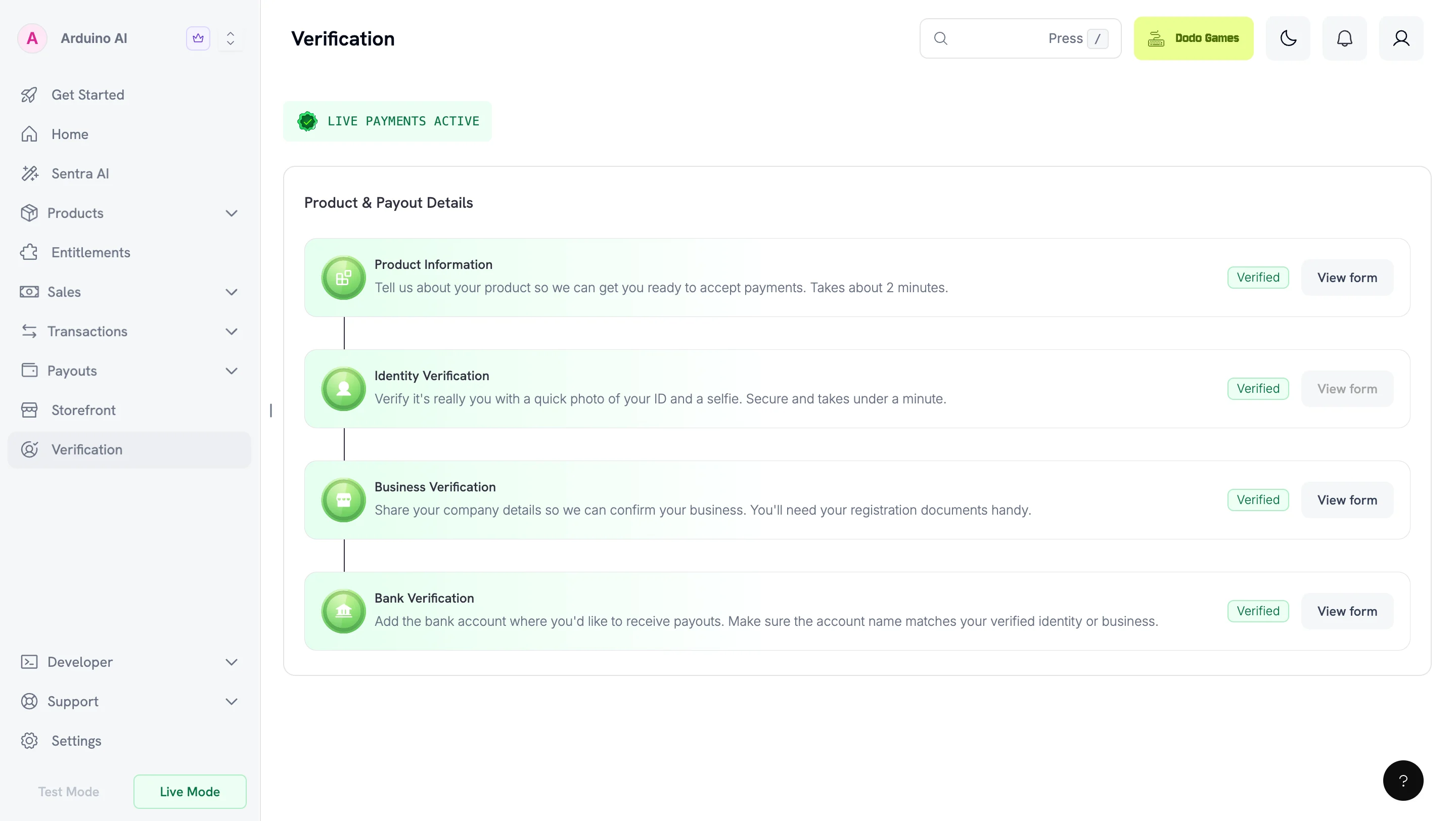
Etapas de verificação
1
Choose your account type
Selecione Individual ou Registered Entity com base na forma como você opera.
2
Submit product information
Preencha o Product Information Form. Antes de enviá-lo, publique seu site e verifique se ele corresponde ao que você informou. Consulte Como preparar seu site.
3
Verify your identity
Conclua a verificação de identidade (KYC) com um documento de identidade emitido pelo governo. As registered entities também devem concluir a verificação empresarial (KYB).
4
Submit payout details
Forneça os dados da sua conta bancária. Os formulários são desbloqueados sequencialmente — conclua cada um antes que o próximo apareça.
A maioria das análises é concluída em 1–3 dias úteis.
Formulários obrigatórios
Os formulários são desbloqueados sequencialmente. Conclua cada um antes que o próximo apareça.
As registered entities do Reino Unido também devem enviar o formulário fiscal W-8BEN-E.
Alterar seu tipo de conta
Você pode alterar seu tipo de conta enquanto todos os formulários estiverem em análise. Depois que qualquer formulário for aprovado, reprovado ou colocado em espera, sua escolha se torna permanente. Se você alterar seu tipo de conta depois de enviar o formulário bancário, enquanto seus formulários ainda estiverem em análise, sua verificação bancária ficará em espera e você precisará enviá-la novamente. A mudança de Individual para Registered Entity também exige o formulário Business Verification. Seus formulários Product Information e Identity Verification são preservados.Product Information Form
Todos os merchants preenchem este formulário. Para concluí-lo mais tarde, selecione Save as Draft. Save as Draft também está disponível nos formulários Bank Verification e Business Verification. O formulário coleta:- Site do produto ou landing page — onde os clientes conhecem ou compram seu produto
- Descrição do produto — uma frase explicando o que ele faz
- Categoria do produto — SaaS, conteúdo digital, serviços, marketplace ou produtos físicos
- Método de entrega — acesso instantâneo, e-mail, assinaturas, fulfillment manual etc.
- Nível de automação — totalmente automatizado, parcialmente automatizado ou conduzido por pessoas
- Áreas sensíveis a compliance — quaisquer tipos de produtos regulamentados, restritos ou de maior risco
- Método de integração — links de pagamento, sessões de checkout, APIs, SDKs etc.
- Estágio do produto e aquisição de clientes — maturidade e estratégia de entrada no mercado
- Presença nas redes sociais — links para os perfis do produto ou do fundador
- Confirmação — declaração de que as informações são precisas e estão em conformidade com as políticas
Como preparar seu site
Seu formulário é analisado em comparação com seu site ativo. Publique seu site antes de enviá-lo. Uma URL que a equipe de análise não consegue abrir é um motivo comum para colocar a conta em espera. Antes de enviar o formulário, verifique se um visitante sem conta consegue acessar seu site e encontrar:- Preços — quanto você cobra, incluindo o intervalo de cobrança para planos recorrentes
- Terms of Service — o contrato que os clientes aceitam ao comprar
- Privacy Policy — como você coleta, armazena e usa os dados dos clientes
- Política de reembolso e cancelamento — como os clientes solicitam reembolsos ou cancelam assinaturas
- Canal de contato — um endereço de suporte monitorado ou formulário de contato
Verificação de identidade (KYC)
Usamos a Persona, uma fornecedora global de verificação, para verificar seu documento de identidade emitido pelo governo e confirmar que você está presente por meio de uma selfie. O processo é concluído em poucos minutos. Seu documento de identidade deve ter sido emitido por um país da nossa lista de países aceitos. Isso se aplica a você como indivíduo e a todos os diretores e beneficiários efetivos de uma registered entity, independentemente de onde a entidade esteja incorporada.Problemas de acesso à câmera
Se você vir “Can’t access your camera”, habilite as permissões de câmera para seu dispositivo e navegador:- Chrome: habilite nas configurações do navegador (computador, iPhone e iPad ou Android)
- Safari: computador — habilite nas preferências. Dispositivo móvel — Settings → Safari → Camera, defina como “Ask” ou “Allow”
- Apps iOS: Settings → Apps → [Your App] → Allow Camera permissions. Verifique se o Lockdown Mode não está bloqueando o app
- Apps Android: Settings → Apps → [Your App] → Allow Camera permissions
Se a verificação de identidade falhar
A verificação pode falhar mesmo com documentos legítimos se a captura não fornecer informações suficientes para a Persona trabalhar. Causas comuns:- Sua foto não corresponde mais ao seu documento. Um documento antigo pode não corresponder suficientemente à sua aparência atual durante a verificação por selfie.
- Você capturou uma imagem de uma tela ou fotocópia. Use o documento físico original.
- A captura está desfocada, cortada ou com reflexos. Todas as bordas devem estar visíveis e todo o texto deve estar legível.
- Seu documento está vencido.
- Seu documento é de um país não aceito. Consulte a lista de países aceitos.
Business Verification (KYB) — somente para Registered Entities
Obrigatória apenas para registered entities. Conclua esta etapa antes da Bank Verification.Dados obrigatórios
Company Registration Number
Company Registration Number
Forneça o Company Registration Number e o documento comprobatório (Certificate of Incorporation ou equivalente na sua jurisdição).
Tax ID (Optional)
Tax ID (Optional)
Se quiser incluir seu número fiscal nas faturas de payout para obter benefícios fiscais, forneça um Tax ID e os documentos válidos. Exemplos: EIN, CRN, VAT ID, GSTIN.
Directors and Beneficial Owners
Directors and Beneficial Owners
Forneça os dados de todos os diretores e beneficiários efetivos.Beneficiário(s) efetivo(s): qualquer pessoa física que possua ou tenha direito a 10% ou mais das ações, do capital ou dos lucros, ou que exerça controle por outros meios (incluindo o direito de nomear a maioria dos diretores ou controlar a administração ou as decisões de política). Se houver vários beneficiários efetivos, forneça os documentos de todos.Diretor(es) da empresa: pessoas que atualmente atuam como diretores do conselho de acordo com as leis locais. Forneça documentos de identidade emitidos pelo governo para todos os diretores.
Bank Verification
Forneça os dados da sua conta bancária e suas informações de contato. Os dados da conta bancária devem corresponder à identidade verificada ou ao nome da registered entity. Para indivíduos, o nome do titular da conta deve corresponder ao documento usado na Identity Verification. Para registered entities, ele deve corresponder ao nome legal da empresa. Dodo Payments não pode processar payouts para contas divergentes ou de terceiros.W-8BEN-E para entidades do Reino Unido
As registered entities do Reino Unido devem enviar o formulário W-8BEN-E para cumprir as regulamentações internacionais de declaração fiscal. Isso garante um processamento tranquilo dos payouts e uma documentação fiscal precisa.Download W-8BEN-E Form
O que é o W-8BEN-E?
O W-8BEN-E é um formulário do IRS que empresas estrangeiras enviam para verificar seu país de residência para fins fiscais e certificar que se qualificam para uma alíquota menor de retenção de impostos.Como preencher o W-8BEN-E
Part I – Identification of Beneficial Owner
Part I – Identification of Beneficial Owner
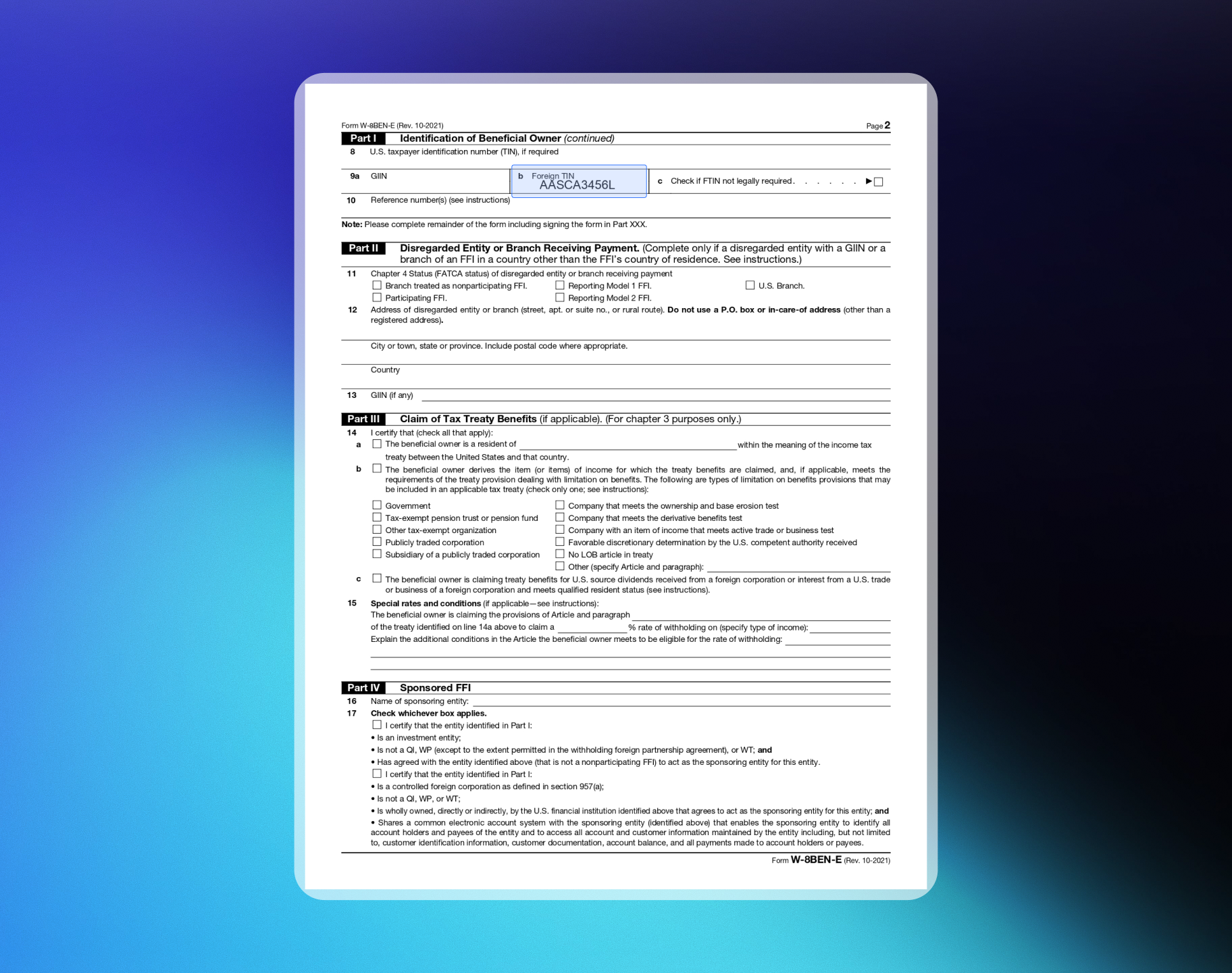
1. Nome da organizaçãoO nome da sua entidade.2. País de incorporação ou organizaçãoO país onde sua empresa está registrada. Para uma corporation, o país de incorporação. Para outros tipos de entidade, o país sob cujas leis você foi criado, organizado ou é regido.3. Status do Chapter 3Na maioria dos casos, “Corporation” ou “Partnership”. Para uma Private Limited company, marque Corporation. Para uma Limited Liability Partnership, marque Partnership.4. Status do Chapter 4 (status FATCA)Para SaaS/Produtos digitais, selecione “Active NFFE” (Active Non-Financial Foreign Entity).5. Endereço de residência permanenteO endereço permanente da sua empresa no país onde você declara residência fiscal.8-10. Informações de identificação fiscalForneça seu FTIN (se emitido pela sua jurisdição de residência fiscal) na linha 9b para obter benefícios de tratado.
Part XXV – Active NFFE
Part XXV – Active NFFE
Marque a caixa 39 para certificar que:
- A entidade é estrangeira e não é um banco ou instituição financeira.
- Menos de 50% da renda bruta do ano-calendário anterior é renda passiva.
- Menos de 50% dos ativos mantidos geram ou são mantidos para gerar renda passiva.
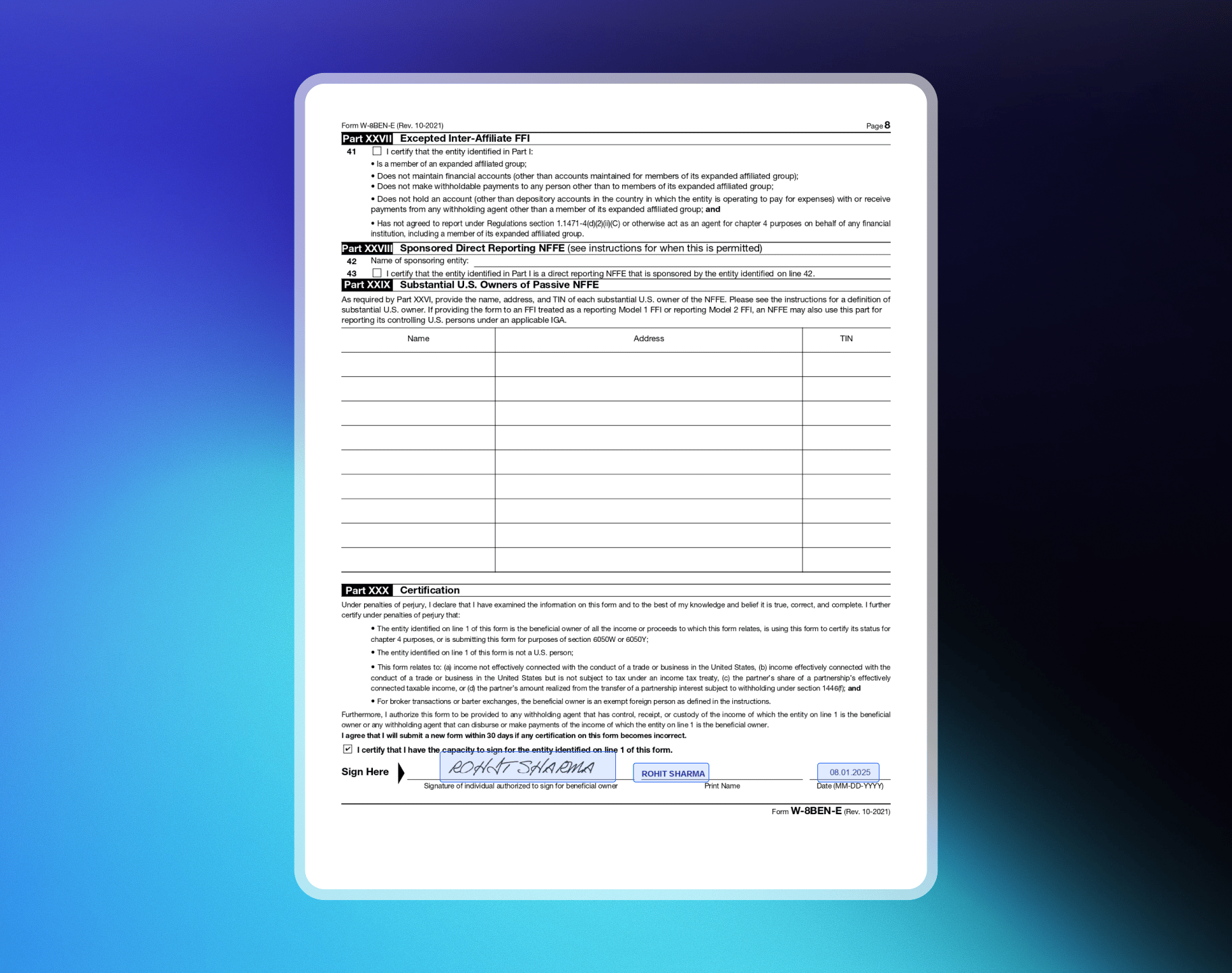
Part XXX – Certification
Part XXX – Certification
Assine e date o formulário. A pessoa que assina deve estar autorizada a assinar em nome do beneficiário efetivo.
Exemplos de formulários W-8BEN-E
Private Limited Company
Private Limited Company
Exemplo: ABC Technologies PVT LTD, SaaS / Produtos digitais, Índia, TIN: PANPágina 1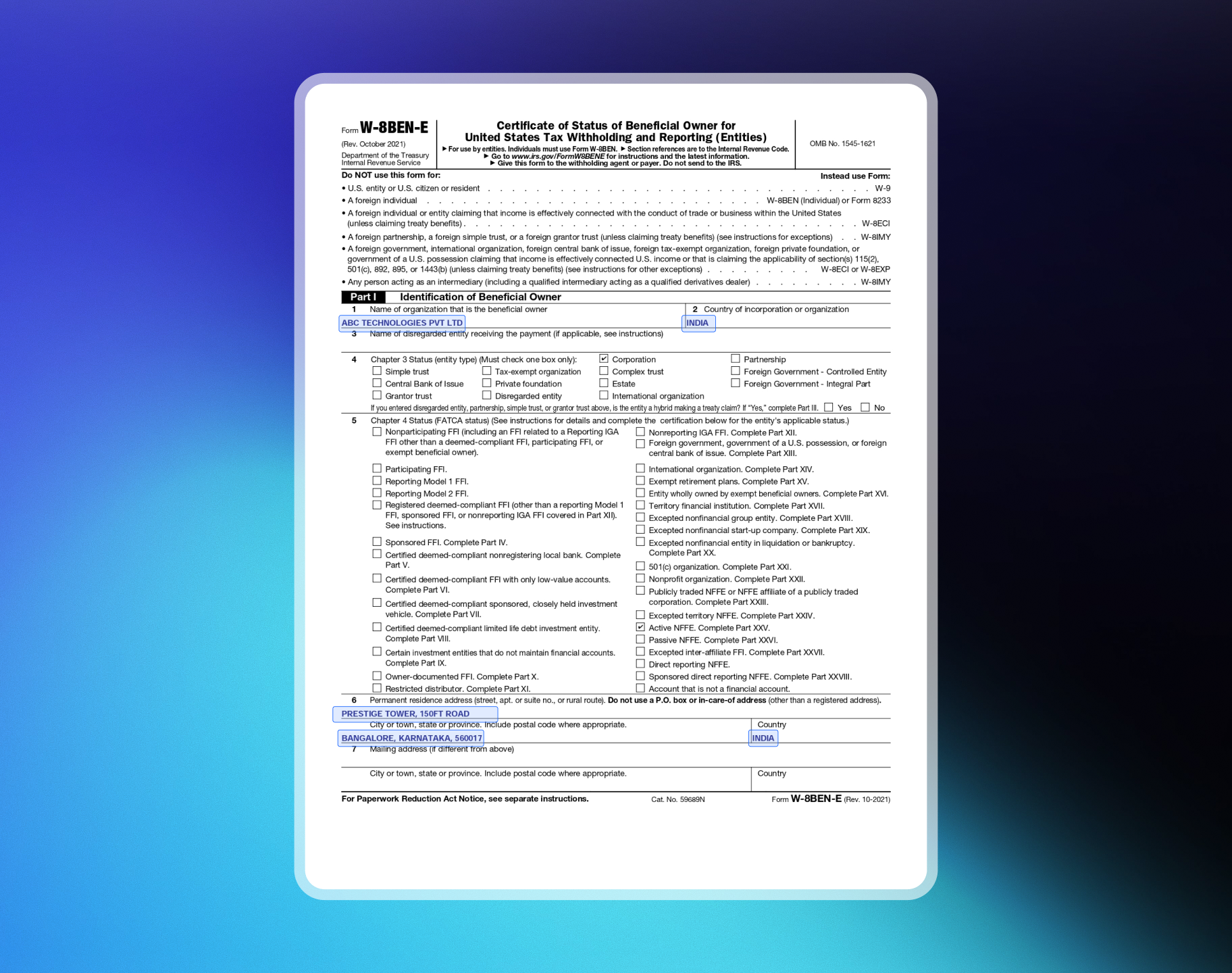
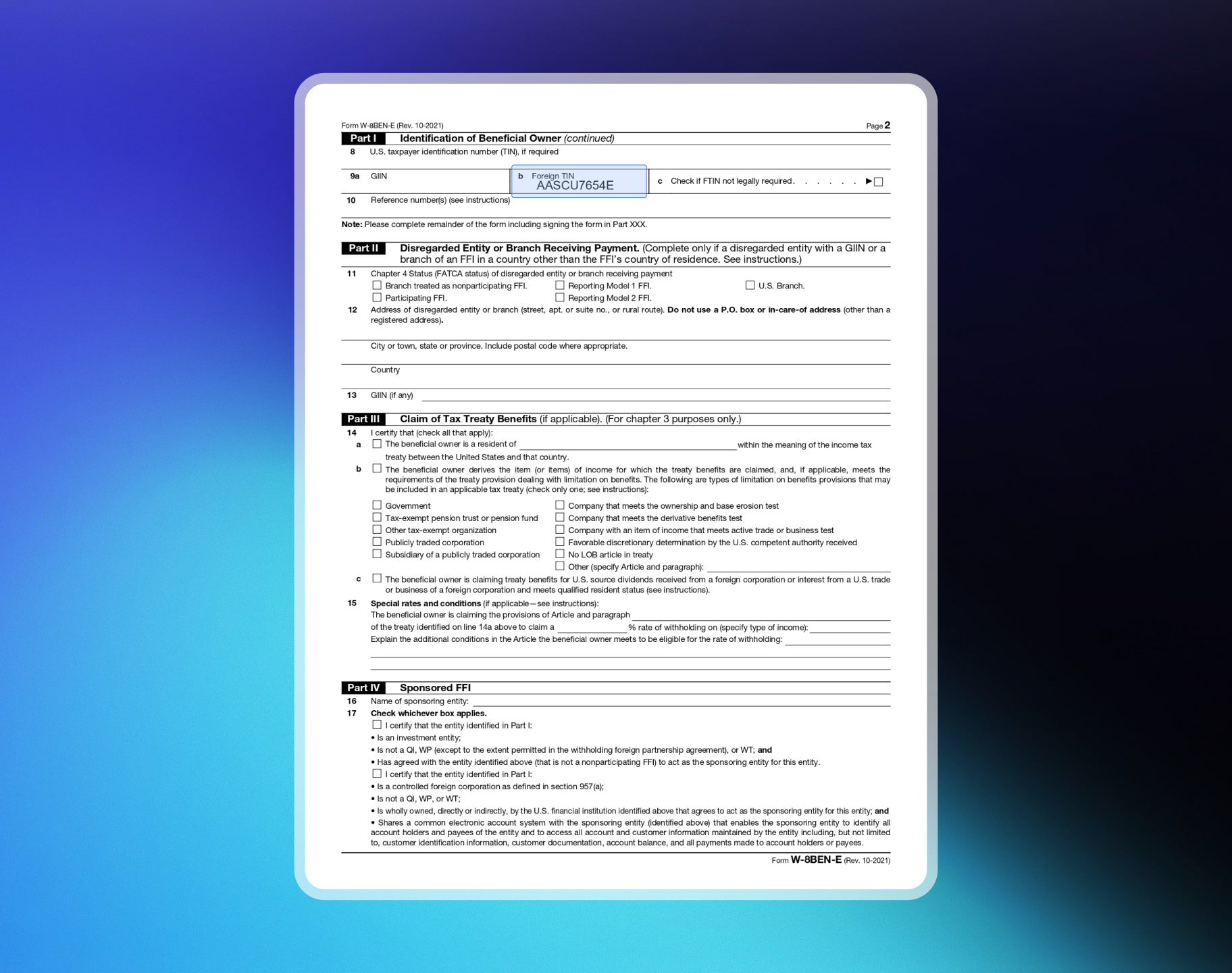
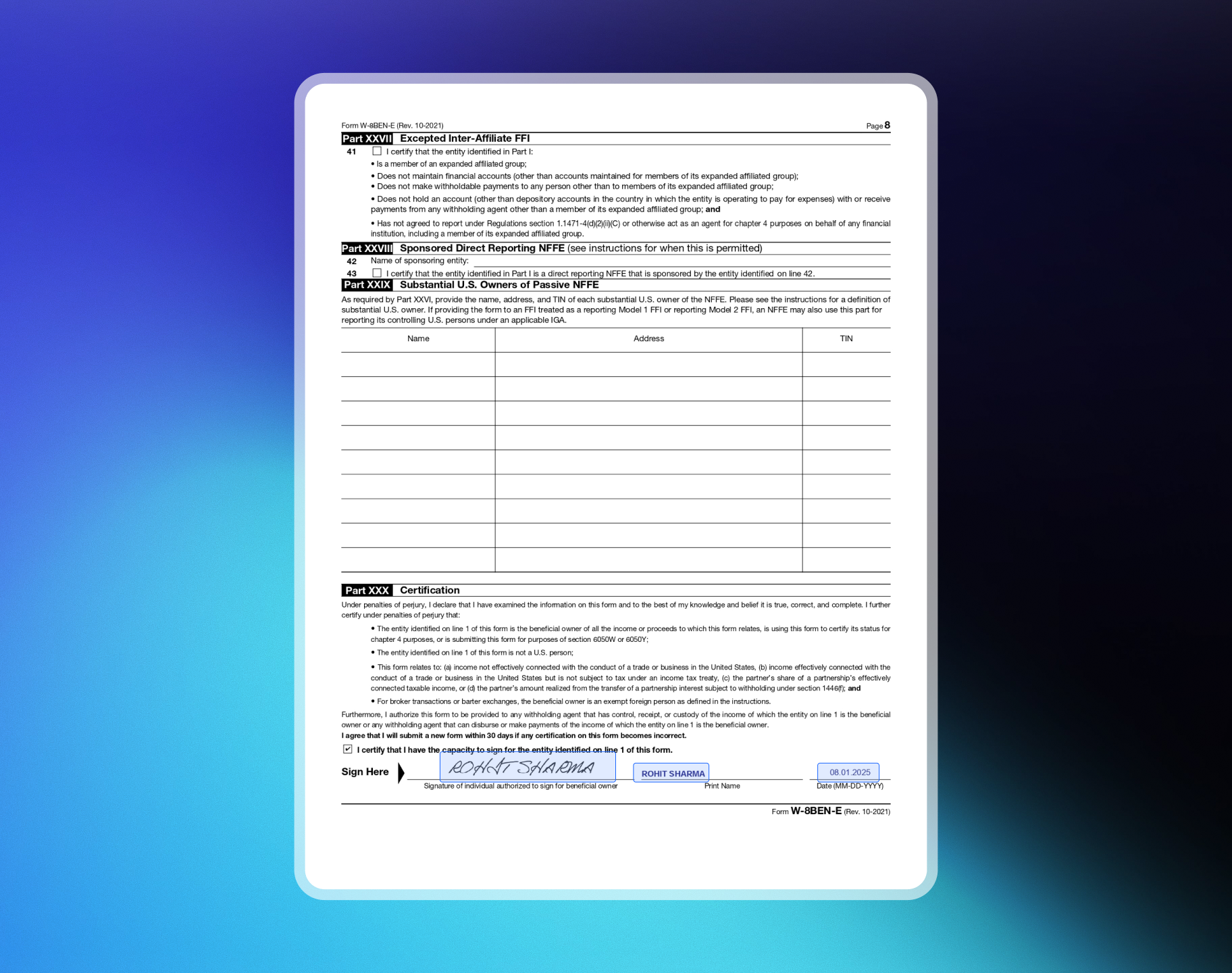
Limited Liability Partnership (LLP)
Limited Liability Partnership (LLP)
Exemplo: ABC Technologies LLP, SaaS / Produtos digitais, Índia, TIN: PANPágina 1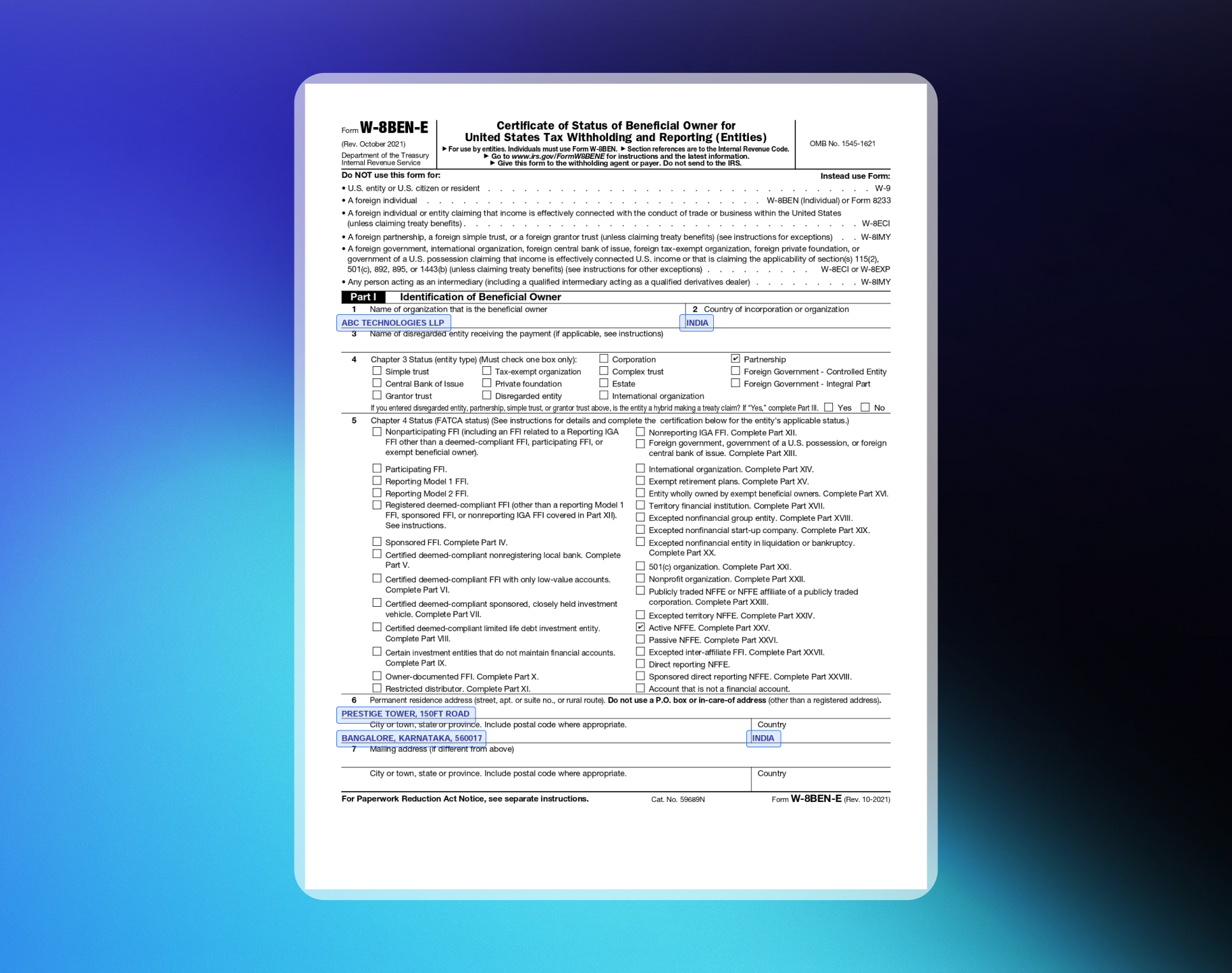
Análise de compliance
Depois que seus dados de payout forem aprovados, nossa equipe de compliance realizará uma Monitoring Review conforme a Review & Monitoring Policy. Essa é uma verificação padrão para todos os merchants. Verificamos:- Conformidade com a Merchant Acceptance Policy
- Regras das bandeiras de cartão e regulamentações de AML
- Possíveis indicadores de fraude ou padrões de atividade incomuns
Pagamentos em produção versus payouts
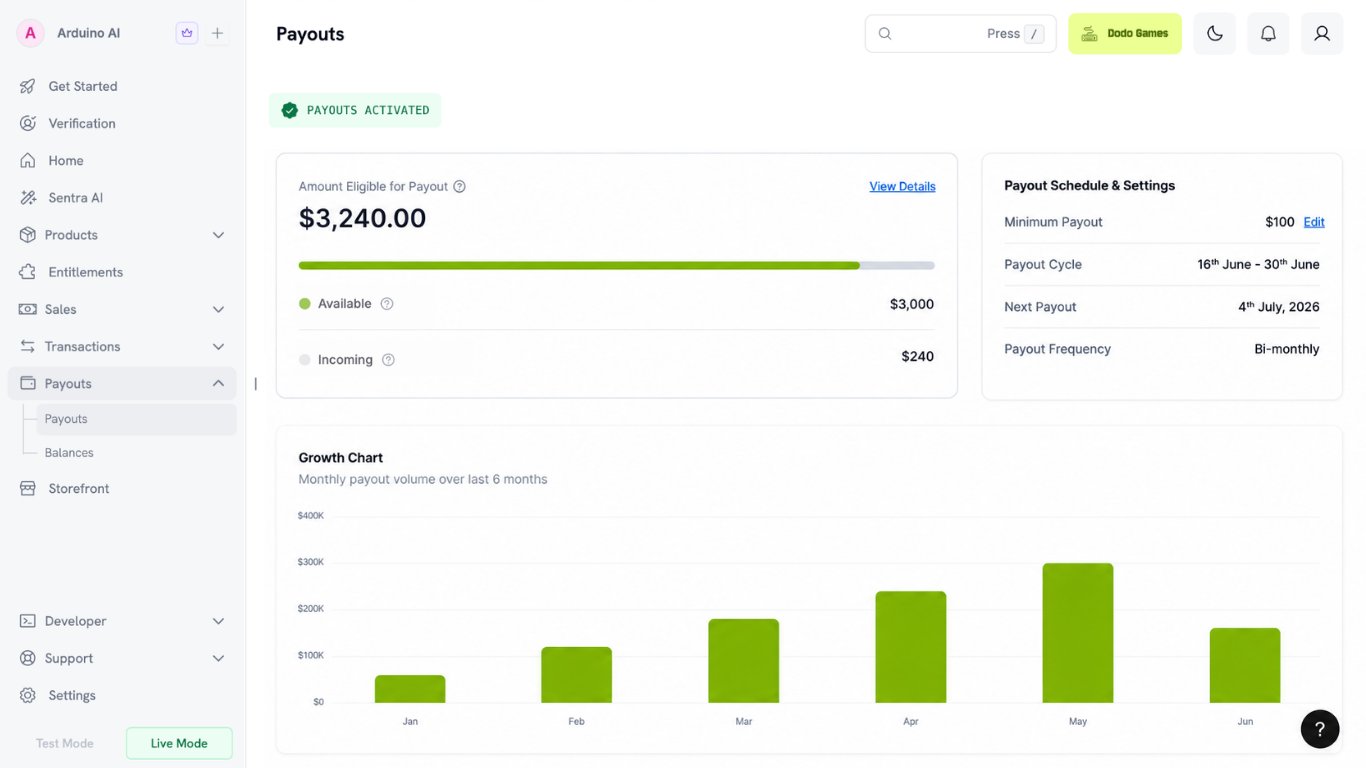
Os pagamentos em produção e os payouts são ativados separadamente. É normal aceitar pagamentos em produção enquanto os payouts ainda estão inativos. Os pagamentos em produção exigem a aprovação de todos os formulários obrigatórios para o seu tipo de conta. Consulte Formulários obrigatórios. Os payouts exigem:- Aprovação de todos os formulários obrigatórios, incluindo Bank Verification
- Monitoring Review concluída
Monitoramento contínuo
Dodo Payments realiza monitoramento contínuo periodicamente para manter as contas em conformidade ao longo do tempo. Se sua empresa continuar em conformidade, você poderá continuar operando sem preocupações. Se tivermos alguma preocupação, as medidas necessárias serão tomadas de acordo com a Review & Monitoring Policy.Solicitações adicionais de informações
Como parte do monitoramento contínuo, nossa equipe de compliance pode solicitar informações adicionais. Essas solicitações são concluídas pelo dashboard e não bloqueiam pagamentos ou payouts, mas o não envio das informações pode provocar pausas no processamento, novas análises ou restrições na conta. Consulte a Review Monitoring Policy para obter detalhes.Prazo e suporte
- Prazo típico de verificação: 1–3 dias úteis (sem incluir fins de semana e feriados)
- Se for necessária uma análise adicional, você será notificado por e-mail e pelo dashboard
- Para obter ajuda, envie um e-mail para support@dodopayments.com
Reenviar documentos
Se a equipe de verificação encontrar problemas nos seus documentos, ela solicitará um novo envio. Use a opção Resubmit no dashboard. Depois que você enviar um formulário, não poderá editá-lo nem reenviá-lo por conta própria. A opção Resubmit aparece somente depois que a equipe de verificação a habilita.Se um formulário for colocado em espera
On Hold significa que nossa equipe de compliance precisa de mais informações antes de concluir a análise. Isso não é uma rejeição — sua solicitação continua aberta. Quando um formulário está em espera, enviamos um e-mail e disponibilizamos um additional verification form na seção Verification. Preencha esse formulário para responder à pendência, e não a opção Resubmit. Seu dashboard pode mostrar que os reenvios estão temporariamente pausados. Isso se refere ao formulário original, que continua bloqueado. Se um formulário adicional de verificação tiver sido disponibilizado, preencha-o.1
Open the Verification section
Encontre o formulário marcado como On Hold. O motivo aparece ao lado dele.
2
Fix the underlying issue first
Resolva o que causou a pendência antes de responder. O motivo mais comum é que a equipe de análise não conseguiu abrir seu site — consulte Como preparar seu site para ver a lista de verificação.
3
Complete the additional verification form
Preencha o formulário adicional de verificação e envie-o. Responda à pergunta específica apresentada, em vez de simplesmente reenviar os mesmos dados originais sem alterações.
Se um formulário for marcado como Failed
O status Failed não é o mesmo que uma solicitação de reenvio. O reenvio não é reaberto automaticamente, portanto normalmente não há uma opção Resubmit. A Identity Verification é uma exceção — ela oferece três tentativas. Consulte Se a verificação de identidade falhar. Para um formulário com falha, envie um recurso pela seção Verification:1
Read the failure reason
Abra a seção Verification para ver por que o formulário falhou.
2
Fix the underlying issue first
Corrija o que causou a falha antes de recorrer. Por exemplo, direcione a URL do seu produto para uma landing page pública em vez de uma tela de login ou verifique se seu site ativo corresponde ao que você descreveu no formulário.
3
File your appeal
Envie o recurso com uma explicação detalhada. É improvável que uma resposta de uma linha altere o resultado.
Quando um novo envio é solicitado
Um novo envio é solicitado nos casos de:- Informações ausentes ou incompletas — números de identificação, nome da empresa ou outros dados importantes
- Divergência nos documentos — os documentos não correspondem às informações empresariais ou pessoais fornecidas
- Documentos ilegíveis ou vencidos — uploads pouco claros, ilegíveis ou vencidos
- Necessidade de esclarecimentos adicionais — documentação adicional para esclarecer informações de identidade ou da empresa
Como reenviar
1
Check your dashboard
Procure uma solicitação de reenvio (você também receberá uma notificação por e-mail).
2
Access the resubmit option
A equipe de verificação habilitará a opção Resubmit.
3
Upload correct documents
Acesse a seção Verification e faça upload dos documentos corretos.
4
Submit for review
Clique em Submit for Review.