

라이선스 키는 License Key entitlement type입니다. 원하는 활성화 제한, 만료 기간 및 활성화 메시지를 사용하여 License Key entitlement를 한 번 생성한 다음 모든 제품에 연결하세요. 기본적으로 Dodo Payments는 구매한 각 수량 또는 각 subscription seat에 대해 하나의 키를 생성하고 이메일로 전송합니다.
라이선스 키란 무엇인가요?
라이선스 키는 제품에 대한 액세스 권한을 부여하는 고유 토큰입니다. 다음과 같은 경우에 라이선스 키를 사용하세요:- Software licensing: 데스크톱 앱, 플러그인 및 CLI.
- Per-seat controls: 사용자 또는 디바이스별 활성화를 제한합니다.
- Digital goods: 다운로드, 업데이트 또는 프리미엄 기능에 대한 액세스를 제어합니다.
Create a License Key Entitlement
1
Open Entitlements
대시보드에서 Entitlements로 이동하고 **+**를 클릭하여 entitlement를 생성합니다.
2
Choose License Key
License Keys를 선택하고 Name을 입력한 다음, 발급되는 각 키의 동작을 구성합니다: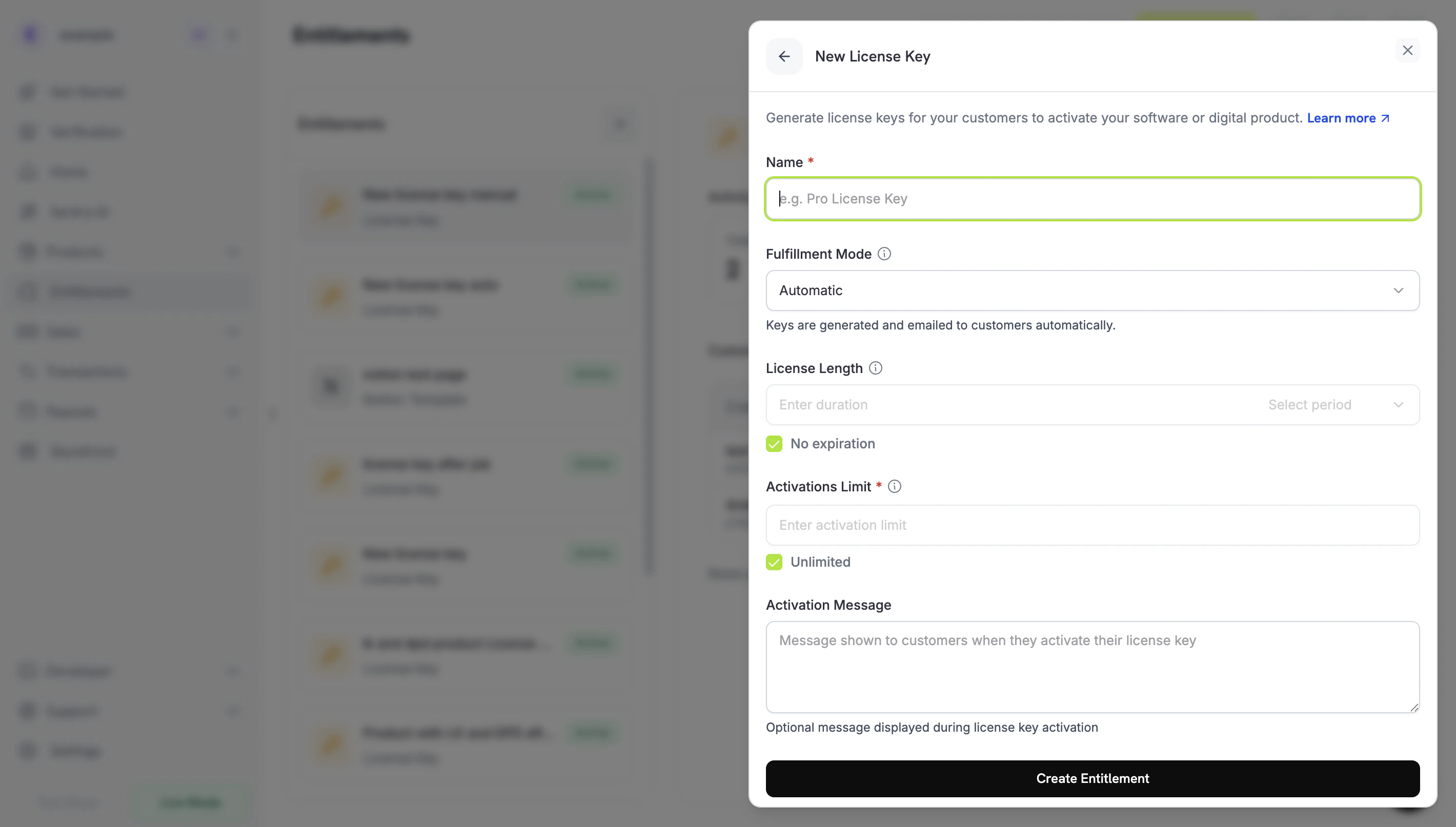
- Fulfillment Mode: Automatic(기본값)은 각 키를 생성하고 이메일로 전송합니다. Manual을 사용하면 각 키를 직접 제공할 수 있습니다. Manual Fulfillment를 참조하세요.
- Activations Limit: 키당 활성화할 수 있는 최대 활성화 수입니다. 예를 들어 단일 사용자는
1, 팀 라이선스는5입니다. 제한이 없으면 Unlimited를 선택하세요. - License Length: 키가 발급된 후 유효한 기간입니다. 예를 들어 30일 또는 1년을 설정하거나 No expiration을 선택할 수 있습니다. subscription 제품에서는 No expiration을 선택하세요. subscription에 발급된 키에는 만료 기간이 없으며, 유효성은 subscription 상태를 따릅니다.
- Activation Message: 고객에게 표시되는 선택적 안내로, 최대 2,500자이며 키를 전달하는 이메일에 포함됩니다. 예:
Paste the key in Settings → License또는Run: mycli activate <key>.
3
Save the Entitlement
Create Entitlement를 클릭합니다. 이제 모든 제품에 entitlement를 연결할 수 있습니다.
Attach to Products
제품을 열고 Entitlements 섹션으로 이동한 다음 License Key entitlement를 선택합니다. 하나의 제품은 동일한 구매에서 Discord 액세스, 파일 다운로드 또는 GitHub repository 액세스와 같은 다른 entitlement와 함께 라이선스 키를 제공할 수 있습니다.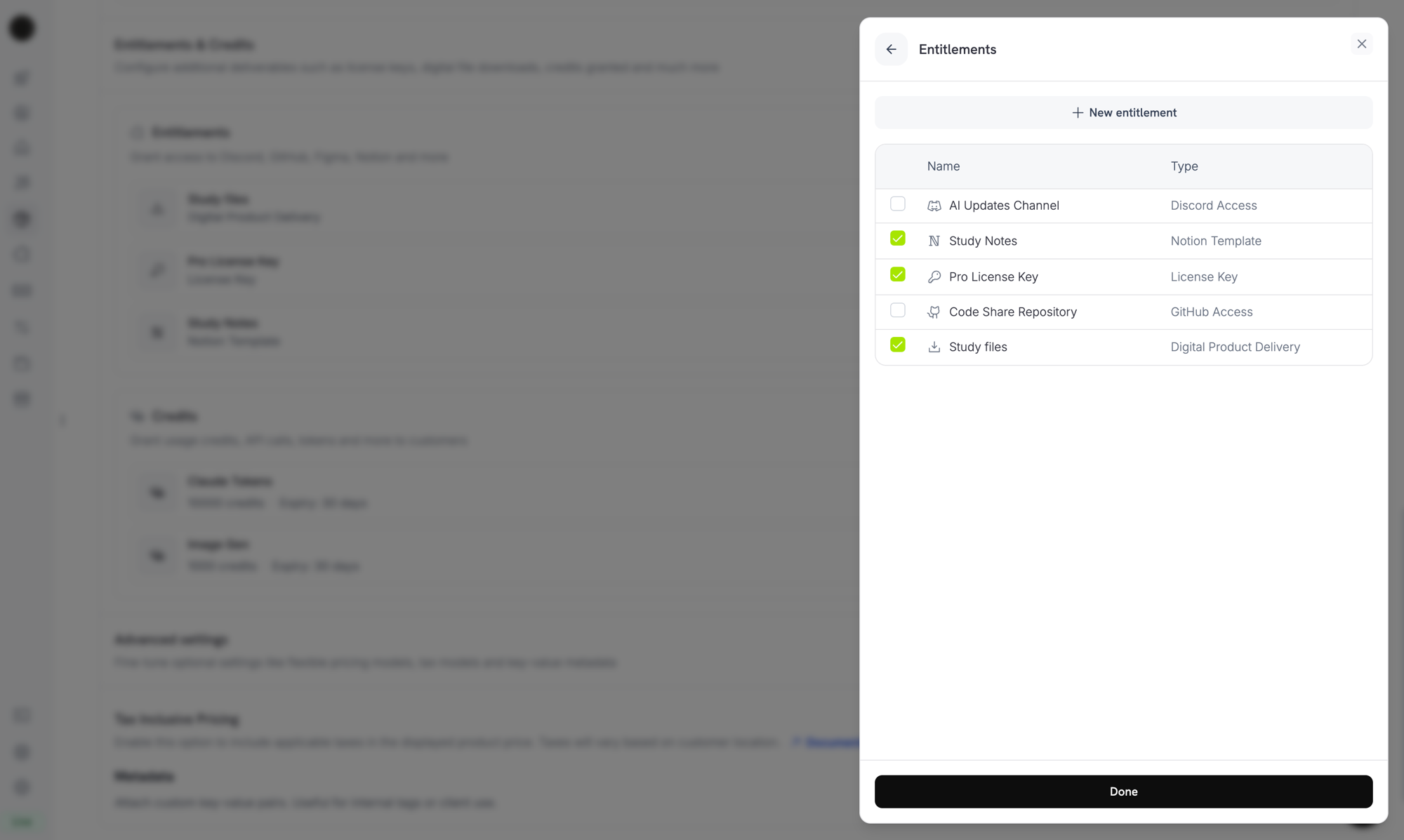
Selecting the License Key entitlement in the product entitlements panel.
How Keys Are Issued
키 발급은 표준 grant lifecycle을 따릅니다. 각 이벤트는 다음과 같이 라이선스 키에 영향을 줍니다:수량 동작
키 수는 grant의 출처에 따라 달라집니다. 각 키에는 자체 grant가 부여됩니다.- Subscription products는 seat당 키 하나를 발급합니다(
subscriptions.quantity). - One-time products는 cart line item의 수량당 키 하나를 발급합니다(
product_cart.quantity). - Manual API grants는 정확히 하나의 키를 발급합니다.
Fulfillment Mode
모든 License Key entitlement에는 키를 누가 제공하는지 제어하는fulfillment_mode가 있습니다:
auto(기본값, 대시보드의 Automatic): Dodo Payments가 결제 또는 subscription 시 키를 생성하고 이메일로 전송합니다. 위 표의 동작이며fulfillment_mode를 생략하면 적용됩니다.manual(대시보드의 Manual): 구매한 각 수량마다 키가 없는Pendinggrant가 생성되며, 각 키 값을 직접 제공합니다. Manual Fulfillment를 참조하세요.
Manual Fulfillment
manual fulfillment에서는 Dodo Payments가 키를 생성하는 대신 직접 각 라이선스 키를 제공합니다. 구매 시 키가 없는Pending grant가 생성되고, webhook으로 알림을 받은 후 키 값을 제출할 때까지 대기합니다. 키가 자체 시스템, third-party vendor 또는 미리 인쇄된 코드의 제한된 pool에서 제공되는 경우 사용하세요.
제품 생성부터 키 전달까지 단계별 구축 방법은 Manual License Key Fulfillment Integration Guide를 참조하세요.
사용 시점
Automatic fulfillment은 대부분의 software licensing에 적합합니다. Dodo Payments가 직접 키를 생성할 수 없는 경우 manual fulfillment을 선택하세요:- Bring your own keys: 애플리케이션, 데스크톱 제품 또는 자체 license server가 키를 생성합니다.
- Third-party vendors: upstream provider가 발급한 키를 재판매합니다. 예를 들어 game key, API credential 또는 partner platform license가 있습니다.
- Finite inventory: 사전 할당된 pool의 코드를 한 번에 하나씩 제공합니다.
- Human review: 액세스를 제공하기 전에 구매를 검토합니다.
Manual Fulfillment 활성화
API를 통해 manual fulfillment을 활성화하려면 License Key entitlement의integration_config에 fulfillment_mode: "manual"를 설정합니다. 대시보드에서는 Fulfillment Mode를 Manual로 설정합니다.
fulfillment_mode는 backward compatible입니다. 이 설정이 존재하기 전에 생성된 entitlement에는 fulfillment_mode가 없으며 auto로 동작합니다. manual로 전환해도 변경 후 생성된 grant에만 영향을 줍니다. 이미 전달된 키는 변경되지 않습니다.Fulfillment 대기 중인 Grant 찾기
고객이 manual-mode entitlement가 포함된 제품을 구매하면 Dodo Payments는 키가 없는Pending 상태의 grant를 생성하고 integration_type: "license_key" 및 status: "Pending"가 포함된 entitlement_grant.created webhook을 전송합니다. 해당 webhook에 응답하거나 integration_type 및 status 필터를 사용하여 List Customer Grants endpoint를 polling하세요:
키 전달
키를 전달하려면 Fulfill License Key Grant endpoint로 키를 전송합니다. grant는Delivered로 변경되고 Dodo Payments가 고객에게 키를 이메일로 보냅니다. automatic fulfillment에서 고객이 받는 이메일과 동일합니다.
cURL
activations_limit 및 expires_at는 선택 사항입니다. 생략하면 Dodo Payments가 entitlement의 구성을 사용합니다. 각 grant는 한 번만 fulfillment할 수 있습니다. 이미 fulfillment된 grant를 재시도하면 두 번째 키를 발급하는 대신 409를 반환합니다.
직접 키를 이메일로 보낼 필요는 없습니다. grant가 fulfillment되면 Dodo Payments가 키를 전달합니다.
POST /license_keys를 사용한 키 가져오기는 다르게 동작하며 고객에게 알림을 보내지 않습니다.활성화, 검증 및 비활성화
소프트웨어는 세 개의 endpoint를 통해 runtime에서 키를 관리합니다. 활성화는 키에 디바이스 또는 설치를 기록하고, 검증은 키를 사용할 수 있는지 확인하며, 비활성화는 활성화를 해제합니다.Public Endpoints: activate, deactivate 및 validate license endpoint는 public이며 API key가 필요하지 않습니다. API credential을 노출하지 않고 데스크톱 소프트웨어, CLI 또는 브라우저 기반 클라이언트에서 직접 호출할 수 있습니다. SDK constructor에는 여전히 bearer token 값이 필요하므로 SDK 예제에서는 placeholder를 전달합니다.
라이선스 활성화
활성화는 키에 대한 activation instance를 생성하고lki_ ID와 함께 반환합니다. instance를 비활성화할 때 필요하므로 이 ID를 저장하세요. 키가 활성 상태가 아니면 403, 키가 존재하지 않으면 404, 키가 활성화 제한에 도달하면 422를 반환합니다.
라이선스 검증
키 상태가active이고 키가 만료되지 않은 경우 검증은 valid: true를 반환합니다. 특정 activation instance가 여전히 존재하는지도 확인하려면 해당 instance의 license_key_instance_id를 전달하세요.
Activation Instance 비활성화
비활성화하면 activation instance가 제거되고 키의 활성화 하나가 해제됩니다. 키와 해당 activation이 반환한 instance ID를 전달하세요. instance가 키에 속하지 않으면403, 키가 존재하지 않으면 404를 반환합니다.
키 관리
발급된 키를 확인하려면 Entitlements에서 License Key entitlement를 엽니다. grants 목록에는 고객 키마다 한 행이 표시되며 고객, 액세스한 날짜, 상태 및 Revoke action이 포함됩니다. 키의 만료, 활성화 수 및 활성화 제한을 확인하려면 Sales → License Keys에서 키를 엽니다. 프로그래밍 방식으로 grants를 나열하려면 List Grants를 호출합니다. 각 license-key grant에서license_key object에는 키, 상태, 만료, 사용된 활성화 수 및 활성화 제한이 포함됩니다. 아직 Pending 상태인 manual-mode grant에서는 object가 null입니다.
API를 통한 기존 라이선스 키 가져오기
다른 시스템의 라이선스 키를 마이그레이션하려면 Create License Key API로 가져옵니다. 고객은 동일한 키 문자열을 계속 활성화, 검증 및 비활성화할 수 있으므로 키를 다시 발급할 필요가 없습니다. 요청에는key, customer_id 및 product_id가 필요합니다. 활성화 제한을 없애려면 activations_limit를 생략하고, 만료되지 않는 키를 만들려면 expires_at를 생략하세요. 이미 존재하는 키 문자열을 가져오면 409를 반환합니다.
출처에 따른 키 차이
source field는 각 라이선스 키가 생성된 방식을 기록합니다:
source를 사용하면 예를 들어 키를 조정하거나 감사할 때 마이그레이션된 키 및 수동 fulfillment 키와 Dodo Payments가 생성한 키를 구분할 수 있습니다. 이 field는 POST /license_keys response와 같은 license key record에 있습니다. List Grants의 grant에 있는 license_key object에는 이 field가 포함되지 않습니다. source를 반환하고 source filter를 허용하는 legacy GET /license_keys endpoint는 deprecated입니다.
Return URL의 라이선스 키
고객이 License Key entitlement가 포함된 제품을 구매하면 Dodo Payments는 생성된 키를license_key query parameter로 return_url에 추가합니다. success page에서 추가 API call 없이 키를 표시할 수 있습니다:
%2C로 URL-encoded되므로, split하기 전에 이를 디코딩하는 URL parser를 사용하여 parameter를 읽으세요:
payment_id 대신 subscription_id 및 subscription status가 포함됩니다:
API 관리
Lifecycle Operations (Public Endpoints)
Lifecycle Operations (Public Endpoints)
활성화, 비활성화 및 검증은 public이며 API key가 필요하지 않습니다.
Activate License
Deactivate License
Validate License
License Key Management
License Key Management
개별 라이선스 키 record를 생성, 나열, 조회 및 업데이트합니다. 이 endpoint를 사용하여 기존 키를 가져오거나 사용량 세부 정보를 읽으세요.
Create License Key
List License Keys
Get License Key
Update License Key
Entitlement Management
Entitlement Management
License Key entitlement 자체를 관리합니다. 활성화 제한, license length 및 activation message를 관리할 수 있습니다.
Create Entitlement
Update Entitlement
List Grants
Revoke Grant
Webhooks
라이선스 키 전달 및 revoke 시 네 개의entitlement_grant.* webhook events가 전송됩니다. license-key grant의 payload에는 키, 상태, 만료, 사용된 활성화 수 및 활성화 제한이 포함된 license_key object가 포함됩니다.
legacy license_key.created event는 라이선스 키 record가 생성될 때 여전히 발생합니다. License Key webhook payload page를 참조하세요.
Legacy License Keys
이전
license_key_enabled flag를 사용하여 생성된 제품은 License Key entitlement로 자동 마이그레이션되었습니다. 마이그레이션은 투명하게 이루어집니다. 기존 고객의 키는 계속 작동하고, public /licenses/activate, /licenses/validate 및 /licenses/deactivate endpoint도 계속 작동하며, /license_keys/* API endpoint는 동일한 key store를 읽고 씁니다.독립적인 Sales → License Keys 대시보드 섹션은 감사 및 검색을 위해 발급된 모든 키의 flat list로 계속 사용할 수 있습니다. 활성화 제한, license length 또는 activation message를 변경하려면 Entitlements에서 마이그레이션된 License Key entitlement를 편집하세요.Best Practices
- 명확한 활성화 제한 선택: 단일 사용자 앱에는 1, 팀 라이선스에는 3–5와 같은 기본값을 선택하고 고객에게 문서로 안내하세요.
- 정확한 활성화 메시지 작성: 고객은 라이선스 키 이메일에서 메시지를 복사하므로 정확한 path와 command를 제공하면 support ticket을 줄일 수 있습니다.
- API에 대해 키 검증: network-connected 제품에서는 로컬에 캐시된 활성화에 의존하지 말고
/licenses/validate를 호출하세요. - revoke에 webhook 사용: 고객이 취소하거나 환불을 받았을 때 앱 내 기능을 비활성화하도록
entitlement_grant.revoked를 처리하세요. - subscription 및 one-time purchase 테스트: 둘 사이에서 라이선스 키 동작이 다릅니다. 예를 들어 subscription 키는 만료되지 않으므로 출시 전에 두 경우를 모두 테스트하세요.