

Credit-Based Billing이란 무엇인가요?
Credit-Based Billing은 제품의 일부로 고객에게 크레딧 권한을 발급할 수 있는 유연한 시스템을 제공합니다. 사용량에 따라 요금을 청구하거나 기능 플래그로 액세스를 제한하는 대신, 고객이 서비스를 사용하는 동안 차감할 수 있는 크레딧 풀을 할당합니다. 크레딧은 다음과 같은 경우에 적합합니다:- AI 및 LLM 플랫폼: 요금제 등급별로 토큰 또는 생성 크레딧 부여
- API 서비스: 초과 사용 가격이 적용되는 API 호출 크레딧 할당
- 인프라 플랫폼: 컴퓨팅 시간 또는 스토리지 크레딧 발급
- 커뮤니케이션 서비스: 구독별 메시지 또는 통화 시간 크레딧 제공
- 사용량 등급이 있는 SaaS: 포함된 사용량을 크레딧 풀로 묶기
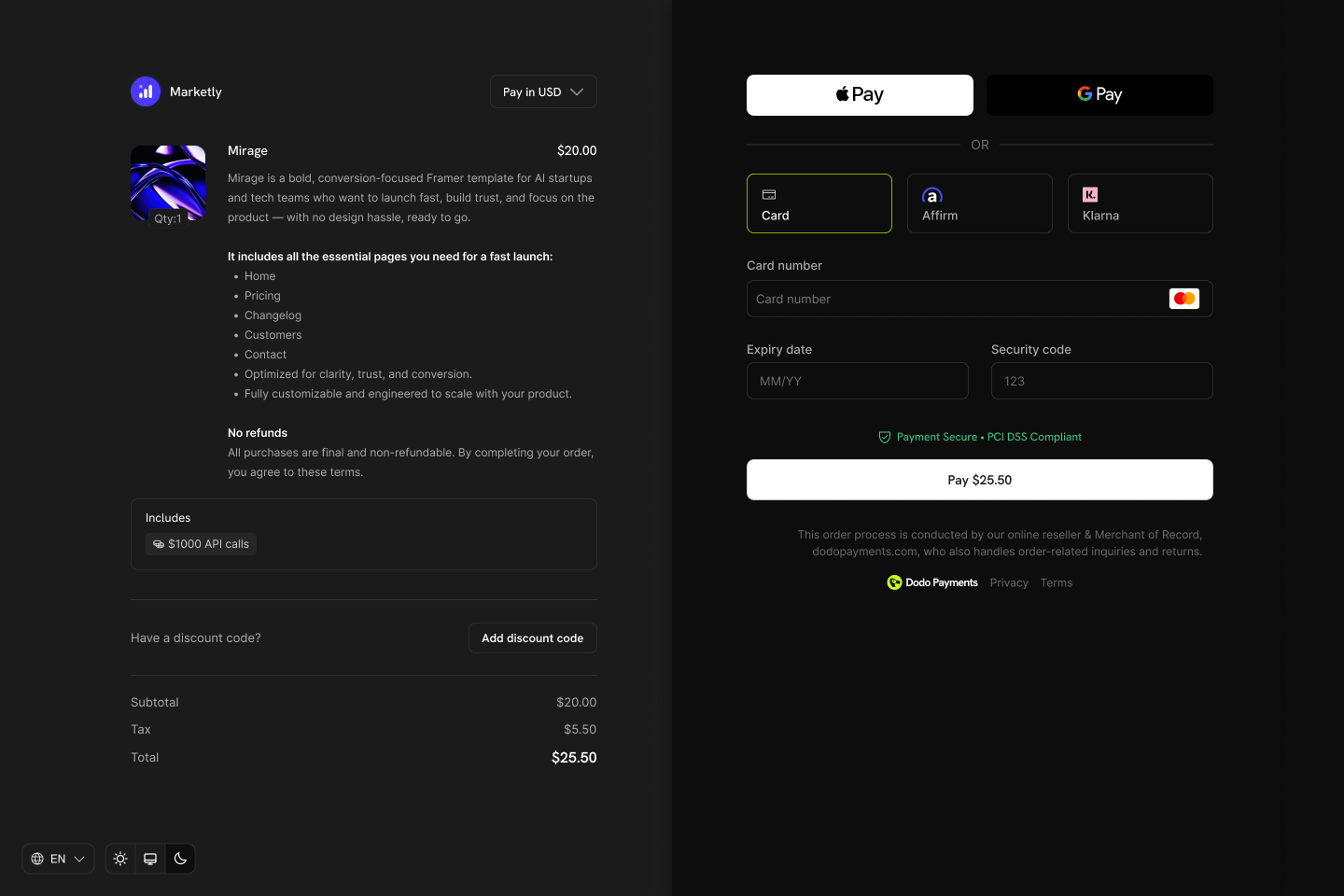
Credits appear as entitlements on your products and show in checkout, customer portal, and subscription details.
핵심 개념
크레딧 유형
크레딧을 생성할 때 두 가지 유형 중 하나를 선택합니다:- Custom Unit
- Fiat Credits
크레딧 수명 주기
크레딧은 발급부터 사용까지 명확한 수명 주기를 따릅니다:Credits Issued
Credits Consumed
Credits Expire or Roll Over
Overage Handling
부여 출처
크레딧은 여러 출처에서 부여할 수 있습니다:크레딧 생성
대시보드의 Products → Credits 섹션에서 크레딧 권한을 생성합니다. 각 크레딧은 단위, 정밀도, 만료 규칙 및 수명 주기 동작을 정의합니다.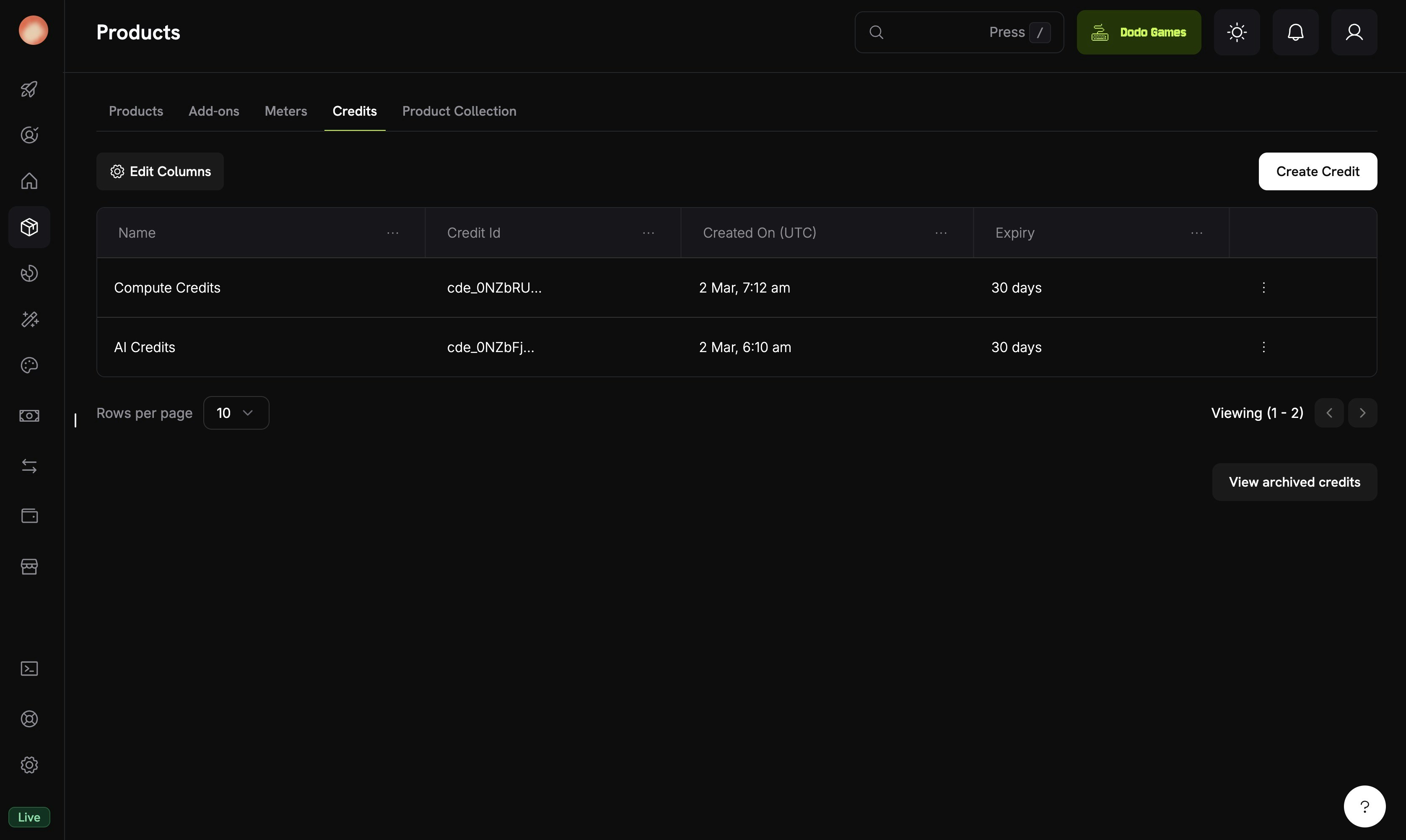
The Credits tab under Products shows all your credit entitlements.
Navigate to Credits
Configure Basic Information
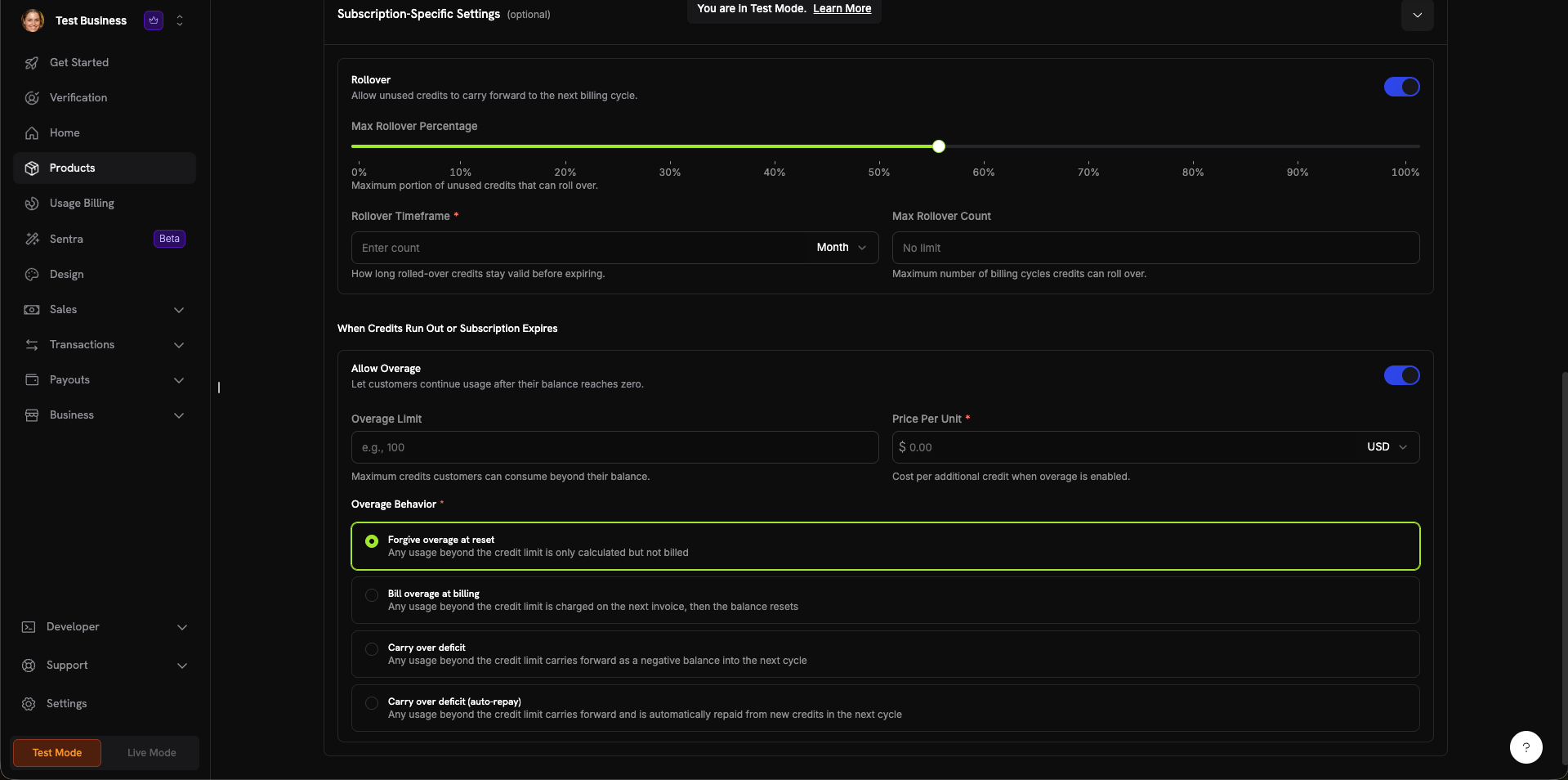
The credit creation form with all configuration sections.
Set General Settings
- Custom Unit: 자체 지표(토큰, API 호출, 컴퓨팅 시간)를 정의합니다. Unit Name(예: “Platform tokens”) 및 Precision 설정이 필요합니다.
- Fiat Credits: 크레딧이 실제 통화 가치를 나타냅니다. Unit Currency(USD, EUR, GBP, INR 등)를 선택해야 합니다.
0에서 10까지입니다:0: 정수(API 호출과 같이 셀 수 있는 항목에 적합)1: 소수점 한 자리(0.0)2: 소수점 두 자리(0.00)—기본값3: 소수점 세 자리(0.000)10까지: 높은 정밀도가 필요한 단위(예: 소수 토큰 또는 마이크로 사용량)
- 7일, 30일(기본값), 60일, 90일, Custom 또는 Never
Configure Subscription Settings (Optional)
- Max Rollover Percentage (0~100%): 이월되는 양의 최대 비율
- Rollover Timeframe: 이월된 크레딧이 유효한 기간(예: 1 Month)
- Max Rollover Count: 크레딧이 소멸되기 전 연속 이월 가능한 최대 횟수
- Overage Limit: 고객이 잔액을 초과하여 사용할 수 있는 최대 크레딧
- Price Per Unit: 초과 사용이 활성화된 경우 추가 크레딧당 비용(통화 선택기 포함)
- Forgive overage at reset(기본값): 크레딧 한도를 초과한 사용량은 추적되지만 청구되지 않습니다. 잔액은 각 주기에 재설정됩니다.
- Bill overage at billing: 크레딧 한도를 초과한 사용량이 다음 invoice에 청구된 후 잔액이 재설정됩니다.
- Carry over deficit: 크레딧 한도를 초과한 사용량이 음수 잔액으로 다음 주기에 이월됩니다.
- Carry over deficit (auto-repay): 적자가 이월되며 다음 주기에 새 크레딧에서 자동으로 상환됩니다.
Create Credit
제품에 크레딧 연결
제품 생성 또는 편집 과정에서 크레딧을 entitlements로 제품에 연결합니다. 제품당 최대 5개의 크레딧을 연결할 수 있습니다. 크레딧은 세 가지 가격 유형 모두에서 작동합니다.구독 제품
구독의 경우 크레딧은 결제 주기별로 발급되며 비례 배분, 체험판 크레딧 및 주기별 설정을 구성할 수 있습니다.Create or Edit a Subscription Product
Open Entitlements Section
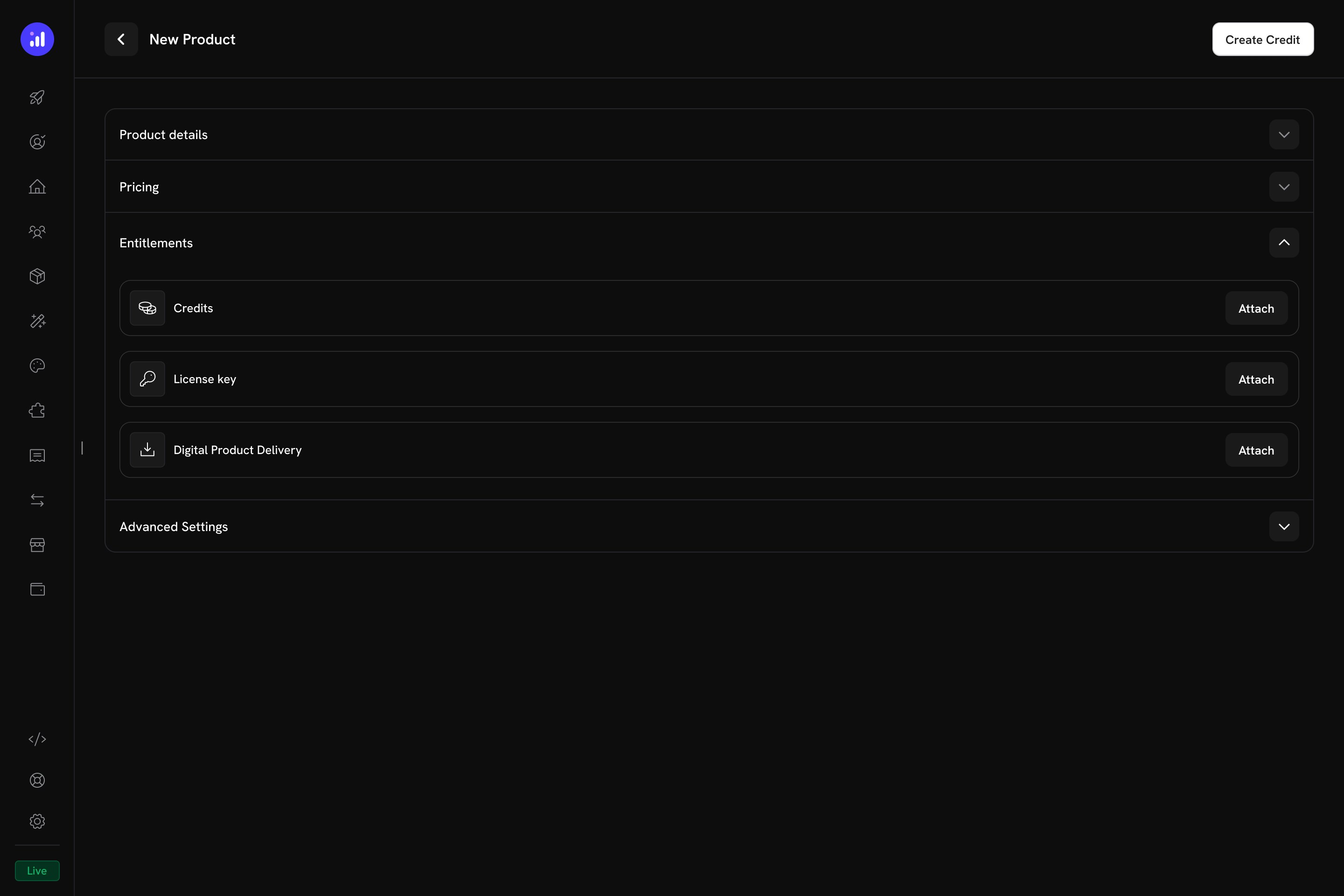
The Entitlements section in the product form with Credits, License Key, and Digital Product Delivery options.
Select Credits to Attach
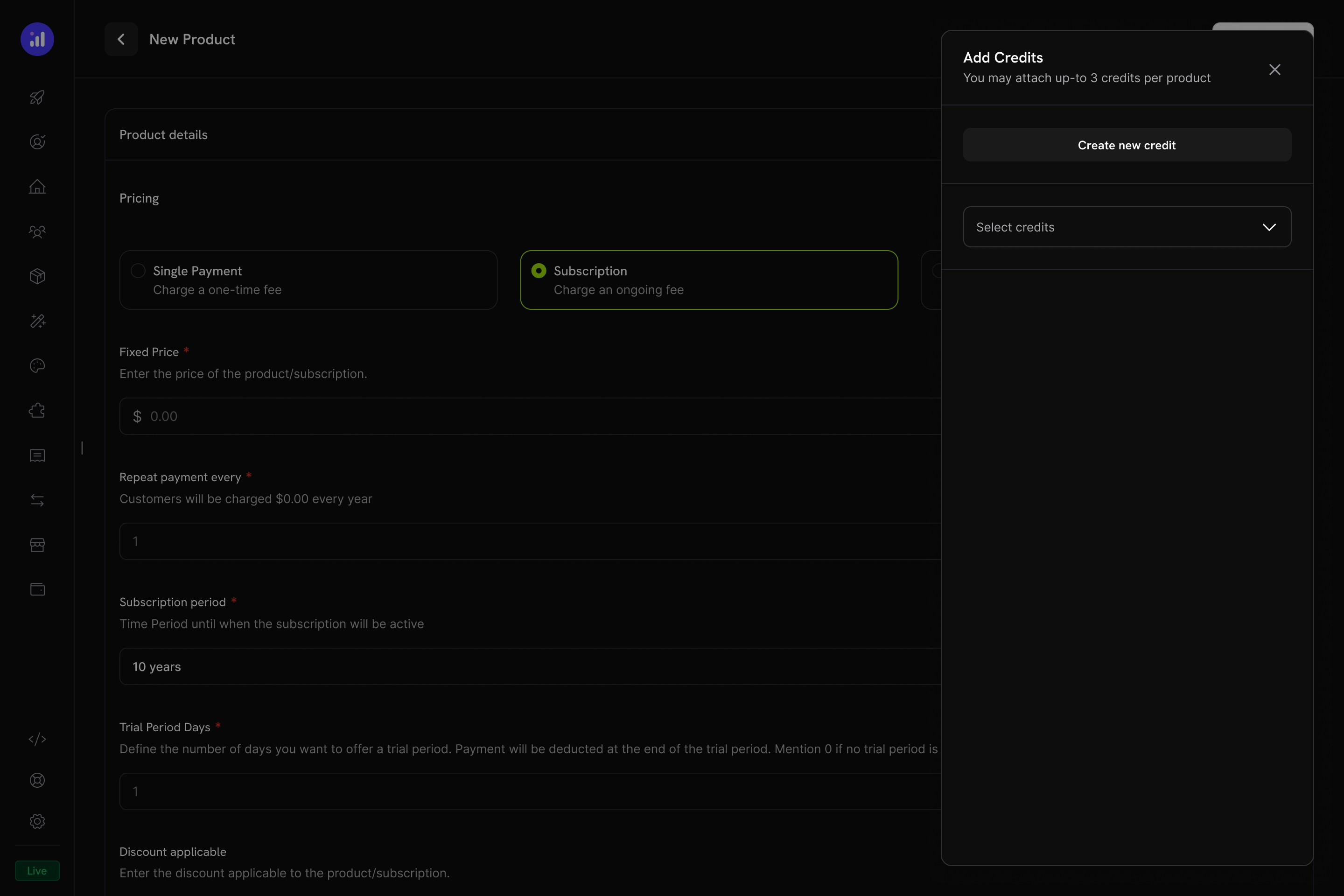
The Add Credits panel lets you select existing credits or create new ones.
Configure Credit Settings
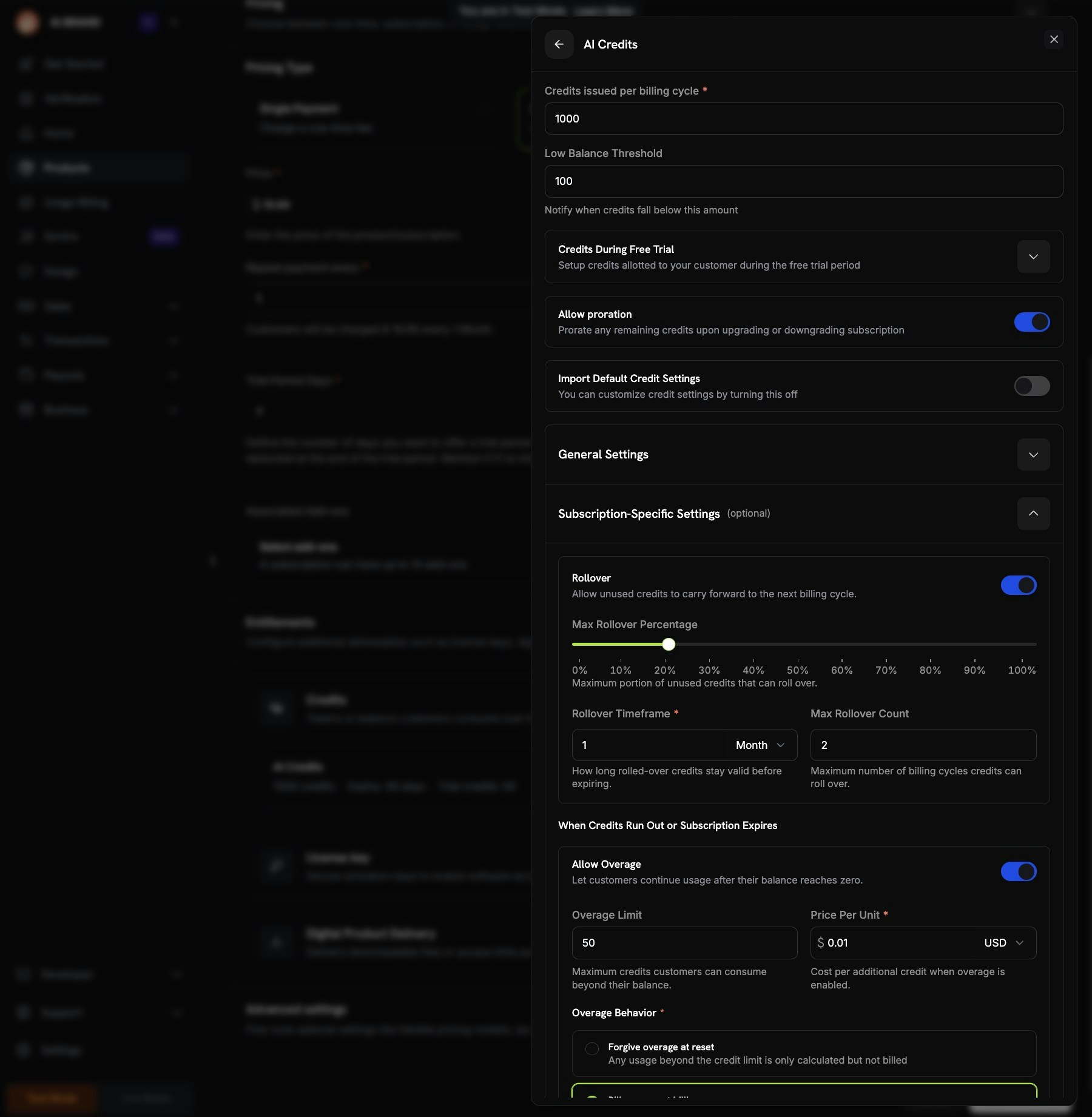
Credit configuration showing per-cycle amount, trial credits, proration, and custom settings.
Review and Add
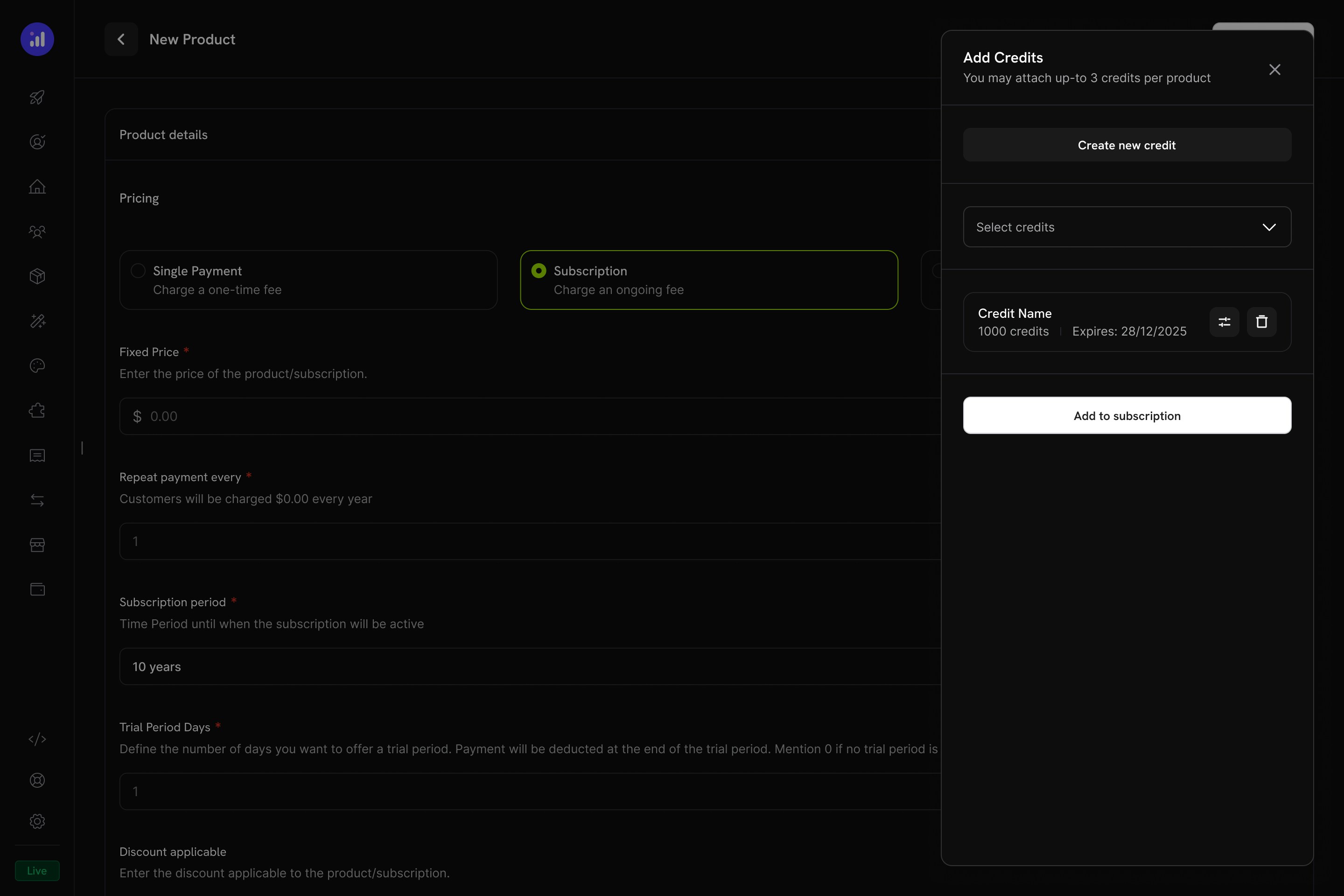
Review attached credits before adding them to the subscription.
일회성 결제 제품
일회성 결제의 경우 구매 시점에 크레딧이 한 번 발급됩니다.Create a One-Time Product
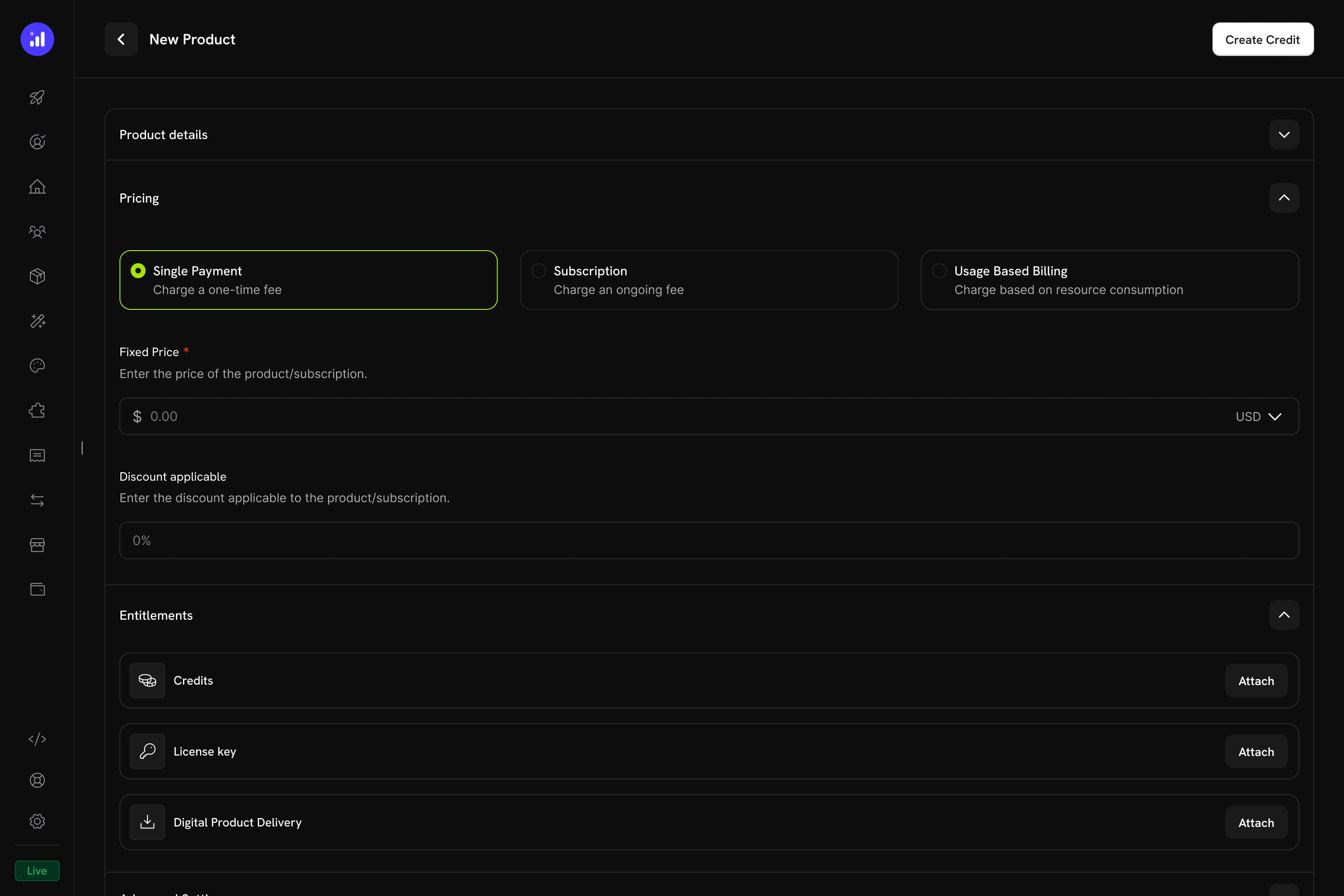
Single Payment pricing selected for a one-time credit product.
Attach Credits
사용량 기반 결제 제품
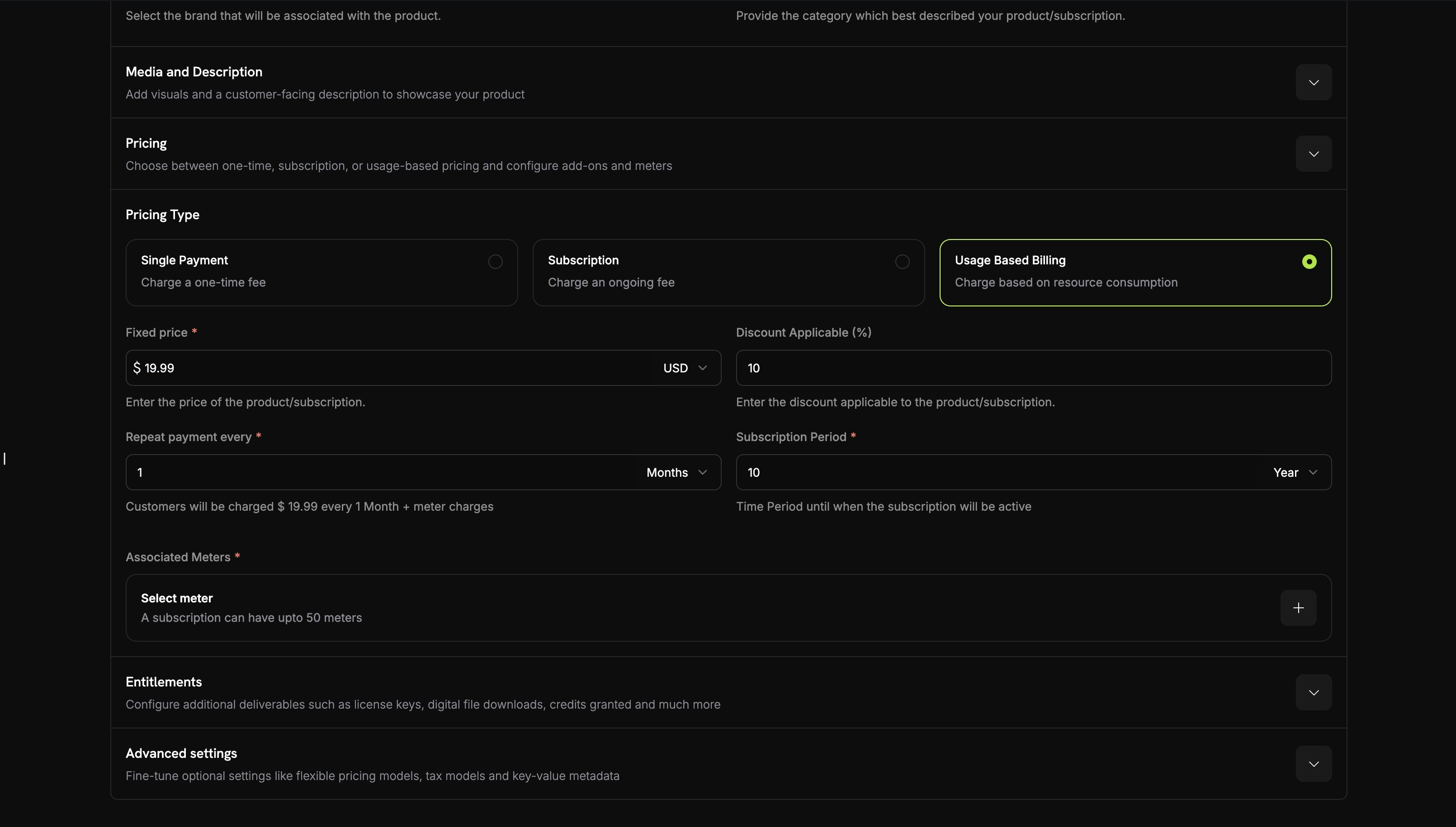
사용량 기반 제품의 경우 크레딧이 미터에 연결되고 실시간 사용량 이벤트에 따라 자동으로 차감됩니다.Create a Usage-Based Product
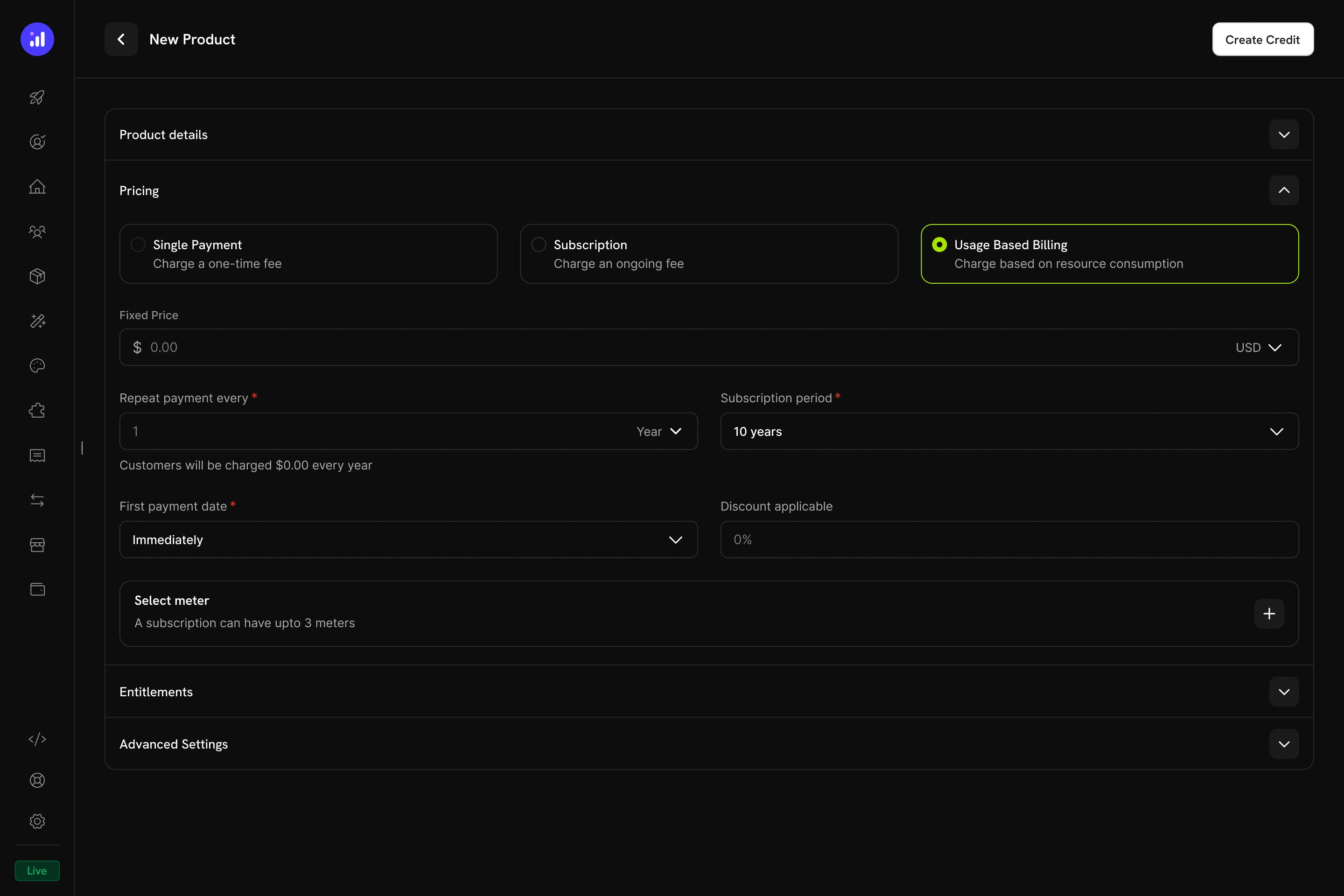
Usage Based Billing pricing type with meter configuration.
Add a Meter
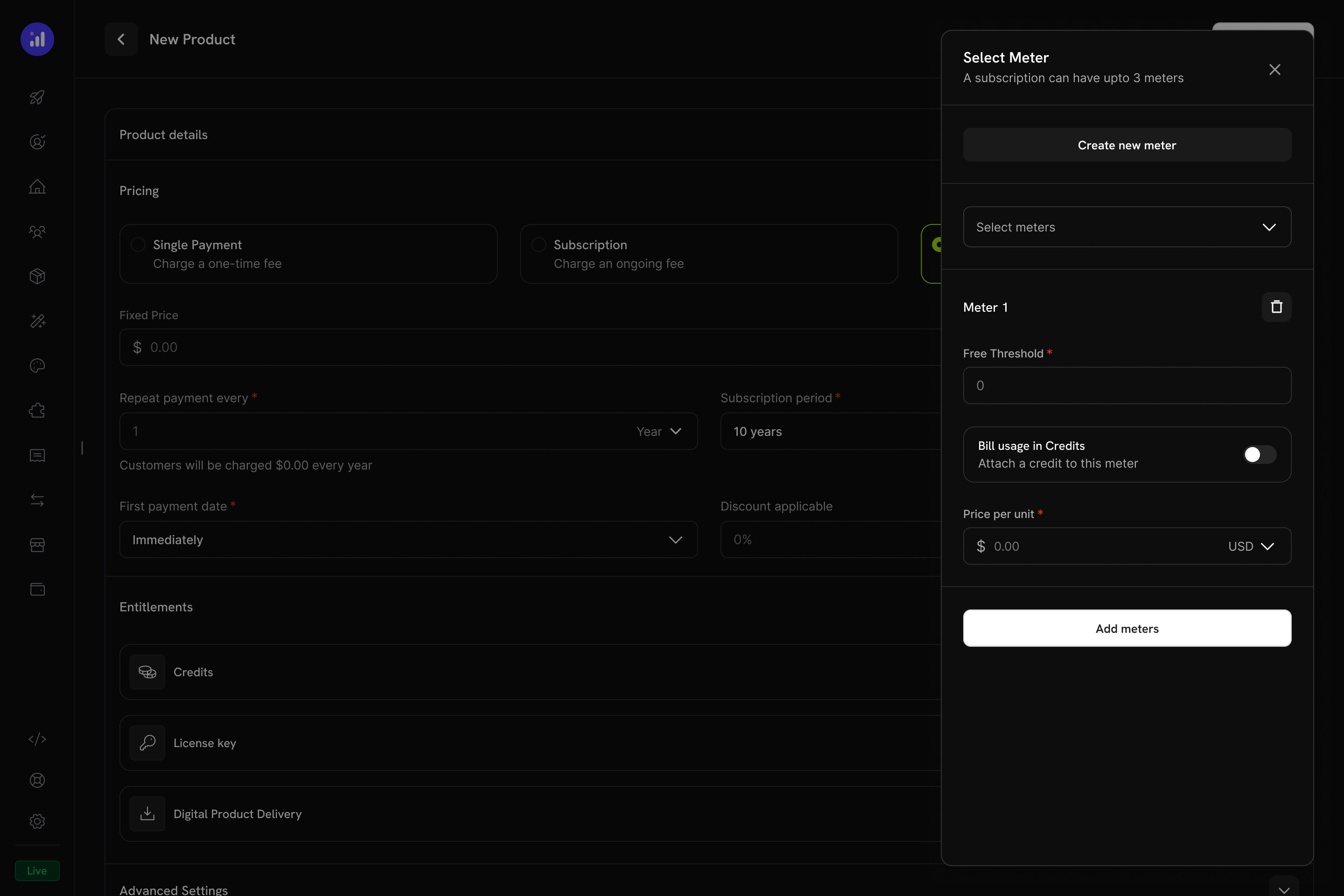
The Select Meter panel with meter configuration and credit toggle.
Enable Credit Billing on the Meter
1000로 설정하면 API 호출 1,000회가 크레딧 1개를 소비합니다.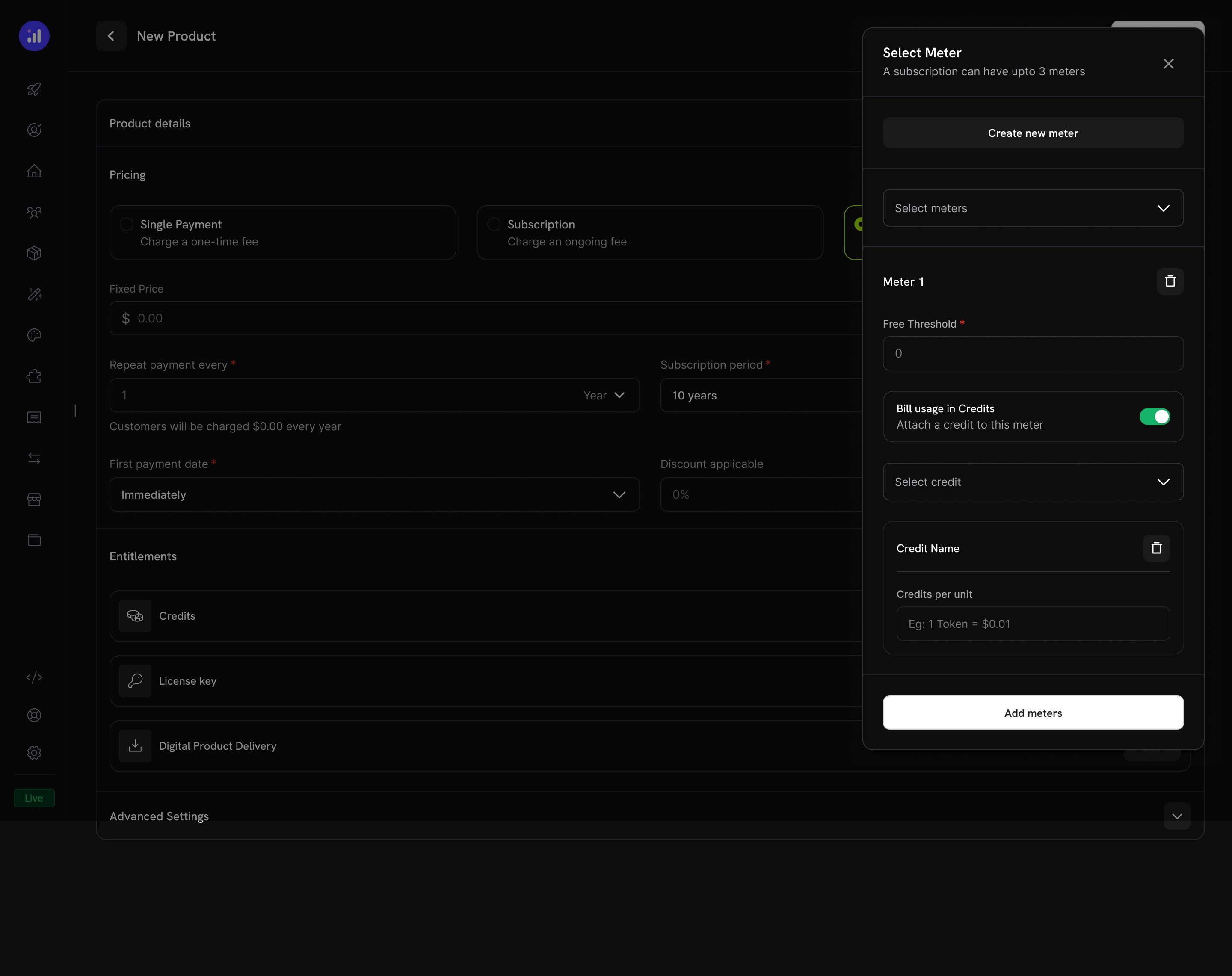
Credit attached to a meter with per-unit conversion rate.
Configure Credit Issuance
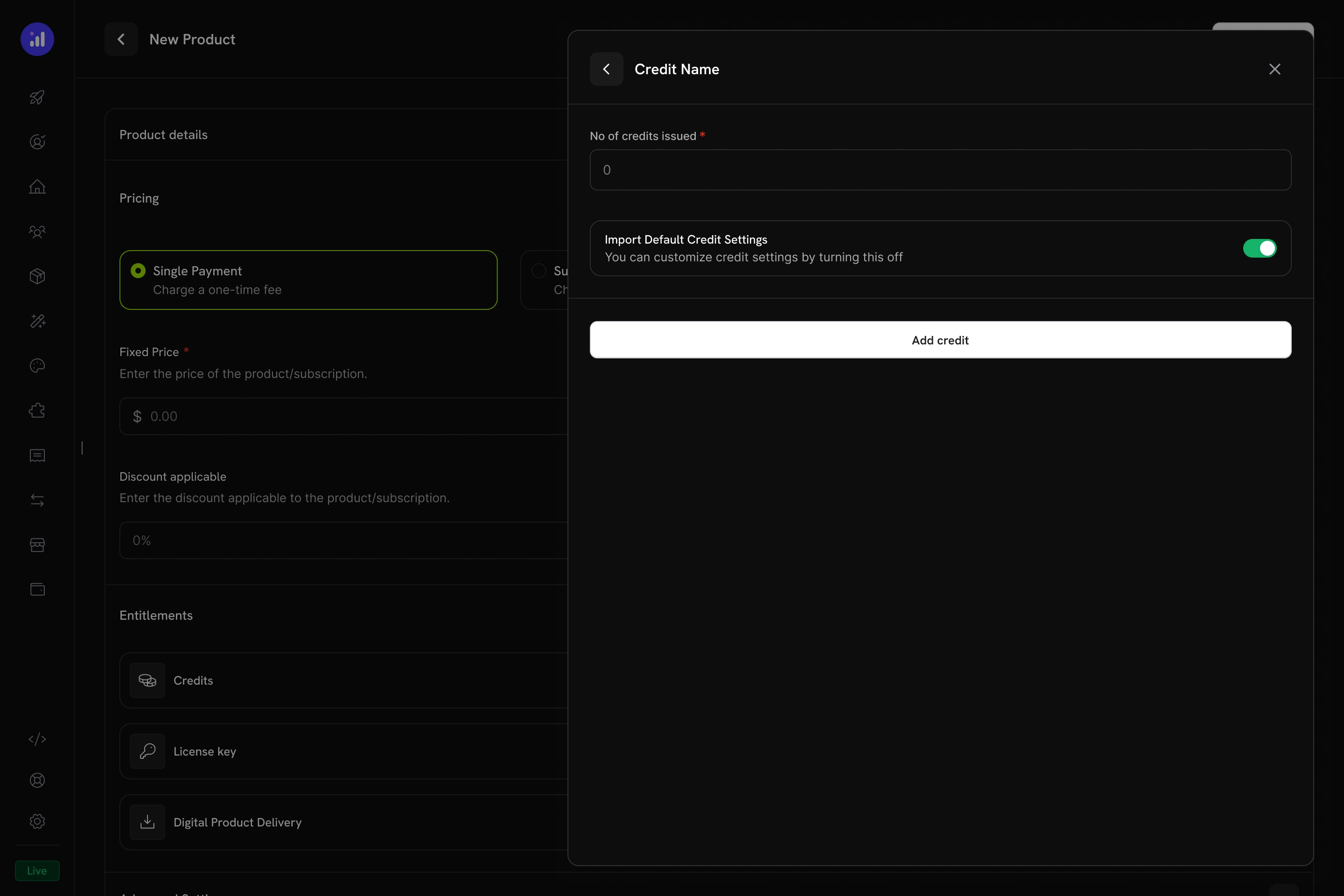
Configure how many credits to issue and whether to use default settings.
Verify Attachment
Meter with credit attached showing price, threshold, and credit name.
크레딧 설정
롤오버
롤오버를 사용하면 사용하지 않은 크레딧이 만료되지 않고 다음 결제 주기로 이월됩니다.초과 사용
초과 사용은 주기 중간에 고객의 크레딧 잔액이 0이 되었을 때 발생하는 일을 제어합니다.만료
credit_expired ledger 항목을 생성합니다. rollover가 활성화된 경우 만료 전에 rollover 비율이 적용되며, 나머지 부분만 만료됩니다.크레딧을 사용한 Usage Billing
크레딧이 usage meter에 연결되면 시스템은 강력한 소비 기반 billing 모델을 생성합니다. 고객은 크레딧 할당량을 받고, 사용량 이벤트가 잔액에서 자동으로 차감됩니다.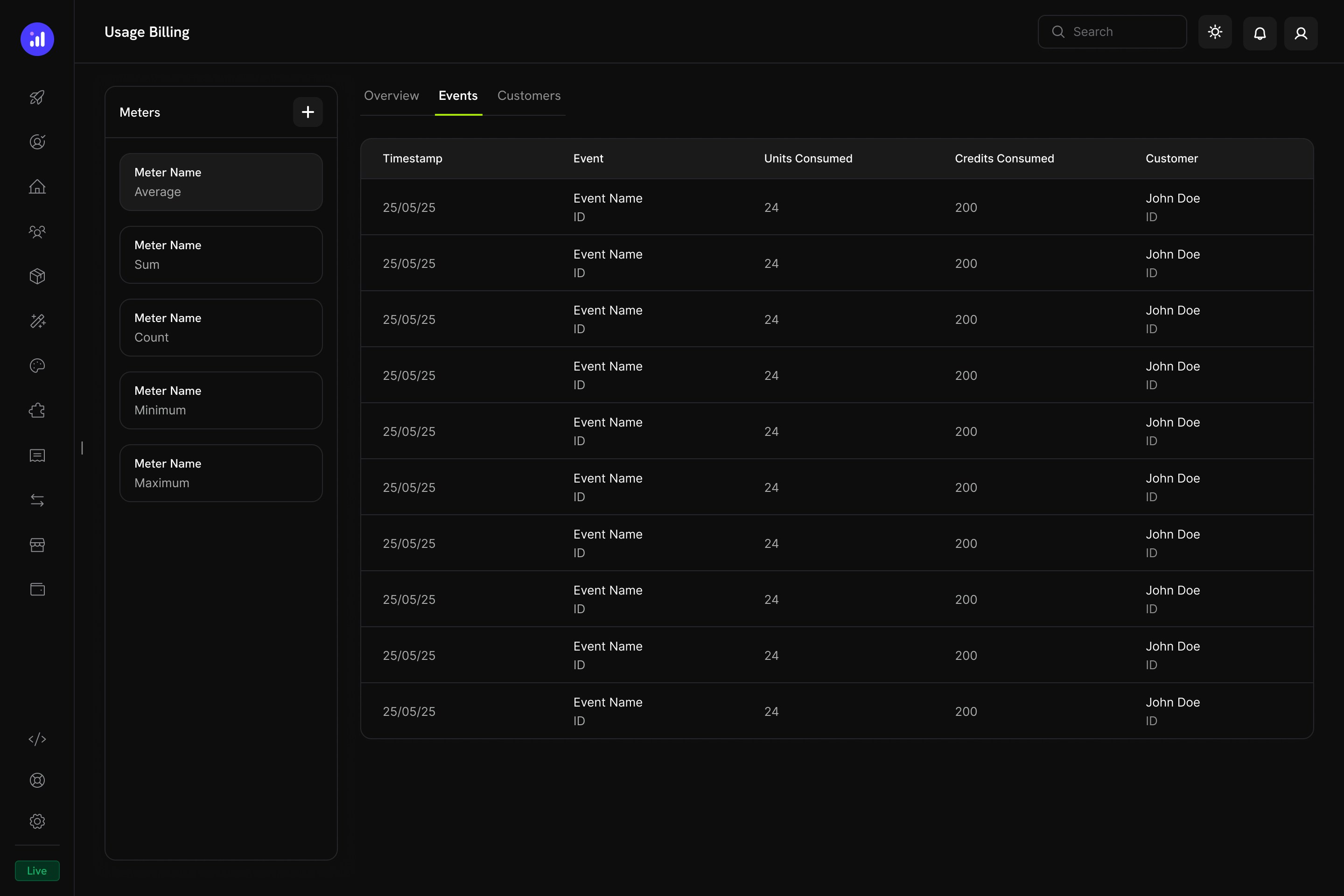
The Usage Billing dashboard shows meter events with units consumed, credits consumed, and customer details.
Meter 기반 크레딧 차감 방식
- 애플리케이션에서 usage event를 전송합니다: 각 이벤트에는 customer ID, event name 및 metadata가 포함됩니다.
- meter가 이벤트를 집계합니다: Count, Sum, Max 또는 Last aggregation을 사용합니다.
- 크레딧이 자동으로 차감됩니다: 백그라운드 worker가 매분 이벤트를 처리하고, 구성된 rate를 사용하여 meter 단위를 크레딧으로 변환한 다음 FIFO 순서(가장 먼저 만료되는 grant 우선)에 따라 고객 잔액에서 차감합니다.
- 초과 사용량이 추적됩니다: 크레딧 잔액이 0에 도달하고 초과 사용이 활성화된 경우 시스템은 주기 종료 시 billing을 위해 초과 사용량을 추적합니다.
Meters 패널
Usage Billing 대시보드에는 정의된 모든 meter와 해당 aggregation type을 나열하는 Meters 패널이 포함되어 있습니다:고객 경험
Checkout
고객이 연결된 크레딧이 포함된 제품을 구매하면 checkout 페이지에 제품 제공 항목의 일부로 포함된 크레딧이 표시됩니다.Checkout shows included credits with the product, making the value proposition clear.
Customer Portal
고객은 Customer Portal의 Credits 섹션에서 크레딧 잔액을 확인하고 관리할 수 있습니다.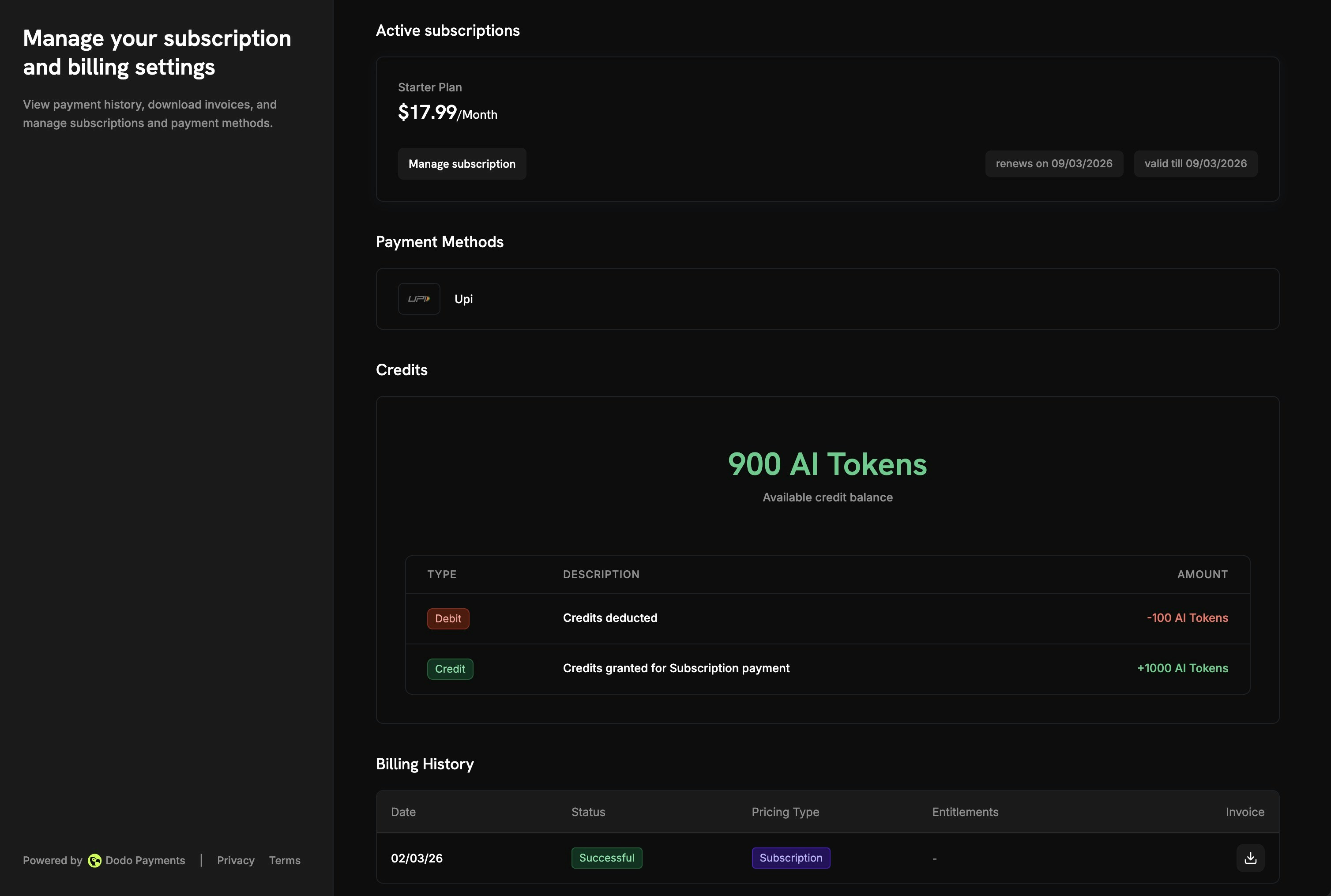
The Customer Portal shows available balance and full transaction history.
- Available Balance: 현재 크레딧 잔액이 눈에 띄게 표시됩니다.
- Credit Tabs: 서로 다른 크레딧 유형 간에 전환합니다(예: “OpenAI Credits” 또는 “Usage Tokens”).
- Recent Transactions: 날짜, transaction ID, 유형, 금액 및 누적 잔액을 포함한 전체 내역
Subscription Details
구독 세부정보 페이지에는 다른 plan 정보와 함께 크레딧 entitlement가 표시됩니다.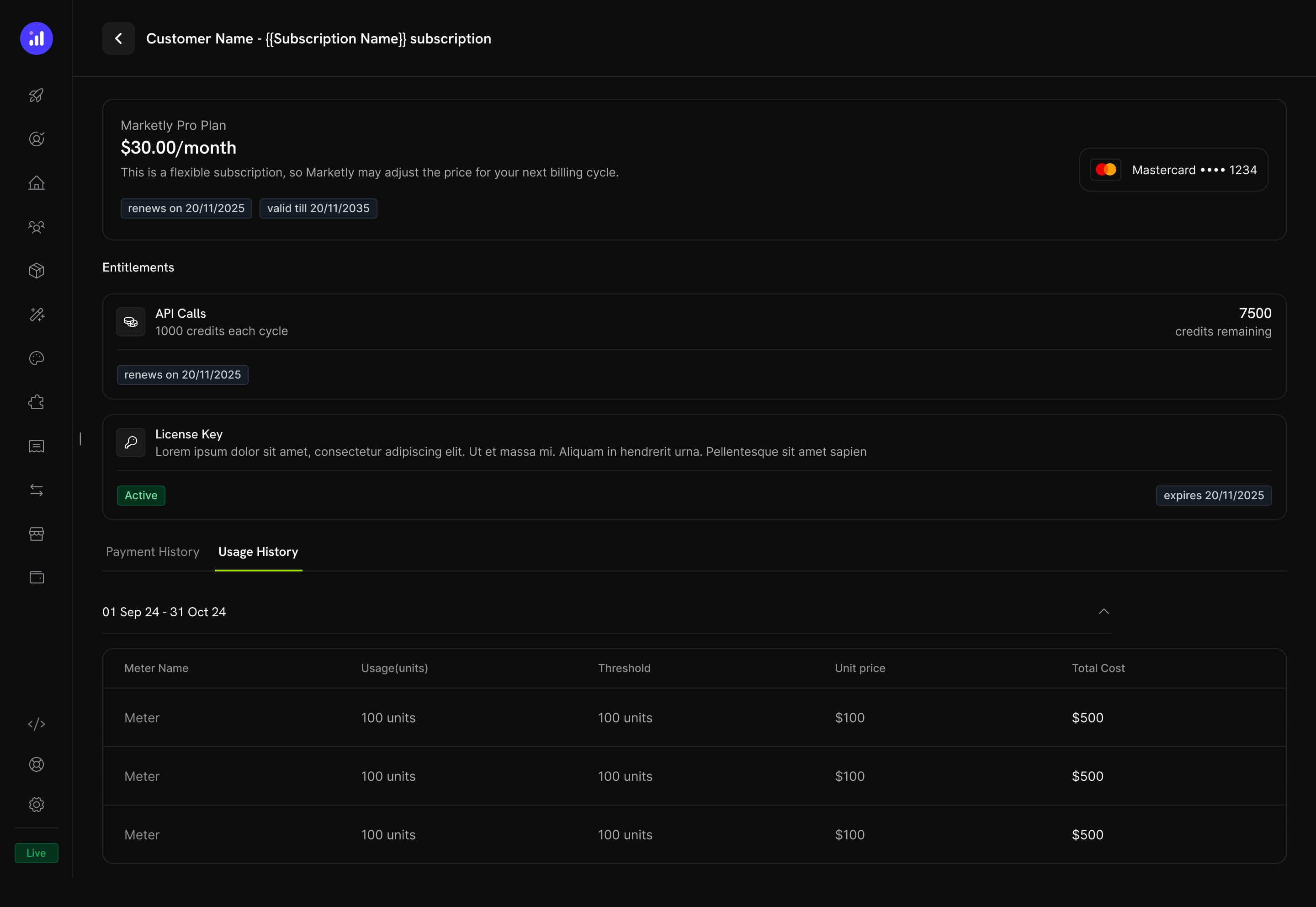
Subscription details show credit allocation, remaining balance, and renewal date.
- billing cycle별 Credit allocation(예: “1000 credits each cycle”)
- Remaining balance(예: “7500 credits remaining”)
- 다음 크레딧 발행을 위한 Renewal date
- 소비된 단위, threshold, unit price 및 총 비용을 meter 수준으로 분석하는 Usage History 탭
Transaction Details
Payment transaction 페이지에는 결제와 함께 제공된 모든 entitlement(크레딧 포함)를 보여주는 Entitlements 섹션이 포함됩니다.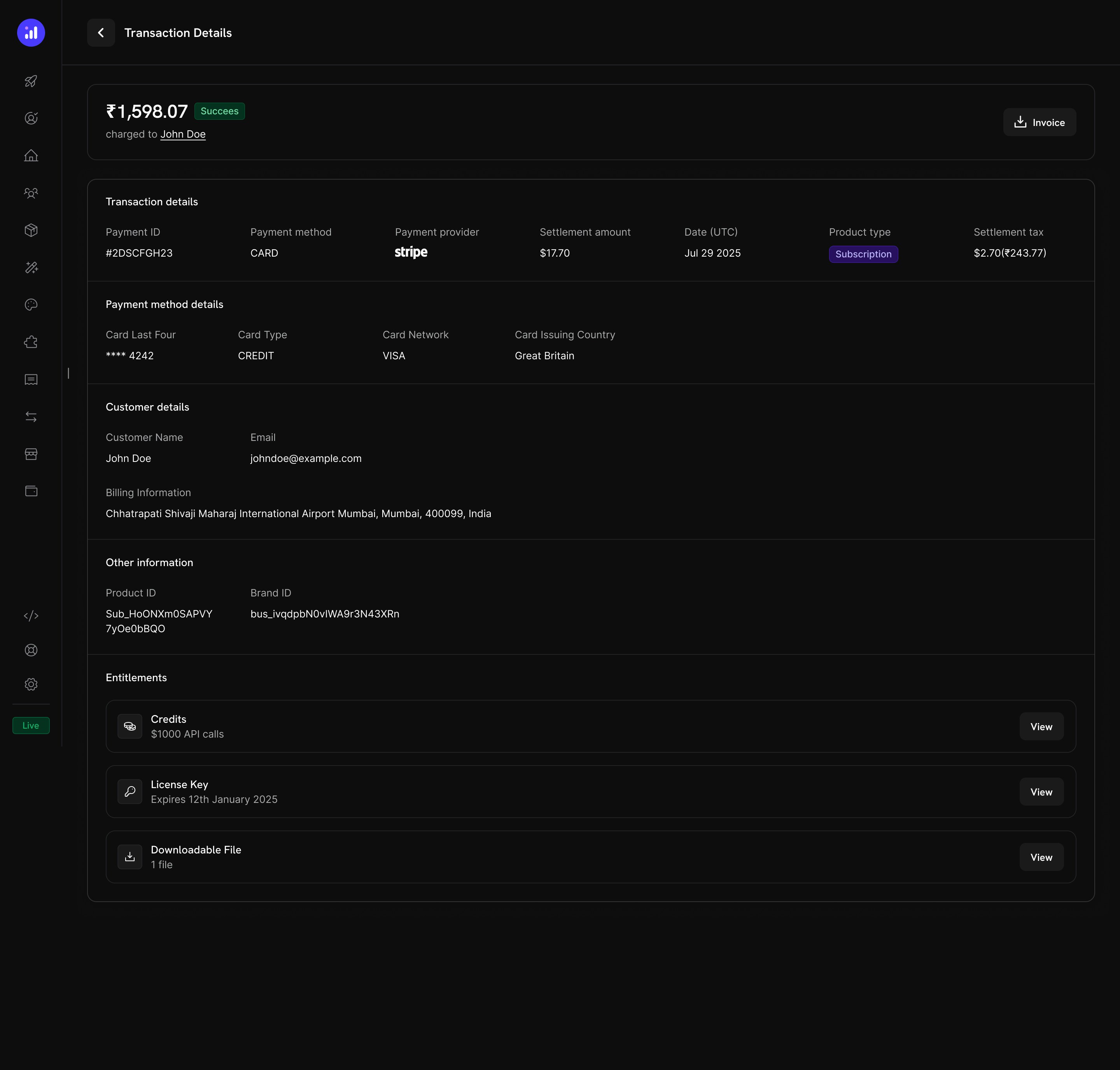
Transaction details show credits alongside other entitlements like license keys and digital downloads.
크레딧 관리
Dashboard 보기
Credit Entitlements 목록
Products → Credits에서 모든 credit entitlement를 확인합니다. 테이블에는 credit name과 expiry setting이 표시되며, 편집 또는 보관을 위한 빠른 작업을 제공합니다.Credits listing with total count, creation button, and management actions.
Customer Credit Details
Customers → [Customer Name] → Credits에서 특정 고객의 크레딧 잔액과 transaction history를 확인합니다.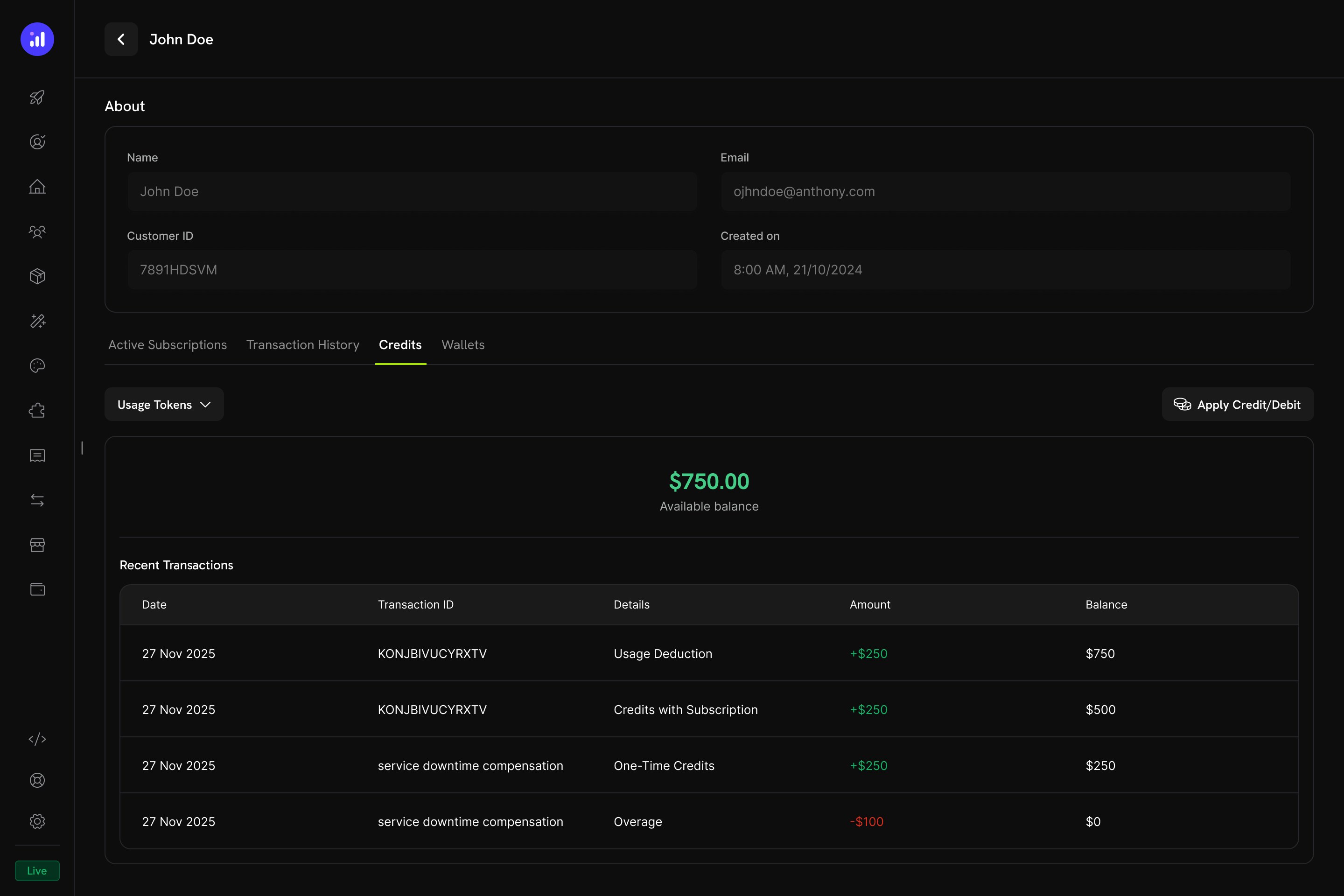
Customer detail page showing credit balance and full transaction ledger.
- Credit Selector - 서로 다른 credit entitlement 간에 전환
- Available Balance - 크고 눈에 띄게 표시되는 현재 잔액
- Apply Credit/Debit - 고객 잔액을 수동으로 조정하는 버튼
- Recent Transactions - 날짜, transaction ID, 유형, 금액 및 누적 잔액을 포함한 전체 ledger
수동 조정
대시보드에서 직접 고객 잔액을 수동으로 credit 또는 debit할 수 있습니다:Navigate to Customer
Open Credits Tab
Confirm
manual_adjustment ledger 항목을 생성합니다.Credit Ledger
모든 credit operation은 credit ledger에 기록되어 완전한 audit trail을 제공합니다:Webhooks
Credit-Based Billing은 모든 credit lifecycle 변경에 대해 webhook event를 발생시킵니다. 이를 사용하여 애플리케이션을 credit balance와 동기화하고, 알림을 트리거하거나, 사용자 지정 billing workflow를 구축할 수 있습니다.credit.balance_low event를 제외한 모든 credit.* event)에는 balance before/after, overage before/after, source reference 및 grant source subscription 또는 payment의 metadata가 포함된 전체 CreditLedgerEntry payload가 포함됩니다(API를 통해 직접 생성된 grant의 경우 비어 있음). credit.balance_low event에는 threshold configuration과 current balance가 포함됩니다.
Credit Webhook Payloads
API Management
Create Credit Entitlements
Create Credit Entitlements
Create Credit Entitlement
List Credit Entitlements
Manage Credit Entitlements
Manage Credit Entitlements
Get Credit Entitlement
Update Credit Entitlement
Delete Credit Entitlement
Undelete Credit Entitlement
Grant and Adjust Credits
Grant and Adjust Credits
Create Ledger Entry
Query Balances and Ledger
Query Balances and Ledger
List Balances
Get Customer Balance
List Customer Grants
List Customer Ledger
Integration Example
Dodo Payments client를 초기화합니다:실제 사용 사례
AI SaaS Platform
AI SaaS Platform
- Credit Type: Custom Unit (“AI Tokens”)
- Precision: 0 (whole tokens)
- Rollover: 25% max, 1-month timeframe
- Overage: Enabled, bill overage at billing
- Meter:
ai.generationwith Sum aggregation ontokensfield
API Gateway
API Gateway
- Credit Type: Custom Unit (“API Calls”)
- Precision: 0 (whole calls)
- Rollover: Disabled
- Overage: Developer+ plans allow overage (forgive at reset), Free plan disables overage
- Meter:
api.requestwith Count aggregation
Cloud Storage Service
Cloud Storage Service
- 크레딧 유형: Custom Unit (“GB-hours”)
- 정밀도: 2 (소수점 이하 두 자리)
- 이월: 최대 50%, 한 번 이월
- 초과 사용: 활성화됨, GB-hours로 설정된 초과 사용 한도
- 미터:
storage.usage, Sum 집계
모범 사례
- 간단하게 시작하기: 단일 크레딧 유형과 rollover 없이 시작합니다. 고객 피드백과 사용 패턴에 따라 복잡성을 추가하세요.
- 명확한 기대치 설정: 제품 페이지와 Customer Portal에 크레딧 할당량, 잔여 잔액 및 overage 가격을 눈에 띄게 표시하세요.
- 의미 있는 단위 사용: 일반적인 용어 대신 크레딧이 나타내는 대상을 기준으로 이름을 지정하세요(예: “API Calls” 또는 “AI Tokens”). 이를 통해 고객이 가치를 이해할 수 있습니다.
- 신중하게 expiry 구성하기: 짧은 expiry window(7일)는 긴급성을 높이지만 고객에게 불편을 줄 수 있습니다. 대부분의 SaaS 제품에서는 더 긴 window(30~90일)가 고객에게 더 친화적입니다.
- 낮은 잔액 모니터링: 고객이 크레딧을 모두 사용하기 전에 알림을 받을 수 있도록 low balance threshold를 설정하여 예상치 못한 overage charge를 줄이세요.
- test mode에서 테스트하기: 크레딧을 생성하고 test product에 연결한 후, 출시 전에 전체 purchase → usage → deduction → expiration cycle을 시뮬레이션하세요.