메인 콘텐츠로 건너뛰기

개요

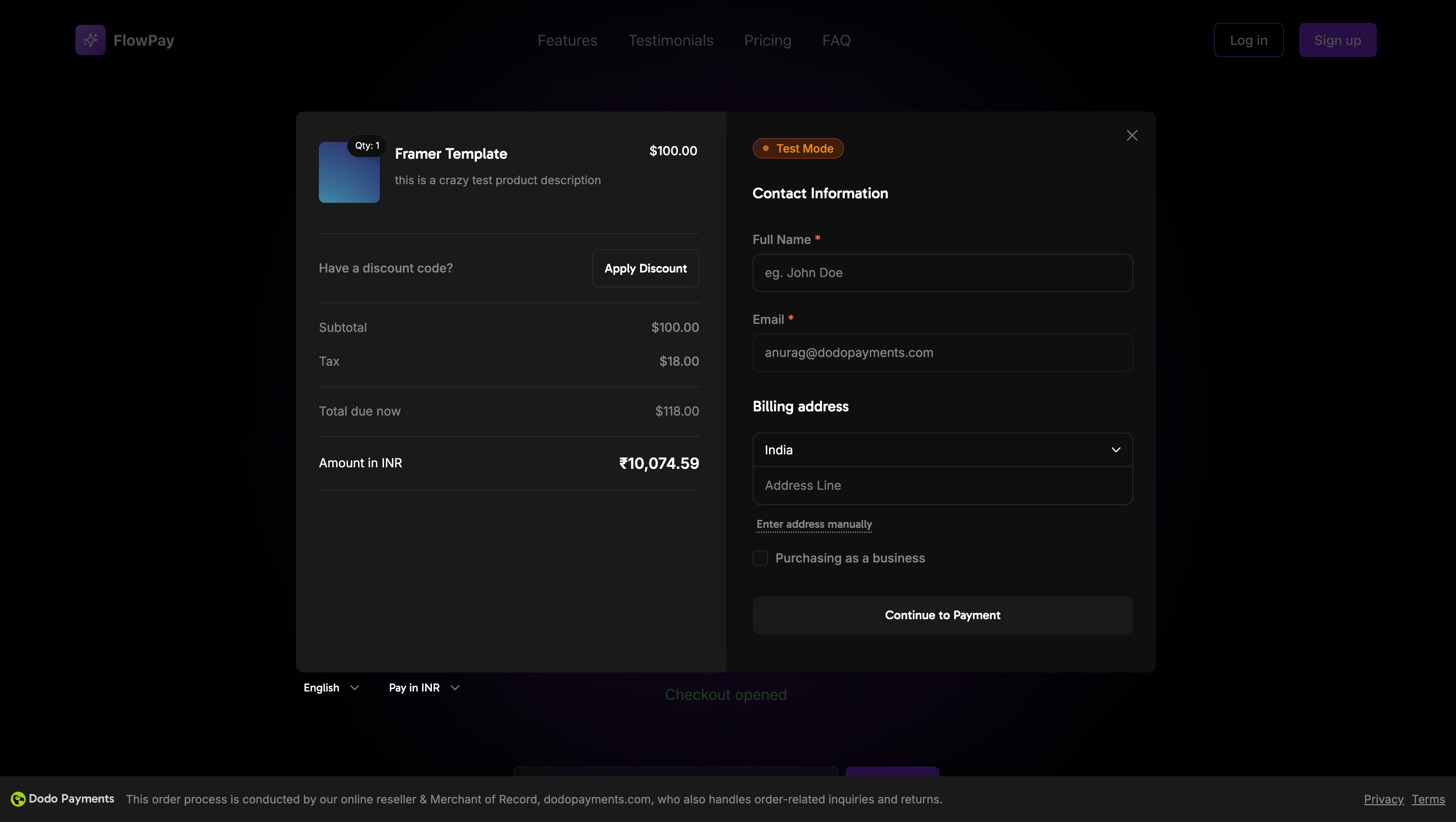
Dodo Payments Checkout SDK는 웹 애플리케이션에 결제 오버레이를 통합하는 매끄러운 방법을 제공합니다. TypeScript와 현대 웹 표준으로 구축되어 있으며, 실시간 이벤트 처리 및 사용자 정의 가능한 테마를 통해 결제를 처리하는 강력한 솔루션을 제공합니다.
오버레이 체크아웃 커버 이미지

데모

인터랙티브 데모

실시간 데모에서 오버레이 체크아웃을 확인하세요.

빠른 시작

Dodo Payments Checkout SDK를 몇 줄의 코드로 시작하세요:
import { DodoPayments } from "dodopayments-checkout";

// Initialize the SDK
DodoPayments.Initialize({
  mode: "test", // 'test' or 'live'
  onEvent: (event) => {
    console.log("Checkout event:", event);
  },
});

// Open checkout
DodoPayments.Checkout.open({
  checkoutUrl: "https://checkout.dodopayments.com/session/cks_123"
});
체크아웃 세션 생성 API에서 체크아웃 URL을 가져오세요.

단계별 통합 가이드

1

SDK 설치

선호하는 패키지 관리자를 사용하여 Dodo Payments Checkout SDK를 설치하세요:
npm install dodopayments-checkout
2

SDK 초기화

주로 메인 컴포넌트나 앱 진입점에서 애플리케이션 내에서 SDK를 초기화하세요:
import { DodoPayments } from "dodopayments-checkout";

DodoPayments.Initialize({
  mode: "test", // Change to 'live' for production
  onEvent: (event) => {
    console.log("Checkout event:", event);
    
    // Handle different events
    switch (event.event_type) {
      case "checkout.opened":
        // Checkout overlay has been opened
        break;
      case "checkout.closed":
        // Checkout has been closed
        break;
      case "checkout.error":
        // Handle errors
        console.error("Checkout error:", event.data?.message);
        break;
    }
  },
});
체크아웃을 열기 전에 항상 SDK를 초기화하세요. 초기화는 애플리케이션이 로드될 때 한 번만 발생해야 합니다.
3

체크아웃 버튼 컴포넌트 생성

체크아웃 오버레이를 여는 컴포넌트를 생성하세요:
// components/CheckoutButton.tsx
"use client";

import { Button } from "@/components/ui/button";
import { DodoPayments } from "dodopayments-checkout";
import { useEffect, useState } from "react";

export function CheckoutButton() {
  const [isLoading, setIsLoading] = useState(false);

  useEffect(() => {
    // Initialize the SDK
    DodoPayments.Initialize({
      mode: "test",
      onEvent: (event) => {
        switch (event.event_type) {
          case "checkout.opened":
            setIsLoading(false);
            break;
          case "checkout.error":
            setIsLoading(false);
            console.error("Checkout error:", event.data?.message);
            break;
        }
      },
    });
  }, []);

  const handleCheckout = async () => {
    try {
      setIsLoading(true);
      await DodoPayments.Checkout.open({
        checkoutUrl: "https://checkout.dodopayments.com/session/cks_123"
      });
    } catch (error) {
      console.error("Failed to open checkout:", error);
      setIsLoading(false);
    }
  };

  return (
    <Button 
      onClick={handleCheckout}
      disabled={isLoading}
    >
      {isLoading ? "Loading..." : "Checkout Now"}
    </Button>
  );
}
4

페이지에 체크아웃 추가

애플리케이션에서 체크아웃 버튼 컴포넌트를 사용하세요:
// app/page.tsx
import { CheckoutButton } from "@/components/CheckoutButton";

export default function Home() {
  return (
    <main className="flex min-h-screen flex-col items-center justify-center p-24">
      <h1>Welcome to Our Store</h1>
      <CheckoutButton />
    </main>
  );
}
5

성공 및 실패 페이지 처리

체크아웃 리디렉션을 처리할 페이지를 생성하세요:
// app/success/page.tsx
export default function SuccessPage() {
  return (
    <div className="flex min-h-screen flex-col items-center justify-center">
      <h1>Payment Successful!</h1>
      <p>Thank you for your purchase.</p>
    </div>
  );
}

// app/failure/page.tsx
export default function FailurePage() {
  return (
    <div className="flex min-h-screen flex-col items-center justify-center">
      <h1>Payment Failed</h1>
      <p>Please try again or contact support.</p>
    </div>
  );
}
6

통합 테스트

  1. 개발 서버를 시작하세요:
npm run dev
  1. 체크아웃 흐름을 테스트하세요:
    • 체크아웃 버튼 클릭
    • 오버레이가 나타나는지 확인
    • 테스트 자격 증명을 사용하여 결제 흐름 테스트
    • 리디렉션이 올바르게 작동하는지 확인
브라우저 콘솔에 체크아웃 이벤트가 기록되는 것을 확인해야 합니다.
7

라이브로 전환

프로덕션 준비가 되었을 때:
  1. 모드를 'live'로 변경하세요:
DodoPayments.Initialize({
  mode: "live",
  onEvent: (event) => {
    console.log("Checkout event:", event);
  }
});
  1. 백엔드에서 라이브 체크아웃 세션을 사용하도록 체크아웃 URL을 업데이트하세요.
  2. 프로덕션에서 전체 흐름을 테스트하세요.
  3. 이벤트 및 오류를 모니터링하세요.

API 참조

구성

초기화 옵션

interface InitializeOptions {
  mode: "test" | "live";
  onEvent: (event: CheckoutEvent) => void;
}
옵션유형필수설명
mode"test" | "live"환경 모드: 'test'는 개발용, 'live'는 프로덕션용
onEventfunction체크아웃 이벤트를 처리하는 콜백 함수

체크아웃 옵션

interface CheckoutOptions {
  checkoutUrl: string;
}
옵션유형필수설명
checkoutUrlstring체크아웃 세션 생성 API에서 가져온 체크아웃 세션 URL

메서드

체크아웃 열기

지정된 체크아웃 세션 URL로 체크아웃 오버레이를 엽니다.
DodoPayments.Checkout.open({
  checkoutUrl: "https://checkout.dodopayments.com/session/cks_123"
});

체크아웃 닫기

프로그램적으로 체크아웃 오버레이를 닫습니다.
DodoPayments.Checkout.close();

상태 확인

현재 체크아웃 오버레이가 열려 있는지 여부를 반환합니다.
const isOpen = DodoPayments.Checkout.isOpen();
// Returns: boolean

이벤트

SDK는 onEvent 콜백을 통해 수신할 수 있는 실시간 이벤트를 제공합니다:
DodoPayments.Initialize({
  onEvent: (event: CheckoutEvent) => {
    switch (event.event_type) {
      case "checkout.opened":
        // Checkout overlay has been opened
        break;
      case "checkout.payment_page_opened":
        // Payment page has been displayed
        break;
      case "checkout.customer_details_submitted":
        // Customer and billing details submitted
        break;
      case "checkout.closed":
        // Checkout has been closed
        break;
      case "checkout.redirect":
        // Checkout will perform a redirect
        break;
      case "checkout.error":
        // An error occurred
        console.error("Error:", event.data?.message);
        break;
    }
  }
});
이벤트 유형설명
checkout.opened체크아웃 오버레이가 열렸습니다
checkout.payment_page_opened결제 페이지가 표시되었습니다
checkout.customer_details_submitted고객 및 청구 세부정보가 제출되었습니다
checkout.closed체크아웃 오버레이가 닫혔습니다
checkout.redirect체크아웃이 리디렉션을 수행합니다
checkout.error체크아웃 중 오류가 발생했습니다

구현 옵션

패키지 관리자 설치

단계별 통합 가이드에서 설명한 대로 npm, yarn 또는 pnpm을 통해 설치하세요.

CDN 구현

빌드 단계 없이 빠른 통합을 위해 CDN을 사용할 수 있습니다:
<!DOCTYPE html>
<html lang="en">
<head>
    <meta charset="UTF-8">
    <meta name="viewport" content="width=device-width, initial-scale=1.0">
    <title>Dodo Payments Checkout</title>
    
    <!-- Load DodoPayments -->
    <script src="https://cdn.jsdelivr.net/npm/dodopayments-checkout@latest/dist/index.js"></script>
    <script>
        // Initialize the SDK
        DodoPaymentsCheckout.DodoPayments.Initialize({
            mode: "test", // Change to 'live' for production
            onEvent: (event) => {
                console.log('Checkout event:', event);
            }
        });
    </script>
</head>
<body>
    <button onclick="openCheckout()">Checkout Now</button>

    <script>
        function openCheckout() {
            DodoPaymentsCheckout.DodoPayments.Checkout.open({
                checkoutUrl: "https://checkout.dodopayments.com/session/cks_123"
            });
        }
    </script>
</body>
</html>

TypeScript 지원

SDK는 TypeScript로 작성되었으며 포괄적인 타입 정의를 포함합니다. 모든 공개 API는 더 나은 개발자 경험과 IntelliSense 지원을 위해 완전히 타입이 지정되어 있습니다.
import { DodoPayments, CheckoutEvent } from "dodopayments-checkout";

DodoPayments.Initialize({
  mode: "test",
  onEvent: (event: CheckoutEvent) => {
    // event is fully typed
    console.log(event.event_type, event.data);
  },
});

오류 처리

SDK는 이벤트 시스템을 통해 자세한 오류 정보를 제공합니다. 항상 onEvent 콜백에서 적절한 오류 처리를 구현하세요:
DodoPayments.Initialize({
  onEvent: (event: CheckoutEvent) => {
    if (event.event_type === "checkout.error") {
      console.error("Checkout error:", event.data?.message);
      // Handle error appropriately
      // You may want to show a user-friendly error message
      // or retry the checkout process
    }
  }
});
오류가 발생할 때 좋은 사용자 경험을 제공하기 위해 항상 checkout.error 이벤트를 처리하세요.

모범 사례

  1. 한 번 초기화: 애플리케이션이 로드될 때 SDK를 한 번만 초기화하고 매 체크아웃 시도 시마다 초기화하지 마세요.
  2. 오류 처리: 이벤트 콜백에서 항상 적절한 오류 처리를 구현하세요.
  3. 테스트 모드: 개발 중에는 test 모드를 사용하고 프로덕션 준비가 되었을 때만 live로 전환하세요.
  4. 이벤트 처리: 완전한 사용자 경험을 위해 모든 관련 이벤트를 처리하세요.
  5. 유효한 URL: 항상 체크아웃 세션 생성 API에서 유효한 체크아웃 URL을 사용하세요.
  6. TypeScript: 더 나은 타입 안전성과 개발자 경험을 위해 TypeScript를 사용하세요.
  7. 로딩 상태: 체크아웃이 열리는 동안 로딩 상태를 표시하여 UX를 개선하세요.

문제 해결

가능한 원인:
  • open() 호출 전에 SDK가 초기화되지 않음
  • 유효하지 않은 체크아웃 URL
  • 콘솔의 JavaScript 오류
  • 네트워크 연결 문제
해결 방법:
  • 체크아웃을 열기 전에 SDK 초기화가 발생하는지 확인하세요.
  • 콘솔 오류를 확인하세요.
  • 체크아웃 URL이 유효하고 체크아웃 세션 생성 API에서 가져온 것인지 확인하세요.
  • 네트워크 연결을 확인하세요.
가능한 원인:
  • 이벤트 핸들러가 제대로 설정되지 않음
  • 이벤트 전파를 방해하는 JavaScript 오류
  • SDK가 올바르게 초기화되지 않음
해결 방법:
  • Initialize()에서 이벤트 핸들러가 올바르게 구성되었는지 확인하세요.
  • JavaScript 오류에 대해 브라우저 콘솔을 확인하세요.
  • SDK 초기화가 성공적으로 완료되었는지 확인하세요.
  • 간단한 이벤트 핸들러로 먼저 테스트하세요.
가능한 원인:
  • 애플리케이션 스타일과의 CSS 충돌
  • 테마 설정이 올바르게 적용되지 않음
  • 반응형 디자인 문제
해결 방법:
  • 브라우저 DevTools에서 CSS 충돌을 확인하세요.
  • 테마 설정이 올바른지 확인하세요.
  • 다양한 화면 크기에서 테스트하세요.
  • 오버레이와의 z-index 충돌이 없는지 확인하세요.

브라우저 지원

Dodo Payments Checkout SDK는 다음 브라우저를 지원합니다:
  • Chrome (최신 버전)
  • Firefox (최신 버전)
  • Safari (최신 버전)
  • Edge (최신 버전)
  • IE11+
Apple Pay는 현재 오버레이 체크아웃 경험에서 지원되지 않습니다. 향후 릴리스에서 Apple Pay 지원을 추가할 계획입니다.
더 많은 도움이 필요하면 Discord 커뮤니티를 방문하거나 개발자 지원 팀에 문의하세요.