구매를 기반으로 자체 애플리케이션에서 기능을 활성화하거나 비활성화하세요. Feature flag entitlement는 결제 시 boolean capability를 제공하고 취소 시 자동으로 회수합니다.
Feature flag entitlement는 Dodo Payments를 결제 인식형 feature flag 저장소로 전환합니다. advanced_reports와 같은 flag를 제품에 연결하면 모든 결제 고객에게 grant가 부여되며, 애플리케이션은 API를 통해 이를 확인하거나 webhooks와 동기화할 수 있습니다. 외부 플랫폼, OAuth 단계 또는 delivery 단계가 필요하지 않습니다. grant 자체가 capability입니다.
일반적인 사용 사례로는 플랜 기반 기능 게이팅(프로는 분석 기능 해제), 추가 기능(“API 액세스” 업그레이드), 일회성 구매로 판매되는 얼리 액세스 프로그램 등이 있습니다.
feature_id는 사용자가 선택하는 identifier이며 entitlement 간에 unique하지 않습니다. 예를 들어 동일한 feature_id를 부여하는 월간 Pro plan과 연간 Pro plan처럼 두 entitlement가 동일한 INLINE_CODE_PLACEHOLDER_8b4a4bef871fbab_END를 부여할 수 있습니다.
Dodo Payments dashboard에서 Entitlements로 이동하고 **+**를 클릭하여 새 entitlement 생성을 시작한 다음 Feature Flags를 선택합니다.
2
Name the Flag
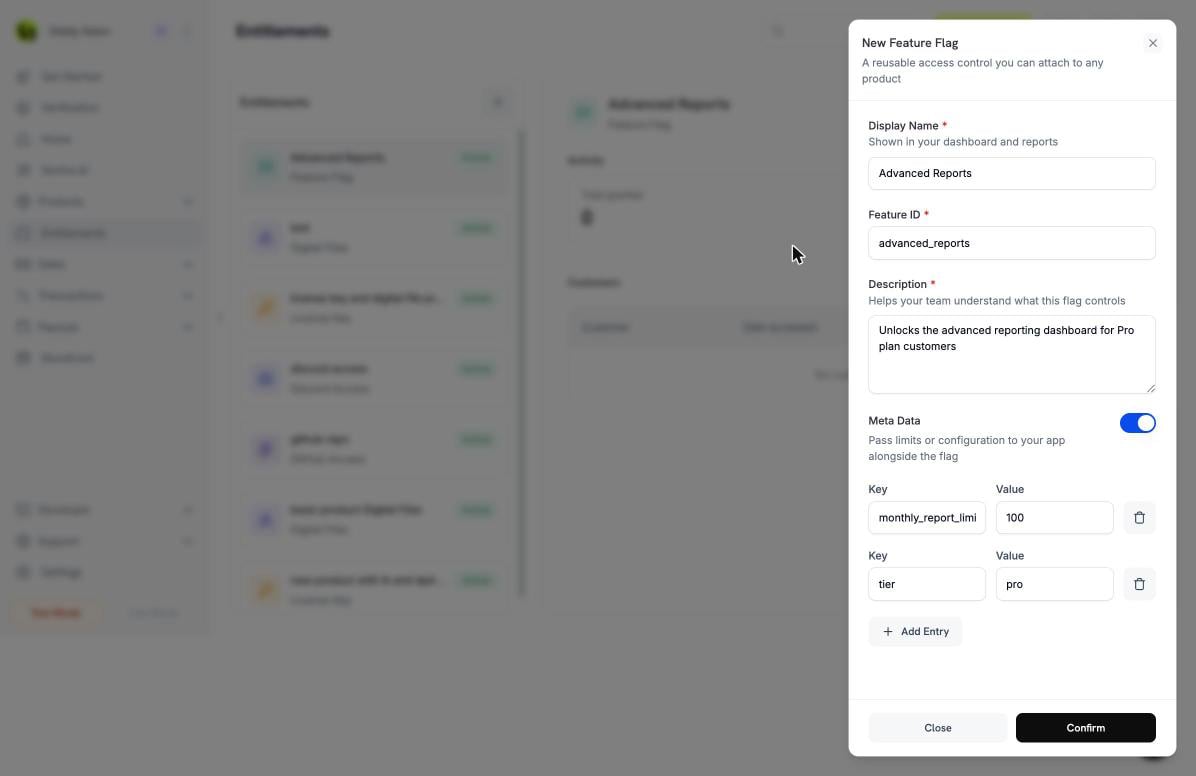
dashboard와 reports에 표시할 Display Name을 입력하고, 팀에서 flag가 제어하는 항목을 알 수 있도록 Description을 입력합니다. Feature ID는 애플리케이션에서 확인하는 값입니다. dashboard는 display name에서 값을 채웁니다(예: “API access”는 api_access가 됨). 이 값을 편집할 수도 있습니다. 공백은 포함할 수 없습니다.
Creating a feature flag. The Feature ID is what your application checks; Meta Data attaches limits alongside the flag.
3
Add Metadata (Optional)
Meta Data를 켜면 애플리케이션이 flag와 함께 받는 key-value configuration을 연결할 수 있습니다. 예를 들면 limits, tier names 또는 quotas가 있습니다. 각 쌍마다 Add Entry를 클릭합니다. 메타데이터로 limits 연결을 참조하세요.
4
Confirm
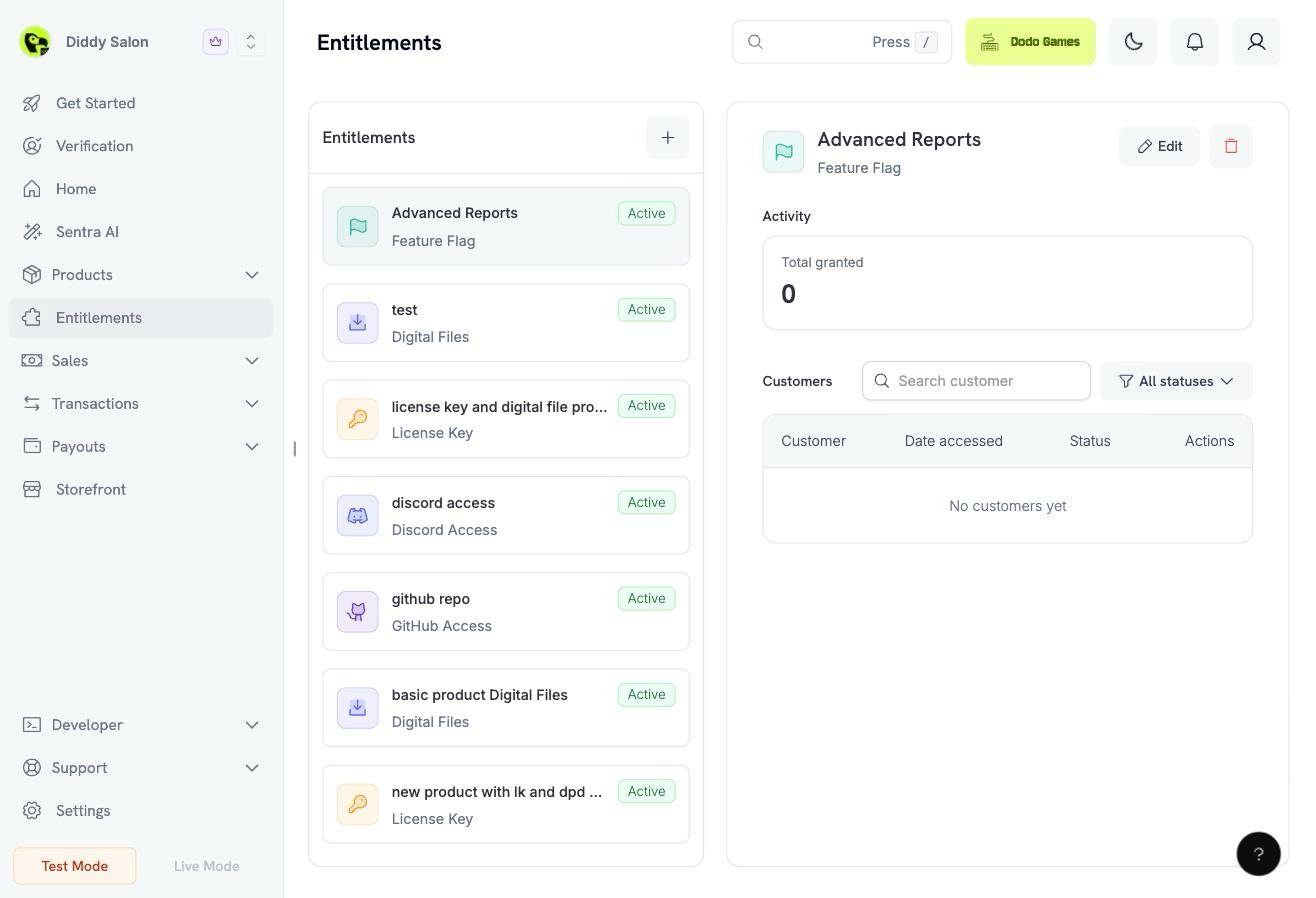
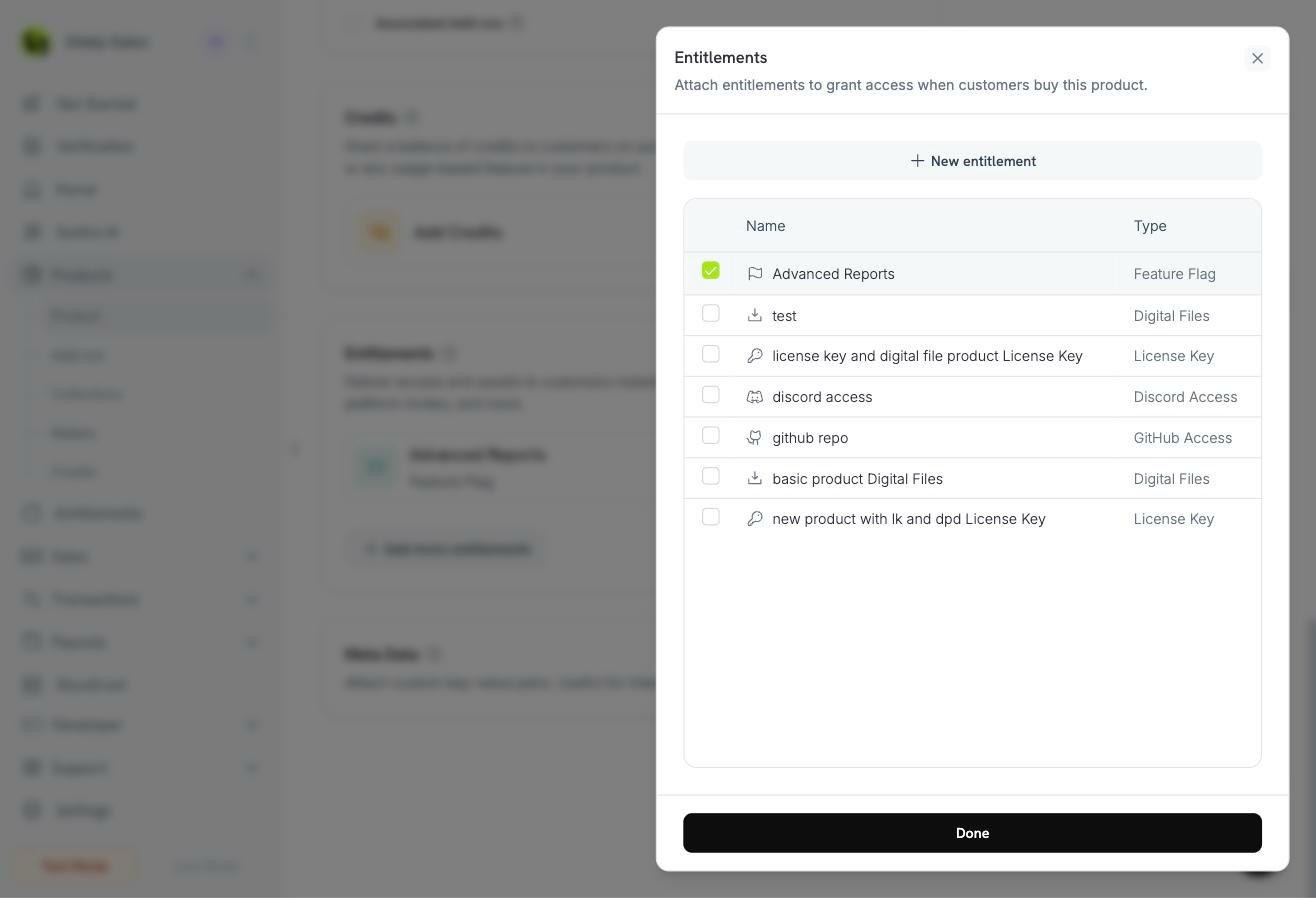
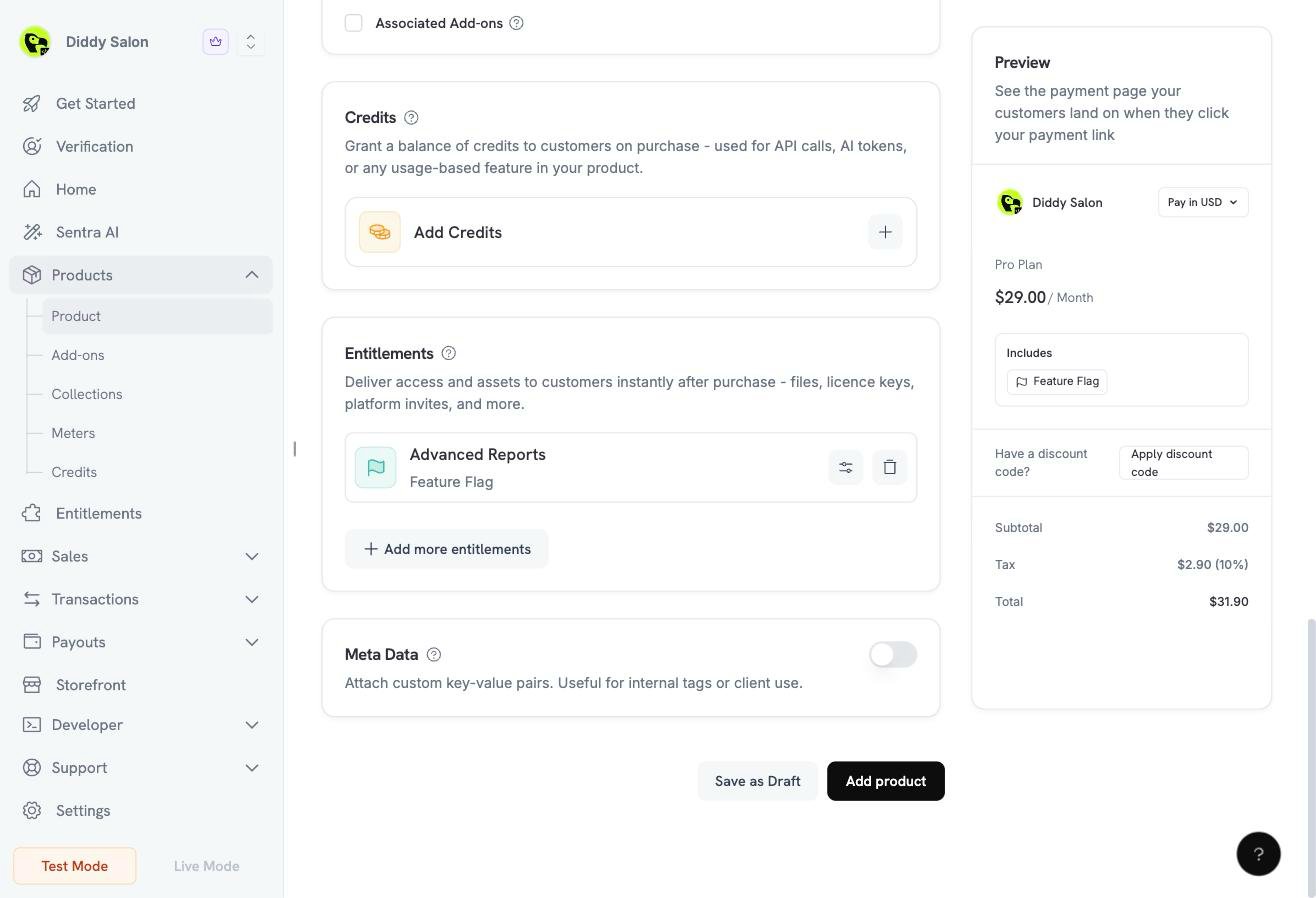
확인을 클릭합니다. 플래그는 제품에 붙이기 위해 권한 목록에 나타납니다.
The created feature flag. The right pane tracks every customer grant issued from it.
// client is a *dodopayments.Client, for example from// dodopayments.NewClient(option.WithEnvironmentTestMode()); ctx is a context.Context.client.Entitlements.New(ctx, dodopayments.EntitlementNewParams{ Name: dodopayments.F("Advanced Reports"), IntegrationType: dodopayments.F(dodopayments.EntitlementIntegrationTypeFeatureFlag), IntegrationConfig: dodopayments.F[dodopayments.IntegrationConfigUnionParam]( dodopayments.IntegrationConfigFeatureFlagConfigParam{ FeatureType: dodopayments.F(dodopayments.FeatureTypeBoolean), FeatureID: dodopayments.F("advanced_reports"), }, ),})
boolean flag는 “이 고객에게 feature가 있는가?”라는 질문에 답합니다. Metadata는 “어떤 configuration으로 제공되는가?”에 답합니다. Entitlement metadata는 string, integer, number 및 boolean 값을 허용합니다. 모든 grant에는 grant가 생성될 때 entitlement metadata의 frozen snapshot이 포함됩니다.이 snapshot 덕분에 metadata를 plan limits에 안전하게 사용할 수 있습니다:
이후 entitlement의 metadata를 편집해도 future grants에만 영향을 줍니다. 고객은 구매 당시의 limits를 그대로 유지합니다.
각 grant는 metadata field에 snapshot을 반환하므로 API call 한 번으로 flag와 configuration을 모두 가져올 수 있습니다.
예를 들어 { "tier": "pro", "monthly_report_limit": 100 }가 포함된 advanced_reports flag를 사용하면 애플리케이션이 dashboard를 잠금 해제하고 두 번째 lookup 없이 100-report quota도 적용할 수 있습니다. 이후 limit를 250으로 늘려도 기존 고객은 새 grant(예: plan change 후)를 받을 때까지 100을 유지합니다.
limits와 configuration에는 metadata를 사용하고, identity에는 feature_id만 사용하세요. ID에 limit를 인코딩하면( advanced_reports_100) limit가 변경될 때마다 새 flag가 필요해지고 애플리케이션의 checks가 중단됩니다.
고객이 보유한 features 집합을 만들려면 delivered feature flag grants를 나열합니다. endpoint는 모든 entitlements에 걸쳐 grant당 한 row를 반환하며, integration_type 및 status로 필터링할 수 있습니다. 다음 예제에서는 Create via API의 client를 사용합니다.
const features = new Map<string, Record<string, unknown>>();for await (const grant of client.customers.listEntitlementGrants('cus_abc123', { integration_type: 'feature_flag', status: 'Delivered',})) { if (grant.feature) { features.set(grant.feature.feature_id, grant.metadata ?? {}); }}if (features.has('advanced_reports')) { const limit = features.get('advanced_reports')?.monthly_report_limit; // unlock the dashboard, enforce the limit}
page = client.customers.list_entitlement_grants( customer_id="cus_abc123", integration_type="feature_flag", status="Delivered",)# Iterating the page fetches every page of results.features = { grant.feature.feature_id: grant.metadata for grant in page if grant.feature}if "advanced_reports" in features: limit = features["advanced_reports"].get("monthly_report_limit")
feature payload는 feature_flag grants에만 채워집니다. 다른 모든 integration type에서는 null입니다. 전체 response shape는 List Customer Grants API reference를 참조하세요.
모든 request마다 API를 호출하면 hot path에 latency가 추가됩니다. 각 고객의 feature set을 짧은 TTL(시간이 아닌 분 단위)로 cache하고, grant의 state가 변경되면 webhook handler에서 cache를 invalidate하세요. 이렇게 하면 checks는 빠르게 유지되고 revoke는 다음 request부터 적용됩니다.
snake_case에서 stable feature IDs를 사용하세요. 애플리케이션 code가 이 strings를 확인하므로 하나의 이름을 변경하면 양쪽 모두에서 breaking change가 발생합니다.
capability당 하나의 flag를 사용하세요. 단일 pro_bundle보다 advanced_reports와 api_access를 두 개의 entitlements로 사용하는 편이 좋습니다. 그래야 revoke와 plan combinations를 깔끔하게 유지할 수 있습니다.
webhooks로 state를 구동하고 API로 확인하세요. Webhooks는 database를 최신 상태로 유지합니다. list endpoint는 reconciliation jobs와 cache misses를 위한 source of truth입니다.
Revoked를 즉시 적용되는 것으로 처리하세요. revoked flag는 고객이 더 이상 해당 feature에 대해 payment하지 않음을 의미합니다. 다음 session이 아니라 다음 request에서 gate하세요.
limits는 code가 아닌 metadata에 넣으세요. quota를 변경할 때 entitlement만 편집하면 됩니다. 신규 고객은 새 값을 받고 기존 grants는 구매 당시의 snapshot을 유지합니다.