

Overview
Digital Product Delivery는 Digital Files entitlement type입니다. 파일을 한 번만 Digital Files entitlement에 업로드한 다음 entitlement를 product에 연결합니다. 그러면 Dodo Payments가 결제한 모든 customer에게 이메일과 Customer Portal을 통해 presigned download link를 전달합니다. Digital Files entitlement는 다음을 지원합니다:- Hosted file uploads: Dodo Payments가 파일을 저장하고 단기 유효 presigned URL을 통해 제공합니다.
- External download link: Dropbox, Google Drive 또는 S3와 같이 다른 곳에 호스팅된 파일을 가리키는 entitlement당 하나의 URL입니다.
- Download instructions: customer의 order page와 delivery email에 표시되는 자유 형식 텍스트입니다.
Key Features
File Upload
Multiple Files
External Links
Presigned URLs
Digital Product Delivery 설정
1
Open Entitlements
dashboard에서 Entitlements로 이동하고 **+**를 클릭하여 entitlement를 생성합니다.
2
Choose Digital Files
Digital Files를 선택하고 entitlement의 Name을 입력합니다.
3
Add Files, Links, and Instructions
다음 필드를 원하는 조합으로 구성합니다: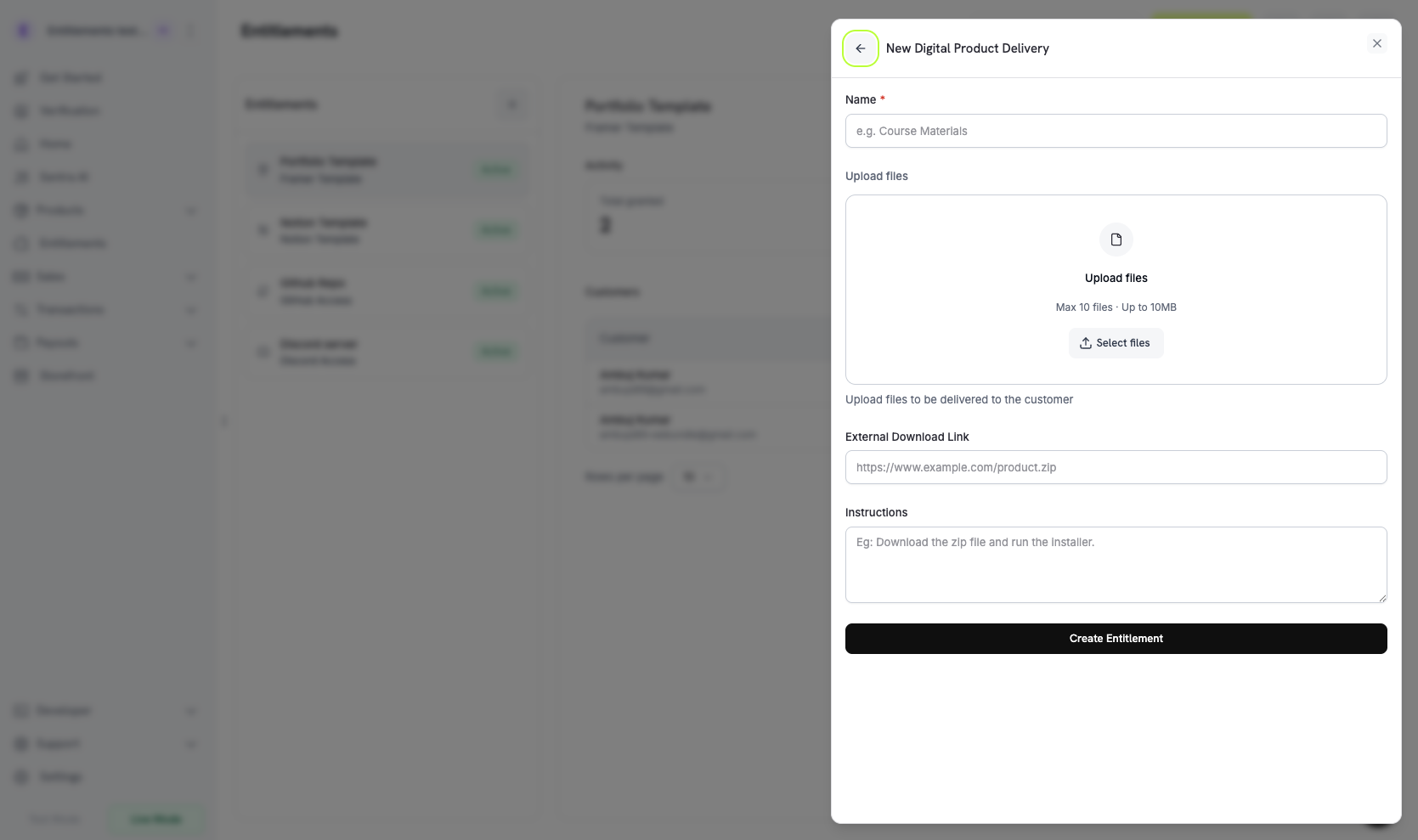
- Upload files: 하나 이상의 파일을 업로드합니다. 각 업로드는
file_id을 반환하고 파일을 entitlement의digital_file_ids에 추가합니다. - External Download Link: customer가 접근할 수 있는
http://또는https://로 시작하는 URL입니다. Dodo Payments는 이 URL을 호스팅된 파일과 함께 전달합니다. - Instructions: customer에게 표시되는 자유 형식 텍스트입니다. 예를 들어 “Unzip and run setup.sh.”와 같이 입력할 수 있습니다.
4
Save the Entitlement
Create Entitlement를 클릭합니다. 이제 이 entitlement를 모든 product에 연결할 수 있습니다.
Attach to Products
product를 열고 Entitlements 섹션으로 이동한 다음 Digital Files entitlement를 선택합니다. Dodo Payments는 해당 product의 성공한 모든 purchase 또는 active subscription에 대해 entitlement를 제공합니다.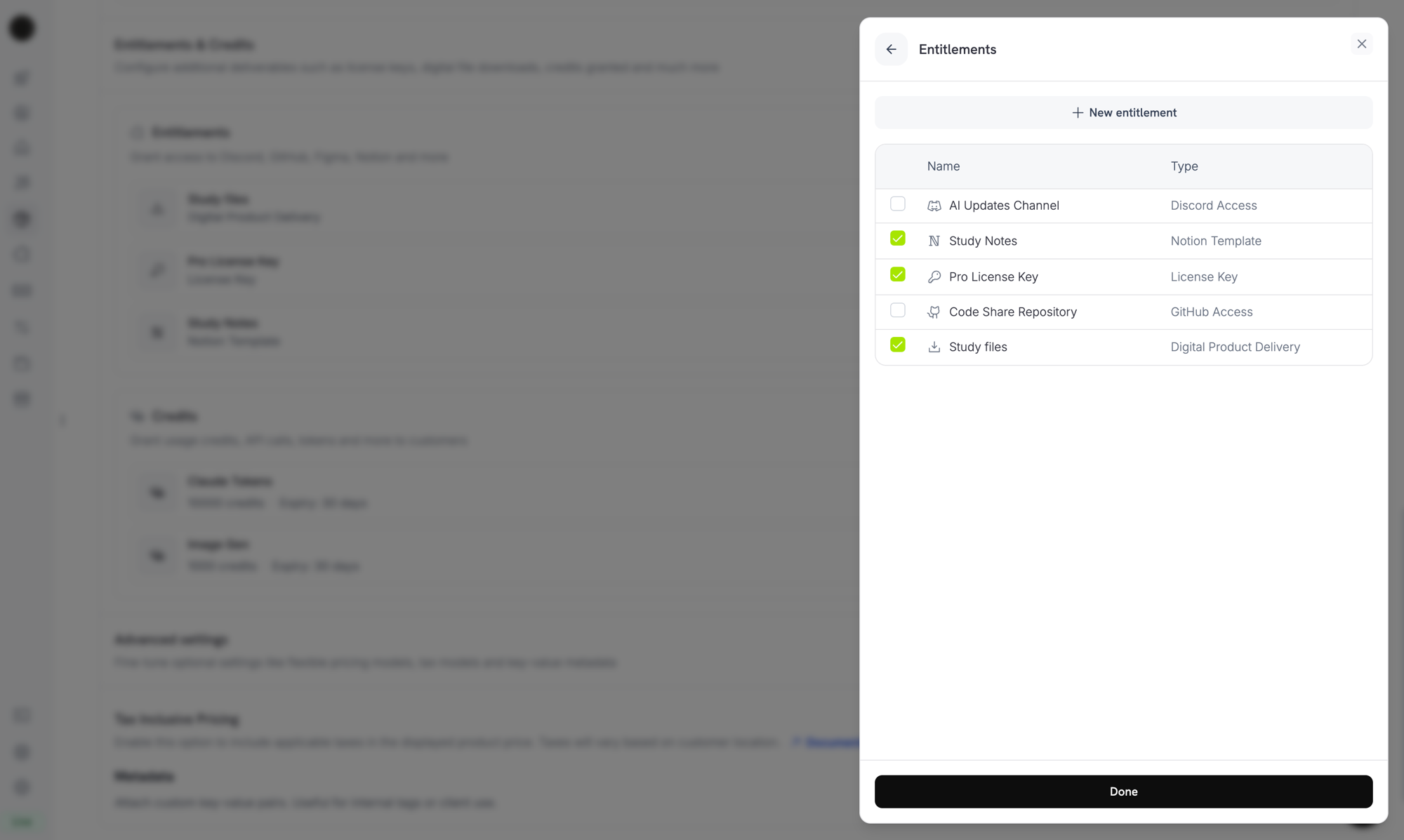
Attaching the Digital Files entitlement to a product alongside other entitlements.
How Delivery Works
Digital Files delivery는 표준 grant lifecycle를 따릅니다. 각 event는 Digital Files grant에 다음과 같이 적용됩니다:Customer Experience
Purchase Confirmation
결제가 성공하면 customer는 다운로드 link와 구성한 모든 instructions가 포함된 이메일을 받습니다.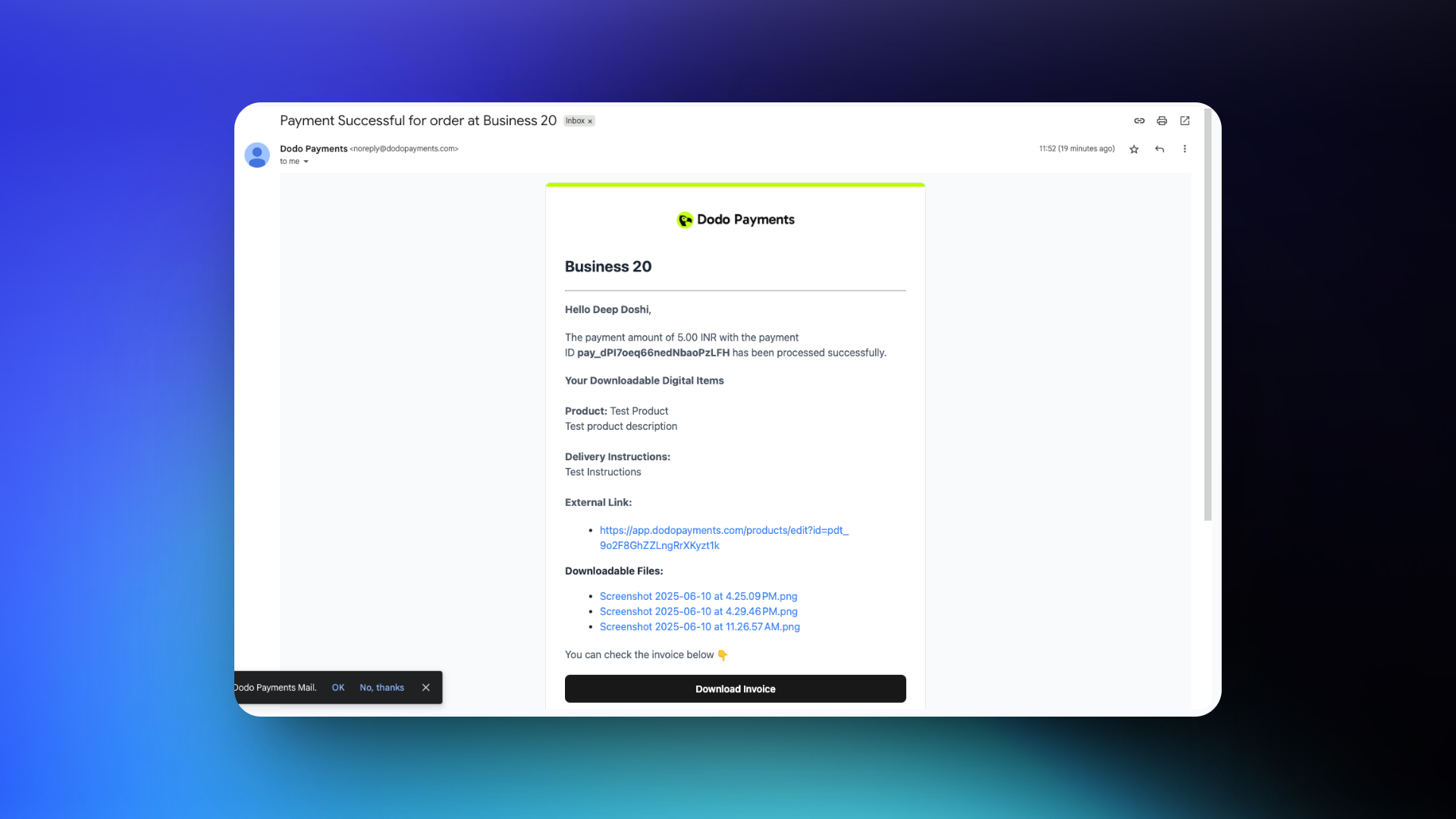
Customer Portal Access
grant가 active 상태인 동안 customer는 Customer Portal에서 download link를 다시 받을 수 있습니다. portal은 요청 시 새로운 presigned URL을 생성하므로 이메일의 link가 만료된 후에도 purchase를 계속 이용할 수 있습니다.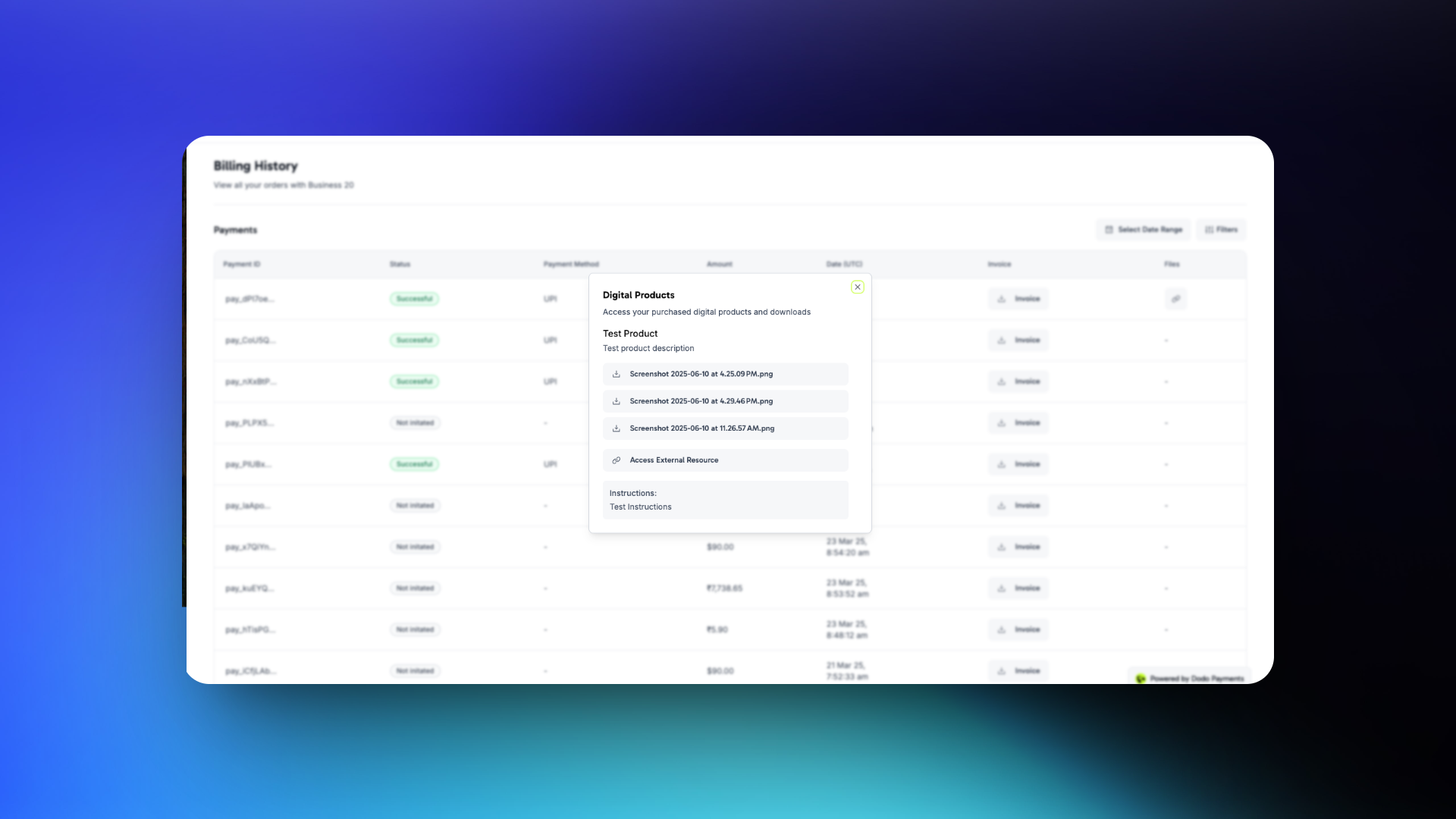
customer는 confirmation email에서 파일을 다운로드하거나 언제든지 Customer Portal에서 파일을 열 수 있습니다.
Manage Files Programmatically
Entitlement에 파일 업로드
파일을 업로드하려면file 필드의 multipart/form-data로 전송합니다. 선택 사항인 filename 필드는 file part보다 먼저 와야 합니다. Dodo Payments는 그 이후에 전송된 필드를 무시하기 때문입니다. filename가 없으면 Dodo Payments는 업로드된 파일의 이름을 사용합니다. response는 새 file_id을 반환합니다.
Grant 나열 및 Download URL 확인
각 Digital Files grant에는 모든 파일에 대해 새로운 presigned URL이 포함된digital_product_delivery object가 있습니다. URL을 읽으려면 entitlement의 grant를 나열합니다:
Entitlement에서 파일 제거
파일을 분리하려면 해당 파일의file_id과 entitlement ID를 전달합니다:
주요 고려 사항
- Presigned URL은 빠르게 만료됩니다. grant payload와 webhook event의 download URL은 15분 동안 유효합니다. 이를 저장하지 마세요. customer가 다시 다운로드해야 할 때 새로운 URL을 가져오세요.
- 파일 업데이트는 향후 purchase에만 영향을 줍니다. 파일을 교체하거나 제거해도 이미 발급된 다운로드는 변경되지 않습니다. 각 grant는 생성 당시의 entitlement configuration을 유지하므로 기존 customer는 당시 사용 가능했던 version을 계속 받을 수 있습니다.
- Refund는 다운로드한 사본을 무효화하지 않습니다. 이미 파일을 다운로드한 customer는 해당 사본을 계속 보유합니다. license로 제한된 media나 기간 제한 access처럼 취소 가능한 content의 경우 Digital Files를 License Keys와 함께 사용하고 runtime에 key를 검증하세요.
- 민감한 content에는 자체 authentication을 사용하는 external URL을 우선 사용하세요. Dodo Payments의 presigned URL은 단기 유효하지만 URL을 가진 사람은 누구나 만료될 때까지 파일을 다운로드할 수 있습니다. account login 뒤에 외부 호스팅된 content를 배치하면 더 많은 제어 권한을 확보할 수 있습니다.
API Management
Create Entitlement
Upload File
Delete File
List Grants
Update Entitlement
Revoke Grant
Webhooks
Digital file delivery 및 취소는 네 가지entitlement_grant.* webhook event를 전송합니다. Digital Files grant의 payload에는 확인된 파일 목록이 포함된 digital_product_delivery object, 선택 사항인 instructions 및 선택 사항인 external_url가 포함됩니다. 각 파일에는 presigned download_url, filename, content_type, bytes 단위의 file_size, 그리고 URL 만료까지 남은 초 단위 시간을 나타내는 expires_in가 포함됩니다:
Legacy Digital Product Delivery
product 자체에 이전
digital_product_delivery block이 구성된 product는 자동으로 마이그레이션되었습니다. legacy product file API를 통해 업로드된 파일은 보존되며, 계속 다운로드할 수 있고 새로 업로드된 파일과 함께 grant payload에 표시됩니다. entitlement의 digital_files configuration은 해당 파일을 legacy_file_ids list에서 추적합니다. 파일을 추가하거나 instructions를 변경하거나 external URL을 교체하려면 Entitlements에서 마이그레이션된 Digital Files entitlement를 편집하세요.하위 호환성을 위해 product response에는 여전히 legacy product-level field(digital_product_delivery.external_url, digital_product_delivery.instructions)가 포함되지만, source of truth는 entitlement입니다.Best Practices
- 다운로드를 일회성 delivery로 취급하세요. customer는 link를 공유하거나 잃어버릴 수 있으므로, 다운로드한 모든 content를 customer가 계속 보유한다고 가정하고 product를 설계하세요.
- instructions를 사용하여 기대치를 설정하세요. 여러 파일로 구성된 bundle의 경우 무엇을 먼저 설치해야 하는지 또는 파일을 어떻게 결합해야 하는지 설명하는
instructionsline을 추가하세요. - 500 MiB 제한에 유의하세요. 여러 GB의 dataset이나 video course와 같은 더 큰 artifact는 외부에서 호스팅하고 업로드하는 대신
external_url로 연결하세요. - 취소 가능한 access에는 License Keys를 함께 사용하세요. refund 후 product 내 feature에 대한 access를 취소하려면 Digital Files entitlement를 License Key entitlement와 함께 사용하고 runtime에 key를 검증하세요.
- Customer Portal refresh flow를 테스트하세요. customer가 일주일 후 portal로 돌아와도 여전히 작동하는 download link를 받을 수 있는지 확인하세요. 이메일 link가 만료되었을 때 portal은 주요 복구 경로입니다.