고객이 결제하면 라이선스 키, 다운로드 가능한 파일, feature flag, Discord, GitHub, Telegram, Framer, Notion에 대한 액세스를 자동으로 제공합니다.
Entitlement는 성공한 결제 또는 활성 구독을 액세스로 전환합니다. 고객의 받은편지함으로 전달되는 라이선스 키, 앱에서 확인하는 feature flag, Discord 역할, GitHub repository, Notion 템플릿, Framer remix 링크, Telegram 채팅 초대 또는 다운로드 가능한 파일 번들이 이에 해당합니다. Dodo Payments는 결제 lifecycle이 변경될 때 이러한 액세스를 자동으로 발급하고 추적하며 철회합니다.
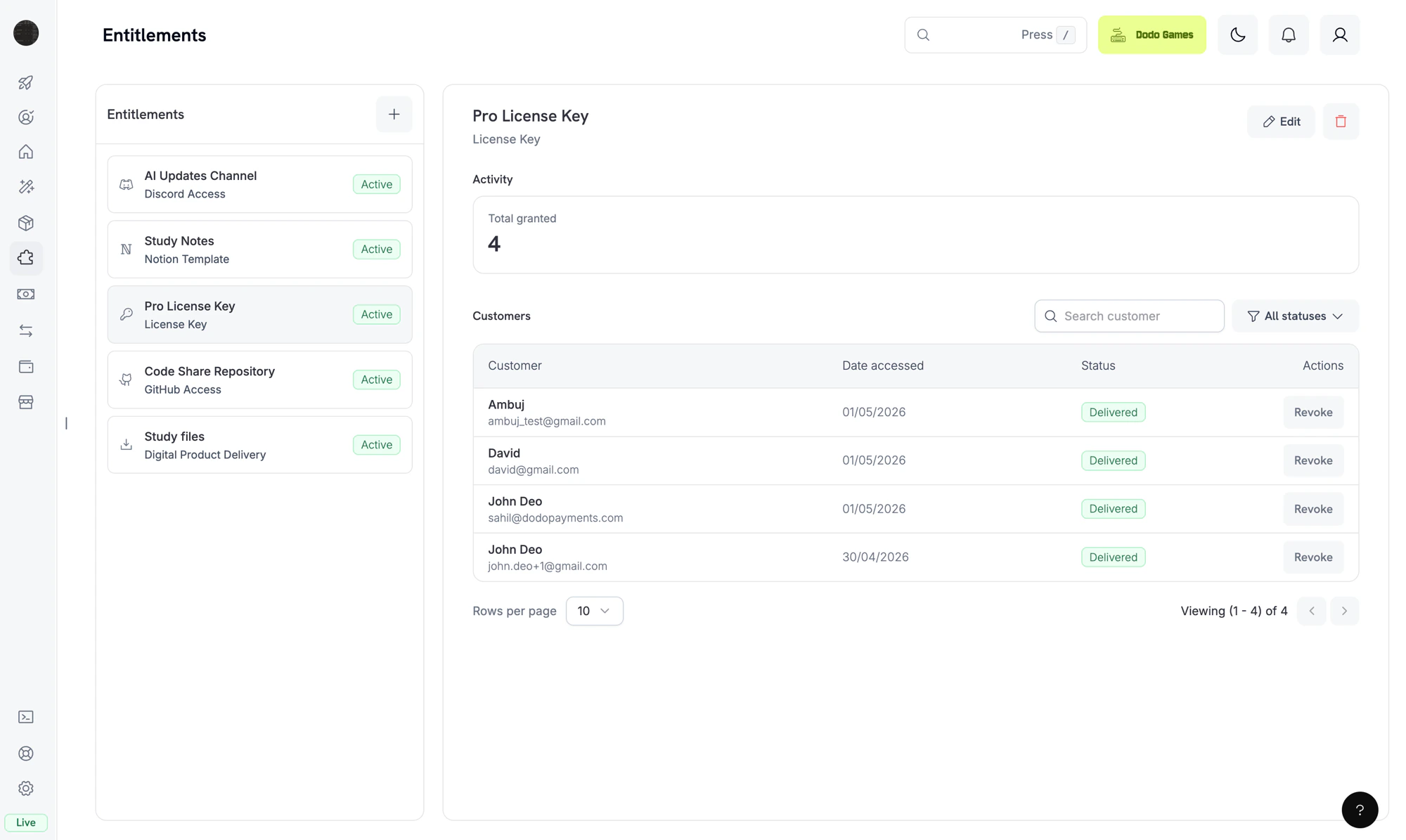
The Entitlements dashboard. Each entitlement is a reusable template; the right pane shows individual customer grants.
Entitlement는 고객에게 제공하는 항목을 재사용 가능한 형태로 정의한 것입니다. 예를 들어 Pro 라이선스 키, “Patrons” Discord 역할, 비공개 GitHub repository 액세스 또는 다운로드 가능한 e-book 번들이 있습니다. Entitlement를 product에 연결하면 고객이 결제할 때 Dodo Payments가 이를 제공합니다.고객이 product를 구매하면 Dodo Payments는 grant를 생성합니다. Grant는 한 고객에게 해당 entitlement를 발급한 것을 의미합니다. Grant에는 네 가지 상태가 있습니다. 전달이 진행 중일 때는 Pending, 고객이 액세스할 수 있게 되면 Delivered, 전달을 완료할 수 없으면 Failed, 액세스가 철회되면 Revoked입니다.
Entitlement는 fulfillment(고객이 액세스할 수 있는가?)을 제어하고, Credit은 consumption(얼마나 사용할 수 있는가?)을 제어합니다. 하나의 product에 둘 다 연결할 수 있습니다. Credit에 대한 자세한 내용은 Credit-Based Billing을 참고하세요.
Dodo Payments는 결제가 완료되거나 구독이 활성화되면 grant를 생성합니다. Feature flag grant는 Delivered 상태로 시작합니다. Entitlement가 fulfillment_mode: auto(기본값)를 사용하는 경우 License Key grant도 Delivered 상태로 시작합니다. fulfillment_mode: manual에서는 키가 없는 Pending 상태로 시작하며, Fulfill License Key Grant를 통해 키를 제공해야 합니다. 그 외 모든 integration은 Pending 상태로 시작합니다.OAuth 기반 integration(Discord, GitHub, Notion)은 고객이 방문하여 동의할 수 있는 oauth_url를 제공합니다. Dodo Payments는 grant를 생성할 때 이 URL을 생성하려고 시도합니다. 실패하면 고객이 delivery email 또는 Customer Portal에서 accept flow를 시작할 때까지 필드는 null 상태로 유지됩니다. Platform-direct integration(Telegram, Framer, Digital Files)은 전달이 provision되는 동안에만 Pending 상태로 유지되고, 이후 Delivered 상태로 변경됩니다.
2
Delivered
전달이 완료되면 grant는 Delivered 상태로 변경되고 delivered_at가 설정됩니다. 라이선스 키가 생성되거나, 역할이 할당되거나, repository 액세스가 부여되거나, 파일 링크가 확인되거나, OAuth flow가 완료되면 전달이 완료된 것입니다.
3
Failed
Integration 호출에서 철회된 OAuth token, 거부된 permission 또는 더 이상 존재하지 않는 파일과 같은 재시도할 수 없는 오류가 반환되면 grant는 Failed 상태로 변경됩니다. error_code 및 error_message 필드에 그 이유가 기록됩니다.
4
Revoked
구독 취소, 환불 처리 또는 grant 직접 철회 등으로 액세스가 철회되면 grant는 Revoked 상태로 변경됩니다. revocation_reason 필드에 해당 trigger가 기록됩니다.
revocation_reason: subscription_on_hold인 전달 완료 및 대기 중 grant를 모두 철회합니다.
subscription.paused
revocation_reason: SubscriptionPaused인 전달 완료 및 대기 중 grant를 모두 철회합니다. 다른 구독 reason과 달리 이 값은 PascalCase를 사용하므로 정확히 일치시켜야 합니다.
subscription.unpaused
subscription.active와 동일한 방식으로 동일한 구독에 대해 이전에 철회된 grant를 다시 발급합니다.
subscription.cancelled
revocation_reason: subscription_cancelled인 모든 grant를 철회합니다.
subscription.expired
revocation_reason: subscription_expired인 모든 grant를 철회합니다.
subscription.plan_changed
revocation_reason: plan_changed인 현재 grant를 모두 철회한 다음 새 plan의 entitlement에 대한 grant를 발급합니다.
refund.succeeded (one-time payment)
해당 결제의 grant를 revocation_reason: refund로 철회합니다.
Manual API revoke
revocation_reason: manual인 grant를 철회합니다. 수동 철회는 구독 renewal 시 자동으로 다시 발급되지 않습니다.
License key disabled
License-key grant의 경우 기본 키를 비활성화하면 revocation_reason: license_key_disabled로 grant가 철회됩니다. 키를 다시 활성화하면 grant가 자동으로 복원됩니다.
Platform drift detected
수동으로 Discord 역할이 제거되거나, GitHub App이 repository 액세스를 잃거나, reconciliation pass에서 누락된 target을 찾는 등 integration의 platform 측 상태가 동기화되지 않으면 Dodo Payments는 revocation_reason: platform_external로 grant를 철회합니다. Platform 문제가 해결될 때까지 구독 renewal 시 자동으로 다시 발급되지 않습니다.
구독 기반 grant는 (entitlement, customer, subscription)별로 idempotent하므로 renewal 및 재활성화로 인해 중복 grant가 생성되지 않습니다. One-time grant는 (entitlement, customer, payment)별로 idempotent합니다.
Dashboard에서 Entitlements로 이동한 다음 **+**를 클릭하여 entitlement를 생성합니다.
2
Pick an Integration
Integration type을 선택합니다: License Key, Digital Files, Feature Flag, Discord, GitHub, Telegram, Figma, Framer 또는 Notion. Platform integration의 경우 아직 연결하지 않았다면 먼저 계정을 연결하세요.
3
Configure Delivery
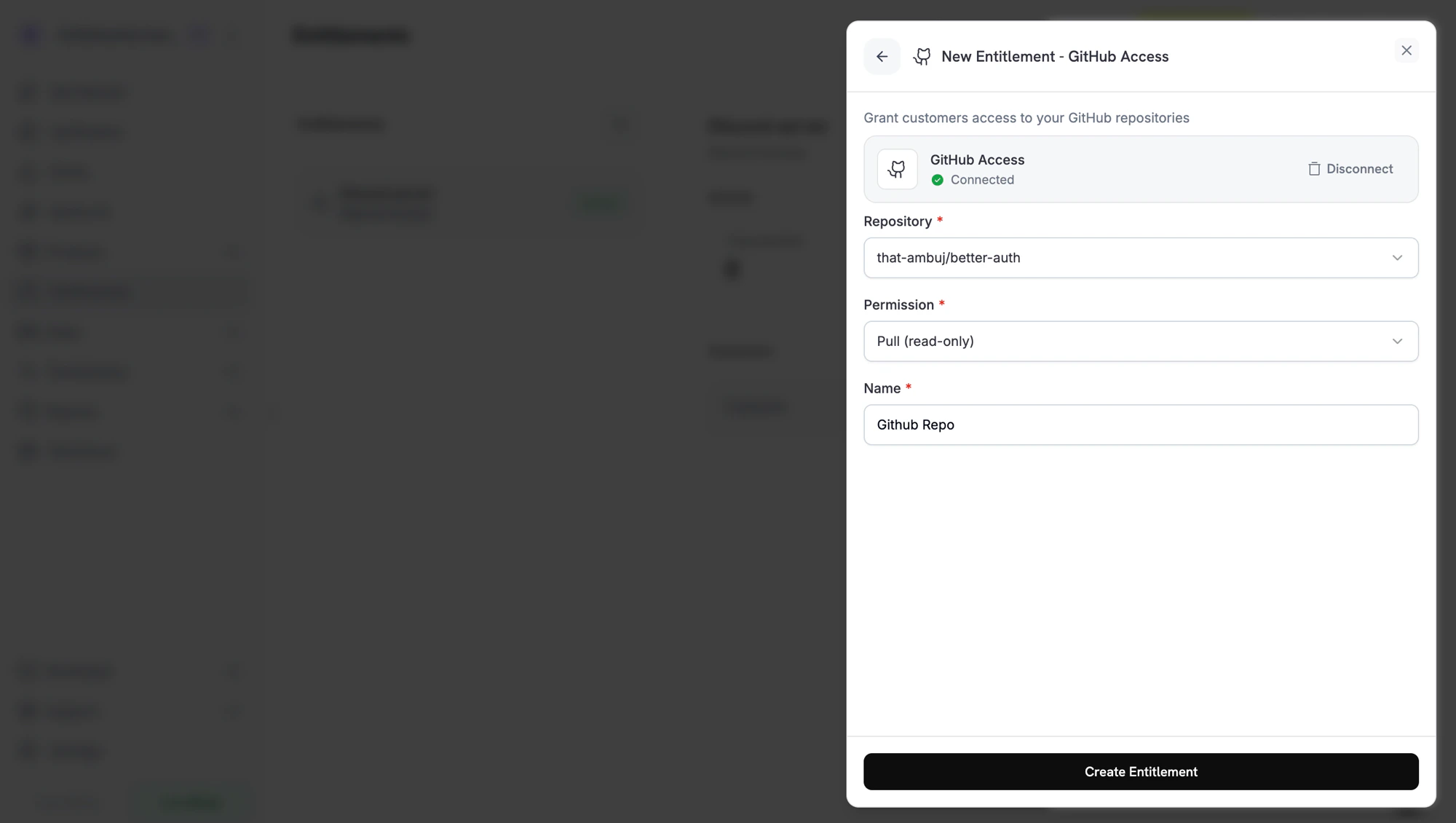
Integration에 필요한 필드를 입력합니다. 예를 들어 GitHub는 repository와 permission level을 요구하고, Discord는 server와 선택적 role을 요구하며, License Key는 activations limit과 license length를 요구합니다.
Creating a GitHub entitlement. Each integration shows the fields it needs.
4
Save
Create Entitlement를 클릭합니다. 이제 모든 product에 entitlement를 연결할 수 있습니다.
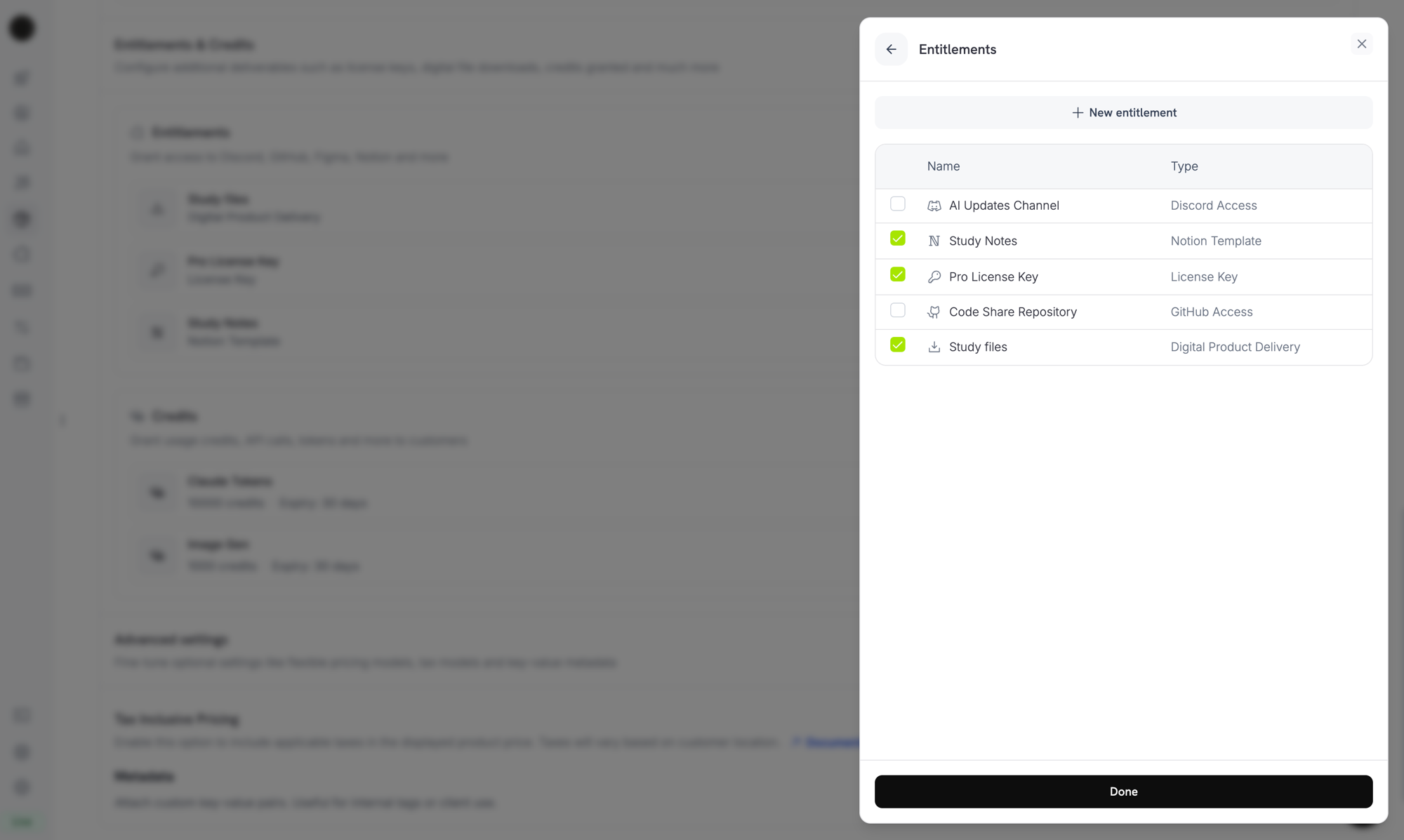
Product를 열고 Entitlements 섹션으로 이동한 다음 product 구매 시 전달할 entitlement를 선택합니다. 하나의 product에서 여러 entitlement를 동시에 전달할 수 있습니다. 예를 들어 Pro plan에는 라이선스 키, GitHub 액세스 및 Discord 역할을 포함할 수 있습니다.
Attaching entitlements to a product. Selected entitlements are delivered on every successful purchase or active subscription.
구매 후 고객은 product의 entitlement에 해당하는 라이선스 키, 다운로드 링크, OAuth 초대 링크 또는 platform 초대가 포함된 delivery email을 받습니다. Grant가 활성 상태인 동안에는 Customer Portal의 주문 기록에서도 동일한 세부 정보를 확인할 수 있습니다.
Grant가 철회되면 Dodo Payments는 platform에서 액세스를 제거합니다. Discord 역할을 제거하고, GitHub collaborator를 제거하거나, 라이선스 키를 비활성화합니다. 고객은 Customer Portal에서 변경 사항을 확인할 수 있습니다.
Digital Files의 경우 철회하면 새로운 presigned download URL이 발급되지 않지만 고객이 이미 다운로드한 사본이 무효화되지는 않습니다. 이 점을 고려하여 content gating을 계획하세요.
Dashboard에서 entitlement를 열어 grant를 확인합니다. Detail panel에는 총 grant 수, status filter, 고객, 액세스한 날짜, 상태 및 Revoke action이 포함된 grant별 행이 표시됩니다.Grant를 programmatically 관리하려면 status filter로 목록을 조회하고 ID로 단일 grant를 철회합니다:
import DodoPayments from 'dodopayments';const client = new DodoPayments({ bearerToken: process.env['DODO_PAYMENTS_API_KEY'],});// List grants for an entitlementconst grants = await client.entitlements.grants.list('ent_abc123', { status: 'Delivered',});// Revoke a single grantawait client.entitlements.grants.revoke('entg_xyz789', { id: 'ent_abc123',});
Dodo Payments는 grant lifecycle에 대해 네 가지 webhook event를 전송합니다. 이를 subscribe하여 각 고객이 액세스할 수 있는 항목과 애플리케이션의 상태를 동기화하세요.
Event
발생 시점
entitlement_grant.created
Grant가 생성될 때 발생합니다. 자동으로 fulfilled된 license-key grant와 feature-flag grant는 Delivered 상태로 도착합니다. 수동으로 fulfilled된 license-key grant 및 그 외 모든 integration은 Pending 상태로 도착한 뒤, platform 호출이 성공하거나 OAuth 기반 integration의 경우 고객이 승인하면 Delivered 상태로 변경됩니다.
entitlement_grant.delivered
기존 grant가 Delivered 상태로 변경되어 고객이 액세스할 수 있게 될 때 발생합니다. 생성 시 Delivered 상태인 grant는 created만 발생시킵니다.
entitlement_grant.failed
Grant를 전달할 수 없을 때 발생합니다. error_code 및 error_message를 확인하세요.
entitlement_grant.revoked
액세스가 철회되었을 때 발생합니다. revocation_reason를 확인하세요.
Entitlement Grant Webhook Payloads
전체 payload schema, sample event 및 revocation_reason reference를 확인하세요.
전달 채널마다 entitlement 하나를 사용하세요. 역할 의도가 서로 다른 product 간에 하나의 Discord entitlement를 공유하지 마세요. 역할마다 entitlement를 하나씩 만들어 철회가 깔끔하게 처리되도록 하세요.
먼저 test mode에서 테스트하세요. Entitlement를 생성하고 test product에 연결한 다음 checkout을 실행하여 grant가 Pending에서 Delivered로 변경되는지 확인하세요. 그런 다음 test subscription을 취소하고 grant가 철회되는지 확인하세요.
payment.succeeded가 아니라 entitlement_grant.delivered를 수신하세요. 특히 OAuth flow에서는 fulfillment가 완료되기 전에 결제가 성공할 수 있습니다. 자체 system에서 종속 feature를 unlock하기 전에 grant가 Delivered 상태가 될 때까지 기다리세요. 자동으로 fulfilled된 license key 또는 feature flag처럼 생성 시 전달되는 grant는 대신 entitlement_grant.created와 status: "Delivered"로 도착합니다.
entitlement_grant.failed를 조치가 필요한 상태로 처리하세요. Failed grant는 고객이 결제했지만 액세스하지 못했다는 의미입니다. 이러한 grant를 support team에 표시하거나 re-grant를 trigger하세요.
revocation_reason를 retention flow에 매핑하세요.subscription_on_hold revoke는 고객이 카드를 업데이트할 수 있으므로 복구할 수 있습니다. manual revoke는 의도적인 철회입니다. 고객 메시지에서 이 둘을 다르게 처리하세요.
subscription.past_due에서 액세스를 철회하지 마세요. 이 event는 grace period를 시작하며 해당 기간이 끝날 때까지 고객이 액세스를 유지합니다. subscription.on_hold 또는 subscription.cancelled를 기다리세요.