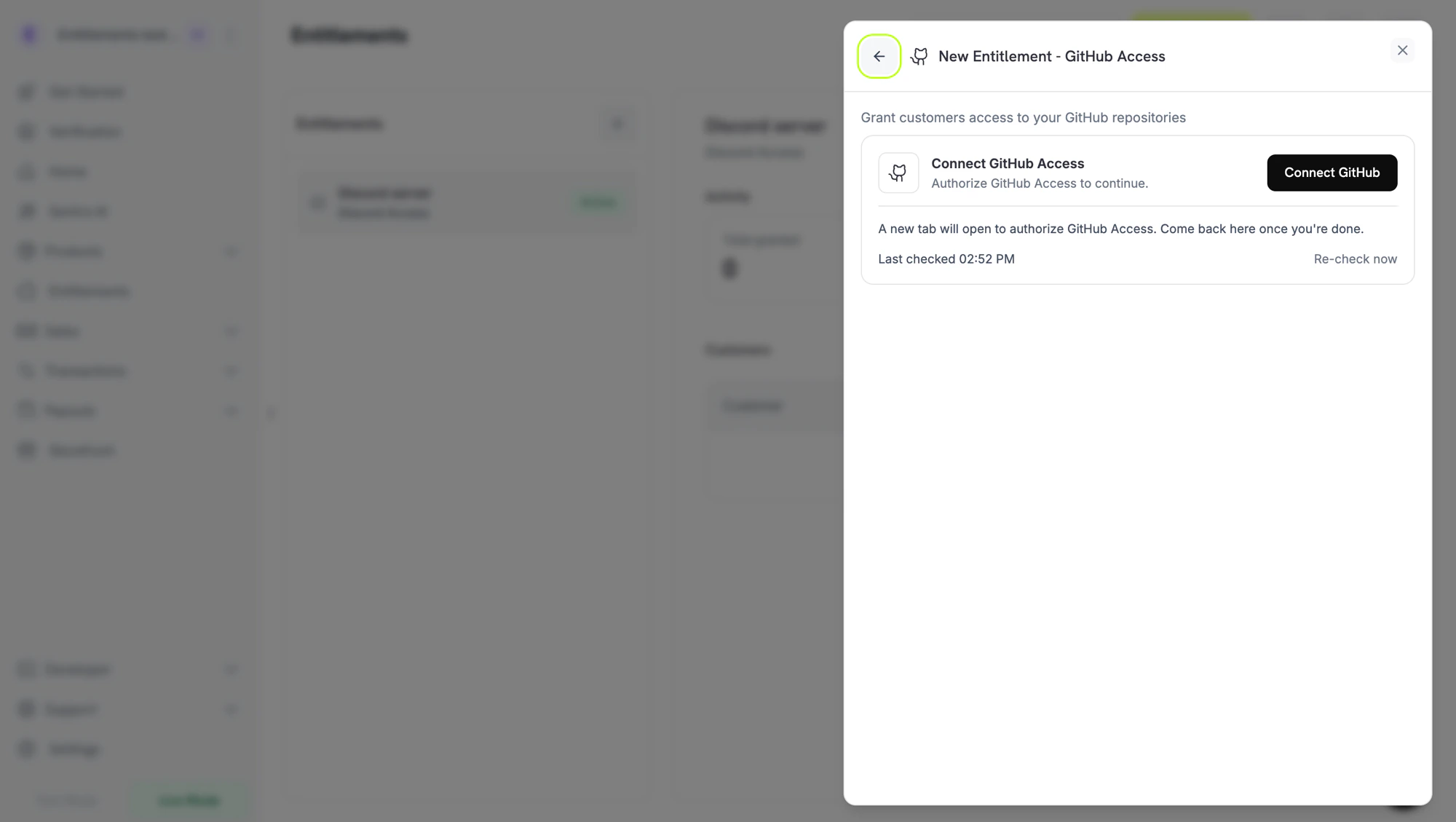
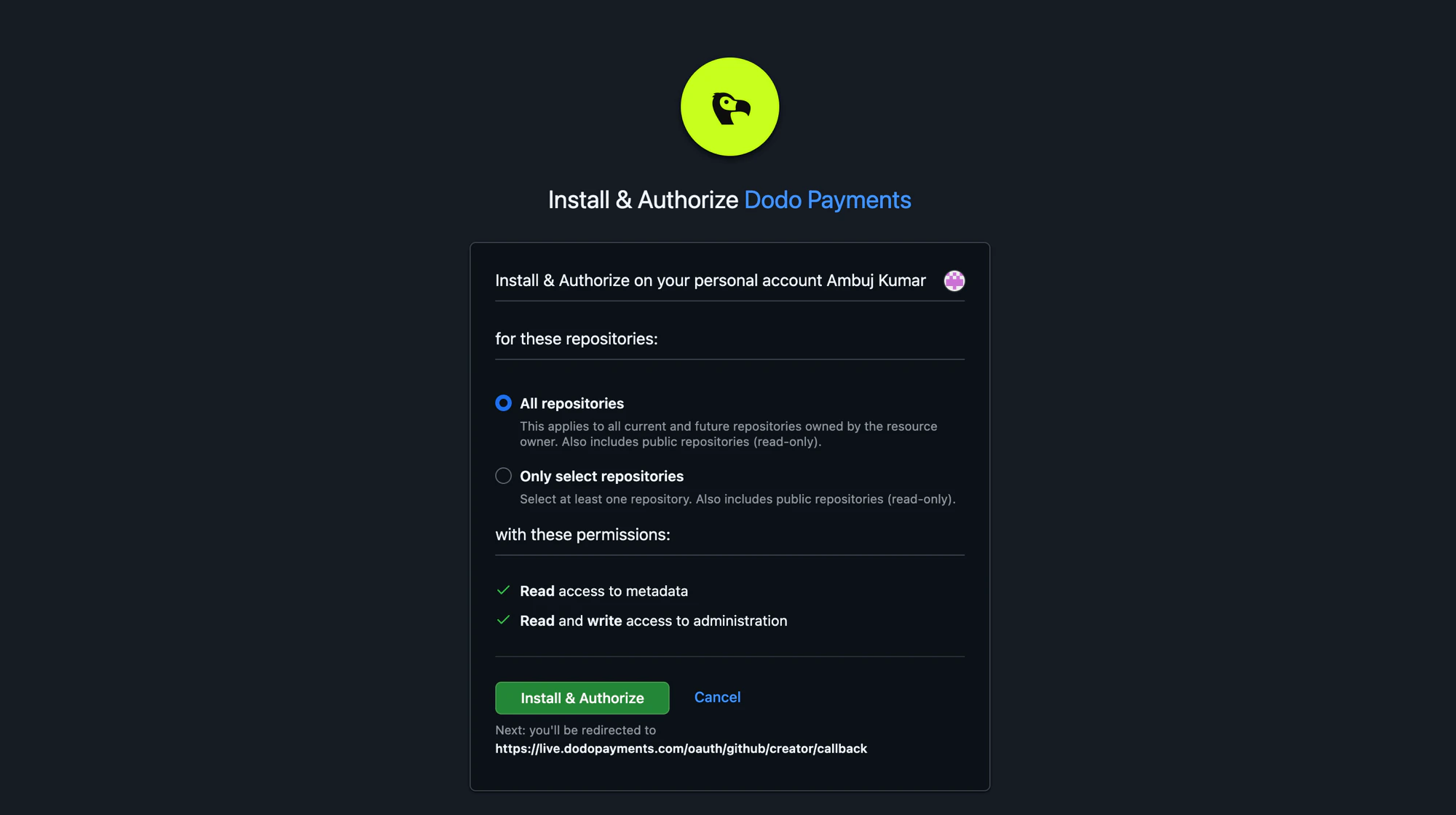
GitHub가 새 탭에서 열립니다. 로그인한 다음 repository를 소유한 organization 또는 사용자 계정에 Dodo Payments GitHub App을 설치합니다. App에 All repositories 또는 Only select repositories에 대한 액세스 권한을 부여할 수 있습니다. repository를 선택하는 경우 액세스를 제한할 모든 repository를 포함해야 합니다.
GitHub Install & Authorize page. Choose which repositories the app can manage.
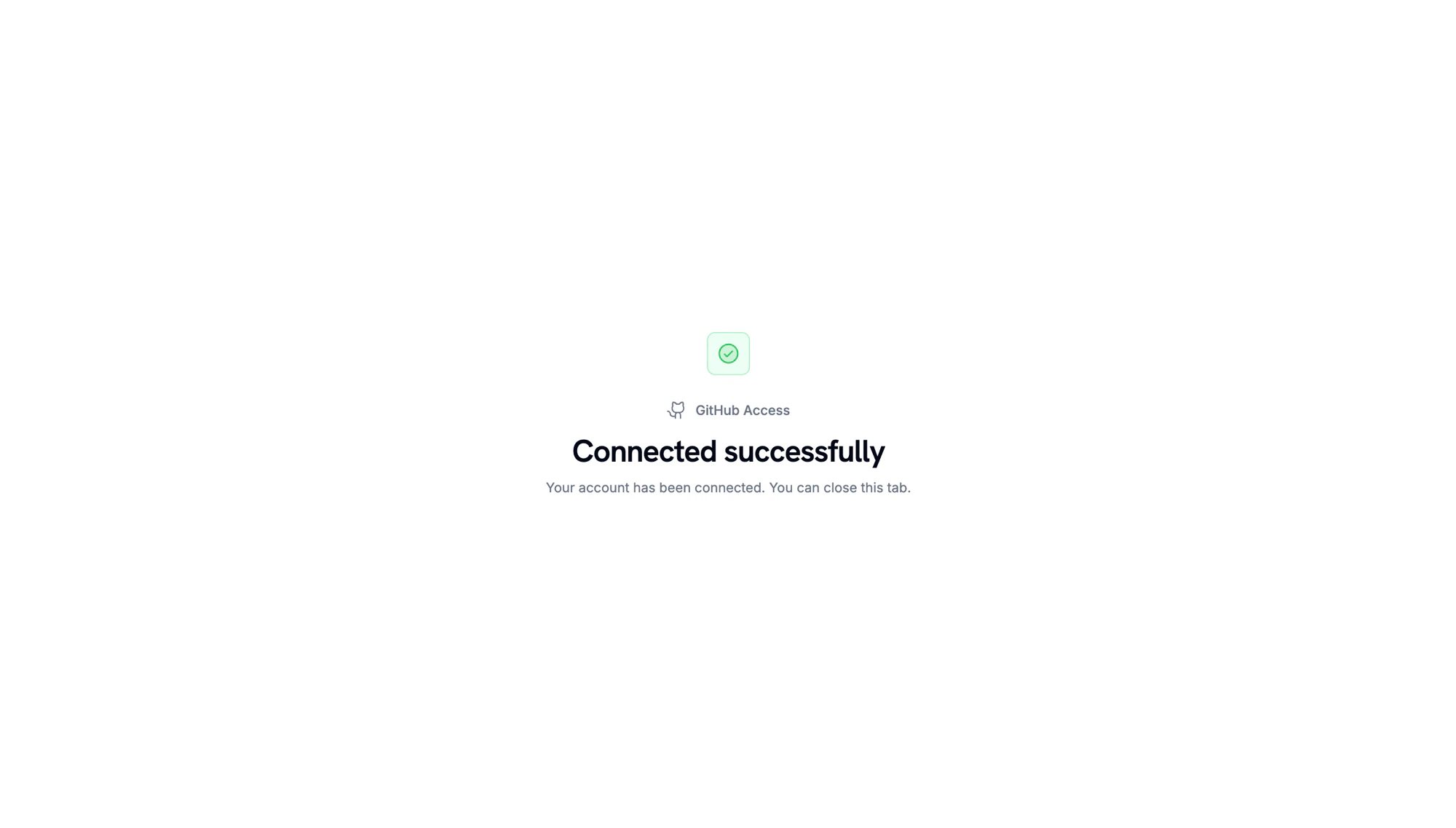
GitHub가 다시 리디렉션하면 계정이 연결되었음을 보여 주는 확인 페이지가 표시됩니다.
Account connected. Return to the Dodo Payments dashboard to continue.
3
Pick a Repository and Permission
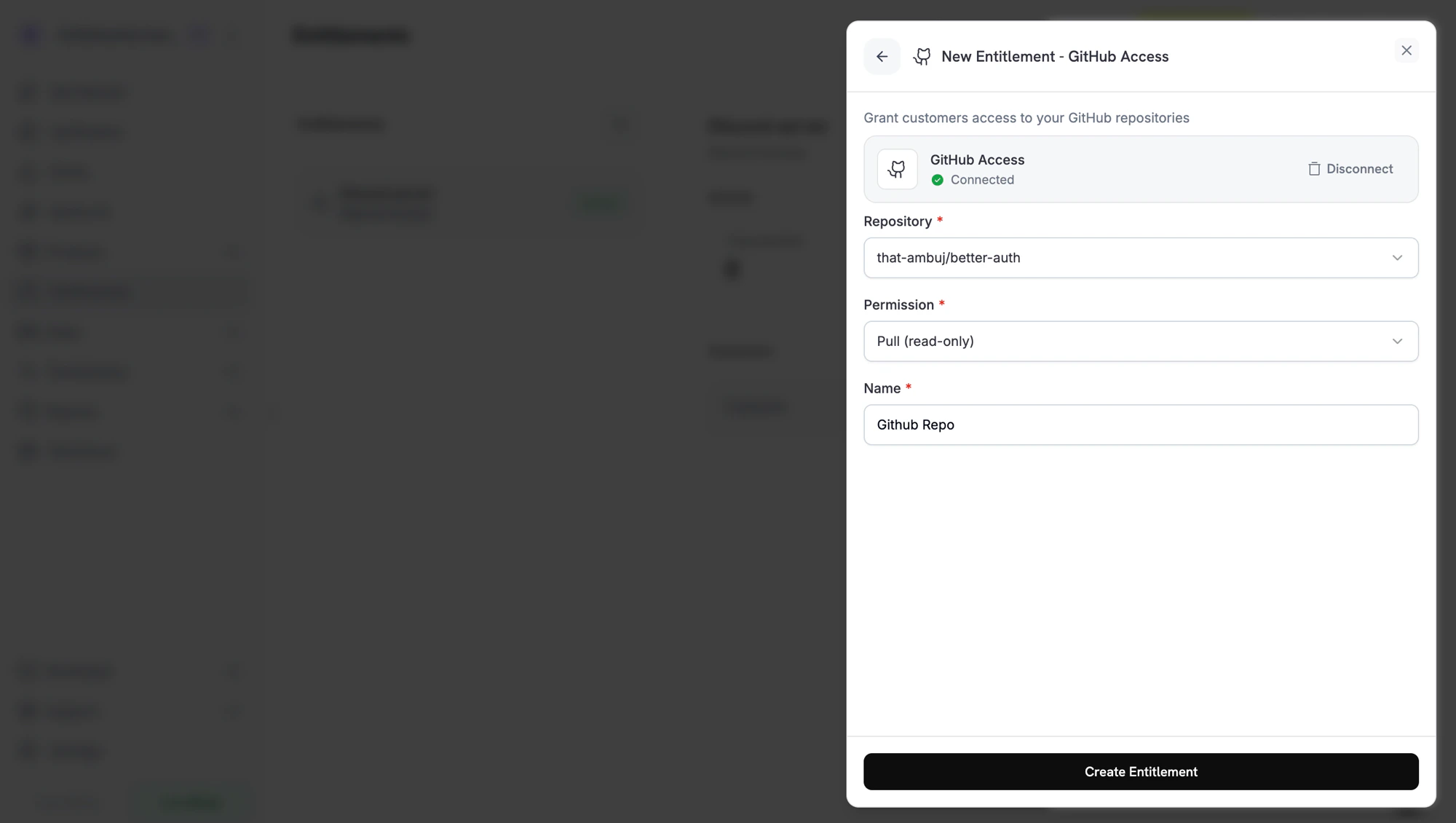
Dashboard로 돌아와 entitlement가 액세스 권한을 부여할 Repository를 선택한 다음 Permission 수준을 선택합니다. repository 선택기에는 GitHub App이 액세스할 수 있는 repository만 표시됩니다. entitlement의 Name을 입력하고 Create Entitlement를 클릭합니다.
Creating a GitHub entitlement. Pick the repository and the permission you want customers to receive.
4
Attach It to a Product
entitlement를 원하는 제품에 연결합니다. 해당 제품을 구매한 고객은 GitHub 계정을 연결한 후 GitHub 초대를 받습니다.
Dodo Payments가 Pending 상태로 grant를 생성합니다. Dodo Payments는 즉시 GitHub authorization URL을 생성하려고 시도하고 이를 oauth_url에 저장합니다. 이 작업이 실패하면 고객이 accept flow를 시작할 때까지 oauth_url는 null 상태로 유지됩니다.
결제 확인 이메일에는 entitlement가 Action Required로 표시되고 Customer Portal 링크가 포함됩니다. 포털에서 고객은 Connect를 클릭하고 GitHub로 authorize합니다. authorization link는 30분 후 만료되며, 고객이 다시 방문하면 Customer Portal에서 새 링크를 생성합니다.
// client is a *dodopayments.Client, for example from// dodopayments.NewClient(option.WithEnvironmentTestMode()); ctx is a context.Context.client.Entitlements.New(ctx, dodopayments.EntitlementNewParams{ Name: dodopayments.F("Code Share Repository"), IntegrationType: dodopayments.F(dodopayments.EntitlementIntegrationTypeGitHub), IntegrationConfig: dodopayments.F[dodopayments.IntegrationConfigUnionParam]( dodopayments.IntegrationConfigGitHubConfigParam{ TargetID: dodopayments.F("acme/private-sdk"), Permission: dodopayments.F(dodopayments.GitHubPermissionPull), }, ),})
entitlement_grant.created가 status: "Pending"와 함께 발생합니다. oauth_url에 이미 GitHub authorization URL이 저장되어 있을 수 있습니다. 값이 null인 경우 고객이 Customer Portal에서 accept flow를 시작하면 값이 설정됩니다.
access가 철회되면 entitlement_grant.revoked가 발생합니다. GitHub App을 uninstall하면 Dodo Payments가 revocation_reason: platform_external를 사용하여 해당 installation의 pending 및 delivered grant를 revoke합니다.
Dodo Payments가 repository에 고객을 추가할 수 없을 때(예: GitHub App이 repository에 대한 access를 잃은 경우) entitlement_grant.failed가 error_code: "GRANT_ACCESS_FAILED"와 함께 발생합니다.
Dodo Payments GitHub App은 repository를 소유한 organization 또는 user에 설치되어 있어야 합니다. entitlement form에서 GitHub card의 Disconnect를 클릭한 다음 Connect GitHub를 클릭하여 app을 다시 설치하고, gate하려는 repository에 대한 access를 부여합니다.
Grant fails with a permission error
GitHub App의 installation이 더 이상 repository에 액세스할 수 없거나 repository의 이름이 변경되었거나 이전되었습니다. App에 repository 액세스 권한을 다시 부여하면 다음 regrant가 성공합니다.
Customer hasn't accepted the invite
고객은 GitHub 알림 또는 GitHub 초대 이메일의 링크를 통해 GitHub 초대를 수락합니다. 수락하기 전에는 초대된 상태이지만 repository를 clone할 수 없습니다. Dodo Payments에서 grant는 여전히 Delivered 상태입니다. Dodo Payments가 발급하는 것은 초대이기 때문입니다.
마지막 수정일 2026년 9월 28일
이 페이지가 도움이 되었나요?
⌘I
{"docsConfig":{"theme":"maple","$schema":"https://mintlify.com/docs.json","name":"Dodo Payments Documentation","description":"Documentation for Dodo Payments — the all-in-one payments, billing, and merchant of record platform for SaaS, AI, and digital products.","colors":{"primary":"#779812","light":"#C6FE1E","dark":"#166534"},"logo":{"light":"https://mintcdn.com/dodopayments/nM_mJfYkri-OpC5M/logo/light.svg?fit=max\u0026auto=format\u0026n=nM_mJfYkri-OpC5M\u0026q=85\u0026s=23f7a052f7ecb9d6570b7c95ee359a97","dark":"https://mintcdn.com/dodopayments/nM_mJfYkri-OpC5M/logo/dark.svg?fit=max\u0026auto=format\u0026n=nM_mJfYkri-OpC5M\u0026q=85\u0026s=cd6c20238a54526436f21c43fee51b26"},"favicon":"https://mintcdn.com/dodopayments/doYQc9oUE-WNz0cs/favicon.svg?fit=max\u0026auto=format\u0026n=doYQc9oUE-WNz0cs\u0026q=85\u0026s=271c6cc8ce7d6bf4d7f2b9cca029e004","background":{"color":{"light":"#FFFFFF","dark":"#0D0D0D"}},"navbar":{"links":[{"icon":"link","href":"https://docs.dodopayments.com/llms-full.txt","label":"llms-full.txt"},{"icon":"discord","href":"https://discord.gg/bYqAp4ayYh","label":"Community"},{"icon":"house","href":"https://app.dodopayments.com/","label":"Dashboard"}]},"footer":{"socials":{"x":"https://x.com/dodopayments","linkedin":"https://linkedin.com/company/dodopayments","website":"https://dodopayments.com","discord":"https://discord.gg/bYqAp4ayYh","github":"https://github.com/dodopayments","instagram":"https://www.instagram.com/dodo.payments","facebook":"https://www.facebook.com/profile.php?id=61565515607280"}},"seo":{"metatags":{"og:site_name":"Dodo Payments Documentation","twitter:card":"summary_large_image"},"indexing":"navigable"},"fonts":{"heading":{"family":"ApfelGrotezk","weight":400,"source":"fonts/ApfelGrotezk-Regular.woff2","format":"woff2"},"body":{"family":"Inter","weight":400,"source":"fonts/Inter-Variable.woff2","format":"woff2"}},"contextual":{"options":["copy","view","chatgpt","claude","perplexity","cursor"],"display":"header"},"metadata":{"timestamp":true},"styling":{"latex":true},"navigation":{"languages":[{"language":"en","href":"introduction"},{"language":"es","href":"es/introduction"},{"language":"ar","href":"ar/introduction"},{"language":"fr","href":"fr/introduction"},{"language":"de","href":"de/introduction"},{"language":"id","href":"id/introduction"},{"language":"ja","href":"ja/introduction"},{"language":"ko","href":"ko/introduction"},{"language":"pt-BR","href":"pt-BR/introduction"},{"language":"vi","href":"vi/introduction"},{"language":"cn","href":"cn/introduction"},{"language":"hi","href":"hi/introduction"},{"language":"it","href":"it/introduction"},{"language":"sv","href":"sv/introduction"}]}},"deployment":{"deploymentMetadataValue":{"subdomain":"dodopayments","hasAudioNarration":false,"actualSubdomain":"dodopayments","customDomains":["docs.dodopayments.com"],"gitSource":{"type":"github","owner":"dodopayments","repo":"dodo-docs","deployBranch":"main","contentDirectory":"","isPrivate":true,"mountPath":"","label":""},"chroma":{"liveDeploymentHistoryId":"6ae4a48d737a5e6c8f11570f","collectionId":"7d1fdd95-d2f3-45f6-b7c1-915a4bc82be8","schemaVersion":"v3","latestBuiltDeploymentHistoryId":"6ae4a48d737a5e6c8f11570f"},"feedback":{"thumbs":true,"edits":false,"issues":false},"entitlements":{"AI_CHAT":{"status":"ENABLED"},"WEB_MCP":{"status":"ENABLED"},"NARRATION":{"status":"ENABLED"}},"buildId":"6ae4a48d737a5e6c8f11570f","clientVersion":"0.0.4043","searchFilterCounts":[{"language":"en","tag":"Docs","count":171},{"language":"en","tag":"API Reference","count":163},{"language":"ar","tag":"Docs","count":153},{"language":"cn","tag":"Docs","count":153},{"language":"de","tag":"Docs","count":153},{"language":"es","tag":"Docs","count":153},{"language":"fr","tag":"Docs","count":153},{"language":"hi","tag":"Docs","count":153},{"language":"id","tag":"Docs","count":153},{"language":"it","tag":"Docs","count":153},{"language":"ja","tag":"Docs","count":153},{"language":"ko","tag":"Docs","count":153},{"language":"pt-BR","tag":"Docs","count":153},{"language":"sv","tag":"Docs","count":153},{"language":"vi","tag":"Docs","count":153},{"language":"ar","tag":"API Reference","count":151},{"language":"cn","tag":"API Reference","count":151},{"language":"de","tag":"API Reference","count":151},{"language":"es","tag":"API Reference","count":151},{"language":"fr","tag":"API Reference","count":151},{"language":"hi","tag":"API Reference","count":151},{"language":"id","tag":"API Reference","count":151},{"language":"it","tag":"API Reference","count":151},{"language":"ja","tag":"API Reference","count":151},{"language":"ko","tag":"API Reference","count":151},{"language":"pt-BR","tag":"API Reference","count":151},{"language":"sv","tag":"API Reference","count":151},{"language":"vi","tag":"API Reference","count":151},{"language":"en","tag":"Features","count":82},{"language":"ar","tag":"Features","count":81},{"language":"cn","tag":"Features","count":81},{"language":"de","tag":"Features","count":81},{"language":"es","tag":"Features","count":81},{"language":"fr","tag":"Features","count":81},{"language":"hi","tag":"Features","count":81},{"language":"id","tag":"Features","count":81},{"language":"it","tag":"Features","count":81},{"language":"ja","tag":"Features","count":81},{"language":"ko","tag":"Features","count":81},{"language":"pt-BR","tag":"Features","count":81},{"language":"sv","tag":"Features","count":81},{"language":"vi","tag":"Features","count":81},{"language":"en","tag":"Integrate","count":73},{"language":"en","tag":"Changelog","count":65},{"language":"ar","tag":"Changelog","count":65},{"language":"cn","tag":"Changelog","count":65},{"language":"de","tag":"Changelog","count":65},{"language":"es","tag":"Changelog","count":65},{"language":"fr","tag":"Changelog","count":65},{"language":"hi","tag":"Changelog","count":65},{"language":"id","tag":"Changelog","count":65},{"language":"it","tag":"Changelog","count":65},{"language":"ja","tag":"Changelog","count":65},{"language":"ko","tag":"Changelog","count":65},{"language":"pt-BR","tag":"Changelog","count":65},{"language":"sv","tag":"Changelog","count":65},{"language":"vi","tag":"Changelog","count":65},{"language":"ar","tag":"Integrate","count":59},{"language":"cn","tag":"Integrate","count":59},{"language":"de","tag":"Integrate","count":59},{"language":"es","tag":"Integrate","count":59},{"language":"fr","tag":"Integrate","count":59},{"language":"hi","tag":"Integrate","count":59},{"language":"id","tag":"Integrate","count":59},{"language":"it","tag":"Integrate","count":59},{"language":"ja","tag":"Integrate","count":59},{"language":"ko","tag":"Integrate","count":59},{"language":"pt-BR","tag":"Integrate","count":59},{"language":"sv","tag":"Integrate","count":59},{"language":"vi","tag":"Integrate","count":59},{"language":"en","tag":"External Integrations","count":33},{"language":"ar","tag":"External Integrations","count":30},{"language":"cn","tag":"External Integrations","count":30},{"language":"de","tag":"External Integrations","count":30},{"language":"es","tag":"External Integrations","count":30},{"language":"fr","tag":"External Integrations","count":30},{"language":"hi","tag":"External Integrations","count":30},{"language":"id","tag":"External Integrations","count":30},{"language":"it","tag":"External Integrations","count":30},{"language":"ja","tag":"External Integrations","count":30},{"language":"ko","tag":"External Integrations","count":30},{"language":"pt-BR","tag":"External Integrations","count":30},{"language":"sv","tag":"External Integrations","count":30},{"language":"vi","tag":"External Integrations","count":30},{"language":"en","tag":"Webhooks","count":23},{"language":"ar","tag":"Webhooks","count":23},{"language":"cn","tag":"Webhooks","count":23},{"language":"de","tag":"Webhooks","count":23},{"language":"es","tag":"Webhooks","count":23},{"language":"fr","tag":"Webhooks","count":23},{"language":"hi","tag":"Webhooks","count":23},{"language":"id","tag":"Webhooks","count":23},{"language":"it","tag":"Webhooks","count":23},{"language":"ja","tag":"Webhooks","count":23},{"language":"ko","tag":"Webhooks","count":23},{"language":"pt-BR","tag":"Webhooks","count":23},{"language":"sv","tag":"Webhooks","count":23},{"language":"vi","tag":"Webhooks","count":23},{"language":"en","tag":"Guides","count":22},{"language":"ar","tag":"Guides","count":22},{"language":"cn","tag":"Guides","count":22},{"language":"de","tag":"Guides","count":22},{"language":"es","tag":"Guides","count":22},{"language":"fr","tag":"Guides","count":22},{"language":"hi","tag":"Guides","count":22},{"language":"id","tag":"Guides","count":22},{"language":"it","tag":"Guides","count":22},{"language":"ja","tag":"Guides","count":22},{"language":"ko","tag":"Guides","count":22},{"language":"pt-BR","tag":"Guides","count":22},{"language":"sv","tag":"Guides","count":22},{"language":"vi","tag":"Guides","count":22},{"language":"en","tag":"Entitlements","count":20},{"language":"ar","tag":"Entitlements","count":20},{"language":"cn","tag":"Entitlements","count":20},{"language":"de","tag":"Entitlements","count":20},{"language":"es","tag":"Entitlements","count":20},{"language":"fr","tag":"Entitlements","count":20},{"language":"hi","tag":"Entitlements","count":20},{"language":"id","tag":"Entitlements","count":20},{"language":"it","tag":"Entitlements","count":20},{"language":"ja","tag":"Entitlements","count":20},{"language":"ko","tag":"Entitlements","count":20},{"language":"pt-BR","tag":"Entitlements","count":20},{"language":"sv","tag":"Entitlements","count":20},{"language":"vi","tag":"Entitlements","count":20},{"language":"en","tag":"Customers","count":16},{"language":"ar","tag":"Customers","count":16},{"language":"cn","tag":"Customers","count":16},{"language":"de","tag":"Customers","count":16},{"language":"es","tag":"Customers","count":16},{"language":"fr","tag":"Customers","count":16},{"language":"hi","tag":"Customers","count":16},{"language":"id","tag":"Customers","count":16},{"language":"it","tag":"Customers","count":16},{"language":"ja","tag":"Customers","count":16},{"language":"ko","tag":"Customers","count":16},{"language":"pt-BR","tag":"Customers","count":16},{"language":"sv","tag":"Customers","count":16},{"language":"vi","tag":"Customers","count":16}]},"assistantConfig":{"deflection":{"enabled":false,"email":"support@dodopayments.com","showHelpButton":true}},"basePath":"","hasChatPermissions":false,"hasWebMcpPermissions":true,"toggles":[{"name":"kill-isr","enabled":true,"variant":{"name":"disabled","enabled":false,"feature_enabled":true},"impressionData":false},{"name":"agent-mintlify-slack","enabled":true,"variant":{"name":"disabled","enabled":false,"feature_enabled":true},"impressionData":false},{"name":"agent-integrations-settings","enabled":true,"variant":{"name":"disabled","enabled":false,"feature_enabled":true},"impressionData":false},{"name":"automations-pr-grouping","enabled":true,"variant":{"name":"disabled","enabled":false,"feature_enabled":true},"impressionData":false},{"name":"custom-prefix","enabled":true,"variant":{"name":"disabled","enabled":false,"feature_enabled":true},"impressionData":false},{"name":"analytics-v7","enabled":true,"variant":{"name":"disabled","enabled":false,"feature_enabled":true},"impressionData":false},{"name":"user-flows-analytics","enabled":true,"variant":{"name":"disabled","enabled":false,"feature_enabled":true},"impressionData":false},{"name":"no-publish-flow","enabled":true,"variant":{"name":"disabled","enabled":false,"feature_enabled":true},"impressionData":false},{"name":"workos-onboarding","enabled":true,"variant":{"name":"disabled","enabled":false,"feature_enabled":true},"impressionData":false},{"name":"llms-txt-v2","enabled":true,"variant":{"name":"disabled","enabled":false,"feature_enabled":true},"impressionData":false},{"name":"snapshot-serving-live","enabled":true,"variant":{"name":"disabled","enabled":false,"feature_enabled":true},"impressionData":false},{"name":"stripTemperatureMiddleware","enabled":true,"variant":{"name":"disabled","enabled":false,"feature_enabled":true},"impressionData":false},{"name":"support-platform-pylon-zendesk","enabled":true,"variant":{"name":"disabled","enabled":false,"feature_enabled":true},"impressionData":false},{"name":"snapshot-serving","enabled":true,"variant":{"name":"disabled","enabled":false,"feature_enabled":true},"impressionData":false},{"name":"instant-rollback","enabled":true,"variant":{"name":"disabled","enabled":false,"feature_enabled":true},"impressionData":false},{"name":"granular-notifications-server","enabled":true,"variant":{"name":"disabled","enabled":false,"feature_enabled":true},"impressionData":false},{"name":"granular-notifications","enabled":true,"variant":{"name":"disabled","enabled":false,"feature_enabled":true},"impressionData":false},{"name":"automations-fable","enabled":true,"variant":{"name":"disabled","enabled":false,"feature_enabled":true},"impressionData":false},{"name":"fixed-ai-action-pricing","enabled":true,"variant":{"name":"disabled","enabled":false,"feature_enabled":true},"impressionData":false},{"name":"automation-resolve-merge-conflict","enabled":true,"variant":{"name":"disabled","enabled":false,"feature_enabled":true},"impressionData":false},{"name":"scoped-publishing","enabled":true,"variant":{"name":"disabled","enabled":false,"feature_enabled":true},"impressionData":false},{"name":"mintql","enabled":true,"variant":{"name":"disabled","enabled":false,"feature_enabled":true},"impressionData":false},{"name":"page-level-analytics","enabled":true,"variant":{"name":"disabled","enabled":false,"feature_enabled":true},"impressionData":false},{"name":"editor-version-history-v2","enabled":true,"variant":{"name":"disabled","enabled":false,"feature_enabled":true},"impressionData":false},{"name":"billing-page-v2","enabled":true,"variant":{"name":"disabled","enabled":false,"feature_enabled":true},"impressionData":false},{"name":"full-page-search","enabled":true,"variant":{"name":"disabled","enabled":false,"feature_enabled":true},"impressionData":false},{"name":"workspace-projects","enabled":true,"variant":{"name":"disabled","enabled":false,"feature_enabled":true},"impressionData":false},{"name":"assistant-v5","enabled":true,"variant":{"name":"disabled","enabled":false,"feature_enabled":true},"impressionData":false},{"name":"byok-sep-25","enabled":true,"variant":{"name":"disabled","enabled":false,"feature_enabled":true},"impressionData":false},{"name":"fork-pr-previews","enabled":true,"variant":{"name":"disabled","enabled":false,"feature_enabled":true},"impressionData":false},{"name":"revalidation-jwt","enabled":true,"variant":{"name":"disabled","enabled":false,"feature_enabled":true},"impressionData":false},{"name":"vite-origin","enabled":true,"variant":{"name":"disabled","enabled":false,"feature_enabled":true},"impressionData":false},{"name":"billing-updated-9-15","enabled":true,"variant":{"name":"disabled","enabled":false,"feature_enabled":true},"impressionData":false},{"name":"workos-sso-scim","enabled":true,"variant":{"name":"disabled","enabled":false,"feature_enabled":true},"impressionData":false},{"name":"hobby-abuse-scan","enabled":true,"variant":{"name":"disabled","enabled":false,"feature_enabled":true},"impressionData":false},{"name":"dashboard-inbox","enabled":true,"variant":{"name":"disabled","enabled":false,"feature_enabled":true},"impressionData":false},{"name":"workos-signup","enabled":true,"variant":{"name":"disabled","enabled":false,"feature_enabled":true},"impressionData":false},{"name":"turbopuffer-dual-write","enabled":true,"variant":{"name":"disabled","enabled":false,"feature_enabled":true},"impressionData":false},{"name":"workos-enabled","enabled":true,"variant":{"name":"disabled","enabled":false,"feature_enabled":true},"impressionData":false},{"name":"approve-review-flow","enabled":true,"variant":{"name":"disabled","enabled":false,"feature_enabled":true},"impressionData":false}],"googleFontsInlined":false},"customCss":[{"filePath":"styles.css","content":"#content-area{max-width:60rem}h1,h2,h3,h4,h5,h6{letter-spacing:.05em!important}.welcome-page .card-group{margin:3rem auto 8rem;max-width:70rem;padding-left:1.25rem;padding-right:1.25rem}.welcome-page .card-group .card{padding:1rem}.welcome-hero{display:flex;flex-direction:column;align-items:center;justify-content:center;min-height:20vh;text-align:center;margin-top:3rem;margin-bottom:2.5rem}.welcome-hero h1{font-size:2.5rem;font-weight:700;margin-bottom:1rem;line-height:1.2;color:#fff;color:rgb(41 42 37/1)}.welcome-hero p{font-size:1.25rem;max-width:600px;margin:0 auto;color:rgb(83 85 79/1)}.dark .welcome-hero h1{color:rgb(255 255 255/1)}.dark .welcome-hero p{color:rgb(162 164 158/1)}"}],"page":{"pagePath":"ko/features/entitlements/github","slug":"/ko/features/entitlements/github","pageMetadata":{"title":"GitHub Entitlement","sidebarTitle":"GitHub","description":"고객에게 선택한 권한 수준으로 비공개 GitHub repository에 collaborator 액세스 권한을 부여하고, 취소 시 자동으로 권한을 철회합니다.","icon":"github","keywords":["Dodo Payments","GitHub","entitlement","repository access","private repo"],"href":"/ko/features/entitlements/github"},"description":{"compiledSource":"\"use strict\";\nconst {jsx: _jsx} = arguments[0];\nconst {useMDXComponents: _provideComponents} = arguments[0];\nfunction _createMdxContent(props) {\n const _components = {\n p: \"p\",\n ..._provideComponents(),\n ...props.components\n };\n return _jsx(_components.p, {\n children: \"고객에게 선택한 권한 수준으로 비공개 GitHub repository에 collaborator 액세스 권한을 부여하고, 취소 시 자동으로 권한을 철회합니다.\"\n });\n}\nfunction MDXContent(props = {}) {\n const {wrapper: MDXLayout} = {\n ..._provideComponents(),\n ...props.components\n };\n return MDXLayout ? _jsx(MDXLayout, {\n ...props,\n children: _jsx(_createMdxContent, {\n ...props\n })\n }) : _createMdxContent(props);\n}\nreturn {\n default: MDXContent\n};\n","frontmatter":{},"scope":{}},"pageType":"default","mdx":{"mdxSource":{"compiledSource":"\"use strict\";const{Fragment:_Fragment,jsx:_jsx,jsxs:_jsxs}=arguments[0];const{useMDXComponents:_provideComponents}=arguments[0];function _createMdxContent(props){const _components={a:`a`,code:`code`,li:`li`,ol:`ol`,p:`p`,pre:`pre`,span:`span`,strong:`strong`,tbody:`tbody`,td:`td`,th:`th`,thead:`thead`,tr:`tr`,ul:`ul`,..._provideComponents(),...props.components},{Accordion,AccordionGroup,CodeBlock,CodeGroup,Frame,Heading,Info,OptimizedImage,Step,Steps,Table,Warning}=_components;if(!Accordion)_missingMdxReference(`Accordion`,true);if(!AccordionGroup)_missingMdxReference(`AccordionGroup`,true);if(!CodeBlock)_missingMdxReference(`CodeBlock`,true);if(!CodeGroup)_missingMdxReference(`CodeGroup`,true);if(!Frame)_missingMdxReference(`Frame`,true);if(!Heading)_missingMdxReference(`Heading`,true);if(!Info)_missingMdxReference(`Info`,true);if(!OptimizedImage)_missingMdxReference(`OptimizedImage`,true);if(!Step)_missingMdxReference(`Step`,true);if(!Steps)_missingMdxReference(`Steps`,true);if(!Table)_missingMdxReference(`Table`,true);if(!Warning)_missingMdxReference(`Warning`,true);return _jsxs(_Fragment,{children:[_jsx(Info,{children:_jsxs(_components.p,{children:[`GitHub entitlement는 결제한 고객을 비공개 repository의 collaborator로 추가합니다. 권한 수준(`,_jsx(_components.code,{children:`pull`}),`, `,_jsx(_components.code,{children:`push`}),`, `,_jsx(_components.code,{children:`triage`}),`, `,_jsx(_components.code,{children:`maintain`}),` 또는 `,_jsx(_components.code,{children:`admin`}),`)을 선택할 수 있습니다. Dodo Payments는 collaborator 초대를 보내고 grant가 철회되면 collaborator를 제거합니다.`]})}),`\n`,_jsx(Heading,{level:`2`,id:`제공되는-항목`,children:`제공되는 항목`}),`\n`,_jsxs(_components.ul,{children:[`\n`,_jsx(_components.li,{children:`고객은 Customer Portal에서 GitHub 계정을 연결합니다. 이렇게 하면 GitHub 계정이 구매 항목에 연결됩니다.`}),`\n`,_jsx(_components.li,{children:`Dodo Payments는 구성된 권한 수준으로 해당 계정을 사용자의 repository에 초대합니다. 고객은 GitHub에서 초대를 수락한 후 액세스 권한을 얻습니다. 고객이 repository 소유자인 경우 초대가 필요하지 않습니다.`}),`\n`,_jsx(_components.li,{children:`취소, 환불 또는 수동 철회가 발생하면 collaborator가 제거되고 대기 중인 초대가 취소됩니다.`}),`\n`]}),`\n`,_jsx(_components.p,{children:`일반적인 사용 사례로는 source-available 제품, 유료 템플릿, 강의 코드 repository, 액세스가 제한된 client SDK가 있습니다.`}),`\n`,_jsx(Heading,{level:`2`,id:`github-연결`,children:`GitHub 연결`}),`\n`,_jsxs(Steps,{children:[_jsx(Step,{title:`Open Entitlements`,children:_jsxs(_components.p,{children:[`Dodo Payments dashboard에서 `,_jsx(_components.strong,{children:`Entitlements`}),`로 이동한 다음 **+**를 클릭하여 새 entitlement를 시작합니다.`]})}),_jsxs(Step,{title:`Pick GitHub`,children:[_jsxs(_components.p,{children:[`통합으로 `,_jsx(_components.strong,{children:`GitHub Access`}),`를 선택합니다. 아직 GitHub가 연결되지 않았다면 `,_jsx(_components.strong,{children:`Connect GitHub`}),`를 클릭합니다.`]}),_jsx(Frame,{caption:`Connect GitHub prompt before the install handoff.`,children:_jsx(OptimizedImage,{src:`https://mintcdn.com/dodopayments/do-W-dMDGVB_xzr_/images/entitlements/github/connect-prompt.png?fit=max\u0026auto=format\u0026n=do-W-dMDGVB_xzr_\u0026q=85\u0026s=8a836c94099accdb2b3dc31c22d0e11b`,alt:`Merchant에게 GitHub 연결을 요청하는 새 entitlement 패널`,style:{maxHeight:`500px`,width:`auto`},\"data-og-width\":`2000`,width:`2000`,\"data-og-height\":`1129`,height:`1129`,\"data-path\":`images/entitlements/github/connect-prompt.png`,\"data-optimize\":`true`,\"data-opv\":`3`,srcset:`https://mintcdn.com/dodopayments/do-W-dMDGVB_xzr_/images/entitlements/github/connect-prompt.png?w=280\u0026fit=max\u0026auto=format\u0026n=do-W-dMDGVB_xzr_\u0026q=85\u0026s=942ab896730cb92e2ab62f3f6fa10511 280w, https://mintcdn.com/dodopayments/do-W-dMDGVB_xzr_/images/entitlements/github/connect-prompt.png?w=560\u0026fit=max\u0026auto=format\u0026n=do-W-dMDGVB_xzr_\u0026q=85\u0026s=e11b794bc274805b3f3b79d98de7af91 560w, https://mintcdn.com/dodopayments/do-W-dMDGVB_xzr_/images/entitlements/github/connect-prompt.png?w=840\u0026fit=max\u0026auto=format\u0026n=do-W-dMDGVB_xzr_\u0026q=85\u0026s=1f5fa783e67bdf8f860dc8e8660b8f1c 840w, https://mintcdn.com/dodopayments/do-W-dMDGVB_xzr_/images/entitlements/github/connect-prompt.png?w=1100\u0026fit=max\u0026auto=format\u0026n=do-W-dMDGVB_xzr_\u0026q=85\u0026s=896b7c57e985a74a0ee9746c728021b5 1100w, https://mintcdn.com/dodopayments/do-W-dMDGVB_xzr_/images/entitlements/github/connect-prompt.png?w=1650\u0026fit=max\u0026auto=format\u0026n=do-W-dMDGVB_xzr_\u0026q=85\u0026s=aca2e68ecd21d500636ac74f8f290376 1650w, https://mintcdn.com/dodopayments/do-W-dMDGVB_xzr_/images/entitlements/github/connect-prompt.png?w=2500\u0026fit=max\u0026auto=format\u0026n=do-W-dMDGVB_xzr_\u0026q=85\u0026s=0e0611dcf521f4434a7d0342e743b74f 2500w`})}),_jsxs(_components.p,{children:[`GitHub가 새 탭에서 열립니다. 로그인한 다음 repository를 소유한 organization 또는 사용자 계정에 Dodo Payments GitHub App을 설치합니다. App에 `,_jsx(_components.strong,{children:`All repositories`}),` 또는 `,_jsx(_components.strong,{children:`Only select repositories`}),`에 대한 액세스 권한을 부여할 수 있습니다. repository를 선택하는 경우 액세스를 제한할 모든 repository를 포함해야 합니다.`]}),_jsx(Frame,{caption:`GitHub Install \u0026 Authorize page. Choose which repositories the app can manage.`,children:_jsx(OptimizedImage,{src:`https://mintcdn.com/dodopayments/do-W-dMDGVB_xzr_/images/entitlements/github/oauth-install.png?fit=max\u0026auto=format\u0026n=do-W-dMDGVB_xzr_\u0026q=85\u0026s=0788d3f6e9df8a087de824967f09c215`,alt:`GitHub Install and Authorize page with All repositories and Only select repositories options`,style:{maxHeight:`500px`,width:`auto`},\"data-og-width\":`2000`,width:`2000`,\"data-og-height\":`1120`,height:`1120`,\"data-path\":`images/entitlements/github/oauth-install.png`,\"data-optimize\":`true`,\"data-opv\":`3`,srcset:`https://mintcdn.com/dodopayments/do-W-dMDGVB_xzr_/images/entitlements/github/oauth-install.png?w=280\u0026fit=max\u0026auto=format\u0026n=do-W-dMDGVB_xzr_\u0026q=85\u0026s=8017ac0873d2d43845769b71dee24220 280w, https://mintcdn.com/dodopayments/do-W-dMDGVB_xzr_/images/entitlements/github/oauth-install.png?w=560\u0026fit=max\u0026auto=format\u0026n=do-W-dMDGVB_xzr_\u0026q=85\u0026s=5d41cdab3f183e220730c7e524865990 560w, https://mintcdn.com/dodopayments/do-W-dMDGVB_xzr_/images/entitlements/github/oauth-install.png?w=840\u0026fit=max\u0026auto=format\u0026n=do-W-dMDGVB_xzr_\u0026q=85\u0026s=ed3b029a7d50fbef3bb02050eb415167 840w, https://mintcdn.com/dodopayments/do-W-dMDGVB_xzr_/images/entitlements/github/oauth-install.png?w=1100\u0026fit=max\u0026auto=format\u0026n=do-W-dMDGVB_xzr_\u0026q=85\u0026s=a8964c1d4d0074df1ed4dd9e905ab77c 1100w, https://mintcdn.com/dodopayments/do-W-dMDGVB_xzr_/images/entitlements/github/oauth-install.png?w=1650\u0026fit=max\u0026auto=format\u0026n=do-W-dMDGVB_xzr_\u0026q=85\u0026s=bbe2a1fabe2d00f0a57d9fdcce6ad3f5 1650w, https://mintcdn.com/dodopayments/do-W-dMDGVB_xzr_/images/entitlements/github/oauth-install.png?w=2500\u0026fit=max\u0026auto=format\u0026n=do-W-dMDGVB_xzr_\u0026q=85\u0026s=4eeed012b2d814837965389c08c3f2e5 2500w`})}),_jsx(_components.p,{children:`GitHub가 다시 리디렉션하면 계정이 연결되었음을 보여 주는 확인 페이지가 표시됩니다.`}),_jsx(Frame,{caption:`Account connected. Return to the Dodo Payments dashboard to continue.`,children:_jsx(OptimizedImage,{src:`https://mintcdn.com/dodopayments/do-W-dMDGVB_xzr_/images/entitlements/github/connected.png?fit=max\u0026auto=format\u0026n=do-W-dMDGVB_xzr_\u0026q=85\u0026s=ee3c87c3b3917f473ff3d376dfdc6494`,alt:`GitHub Access connected successfully confirmation page`,style:{maxHeight:`500px`,width:`auto`},\"data-og-width\":`2000`,width:`2000`,\"data-og-height\":`1137`,height:`1137`,\"data-path\":`images/entitlements/github/connected.png`,\"data-optimize\":`true`,\"data-opv\":`3`,srcset:`https://mintcdn.com/dodopayments/do-W-dMDGVB_xzr_/images/entitlements/github/connected.png?w=280\u0026fit=max\u0026auto=format\u0026n=do-W-dMDGVB_xzr_\u0026q=85\u0026s=6c869f139ca751f668e6870384197fa0 280w, https://mintcdn.com/dodopayments/do-W-dMDGVB_xzr_/images/entitlements/github/connected.png?w=560\u0026fit=max\u0026auto=format\u0026n=do-W-dMDGVB_xzr_\u0026q=85\u0026s=23c88456632dddeaf8fd27a44578d33d 560w, https://mintcdn.com/dodopayments/do-W-dMDGVB_xzr_/images/entitlements/github/connected.png?w=840\u0026fit=max\u0026auto=format\u0026n=do-W-dMDGVB_xzr_\u0026q=85\u0026s=aaef4e4c181a97eea5961086161e71e1 840w, https://mintcdn.com/dodopayments/do-W-dMDGVB_xzr_/images/entitlements/github/connected.png?w=1100\u0026fit=max\u0026auto=format\u0026n=do-W-dMDGVB_xzr_\u0026q=85\u0026s=68ff88fac797c91e590b80e593d34074 1100w, https://mintcdn.com/dodopayments/do-W-dMDGVB_xzr_/images/entitlements/github/connected.png?w=1650\u0026fit=max\u0026auto=format\u0026n=do-W-dMDGVB_xzr_\u0026q=85\u0026s=24836a546d4d3eb3a5628ea9ff0cf64e 1650w, https://mintcdn.com/dodopayments/do-W-dMDGVB_xzr_/images/entitlements/github/connected.png?w=2500\u0026fit=max\u0026auto=format\u0026n=do-W-dMDGVB_xzr_\u0026q=85\u0026s=dfcdc00fc59dd5338f0eef1a7b86cbbe 2500w`})})]}),_jsxs(Step,{title:`Pick a Repository and Permission`,children:[_jsxs(_components.p,{children:[`Dashboard로 돌아와 entitlement가 액세스 권한을 부여할 `,_jsx(_components.strong,{children:`Repository`}),`를 선택한 다음 `,_jsx(_components.strong,{children:`Permission`}),` 수준을 선택합니다. repository 선택기에는 GitHub App이 액세스할 수 있는 repository만 표시됩니다. entitlement의 `,_jsx(_components.strong,{children:`Name`}),`을 입력하고 `,_jsx(_components.strong,{children:`Create Entitlement`}),`를 클릭합니다.`]}),_jsx(Frame,{caption:`Creating a GitHub entitlement. Pick the repository and the permission you want customers to receive.`,children:_jsx(OptimizedImage,{src:`https://mintcdn.com/dodopayments/do-W-dMDGVB_xzr_/images/entitlements/github/create.png?fit=max\u0026auto=format\u0026n=do-W-dMDGVB_xzr_\u0026q=85\u0026s=722e925ec5158a5d16c58213132ccb9d`,alt:`연결된 GitHub Access, repository 선택기, permission 드롭다운 및 name 필드가 포함된 GitHub entitlement 양식`,style:{maxHeight:`500px`,width:`auto`},\"data-og-width\":`2000`,width:`2000`,\"data-og-height\":`1130`,height:`1130`,\"data-path\":`images/entitlements/github/create.png`,\"data-optimize\":`true`,\"data-opv\":`3`,srcset:`https://mintcdn.com/dodopayments/do-W-dMDGVB_xzr_/images/entitlements/github/create.png?w=280\u0026fit=max\u0026auto=format\u0026n=do-W-dMDGVB_xzr_\u0026q=85\u0026s=27f80ec98d393359ca3136524a0ad9d8 280w, https://mintcdn.com/dodopayments/do-W-dMDGVB_xzr_/images/entitlements/github/create.png?w=560\u0026fit=max\u0026auto=format\u0026n=do-W-dMDGVB_xzr_\u0026q=85\u0026s=6cf0a907fa86298b9ad896b1a604fa0b 560w, https://mintcdn.com/dodopayments/do-W-dMDGVB_xzr_/images/entitlements/github/create.png?w=840\u0026fit=max\u0026auto=format\u0026n=do-W-dMDGVB_xzr_\u0026q=85\u0026s=a34a563dad17160d3c13067e3a349f3c 840w, https://mintcdn.com/dodopayments/do-W-dMDGVB_xzr_/images/entitlements/github/create.png?w=1100\u0026fit=max\u0026auto=format\u0026n=do-W-dMDGVB_xzr_\u0026q=85\u0026s=fc893072e5f07d021b962b0bdd87933c 1100w, https://mintcdn.com/dodopayments/do-W-dMDGVB_xzr_/images/entitlements/github/create.png?w=1650\u0026fit=max\u0026auto=format\u0026n=do-W-dMDGVB_xzr_\u0026q=85\u0026s=222cfaf3c0ac63f69d8494d7387d3e22 1650w, https://mintcdn.com/dodopayments/do-W-dMDGVB_xzr_/images/entitlements/github/create.png?w=2500\u0026fit=max\u0026auto=format\u0026n=do-W-dMDGVB_xzr_\u0026q=85\u0026s=f6b547a74f61c76b6735d3e92c4960d8 2500w`})})]}),_jsx(Step,{title:`Attach It to a Product`,children:_jsx(_components.p,{children:`entitlement를 원하는 제품에 연결합니다. 해당 제품을 구매한 고객은 GitHub 계정을 연결한 후 GitHub 초대를 받습니다.`})})]}),`\n`,_jsx(Heading,{level:`2`,id:`권한-수준`,children:`권한 수준`}),`\n`,_jsx(_components.p,{children:`entitlement는 GitHub의 표준 repository 권한을 사용합니다:`}),`\n`,_jsxs(Table,{children:[_jsx(_components.thead,{children:_jsxs(_components.tr,{children:[_jsx(_components.th,{children:`Permission`}),_jsx(_components.th,{children:`적합한 용도`})]})}),_jsxs(_components.tbody,{children:[_jsxs(_components.tr,{children:[_jsx(_components.td,{children:_jsx(_components.code,{children:`pull`})}),_jsx(_components.td,{children:`읽기 전용 액세스입니다. 고객은 repository를 clone하고 fetch하며 확인할 수 있습니다.`})]}),_jsxs(_components.tr,{children:[_jsx(_components.td,{children:_jsx(_components.code,{children:`triage`})}),_jsx(_components.td,{children:`읽기 액세스에 더해 issue와 pull request를 관리할 수 있습니다.`})]}),_jsxs(_components.tr,{children:[_jsx(_components.td,{children:_jsx(_components.code,{children:`push`})}),_jsx(_components.td,{children:`읽기 및 쓰기 액세스입니다. 고객은 branch를 push하고 pull request를 열 수 있습니다.`})]}),_jsxs(_components.tr,{children:[_jsx(_components.td,{children:_jsx(_components.code,{children:`maintain`})}),_jsx(_components.td,{children:`push 액세스에 더해 민감한 설정을 제외한 repository 설정을 관리할 수 있습니다.`})]}),_jsxs(_components.tr,{children:[_jsx(_components.td,{children:_jsx(_components.code,{children:`admin`})}),_jsx(_components.td,{children:`repository를 완전히 제어할 수 있습니다. 신중하게 사용하세요.`})]})]})]}),`\n`,_jsx(Warning,{children:_jsxs(_components.p,{children:[`사용 사례에 맞는 `,_jsx(_components.strong,{children:`최소 권한`}),`을 부여하세요. 대부분의 유료 콘텐츠 제품에는 `,_jsx(_components.code,{children:`pull`}),`만 필요합니다.`]})}),`\n`,_jsx(Heading,{level:`2`,id:`고객-흐름`,children:`고객 흐름`}),`\n`,_jsxs(_components.ol,{children:[`\n`,_jsx(_components.li,{children:`고객이 결제를 완료합니다.`}),`\n`,_jsxs(_components.li,{children:[`Dodo Payments가 `,_jsx(_components.code,{children:`Pending`}),` 상태로 grant를 생성합니다. Dodo Payments는 즉시 GitHub authorization URL을 생성하려고 시도하고 이를 `,_jsx(_components.code,{children:`oauth_url`}),`에 저장합니다. 이 작업이 실패하면 고객이 accept flow를 시작할 때까지 `,_jsx(_components.code,{children:`oauth_url`}),`는 `,_jsx(_components.code,{children:`null`}),` 상태로 유지됩니다.`]}),`\n`,_jsxs(_components.li,{children:[`결제 확인 이메일에는 entitlement가 `,_jsx(_components.strong,{children:`Action Required`}),`로 표시되고 Customer Portal 링크가 포함됩니다. 포털에서 고객은 `,_jsx(_components.strong,{children:`Connect`}),`를 클릭하고 GitHub로 authorize합니다. authorization link는 30분 후 만료되며, 고객이 다시 방문하면 Customer Portal에서 새 링크를 생성합니다.`]}),`\n`,_jsxs(_components.li,{children:[`Dodo Payments가 구성된 permission으로 고객의 GitHub account를 repository에 초대합니다. invitation이 생성되면 grant가 `,_jsx(_components.code,{children:`Delivered`}),`로 변경됩니다. GitHub가 invitation을 거부하면 grant가 전달되지 않습니다.`]}),`\n`,_jsx(_components.li,{children:`subscription이 취소되거나 payment가 환불되거나 grant가 revoke되면 Dodo Payments가 collaborator에서 고객을 제거하고 pending invitation을 취소합니다.`}),`\n`]}),`\n`,_jsx(Heading,{level:`2`,id:`필수-구성`,children:`필수 구성`}),`\n`,_jsxs(Table,{children:[_jsx(_components.thead,{children:_jsxs(_components.tr,{children:[_jsx(_components.th,{children:`Field`}),_jsx(_components.th,{children:`Required`}),_jsx(_components.th,{children:`Description`})]})}),_jsxs(_components.tbody,{children:[_jsxs(_components.tr,{children:[_jsx(_components.td,{children:_jsx(_components.code,{children:`target_id`})}),_jsx(_components.td,{children:`Yes`}),_jsxs(_components.td,{children:[`고객을 초대할 repository이며 `,_jsx(_components.code,{children:`owner/repo`}),` 형식입니다. Dashboard의 repository 선택기가 이 값을 자동으로 입력합니다.`]})]}),_jsxs(_components.tr,{children:[_jsx(_components.td,{children:_jsx(_components.code,{children:`permission`})}),_jsx(_components.td,{children:`Yes`}),_jsxs(_components.td,{children:[_jsx(_components.code,{children:`pull`}),`, `,_jsx(_components.code,{children:`push`}),`, `,_jsx(_components.code,{children:`triage`}),`, `,_jsx(_components.code,{children:`maintain`}),`, `,_jsx(_components.code,{children:`admin`}),` 중 하나입니다.`]})]})]})]}),`\n`,_jsx(Heading,{level:`2`,id:`api로-생성`,children:`API로 생성`}),`\n`,_jsxs(CodeGroup,{children:[_jsx(CodeBlock,{filename:`TypeScript`,expandable:`true`,numberOfLines:`15`,language:`typescript`,children:_jsx(_components.pre,{className:`shiki shiki-themes github-light-default dark-plus`,style:{backgroundColor:`#ffffff`,\"--shiki-dark-bg\":`#0B0C0E`,color:`#1f2328`,\"--shiki-dark\":`#D4D4D4`},language:`typescript`,children:_jsxs(_components.code,{language:`typescript`,numberOfLines:`15`,children:[_jsxs(_components.span,{className:`line`,children:[_jsx(_components.span,{style:{color:`#CF222E`,\"--shiki-dark\":`#C586C0`},children:`import`}),_jsx(_components.span,{style:{color:`#1F2328`,\"--shiki-dark\":`#9CDCFE`},children:` DodoPayments`}),_jsx(_components.span,{style:{color:`#CF222E`,\"--shiki-dark\":`#C586C0`},children:` from`}),_jsx(_components.span,{style:{color:`#0A3069`,\"--shiki-dark\":`#CE9178`},children:` 'dodopayments'`}),_jsx(_components.span,{style:{color:`#1F2328`,\"--shiki-dark\":`#D4D4D4`},children:`;`})]}),`\n`,_jsx(_components.span,{className:`line`}),`\n`,_jsxs(_components.span,{className:`line`,children:[_jsx(_components.span,{style:{color:`#CF222E`,\"--shiki-dark\":`#569CD6`},children:`const`}),_jsx(_components.span,{style:{color:`#0550AE`,\"--shiki-dark\":`#4FC1FF`},children:` client`}),_jsx(_components.span,{style:{color:`#CF222E`,\"--shiki-dark\":`#D4D4D4`},children:` =`}),_jsx(_components.span,{style:{color:`#CF222E`,\"--shiki-dark\":`#569CD6`},children:` new`}),_jsx(_components.span,{style:{color:`#8250DF`,\"--shiki-dark\":`#DCDCAA`},children:` DodoPayments`}),_jsx(_components.span,{style:{color:`#1F2328`,\"--shiki-dark\":`#D4D4D4`},children:`({`})]}),`\n`,_jsxs(_components.span,{className:`line`,children:[_jsx(_components.span,{style:{color:`#1F2328`,\"--shiki-dark\":`#9CDCFE`},children:` bearerToken:`}),_jsx(_components.span,{style:{color:`#1F2328`,\"--shiki-dark\":`#9CDCFE`},children:` process`}),_jsx(_components.span,{style:{color:`#1F2328`,\"--shiki-dark\":`#D4D4D4`},children:`.`}),_jsx(_components.span,{style:{color:`#1F2328`,\"--shiki-dark\":`#9CDCFE`},children:`env`}),_jsx(_components.span,{style:{color:`#1F2328`,\"--shiki-dark\":`#D4D4D4`},children:`[`}),_jsx(_components.span,{style:{color:`#0A3069`,\"--shiki-dark\":`#CE9178`},children:`'DODO_PAYMENTS_API_KEY'`}),_jsx(_components.span,{style:{color:`#1F2328`,\"--shiki-dark\":`#D4D4D4`},children:`],`})]}),`\n`,_jsxs(_components.span,{className:`line`,children:[_jsx(_components.span,{style:{color:`#1F2328`,\"--shiki-dark\":`#9CDCFE`},children:` environment:`}),_jsx(_components.span,{style:{color:`#0A3069`,\"--shiki-dark\":`#CE9178`},children:` 'test_mode'`}),_jsx(_components.span,{style:{color:`#1F2328`,\"--shiki-dark\":`#D4D4D4`},children:`,`})]}),`\n`,_jsx(_components.span,{className:`line`,children:_jsx(_components.span,{style:{color:`#1F2328`,\"--shiki-dark\":`#D4D4D4`},children:`});`})}),`\n`,_jsx(_components.span,{className:`line`}),`\n`,_jsxs(_components.span,{className:`line`,children:[_jsx(_components.span,{style:{color:`#CF222E`,\"--shiki-dark\":`#569CD6`},children:`const`}),_jsx(_components.span,{style:{color:`#0550AE`,\"--shiki-dark\":`#4FC1FF`},children:` entitlement`}),_jsx(_components.span,{style:{color:`#CF222E`,\"--shiki-dark\":`#D4D4D4`},children:` =`}),_jsx(_components.span,{style:{color:`#CF222E`,\"--shiki-dark\":`#C586C0`},children:` await`}),_jsx(_components.span,{style:{color:`#1F2328`,\"--shiki-dark\":`#9CDCFE`},children:` client`}),_jsx(_components.span,{style:{color:`#1F2328`,\"--shiki-dark\":`#D4D4D4`},children:`.`}),_jsx(_components.span,{style:{color:`#1F2328`,\"--shiki-dark\":`#9CDCFE`},children:`entitlements`}),_jsx(_components.span,{style:{color:`#1F2328`,\"--shiki-dark\":`#D4D4D4`},children:`.`}),_jsx(_components.span,{style:{color:`#8250DF`,\"--shiki-dark\":`#DCDCAA`},children:`create`}),_jsx(_components.span,{style:{color:`#1F2328`,\"--shiki-dark\":`#D4D4D4`},children:`({`})]}),`\n`,_jsxs(_components.span,{className:`line`,children:[_jsx(_components.span,{style:{color:`#1F2328`,\"--shiki-dark\":`#9CDCFE`},children:` name:`}),_jsx(_components.span,{style:{color:`#0A3069`,\"--shiki-dark\":`#CE9178`},children:` 'Code Share Repository'`}),_jsx(_components.span,{style:{color:`#1F2328`,\"--shiki-dark\":`#D4D4D4`},children:`,`})]}),`\n`,_jsxs(_components.span,{className:`line`,children:[_jsx(_components.span,{style:{color:`#1F2328`,\"--shiki-dark\":`#9CDCFE`},children:` integration_type:`}),_jsx(_components.span,{style:{color:`#0A3069`,\"--shiki-dark\":`#CE9178`},children:` 'github'`}),_jsx(_components.span,{style:{color:`#1F2328`,\"--shiki-dark\":`#D4D4D4`},children:`,`})]}),`\n`,_jsxs(_components.span,{className:`line`,children:[_jsx(_components.span,{style:{color:`#1F2328`,\"--shiki-dark\":`#9CDCFE`},children:` integration_config:`}),_jsx(_components.span,{style:{color:`#1F2328`,\"--shiki-dark\":`#D4D4D4`},children:` {`})]}),`\n`,_jsxs(_components.span,{className:`line`,children:[_jsx(_components.span,{style:{color:`#1F2328`,\"--shiki-dark\":`#9CDCFE`},children:` target_id:`}),_jsx(_components.span,{style:{color:`#0A3069`,\"--shiki-dark\":`#CE9178`},children:` 'acme/private-sdk'`}),_jsx(_components.span,{style:{color:`#1F2328`,\"--shiki-dark\":`#D4D4D4`},children:`,`})]}),`\n`,_jsxs(_components.span,{className:`line`,children:[_jsx(_components.span,{style:{color:`#1F2328`,\"--shiki-dark\":`#9CDCFE`},children:` permission:`}),_jsx(_components.span,{style:{color:`#0A3069`,\"--shiki-dark\":`#CE9178`},children:` 'pull'`}),_jsx(_components.span,{style:{color:`#1F2328`,\"--shiki-dark\":`#D4D4D4`},children:`,`})]}),`\n`,_jsx(_components.span,{className:`line`,children:_jsx(_components.span,{style:{color:`#1F2328`,\"--shiki-dark\":`#D4D4D4`},children:` },`})}),`\n`,_jsx(_components.span,{className:`line`,children:_jsx(_components.span,{style:{color:`#1F2328`,\"--shiki-dark\":`#D4D4D4`},children:`});`})}),`\n`]})})}),_jsx(CodeBlock,{filename:`Python`,expandable:`true`,numberOfLines:`16`,language:`python`,children:_jsx(_components.pre,{className:`shiki shiki-themes github-light-default dark-plus`,style:{backgroundColor:`#ffffff`,\"--shiki-dark-bg\":`#0B0C0E`,color:`#1f2328`,\"--shiki-dark\":`#D4D4D4`},language:`python`,children:_jsxs(_components.code,{language:`python`,numberOfLines:`16`,children:[_jsxs(_components.span,{className:`line`,children:[_jsx(_components.span,{style:{color:`#CF222E`,\"--shiki-dark\":`#C586C0`},children:`import`}),_jsx(_components.span,{style:{color:`#1F2328`,\"--shiki-dark\":`#D4D4D4`},children:` os`})]}),`\n`,_jsxs(_components.span,{className:`line`,children:[_jsx(_components.span,{style:{color:`#CF222E`,\"--shiki-dark\":`#C586C0`},children:`from`}),_jsx(_components.span,{style:{color:`#1F2328`,\"--shiki-dark\":`#D4D4D4`},children:` dodopayments `}),_jsx(_components.span,{style:{color:`#CF222E`,\"--shiki-dark\":`#C586C0`},children:`import`}),_jsx(_components.span,{style:{color:`#1F2328`,\"--shiki-dark\":`#D4D4D4`},children:` DodoPayments`})]}),`\n`,_jsx(_components.span,{className:`line`}),`\n`,_jsxs(_components.span,{className:`line`,children:[_jsx(_components.span,{style:{color:`#1F2328`,\"--shiki-dark\":`#D4D4D4`},children:`client `}),_jsx(_components.span,{style:{color:`#CF222E`,\"--shiki-dark\":`#D4D4D4`},children:`=`}),_jsx(_components.span,{style:{color:`#1F2328`,\"--shiki-dark\":`#D4D4D4`},children:` DodoPayments(`})]}),`\n`,_jsxs(_components.span,{className:`line`,children:[_jsx(_components.span,{style:{color:`#953800`,\"--shiki-dark\":`#9CDCFE`},children:` bearer_token`}),_jsx(_components.span,{style:{color:`#CF222E`,\"--shiki-dark\":`#D4D4D4`},children:`=`}),_jsx(_components.span,{style:{color:`#1F2328`,\"--shiki-dark\":`#D4D4D4`},children:`os.environ.get(`}),_jsx(_components.span,{style:{color:`#0A3069`,\"--shiki-dark\":`#CE9178`},children:`\"DODO_PAYMENTS_API_KEY\"`}),_jsx(_components.span,{style:{color:`#1F2328`,\"--shiki-dark\":`#D4D4D4`},children:`),`})]}),`\n`,_jsxs(_components.span,{className:`line`,children:[_jsx(_components.span,{style:{color:`#953800`,\"--shiki-dark\":`#9CDCFE`},children:` environment`}),_jsx(_components.span,{style:{color:`#CF222E`,\"--shiki-dark\":`#D4D4D4`},children:`=`}),_jsx(_components.span,{style:{color:`#0A3069`,\"--shiki-dark\":`#CE9178`},children:`\"test_mode\"`}),_jsx(_components.span,{style:{color:`#1F2328`,\"--shiki-dark\":`#D4D4D4`},children:`,`})]}),`\n`,_jsx(_components.span,{className:`line`,children:_jsx(_components.span,{style:{color:`#1F2328`,\"--shiki-dark\":`#D4D4D4`},children:`)`})}),`\n`,_jsx(_components.span,{className:`line`}),`\n`,_jsxs(_components.span,{className:`line`,children:[_jsx(_components.span,{style:{color:`#1F2328`,\"--shiki-dark\":`#D4D4D4`},children:`entitlement `}),_jsx(_components.span,{style:{color:`#CF222E`,\"--shiki-dark\":`#D4D4D4`},children:`=`}),_jsx(_components.span,{style:{color:`#1F2328`,\"--shiki-dark\":`#D4D4D4`},children:` client.entitlements.create(`})]}),`\n`,_jsxs(_components.span,{className:`line`,children:[_jsx(_components.span,{style:{color:`#953800`,\"--shiki-dark\":`#9CDCFE`},children:` name`}),_jsx(_components.span,{style:{color:`#CF222E`,\"--shiki-dark\":`#D4D4D4`},children:`=`}),_jsx(_components.span,{style:{color:`#0A3069`,\"--shiki-dark\":`#CE9178`},children:`\"Code Share Repository\"`}),_jsx(_components.span,{style:{color:`#1F2328`,\"--shiki-dark\":`#D4D4D4`},children:`,`})]}),`\n`,_jsxs(_components.span,{className:`line`,children:[_jsx(_components.span,{style:{color:`#953800`,\"--shiki-dark\":`#9CDCFE`},children:` integration_type`}),_jsx(_components.span,{style:{color:`#CF222E`,\"--shiki-dark\":`#D4D4D4`},children:`=`}),_jsx(_components.span,{style:{color:`#0A3069`,\"--shiki-dark\":`#CE9178`},children:`\"github\"`}),_jsx(_components.span,{style:{color:`#1F2328`,\"--shiki-dark\":`#D4D4D4`},children:`,`})]}),`\n`,_jsxs(_components.span,{className:`line`,children:[_jsx(_components.span,{style:{color:`#953800`,\"--shiki-dark\":`#9CDCFE`},children:` integration_config`}),_jsx(_components.span,{style:{color:`#CF222E`,\"--shiki-dark\":`#D4D4D4`},children:`=`}),_jsx(_components.span,{style:{color:`#1F2328`,\"--shiki-dark\":`#D4D4D4`},children:`{`})]}),`\n`,_jsxs(_components.span,{className:`line`,children:[_jsx(_components.span,{style:{color:`#0A3069`,\"--shiki-dark\":`#CE9178`},children:` \"target_id\"`}),_jsx(_components.span,{style:{color:`#1F2328`,\"--shiki-dark\":`#D4D4D4`},children:`: `}),_jsx(_components.span,{style:{color:`#0A3069`,\"--shiki-dark\":`#CE9178`},children:`\"acme/private-sdk\"`}),_jsx(_components.span,{style:{color:`#1F2328`,\"--shiki-dark\":`#D4D4D4`},children:`,`})]}),`\n`,_jsxs(_components.span,{className:`line`,children:[_jsx(_components.span,{style:{color:`#0A3069`,\"--shiki-dark\":`#CE9178`},children:` \"permission\"`}),_jsx(_components.span,{style:{color:`#1F2328`,\"--shiki-dark\":`#D4D4D4`},children:`: `}),_jsx(_components.span,{style:{color:`#0A3069`,\"--shiki-dark\":`#CE9178`},children:`\"pull\"`}),_jsx(_components.span,{style:{color:`#1F2328`,\"--shiki-dark\":`#D4D4D4`},children:`,`})]}),`\n`,_jsx(_components.span,{className:`line`,children:_jsx(_components.span,{style:{color:`#1F2328`,\"--shiki-dark\":`#D4D4D4`},children:` },`})}),`\n`,_jsx(_components.span,{className:`line`,children:_jsx(_components.span,{style:{color:`#1F2328`,\"--shiki-dark\":`#D4D4D4`},children:`)`})}),`\n`]})})}),_jsx(CodeBlock,{filename:`Go`,expandable:`true`,numberOfLines:`12`,language:`go`,children:_jsx(_components.pre,{className:`shiki shiki-themes github-light-default dark-plus`,style:{backgroundColor:`#ffffff`,\"--shiki-dark-bg\":`#0B0C0E`,color:`#1f2328`,\"--shiki-dark\":`#D4D4D4`},language:`go`,children:_jsxs(_components.code,{language:`go`,numberOfLines:`12`,children:[_jsx(_components.span,{className:`line`,children:_jsx(_components.span,{style:{color:`#6E7781`,\"--shiki-dark\":`#6A9955`},children:`// client is a *dodopayments.Client, for example from`})}),`\n`,_jsx(_components.span,{className:`line`,children:_jsx(_components.span,{style:{color:`#6E7781`,\"--shiki-dark\":`#6A9955`},children:`// dodopayments.NewClient(option.WithEnvironmentTestMode()); ctx is a context.Context.`})}),`\n`,_jsxs(_components.span,{className:`line`,children:[_jsx(_components.span,{style:{color:`#1F2328`,\"--shiki-dark\":`#9CDCFE`},children:`client`}),_jsx(_components.span,{style:{color:`#1F2328`,\"--shiki-dark\":`#D4D4D4`},children:`.`}),_jsx(_components.span,{style:{color:`#1F2328`,\"--shiki-dark\":`#9CDCFE`},children:`Entitlements`}),_jsx(_components.span,{style:{color:`#1F2328`,\"--shiki-dark\":`#D4D4D4`},children:`.`}),_jsx(_components.span,{style:{color:`#8250DF`,\"--shiki-dark\":`#DCDCAA`},children:`New`}),_jsx(_components.span,{style:{color:`#1F2328`,\"--shiki-dark\":`#D4D4D4`},children:`(`}),_jsx(_components.span,{style:{color:`#1F2328`,\"--shiki-dark\":`#9CDCFE`},children:`ctx`}),_jsx(_components.span,{style:{color:`#1F2328`,\"--shiki-dark\":`#D4D4D4`},children:`, `}),_jsx(_components.span,{style:{color:`#953800`,\"--shiki-dark\":`#4EC9B0`},children:`dodopayments`}),_jsx(_components.span,{style:{color:`#1F2328`,\"--shiki-dark\":`#D4D4D4`},children:`.`}),_jsx(_components.span,{style:{color:`#953800`,\"--shiki-dark\":`#4EC9B0`},children:`EntitlementNewParams`}),_jsx(_components.span,{style:{color:`#1F2328`,\"--shiki-dark\":`#D4D4D4`},children:`{`})]}),`\n`,_jsxs(_components.span,{className:`line`,children:[_jsx(_components.span,{style:{color:`#1F2328`,\"--shiki-dark\":`#9CDCFE`},children:` Name`}),_jsx(_components.span,{style:{color:`#1F2328`,\"--shiki-dark\":`#D4D4D4`},children:`: `}),_jsx(_components.span,{style:{color:`#1F2328`,\"--shiki-dark\":`#9CDCFE`},children:`dodopayments`}),_jsx(_components.span,{style:{color:`#1F2328`,\"--shiki-dark\":`#D4D4D4`},children:`.`}),_jsx(_components.span,{style:{color:`#8250DF`,\"--shiki-dark\":`#DCDCAA`},children:`F`}),_jsx(_components.span,{style:{color:`#1F2328`,\"--shiki-dark\":`#D4D4D4`},children:`(`}),_jsx(_components.span,{style:{color:`#0A3069`,\"--shiki-dark\":`#CE9178`},children:`\"Code Share Repository\"`}),_jsx(_components.span,{style:{color:`#1F2328`,\"--shiki-dark\":`#D4D4D4`},children:`),`})]}),`\n`,_jsxs(_components.span,{className:`line`,children:[_jsx(_components.span,{style:{color:`#1F2328`,\"--shiki-dark\":`#9CDCFE`},children:` IntegrationType`}),_jsx(_components.span,{style:{color:`#1F2328`,\"--shiki-dark\":`#D4D4D4`},children:`: `}),_jsx(_components.span,{style:{color:`#1F2328`,\"--shiki-dark\":`#9CDCFE`},children:`dodopayments`}),_jsx(_components.span,{style:{color:`#1F2328`,\"--shiki-dark\":`#D4D4D4`},children:`.`}),_jsx(_components.span,{style:{color:`#8250DF`,\"--shiki-dark\":`#DCDCAA`},children:`F`}),_jsx(_components.span,{style:{color:`#1F2328`,\"--shiki-dark\":`#D4D4D4`},children:`(`}),_jsx(_components.span,{style:{color:`#1F2328`,\"--shiki-dark\":`#9CDCFE`},children:`dodopayments`}),_jsx(_components.span,{style:{color:`#1F2328`,\"--shiki-dark\":`#D4D4D4`},children:`.`}),_jsx(_components.span,{style:{color:`#1F2328`,\"--shiki-dark\":`#9CDCFE`},children:`EntitlementIntegrationTypeGitHub`}),_jsx(_components.span,{style:{color:`#1F2328`,\"--shiki-dark\":`#D4D4D4`},children:`),`})]}),`\n`,_jsxs(_components.span,{className:`line`,children:[_jsx(_components.span,{style:{color:`#1F2328`,\"--shiki-dark\":`#9CDCFE`},children:` IntegrationConfig`}),_jsx(_components.span,{style:{color:`#1F2328`,\"--shiki-dark\":`#D4D4D4`},children:`: `}),_jsx(_components.span,{style:{color:`#1F2328`,\"--shiki-dark\":`#9CDCFE`},children:`dodopayments`}),_jsx(_components.span,{style:{color:`#1F2328`,\"--shiki-dark\":`#D4D4D4`},children:`.`}),_jsx(_components.span,{style:{color:`#8250DF`,\"--shiki-dark\":`#DCDCAA`},children:`F`}),_jsx(_components.span,{style:{color:`#1F2328`,\"--shiki-dark\":`#D4D4D4`},children:`[`}),_jsx(_components.span,{style:{color:`#953800`,\"--shiki-dark\":`#4EC9B0`},children:`dodopayments`}),_jsx(_components.span,{style:{color:`#1F2328`,\"--shiki-dark\":`#D4D4D4`},children:`.`}),_jsx(_components.span,{style:{color:`#953800`,\"--shiki-dark\":`#4EC9B0`},children:`IntegrationConfigUnionParam`}),_jsx(_components.span,{style:{color:`#1F2328`,\"--shiki-dark\":`#D4D4D4`},children:`](`})]}),`\n`,_jsxs(_components.span,{className:`line`,children:[_jsx(_components.span,{style:{color:`#953800`,\"--shiki-dark\":`#4EC9B0`},children:` dodopayments`}),_jsx(_components.span,{style:{color:`#1F2328`,\"--shiki-dark\":`#D4D4D4`},children:`.`}),_jsx(_components.span,{style:{color:`#953800`,\"--shiki-dark\":`#4EC9B0`},children:`IntegrationConfigGitHubConfigParam`}),_jsx(_components.span,{style:{color:`#1F2328`,\"--shiki-dark\":`#D4D4D4`},children:`{`})]}),`\n`,_jsxs(_components.span,{className:`line`,children:[_jsx(_components.span,{style:{color:`#1F2328`,\"--shiki-dark\":`#9CDCFE`},children:` TargetID`}),_jsx(_components.span,{style:{color:`#1F2328`,\"--shiki-dark\":`#D4D4D4`},children:`: `}),_jsx(_components.span,{style:{color:`#1F2328`,\"--shiki-dark\":`#9CDCFE`},children:`dodopayments`}),_jsx(_components.span,{style:{color:`#1F2328`,\"--shiki-dark\":`#D4D4D4`},children:`.`}),_jsx(_components.span,{style:{color:`#8250DF`,\"--shiki-dark\":`#DCDCAA`},children:`F`}),_jsx(_components.span,{style:{color:`#1F2328`,\"--shiki-dark\":`#D4D4D4`},children:`(`}),_jsx(_components.span,{style:{color:`#0A3069`,\"--shiki-dark\":`#CE9178`},children:`\"acme/private-sdk\"`}),_jsx(_components.span,{style:{color:`#1F2328`,\"--shiki-dark\":`#D4D4D4`},children:`),`})]}),`\n`,_jsxs(_components.span,{className:`line`,children:[_jsx(_components.span,{style:{color:`#1F2328`,\"--shiki-dark\":`#9CDCFE`},children:` Permission`}),_jsx(_components.span,{style:{color:`#1F2328`,\"--shiki-dark\":`#D4D4D4`},children:`: `}),_jsx(_components.span,{style:{color:`#1F2328`,\"--shiki-dark\":`#9CDCFE`},children:`dodopayments`}),_jsx(_components.span,{style:{color:`#1F2328`,\"--shiki-dark\":`#D4D4D4`},children:`.`}),_jsx(_components.span,{style:{color:`#8250DF`,\"--shiki-dark\":`#DCDCAA`},children:`F`}),_jsx(_components.span,{style:{color:`#1F2328`,\"--shiki-dark\":`#D4D4D4`},children:`(`}),_jsx(_components.span,{style:{color:`#1F2328`,\"--shiki-dark\":`#9CDCFE`},children:`dodopayments`}),_jsx(_components.span,{style:{color:`#1F2328`,\"--shiki-dark\":`#D4D4D4`},children:`.`}),_jsx(_components.span,{style:{color:`#1F2328`,\"--shiki-dark\":`#9CDCFE`},children:`GitHubPermissionPull`}),_jsx(_components.span,{style:{color:`#1F2328`,\"--shiki-dark\":`#D4D4D4`},children:`),`})]}),`\n`,_jsx(_components.span,{className:`line`,children:_jsx(_components.span,{style:{color:`#1F2328`,\"--shiki-dark\":`#D4D4D4`},children:` },`})}),`\n`,_jsx(_components.span,{className:`line`,children:_jsx(_components.span,{style:{color:`#1F2328`,\"--shiki-dark\":`#D4D4D4`},children:` ),`})}),`\n`,_jsx(_components.span,{className:`line`,children:_jsx(_components.span,{style:{color:`#1F2328`,\"--shiki-dark\":`#D4D4D4`},children:`})`})}),`\n`]})})})]}),`\n`,_jsx(Heading,{level:`2`,id:`webhooks`,children:`Webhooks`}),`\n`,_jsxs(_components.p,{children:[`표준 `,_jsxs(_components.a,{href:`/developer-resources/webhooks/intents/entitlement-grant`,children:[_jsx(_components.code,{children:`entitlement_grant.*`}),` webhook events`]}),`가 GitHub flow를 처리합니다:`]}),`\n`,_jsxs(_components.ul,{children:[`\n`,_jsxs(_components.li,{children:[_jsx(_components.code,{children:`entitlement_grant.created`}),`가 `,_jsx(_components.code,{children:`status: \"Pending\"`}),`와 함께 발생합니다. `,_jsx(_components.code,{children:`oauth_url`}),`에 이미 GitHub authorization URL이 저장되어 있을 수 있습니다. 값이 `,_jsx(_components.code,{children:`null`}),`인 경우 고객이 Customer Portal에서 accept flow를 시작하면 값이 설정됩니다.`]}),`\n`,_jsxs(_components.li,{children:[`collaborator invitation이 생성되면 `,_jsx(_components.code,{children:`entitlement_grant.delivered`}),`가 발생합니다.`]}),`\n`,_jsxs(_components.li,{children:[`access가 철회되면 `,_jsx(_components.code,{children:`entitlement_grant.revoked`}),`가 발생합니다. GitHub App을 uninstall하면 Dodo Payments가 `,_jsx(_components.code,{children:`revocation_reason: platform_external`}),`를 사용하여 해당 installation의 pending 및 delivered grant를 revoke합니다.`]}),`\n`,_jsxs(_components.li,{children:[`Dodo Payments가 repository에 고객을 추가할 수 없을 때(예: GitHub App이 repository에 대한 access를 잃은 경우) `,_jsx(_components.code,{children:`entitlement_grant.failed`}),`가 `,_jsx(_components.code,{children:`error_code: \"GRANT_ACCESS_FAILED\"`}),`와 함께 발생합니다.`]}),`\n`]}),`\n`,_jsx(Heading,{level:`2`,id:`문제-해결`,children:`문제 해결`}),`\n`,_jsxs(AccordionGroup,{children:[_jsx(Accordion,{title:`Repository picker is empty`,id:`repository-picker-is-empty`,children:_jsxs(_components.p,{children:[`Dodo Payments GitHub App은 repository를 소유한 organization 또는 user에 설치되어 있어야 합니다. entitlement form에서 GitHub card의 `,_jsx(_components.strong,{children:`Disconnect`}),`를 클릭한 다음 `,_jsx(_components.strong,{children:`Connect GitHub`}),`를 클릭하여 app을 다시 설치하고, gate하려는 repository에 대한 access를 부여합니다.`]})}),_jsx(Accordion,{title:`Grant fails with a permission error`,id:`grant-fails-with-a-permission-error`,children:_jsx(_components.p,{children:`GitHub App의 installation이 더 이상 repository에 액세스할 수 없거나 repository의 이름이 변경되었거나 이전되었습니다. App에 repository 액세스 권한을 다시 부여하면 다음 regrant가 성공합니다.`})}),_jsx(Accordion,{title:`Customer hasn't accepted the invite`,id:`customer-hasnt-accepted-the-invite`,children:_jsxs(_components.p,{children:[`고객은 GitHub 알림 또는 GitHub 초대 이메일의 링크를 통해 GitHub 초대를 수락합니다. 수락하기 전에는 초대된 상태이지만 repository를 clone할 수 없습니다. Dodo Payments에서 grant는 여전히 `,_jsx(_components.code,{children:`Delivered`}),` 상태입니다. Dodo Payments가 발급하는 것은 초대이기 때문입니다.`]})})]})]})}function MDXContent(props={}){const{wrapper:MDXLayout}={..._provideComponents(),...props.components};return MDXLayout?_jsx(MDXLayout,{...props,children:_jsx(_createMdxContent,{...props})}):_createMdxContent(props)}return{default:MDXContent};function _missingMdxReference(id,component){throw new Error(`Expected `+(component?`component`:`object`)+\" `\"+id+\"` to be defined: you likely forgot to import, pass, or provide it.\")}","frontmatter":{},"scope":{"config":{},"pageMetadata":{"title":"GitHub Entitlement","sidebarTitle":"GitHub","description":"고객에게 선택한 권한 수준으로 비공개 GitHub repository에 collaborator 액세스 권한을 부여하고, 취소 시 자동으로 권한을 철회합니다.","icon":"github","keywords":["Dodo Payments","GitHub","entitlement","repository access","private repo"],"href":"/ko/features/entitlements/github"}}},"mdxSourceWithNoJs":null},"mdxExtracts":{"tableOfContents":[{"title":"제공되는 항목","slug":"제공되는-항목","depth":2,"children":[]},{"title":"GitHub 연결","slug":"github-연결","depth":2,"children":[]},{"title":"권한 수준","slug":"권한-수준","depth":2,"children":[]},{"title":"고객 흐름","slug":"고객-흐름","depth":2,"children":[]},{"title":"필수 구성","slug":"필수-구성","depth":2,"children":[]},{"title":"API로 생성","slug":"api로-생성","depth":2,"children":[]},{"title":"Webhooks","slug":"webhooks","depth":2,"children":[]},{"title":"문제 해결","slug":"문제-해결","depth":2,"children":[]}],"codeExamples":{}},"jsLinks":["/_mintlify/custom/dodopayments/0ee82a08f7b65bcb/seo.js","/_mintlify/custom/dodopayments/6f88c9bbee313616/assistant-loader.js"],"subdomain":"dodopayments","siteName":"Dodo Payments Documentation","title":"GitHub Entitlement - Dodo Payments Documentation","navMaps":{"firstHrefInVersion":{},"firstHrefInLanguage":{"en":{"href":"/features/entitlements/github","matchLevel":1},"es":{"href":"/es/features/entitlements/github","matchLevel":1},"ar":{"href":"/ar/features/entitlements/github","matchLevel":1},"fr":{"href":"/fr/features/entitlements/github","matchLevel":1},"de":{"href":"/de/features/entitlements/github","matchLevel":1},"id":{"href":"/id/features/entitlements/github","matchLevel":1},"ja":{"href":"/ja/features/entitlements/github","matchLevel":1},"ko":{"href":"/ko/features/entitlements/github","matchLevel":0},"pt-BR":{"href":"/pt-BR/features/entitlements/github","matchLevel":1},"vi":{"href":"/vi/features/entitlements/github","matchLevel":1},"cn":{"href":"/cn/features/entitlements/github","matchLevel":1},"hi":{"href":"/hi/features/entitlements/github","matchLevel":1},"it":{"href":"/it/features/entitlements/github","matchLevel":1},"sv":{"href":"/sv/features/entitlements/github","matchLevel":1}}},"lastModified":"2026-09-28T05:12:06.694Z","gitLastModified":"2026-09-28T05:10:45.000Z","originalFileLocation":"ko/features/entitlements/github.mdx","locale":"ko"},"headHtml":"\u003cscript data-mint-head>(function(){var d=document.documentElement,p=null;if(!p){try{p=localStorage.getItem(\"isDarkMode\")}catch(e){}if(p==='true')p='dark';else if(p==='false')p='light';if(p!=='light'\u0026\u0026p!=='dark'\u0026\u0026p!=='system')p=\"system\"}var r=p==='system'?(matchMedia(\"(prefers-color-scheme: dark)\").matches?'dark':'light'):p;d.classList.remove(r==='dark'?'light':'dark');d.classList.add(r);d.setAttribute(\"data-theme-preference\",p)})();\u003c/script>\u003cmeta data-mint-head name=\"description\" content=\"고객에게 선택한 권한 수준으로 비공개 GitHub repository에 collaborator 액세스 권한을 부여하고, 취소 시 자동으로 권한을 철회합니다.\">\u003cmeta data-mint-head name=\"application-name\" content=\"Dodo Payments Documentation\">\u003cmeta data-mint-head name=\"generator\" content=\"Mintlify\">\u003clink data-mint-head rel=\"icon\" type=\"image/png\" sizes=\"192x192\" href=\"/mintlify-assets/_mintlify/favicons/dodopayments/KuV_TozyHuGHOyyc/_generated/favicon/android-chrome-192x192.png\" media=\"(prefers-color-scheme: light)\">\u003clink data-mint-head rel=\"apple-touch-icon\" type=\"image/png\" sizes=\"180x180\" href=\"/mintlify-assets/_mintlify/favicons/dodopayments/KuV_TozyHuGHOyyc/_generated/favicon/apple-touch-icon.png\">\u003clink data-mint-head rel=\"icon\" type=\"image/png\" sizes=\"16x16\" href=\"/mintlify-assets/_mintlify/favicons/dodopayments/KuV_TozyHuGHOyyc/_generated/favicon/favicon-16x16.png\" media=\"(prefers-color-scheme: light)\">\u003clink data-mint-head rel=\"icon\" type=\"image/png\" sizes=\"32x32\" href=\"/mintlify-assets/_mintlify/favicons/dodopayments/KuV_TozyHuGHOyyc/_generated/favicon/favicon-32x32.png\" media=\"(prefers-color-scheme: light)\">\u003clink data-mint-head rel=\"shortcut icon\" type=\"image/x-icon\" href=\"/mintlify-assets/_mintlify/favicons/dodopayments/KuV_TozyHuGHOyyc/_generated/favicon/favicon.ico\" media=\"(prefers-color-scheme: light)\">\u003clink data-mint-head rel=\"icon\" type=\"image/png\" sizes=\"192x192\" href=\"/mintlify-assets/_mintlify/favicons/dodopayments/KuV_TozyHuGHOyyc/_generated/favicon-dark/android-chrome-192x192.png\" media=\"(prefers-color-scheme: dark)\">\u003clink data-mint-head rel=\"icon\" type=\"image/png\" sizes=\"16x16\" href=\"/mintlify-assets/_mintlify/favicons/dodopayments/KuV_TozyHuGHOyyc/_generated/favicon-dark/favicon-16x16.png\" media=\"(prefers-color-scheme: dark)\">\u003clink data-mint-head rel=\"icon\" type=\"image/png\" sizes=\"32x32\" href=\"/mintlify-assets/_mintlify/favicons/dodopayments/KuV_TozyHuGHOyyc/_generated/favicon-dark/favicon-32x32.png\" media=\"(prefers-color-scheme: dark)\">\u003clink data-mint-head rel=\"shortcut icon\" type=\"image/x-icon\" href=\"/mintlify-assets/_mintlify/favicons/dodopayments/KuV_TozyHuGHOyyc/_generated/favicon-dark/favicon.ico\" media=\"(prefers-color-scheme: dark)\">\u003cmeta data-mint-head property=\"og:title\" content=\"GitHub Entitlement - Dodo Payments Documentation\">\u003cmeta data-mint-head property=\"og:description\" content=\"고객에게 선택한 권한 수준으로 비공개 GitHub repository에 collaborator 액세스 권한을 부여하고, 취소 시 자동으로 권한을 철회합니다.\">\u003cmeta data-mint-head property=\"og:site_name\" content=\"Dodo Payments Documentation\">\u003cmeta data-mint-head property=\"og:url\" content=\"https://docs.dodopayments.com/ko/features/entitlements/github\">\u003cmeta data-mint-head property=\"og:type\" content=\"website\">\u003cmeta data-mint-head property=\"og:image\" content=\"https://dodopayments.mintlify.app/_mintlify/api/og/v2?division=Entitlements\u0026amp;title=GitHub+Entitlement\u0026amp;description=%EA%B3%A0%EA%B0%9D%EC%97%90%EA%B2%8C+%EC%84%A0%ED%83%9D%ED%95%9C+%EA%B6%8C%ED%95%9C+%EC%88%98%EC%A4%80%EC%9C%BC%EB%A1%9C+%EB%B9%84%EA%B3%B5%EA%B0%9C+GitHub+repository%EC%97%90+collaborator+%EC%95%A1%EC%84%B8%EC%8A%A4+%EA%B6%8C%ED%95%9C%EC%9D%84+%EB%B6%80%EC%97%AC%ED%95%98%EA%B3%A0%2C+%EC%B7%A8%EC%86%8C+%EC%8B%9C+%EC%9E%90%EB%8F%99%EC%9C%BC%EB%A1%9C+%EA%B6%8C%ED%95%9C%EC%9D%84+%EC%B2%A0%ED%9A%8C%ED%95%A9%EB%8B%88%EB%8B%A4.\u0026amp;theme=7deaaa10b0ab3bbb6a23be51\u0026amp;signature=1595f72aff3c26de36b20a59e55c76e7d75f4fa251d15e8117c9b37d1d022093\">\u003cmeta data-mint-head property=\"og:image:width\" content=\"1200\">\u003cmeta data-mint-head property=\"og:image:height\" content=\"630\">\u003cmeta data-mint-head name=\"twitter:card\" content=\"summary_large_image\">\u003cmeta data-mint-head name=\"twitter:title\" content=\"GitHub Entitlement - Dodo Payments Documentation\">\u003cmeta data-mint-head name=\"twitter:description\" content=\"고객에게 선택한 권한 수준으로 비공개 GitHub repository에 collaborator 액세스 권한을 부여하고, 취소 시 자동으로 권한을 철회합니다.\">\u003cmeta data-mint-head name=\"twitter:image\" content=\"https://dodopayments.mintlify.app/_mintlify/api/og/v2?division=Entitlements\u0026amp;title=GitHub+Entitlement\u0026amp;description=%EA%B3%A0%EA%B0%9D%EC%97%90%EA%B2%8C+%EC%84%A0%ED%83%9D%ED%95%9C+%EA%B6%8C%ED%95%9C+%EC%88%98%EC%A4%80%EC%9C%BC%EB%A1%9C+%EB%B9%84%EA%B3%B5%EA%B0%9C+GitHub+repository%EC%97%90+collaborator+%EC%95%A1%EC%84%B8%EC%8A%A4+%EA%B6%8C%ED%95%9C%EC%9D%84+%EB%B6%80%EC%97%AC%ED%95%98%EA%B3%A0%2C+%EC%B7%A8%EC%86%8C+%EC%8B%9C+%EC%9E%90%EB%8F%99%EC%9C%BC%EB%A1%9C+%EA%B6%8C%ED%95%9C%EC%9D%84+%EC%B2%A0%ED%9A%8C%ED%95%A9%EB%8B%88%EB%8B%A4.\u0026amp;theme=7deaaa10b0ab3bbb6a23be51\u0026amp;signature=1595f72aff3c26de36b20a59e55c76e7d75f4fa251d15e8117c9b37d1d022093\">\u003cmeta data-mint-head name=\"twitter:image:width\" content=\"1200\">\u003cmeta data-mint-head name=\"twitter:image:height\" content=\"630\">\u003cmeta data-mint-head name=\"msapplication-config\" content=\"/mintlify-assets/_mintlify/favicons/dodopayments/KuV_TozyHuGHOyyc/_generated/favicon/browserconfig.xml\">\u003cmeta data-mint-head name=\"apple-mobile-web-app-title\" content=\"Dodo Payments Documentation\">\u003cmeta data-mint-head name=\"msapplication-TileColor\" content=\"#779812\">\u003clink data-mint-head rel=\"canonical\" href=\"https://docs.dodopayments.com/ko/features/entitlements/github\">\u003clink data-mint-head rel=\"alternate\" type=\"application/xml\" href=\"/sitemap.xml\">\u003clink data-mint-head rel=\"alternate\" type=\"text/markdown\" href=\"/ko/features/entitlements/github.md\">\u003clink data-mint-head rel=\"alternate\" hreflang=\"ko\" href=\"https://docs.dodopayments.com/ko/features/entitlements/github\">\u003clink data-mint-head rel=\"alternate\" hreflang=\"en\" href=\"https://docs.dodopayments.com/features/entitlements/github\">\u003clink data-mint-head rel=\"alternate\" hreflang=\"es\" href=\"https://docs.dodopayments.com/es/features/entitlements/github\">\u003clink data-mint-head rel=\"alternate\" hreflang=\"ar\" href=\"https://docs.dodopayments.com/ar/features/entitlements/github\">\u003clink data-mint-head rel=\"alternate\" hreflang=\"fr\" href=\"https://docs.dodopayments.com/fr/features/entitlements/github\">\u003clink data-mint-head rel=\"alternate\" hreflang=\"de\" href=\"https://docs.dodopayments.com/de/features/entitlements/github\">\u003clink data-mint-head rel=\"alternate\" hreflang=\"id\" href=\"https://docs.dodopayments.com/id/features/entitlements/github\">\u003clink data-mint-head rel=\"alternate\" hreflang=\"ja\" href=\"https://docs.dodopayments.com/ja/features/entitlements/github\">\u003clink data-mint-head rel=\"alternate\" hreflang=\"pt-BR\" href=\"https://docs.dodopayments.com/pt-BR/features/entitlements/github\">\u003clink data-mint-head rel=\"alternate\" hreflang=\"vi\" href=\"https://docs.dodopayments.com/vi/features/entitlements/github\">\u003clink data-mint-head rel=\"alternate\" hreflang=\"zh\" href=\"https://docs.dodopayments.com/cn/features/entitlements/github\">\u003clink data-mint-head rel=\"alternate\" hreflang=\"hi\" href=\"https://docs.dodopayments.com/hi/features/entitlements/github\">\u003clink data-mint-head rel=\"alternate\" hreflang=\"it\" href=\"https://docs.dodopayments.com/it/features/entitlements/github\">\u003clink data-mint-head rel=\"alternate\" hreflang=\"sv\" href=\"https://docs.dodopayments.com/sv/features/entitlements/github\">\u003clink data-mint-head rel=\"alternate\" hreflang=\"x-default\" href=\"https://docs.dodopayments.com/features/entitlements/github\">\u003cscript data-mint-head type=\"application/ld+json\">{\"@context\":\"https://schema.org\",\"@graph\":[{\"@type\":\"Organization\",\"@id\":\"https://docs.dodopayments.com/#organization\",\"name\":\"Dodo Payments Documentation\",\"url\":\"https://docs.dodopayments.com\",\"logo\":{\"@type\":\"ImageObject\",\"url\":\"https://mintcdn.com/dodopayments/nM_mJfYkri-OpC5M/logo/light.svg?fit=max\u0026auto=format\u0026n=nM_mJfYkri-OpC5M\u0026q=85\u0026s=23f7a052f7ecb9d6570b7c95ee359a97\"}},{\"@type\":\"WebSite\",\"@id\":\"https://docs.dodopayments.com#website\",\"name\":\"Dodo Payments Documentation\",\"url\":\"https://docs.dodopayments.com\",\"publisher\":{\"@id\":\"https://docs.dodopayments.com/#organization\"}},{\"@type\":\"WebPage\",\"@id\":\"https://docs.dodopayments.com/ko/features/entitlements/github#webpage\",\"url\":\"https://docs.dodopayments.com/ko/features/entitlements/github\",\"name\":\"GitHub Entitlement\",\"description\":\"고객에게 선택한 권한 수준으로 비공개 GitHub repository에 collaborator 액세스 권한을 부여하고, 취소 시 자동으로 권한을 철회합니다.\",\"dateModified\":\"2026-09-28T05:10:45.000Z\",\"isPartOf\":{\"@id\":\"https://docs.dodopayments.com#website\"},\"breadcrumb\":{\"@id\":\"https://docs.dodopayments.com/ko/features/entitlements/github#breadcrumb\"}},{\"@type\":\"BreadcrumbList\",\"@id\":\"https://docs.dodopayments.com/ko/features/entitlements/github#breadcrumb\",\"itemListElement\":[{\"@type\":\"ListItem\",\"position\":1,\"name\":\"Features\",\"item\":\"https://docs.dodopayments.com/ko/features/products\"},{\"@type\":\"ListItem\",\"position\":2,\"name\":\"Entitlements\",\"item\":\"https://docs.dodopayments.com/ko/features/entitlements/introduction\"},{\"@type\":\"ListItem\",\"position\":3,\"name\":\"GitHub Entitlement\",\"item\":\"https://docs.dodopayments.com/ko/features/entitlements/github\"}]},{\"@type\":[\"Article\",\"TechArticle\"],\"@id\":\"https://docs.dodopayments.com/ko/features/entitlements/github#article\",\"headline\":\"GitHub Entitlement\",\"name\":\"GitHub Entitlement\",\"description\":\"고객에게 선택한 권한 수준으로 비공개 GitHub repository에 collaborator 액세스 권한을 부여하고, 취소 시 자동으로 권한을 철회합니다.\",\"url\":\"https://docs.dodopayments.com/ko/features/entitlements/github\",\"mainEntityOfPage\":{\"@id\":\"https://docs.dodopayments.com/ko/features/entitlements/github#webpage\"},\"dateModified\":\"2026-09-28T05:10:45.000Z\",\"keywords\":\"Dodo Payments, GitHub, entitlement, repository access, private repo\",\"publisher\":{\"@id\":\"https://docs.dodopayments.com/#organization\"},\"isPartOf\":{\"@id\":\"https://docs.dodopayments.com#website\"}}]}\u003c/script>\u003cscript data-mint-head type=\"application/ld+json\">{\"@context\":\"https://schema.org\",\"@type\":\"WebSite\",\"name\":\"Dodo Payments Documentation\",\"creator\":{\"@type\":\"Organization\",\"name\":\"Mintlify\",\"url\":\"https://mintlify.com\"}}\u003c/script>","siteName":"Dodo Payments Documentation","nav":{"global":null,"languages":[{"language":"en","pages":[{"title":"en","href":"/features/entitlements/github"}]},{"language":"es","pages":[{"title":"es","href":"/es/features/entitlements/github"}]},{"language":"ar","pages":[{"title":"ar","href":"/ar/features/entitlements/github"}]},{"language":"fr","pages":[{"title":"fr","href":"/fr/features/entitlements/github"}]},{"language":"de","pages":[{"title":"de","href":"/de/features/entitlements/github"}]},{"language":"id","pages":[{"title":"id","href":"/id/features/entitlements/github"}]},{"language":"ja","pages":[{"title":"ja","href":"/ja/features/entitlements/github"}]},{"language":"ko","tabs":[{"tab":"Docs","icon":"book","groups":[{"group":"Getting Started","pages":[{"title":"Dodo Payments에 오신 것을 환영합니다","sidebarTitle":"소개","icon":"rocket","href":"/ko/introduction"},{"title":"AI 코딩 에이전트와 함께 구축하기","sidebarTitle":"AI 코딩 에이전트","icon":"robot","href":"/ko/developer-resources/build-with-ai-coding-agents"},{"title":"Dodo Payments로 마이그레이션하기","icon":"arrow-right-arrow-left","href":"/ko/migrate-to-dodo"},{"title":"계정 인증","icon":"id-card","href":"/ko/miscellaneous/verification-process"}]},{"group":"Features","pages":[{"sidebarTitle":"제품","title":"제품","icon":"box","href":"/ko/features/products"},{"sidebarTitle":"제품 컬렉션","title":"제품 컬렉션","icon":"layer-group","href":"/ko/features/product-collections"},{"sidebarTitle":"일회성 결제","title":"일회성 결제","icon":"credit-card","href":"/ko/features/one-time-payment-products"},{"group":"Subscriptions","icon":"infinity","pages":[{"sidebarTitle":"Subscriptions","title":"Subscriptions","icon":"repeat","href":"/ko/features/subscription"},{"sidebarTitle":"추가 기능","title":"구독을 위한 추가 기능","icon":"puzzle","href":"/ko/features/addons"},{"title":"주문형 구독","icon":"bolt","href":"/ko/developer-resources/ondemand-subscriptions"}]},{"group":"Usage Based Billing","icon":"arrow-trend-up","pages":[{"sidebarTitle":"소개","title":"사용량 기반 결제","icon":"box","href":"/ko/features/usage-based-billing/introduction"},{"sidebarTitle":"미터","title":"미터","icon":"sliders","href":"/ko/features/usage-based-billing/meters"},{"sidebarTitle":"이벤트 수집","title":"이벤트 수집","icon":"bolt","href":"/ko/features/usage-based-billing/event-ingestion"},{"group":"Ingestion Blueprints","icon":"copy","pages":[{"sidebarTitle":"소개","title":"수집 청사진","icon":"box","href":"/ko/features/usage-based-billing/ingestion-blueprints"},{"title":"LLM Blueprint","icon":"brain-circuit","href":"/ko/developer-resources/ingestion-blueprints/llm"},{"title":"API Gateway Blueprint","icon":"cloud","href":"/ko/developer-resources/ingestion-blueprints/api-gateway"},{"title":"객체 저장소 청사진","icon":"box-archive","href":"/ko/developer-resources/ingestion-blueprints/object-storage"},{"title":"스트림 블루프린트","icon":"tower-broadcast","href":"/ko/developer-resources/ingestion-blueprints/stream"},{"title":"시간 범위 청사진","icon":"clock","href":"/ko/developer-resources/ingestion-blueprints/time-range"}]}]},{"sidebarTitle":"Credit-Based Billing","title":"Credit-Based Billing","icon":"coins","tag":"NEW","href":"/ko/features/credit-based-billing"},{"sidebarTitle":"좌석 기반 청구","title":"좌석 기반 청구","icon":"users","href":"/ko/features/seat-based-billing"},{"sidebarTitle":"하이브리드 결제","title":"하이브리드 결제 모델","icon":"layer-group","href":"/ko/features/hybrid-billing"},{"title":"업셀 \u0026 다운셀","icon":"arrow-up-right-dots","href":"/ko/features/upsells-and-downsells"},{"group":"Customers","icon":"user-group","pages":[{"title":"Customer Management","icon":"user-group","href":"/ko/features/customers"},{"sidebarTitle":"고객 포털","title":"고객 포털","icon":"id-card","href":"/ko/features/customer-portal"},{"title":"고객 지갑","icon":"wallet","tag":"NEW","href":"/ko/features/customer-wallet"},{"sidebarTitle":"발송된 이메일","title":"고객 이메일 로그","icon":"envelope","tag":"NEW","href":"/ko/features/email-logs"},{"sidebarTitle":"Customer Blocklist","title":"Customer Blocklist","icon":"user-slash","tag":"NEW","href":"/ko/features/customer-blocklist"}]},{"sidebarTitle":"할인","title":"할인","icon":"percent","href":"/ko/features/discount-codes"},{"group":"Recovery","icon":"rotate","tag":"NEW","pages":[{"sidebarTitle":"개요","title":"수익 회복","icon":"rotate","href":"/ko/features/recovery/overview"},{"sidebarTitle":"장바구니 복구","title":"장바구니 복구","icon":"cart-shopping","href":"/ko/features/recovery/abandoned-cart-recovery"},{"sidebarTitle":"구독 추심","title":"구독 추심","icon":"repeat","href":"/ko/features/recovery/subscription-dunning"},{"sidebarTitle":"구독 결제 재시도","title":"구독 결제 재시도","icon":"arrow-rotate-right","href":"/ko/features/recovery/payment-retries"},{"sidebarTitle":"수동 재시도","title":"수동 결제 재시도","icon":"hand-pointer","tag":"NEW","href":"/ko/features/recovery/manual-retry"}]},{"group":"Transactions","icon":"credit-card","pages":[{"title":"결제","icon":"money-bill-transfer","href":"/ko/features/transactions/payments"},{"title":"환불","icon":"rotate-left","href":"/ko/features/transactions/refunds"},{"title":"분쟁","icon":"circle-exclamation","href":"/ko/features/transactions/disputes"}]},{"group":"Entitlements","icon":"gift","tag":"NEW","pages":[{"title":"소개","sidebarTitle":"소개","icon":"box-archive","href":"/ko/features/entitlements/introduction"},{"title":"License Keys","icon":"key","href":"/ko/features/license-keys"},{"title":"Digital Product Delivery","sidebarTitle":"Digital Products","icon":"download","href":"/ko/features/digital-product-delivery"},{"title":"기능 플래그 권한","sidebarTitle":"기능 플래그","icon":"flag","tag":"NEW","href":"/ko/features/entitlements/feature-flags"},{"title":"Discord Entitlement","sidebarTitle":"Discord","description":"선택적으로 역할을 부여하여 Discord 서버에 결제 고객을 추가하고, 액세스 권한이 종료되면 자동으로 제거합니다.","icon":"discord","href":"/ko/features/entitlements/discord"},{"title":"GitHub Entitlement","sidebarTitle":"GitHub","icon":"github","href":"/ko/features/entitlements/github"},{"title":"Telegram 자격 부여","sidebarTitle":"Telegram","description":"고객이 구독하거나 구매하면 유료 고객을 비공개 Telegram 그룹 또는 채널에 추가하고, 액세스가 종료되면 자동으로 제거합니다.","icon":"telegram","href":"/ko/features/entitlements/telegram"},{"title":"Framer 권한","sidebarTitle":"Framer","icon":"puzzle-piece","href":"/ko/features/entitlements/framer"},{"title":"Notion 권한","sidebarTitle":"Notion","icon":"book","href":"/ko/features/entitlements/notion"}]},{"group":"Payouts and Balances","icon":"wallet","pages":[{"title":"지급 프로세스","icon":"money-bill","href":"/ko/features/payouts/payout-structure"},{"title":"잔액","icon":"file-invoice-dollar","href":"/ko/features/account-summary-payout-wallet"}]},{"group":"Account Management","icon":"user","pages":[{"sidebarTitle":"비즈니스 보관","title":"비즈니스 보관","icon":"box-archive","tag":"NEW","href":"/ko/features/archive-business"},{"title":"다중 브랜드 설정","icon":"building-columns","href":"/ko/features/multi-brands"},{"title":"청구서 관리","icon":"file-invoice-dollar","href":"/ko/features/invoice-generation"},{"title":"팀 구성원","icon":"user-gear","href":"/ko/features/team"},{"title":"커뮤니케이션 환경설정","sidebarTitle":"커뮤니케이션 환경설정","icon":"bell","tag":"NEW","href":"/ko/features/communication-preferences"},{"title":"내 계정","icon":"user-gear","href":"/ko/miscellaneous/accounts"}]},{"group":"Pricing","icon":"dollar-sign","pages":[{"sidebarTitle":"세금 포함 가격","title":"세금 포함 가격","icon":"file-invoice","href":"/ko/features/tax-inclusive-pricing"},{"sidebarTitle":"원하는 만큼 지불하기","title":"원하는 만큼 지불하기 가격 책정","icon":"dollar-sign","href":"/ko/features/pay-what-you-want"},{"title":"B2B 결제","icon":"money-bills","href":"/ko/features/b2b-payments"},{"title":"현지화된 가격","sidebarTitle":"현지화된 가격","icon":"earth-americas","href":"/ko/features/localized-pricing"},{"sidebarTitle":"구매력 평가 (PPP)","title":"구매력 평형","tag":"NEW","icon":"money-bill-trend-up","href":"/ko/features/purchasing-power-parity"},{"sidebarTitle":"Charm Pricing","title":"Charm Pricing","tag":"NEW","icon":"tag","href":"/ko/features/charm-pricing"}]},{"sidebarTitle":"결제","title":"결제 기능","icon":"cart-shopping","href":"/ko/features/checkout"},{"sidebarTitle":"디자인","title":"디자인 및 테마 커스터마이징","icon":"palette","tag":"NEW","href":"/ko/features/design"},{"group":"Payment Methods","icon":"money-bill-wave","pages":[{"title":"Payment Methods","sidebarTitle":"Overview","icon":"layer-group","href":"/ko/features/payment-methods"},{"title":"신용카드 및 직불카드","sidebarTitle":"카드","icon":"credit-card","href":"/ko/features/payment-methods/cards"},{"title":"Digital Wallets","sidebarTitle":"Digital Wallets","icon":"wallet","href":"/ko/features/payment-methods/digital-wallets"},{"title":"지금 구매 나중에 결제 (BNPL)","sidebarTitle":"BNPL","icon":"calendar-days","href":"/ko/features/payment-methods/bnpl"},{"title":"ACH Direct Debit","sidebarTitle":"ACH Direct Debit","icon":"building-columns","href":"/ko/features/payment-methods/ach"},{"title":"인도 결제 방법","sidebarTitle":"인도","icon":"indian-rupee-sign","href":"/ko/features/payment-methods/india"},{"title":"유럽 결제 수단","sidebarTitle":"유럽","icon":"euro-sign","href":"/ko/features/payment-methods/europe"},{"title":"대한민국 결제 방법","sidebarTitle":"대한민국","icon":"won-sign","href":"/ko/features/payment-methods/south-korea"},{"title":"아시아 태평양 결제 수단","sidebarTitle":"아시아 태평양","icon":"earth-asia","href":"/ko/features/payment-methods/asia-pacific"},{"title":"Pix","sidebarTitle":"Pix","icon":"brazilian-real-sign","href":"/ko/features/payment-methods/pix"},{"title":"스테이블코인","sidebarTitle":"스테이블코인","icon":"dollar-sign","href":"/ko/features/payment-methods/stablecoins"},{"title":"WeChat Pay","sidebarTitle":"WeChat Pay","icon":"comment-dollar","href":"/ko/features/payment-methods/wechat"}]},{"title":"타사 분석","sidebarTitle":"타사 분석","icon":"chart-line","tag":"NEW","href":"/ko/features/analytics"},{"sidebarTitle":"적응형 통화","title":"적응형 통화","icon":"money-bill-transfer","href":"/ko/features/adaptive-currency"},{"group":"BYOP","icon":"shuffle","tag":"BETA","pages":[{"title":"Bring Your Own Processor (BYOP)","sidebarTitle":"개요","tag":"BETA","icon":"boxes-stacked","href":"/ko/features/byop"},{"title":"Stripe - Connect \u0026 Raw Card API Access","sidebarTitle":"Stripe","icon":"stripe","href":"/ko/features/byop/stripe"},{"title":"Adyen - 연결 및 Raw Card API 접근","sidebarTitle":"Adyen","icon":"https://mintlify.s3.us-west-1.amazonaws.com/dodopayments/images/logos/adyen.svg","href":"/ko/features/byop/adyen"}]},{"title":"스토어프론트","icon":"store","href":"/ko/features/storefront"},{"title":"제휴사","icon":"users-line","href":"/ko/features/affiliates"},{"title":"Moderation API","icon":"shield-check","tag":"NEW","href":"/ko/features/moderation"},{"title":"iOS에서 디지털 상품 판매하기","icon":"mobile","href":"/ko/features/appstore-digital-goods"},{"title":"대시보드 분석","sidebarTitle":"대시보드 분석","icon":"chart-line","href":"/ko/features/analytics-and-reporting"},{"title":"보고서","sidebarTitle":"보고서","icon":"file-invoice","href":"/ko/features/reports"}]},{"group":"Integrate","pages":[{"group":"SDKs","icon":"box-open","pages":[{"sidebarTitle":"개요","title":"공식 SDK","icon":"box","href":"/ko/developer-resources/dodo-payments-sdks"},{"title":"TypeScript","icon":"js","href":"/ko/developer-resources/sdks/typescript"},{"title":"Python","icon":"python","href":"/ko/developer-resources/sdks/python"},{"title":"Go","icon":"golang","href":"/ko/developer-resources/sdks/go"},{"title":"루비","icon":"gem","href":"/ko/developer-resources/sdks/ruby"},{"title":"자바","icon":"java","href":"/ko/developer-resources/sdks/java"},{"title":"Kotlin","icon":"k","href":"/ko/developer-resources/sdks/kotlin"},{"title":"PHP","icon":"php","href":"/ko/developer-resources/sdks/php"},{"title":"C#","icon":"c","href":"/ko/developer-resources/sdks/csharp"},{"title":"Rust","icon":"rust","href":"/ko/developer-resources/sdks/rust"}]},{"group":"Mobile Checkout SDKs","icon":"mobile","pages":[{"title":"Mobile Integration Guide","sidebarTitle":"Integration Guide","icon":"mobile","href":"/ko/developer-resources/mobile-integration"},{"title":"Android","sidebarTitle":"Android","tag":"NEW","icon":"android","href":"/ko/developer-resources/sdks/android"},{"title":"iOS","sidebarTitle":"iOS","tag":"NEW","icon":"apple","href":"/ko/developer-resources/sdks/ios"},{"title":"React Native","sidebarTitle":"React Native","tag":"NEW","icon":"react","href":"/ko/developer-resources/sdks/react-native"},{"title":"Flutter","sidebarTitle":"Flutter","tag":"NEW","icon":"layer-group","href":"/ko/developer-resources/sdks/flutter"}]},{"group":"Framework Adaptors","icon":"frame","pages":[{"sidebarTitle":"개요","title":"프레임워크 어댑터 개요","icon":"box","href":"/ko/developer-resources/framework-adaptors"},{"title":"Next.js Adaptor","icon":"code-merge","href":"/ko/developer-resources/nextjs-adaptor"},{"title":"Better Auth 어댑터","icon":"code-merge","href":"/ko/developer-resources/better-auth-adaptor"},{"title":"Convex Component","icon":"code-merge","href":"/ko/developer-resources/convex-component"},{"title":"TanStack Adaptor","icon":"code-merge","href":"/ko/developer-resources/tanstack-adaptor"},{"title":"Nuxt 어댑터","icon":"code-merge","href":"/ko/developer-resources/nuxt-adaptor"},{"title":"Express 어댑터","icon":"code-merge","href":"/ko/developer-resources/express-adaptor"},{"title":"Astro Adaptor","icon":"code-merge","href":"/ko/developer-resources/astro-adaptor"},{"title":"SvelteKit Adaptor","icon":"code-merge","href":"/ko/developer-resources/sveltekit-adaptor"},{"title":"Hono Adaptor","icon":"code-merge","href":"/ko/developer-resources/hono-adaptor"},{"title":"Remix Adaptor","icon":"code-merge","href":"/ko/developer-resources/remix-adaptor"},{"title":"Fastify 어댑터","icon":"code-merge","href":"/ko/developer-resources/fastify-adaptor"},{"title":"Bun Adaptor","icon":"code-merge","href":"/ko/developer-resources/bun-adaptor"}]},{"group":"Webhooks","icon":"webhook","pages":[{"sidebarTitle":"개요","title":"Webhooks","icon":"webhook","href":"/ko/developer-resources/webhooks"},{"title":"Webhook Events Guide","icon":"bell","href":"/ko/developer-resources/webhooks/intents/webhook-events-guide"},{"group":"Webhook Payloads","icon":"code","pages":[{"title":"결제","icon":"credit-card","href":"/ko/developer-resources/webhooks/intents/payment"},{"sidebarTitle":"구독","title":"구독 웹훅","icon":"repeat","href":"/ko/developer-resources/webhooks/intents/subscription"},{"title":"환불","icon":"rotate-left","href":"/ko/developer-resources/webhooks/intents/refund"},{"sidebarTitle":"분쟁","title":"분쟁 Webhooks","icon":"circle-exclamation","href":"/ko/developer-resources/webhooks/intents/dispute"},{"title":"라이센스 키","icon":"key","href":"/ko/developer-resources/webhooks/intents/license-key"},{"title":"자격 부여","icon":"gift","href":"/ko/developer-resources/webhooks/intents/entitlement-grant"},{"sidebarTitle":"크레딧 기반 청구","title":"크레딧 기반 청구 웹훅","icon":"coins","href":"/ko/developer-resources/webhooks/intents/credit"},{"title":"Recovery","icon":"rotate","href":"/ko/developer-resources/webhooks/intents/recovery"},{"sidebarTitle":"Payout","title":"Payout Webhooks","icon":"money-bill-transfer","href":"/ko/developer-resources/webhooks/intents/payout"}]},{"group":"Deploy to Cloud","icon":"rocket","pages":[{"title":"Vercel Functions","icon":"triangle","href":"/ko/developer-resources/webhooks/examples/vercel-example"},{"title":"Cloudflare Workers","icon":"cloud","href":"/ko/developer-resources/webhooks/examples/cloudflare-example"},{"title":"Supabase Edge Functions","icon":"bolt","href":"/ko/developer-resources/webhooks/examples/supabase-example"},{"title":"Netlify Functions","icon":"diamond","href":"/ko/developer-resources/webhooks/examples/netlify-example"}]}]},{"group":"Testing \u0026 Demo Tools","icon":"flask","pages":[{"title":"테스트 모드 vs 라이브 모드","icon":"toggle-on","href":"/ko/miscellaneous/test-mode-vs-live-mode"},{"title":"테스트 프로세스","icon":"flask","href":"/ko/miscellaneous/testing-process"},{"title":"Atlas Demo Product","icon":"palette","href":"/ko/features/atlas-demo-website"}]},{"group":"Boilerplates","icon":"box-open","pages":[{"sidebarTitle":"Expo","title":"Expo Boilerplate","icon":"https://mintlify.s3.us-west-1.amazonaws.com/dodopayments/images/logos/expo.svg","tag":"NEW","href":"/ko/developer-resources/expo-boilerplate"},{"sidebarTitle":"Supabase","title":"Supabase 보일러플레이트","icon":"https://mintlify.s3.us-west-1.amazonaws.com/dodopayments/images/logos/supabase.svg","href":"/ko/developer-resources/supabase-boilerplate"},{"sidebarTitle":"피그마 플러그인","title":"Figma 플러그인","icon":"https://mintlify.s3.us-west-1.amazonaws.com/dodopayments/images/logos/figma.svg","href":"/ko/integrations/figma-plugin"},{"sidebarTitle":"Next.js","title":"Next.js Minimal Boilerplate","icon":"https://mintlify.s3.us-west-1.amazonaws.com/dodopayments/images/logos/nextjs.svg","href":"/ko/developer-resources/nextjs-boilerplate"},{"sidebarTitle":"Astro","title":"Astro Minimal Boilerplate","icon":"https://mintlify.s3.us-west-1.amazonaws.com/dodopayments/images/logos/astro.svg","href":"/ko/developer-resources/astro-boilerplate"},{"sidebarTitle":"FastAPI","title":"FastAPI 보일러플레이트","icon":"https://mintlify.s3.us-west-1.amazonaws.com/dodopayments/images/logos/fastapi.svg","tag":"NEW","href":"/ko/developer-resources/fastapi-boilerplate"},{"sidebarTitle":"Go","title":"Go 보일러플레이트","icon":"golang","tag":"NEW","href":"/ko/developer-resources/go-boilerplate"}]},{"title":"Dodo CLI","icon":"terminal","tag":"NEW","href":"/ko/developer-resources/sdks/cli"},{"title":"오버레이 체크아웃","icon":"cart-shopping","href":"/ko/developer-resources/overlay-checkout"},{"title":"인라인 체크아웃","icon":"credit-card","href":"/ko/developer-resources/inline-checkout"},{"title":"청구 SDK","icon":"boxes-stacked","href":"/ko/developer-resources/billingsdk"},{"title":"Dodo Payments MCP Server","icon":"server","href":"/ko/developer-resources/mcp-server"},{"title":"Agent Skills","icon":"wand-magic-sparkles","href":"/ko/developer-resources/agent-skills"},{"sidebarTitle":"데이터베이스 동기화","title":"데이터베이스와 동기화","icon":"database","href":"/ko/developer-resources/dodo-sync"},{"sidebarTitle":"구독 마이그레이션","title":"Dodo Payments로의 구독 마이그레이션","icon":"file-import","href":"/ko/miscellaneous/subscription-migration"}]},{"group":"Merchant of Record","pages":[{"sidebarTitle":"MoR이란 무엇인가요?","title":"소개","icon":"building-columns","href":"/ko/features/mor-introduction"},{"title":"MoR vs PG","icon":"scale-balanced","href":"/ko/features/mor-vs-pg"},{"title":"가맹점 등록이 가능한 국가","icon":"globe","href":"/ko/miscellaneous/accepted-countries-and-territories"},{"title":"검토 및 모니터링 정책","icon":"magnifying-glass","href":"/ko/miscellaneous/review-monitoring-policy"},{"sidebarTitle":"App Store 수수료 우회","title":"Dodo Payments를 사용하여 App Store 및 Play Store 수수료 우회하기","icon":"shield-check","href":"/ko/features/bypassing-app-store-fees"}]},{"group":"Miscellaneous","pages":[{"group":"Support Channels","icon":"headset","pages":[{"title":"도움 및 지원","icon":"headset","href":"/ko/miscellaneous/help-support"},{"title":"기능 요청 및 로드맵","icon":"lightbulb","href":"/ko/features/feature-request"}]},{"title":"모바일 및 데스크톱 앱","icon":"mobile","href":"/ko/features/mobile-app"},{"title":"보안 보고 정책","icon":"shield","href":"/ko/miscellaneous/security-policy"}]}]},{"tab":"Guides","icon":"compass","pages":[{"title":"Guides","href":"/ko/developer-resources/integration-guide"}]},{"tab":"API Reference","icon":"rectangle-code","pages":[{"title":"API Reference","href":"/ko/api-reference/introduction"}]},{"tab":"External Integrations","icon":"plug","pages":[{"title":"External Integrations","href":"/ko/integrations/introduction"}]},{"tab":"Changelog","icon":"calendar-days","pages":[{"title":"Changelog","href":"/ko/changelog/introduction"}]},{"tab":"Community Projects","icon":"users","pages":[{"title":"Community Projects","href":"/ko/community/overview"}]}]},{"language":"pt-BR","pages":[{"title":"pt-BR","href":"/pt-BR/features/entitlements/github"}]},{"language":"vi","pages":[{"title":"vi","href":"/vi/features/entitlements/github"}]},{"language":"cn","pages":[{"title":"cn","href":"/cn/features/entitlements/github"}]},{"language":"hi","pages":[{"title":"hi","href":"/hi/features/entitlements/github"}]},{"language":"it","pages":[{"title":"it","href":"/it/features/entitlements/github"}]},{"language":"sv","pages":[{"title":"sv","href":"/sv/features/entitlements/github"}]}]},"basePath":"","title":"GitHub Entitlement - Dodo Payments Documentation","buildId":"dpl_G9nrg4qeJSZtah1Ziwbc2n6WkLch","deploymentId":"dpl_G9nrg4qeJSZtah1Ziwbc2n6WkLch","dynamics":["07c022d89b","a74be98ba7","a9bb46feb3"],"chunks":["Frame-Bpq2Z6jK.js","DynamicMarkdown-D5M2At0B.js","zoom-image-lightbox-DL4wrF0w.js","lightbox-handle-r17bVUz3.js","Markdown-D7QRHV3m.js","clsx-D1Z-ELXV.js","lib-DuNMoZ05.js","lib-B8HbPgcC.js","html-void-elements-mCSPHezU.js","dist-lvhuD9Du.js","katex-YMM-FMeD.js","marked.esm-CZWythHk.js","AssistantPageLink-CKfC4ywL.js"]}