B2B payments से आप checkout के दौरान Tax IDs और business names एकत्र कर सकते हैं, Tax IDs को validate कर सकते हैं और ग्राहक के देश और regulations के आधार पर सही tax treatment लागू कर सकते हैं।

B2B Transactions के लिए Tax ID Validation

Checkout के दौरान valid Tax ID दिए जाने पर:
  • Invoice में ग्राहक का Tax ID शामिल होता है।
  • Tax deductions ग्राहक के देश के लागू regulations के आधार पर निर्धारित किए जाते हैं।
  • Invoice में Dodo Payments की tax details और transaction पर लागू tax शामिल होता है।

B2B Invoices के लिए Business Name एकत्र करना

B2B purchases के लिए, आप buyer के personal name के बजाय ग्राहक का legal business name invoice पर दिखा सकते हैं। इसे Tax ID के साथ customer_business_name field के माध्यम से एकत्र किया जाता है। जब ग्राहक checkout पर Purchasing as a business चुनता है, तो उससे Business Name और Tax ID Number दोनों मांगे जाते हैं। ग्राहक के type करते समय Tax ID को live validate किया जाता है। EU member states, Great Britain और Australia के लिए checkout format और checksum validation के साथ live registry lookup (क्रमशः VIES, HMRC और ABR) भी करता है और match मिलने पर registered legal business name को autofill कर देता है। अन्य सभी देशों के लिए केवल format और checksum validation किया जाता है।
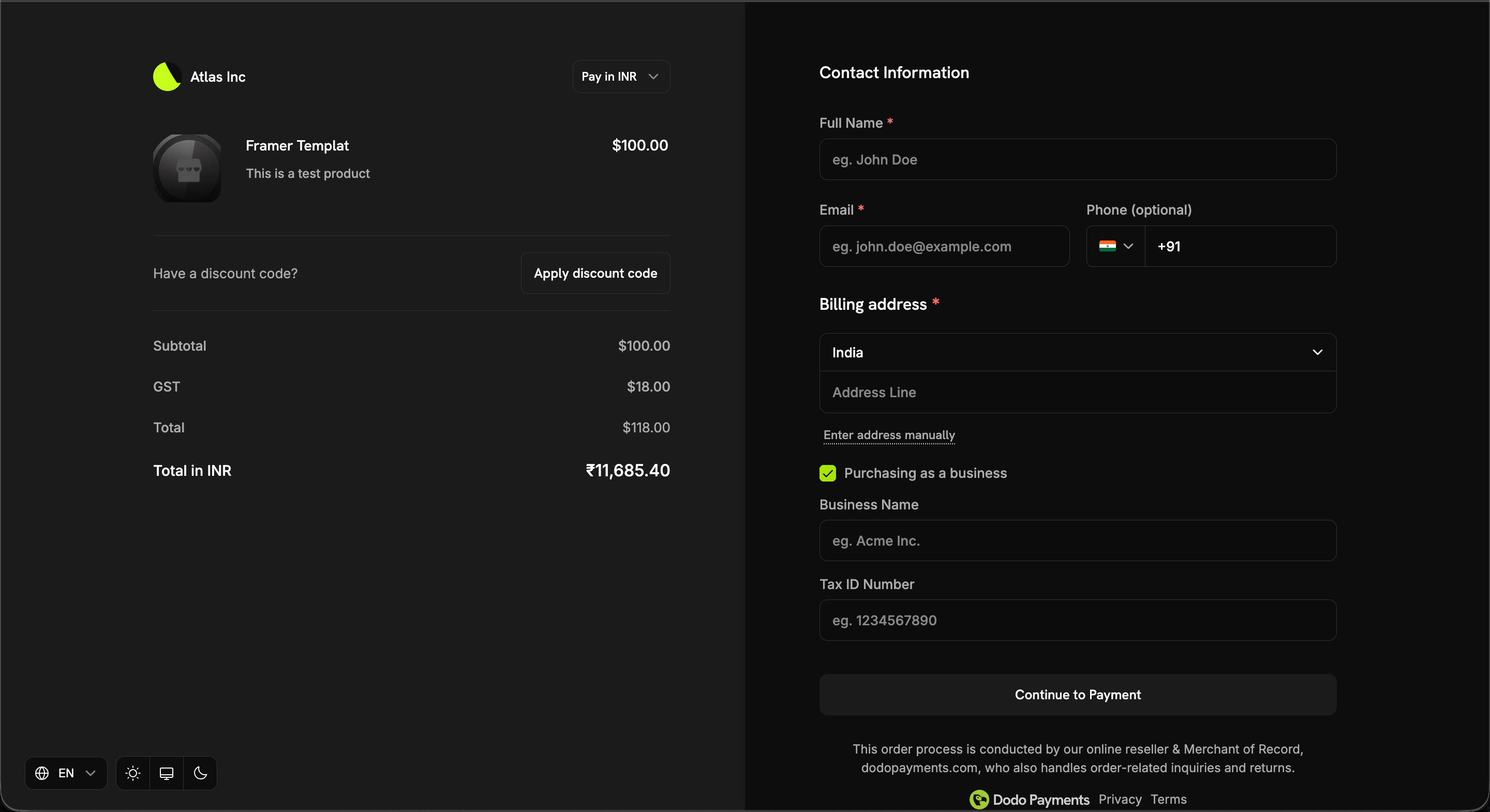
'Purchasing as a business' toggle enabled वाला checkout page, जिसमें Business Name और Tax ID Number fields दिखाई दे रहे हैं
Business name invoice पर तभी दिखाई देता है जब ये तीनों conditions पूरी हों:
  1. Transaction B2B है (b2b = true)।
  2. एक tax_id मौजूद है।
  3. एक non-empty customer_business_name दिया गया है।
यदि कोई भी condition पूरी नहीं होती है, तो इसके बजाय ग्राहक का personal name उपयोग किया जाता है।

Checkout पर इसे सेट करना

customer_business_name सीधे pass करें और/या ग्राहक को checkout page पर उसके Tax ID के बगल में इसे enter या edit करने देने के लिए allow_customer_editing_business_name enable करें:
customer_business_name को tax_id के बिना set नहीं किया जा सकता — request reject कर दी जाती है। tax_id को clear करने पर business name भी clear हो जाता है, क्योंकि invoice पर दोनों coupled हैं। आसपास के whitespace को trim किया जाता है और केवल whitespace वाले values को explicit clear माना जाता है।

Tax ID को Mandatory बनाना

Default रूप से Tax ID optional होता है — ग्राहक तय करता है कि business के रूप में purchase करना है या नहीं। यदि आप exclusively registered businesses को बेचते हैं, तो इसे compulsory बनाने के लिए checkout session पर require_tax_id feature flag set करें:

Checkout पर क्या बदलता है

  • Purchasing as a business पहले से selected होता है और इसे unchecked नहीं किया जा सकता। इन sessions में individual-buyer path नहीं होता।
  • Business Name और Tax ID Number दोनों required के रूप में marked होते हैं और इन्हें भरना आवश्यक है।
  • जब तक कोई भी field खाली रहती है या entered Tax ID validation द्वारा reject की जाती है, Continue to Payment greyed out रहता है।
Tax ID validation fail-open रहती है — lookup outage या unsupported country ग्राहक को कभी block नहीं करता, इसलिए button greyed out होने पर भी clickable रहता है।
Session पर tax_id और customer_business_name pass करने पर दोनों fields पहले से भर जाते हैं, जिससे ग्राहक के form को touch करने से पहले ही requirement पूरी हो जाती है। यदि आप चाहते हैं कि ग्राहक स्वयं इन्हें भरे, तो इन्हें omit करें।

Rules और Limits

Blank या केवल whitespace वाला tax_id, confirm: true guard और hosted-page session के confirm किए जाने—दोनों स्थितियों में missing माना जाता है।
Hosted checkout page (confirm: false) पर requirement browser में enforce की जाती है। Confirmation पर API blank Tax ID को reject करती है, लेकिन यह individual buyer और ऐसा business buyer जिसने field omit कर दी है, के बीच अंतर नहीं कर सकती। इसलिए hosted sessions पर require_tax_id को इस बात की guarantee के बजाय checkout experience control मानें कि हर payment में Tax ID शामिल होगा। confirm: true session अधिक strict स्थिति है: इसे हमेशा business purchase माना जाता है और Tax ID के बिना सीधे reject कर दिया जाता है।

B2C Transactions के लिए Tax Treatment

जिन transactions में valid Tax ID नहीं दिया जाता, उन्हें B2C transactions माना जाता है और ग्राहक के देश में लागू tax regulations के अनुसार tax deduct किया जाता है। Invoice में Dodo Payments की tax details और transaction पर लागू tax शामिल होता है।

Reverse Charge Mechanism

सामान्यतः goods या services का supplier VAT, Service Tax या GST का भुगतान करने के लिए liable होता है। हालांकि, imports और अन्य notified supplies जैसे specified cases में reverse charge mechanism के तहत liability recipient (customer) की होती है। Reverse Charge का अर्थ है कि notified categories of supply के संबंध में goods या services की supply पर tax का भुगतान करने की liability supplier के बजाय recipient की होती है।

Reverse Charge Applicability

कुछ मामलों में, जहां law के अनुसार लागू हो, checkout पर tax deduct नहीं किया जाता और transaction reverse charge mechanism के अधीन होता है। Regulatory requirements के अनुसार, invoice में स्पष्ट रूप से बताया जाता है कि reverse charge कब लागू होता है।
अंतिम संशोधन 26 सितंबर 2026