

ライセンスキーは License Key entitlement type です。アクティベーション制限、有効期限、必要なアクティベーションメッセージを設定して License Key entitlement を一度作成し、それを任意の product に紐付けます。デフォルトでは、Dodo Payments が購入された各 unit または各 subscription seat につき1つのキーを生成し、メールで送信します。
ライセンスキーとは?
ライセンスキーは、product へのアクセスを認証する一意の token です。ライセンスキーは次の用途に使用できます。- Software licensing:desktop apps、plugins、CLI。
- Per-seat controls:user または device ごとのアクティベーション数の制限。
- Digital goods:downloads、updates、premium features へのアクセス制御。
License Key Entitlementを作成する
1
Open Entitlements
dashboard の Entitlements に移動し、+ をクリックして entitlement を作成します。
2
Choose License Key
License Keys を選択して Name を入力し、発行する各キーの動作を設定します。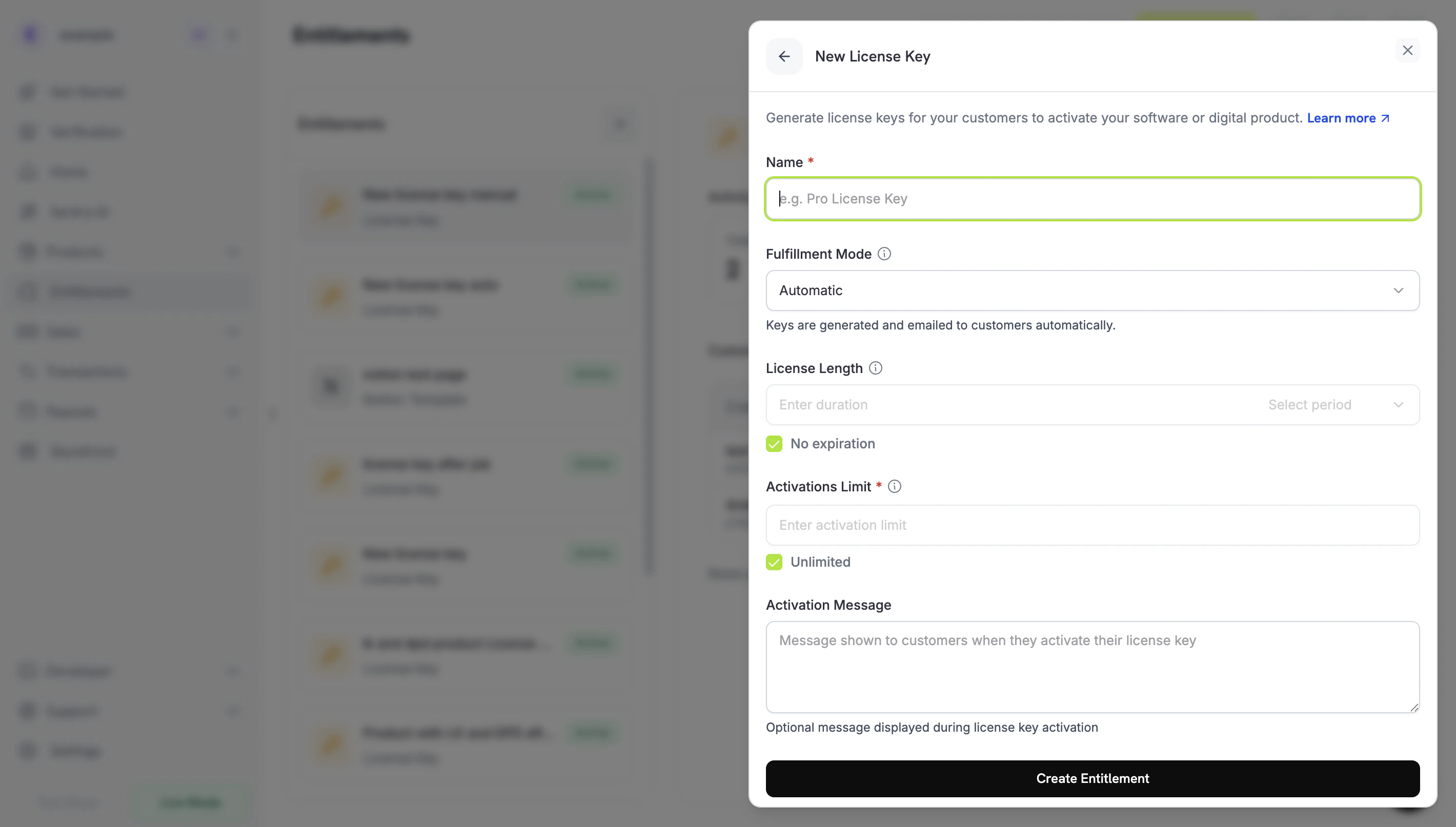
- Fulfillment Mode:Automatic(デフォルト)では各キーを生成してメールで送信します。Manual ではキーを自分で指定できます。Manual Fulfillment を参照してください。
- Activations Limit:キーごとのアクティブなアクティベーションの最大数です。たとえば、単一 user には
1、team license には5を指定します。制限しない場合は Unlimited を選択します。 - License Length:発行後にキーが有効である期間です。30 days や 1 year、または No expiration を指定できます。subscription products では No expiration を選択してください。subscription 用に発行されたキーには有効期限がなく、subscription status に従って有効性が決まります。
- Activation Message:任意の customer-facing instructions です。最大2,500文字で、キーを届けるメールに含められます。例:
Paste the key in Settings → LicenseまたはRun: mycli activate <key>。
3
Save the Entitlement
Create Entitlement をクリックします。これで entitlement を任意の product に紐付けられます。
Productsに紐付ける
product を開き、Entitlements セクションに移動して License Key entitlement を選択します。1つの product で、同じ購入に対して License Key を他の entitlements と一緒に提供できます。たとえば、Discord access、file downloads、GitHub repository access などです。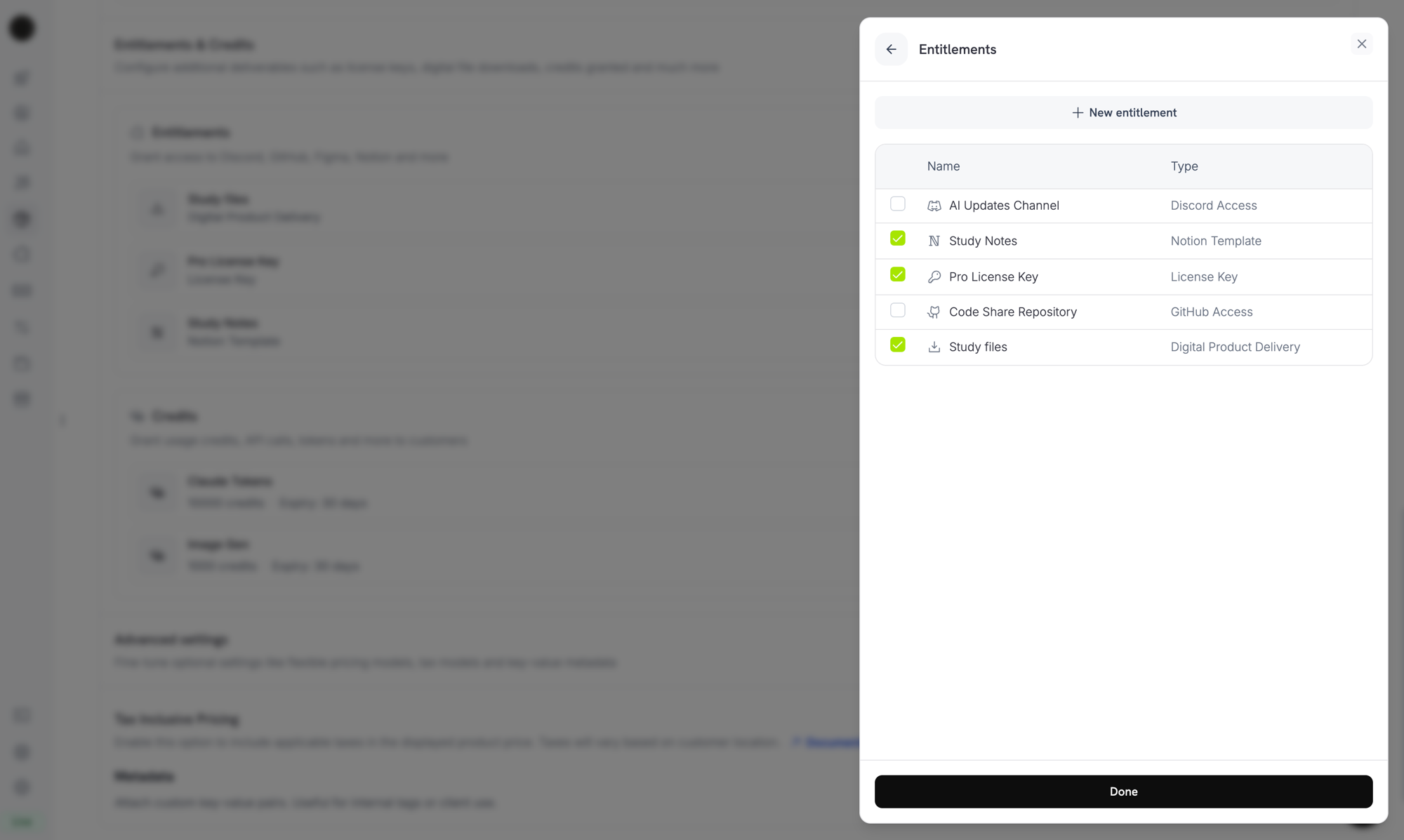
Selecting the License Key entitlement in the product entitlements panel.
Keysの発行方法
キーの発行は標準の grant lifecycle に従います。各イベントがライセンスキーに与える影響は次のとおりです。Quantity Behavior
キーの数は grant の取得元によって決まります。各キーには独自の grant が割り当てられます。- Subscription products は seat ごとに1つのキー(
subscriptions.quantity)を発行します。 - One-time products は cart line item の unit ごとに1つのキー(
product_cart.quantity)を発行します。 - Manual API grants は必ず1つのキーを発行します。
Fulfillment Mode
すべての License Key entitlement には、キーを誰が提供するかを制御するfulfillment_mode があります。
auto(デフォルト。dashboard では Automatic):Dodo Payments が payment または subscription の発生時にキーを生成してメールで送信します。これは上の表に示した動作で、fulfillment_modeを省略した場合に適用されます。manual(dashboard では Manual):購入された各 unit に対して、キーのないPendinggrant が作成され、各キーの値を自分で指定します。Manual Fulfillment を参照してください。
Manual Fulfillment
Manual fulfillment では、Dodo Payments に生成させる代わりに、各ライセンスキーを自分で指定します。購入によってキーのないPending grant が作成され、webhook で通知を受けた後、キーの値が送信されるまで待機します。自分の system、third-party vendor、または事前印刷済みコードの有限 pool からキーを取得する場合に使用してください。
product の作成からキーの配信までの手順については、Manual License Key Fulfillment Integration Guide を参照してください。
When to Use It
Automatic fulfillment は、ほとんどの software licensing に適しています。Dodo Payments 自身でキーを生成できない場合は manual fulfillment を選択してください。- Bring your own keys:application、desktop product、または独自の license server がキーを生成する場合。
- Third-party vendors:game key、API credential、partner platform license など、upstream provider が発行したキーを再販売する場合。
- Finite inventory:事前に割り当てた pool からコードを1つずつ配布する場合。
- Human review:アクセスを提供する前に購入を確認したい場合。
Enable Manual Fulfillment
API で manual fulfillment を有効にするには、License Key entitlement のintegration_config に fulfillment_mode: "manual" を設定します。dashboard では Fulfillment Mode を Manual に設定します。
fulfillment_mode は backward compatible です。この設定が存在する前に作成された entitlements には fulfillment_mode がなく、auto として動作します。manual に切り替えても、変更後に作成された grant のみに影響します。すでに配信されたキーは変わりません。Find Grants Awaiting Fulfillment
customer が manual-mode entitlement 付きの product を購入すると、Dodo Payments はキーのない grant をPending status で作成し、integration_type: "license_key" と status: "Pending" を含む entitlement_grant.created webhook を送信します。この webhook に反応するか、integration_type と status の filter を指定して List Customer Grants endpoint を poll します。
Deliver the Key
キーを配信するには、Fulfill License Key Grant endpoint にキーを送信します。grant はDelivered に移行し、Dodo Payments が customer にキーをメール送信します。これは automatic fulfillment で customer が受け取るメールと同じものです。
cURL
activations_limit と expires_at は任意です。省略すると、Dodo Payments は entitlement の configuration を使用します。各 grant は一度だけ fulfill できます。すでに fulfill 済みの grant を再試行すると、2つ目のキーを発行せず、409 を返します。
キーを自分でメール送信する必要はありません。grant が fulfill されると、Dodo Payments が配信します。
POST /license_keys を使用した Importing keys は動作が異なり、customer には通知されません。Activation, Validation, Deactivation
software は runtime に3つの endpoint を通じてキーを管理します。Activation は device または installation をキーに紐付けて記録し、validation はキーが使用可能かを確認し、deactivation はアクティベーションを解放します。Public Endpoints:activate、deactivate、validate license endpoint は public で、API key を必要としません。API credential を公開することなく、desktop software、CLI、browser-based client から直接呼び出せます。SDK constructor では bearer token value が引き続き必要なため、SDK の例では placeholder を渡しています。
Activate a License
Activation はキーの activation instance を作成し、lki_ ID とともに返します。この ID は instance の deactivate に必要なため保存してください。キーが active でない場合は 403、キーが存在しない場合は 404、キーが activation limit に達している場合は 422 が返されます。
Validate a License
キーの status がactive で、キーの有効期限が切れていない場合、validation は valid: true を返します。特定の activation instance がまだ存在することも確認するには、その license_key_instance_id を渡します。
Deactivate an Activation Instance
Deactivation は activation instance を削除し、キー上の1つのアクティベーションを解放します。キーと、activation が返した instance ID を渡します。instance がキーに属していない場合は403、キーが存在しない場合は 404 が返されます。
Manage Keys
発行済みのキーを確認するには、Entitlements の下にある License Key entitlement を開きます。grants list には customer key ごとに1行が表示され、customer、アクセスされた日付、status、Revoke action が確認できます。キーの有効期限、activation count、activation limit を確認するには、Sales → License Keys でキーを開きます。 grant を programmatically に一覧表示するには、List Grants を呼び出します。各 license-key grant のlicense_key object には、key、status、expiry、activations used、activations limit が含まれます。manual-mode grant がまだ Pending の場合、この object は null です。
Import Existing License Keys via API
別の system からライセンスキーを移行するには、Create License Key API で import します。customer は同じ key string の activation、validation、deactivation を継続できるため、キーを再発行する必要はありません。 request にはkey、customer_id、product_id が必要です。Unlimited activations にする場合は activations_limit を省略し、期限のないキーにする場合は expires_at を省略します。すでに存在する key string を import すると 409 が返されます。
How Keys Differ by Source
source field は、各ライセンスキーの作成方法を記録します。
source を使用すると、migrated key と manually fulfilled key を Dodo Payments が生成したキーと区別できます。たとえば、キーの reconcile や audit の際に使用します。この field は POST /license_keys response などの license key records にあります。List Grants の grant に含まれる license_key object には、この field はありません。source を返し、source filter を受け付ける legacy GET /license_keys endpoint は deprecated です。
License Keys in Return URL
customer が License Key entitlement 付きの product を購入すると、Dodo Payments は生成されたキーをreturn_url に license_key query parameter として追加します。success page では追加の API call なしでキーを表示できます。
%2C として URL-encoded されるため、split する前に、decode してくれる URL parser で parameter を読み取ってください。
payment_id の代わりに subscription_id と subscription status が含まれます。
API Management
Lifecycle Operations (Public Endpoints)
Lifecycle Operations (Public Endpoints)
Activation、deactivation、validation は public で、API key を必要としません。
Activate License
Deactivate License
Validate License
License Key Management
License Key Management
個別の license key records を作成、一覧表示、取得、更新します。これらの endpoint を使用して既存のキーを import したり、usage details を読み取ったりできます。
Create License Key
List License Keys
Get License Key
Update License Key
Entitlement Management
Entitlement Management
License Key entitlement 自体を管理します。activation limit、license length、activation message を設定できます。
Create Entitlement
Update Entitlement
List Grants
Revoke Grant
Webhooks
ライセンスキーの配信と revoke により、4つのentitlement_grant.* webhook events が送信されます。license-key grant の payload には、key、status、expiry、activations used、activations limit を含む license_key object が含まれます。
legacy license_key.created event は、license key record が作成されたときにも引き続き発生します。License Key webhook payload page を参照してください。
Legacy License Keys
旧来の
license_key_enabled flag を使用して作成された products は、License Key entitlement に automatically migrated されています。migration は transparent です。既存 customer のキーは引き続き機能し、public な /licenses/activate、/licenses/validate、/licenses/deactivate endpoints も引き続き動作します。また、/license_keys/* API endpoints は同じ key store を読み書きします。独立した Sales → License Keys dashboard section は、audit と検索のため、発行されたすべてのキーの flat list として引き続き利用できます。activation limits、license length、activation message を変更するには、Entitlements の下にある migrated License Key entitlement を編集してください。Best Practices
- 明確な activation limits を選択する:single-user apps には1、team licenses には3〜5などの default を選び、customer 向けに説明してください。
- 正確な activation messages を記述する:customer は license key email からコピーするため、正確な paths と commands を記載すると support tickets を防げます。
- API に対してキーを validate する:network-connected products では、local に cached された activation に依存せず
/licenses/validateを呼び出してください。 - revoke には webhooks を使用する:customer が cancel または refund を受けたときに、
entitlement_grant.revokedを処理して in-app features を無効化してください。 - subscriptions と one-time purchases をテストする:両者では license key の動作が異なります。たとえば subscription keys には有効期限がありません。本番稼働前に両方をテストしてください。