

Telegram 权益可让付费客户访问私有 Telegram 群组或频道。客户在 Customer Portal 中关联其 Telegram 账户后,Dodo Payments Telegram 机器人会向其发送加入请求链接,并且仅批准该账户的请求。撤销授权后,机器人会将客户从聊天中移除。
交付内容
- 授权创建时使用
Pending。客户关联其 Telegram 账户并由机器人发出加入请求链接后,仍使用Pending。 - 在 Customer Portal 中,客户点击 Connect,向 Dodo Payments 机器人发送
/start以获取其 Telegram 用户 ID,输入该 ID,然后点击 Link account。 - 机器人会在 Telegram 中向客户发送加入请求链接。当客户请求加入时,机器人仅批准其关联账户的请求。
- 取消、退款或手动撤销时,机器人会将客户从聊天中移除并封禁。如果客户再次购买,机器人会在发送新链接前解除封禁。
连接 Telegram
1
Open Entitlements
在 Dodo Payments 仪表板中,前往 Entitlements 并点击 +,然后选择 Telegram Access 作为集成。仪表板会要求你提供 Telegram 用户 ID;该 ID 会将你添加机器人所在的聊天与业务关联起来。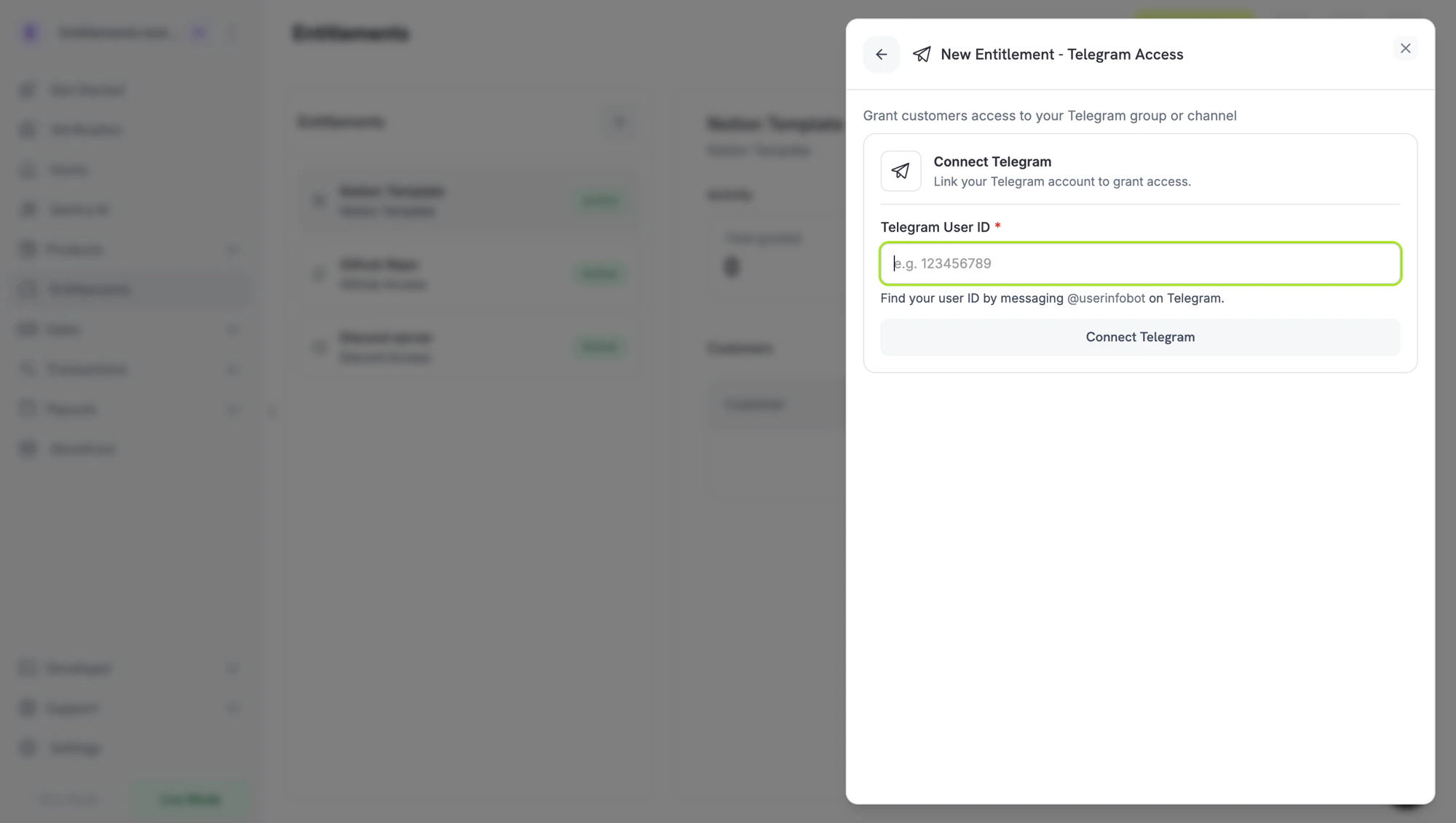
New Entitlement → Telegram Access. The dashboard needs your Telegram user ID before it lists chats.
2
Get Your Telegram User ID
在 Telegram 中,将
/start 发送至:@dodo_payments_bot如果您在使用 Live 模式@DodoPaymentsTestBot如果您在使用 Test 模式
3
Add the Bot to Your Chat as an Admin
使用同一个 Telegram 账户,打开你要设置访问限制的群组或频道,并将同一个机器人添加为管理员(实时模式使用 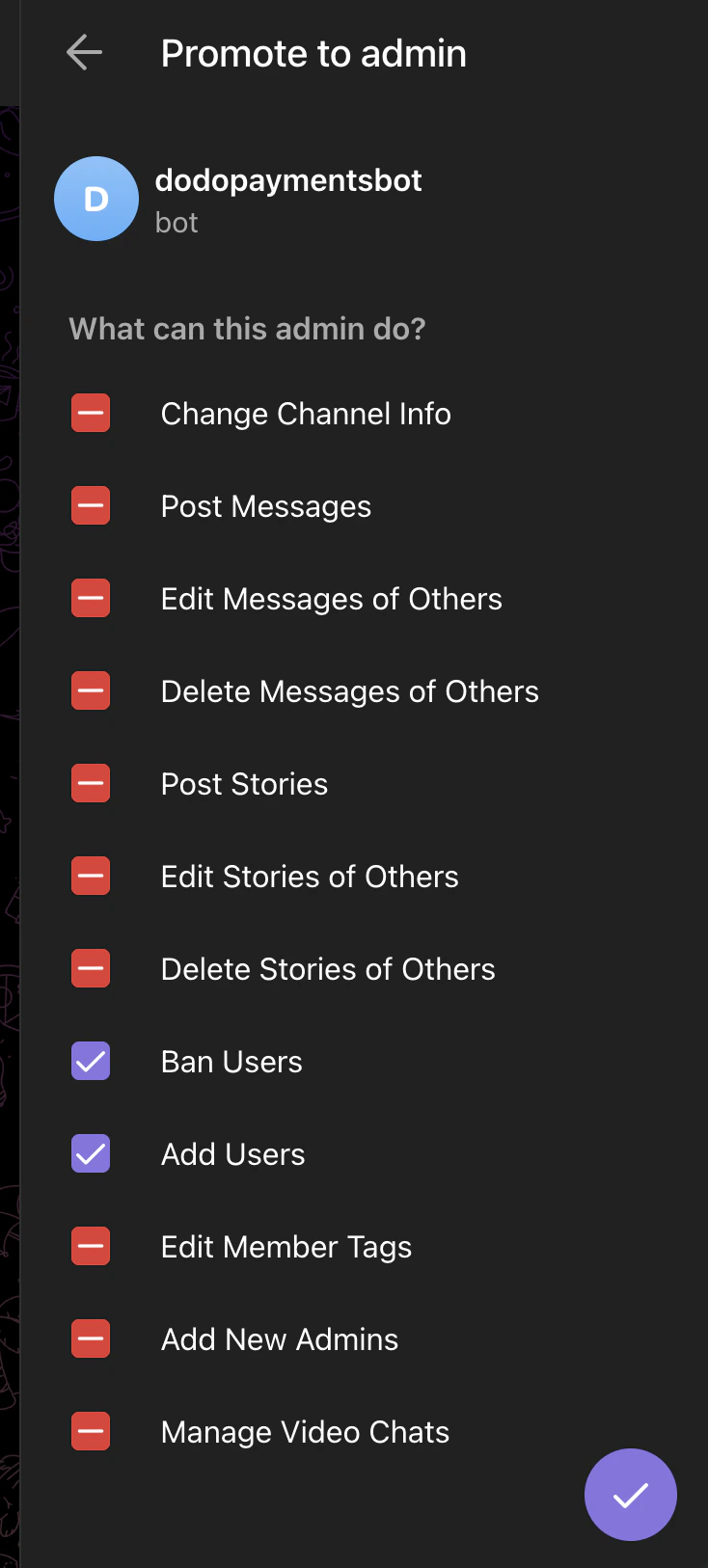
@dodo_payments_bot,测试模式使用 @DodoPaymentsTestBot)。启用以下两项权限:- Ban Users:移除成员时必需。
- Add Users:邀请付费客户时必需。
Telegram → Promote to admin. Only Ban Users and Add Users need to be enabled.
4
Connect Telegram and Pick the Chat
返回仪表板,将第 2 步中的用户 ID 粘贴到 Telegram User ID,然后点击 Connect Telegram。Chat 选择器会列出你从该账户将机器人添加到的群组和频道。选择要设置访问限制的聊天,输入权益的 Name,然后点击 Create Entitlement。
客户流程
- 客户完成结账。
- Dodo Payments 创建一个
Pending授权。此时还不存在邀请链接。 - 付款确认邮件会将该权益列为 Action Required,并链接到 Customer Portal。在门户中,客户点击 Connect,向机器人发送
/start,输入其 Telegram 用户 ID,然后点击 Link account。 - 机器人会在 Telegram 中向客户发送加入请求链接。客户打开链接并请求加入,机器人随后批准该请求。
- 撤销授权后,机器人会将客户从聊天中移除。
必需配置
通过 API 创建
Webhooks
请参阅entitlement_grant.* webhook events。Telegram 授权到达时使用 Pending,并在客户关联其 Telegram 账户后仍使用 Pending。如果拥有已交付授权的客户离开聊天,Dodo Payments 会使用 revocation_reason: platform_external 撤销该授权。
故障排除
Chat doesn't appear in the picker
Chat doesn't appear in the picker
将 Dodo Payments 机器人作为管理员添加到聊天中,并启用 Add Users,操作时使用你在仪表板中输入用户 ID 的那个 Telegram 账户。机器人获得管理员权限后,该聊天就会出现在选择器中。
Customer says the invite link doesn't work
Customer says the invite link doesn't work
机器人仅批准来自关联 Telegram 账户的加入请求。请让客户从该账户打开链接。撤销授权是最终操作。你无法重新发放已撤销的授权,因此客户需要进行新的购买才能获得新授权。
Customer cancelled but is still in the chat
Customer cancelled but is still in the chat
机器人需要 Ban Users 管理员权限才能移除成员。打开聊天设置,并确认已为 Dodo Payments 机器人启用 Ban Users 和 Add Users。