跳转到主要内容

概述

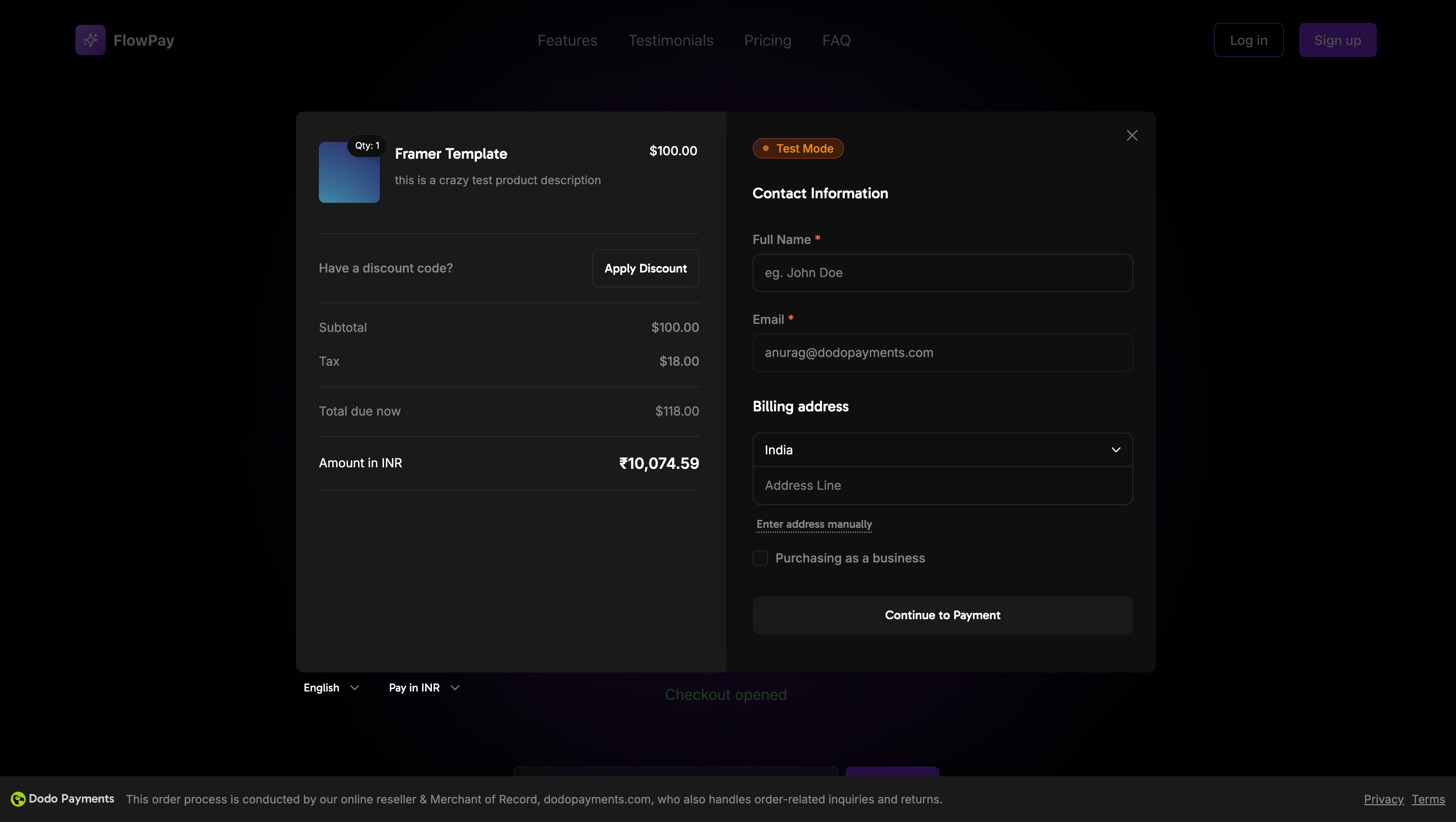
Dodo Payments Checkout SDK 提供了一种无缝的方式将我们的支付覆盖集成到您的 Web 应用程序中。它使用 TypeScript 和现代 Web 标准构建,提供了一个强大的解决方案,用于处理实时事件处理和可自定义主题的支付。
覆盖结账封面图

演示

互动演示

查看我们的实时演示中的覆盖结账。

快速开始

只需几行代码即可开始使用 Dodo Payments Checkout SDK:
import { DodoPayments } from "dodopayments-checkout";

// Initialize the SDK
DodoPayments.Initialize({
  mode: "test", // 'test' or 'live'
  displayType: "overlay", // Optional: defaults to 'overlay' for overlay checkout
  onEvent: (event) => {
    console.log("Checkout event:", event);
  },
});

// Open checkout
DodoPayments.Checkout.open({
  checkoutUrl: "https://checkout.dodopayments.com/session/cks_123"
});
创建结账会话 API 获取您的结账 URL。

分步集成指南

1

安装 SDK

使用您喜欢的包管理器安装 Dodo Payments Checkout SDK:
npm install dodopayments-checkout
2

初始化 SDK

在您的应用程序中初始化 SDK,通常在您的主组件或应用程序入口点:
import { DodoPayments } from "dodopayments-checkout";

DodoPayments.Initialize({
  mode: "test", // Change to 'live' for production
  displayType: "overlay", // Optional: defaults to 'overlay' for overlay checkout
  onEvent: (event) => {
    console.log("Checkout event:", event);
    
    // Handle different events
    switch (event.event_type) {
      case "checkout.opened":
        // Checkout overlay has been opened
        break;
      case "checkout.closed":
        // Checkout has been closed
        break;
      case "checkout.error":
        // Handle errors
        console.error("Checkout error:", event.data?.message);
        break;
    }
  },
});
在尝试打开结账之前,请始终初始化 SDK。初始化应在您的应用程序加载时进行一次。
3

创建结账按钮组件

创建一个打开结账覆盖的组件:
// components/CheckoutButton.tsx
"use client";

import { Button } from "@/components/ui/button";
import { DodoPayments } from "dodopayments-checkout";
import { useEffect, useState } from "react";

export function CheckoutButton() {
  const [isLoading, setIsLoading] = useState(false);

  useEffect(() => {
    // Initialize the SDK
    DodoPayments.Initialize({
      mode: "test",
      displayType: "overlay",
      onEvent: (event) => {
        switch (event.event_type) {
          case "checkout.opened":
            setIsLoading(false);
            break;
          case "checkout.error":
            setIsLoading(false);
            console.error("Checkout error:", event.data?.message);
            break;
        }
      },
    });
  }, []);

  const handleCheckout = async () => {
    try {
      setIsLoading(true);
      await DodoPayments.Checkout.open({
        checkoutUrl: "https://checkout.dodopayments.com/session/cks_123"
      });
    } catch (error) {
      console.error("Failed to open checkout:", error);
      setIsLoading(false);
    }
  };

  return (
    <Button 
      onClick={handleCheckout}
      disabled={isLoading}
    >
      {isLoading ? "Loading..." : "Checkout Now"}
    </Button>
  );
}
4

将结账添加到您的页面

在您的应用程序中使用结账按钮组件:
// app/page.tsx
import { CheckoutButton } from "@/components/CheckoutButton";

export default function Home() {
  return (
    <main className="flex min-h-screen flex-col items-center justify-center p-24">
      <h1>Welcome to Our Store</h1>
      <CheckoutButton />
    </main>
  );
}
5

处理成功和失败页面

创建页面以处理结账重定向:
// app/success/page.tsx
export default function SuccessPage() {
  return (
    <div className="flex min-h-screen flex-col items-center justify-center">
      <h1>Payment Successful!</h1>
      <p>Thank you for your purchase.</p>
    </div>
  );
}

// app/failure/page.tsx
export default function FailurePage() {
  return (
    <div className="flex min-h-screen flex-col items-center justify-center">
      <h1>Payment Failed</h1>
      <p>Please try again or contact support.</p>
    </div>
  );
}
6

测试您的集成

  1. 启动您的开发服务器:
npm run dev
  1. 测试结账流程:
    • 点击结账按钮
    • 验证覆盖是否出现
    • 使用测试凭据测试支付流程
    • 确认重定向正常工作
您应该在浏览器控制台中看到结账事件的日志。
7

上线

当您准备好进行生产时:
  1. 将模式更改为 'live':
DodoPayments.Initialize({
  mode: "live",
  displayType: "overlay",
  onEvent: (event) => {
    console.log("Checkout event:", event);
  }
});
  1. 更新您的结账 URL,以使用来自后端的实时结账会话
  2. 在生产环境中测试完整流程
  3. 监控事件和错误

API 参考

配置

初始化选项

interface InitializeOptions {
  mode: "test" | "live";
  displayType?: "overlay" | "inline";
  onEvent: (event: CheckoutEvent) => void;
}
选项类型必需描述
mode"test" | "live"环境模式: 'test' 用于开发,'live' 用于生产
displayType"overlay" | "inline"显示类型: 'overlay' 用于模态结账(默认),'inline' 用于嵌入式结账
onEventfunction用于处理结账事件的回调函数

结账选项

interface CheckoutOptions {
  checkoutUrl: string;
  options?: {
    showTimer?: boolean;
    showSecurityBadge?: boolean;
    manualRedirect?: boolean;
  };
}
选项类型必需描述
checkoutUrlstring来自 创建结账会话 API 的结账会话 URL
options.showTimerboolean显示或隐藏结账计时器。默认为 true。禁用时,当会话过期时,您将收到 checkout.link_expired 事件。
options.showSecurityBadgeboolean显示或隐藏安全徽章。默认为 true
options.manualRedirectboolean启用时,结账完成后不会自动重定向。相反,您将收到 checkout.statuscheckout.redirect_requested 事件,以便您自己处理重定向。

方法

打开结账

使用指定的结账会话 URL 打开结账覆盖。
DodoPayments.Checkout.open({
  checkoutUrl: "https://checkout.dodopayments.com/session/cks_123"
});
您还可以传递其他选项以自定义结账行为:
DodoPayments.Checkout.open({
  checkoutUrl: "https://checkout.dodopayments.com/session/cks_123",
  options: {
    showTimer: false,
    showSecurityBadge: false,
    manualRedirect: true,
  },
});
使用 manualRedirect 时,在您的 onEvent 回调中处理结账完成:
DodoPayments.Initialize({
  mode: "test",
  displayType: "overlay",
  onEvent: (event) => {
    if (event.event_type === "checkout.status") {
      const status = event.data?.message?.status;
      // Handle status: "succeeded", "failed", or "processing"
    }
    if (event.event_type === "checkout.redirect_requested") {
      const redirectUrl = event.data?.message?.redirect_to;
      // Redirect the customer manually
      window.location.href = redirectUrl;
    }
    if (event.event_type === "checkout.link_expired") {
      // Handle expired checkout session
    }
  },
});

关闭结账

以编程方式关闭结账覆盖层。
DodoPayments.Checkout.close();

检查状态

返回结账覆盖层当前是否打开。
const isOpen = DodoPayments.Checkout.isOpen();
// Returns: boolean

事件

SDK 提供实时事件,您可以通过 onEvent 回调进行监听:

结账状态事件数据

当启用 manualRedirect 时,您将收到带有以下数据的 checkout.status 事件:
interface CheckoutStatusEventData {
  message: {
    status?: "succeeded" | "failed" | "processing";
  };
}

结账重定向请求事件数据

当启用 manualRedirect 时,您将收到带有以下数据的 checkout.redirect_requested 事件:
interface CheckoutRedirectRequestedEventData {
  message: {
    redirect_to?: string;
  };
}
DodoPayments.Initialize({
  onEvent: (event: CheckoutEvent) => {
    switch (event.event_type) {
      case "checkout.opened":
        // Checkout overlay has been opened
        break;
      case "checkout.payment_page_opened":
        // Payment page has been displayed
        break;
      case "checkout.customer_details_submitted":
        // Customer and billing details submitted
        break;
      case "checkout.closed":
        // Checkout has been closed
        break;
      case "checkout.redirect":
        // Checkout will perform a redirect
        break;
      case "checkout.error":
        // An error occurred
        console.error("Error:", event.data?.message);
        break;
      case "checkout.link_expired":
        // Checkout session has expired (only when showTimer is false)
        break;
      case "checkout.status":
        // Checkout status update (only when manualRedirect is enabled)
        const status = event.data?.message?.status;
        break;
      case "checkout.redirect_requested":
        // Redirect requested (only when manualRedirect is enabled)
        const redirectUrl = event.data?.message?.redirect_to;
        break;
    }
  }
});
事件类型描述
checkout.opened结账覆盖已打开
checkout.payment_page_opened支付页面已显示
checkout.customer_details_submitted客户和账单详细信息已提交
checkout.closed结账覆盖已关闭
checkout.redirect结账将执行重定向
checkout.error结账过程中发生错误
checkout.link_expired当结账会话过期时触发。仅在 showTimer 设置为 false 时接收。
checkout.status当启用 manualRedirect 时触发。包含结账状态 (succeededfailedprocessing)。
checkout.redirect_requested当启用 manualRedirect 时触发。包含重定向客户的 URL。

实现选项

包管理器安装

通过 npm、yarn 或 pnpm 安装,如 逐步集成指南 中所示。

CDN 实现

为了快速集成而无需构建步骤,您可以使用我们的 CDN:
<!DOCTYPE html>
<html lang="en">
<head>
    <meta charset="UTF-8">
    <meta name="viewport" content="width=device-width, initial-scale=1.0">
    <title>Dodo Payments Checkout</title>
    
    <!-- Load DodoPayments -->
    <script src="https://cdn.jsdelivr.net/npm/dodopayments-checkout@latest/dist/index.js"></script>
    <script>
        // Initialize the SDK
        DodoPaymentsCheckout.DodoPayments.Initialize({
            mode: "test", // Change to 'live' for production
            displayType: "overlay",
            onEvent: (event) => {
                console.log('Checkout event:', event);
            }
        });
    </script>
</head>
<body>
    <button onclick="openCheckout()">Checkout Now</button>

    <script>
        function openCheckout() {
            DodoPaymentsCheckout.DodoPayments.Checkout.open({
                checkoutUrl: "https://checkout.dodopayments.com/session/cks_123"
            });
        }
    </script>
</body>
</html>

主题自定义

您可以通过在打开结账时将一个 themeConfig 对象传递给 options 参数来自定义结账外观。主题配置支持明亮和黑暗模式,允许您自定义颜色、边框、文本、按钮和边框半径。

基本主题配置

DodoPayments.Checkout.open({
  checkoutUrl: "https://checkout.dodopayments.com/session/cks_123",
  options: {
    themeConfig: {
      light: {
        bgPrimary: "#FFFFFF",
        textPrimary: "#344054",
        buttonPrimary: "#A6E500",
      },
      dark: {
        bgPrimary: "#0D0D0D",
        textPrimary: "#FFFFFF",
        buttonPrimary: "#A6E500",
      },
      radius: "8px",
    },
  },
});

完整主题配置

所有可用的主题属性:
DodoPayments.Checkout.open({
  checkoutUrl: "https://checkout.dodopayments.com/session/cks_123",
  options: {
    themeConfig: {
      light: {
        // Background colors
        bgPrimary: "#FFFFFF",        // Primary background color
        bgSecondary: "#F9FAFB",      // Secondary background color (e.g., tabs)
        
        // Border colors
        borderPrimary: "#D0D5DD",     // Primary border color
        borderSecondary: "#6B7280",  // Secondary border color
        
        // Text colors
        textPrimary: "#344054",       // Primary text color
        textSecondary: "#6B7280",    // Secondary text color
        textPlaceholder: "#667085",  // Placeholder text color
        textError: "#D92D20",        // Error text color
        textSuccess: "#10B981",      // Success text color
        
        // Button colors
        buttonPrimary: "#A6E500",           // Primary button background
        buttonPrimaryHover: "#8CC500",      // Primary button hover state
        buttonTextPrimary: "#0D0D0D",       // Primary button text color
        buttonSecondary: "#F3F4F6",         // Secondary button background
        buttonSecondaryHover: "#E5E7EB",     // Secondary button hover state
        buttonTextSecondary: "#344054",     // Secondary button text color
      },
      dark: {
        // Background colors
        bgPrimary: "#0D0D0D",
        bgSecondary: "#1A1A1A",
        
        // Border colors
        borderPrimary: "#323232",
        borderSecondary: "#D1D5DB",
        
        // Text colors
        textPrimary: "#FFFFFF",
        textSecondary: "#909090",
        textPlaceholder: "#9CA3AF",
        textError: "#F97066",
        textSuccess: "#34D399",
        
        // Button colors
        buttonPrimary: "#A6E500",
        buttonPrimaryHover: "#8CC500",
        buttonTextPrimary: "#0D0D0D",
        buttonSecondary: "#2A2A2A",
        buttonSecondaryHover: "#3A3A3A",
        buttonTextSecondary: "#FFFFFF",
      },
      radius: "8px", // Border radius for inputs, buttons, and tabs
    },
  },
});

仅限浅色模式

如果您只想自定义浅色主题:
DodoPayments.Checkout.open({
  checkoutUrl: "https://checkout.dodopayments.com/session/cks_123",
  options: {
    themeConfig: {
      light: {
        bgPrimary: "#FFFFFF",
        textPrimary: "#000000",
        buttonPrimary: "#0070F3",
      },
      radius: "12px",
    },
  },
});

仅限深色模式

如果您只想自定义深色主题:
DodoPayments.Checkout.open({
  checkoutUrl: "https://checkout.dodopayments.com/session/cks_123",
  options: {
    themeConfig: {
      dark: {
        bgPrimary: "#000000",
        textPrimary: "#FFFFFF",
        buttonPrimary: "#0070F3",
      },
      radius: "12px",
    },
  },
});

部分主题覆盖

您可以仅覆盖特定属性。结账将对您未指定的属性使用默认值:
DodoPayments.Checkout.open({
  checkoutUrl: "https://checkout.dodopayments.com/session/cks_123",
  options: {
    themeConfig: {
      light: {
        buttonPrimary: "#FF6B6B", // Only override primary button color
      },
      radius: "16px", // Override border radius
    },
  },
});

带其他选项的主题配置

您可以将主题配置与其他结账选项结合使用:
DodoPayments.Checkout.open({
  checkoutUrl: "https://checkout.dodopayments.com/session/cks_123",
  options: {
    showTimer: true,
    showSecurityBadge: true,
    manualRedirect: false,
    themeConfig: {
      light: {
        bgPrimary: "#FFFFFF",
        buttonPrimary: "#A6E500",
      },
      dark: {
        bgPrimary: "#0D0D0D",
        buttonPrimary: "#A6E500",
      },
      radius: "8px",
    },
  },
});

TypeScript 类型

对于 TypeScript 用户,所有主题配置类型都已导出:
import { ThemeConfig, ThemeModeConfig } from "dodopayments-checkout";

const themeConfig: ThemeConfig = {
  light: {
    bgPrimary: "#FFFFFF",
    // ... other properties
  },
  dark: {
    bgPrimary: "#0D0D0D",
    // ... other properties
  },
  radius: "8px",
};

错误处理

SDK 通过事件系统提供详细的错误信息。在您的 onEvent 回调中始终实现适当的错误处理:
DodoPayments.Initialize({
  mode: "test",
  displayType: "overlay",
  onEvent: (event: CheckoutEvent) => {
    if (event.event_type === "checkout.error") {
      console.error("Checkout error:", event.data?.message);
      // Handle error appropriately
      // You may want to show a user-friendly error message
      // or retry the checkout process
    }
    if (event.event_type === "checkout.link_expired") {
      // Handle expired checkout session
      console.warn("Checkout session has expired");
    }
  }
});
始终处理 checkout.error 事件,以在发生错误时提供良好的用户体验。

最佳实践

  1. 仅初始化一次: 在应用程序加载时初始化 SDK,而不是在每次结账尝试时
  2. 错误处理: 在事件回调中始终实现适当的错误处理
  3. 测试模式: 在开发期间使用 test 模式,并在准备好生产时切换到 live
  4. 事件处理: 处理所有相关事件以获得完整的用户体验
  5. 有效的 URL: 始终使用来自创建结账会话 API 的有效结账 URL
  6. TypeScript: 使用 TypeScript 以获得更好的类型安全性和开发者体验
  7. 加载状态: 在结账打开时显示加载状态以改善用户体验
  8. 手动重定向: 当您需要对结账后导航进行自定义控制时,使用 manualRedirect
  9. 计时器管理: 如果您想手动处理会话过期,请禁用计时器 (showTimer: false)

故障排除

可能的原因:
  • 在调用 open() 之前未初始化 SDK
  • 无效的结账 URL
  • 控制台中的 JavaScript 错误
  • 网络连接问题
解决方案:
  • 验证 SDK 初始化在打开结账之前发生
  • 检查控制台错误
  • 确保结账 URL 有效且来自创建结账会话 API
  • 验证网络连接
可能的原因:
  • 事件处理程序未正确设置
  • JavaScript 错误阻止事件传播
  • SDK 未正确初始化
解决方案:
  • 确认事件处理程序在 Initialize() 中正确配置
  • 检查浏览器控制台中的 JavaScript 错误
  • 验证 SDK 初始化是否成功完成
  • 首先使用简单的事件处理程序进行测试
可能的原因:
  • CSS 与您的应用样式冲突
  • 主题设置未正确应用
  • 响应式设计问题
解决方案:
  • 在浏览器开发者工具中检查 CSS 冲突
  • 验证主题设置是否正确
  • 在不同屏幕尺寸上测试
  • 确保没有与覆盖层的 z-index 冲突

启用数字钱包

有关设置 Apple Pay、Google Pay 和其他数字钱包的详细信息,请参见 数字钱包 页面。

Apple Pay 的快速设置

1

下载域名关联文件

2

请求激活

发送电子邮件至 support@dodopayments.com,提供您的生产域名 URL,并请求激活 Apple Pay。
3

确认后测试

确认后,验证 Apple Pay 是否出现在结账页面,并测试完整流程。
Apple Pay 需要在生产环境中进行域名验证。计划提供 Apple Pay 的话,请在上线前联系支持。

浏览器支持

Dodo Payments Checkout SDK 支持以下浏览器:
  • Chrome(最新)
  • Firefox(最新)
  • Safari(最新)
  • Edge(最新)
  • IE11+

悬浮式与内嵌式结账

根据您的用例选择合适的结账类型:
特性悬浮式结账内嵌式结账
集成深度页面上方的模态完全嵌入页面
布局控制有限完全控制
品牌与页面分离无缝
实施工作量较低较高
最适合快速集成,现有页面自定义结账页面,高转化流程
使用 悬浮式结账 可以更快集成,并对现有页面最少修改。使用 内嵌式结账 时,您可以对结账体验进行最大控制,并保持无缝品牌。

相关资源

如需更多帮助,请访问我们的 Discord 社区 或联系开发者支持团队。