

مفاتيح الترخيص هي نوع entitlement من نوع License Key. أنشئ entitlement من نوع License Key مرة واحدة مع حد التفعيل وتاريخ الانتهاء ورسالة التفعيل التي تريدها، ثم أرفقه بأي منتج. بشكل افتراضي، ينشئ Dodo Payments مفتاحًا واحدًا ويرسله عبر البريد الإلكتروني لكل وحدة يتم شراؤها أو لكل مقعد في الاشتراك.
ما هي مفاتيح الترخيص؟
مفتاح الترخيص هو رمز مميز فريد يصرّح بالوصول إلى منتجك. استخدم مفاتيح الترخيص من أجل:- ترخيص البرامج: تطبيقات سطح المكتب والإضافات وCLIs.
- عناصر التحكم لكل مقعد: تقييد عمليات التفعيل لكل مستخدم أو جهاز.
- المنتجات الرقمية: تقييد الوصول إلى التنزيلات أو التحديثات أو الميزات المميزة.
إنشاء استحقاق License Key
1
Open Entitlements
انتقل إلى Entitlements في لوحة التحكم وانقر على + لإنشاء entitlement.
2
Choose License Key
حدّد License Keys، وأدخل Name، واضبط كيفية تصرف كل مفتاح يتم إصداره: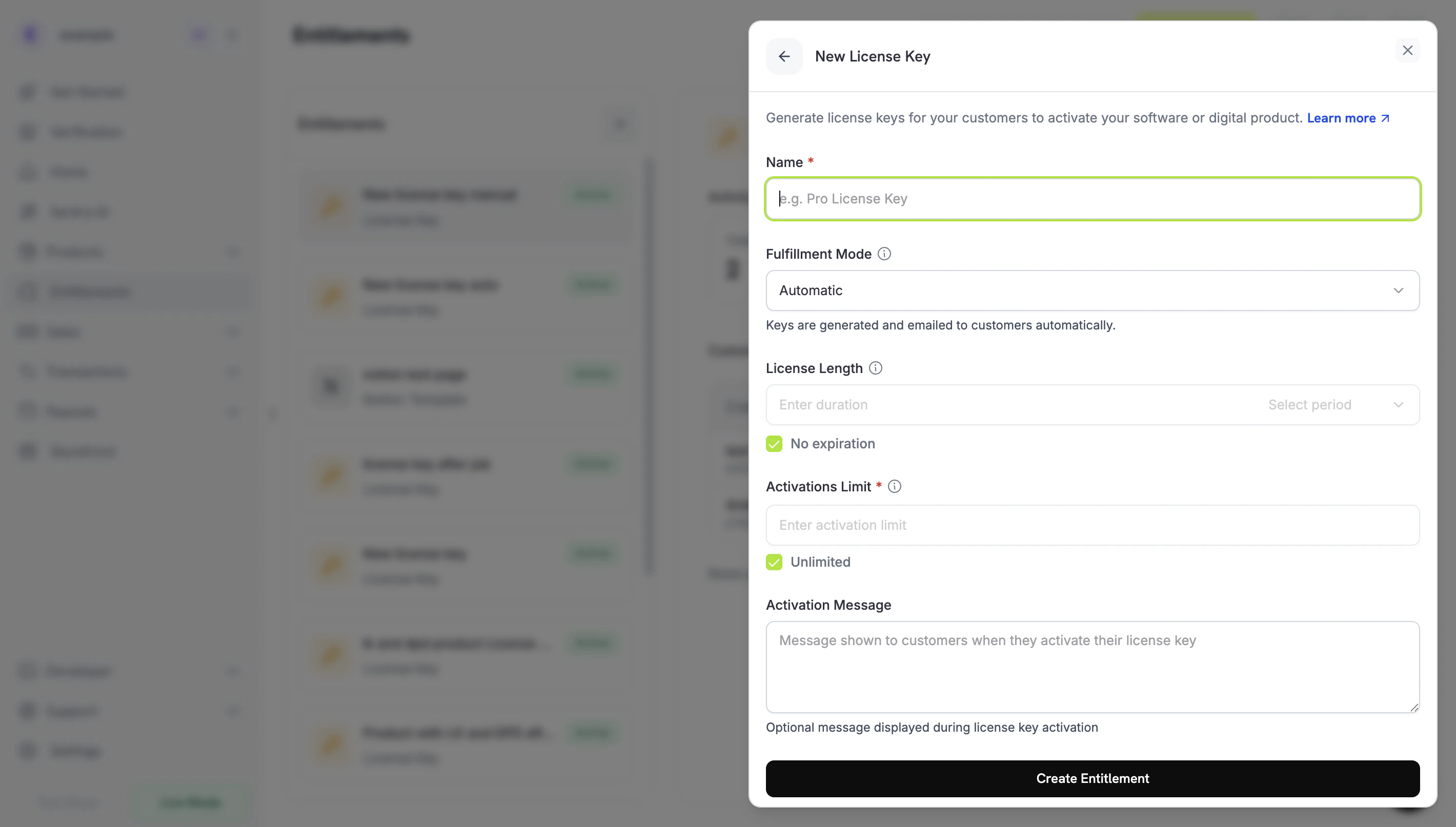
- Fulfillment Mode: ينشئ Automatic (الإعداد الافتراضي) كل مفتاح ويرسله عبر البريد الإلكتروني. يتيح لك Manual توفير كل مفتاح بنفسك. راجع Manual Fulfillment.
- Activations Limit: الحد الأقصى لعدد عمليات التفعيل النشطة لكل مفتاح، مثل
1لمستخدم واحد أو5لترخيص فريق. حدّد Unlimited لعدم فرض حد. - License Length: المدة التي يظل فيها المفتاح صالحًا بعد إصداره، مثل 30 يومًا أو سنة واحدة، أو No expiration. بالنسبة إلى المنتجات القائمة على الاشتراك، اختر No expiration: لا تنتهي صلاحية المفاتيح الصادرة لاشتراك، وتتبع صلاحيتها حالة الاشتراك.
- Activation Message: تعليمات اختيارية موجّهة إلى العميل، بحد أقصى 2,500 حرف، تُضمّن في البريد الإلكتروني الذي يسلّم المفتاح. مثال:
Paste the key in Settings → LicenseأوRun: mycli activate <key>.
3
Save the Entitlement
انقر على Create Entitlement. يمكنك الآن إرفاق entitlement بأي منتج.
إرفاق الاستحقاق بالمنتجات
افتح منتجًا، وانتقل إلى قسم Entitlements الخاص به، ثم حدّد entitlement من نوع License Key. يمكن لمنتج واحد تقديم مفتاح ترخيص إلى جانب entitlements أخرى ضمن عملية الشراء نفسها، مثل الوصول إلى Discord أو تنزيل الملفات أو الوصول إلى مستودع GitHub.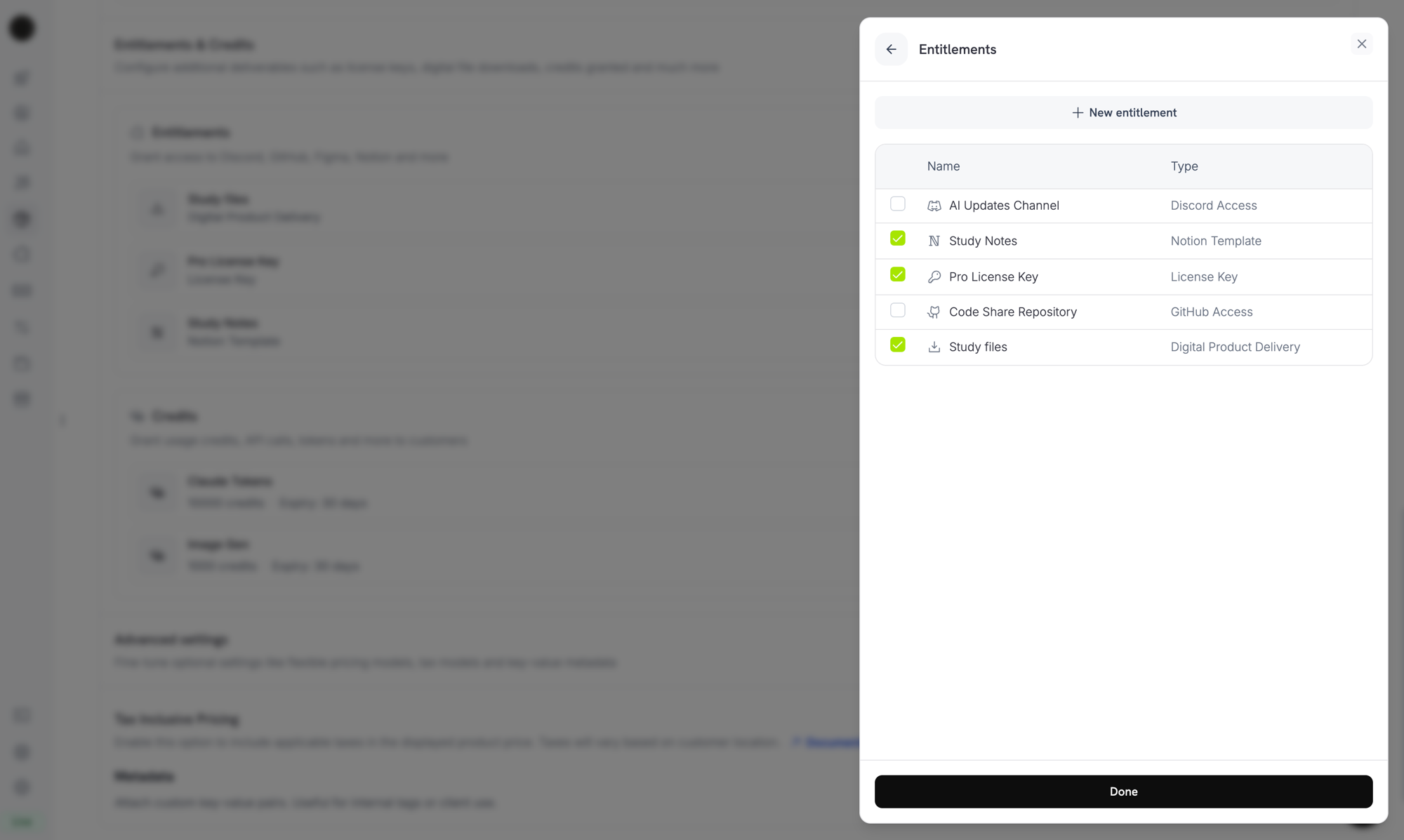
Selecting the License Key entitlement in the product entitlements panel.
كيفية إصدار المفاتيح
يتبع إصدار المفاتيح دورة المنح القياسية. يؤثر كل حدث في مفاتيح الترخيص كما يلي:سلوك الكمية
يعتمد عدد المفاتيح على مصدر المنحة. ويحصل كل مفتاح على منحة خاصة به.- المنتجات القائمة على الاشتراك: تصدر مفتاحًا واحدًا لكل مقعد (
subscriptions.quantity). - المنتجات لمرة واحدة: تصدر مفتاحًا واحدًا لكل وحدة من عنصر السطر في سلة التسوق (
product_cart.quantity). - المنح اليدوية عبر API: تصدر مفتاحًا واحدًا بالضبط.
Fulfillment Mode
يحتوي كل entitlement من نوع License Key علىfulfillment_mode يتحكم في الجهة التي توفر المفتاح:
auto(الإعداد الافتراضي، Automatic في لوحة التحكم): ينشئ Dodo Payments المفتاح ويرسله عبر البريد الإلكتروني عند الدفع أو الاشتراك. هذا هو السلوك الموضح في الجدول أعلاه، وينطبق عند حذفfulfillment_mode.manual(Manual في لوحة التحكم): ينشئ كل عنصر يتم شراؤه منحةPendingبلا مفتاح، وعليك توفير قيمة كل مفتاح. راجع Manual Fulfillment.
Manual Fulfillment
مع التوفير اليدوي، توفر كل مفتاح ترخيص بدلًا من أن ينشئه Dodo Payments. ينشئ الشراء منحةPending بلا مفتاح، ويخطرك عبر webhook، وينتظر منك إرسال قيمة المفتاح. استخدمه عندما تأتي المفاتيح من نظامك الخاص أو من مورّد خارجي أو من مجموعة محدودة من الرموز المطبوعة مسبقًا.
لإنشاء التكامل خطوة بخطوة، بدءًا من إنشاء المنتج ووصولًا إلى تسليم المفتاح، راجع دليل تكامل Manual License Key Fulfillment.
متى تستخدمه؟
يناسب التوفير التلقائي معظم حالات ترخيص البرامج. اختر التوفير اليدوي عندما يتعذر على Dodo Payments إنشاء المفتاح بنفسه:- استخدام مفاتيحك الخاصة: ينشئ تطبيقك أو منتج سطح المكتب أو خادم الترخيص الخاص بك المفتاح.
- المورّدون الخارجيون: تعيد بيع مفاتيح يصدرها مزود أصلي، مثل مفتاح لعبة أو بيانات اعتماد API أو ترخيص منصة شريكة.
- المخزون المحدود: توزع رموزًا من مجموعة مخصصة مسبقًا وتعيّنها واحدًا تلو الآخر.
- المراجعة البشرية: تريد التحقق من عملية شراء قبل منح الوصول.
تفعيل التوفير اليدوي
لتفعيل التوفير اليدوي عبر API، اضبطfulfillment_mode: "manual" في integration_config الخاص بـ entitlement من نوع License Key. في لوحة التحكم، اضبط Fulfillment Mode على Manual.
يتوافق
fulfillment_mode مع الإصدارات السابقة. لا تحتوي entitlements التي أُنشئت قبل وجود هذا الإعداد على fulfillment_mode، وتتصرف مثل auto. يؤثر التبديل إلى manual في المنح التي أُنشئت بعد التغيير فقط. ولا تتغير المفاتيح التي تم تسليمها مسبقًا.العثور على المنح التي تنتظر التوفير
عندما يشتري العميل منتجًا يحتوي على entitlement في الوضع اليدوي، ينشئ Dodo Payments المنحة بالحالةPending من دون مفتاح، ويرسل إليك webhook من نوع entitlement_grant.created يتضمن integration_type: "license_key" وstatus: "Pending". استجب لذلك webhook، أو استعلم دوريًا عن endpoint List Customer Grants باستخدام عاملَي التصفية integration_type وstatus:
تسليم المفتاح
لتسليم مفتاح، أرسله إلى endpoint Fulfill License Key Grant. تنتقل المنحة إلىDelivered، ويرسل Dodo Payments المفتاح عبر البريد الإلكتروني إلى العميل. وهو البريد الإلكتروني نفسه الذي يتلقاه العميل في حالة التوفير التلقائي.
cURL
activations_limit وexpires_at اختياريان. عند حذفهما، يستخدم Dodo Payments إعدادات entitlement. يمكن توفير كل منحة مرة واحدة: تؤدي إعادة محاولة توفير منحة تم توفيرها بالفعل إلى إرجاع 409 بدلًا من إصدار مفتاح ثانٍ.
لا تحتاج إلى إرسال المفتاح عبر البريد الإلكتروني بنفسك. يسلّمه Dodo Payments عند توفير المنحة. يختلف استيراد المفاتيح باستخدام
POST /license_keys: إذ لا يرسل إشعارًا إلى العميل.تفعيل الترخيص والتحقق منه وإلغاء تفعيله
يدير برنامجك المفتاح أثناء التشغيل من خلال ثلاثة endpoints. يسجل التفعيل جهازًا أو عملية تثبيت للمفتاح، ويتحقق التحقق من إمكانية استخدام المفتاح، بينما يحرر إلغاء التفعيل عملية تفعيل.Public Endpoints: إن endpoints الخاصة بتفعيل الترخيص وإلغاء تفعيله والتحقق منه عامة ولا تتطلب API key. استدعها مباشرةً من برامج سطح المكتب أو CLIs أو العملاء المستندين إلى المتصفح من دون كشف بيانات اعتماد API الخاصة بك. ولا تزال مُنشئات SDK تتطلب قيمة bearer token، لذلك تمرر أمثلة SDK قيمة نائبة.
تفعيل ترخيص
ينشئ التفعيل مثيل تفعيل للمفتاح ويعيده مع معرّفlki_. احفظ ذلك المعرّف، لأنك تحتاج إليه لإلغاء تفعيل المثيل. يعيد الطلب 403 إذا لم يكن المفتاح نشطًا، و404 إذا لم يكن المفتاح موجودًا، و422 إذا بلغ المفتاح حد التفعيل.
التحقق من ترخيص
يعيد التحققvalid: true عندما تكون حالة المفتاح active ولم تنتهِ صلاحية المفتاح. وللتحقق أيضًا من استمرار وجود مثيل تفعيل محدد، مرّر license_key_instance_id الخاص به.
إلغاء تفعيل مثيل تفعيل
يزيل إلغاء التفعيل مثيل تفعيل ويحرر عملية تفعيل واحدة على المفتاح. مرّر المفتاح ومعرّف المثيل الذي أعاده التفعيل. يعيد الطلب403 إذا لم يكن المثيل تابعًا للمفتاح، و404 إذا لم يكن المفتاح موجودًا.
إدارة المفاتيح
لعرض المفاتيح الصادرة، افتح entitlement من نوع License Key ضمن Entitlements. تعرض قائمة المنح صفًا واحدًا لكل مفتاح عميل، مع العميل وتاريخ الوصول والحالة وإجراء Revoke. لعرض تاريخ انتهاء المفتاح وعدد عمليات التفعيل وحد التفعيل، افتحه ضمن Sales → License Keys. لسرد المنح برمجيًا، استدعِ List Grants. في كل منحة لمفتاح ترخيص، يحمل كائنlicense_key المفتاح والحالة وتاريخ الانتهاء وعمليات التفعيل المستخدمة وحد عمليات التفعيل. يكون الكائن null في المنحة ذات الوضع اليدوي التي لا تزال في الحالة Pending.
استيراد مفاتيح الترخيص الحالية عبر API
لترحيل مفاتيح الترخيص من نظام آخر، استوردها باستخدام API Create License Key. وسيواصل عملاؤك تفعيل سلاسل المفاتيح نفسها والتحقق منها وإلغاء تفعيلها، لذلك لا تحتاج إلى إعادة إصدار المفاتيح. يتطلب الطلبkey وcustomer_id وproduct_id. احذف activations_limit لعمليات التفعيل غير المحدودة، واحذف expires_at لمفتاح لا تنتهي صلاحيته أبدًا. يؤدي استيراد سلسلة مفتاح موجودة مسبقًا إلى إرجاع 409.
كيف تختلف المفاتيح حسب المصدر؟
يسجل الحقلsource كيفية إنشاء كل مفتاح ترخيص:
استخدم
source للتمييز بين المفاتيح المُرحّلة والمفاتيح التي تم توفيرها يدويًا والمفاتيح التي أنشأها Dodo Payments، مثلًا عند مطابقة المفاتيح أو تدقيقها. يوجد الحقل في سجلات مفاتيح الترخيص، مثل استجابة POST /license_keys. ولا يتضمن كائن license_key في المنح الناتجة عن List Grants هذا الحقل. إن endpoint القديم GET /license_keys، الذي يعيد source ويقبل عامل تصفية source، مهمل.
مفاتيح الترخيص في Return URL
عندما يشتري العميل منتجًا يحتوي على entitlement من نوع License Key، يُلحق Dodo Payments المفتاح الذي تم إنشاؤه بـreturn_url باعتباره query parameter باسم license_key. يمكن لصفحة النجاح عرض المفتاح من دون استدعاء API إضافي:
%2C، لذا اقرأ العامل باستخدام محلل URL، الذي يفك تشفيره، قبل تقسيمه:
subscription_id وحالة الاشتراك بدلًا من payment_id:
إدارة API
Lifecycle Operations (Public Endpoints)
Lifecycle Operations (Public Endpoints)
التفعيل وإلغاء التفعيل والتحقق عمليات عامة ولا تتطلب API key.
Activate License
Deactivate License
Validate License
License Key Management
License Key Management
أنشئ سجلات مفاتيح الترخيص الفردية واسردها واسترجعها وحدّثها. استخدم هذه endpoints لاستيراد المفاتيح الحالية أو قراءة تفاصيل الاستخدام.
Create License Key
List License Keys
Get License Key
Update License Key
Entitlement Management
Entitlement Management
أدر entitlement من نوع License Key نفسه: حد التفعيل وطول الترخيص ورسالة التفعيل.
Create Entitlement
Update Entitlement
List Grants
Revoke Grant
Webhooks
يرسل تسليم مفتاح الترخيص وإلغاؤه أحداث webhook الأربعةentitlement_grant.*. بالنسبة إلى منح مفاتيح الترخيص، تتضمن الحمولة كائن license_key الذي يحتوي على المفتاح والحالة وتاريخ الانتهاء وعمليات التفعيل المستخدمة وحد عمليات التفعيل.
لا يزال الحدث القديم license_key.created يُطلَق عند إنشاء سجل مفتاح ترخيص. راجع صفحة حمولة License Key webhook.
مفاتيح الترخيص القديمة
تم ترحيل المنتجات التي أُنشئت باستخدام العلامة القديمة
license_key_enabled تلقائيًا إلى entitlement من نوع License Key. عملية الترحيل شفافة: تواصل مفاتيح العملاء الحاليين عملها، وتواصل endpoints العامة /licenses/activate و/licenses/validate و/licenses/deactivate عملها، كما تقرأ endpoints الخاصة بـ API /license_keys/* مخزن المفاتيح نفسه وتكتب فيه.يبقى قسم لوحة التحكم المستقل Sales → License Keys متاحًا كقائمة مسطحة بكل مفتاح تم إصداره، لأغراض التدقيق والبحث. لتغيير حدود التفعيل أو طول الترخيص أو رسالة التفعيل، عدّل entitlement من نوع License Key الذي تمت مهاجرته ضمن Entitlements.أفضل الممارسات
- اختر حدود تفعيل واضحة: اختر إعدادات افتراضية مثل 1 لتطبيقات المستخدم الواحد أو 3–5 لتراخيص الفرق، ووثّقها لعملائك.
- اكتب رسائل تفعيل دقيقة: ينسخها العملاء من البريد الإلكتروني لمفتاح الترخيص، لذا تمنع المسارات والأوامر الدقيقة تذاكر الدعم.
- تحقق من المفاتيح مقابل API: بالنسبة إلى المنتجات المتصلة بالشبكة، استدعِ
/licenses/validateبدلًا من الاعتماد على تفعيل مخزّن محليًا. - استخدم webhooks للإلغاء: عالج
entitlement_grant.revokedلتعطيل الميزات داخل التطبيق عندما يلغي العميل أو يسترد أمواله. - اختبر الاشتراكات وعمليات الشراء لمرة واحدة: يختلف سلوك مفتاح الترخيص بينهما؛ فمثلًا لا تنتهي صلاحية مفاتيح الاشتراك، لذا اختبر كليهما قبل الإطلاق.