

Overview
Trang Customers liệt kê tất cả những người đã mua hàng từ doanh nghiệp của bạn. Từ trang của một khách hàng, bạn có thể xem lại các khoản thanh toán và gói đăng ký, kiểm tra và điều chỉnh số dư ví, gửi liên kết Customer Portal cho họ và chặn họ. Các hồ sơ khách hàng tương tự cũng có sẵn thông qua API.Customer Dashboard
Customer Wallets
Customer Portal
API Management
Accessing the Customers Page
1
Navigate to Customers
Trong dashboard, đi đến Sales → Customers.
2
View Customer List
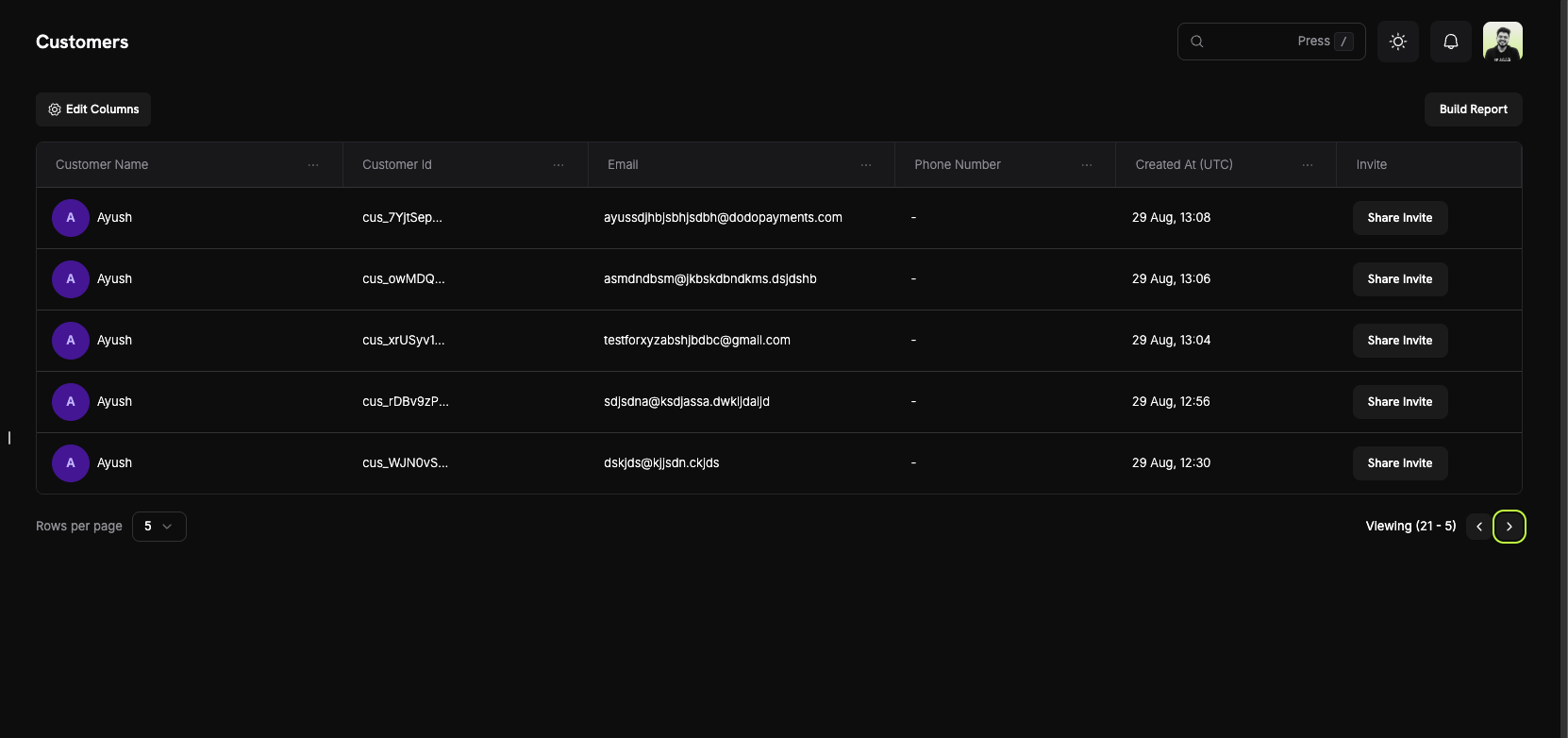
Trang này liệt kê mọi khách hàng hiện tại và trước đây của doanh nghiệp bạn.
Customer Information
Bảng khách hàng hiển thị một hàng cho mỗi khách hàng, với các cột bên dưới.Customer List Columns
- Customer Name: Tên đầy đủ của khách hàng, kèm ảnh đại diện.
- Customer Id: Mã nhận dạng duy nhất, bắt đầu bằng
cus_. Sử dụng mã này trong các lệnh gọi API. - Email: Địa chỉ email của khách hàng. Khách hàng sử dụng địa chỉ này để đăng nhập vào Customer Portal.
- Phone Number: Số điện thoại của khách hàng, nếu được cung cấp.
- Created At: Thời điểm tạo hồ sơ khách hàng. Di chuột lên giá trị để xem thời gian theo UTC.
- Invite: Nút Share Invite mở các liên kết Customer Portal dành cho khách hàng này.
Page Features
- Column visibility: Chọn các cột mà bảng hiển thị.
- Filters: Tìm khách hàng theo Name hoặc Email Address.
- Pagination: Di chuyển qua danh sách và đặt số Rows per page.
Customer Details Page
Nhấp vào một khách hàng để mở trang Customer Information của họ: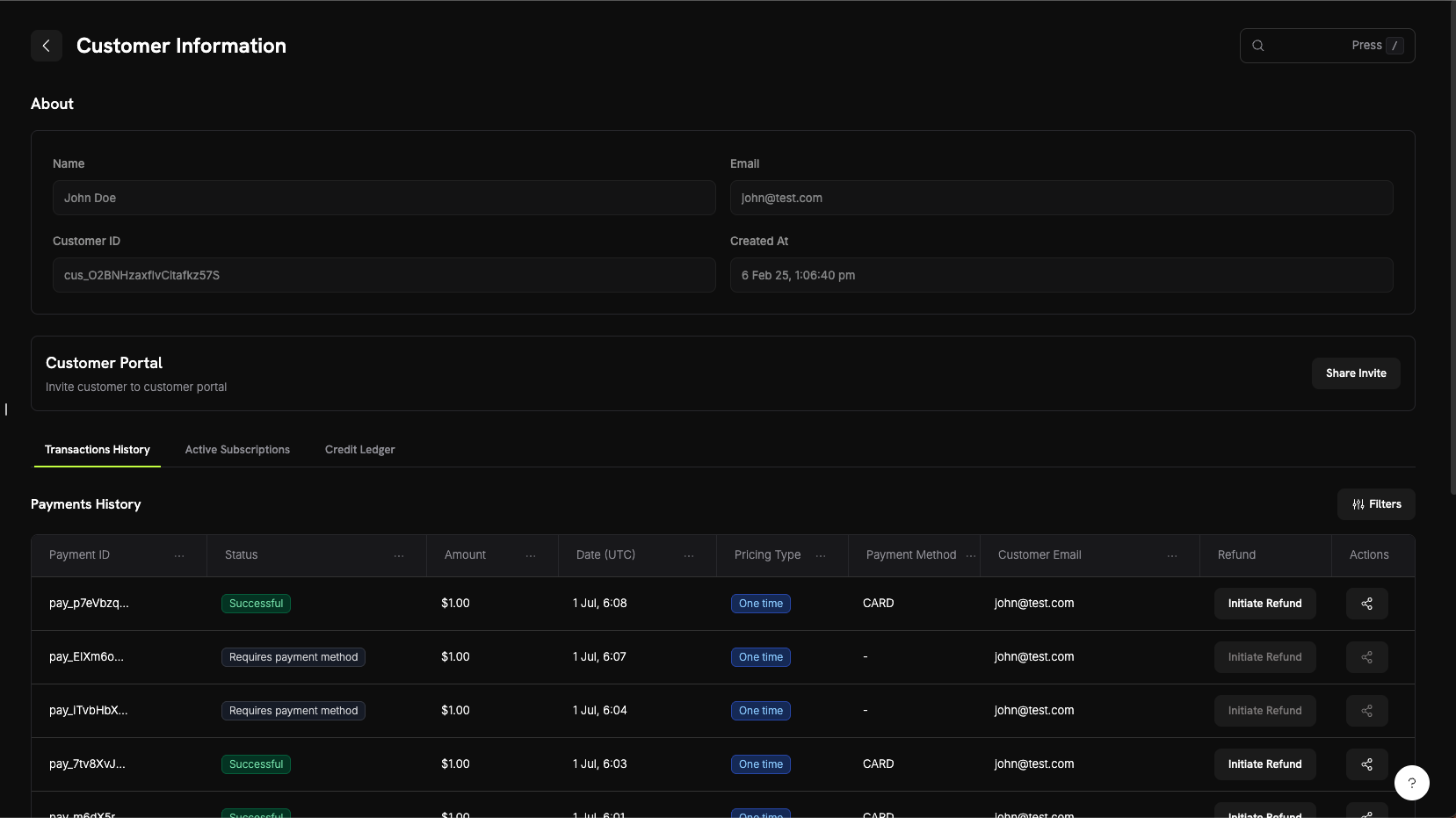
About Section
Phần đầu trang hiển thị các thông tin chính của khách hàng:- Name: Tên đầy đủ của khách hàng.
- Email: Địa chỉ email của khách hàng.
- Customer ID: Mã nhận dạng dùng trong API và các yêu cầu hỗ trợ.
- Created At: Thời điểm tạo hồ sơ khách hàng.
Các tab hoạt động của khách hàng
Các tab bên dưới phần thông tin hiển thị hoạt động của khách hàng. Những tab chính được mô tả tại đây. Trang này cũng có các tab Credits, Entitlements và Sent Emails; xem Customer Email Logs để biết thêm về Sent Emails.- Transactions History
- Active Subscriptions
- Wallets
Các khoản thanh toán, hoàn tiền và tranh chấp của khách hàng. Bảng thanh toán hiển thị:
- Payment ID: Mã nhận dạng của khoản thanh toán, bắt đầu bằng
pay_. - Status: Trạng thái thanh toán, chẳng hạn Successful, Failed hoặc Refunded.
- Amount: Số tiền thanh toán.
- Date: Thời điểm tạo khoản thanh toán.
- Pricing Type: Thanh toán một lần hoặc gói đăng ký.
- Payment Method: Phương thức thanh toán được sử dụng, chẳng hạn như thẻ hoặc UPI.
- Customer Email: Địa chỉ email trong khoản thanh toán.
- Refund: Nút Initiate Refund.
- Actions: Các tùy chọn khác cho khoản thanh toán.
Tab Wallets hiển thị mọi thay đổi đối với ví của khách hàng, giúp bạn truy vết cách số dư hiện tại được hình thành.
Chặn khách hàng
Chặn khách hàng gian lận hoặc lạm dụng hoàn tiền để họ không thể thanh toán với bạn lần nữa. Việc chặn sẽ hủy các gói đăng ký đang hoạt động của khách hàng và chuyển Customer Portal của họ sang chế độ chỉ đọc. Trang của khách hàng bị chặn hiển thị nhãn Blocked, nút Unblock Customer và Activity Log ghi chú giải thích lý do chặn. Quản lý tất cả các trường hợp chặn từ Settings → Blocklist.Customer Blocklist
Customer Portal
Customer Portal là một trang self-service được lưu trữ, nơi khách hàng của bạn quản lý gói đăng ký, xem lịch sử thanh toán và truy xuất khóa giấy phép mà không cần liên hệ với bộ phận hỗ trợ.Khả năng của portal
Trong portal, khách hàng có thể:- View Billing History: Xem các khoản thanh toán trước đây và tải xuống hóa đơn.
- Manage Subscriptions: Xem thông tin chi tiết, thay đổi gói, tạm dừng hoặc hủy gói, tùy thuộc vào cài đặt của bạn.
- Retrieve License Keys: Xem các khóa giấy phép gắn với giao dịch mua của họ.
- Update Billing Details: Thay đổi tên, địa chỉ thanh toán và phương thức thanh toán trên một gói đăng ký. Địa chỉ email và số điện thoại được hiển thị nhưng không thể chỉnh sửa trong portal.
Learn More About Customer Portal
Ví khách hàng
Ví khách hàng lưu giữ tiền trả trước cho khách hàng, với một số dư cho mỗi loại tiền tệ. Dodo Payments áp dụng số dư ví vào các khoản phí gói đăng ký của khách hàng trước khi tính phí vào phương thức thanh toán của họ. Bạn cộng hoặc trừ tiền bằng một mục trong sổ cái, chẳng hạn để hoàn tiền dưới dạng số dư ví hoặc tiền thưởng khuyến mại.Tính năng chính
- Multi-Currency Support: Mỗi loại tiền tệ có số dư riêng.
- Prepaid Balances: Tiền được áp dụng cho các lần gia hạn gói đăng ký và khoản phí khi thay đổi gói trong tương lai.
- Transaction History: Sổ cái ghi lại mọi khoản cộng và trừ tiền.
- API-First Design: Kiểm tra số dư và cộng hoặc trừ tiền thông qua API hoặc từ tab Wallets.
Learn More About Customer Wallets
Quản lý API
Customers API cho phép bạn tạo, truy xuất và cập nhật khách hàng, liệt kê khách hàng bằng bộ lọc và quản lý các phương thức thanh toán đã lưu của họ.Các API endpoint hiện có
Create Customer
List Customers
Get Customer Details
Update Customer
Delete Payment Method
Create Portal Session
Mọi endpoint đều yêu cầu API key của bạn. Gọi API từ server của bạn và không bao giờ để lộ key trong code phía client.