

Overview
Digital Product Delivery là loại entitlement Digital Files. Bạn tải tệp lên một lần vào entitlement Digital Files và gắn entitlement đó vào một sản phẩm. Sau đó, Dodo Payments sẽ gửi các liên kết tải xuống presigned cho mọi khách hàng đã thanh toán qua email và trong Customer Portal. Một entitlement Digital Files hỗ trợ:- Tải tệp được lưu trữ: Dodo Payments lưu trữ tệp của bạn và cung cấp chúng thông qua các presigned URL có thời hạn ngắn.
- Liên kết tải xuống bên ngoài: một URL cho mỗi entitlement, trỏ đến các tệp được lưu trữ ở nơi khác, chẳng hạn như Dropbox, Google Drive hoặc S3.
- Hướng dẫn tải xuống: văn bản tự do hiển thị cho khách hàng trên trang đơn hàng và trong email giao hàng.
Key Features
File Upload
Multiple Files
External Links
Presigned URLs
Thiết lập Digital Product Delivery
1
Open Entitlements
Đi đến Entitlements trong dashboard và nhấp vào + để tạo một entitlement.
2
Choose Digital Files
Chọn Digital Files và nhập Name cho entitlement.
3
Add Files, Links, and Instructions
Cấu hình bất kỳ tổ hợp nào của các trường sau: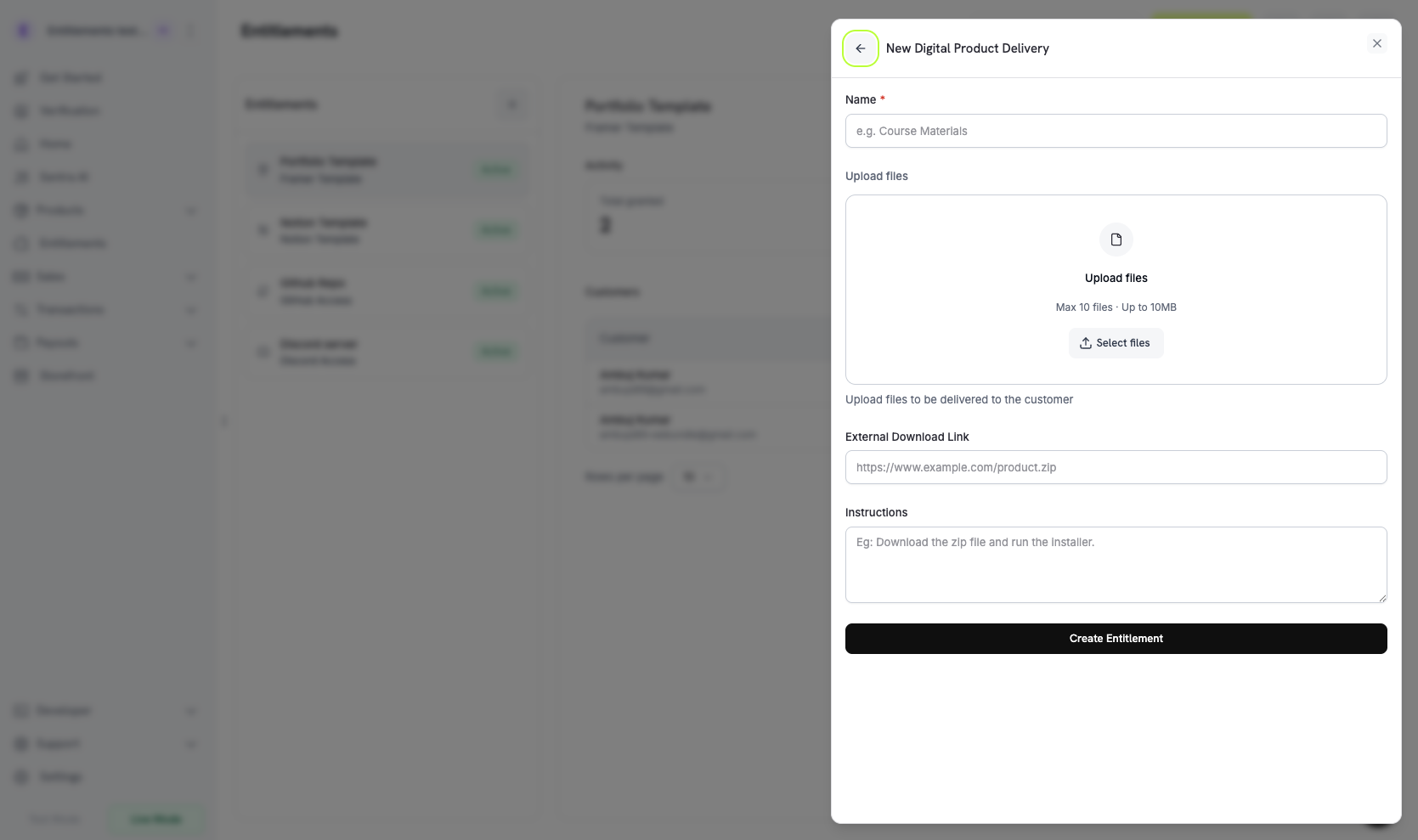
- Upload files: tải lên một hoặc nhiều tệp. Mỗi lần tải lên trả về một
file_idvà thêm tệp vàodigital_file_idscủa entitlement. - External Download Link: một URL bắt đầu bằng
http://hoặchttps://mà khách hàng có thể truy cập. Dodo Payments cung cấp URL này cùng với các tệp được lưu trữ. - Instructions: văn bản tự do hiển thị cho khách hàng, ví dụ: “Giải nén và chạy setup.sh.”
4
Save the Entitlement
Nhấp vào Create Entitlement. Bây giờ bạn có thể gắn entitlement này vào bất kỳ sản phẩm nào.
Attach to Products
Mở một sản phẩm, đi đến phần Entitlements và chọn entitlement Digital Files của bạn. Dodo Payments cung cấp entitlement này sau mỗi lần mua hàng thành công hoặc mỗi subscription đang hoạt động của sản phẩm đó.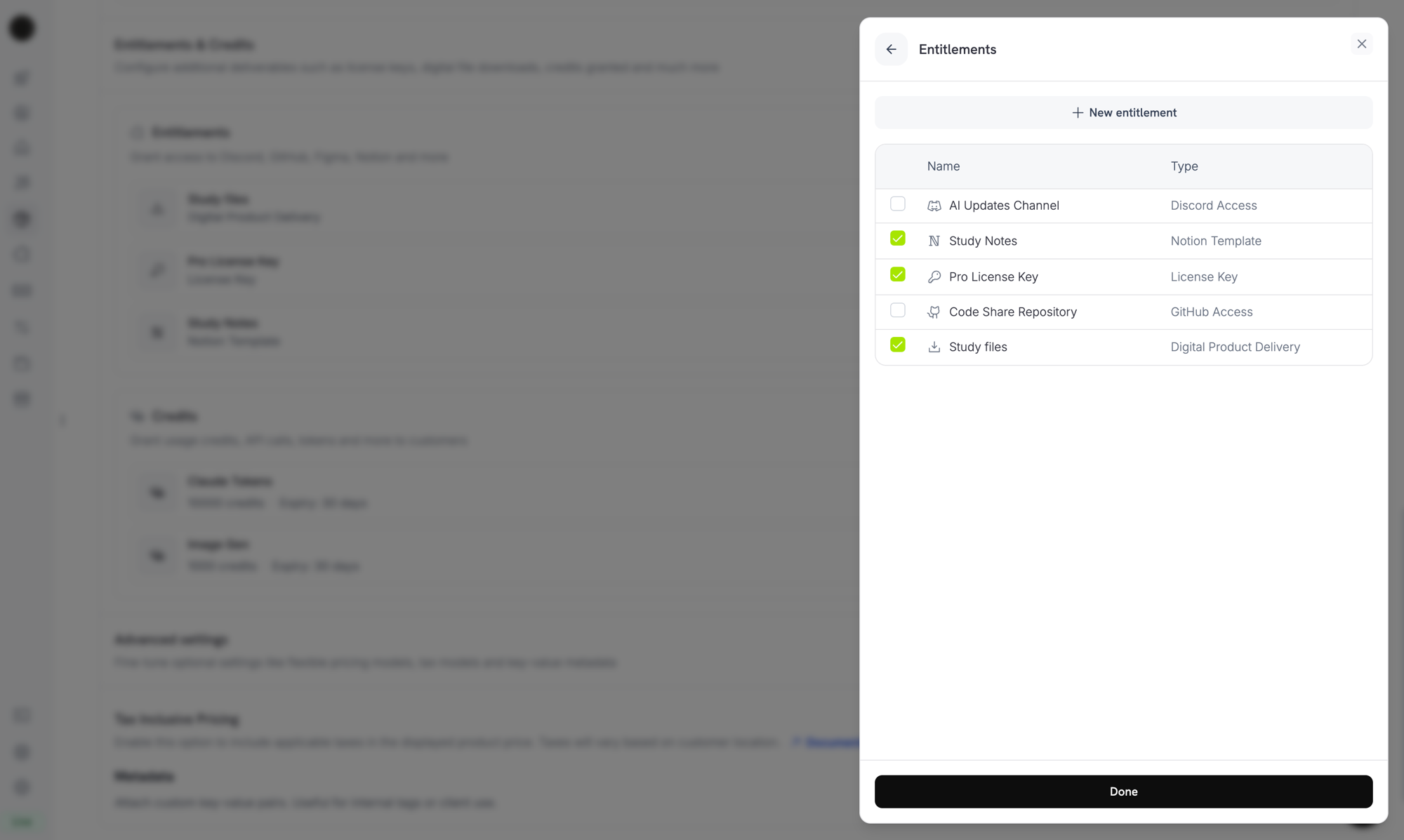
Attaching the Digital Files entitlement to a product alongside other entitlements.
How Delivery Works
Việc cung cấp Digital Files tuân theo vòng đời cấp quyền tiêu chuẩn. Mỗi sự kiện ảnh hưởng đến một grant Digital Files như sau:Customer Experience
Purchase Confirmation
Sau khi thanh toán thành công, khách hàng sẽ nhận được email có các liên kết tải xuống và mọi hướng dẫn bạn đã cấu hình.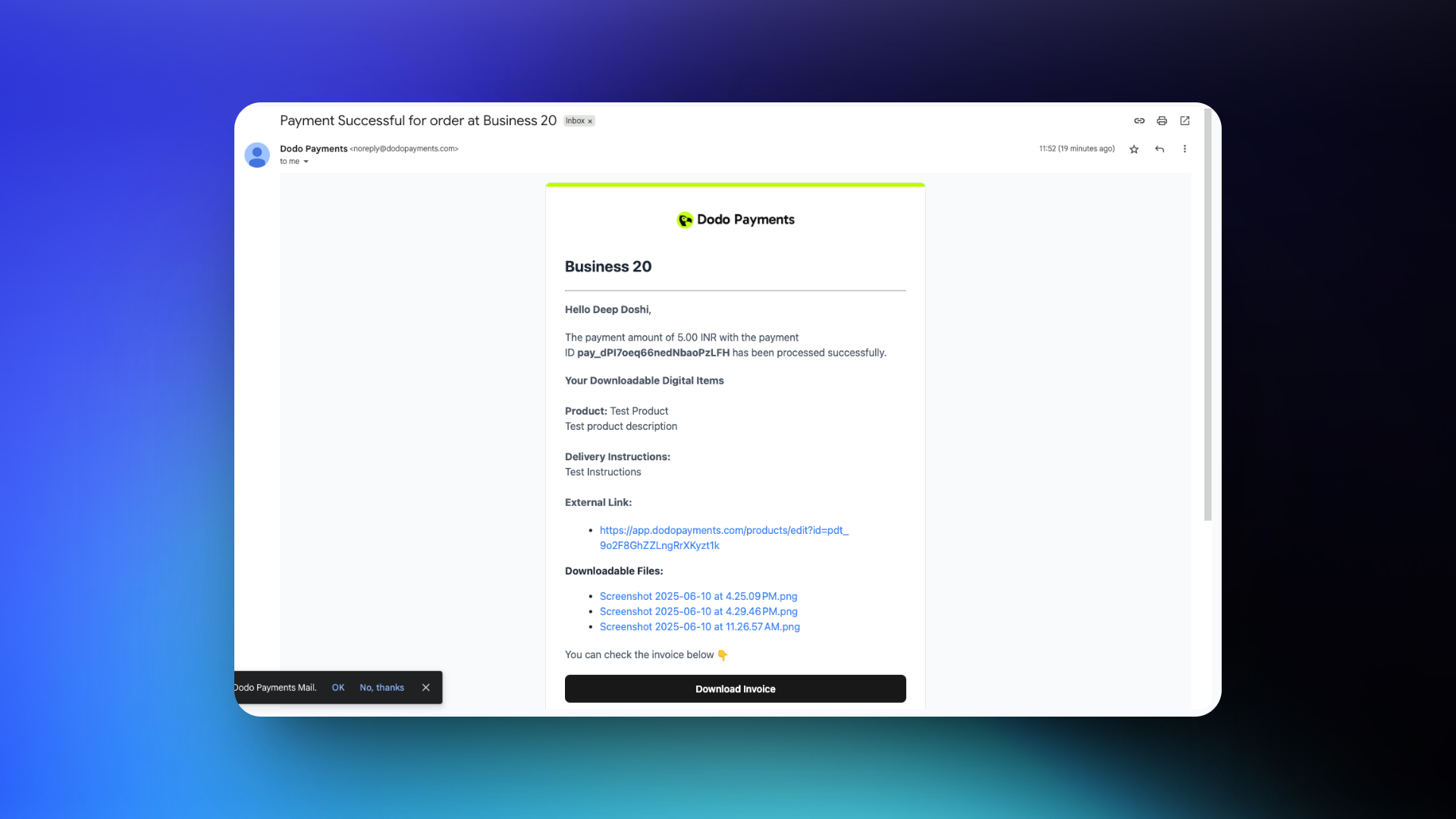
Customer Portal Access
Khách hàng có thể nhận lại các liên kết tải xuống từ Customer Portal trong khi grant của họ còn hoạt động. Portal tạo các presigned URL mới theo yêu cầu, vì vậy giao dịch mua vẫn hoạt động sau khi các liên kết trong email hết hạn.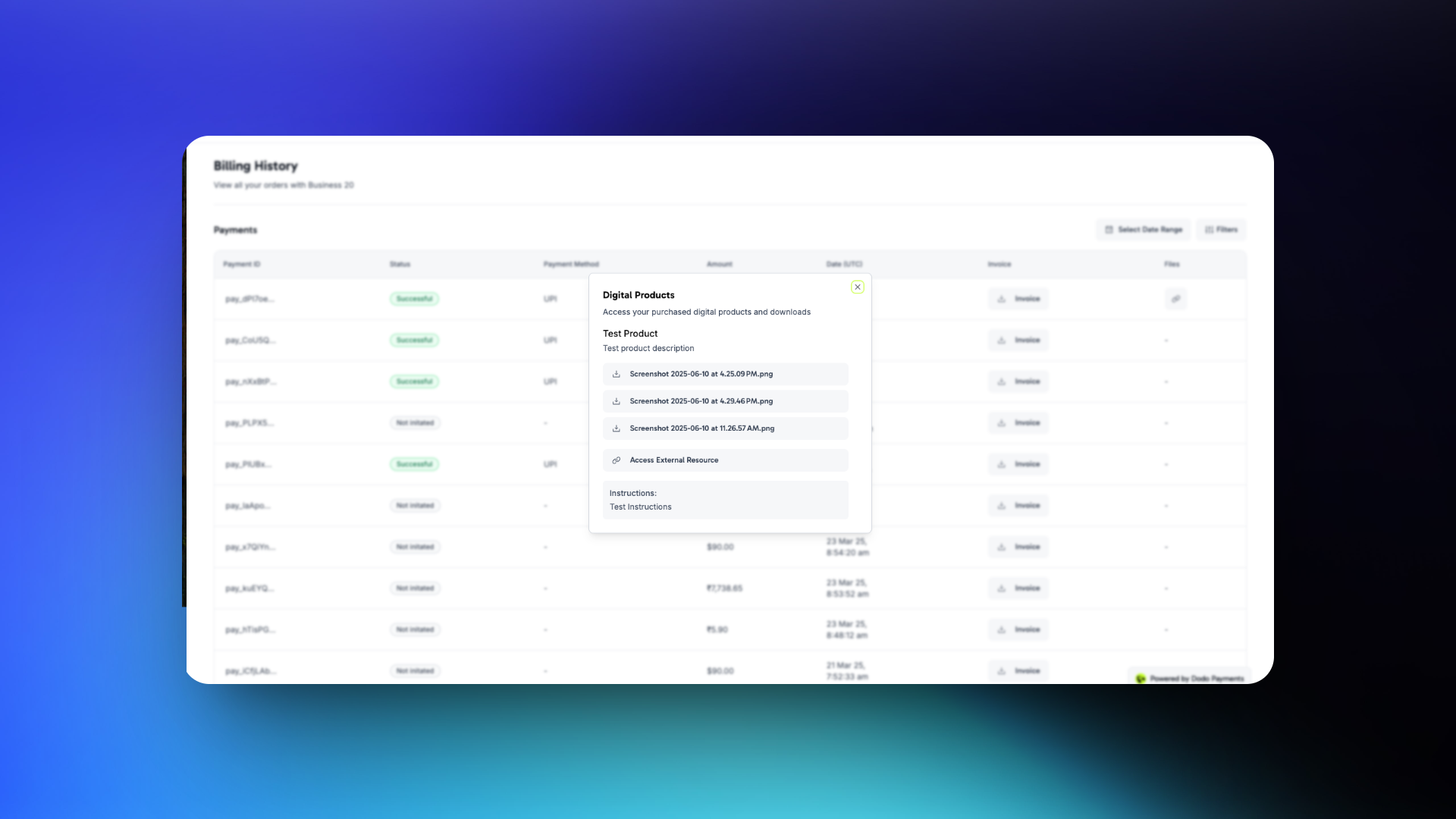
Khách hàng có thể tải tệp xuống từ email xác nhận hoặc mở tệp bất cứ lúc nào từ Customer Portal.
Manage Files Programmatically
Tải tệp lên một Entitlement
Để tải tệp lên, hãy gửi tệp dưới dạngmultipart/form-data trong trường file. Trường filename không bắt buộc phải đứng trước phần file, vì Dodo Payments bỏ qua các trường được gửi sau phần này. Nếu không có filename, Dodo Payments sẽ sử dụng tên của tệp đã tải lên. Response trả về file_id mới.
Liệt kê Grant và phân giải URL tải xuống
Mỗi grant Digital Files có một objectdigital_product_delivery với một presigned URL mới cho từng tệp. Để đọc các URL, hãy liệt kê các grant của entitlement:
Xóa tệp khỏi Entitlement
Để tách một tệp, hãy truyềnfile_id của tệp và ID của entitlement:
Những điều cần lưu ý
- Presigned URL hết hạn nhanh. URL tải xuống trong payload của grant và webhook event có hiệu lực trong 15 phút. Đừng lưu trữ chúng. Hãy fetch URL mới khi khách hàng cần tải xuống lần nữa.
- Việc cập nhật tệp chỉ ảnh hưởng đến các lần mua trong tương lai. Thay thế hoặc xóa tệp không làm thay đổi các lượt tải xuống đã được cấp. Mỗi grant giữ cấu hình entitlement tại thời điểm được tạo, vì vậy khách hàng trước đây vẫn có thể nhận phiên bản đã hiện hành vào thời điểm đó.
- Hoàn tiền không làm mất hiệu lực các bản sao đã tải xuống. Khách hàng đã tải tệp xuống vẫn giữ bản sao đó. Đối với nội dung có thể thu hồi, chẳng hạn như media bị giới hạn bởi license hoặc quyền truy cập có thời hạn, hãy kết hợp Digital Files với License Keys và xác thực key trong runtime.
- Đối với nội dung nhạy cảm, nên ưu tiên URL bên ngoài có cơ chế authentication riêng. Presigned URL từ Dodo Payments có thời hạn ngắn, nhưng bất kỳ ai có URL đều có thể tải tệp xuống cho đến khi URL hết hạn. Nội dung được lưu trữ bên ngoài và yêu cầu đăng nhập tài khoản giúp bạn kiểm soát tốt hơn.
Quản lý API
Create Entitlement
Upload File
Delete File
List Grants
Update Entitlement
Revoke Grant
Webhook
Việc cung cấp và thu hồi tệp kỹ thuật số sẽ gửi bốn webhook evententitlement_grant.*. Đối với grant Digital Files, payload bao gồm một object digital_product_delivery với danh sách tệp đã được phân giải, instructions không bắt buộc và external_url không bắt buộc. Mỗi tệp chứa một download_url presigned, filename, content_type, file_size tính bằng byte và expires_in, số giây còn lại trước khi URL hết hạn:
Digital Product Delivery cũ
Các sản phẩm được cấu hình với block
digital_product_delivery cũ trên chính sản phẩm đã được tự động di chuyển sang một entitlement Digital Files. Các tệp được tải lên thông qua legacy product file API vẫn được bảo toàn: chúng vẫn có thể tải xuống và xuất hiện trong payload của grant cùng với các tệp mới được tải lên. Cấu hình digital_files của entitlement theo dõi các tệp này trong danh sách legacy_file_ids. Để thêm tệp, thay đổi hướng dẫn hoặc thay thế URL bên ngoài, hãy chỉnh sửa entitlement Digital Files đã di chuyển trong Entitlements.Response của sản phẩm vẫn bao gồm các trường cấp sản phẩm cũ (digital_product_delivery.external_url, digital_product_delivery.instructions) để đảm bảo backward compatibility, nhưng entitlement mới là nguồn dữ liệu chính.Best Practices
- Coi các lượt tải xuống là những lần cung cấp một lần. Khách hàng có thể chia sẻ hoặc làm mất liên kết, vì vậy hãy thiết kế sản phẩm với giả định rằng mọi thứ họ tải xuống đều thuộc quyền lưu giữ của họ.
- Sử dụng hướng dẫn để thiết lập kỳ vọng. Đối với các gói gồm nhiều tệp, hãy thêm một dòng
instructionsgiải thích cần cài đặt gì trước hoặc cách kết hợp các tệp. - Lưu ý giới hạn 500 MiB. Lưu trữ các artifact lớn hơn, chẳng hạn như dataset nhiều GB hoặc khóa học video, ở bên ngoài và liên kết chúng bằng
external_urlthay vì tải lên. - Kết hợp với License Keys để có quyền truy cập có thể thu hồi. Để thu hồi quyền truy cập vào các tính năng trong sản phẩm sau khi hoàn tiền, hãy kết hợp entitlement Digital Files với entitlement License Key và xác thực key trong runtime.
- Kiểm tra flow làm mới của Customer Portal. Xác nhận rằng khách hàng có thể quay lại portal một tuần sau đó và vẫn nhận được liên kết tải xuống hoạt động. Portal là phương án khôi phục chính khi các liên kết email hết hạn.