

परिचय
Resend integration, Dodo Payments की कोई घटना होने पर Resend के माध्यम से transactional email भेजता है। इसका उपयोग भुगतान की पुष्टि करने, नए subscribers का स्वागत करने और भुगतान विफल होने पर ग्राहकों को सूचित करने के लिए अपने sending domain से करें।इस integration के लिए Sending access वाला Resend API key और Resend में verified sending domain आवश्यक है। आपको Dodo Payments dashboard में Developer → Webhooks का access भी चाहिए।
प्रारंभ करना
1
Open the Webhook Section
Dodo Payments डैशबोर्ड में, Developer → Webhooks पर जाएँ और Add endpoint पर क्लिक करें।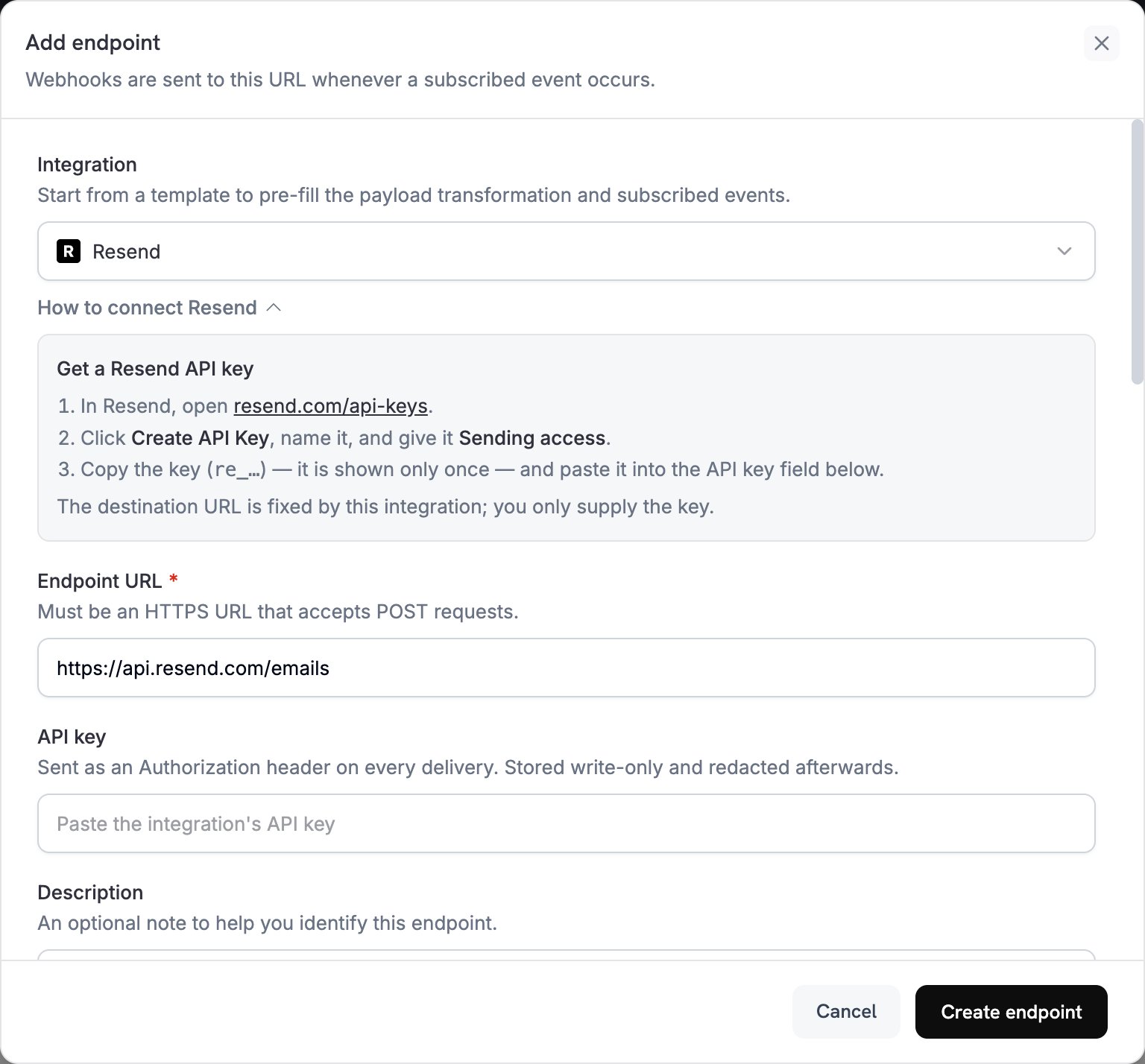
2
Select Resend
Integration में Resend चुनें। Dashboard, Endpoint URL और Resend के लिए transformation code अपने-आप भर देता है, और How to connect Resend panel setup steps दिखाता है।
3
Enter API Key
Resend में API Keys खोलें, Create API Key पर क्लिक करें और key को Sending access दें। Resend key दिखाता है, जो
re_ से शुरू होती है, केवल एक बार। इसे API key में paste करें। Dodo Payments, Resend को भेजे जाने वाले हर request के Authorization header में इसे bearer token के रूप में भेजता है।4
Select Events
Subscribed events में केवल वे events चुनें जिन्हें आपका transformation handle करता है। जिस event को transformation बिना बदले छोड़ देता है, वह Resend तक Dodo Payments format में पहुँचता है और Resend उसे reject कर देता है।
5
Configure Transformation
Transformation code के अंतर्गत handler को edit करें, ताकि प्रत्येक subscribed event Resend email बन जाए। examples से शुरुआत करें।
6
Test & Create
Test this code के अंतर्गत कोई event type चुनें और Resend को भेजे जाने वाले request का preview देखने के लिए Simulate पर क्लिक करें। फिर Create endpoint पर क्लिक करें।
7
Done
अब Dodo Payments प्रत्येक subscribed event के लिए Resend के माध्यम से email भेजता है। प्रत्येक delivery और Resend की response देखने के लिए Developer → Webhooks में Logs tab खोलें।
Transformation Code Examples
प्रत्येक handlerwebhook.url को Resend के send-email endpoint पर सेट करता है और webhook.payload को email से replace करता है। Dodo Payments की amounts currency की सबसे छोटी unit में होती हैं, इसलिए examples 100 से divide करते हैं और currency code दिखाते हैं। JPY और KRW जैसी zero-decimal currencies के लिए amount को जैसा है वैसा ही उपयोग करें।
Payment Confirmation Email
भुगतान सफल होने पर receipt भेजें (payment.succeeded):
payment_confirmation.js
Subscription Welcome Email
जब subscription active हो जाए, तब customer का स्वागत करें (subscription.active):
subscription_welcome.js
Payment Failure Notification
भुगतान विफल होने पर customer से अपनी payment method update करने को कहें (payment.failed):
payment_failure.js
सुझाव
- ऐसे domain से भेजें जिसे आपने Resend में verify किया है, इससे deliverability बेहतर होती है।
- प्रत्येक email का
htmlऔरtext, दोनों version शामिल करें। - Payload से customer data, जैसे
customer.name, का उपयोग करके content को personalize करें। - ऐसी subject lines लिखें जो result या आवश्यक action स्पष्ट रूप से बताएँ।
- Marketing content वाले किसी भी email में unsubscribe link शामिल करें।
- Endpoint बनाने से पहले प्रत्येक template का Simulate के साथ preview देखें।
- Code में किसी event को skip करने के लिए webhook return करने से पहले
webhook.cancel = trueसेट करें। Logs skipped delivery को successful के रूप में record करते हैं।
समस्या निवारण
Emails Not Being Sent
Emails Not Being Sent
- जाँचें कि API key सही और active है तथा इसमें Sending access है। इसे replace करने के लिए endpoint edit करें और API key में नई key paste करें।
- जाँचें कि sender domain Resend में verified है।
- जाँचें कि recipient email addresses valid हैं।
- अपने plan के लिए Resend की sending limits और quotas जाँचें।
- Developer → Webhooks में Logs tab खोलें और failed delivery के लिए Resend की response पढ़ें।
Transformation Errors
Transformation Errors
- जाँचें कि payload Resend के send-email format से मेल खाता है। Resend को
from,toऔरsubjectआवश्यक हैं। - जाँचें कि आपका code जिन events को handle करता है, उनमें से प्रत्येक सभी required fields सेट करता है।
- जाँचें कि
htmlvalue सही format में HTML है। - जाँचें कि
fromaddress, Resend में verified domain का उपयोग करता है।