

परिचय
Payment events होने पर Inngest functions और background jobs चलाएँ। Dodo Payments हर event को Inngest को भेजता है, जहाँ आपकी functions notifications भेज सकती हैं, databases अपडेट कर सकती हैं और Inngest के retries और error handling के साथ multi-step workflows चला सकती हैं।आपको Inngest webhook URL चाहिए। इसे Inngest dashboard में Manage → Webhooks के अंतर्गत बनाएँ।
प्रारंभ करना
1
Open the Webhook Section
Dodo Payments डैशबोर्ड में, Developer → Webhooks पर जाएँ और Add endpoint पर क्लिक करें।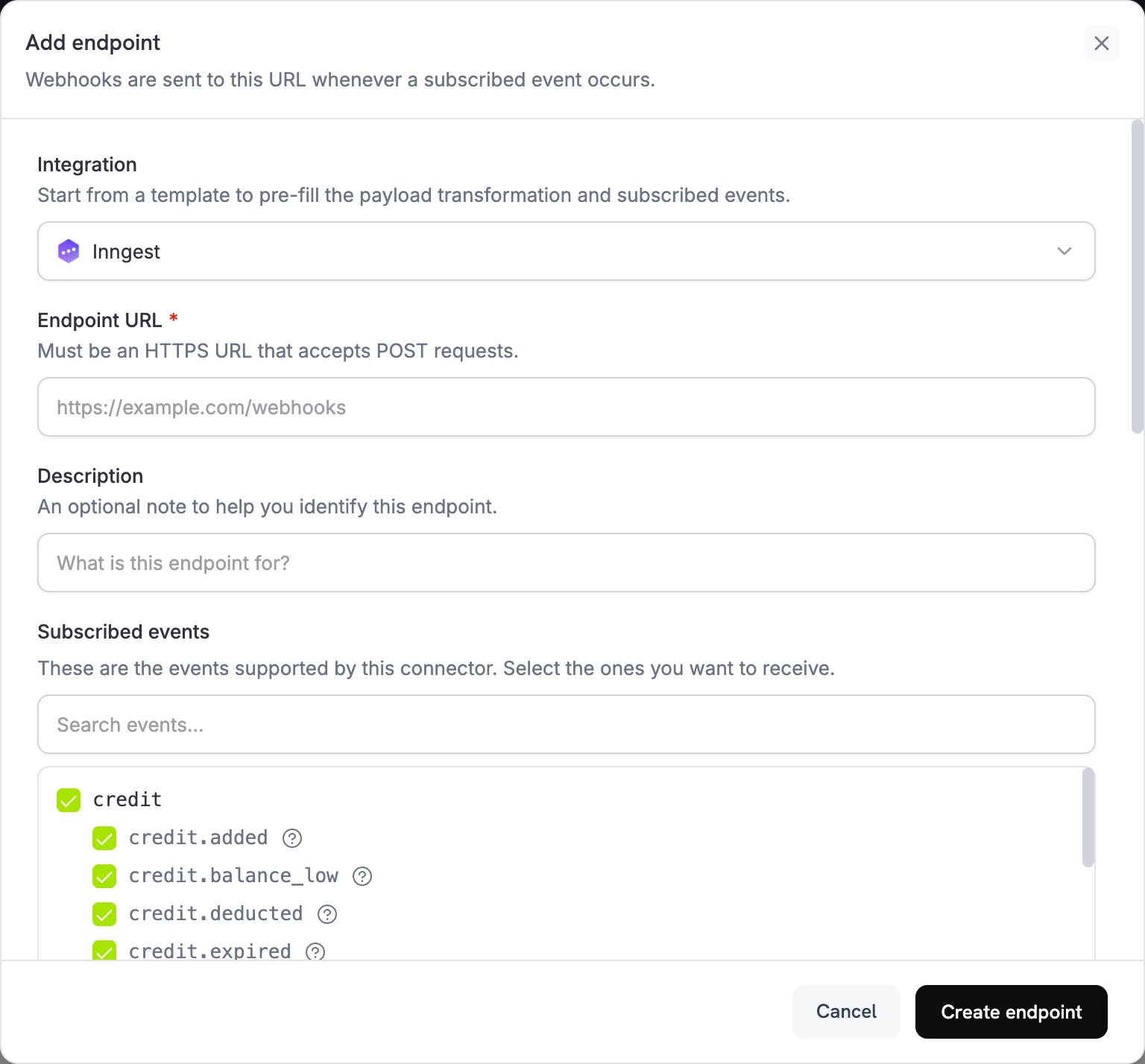
2
Select Inngest
Integration में Inngest चुनें। Subscribed events के अंतर्गत वे events चुनें जिन्हें आपकी functions को ट्रिगर करना चाहिए।
3
Create an Inngest Webhook
Inngest dashboard में Manage tab खोलें और Webhooks चुनें। एक webhook बनाएँ और उसका URL कॉपी करें। Inngest हर request पर webhook का transform function चलाता है, इसलिए जाँचें कि इसमें वे
name और data fields बनी रहें जिनकी आपकी functions अपेक्षा करती हैं।4
Paste Webhook URL
Inngest webhook URL को Endpoint URL में पेस्ट करें।
5
Configure Transformation
Transformation code में code को edit करके events को अपनी Inngest functions के लिए format करें। नीचे दिए गए examples देखें।
6
Test & Create
Test this code के अंतर्गत कोई event type चुनें और sample payload पर transformation चलाने के लिए Simulate पर क्लिक करें। फिर integration को activate करने के लिए Create endpoint पर क्लिक करें।
7
Done
Dodo Payments events अब आपकी Inngest functions को ट्रिगर करते हैं।
रूपांतरण कोड उदाहरण
हर examplewebhook.payload को Inngest event में फिर से लिखता है। name वह event है जिस पर आपकी function ट्रिगर होती है, data में event का विवरण होता है, user में customer होता है और ts milliseconds में event time होता है, जिसकी Inngest के event format को आवश्यकता होती है।
Basic Event Payload
basic_event.js
Subscription Event Handler
subscription_event.js
Dispute Event Handler
यह handler हरdispute.* event को forward करता है और dispute.opened को urgent के रूप में चिह्नित करता है। Dispute payloads में customer details शामिल नहीं होतीं, इसलिए यह कोई user object नहीं भेजता।
dispute_event.js
सामान्य Inngest उपयोग के मामले
Payment Processing
Payment Processing
- Confirmation emails भेजें
- Customer records अपडेट करें
- Refunds process करें
- Invoices generate करें
- Inventory अपडेट करें
Subscription Management
Subscription Management
- नए subscribers का स्वागत करें
- Cancellations process करें
- Renewal reminders भेजें
- Billing cycles अपडेट करें
- Failed payments संभालें
Analytics & Reporting
Analytics & Reporting
- Revenue metrics अपडेट करें
- Customer behavior track करें
- Reports generate करें
- Analytics platforms के साथ data sync करें
- Churn rates calculate करें
सुझाव
- Descriptive event names का उपयोग करें। Inngest उन्हें source के prefix के साथ रखने की सलाह देता है, जैसे
dodo/payment.succeeded। - Customer details को
userमें रखें, जिसे Inngest at rest encrypt करता है। - Webhook के
timestampसे, milliseconds में,tsसेट करें, ताकि events अपना original order और time बनाए रखें। - सभी events में एक ही data structure का उपयोग करें।
- Inngest की retry और error handling सुविधाओं का उपयोग करें।
समस्या निवारण
Functions not triggering
Functions not triggering
- जाँचें कि endpoint URL आपके Inngest webhook URL से मेल खाता है और webhook active है।
- जाँचें कि आपकी Inngest function deployed और active है।
- जाँचें कि event names आपकी function triggers से मेल खाते हैं।
- Errors के लिए Inngest function logs की समीक्षा करें।
Data not received correctly
Data not received correctly
- जाँचें कि payload structure Inngest event format से मेल खाता है।
- जाँचें कि event names सही ढंग से formatted हैं।
- जाँचें कि Inngest webhook का transform function वे fields बनाए रखता है जिन्हें Dodo Payments transformation सेट करता है।
- जाँचें कि सभी required fields शामिल हैं।
- Inngest के webhook testing tool से test करें।