

परिचय
Customer.io integration Dodo Payments events को Customer.io के Track API पर भेजता है, जिससे payments और subscription changes campaigns और customer journeys को ट्रिगर कर सकते हैं। उदाहरण के लिए, नए customer को welcome email मिल सकता है, subscription change पर update भेजा जा सकता है, और failed payment पर notification भेजी जा सकती है।इस integration के लिए आपके Customer.io Site ID और API key आवश्यक हैं। Track API HTTP Basic authentication का उपयोग करता है, जिसमें Site ID username और API key password होता है।
प्रारंभ करना
1
Open the Webhook Section
Dodo Payments dashboard में, Developer → Webhooks पर जाएँ और Add endpoint पर क्लिक करें।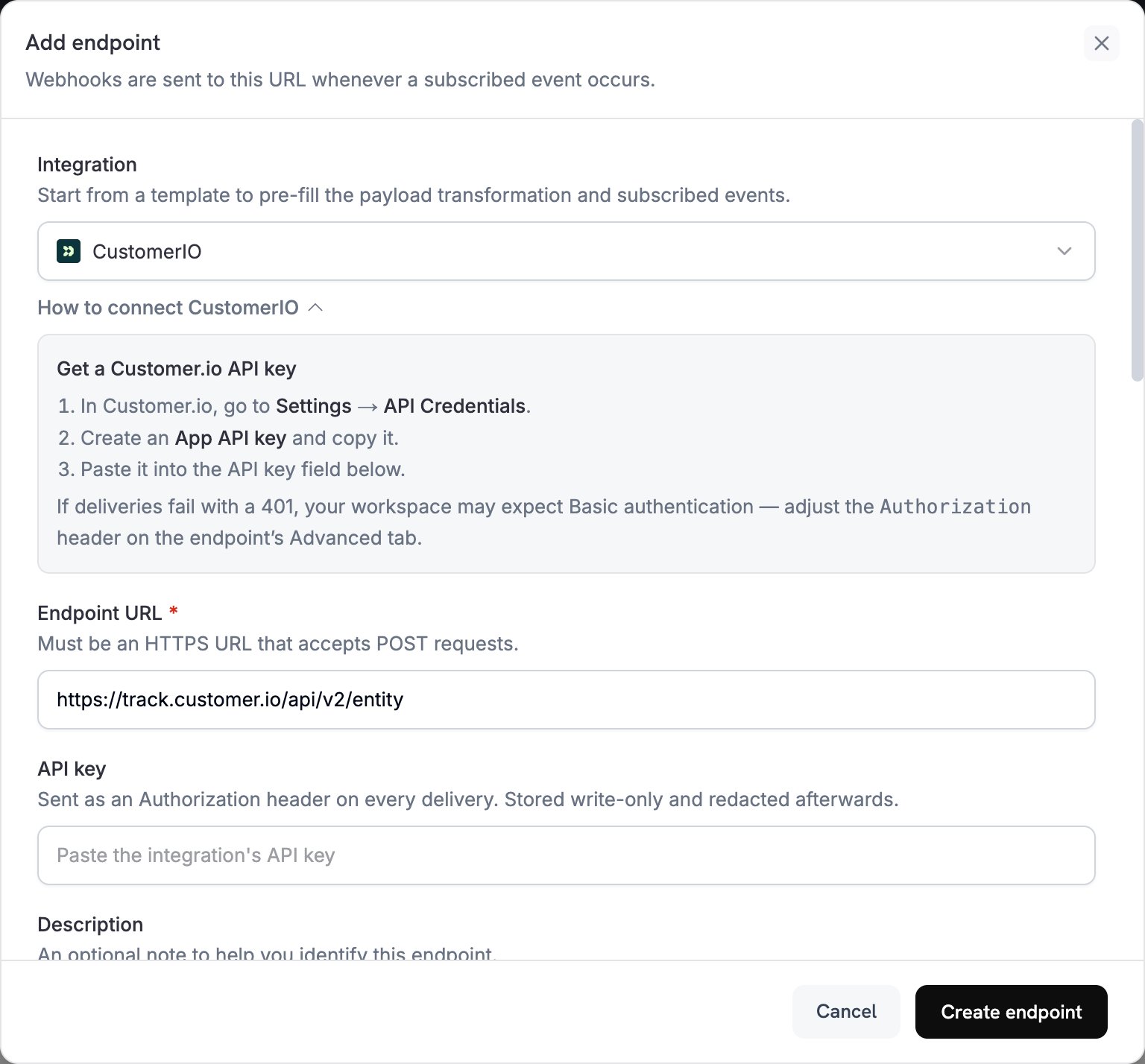
2
Select Customer.io
Integration में, CustomerIO चुनें।
3
Enter Credentials
API key में अपनी Customer.io API key paste करें। Dodo Payments key को bearer token के रूप में
Authorization header में भेजता है।Track API को Basic authentication की अपेक्षा होती है। यदि deliveries 401 के साथ विफल होती हैं, तो endpoint का Advanced tab खोलें और Authorization header को Basic से बदलें, जिसके बाद site_id:api_key का Base64 encoding डालें।4
Select Events
Subscribed events में, वे events चुनें जिन्हें आपका transformation handle करता है। इस page के examples
payment.succeeded, subscription.active और subscription.cancelled का उपयोग करते हैं।5
Configure Transformation
Transformation code के अंतर्गत, Customer.io के Track API के लिए events format करने हेतु handler को edit करें। examples से शुरुआत करें।
6
Test & Create
Test this code के अंतर्गत, sample payload के विरुद्ध handler चलाने के लिए Simulate पर click करें। फिर Create endpoint पर click करें।
7
Done
अब subscribed events Customer.io तक पहुँचते हैं, जहाँ वे आपकी email automations को ट्रिगर कर सकते हैं।
Transformation Code Examples
प्रत्येक handler Track API v2entity endpoint को एक request भेजता है और व्यक्ति की पहचान उनके Dodo Payments customer_id से करता है। Event record करने के लिए, request action को event पर सेट करती है और event name को name में रखती है। व्यक्ति के attributes update करने के लिए, यह action को identify पर सेट करती है। Dodo Payments amounts सबसे छोटी currency unit में होते हैं, इसलिए examples उन्हें 100 से divide करते हैं।
Track Payment Events
Payment सफल होने परpayment_completed event record करें:
track_payments.js
Track Subscription Lifecycle
Subscription active होने परsubscription_started event और cancel होने पर subscription_cancelled event record करें:
track_subscriptions.js
Track Customer Attributes
Payment सफल होने पर व्यक्ति के profile attributes update करें। प्रत्येकidentify request अपने द्वारा भेजे गए attributes को overwrite करती है, इसलिए last_payment_amount और last_payment_date में हमेशा latest payment होता है।
track_attributes.js
Tips
- Transformation और अपने Customer.io campaign triggers में समान event names का उपयोग करें, उदाहरण के लिए
payment_completed। ऐसे names चुनें जो हुई घटना का वर्णन करें। - Personalization के लिए अपने messages द्वारा उपयोग किए जाने वाले attributes शामिल करें।
- प्रत्येक request में हर व्यक्ति की पहचान समान ID से करें। Examples Dodo Payments
customer_idका उपयोग करते हैं। - प्रत्येक request field के लिए Customer.io Track API reference देखें।
Troubleshooting
Events Not Triggering Campaigns
Events Not Triggering Campaigns
- Verify करें कि Site ID और API key सही हैं।
- यदि deliveries
401के साथ विफल होती हैं, तो Getting Started में बताए अनुसारAuthorizationheader को Basic authentication पर सेट करें। - जाँचें कि event names आपके Customer.io campaign triggers से match करते हैं।
- जाँचें कि customer identifiers सेट हैं।
- Customer.io API rate limits की समीक्षा करें।
Transformation Errors
Transformation Errors
- जाँचें कि payload Customer.io API format से match करता है।
- जाँचें कि सभी required fields मौजूद हैं और
actionवह action है जिसे Track API support करता है, जैसेeventयाidentify। - जाँचें कि event names और attributes सही format में हैं।