

Einführung
Die Segment-Integration sendet Dodo Payments-Ereignisse als Track- und Identify-Aufrufe an die HTTP Tracking API von Segment. Segment leitet Zahlungs-, Abonnement- und Kundendaten anschließend an die Analyse-, Marketing- und Warehouse-Tools weiter, die mit Ihrem Workspace verbunden sind – aus einem Katalog mit mehr als 300 Zielen.Für diese Integration benötigen Sie den Write Key einer HTTP API-Quelle in Ihrem Segment-Workspace. Außerdem benötigen Sie Zugriff auf Developer → Webhooks im Dodo Payments-Dashboard.
Erste Schritte
1
Open the Webhook Section
Gehen Sie im Dodo Payments-Dashboard zu Entwickler → Webhooks und klicken Sie auf Endpunkt hinzufügen.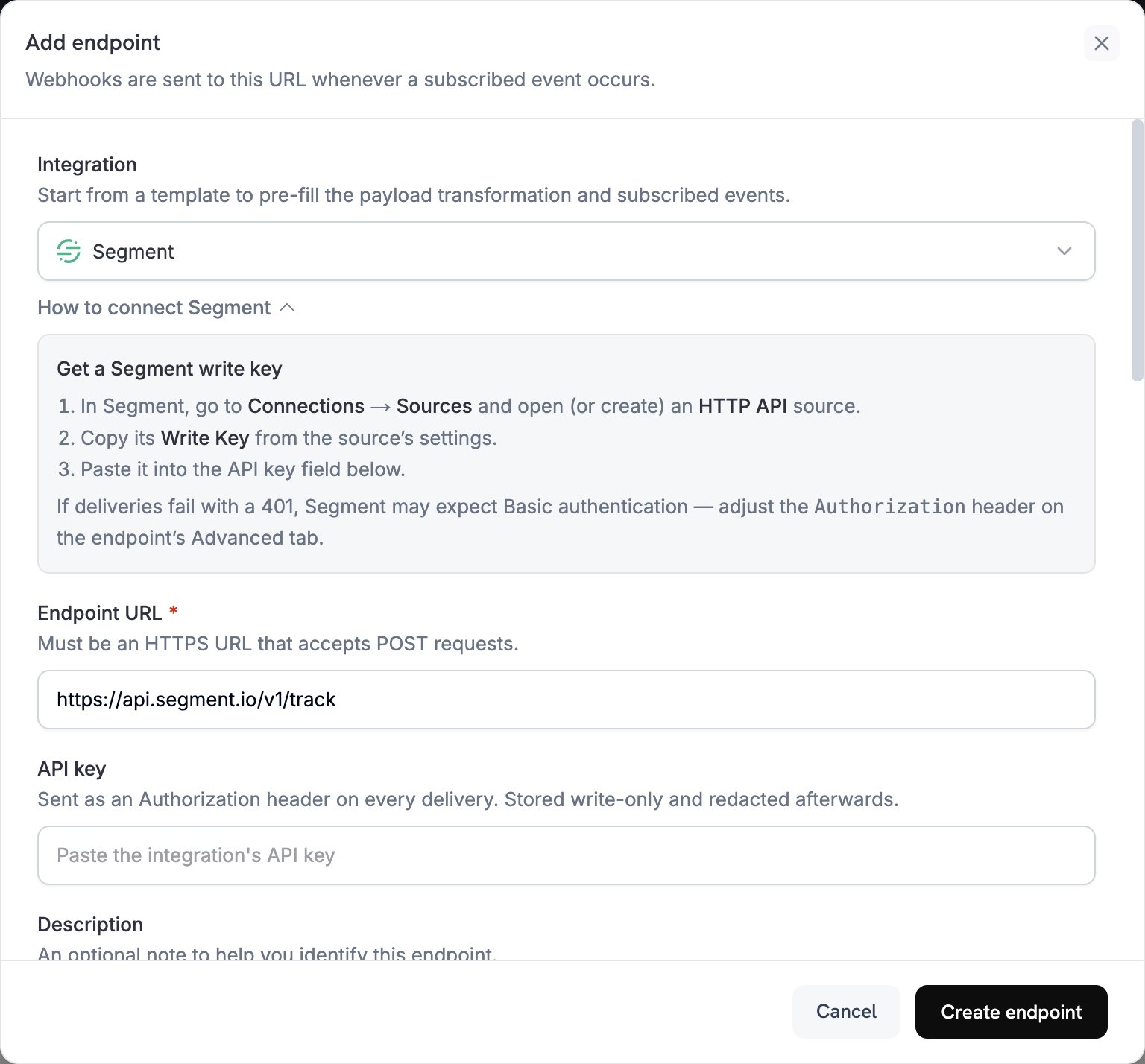
2
Select Segment
Wählen Sie unter Integration die Option Segment aus. Das Dashboard trägt die Endpoint URL und den Transformationscode für Segment ein.
3
Enter Write Key
Gehen Sie in Segment zu Connections → Sources und öffnen oder erstellen Sie eine HTTP API-Quelle. Kopieren Sie den Write Key aus den Einstellungen der Quelle und fügen Sie ihn unter API key ein.
4
Select Events
Wählen Sie unter Subscribed events nur die Ereignisse aus, die Ihre Transformation verarbeitet. Die Beispiele auf dieser Seite verwenden
payment.succeeded, subscription.active und subscription.cancelled.5
Configure Transformation
Bearbeiten Sie unter Transformation code den Handler, um Ereignisse für die Track- oder Identify API von Segment zu formatieren. Beginnen Sie mit den Beispielen.
6
Test & Create
Wählen Sie unter Test this code einen Ereignistyp aus und klicken Sie auf Simulate, um den Aufruf an Segment in der Vorschau anzuzeigen. Klicken Sie anschließend auf Create endpoint.
7
Switch to Basic Authentication
Dodo Payments sendet den Wert von API key als Bearer-Token. Die HTTP API von Segment akzeptiert jedoch einen Write Key über Basic authentication oder ein
writeKey-Feld im Body. Öffnen Sie direkt nach dem Erstellen des Endpunkts dessen Tab Advanced. Geben Sie unter Custom headers in der ausgeblendeten Zeile Authorization einen neuen Wert ein: Basic, ein Leerzeichen und die Base64-Kodierung Ihres Write Key mit einem angehängten Doppelpunkt. Klicken Sie anschließend auf Save. Beispielsweise gibt echo -n 'YOUR_WRITE_KEY:' | base64 den kodierten Wert aus.8
Done
Subscribed events erreichen nun Segment, das sie an Ihre verbundenen Ziele weiterleitet.
Beispiele für Transformationscode
Jeder Handler setztwebhook.url auf einen Segment-API-Endpunkt und ersetzt webhook.payload durch den Aufruf. Die Beträge von Dodo Payments werden in der kleinsten Währungseinheit angegeben, daher teilen die Beispiele durch 100. Verwenden Sie bei Währungen ohne Dezimalstellen wie JPY und KRW den Betrag unverändert.
Zahlungsereignisse mit Track erfassen
Erfassen Sie einPayment Completed-Ereignis, wenn eine Zahlung erfolgreich ist:
track_payments.js
Lebenszyklus von Abonnements mit Track erfassen
Erfassen Sie die EreignisseSubscription Started und Subscription Cancelled:
track_subscriptions.js
Kundeneigenschaften mit Identify erfassen
Aktualisieren Sie die Merkmale des Kunden nach jeder erfolgreichen Zahlung. Jeder Identify-Aufruf setzt die Merkmale auf die gesendeten Werte. Diese Merkmale beschreiben daher die letzte Zahlung:identify_customer.js
Tipps
- Verwenden Sie in Ihrer Integration konsistente Ereignisnamen, beispielsweise das Objekt- und Aktionsformat von Segment in
Payment Completed. - Fügen Sie die Eigenschaften ein, die Sie für Analysen und Segmentierung benötigen.
- Setzen Sie
timestampanhand vontimestampdes Ereignisses, damit Segment den Zeitpunkt des Ereignisses und nicht den Zeitpunkt des Eingangs erfasst. - Verwenden Sie die Dodo Payments
customer_idalsuserId, damit jeder Aufruf für einen Kunden demselben Segment-Benutzer zugeordnet wird.
Fehlerbehebung
Events Not Appearing in Segment
Events Not Appearing in Segment
- Prüfen Sie, ob der Write Key zu einer HTTP API-Quelle gehört und der
Authorization-Header Basic authentication verwendet. - Segment gibt für die meisten Anfragen
200zurück, auch für solche, die nicht akzeptiert werden. Eine erfolgreiche Zustellung in den Dodo Payments-Logs belegt daher nicht, dass das Ereignis angekommen ist. Prüfen Sie den Debugger der Quelle in Segment. - Prüfen Sie, ob die Ereignisnamen den Namenskonventionen von Segment entsprechen.
- Prüfen Sie, ob jeder Aufruf
userIdsetzt. Segment lehnt einen Aufruf ab, der weder einuserIdnoch einanonymousIdenthält. - Prüfen Sie die Rate Limits der HTTP API von Segment. Segment empfiehlt, unter 1.000 Anfragen pro Sekunde und Workspace zu bleiben.
- Wenn Ihr Workspace die EU-Region von Segment verwendet, senden Sie Aufrufe stattdessen an
https://events.eu1.segmentapis.com/v1/trackundhttps://events.eu1.segmentapis.com/v1/identify.
Transformation Errors
Transformation Errors
- Prüfen Sie, ob die Payload dem API-Format von Segment entspricht.
- Prüfen Sie, ob alle erforderlichen Felder vorhanden sind. Track erfordert
event, und sowohl Track als auch Identify erfordern einuserIdoder einanonymousId. - Prüfen Sie, ob die Ereignisnamen Zeichenfolgen und keine Objekte sind.