

Subscriptions automate recurring revenue. Create flexible billing cycles, free or paid trials, plan changes with proration, and add-ons. Customers renew automatically until they cancel or the term ends.
Upgrade & Downgrade
On‑Demand Subscriptions
Customer Portal
Subscription Webhooks
What Are Subscriptions?
A subscription is a recurring product that charges customers on a schedule. Ideal for SaaS, memberships, digital content, and support plans.- SaaS licenses: Apps, APIs, or platform access
- Memberships: Communities, programs, or clubs
- Digital content: Courses, media, or premium content
- Support plans: SLAs, success packages, or maintenance
Key Benefits
- Predictable revenue: Recurring billing with automated renewals
- Flexible cycles: Monthly, annual, custom intervals, and trials
- Plan agility: Proration for upgrades and downgrades
- Add-ons and seats: Attach optional, quantifiable upgrades
- Hosted checkout: Checkout pages and Customer Portal
- Developer-first: Clear APIs for creation, changes, and usage tracking
Creating Subscriptions
Create subscription products in your Dodo Payments dashboard, then sell them through checkout or your API. Separating products from active subscriptions lets you version pricing, attach add-ons, and track performance independently.Subscription Product Creation
Configure the fields in the dashboard to define how your subscription sells, renews, and bills. The sections below map directly to what you see in the creation form.Product Details
- Product Name (필수): checkout, Customer Portal 및 청구서에 표시되는 이름입니다.
- Product Description (선택 사항): checkout 및 청구서에 표시되는 명확한 가치 설명입니다.
- Product Image (선택 사항): 최대 3MB의 PNG/JPG/WebP 파일입니다. checkout 및 청구서에 사용됩니다.
- Brand: 테마와 이메일에 사용할 특정 브랜드와 제품을 연결합니다.
- Tax Category (필수): 세금 규칙을 결정할 카테고리(예: SaaS)를 선택합니다.
Pricing
- Pricing Type: Subscription을 선택합니다(이 가이드). 대안으로 Single Payment 및 Usage Based Billing이 있습니다.
- Price (필수): 통화가 포함된 기본 반복 결제 가격입니다. 0이 아닌 가격은 고객이 결제하는 통화의 구독 최소 금액을 충족해야 합니다. USD의 경우 $1.00입니다. USD, EUR, GBP 이외의 통화에서는 가격이 $1.00 이상의 가치여야 합니다. 예를 들어 AED 구독에는 명시된 2.00 AED 최소 금액이 아니라 약 3.70 AED가 필요합니다. EUR 및 GBP에는 각각 고유한 명시된 최소 금액이 적용됩니다. Minimum Amounts를 참조하세요. 최소 금액 미만의 가격은 지원되지 않습니다. 정확히 $0인 가격은 별도로 지원되는 경우입니다. Card-Optional at Zero Price를 참조하세요.
- Discount Applicable (%): 기본 가격에 적용되는 선택적 백분율 할인으로, checkout 및 invoices에 반영됩니다.
10.5와 같이 소수점 이하 최대 두 자리까지 입력할 수 있습니다. API에서는discount_bps를 사용합니다(베이시스 포인트이므로1050는 10.5%입니다). - Repeat payment every (필수): 갱신 간격입니다(예: 1 Month마다). 주기(개월 또는 년)와 수량을 선택합니다.
- Subscription Period (필수): 구독이 활성 상태로 유지되는 전체 기간입니다(예: 10 Years). 이 기간이 끝나면 연장하지 않는 한 갱신이 중지됩니다.
- Trial Period Days (필수): 일 단위로 trial 기간을 설정합니다. trial을 비활성화하려면 0을 사용합니다. trial이 종료되면 첫 번째 charge가 자동으로 발생합니다.
- Trial Amount: 유료 trial에 대한 선택적 선불 charge입니다. 무료 trial의 경우 설정하지 않은 상태로 둡니다. Paid Trials를 참조하세요.
- Card-optional at $0 Price: $0 가격이거나 할인이 적용되어 당일 결제할 금액이 없는 경우, 고객이 카드를 추가하지 않고 구독을 시작할 수 있도록 합니다. 무료 trial에는 자체 Start the trial without a card checkbox가 있습니다. Card-Optional at Zero Price를 참조하세요.
- Select add-on: 고객이 기본 plan과 함께 구매할 수 있는 add-on을 최대 10개까지 연결합니다.
Add-ons are ideal for quantifiable extras such as seats or storage. You can control allowed quantities and proration behavior when customers change them.
Advanced Settings
- Tax Inclusive Pricing: 적용 가능한 세금이 포함된 가격을 표시합니다. 최종 세금 계산은 여전히 고객의 위치에 따라 달라집니다.
- License key (Entitlements 내): 구매 후 각 고객에게 고유한 key를 발급합니다. License Keys 가이드를 참조하세요.
- Digital Files (Entitlements 내): 구매 후 파일 또는 콘텐츠를 자동으로 제공합니다. 자세한 내용은 Digital Product Delivery에서 확인하세요.
- Metadata: 내부 tagging 또는 client integration을 위한 사용자 지정 key–value 쌍을 연결합니다. Metadata를 참조하세요.
Subscription Trials
Trials let customers evaluate a subscription before paying the full recurring price. A trial can be free (no charge until it ends) or paid (a reduced amount charged upfront). After the trial, the full price charges at the first renewal.Configuring Trials
Set Trial Period Days in the product’s pricing section (use0 to disable). Override it when creating a subscription:
Paid Trials
Charge a reduced amount upfront for the trial window. Set Trial Amount on the product’s price. The full recurring price charges at the first renewal.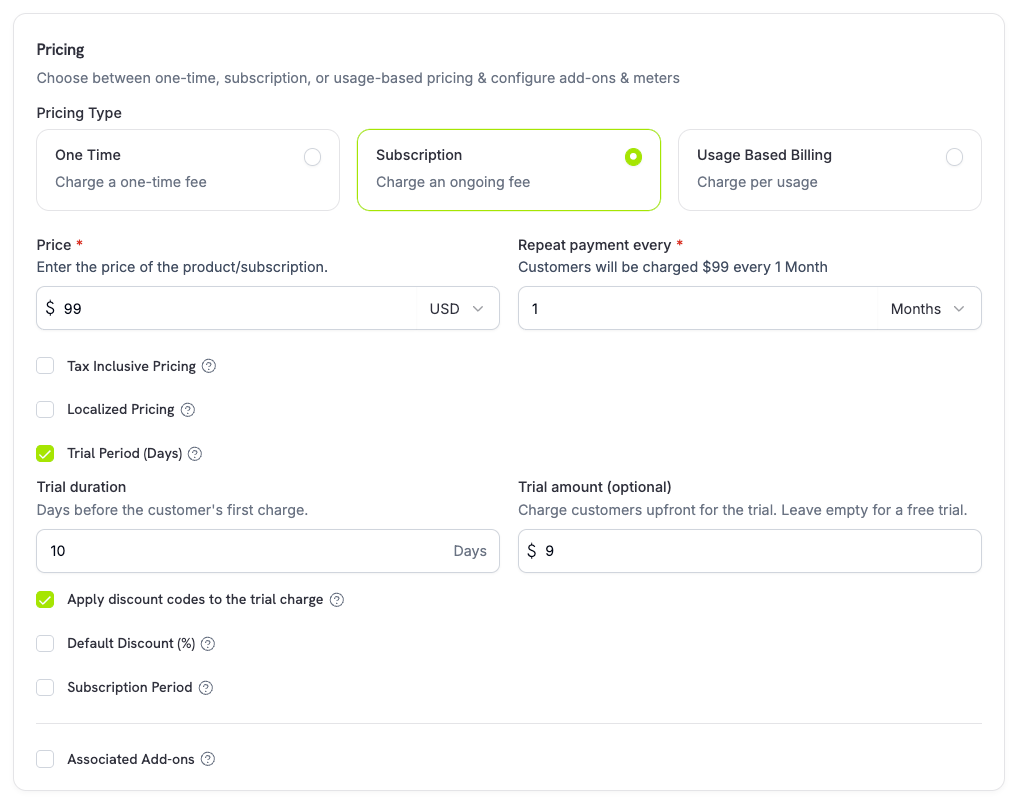
trial_amount and trial_period_days so you can show the amount due today before creating the subscription.
Card-Optional at Zero Price
Let customers start a subscription without adding a payment method when nothing is due today. Enable it per price in the product’s pricing section, with one checkbox for each case below.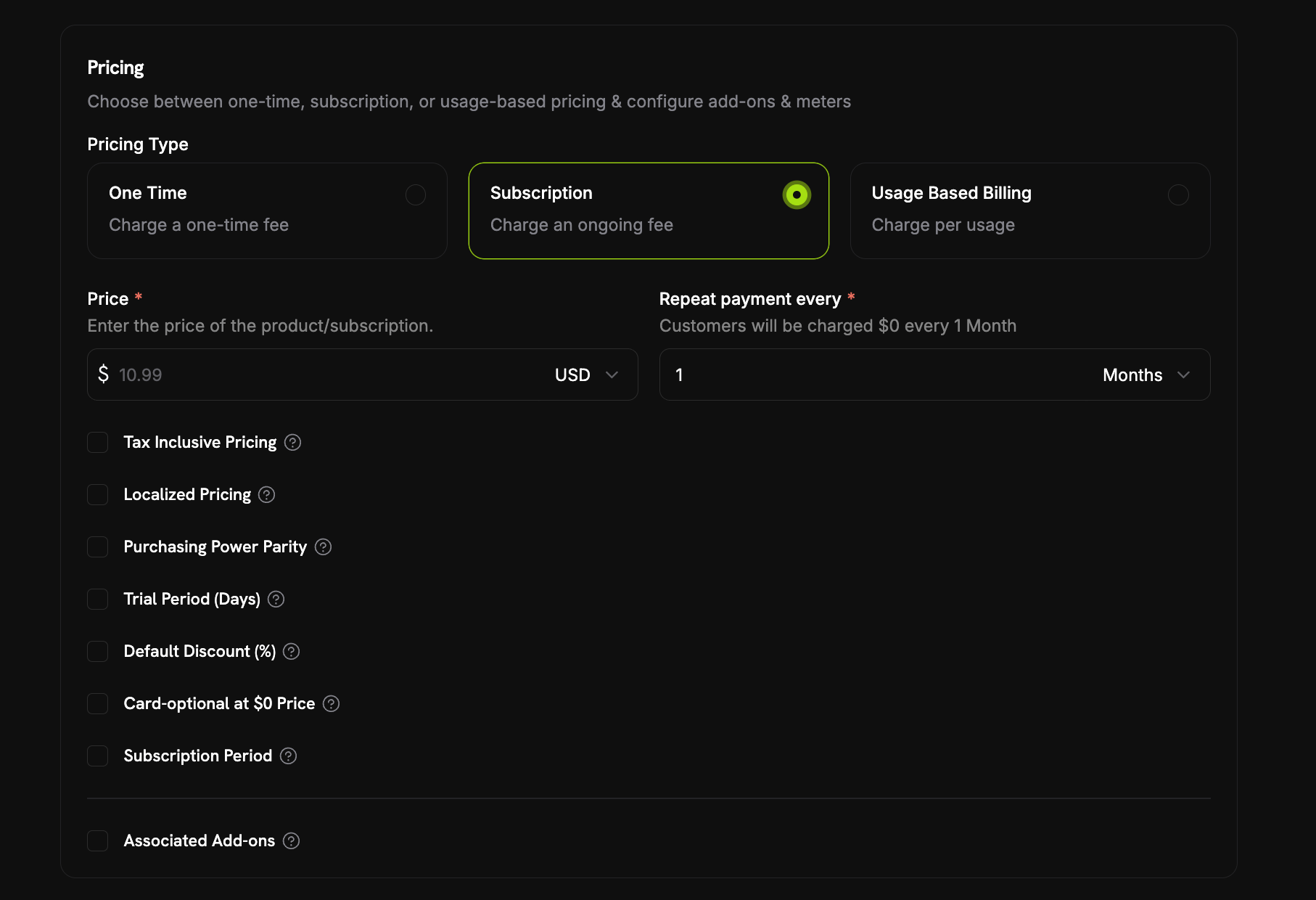
- A free trial:
trial_period_daysis set with notrial_amount, so the first charge is $0 while the trial runs. Check Start the trial without a card under Trial Period (Days). - A $0 recurring price: Either the price itself is $0, or a discount brings it to $0 (the product’s Default Discount (%) or a discount code stacked at checkout). Check Card-optional at $0 Price.
Each checkbox maps to its own API field:
trial_payment_method_optional (free trial case) and zero_amount_payment_method_optional ($0 price case). You can enable either one on its own.What Happens Without a Card
A card-optional subscription is created and activated immediately with no payment method on file. The create response returnspayment_method_required: false, and the subscription object shows has_payment_method: false. Then:
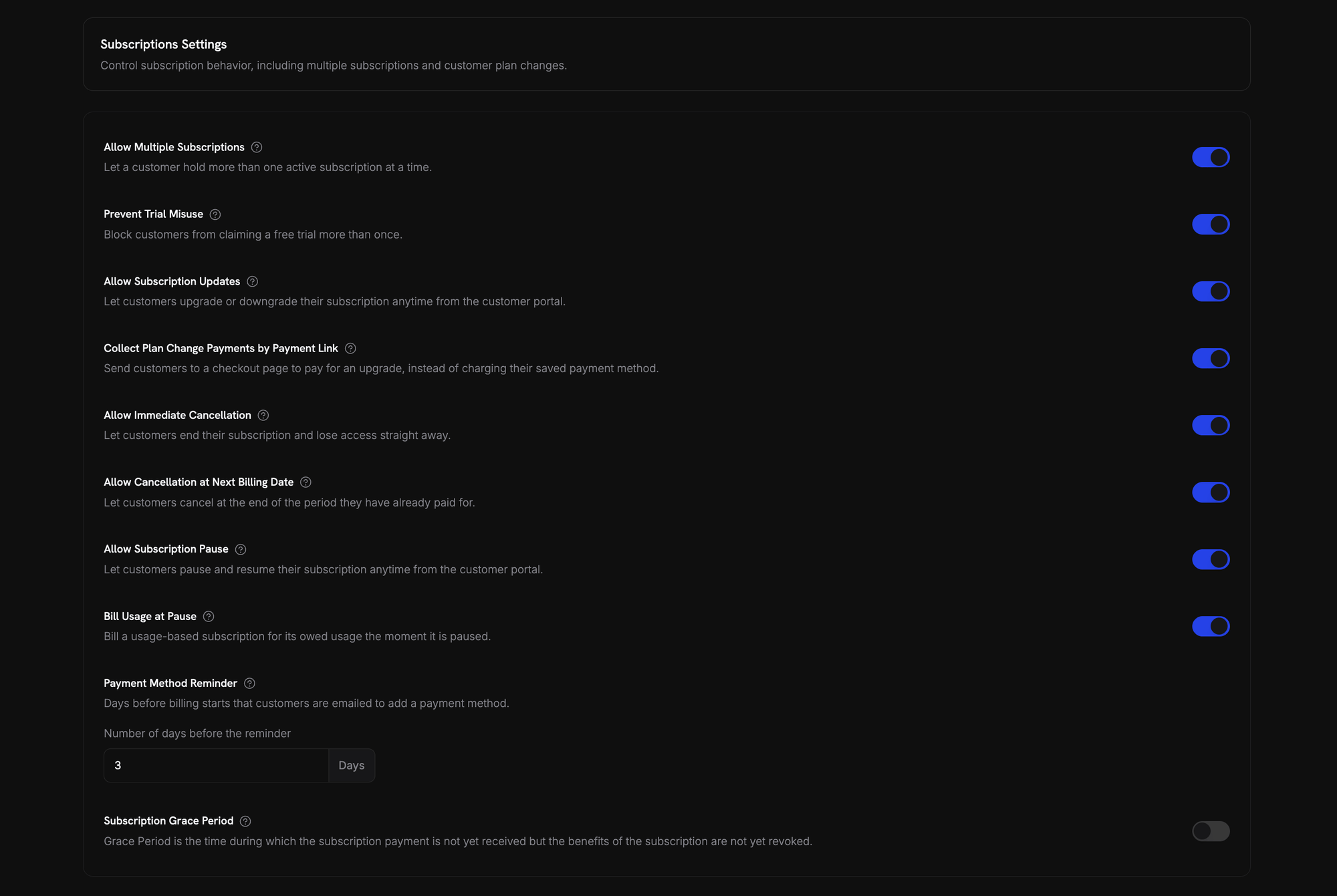
- A reminder email goes out before billing starts. The number of days is set in Settings → Subscriptions → Payment Method Reminder (see Subscription Settings). The Add Payment Method Reminder email (see Customer Emails) links the customer to the Customer Portal to add a card.
- If no card is added in time, the subscription goes
on_holdwhen the trial ends or the discounted period runs out and a real charge is due. The customer receives the Subscription On Hold, No Payment Method email. - Adding a payment method reactivates the subscription (see Reactivating from On Hold). A charge is created for the amount now due, and the subscription returns to
activeon success.
A card added before the trial or discounted period ends prevents the hold. The next renewal charges that card.
Preventing Trial Misuse
Stop customers from repeatedly claiming trials of the same product. When enabled, a customer who has already redeemed a trial of a product gets a paid subscription instead of a fresh trial of that product.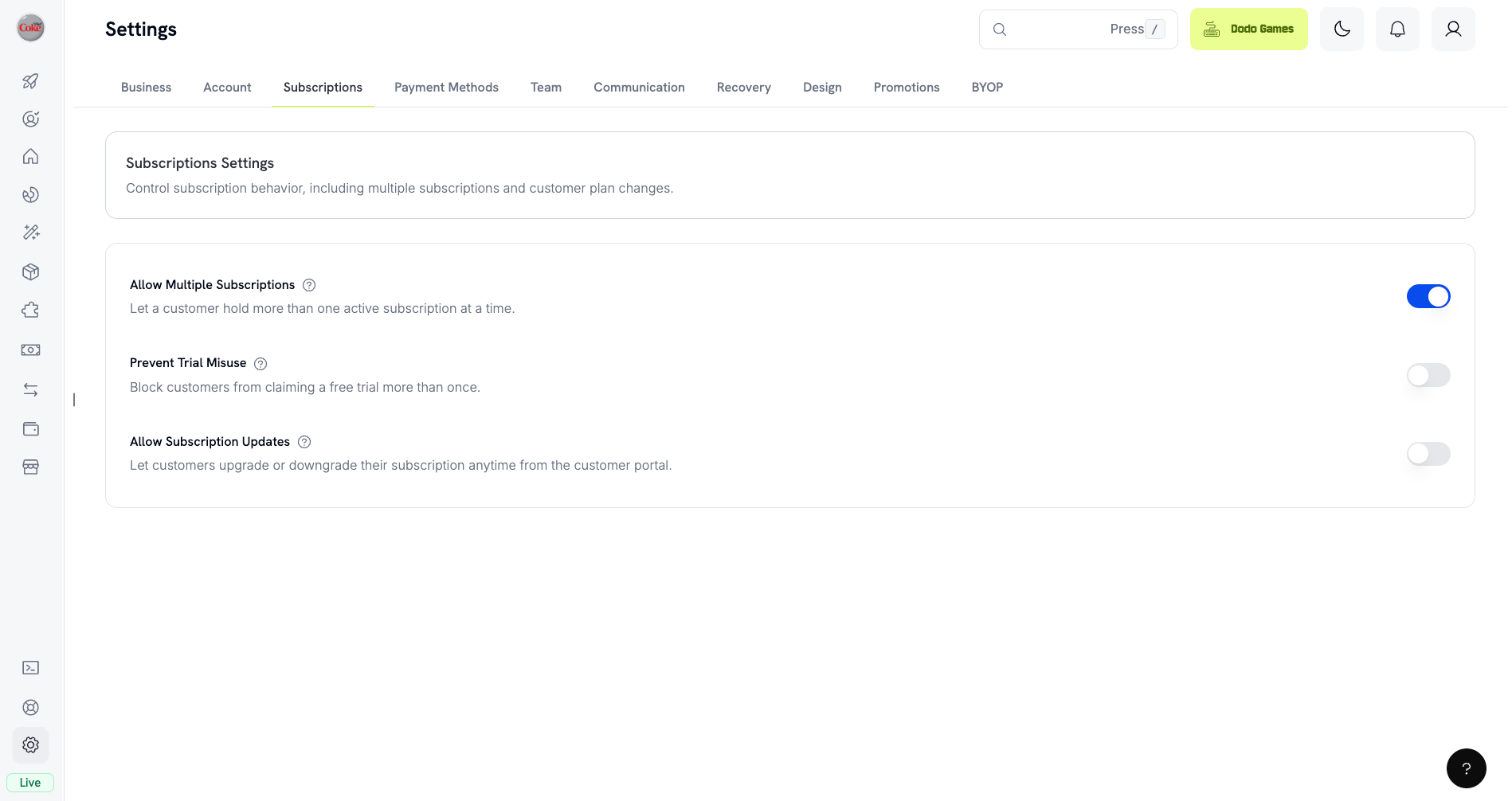
- Customers are matched by normalized email (plus-aliases stripped), so
user+trial@example.comanduser@example.comcount as the same person. - Redemptions are recorded at trial activation, so a customer who cancels the same day has still consumed their trial.
- Existing customers are backfilled from historical trials by email, so past trial users are recognized immediately.
- Passing
trial_period_daysexplicitly on a checkout session or subscription skips the check and grants that trial.
Off by default. See Subscription Settings for all business-level subscription controls.
Detecting Trial Status
The subscription object has no trial status field. For a free trial, retrieve the subscription’s payments: if there is exactly one payment with atotal_amount of 0, the subscription is in trial. This check doesn’t work for paid trials, where the first payment is the trial_amount.
Updating Trial Period
Extend the trial by updatingnext_billing_date:
Subscription Plan Changes
Upgrade or downgrade subscriptions, adjust quantities, or migrate to different products. Proration mode controls whether the change triggers an immediate charge, creates credit, or applies no billing adjustment. You can change plans and update the next billing date from the dashboard, or change plans with the API. To let customers change plans themselves, add subscription products to a Product Collection and enable Allow Subscription Updates in Settings → Subscriptions.Product Collections
Proration Modes
Choose how customers are billed when changing plans:prorated_immediately
Credits the unused portion of the current billing cycle, then charges a full cycle at the new plan. The new plan is never charged at a fraction of its price.
Net immediate charge = (full new cycle) minus (remaining fraction × full old cycle). If the credit exceeds the new cycle charge, the difference is held as subscription-scoped credit for future renewals. The billing cycle re-anchors to the change date.
difference_immediately
Charges the price difference immediately (upgrade) or adds credit for future renewals (downgrade).
Credits from downgrades are subscription-scoped and auto-applied to future renewals. They’re distinct from Credit-Based Billing entitlements.
difference_immediately, the unused value becomes a subscription-scoped credit that automatically offsets future renewals:
full_immediately
Charges the full new plan amount immediately, ignoring remaining time. Best for resetting billing cycles.
do_not_bill
Switches to the new plan immediately without any billing adjustment. No charges, no credits. The new plan is active as soon as the call succeeds but is not charged until the next renewal. The customer keeps the upgraded plan free for the rest of the current cycle. The original renewal date is preserved, and the new plan price applies at that renewal.
Example: Prorated upgrade calculation
Example: Prorated upgrade calculation
Scenario: Customer on Basic ($30/month) upgrades to Pro ($80/month) on day 16 of a 30-day cycle using The customer starts a full new month of Pro today, so Pro is charged in full and only the unused time on Basic is credited.Next renewal on February 15 (January 16 + 30 days): $80.00/month.
prorated_immediately.Example: Downgrade credit calculation
Example: Downgrade credit calculation
Scenario: Customer on Pro ($80/month) downgrades to Starter ($20/month) using The $60 credit auto-applies to future renewals:
difference_immediately.- Renewal 1: $20 − $20 (credit) = $0.00 ($40 credit remaining)
- Renewal 2: $20 − $20 (credit) = $0.00 ($20 credit remaining)
- Renewal 3: $20 − $20 (credit) = $0.00 (credit exhausted)
- Renewal 4: $20.00 (full price)
Learn more about how credits are managed in the Upgrade & Downgrade Guide.
Changing Plans with Add-ons
Modify add-ons when changing plans. Add-ons are included in proration calculations:By default (
effective_at: 'immediately') plan changes trigger immediate charges. Pass effective_at: 'next_billing_date' to schedule the change for the next billing date instead — the pending change is returned on the subscription as scheduled_change, and you can cancel it with Cancel Scheduled Plan Change. Failed charges may move the subscription to on_hold status, unless you pass on_payment_failure: 'prevent_change', which keeps the subscription on its current plan until payment succeeds. Track changes via subscription.plan_changed webhook events. Plan changes are rejected while a subscription is past_due — see Grace Period.Previewing Plan Changes
Preview the exact charge before committing:Preview Change Plan API
Pausing and Resuming Subscriptions
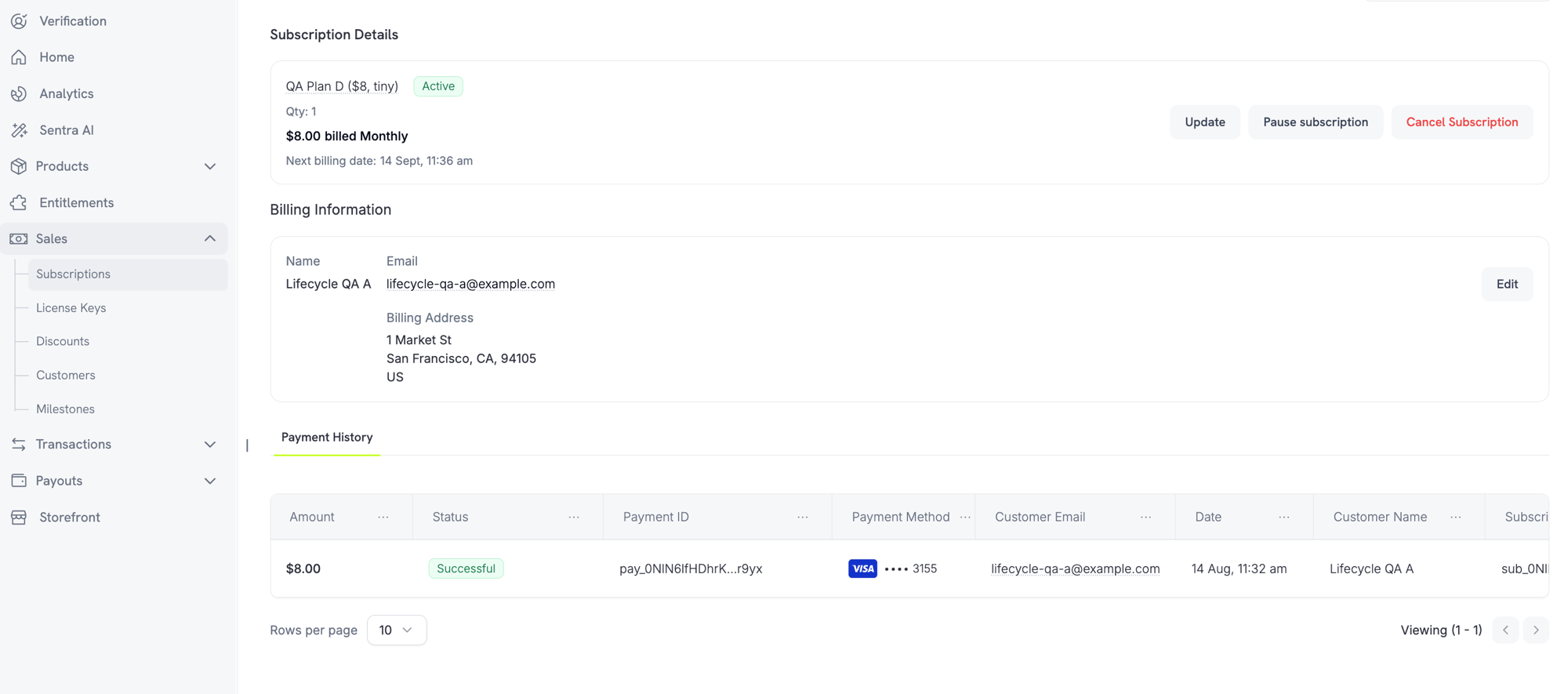
Pause a subscription to freeze it instead of ending it. Billing stops, access is revoked, and the subscription keeps its plan and history. Use it as a retention alternative to cancellation. Open any active subscription under Sales → Subscriptions and click Pause subscription. The status changes topaused and renewals stop until resumed.
What Happens When You Pause
- Renewals stop. No invoice is generated and no renewal charge is attempted while paused.
- Access is revoked immediately. Pausing revokes every delivered and pending entitlement grant, which disables license keys and stops new digital product download URLs. Resuming re-grants them.
- The billing clock freezes.
next_billing_dateandexpires_atboth move forward by the exact length of the pause, so the customer keeps the time they already paid for. - No pause duration limit. A paused subscription stays paused until resumed. You don’t set a pause length upfront.
active and restores entitlements. Because the clock was frozen, the next renewal lands the paused duration later than originally scheduled.
Pausing Usage-Based Subscriptions
A usage-based subscription can have usage recorded but not yet billed when paused. Bill Usage at Pause under Settings → Subscriptions controls what happens:
Only metered usage is settled this way. The recurring base fee is never charged at pause time. Standard and on-demand subscriptions have nothing to settle.
Bill Usage at Pause is recorded per billing cycle. Changing it mid-cycle doesn’t affect the cycle already in progress; the new value applies from the next cycle onward.
Resuming is a valid exit from this hold. You don’t have to collect the settlement invoice first. Resuming forgives the outstanding usage rather than deferring it.
Letting Customers Pause Their Own Subscriptions
Allow Subscription Pause under Settings → Subscriptions controls whether customers can pause and resume from the Customer Portal. Off by default, so self-service pause is opt-in.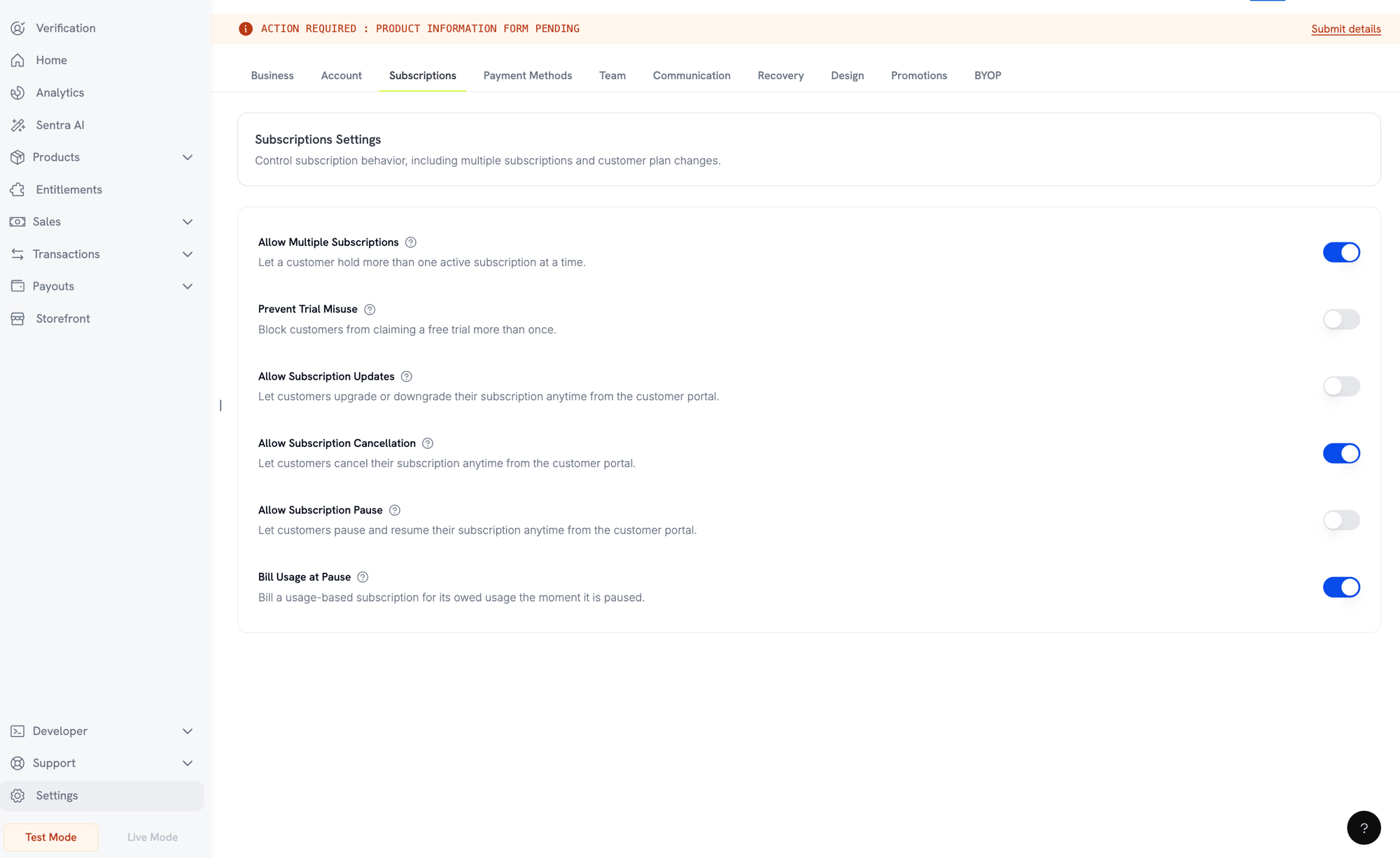
Pausing from the Customer Portal
Pausing via API
Pause and resume run through thestatus field on the update subscription endpoint:
subscription.paused and resuming emits subscription.unpaused. Both carry the full subscription object, with paused_at set while paused and null once resumed.
Pause and Other Subscription Actions
- Cancellation still works. You can cancel a paused subscription exactly as you would an active one. Any open settlement invoice from the pause is voided.
- Scheduled plan changes are delayed, not dropped. A plan change scheduled for the next billing date sits untouched while paused, then applies at the shifted billing date once resumed. Its
scheduled_change.effective_atis a snapshot from when it was scheduled and is not adjusted for the pause. To drop the change, use Cancel Scheduled Plan Change.
Subscription States
A subscription moves through defined statuses over its lifetime:past_due and on_hold are both involuntary but differ in one way: past_due keeps the customer’s access, on_hold removes it. A subscription reaches past_due only when you enable a grace period. Without one, a failed renewal goes straight to on_hold.on_hold and paused are distinct. on_hold is involuntary (payment failed). paused is deliberate (you or the customer chose to freeze it). A usage-based subscription can still owe a settlement invoice at the moment it is paused (see Pausing Usage-Based Subscriptions).State Machine
On Hold State
A subscription enterson_hold when:
- A renewal payment fails (insufficient funds, expired card, etc.)
- A plan change charge fails
- Payment method authorization fails
- A pause settlement invoice for a usage-based subscription goes unpaid
- A grace period ends with renewal debt unpaid and expiry action is
on_hold - A Card-Optional at Zero Price subscription’s free trial or $0 period ends with no payment method ever added
If you set a grace period, a failed renewal moves the subscription to
past_due first. It reaches on_hold only when the window ends.Reactivating from On Hold
Update the payment method to reactivate a subscription fromon_hold. This automatically:
- Creates a charge for remaining dues
- Generates an invoice
- Processes the payment using the new payment method
- Reactivates the subscription to
activeon successful payment
The one exception is a hold caused by an unpaid pause settlement invoice. Clearing that invoice returns the subscription to
paused, not active, because pause is where it was before the payment failed. Resume it explicitly once the invoice is settled.After successfully updating the payment method for an
on_hold subscription, you’ll receive payment.succeeded followed by subscription.active webhook events.Grace Period
A grace period is a window between a failed renewal and loss of access. The subscription moves topast_due instead of on_hold, and the customer keeps everything they bought until the window ends. This gives them time to fix a card without losing your product.
Off by default. Enable one from Settings → Subscriptions → Subscription Grace Period.

Settings
What Happens During the Window
While a subscription ispast_due:
- The customer keeps access. Entitlement grants, license keys, and digital product downloads all stay live.
- Usage-based billing keeps recording usage.
- The subscription does not renew.
- The subscription cannot be paused.
- Dunning emails go out, and payment retries continue.
subscription.past_dueis emitted at entry.
subscription.past_due webhook carries the deadline as past_due_ends_at. Store it when the event arrives — the subscription API does not return this field. Every subscription webhook while the window is open carries the same value, next to a status of past_due.
The window is fixed when the subscription enters it. If you change the length or expiry action later, a window already open keeps its original values. New values apply to the next subscription that enters a window.
Recovery
The window closes when the renewal debt is settled through a successful retry or when the customer updates the payment method. The subscription returns toactive, and a subscription.active webhook is sent.
Only the failed renewal opens a window. An unrelated merchant charge that goes unpaid does not move a subscription to past_due.
When the Window Ends
If the renewal debt is still unpaid at the deadline, the subscription moves toon_hold or to cancelled, as you configured. At the same time:
- A scheduled plan change on the subscription is cancelled.
- A pending plan change whose invoice is still unpaid is cancelled.
cancel_subscription, open invoices are also voided, and their payment retries stop.
A pending plan change whose invoice was paid is applied while the window is still open, not at the deadline. A paid invoice settles the change whatever the subscription status.
Webhook Events by Transition
Each transition emits a webhook so you can drive entitlement logic without polling:Subscription Webhook Payloads
API Management
Create subscriptions
Create subscriptions
Use
POST /checkouts to create subscriptions programmatically from products, with optional trials (subscription_data.trial_period_days) and add-ons (product_cart[].addons).API Reference
Update subscriptions
Update subscriptions
Use
PATCH /subscriptions/{subscription_id} to cancel at the next billing date, extend the subscription period, update billing details, or modify metadata. To change quantity, use the Change Plan API instead.API Reference
Pause and resume subscriptions
Pause and resume subscriptions
Pause and resume run through the
status field on PATCH /subscriptions/{subscription_id}: status: paused pauses an active subscription and status: active resumes it. Neither value can be combined with any other field in the same request. See Pausing and Resuming Subscriptions for full behavior and billing effects.API Reference
Change plans (proration)
Change plans (proration)
Change the active product and quantities with proration controls.
API Reference
On-demand charges
On-demand charges
For on-demand subscriptions, charge specific amounts on demand.
API Reference
List and retrieve
List and retrieve
Use
GET /subscriptions to list all subscriptions and GET /subscriptions/{id} to retrieve one.API Reference
Usage history
Usage history
Fetch recorded usage for metered or hybrid pricing models.
API Reference
Update payment method
Update payment method
Update the payment method for a subscription. For active subscriptions, this updates the payment method for future renewals. For subscriptions in
on_hold, this reactivates the subscription by creating a charge for remaining dues.When generating a new payment-method link, you can pass allowed_payment_method_types to restrict which payment methods the customer sees. Customers will never see a method that isn’t in the list, though including a method does not guarantee it appears (availability depends on factors like customer location and your business settings).API Reference
Common Use Cases
- SaaS and APIs: Tiered access with add-ons for seats or usage
- Content and media: Monthly access with introductory trials
- B2B support plans: Annual contracts with premium support add-ons
- Tools and plugins: License keys and versioned releases
Integration Examples
Checkout Sessions (Subscriptions)
Create a checkout session with a subscription product and optional add-ons:Plan Changes with Proration
Upgrade or downgrade a subscription and control proration behavior:Cancel at Next Billing Date
Schedule a cancellation that takes effect at the end of the current billing period:Extend the Subscription Period
Extend how long a subscription runs by passing a newsubscription_period_count and subscription_period_interval to PATCH /subscriptions/{subscription_id}. The subscription’s expiry is recomputed from the new count and interval:
A subscription’s period can only be increased, never shortened.
On‑Demand Subscriptions
Create an on‑demand subscription and charge later as needed:Update Payment Method for Active Subscription
Update the payment method for an active subscription:on_hold 상태의 Subscription 재활성화
결제 실패로 on hold 상태가 된 subscription을 재활성화합니다:RBI-Compliant Mandates를 사용하는 Subscriptions
UPI 및 Indian card subscriptions는 특정 mandate 요구 사항이 적용되는 RBI (Reserve Bank of India) regulations에 따라 운영됩니다.Mandate Limits
mandate type과 amount는 subscription의 recurring charge에 따라 달라집니다:- mandate floor(기본값 ₹15,000) 미만의 charges: floor amount에 대한 on-demand mandate를 생성합니다. subscription amount는 subscription frequency에 따라 mandate limit까지 주기적으로 청구됩니다.
- mandate floor 이상인 charges: 정확한 subscription amount에 대한 subscription mandate(또는 on-demand mandate)를 생성합니다.
mandate_min_amount_inr_paise(INR paise)를 통해 구성할 수 있습니다. 은행에 등록되는 amount는 max(mandate_floor, billing_amount)이므로, billing 금액이 더 낮을 때 floor는 사실상 고객에게 표시되는 authorization ceiling이 됩니다.
RBI-compliant mandates 및 구성 가능한 mandate floor에 대한 자세한 내용은 India Payment Methods를 참조하세요.
Upgrade 및 Downgrade 고려 사항
subscriptions를 upgrade 또는 downgrade할 때 mandate limits를 고려하세요:- upgrade/downgrade로 인해 charge amount가 mandate floor(기본값 ₹15,000)를 초과하고 기존 on-demand payment limit을 넘어서는 경우 transaction charge가 실패할 수 있습니다.
- 고객이 payment method를 업데이트하거나 subscription을 다시 변경하여 올바른 limit으로 새 mandate를 설정해야 할 수 있습니다.
High-Value Charges에 대한 Authorization
₹15,000 이상의 subscription charges에 대해서는 다음이 적용됩니다:- 고객의 은행에서 transaction을 authorize하라는 메시지를 표시합니다.
- 고객이 authorize하지 못하면 transaction이 실패하고 subscription은 on hold 상태가 됩니다.
48시간 Processing Delay
Indian cards 및 UPI subscriptions의 recurring charges에는 고유한 processing pattern이 적용됩니다:- charges는 subscription frequency에 따라 scheduled date에 시작됩니다.
- 고객 계정에서 실제 deduction은 payment initiation 후 48시간이 지나야 발생합니다.
- 이 48시간 window는 bank API responses에 따라 추가로 2~3시간까지 연장될 수 있습니다.
Mandate Cancellation Window
48시간 processing window 동안 다음이 가능합니다:- 고객은 banking apps를 통해 mandate를 취소할 수 있습니다.
- 고객이 이 기간에 mandate를 취소해도 subscription은 활성 상태로 유지됩니다(Indian card 및 UPI AutoPay subscriptions에 해당하는 edge case).
- 그러나 실제 deduction은 실패할 수 있으며, 이 경우 subscription을 on hold 상태로 전환합니다.
- payment confirmation이 완료될 때까지 benefit activation을 지연합니다
- grace period 또는 temporary access를 구현합니다
- mandate cancellations에 대한 subscription status를 모니터링합니다
- 애플리케이션 로직에서 subscription hold states를 처리합니다
Best Practices
- 명확한 tiers로 시작: 차이가 분명한 2~3개의 plans
- pricing을 명확하게 전달: totals, proration 및 다음 renewal date를 표시합니다
- trials를 신중하게 사용: 단순히 시간을 제공하는 것이 아니라 onboarding을 통해 전환합니다
- add-ons 활용: base plans는 간단하게 유지하고 추가 기능을 upsell합니다
- 변경 사항 테스트: test mode에서 plan changes 및 proration을 검증합니다
Subscriptions는 recurring revenue를 위한 유연한 기반입니다. 간단하게 시작하고 철저히 테스트한 후 adoption, churn 및 expansion metrics를 기반으로 반복 개선하세요.