

소개
Dodo Payments 이벤트가 발생할 때마다 Windmill 스크립트 또는 플로우를 실행합니다. 이를 사용하여 데이터베이스를 업데이트하고, 레코드를 다른 시스템과 동기화하고, 알림을 보내거나, 코드로 자체 비즈니스 로직을 실행할 수 있습니다.Windmill connector는 각 이벤트를 Windmill 스크립트 또는 플로우의 webhook URL로 전송합니다. 배포된 스크립트 또는 플로우, 이를 실행할 수 있는 Windmill token, 그리고 Dodo Payments 대시보드의 Developer → Webhooks에 대한 액세스 권한이 필요합니다.
시작하기
1
Open the Webhook Section
Dodo Payments 대시보드에서 Developer → Webhooks로 이동한 다음 Add endpoint를 클릭합니다.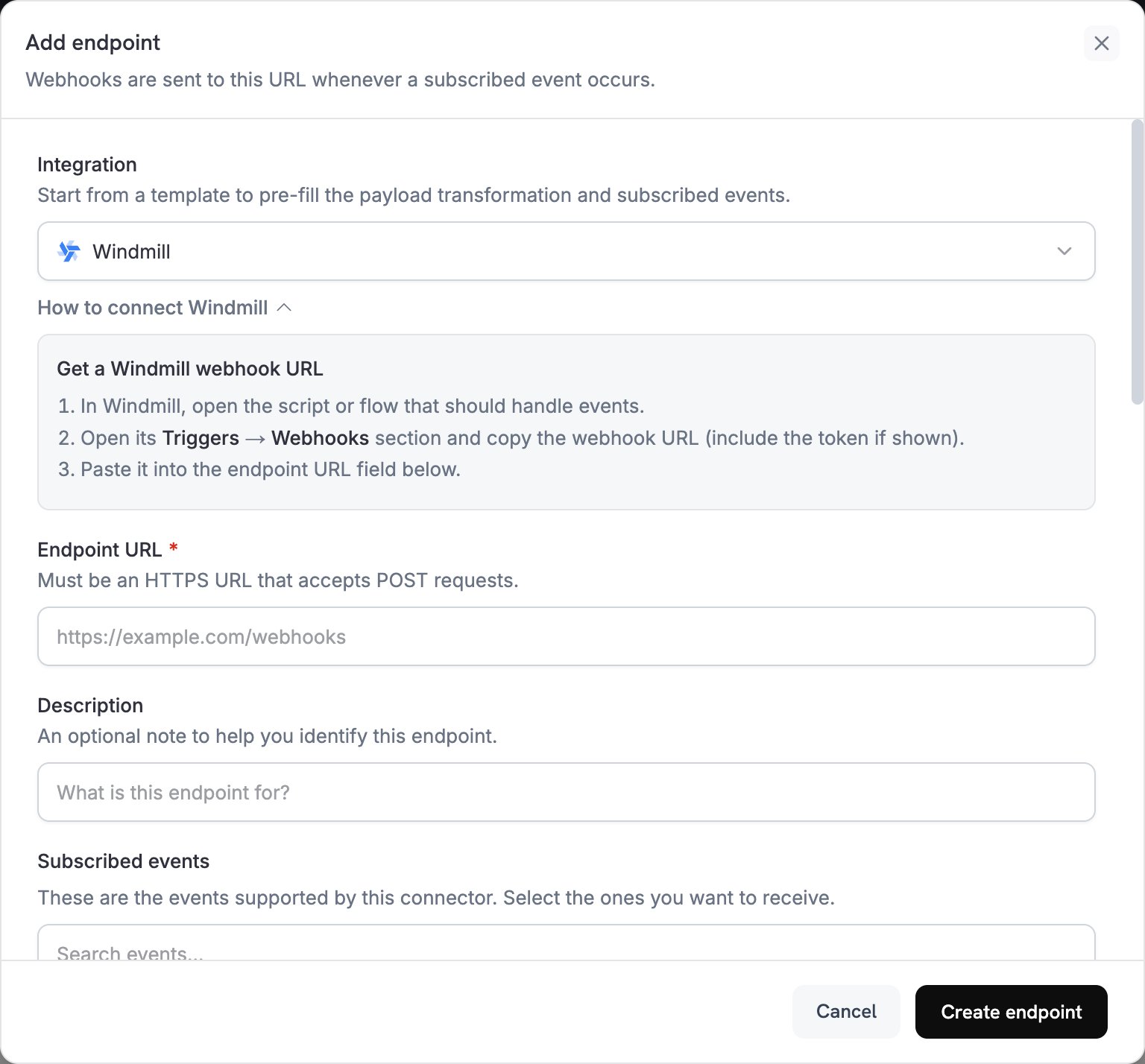
2
Select Windmill
Integration에서 Windmill을 선택합니다. 대시보드가 Windmill 변환 코드를 불러오고 How to connect Windmill 패널에 설정 단계를 표시합니다.
3
Copy the Windmill Webhook URL
Windmill에서 이벤트를 처리할 스크립트 또는 플로우를 엽니다. Triggers 탭에서 Webhooks를 열고 비동기 (UUID/Async) webhook URL을 복사합니다. 그런 다음 해당 스크립트 또는 플로우 전용 webhook-specific token을 생성하고 복사합니다. 이 token은 해당 스크립트 또는 플로우만 실행할 수 있습니다.
4
Paste Webhook URL
Windmill webhook URL을 Endpoint URL에 붙여 넣습니다. URL은 HTTPS를 사용해야 하므로 self-hosted Windmill 인스턴스에는 public HTTPS 주소가 필요합니다. Windmill connector에는 API key 필드가 없으므로 endpoint를 생성한 후 token을 추가합니다.
5
Select Events
Subscribed events에는 Windmill connector가 지원하는 이벤트가 나열됩니다. 스크립트 또는 플로우가 처리하는 이벤트만 남겨 둡니다.
6
Configure Transformation
Transformation code에서 handler를 편집하여 payload의 최상위 키가 스크립트 또는 플로우의 입력과 일치하도록 합니다. 예시에서 시작하세요.
7
Test & Create
Test this code에서 이벤트 유형을 선택하고 Simulate를 클릭하여 payload를 미리 봅니다. 그런 다음 Create endpoint를 클릭합니다.
8
Add the Windmill Token
endpoint를 생성한 직후 Advanced 탭을 엽니다. Custom headers에서 Add header를 클릭합니다. 이름으로
Authorization를 입력하고, 값으로 Bearer, 공백, 그리고 token을 입력합니다. 그런 다음 Save를 클릭합니다. header를 저장할 때까지 Windmill은 전송을 거부하며, Dodo Payments는 retry schedule에 따라 재시도합니다.Windmill은 URL 끝의 token query parameter에도 token을 허용합니다. token이 포함된 URL을 볼 수 있는 사람은 누구나 token을 사용할 수 있으므로 Windmill은 header 사용을 권장합니다.9
Done
이제 구독 이벤트가 스크립트 또는 플로우의 실행을 시작합니다. 테스트 이벤트를 보내려면 endpoint의 Testing 탭을 열고 이벤트 유형을 선택한 다음 Send example을 클릭합니다. Windmill에서는
Webhook trigger와 함께 Runs 페이지에 실행이 표시됩니다.변환 코드 예시
각 handler는webhook.payload를 flat object로 대체하고, Windmill webhook URL인 webhook.url는 유지합니다. Windmill은 각 최상위 키를 동일한 이름의 스크립트 또는 플로우 입력으로 전달하므로 첫 번째 예시의 스크립트는 event_type, payment_id, amount와 같은 입력을 선언합니다. Dodo Payments 금액은 통화의 최소 단위로 표시되므로, 예시에서는 100으로 나누고 "25.00"와 같은 문자열로 결과를 전송합니다. JPY 및 KRW와 같은 소수점 없는 통화의 경우 금액을 그대로 사용합니다.
기본 워크플로 payload
성공한 결제의 세부 정보를 전송합니다:basic_workflow.js
구독 워크플로 handler
구독이 활성화되거나 취소될 때subscription_started 또는 subscription_cancelled 이벤트를 전송합니다:
subscription_workflow.js
분쟁 워크플로 handler
모든 분쟁 이벤트를 전송하며, 분쟁이 시작될 때urgent를 true로 설정합니다:
dispute_workflow.js
일반적인 Windmill 사용 사례
Database Operations
Database Operations
- PostgreSQL 또는 MySQL에서 고객 레코드 업데이트
- 데이터 웨어하우스에 결제 이벤트 기록
- 외부 시스템과 데이터 동기화
- 재고 수준 업데이트
- 분석 지표 추적
Business Logic
Business Logic
- 수익 지표 계산
- 환불 및 조정 처리
- 구독 수명 주기 변경 처리
- 보고서 및 export 생성
- 결제 데이터 검증
External Integrations
External Integrations
- 분석 플랫폼으로 데이터 전송
- CRM 시스템 업데이트
- 이메일 캠페인 시작
- 캘린더 이벤트 생성
- SMS 알림 전송
팁
- payload 키의 이름을 스크립트 또는 플로우 입력에 맞추세요. Windmill은 각 최상위 키를 동일한 이름의 입력에 매핑합니다.
- 이벤트 간에 동일한 필드 이름을 사용하여 하나의 스크립트가 여러 이벤트 유형을 처리할 수 있도록 하세요.
- 이벤트 유형과
timestamp를 포함하세요. 이벤트는 순서가 뒤바뀌어 도착할 수 있으며,timestamp를 사용하면 스크립트가 이벤트 순서를 정할 수 있습니다. - 비동기 webhook URL을 사용하세요. 동기 URL은 실행이 완료될 때까지 기다리며, 전송 timeout보다 오래 걸리는 실행은 실패한 전송으로 처리되어 Dodo Payments가 재시도합니다.
- 재시도로 인해 이벤트가 두 번 이상 전송될 수 있으므로 동일한 이벤트를 두 번 실행해도 안전하도록 스크립트를 작성하세요.
- 코드에서 이벤트를 건너뛰려면 webhook을 return하기 전에
webhook.cancel = true를 설정하세요. 로그에는 건너뛴 전송이 성공으로 기록됩니다. - 실행이 실패할 때 알림을 받으려면 Windmill의 error handlers를 사용하세요.
문제 해결
Workflows Not Triggering
Workflows Not Triggering
- Endpoint URL이 스크립트 또는 플로우의 webhook URL이고 endpoint가 활성화되어 있는지 확인하세요.
Authorizationheader에Bearer와 유효한 token이 포함되어 있는지 확인하세요. webhook-specific token은 해당 스크립트 또는 플로우만 실행합니다.- 스크립트 또는 플로우가 배포되어 있는지 확인하세요. webhook은 draft가 아니라 가장 최근에 배포된 버전을 실행합니다.
- Developer → Webhooks의 Logs 탭을 열어 각 전송에 대한 Windmill의 응답을 확인하세요.
Data Processing Issues
Data Processing Issues
- payload의 최상위 키가 이름 기준으로 스크립트 또는 플로우 입력과 일치하는지 확인하세요.
- 각 값이 입력 유형과 일치하는지 확인하세요. 예시에서는 금액을 문자열로 전송합니다.
Webhooktrigger로 필터링한 Windmill Runs 페이지에서 실행을 확인하세요. 비동기 URL은 Windmill이 실행을 대기열에 추가하는 즉시 응답하므로, 실행이 실패하더라도 Dodo Payments 로그에는 성공한 전송으로 표시됩니다.- Simulate의 payload를 사용하여 Windmill에서 스크립트 또는 플로우를 실행하세요.