

소개
AutoSend 통합은 성공한 결제부터 실패한 결제 시도와 환불 확인에 이르기까지 Dodo Payments 이벤트가 발생할 때마다 AutoSend의 이메일 API를 통해 이메일을 전송합니다. 웹훅 엔드포인트의 transformation은 각 이벤트를 AutoSend send 요청으로 변환합니다. 설정하려면 AutoSend API 키와 AutoSend에서 인증된 sender domain이 필요합니다. AutoSend 대시보드의 Settings → API Keys에서 API 키를 찾을 수 있습니다.시작하기
다음 단계에 따라 AutoSend를 Dodo Payments에 연결하세요:1
Open Webhook Section
Dodo Payments 대시보드에서 Developer → Webhooks로 이동한 다음 Add endpoint를 클릭합니다.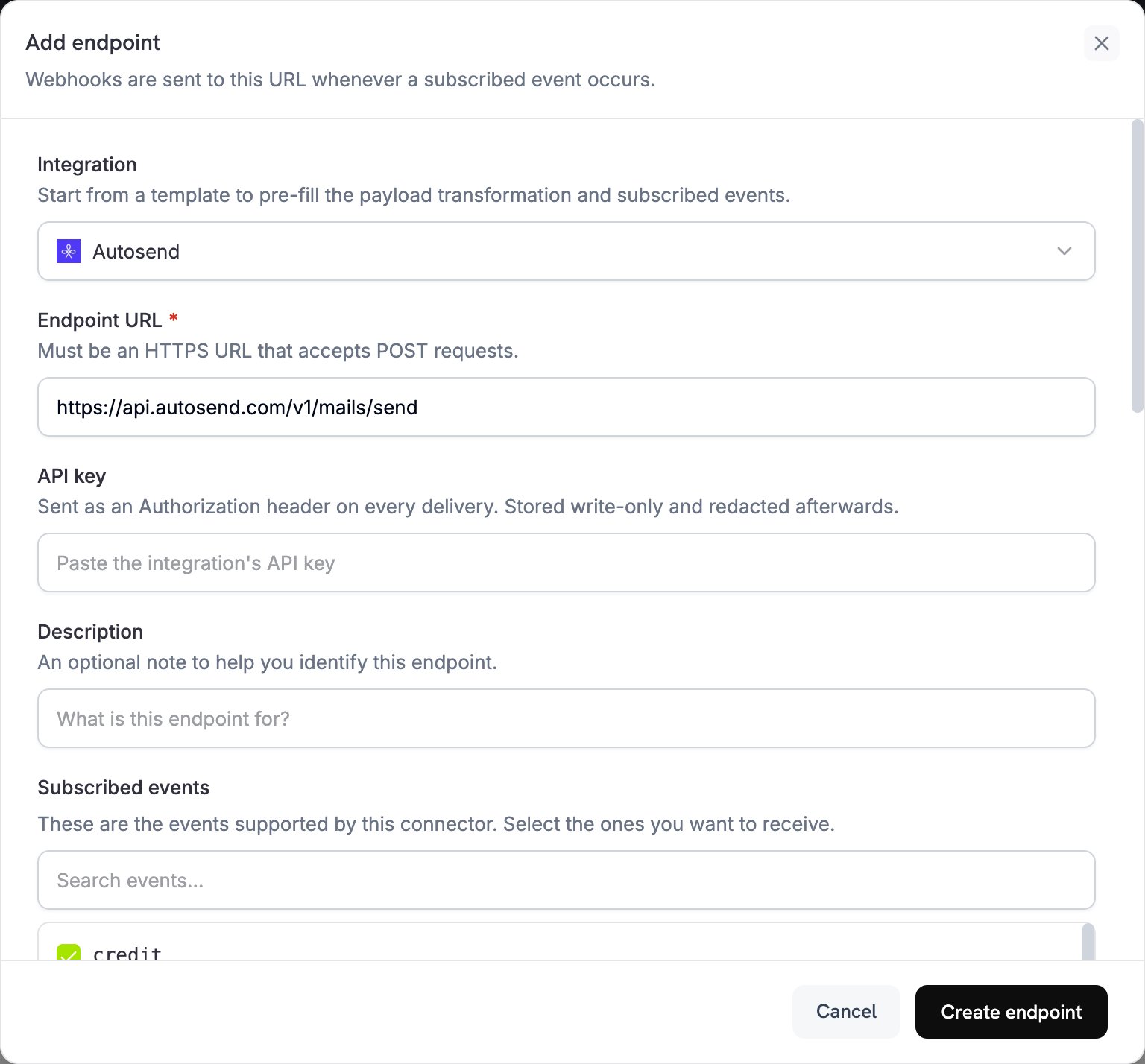
2
Select AutoSend Integration
Integration에서 Autosend를 선택합니다.
3
Enter API Key
API key에 AutoSend API 키를 붙여 넣습니다. Dodo Payments는 모든 delivery의
Authorization 헤더에 이 키를 포함합니다.Learn how to create and manage API keys
4
Select Events
Subscribed events에서 transformation이 처리할 이벤트를 선택합니다. 예를 들어
payment.succeeded, subscription.active, payment.failed 등이 있습니다. 이벤트를 선택하지 않은 엔드포인트는 모든 이벤트 유형을 수신합니다.5
Configure Transformation
Transformation code에서 각 이벤트에 대한 이메일을 생성하는 JavaScript handler를 작성합니다. code examples에서 시작하세요.
6
Test & Create
Test this code에서 Simulate를 클릭하여 샘플 payload에 대해 handler를 실행하고 결과를 확인합니다. 그런 다음 Create endpoint를 클릭합니다.
7
Activation Complete
구독한 이벤트가 발생할 때마다 엔드포인트가 AutoSend를 통해 이메일을 전송합니다.
코드 예시
각 handler는webhook.eventType에서 이벤트 유형을 확인하고 webhook.payload.data에서 이벤트 데이터를 읽습니다. webhook.url를 AutoSend의 send endpoint로 설정하고 webhook.payload를 이메일 요청으로 대체합니다. total_amount와 같은 Dodo Payments 금액은 가장 작은 통화 단위로 표시됩니다. 예를 들어 USD의 경우 센트 단위입니다.
결제 확인 이메일
결제가 성공하면 확인 이메일을 전송합니다(payment.succeeded):
payment_confirmation.js
구독 환영 이메일
구독이 활성화되면 환영 이메일을 전송합니다(subscription.active). 이 예시에서는 product_id를 planName로 전달합니다. 템플릿에 요금제 이름을 표시하는 경우 먼저 ID를 표시 이름에 매핑하세요.
subscription_welcome.js
결제 실패 알림
결제가 실패하면 알림 이메일을 전송합니다(payment.failed). 결제의 error_message 필드에 실패 이유가 포함됩니다.
payment_failure.js
권장 사항
-
발신자 도메인 확인: AutoSend는 확인된 도메인에서만 전송하므로 엔드포인트를 생성하기 전에 AutoSend에서
from주소의 도메인을 확인하세요. 확인된 도메인은 deliverability도 개선하고 이메일이 스팸 폴더로 이동하는 것을 방지하는 데 도움이 됩니다. -
개인화를 위해 동적 데이터 사용: 이름, 결제 금액, 구독 세부 정보와 같은 고객별 값을
dynamicData필드에 전달하고, AutoSend 템플릿에서 이를 변수로 참조하세요. - 명확한 제목 작성: 이메일의 목적을 나타내는 제목을 작성하세요. 스팸 필터를 트리거하는 단어는 피하고 제목을 50자 이내로 유지하세요.
-
프로덕션 전에 테스트: Test this code를 사용하여 각 handler를 실행한 다음 실제 운영을 시작하기 전에 테스트 이메일을 전송하세요. 콘텐츠가 올바르게 렌더링되고 모든
dynamicData값이 매핑되었는지 확인하세요.
API Reference
send endpoint의 모든 parameter와 error code는 AutoSend API documentation을 참조하세요.문제 해결
Emails Not Being Sent
Emails Not Being Sent
- API 키가 올바르고 활성 상태인지 확인합니다.
- AutoSend에서 발신자 도메인이 확인되었는지 확인합니다.
- 수신자 이메일 주소가 유효한지 확인합니다.
- AutoSend 전송 제한 및 quota를 검토합니다.
- transformation이 send endpoint URL을 설정하는지 확인합니다:
https://api.autosend.com/v1/mails/send. - payload에 모든 필수 parameter가 포함되어 있는지 확인합니다.
- Developer → Webhooks의 Logs 탭에서 엔드포인트의 delivery attempts를 열어 AutoSend의 response code를 확인합니다.
Transformation Errors
Transformation Errors
- payload가 AutoSend API 형식과 일치하는지 확인합니다.
- 모든 필수 field가 있는지 확인합니다:
to,from, 그리고templateId또는html/text중 하나입니다.templateId가 없으면subject도 필요합니다. - 이메일 주소 형식이 올바른지 확인합니다.
- 템플릿을 사용하는 경우
templateId가 유효한지 확인합니다. dynamicData키가 템플릿 변수와 일치하는지 확인합니다.
Template Issues
Template Issues
- 템플릿 ID가 올바르고 AutoSend에서 템플릿이 활성 상태인지 확인합니다.
dynamicData키가 템플릿의 변수와 일치하는지 확인합니다.- 모든 필수 템플릿 변수에 값이 있는지 확인합니다.
- AutoSend dashboard에서 템플릿 자체를 테스트합니다.