

소개
SendGrid integration은 Dodo Payments 이벤트가 발생할 때 SendGrid의 Mail Send API를 통해 트랜잭션 이메일을 전송합니다. 각 이메일은 SendGrid dynamic template 중 하나를 사용하며, 이벤트의 데이터로 채워집니다. 이를 통해 결제를 확인하고, 새로운 구독자를 환영하며, 결제 실패 후 후속 조치를 진행할 수 있습니다.이 integration에는 Mail Send 권한이 있는 SendGrid API key, SendGrid에서 verified sender, 그리고 전송할 각 이메일에 대한 dynamic template이 필요합니다. 또한 Dodo Payments dashboard에서 Developer → Webhooks에 액세스할 수 있어야 합니다.
시작하기
1
Open the Webhook Section
Dodo Payments 대시보드에서 Developer → Webhooks로 이동한 다음 Add endpoint를 클릭합니다.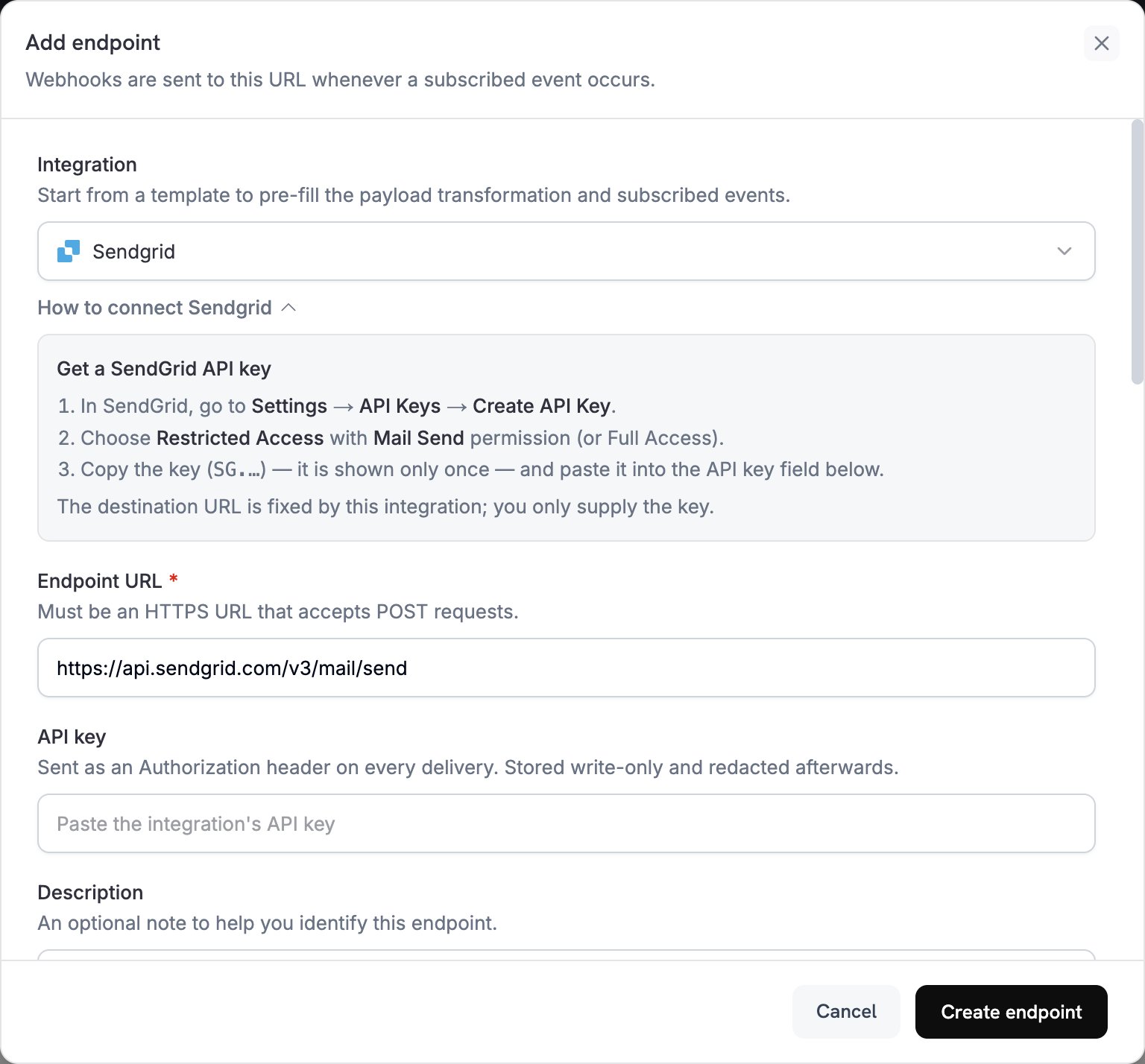
2
Select SendGrid
Integration에서 SendGrid를 선택합니다. dashboard가 Endpoint URL과 SendGrid용 transformation code를 입력하고, How to connect SendGrid 패널에 설정 단계가 표시됩니다.
3
Enter API Key
SendGrid에서 Settings → API Keys로 이동한 다음 Create API Key를 클릭합니다. Restricted Access와 Mail Send 권한을 선택하거나 Full Access를 선택합니다. SendGrid는
SG.로 시작하는 key를 한 번만 표시합니다. 이 key를 API key에 붙여 넣습니다. Dodo Payments는 SendGrid로 보내는 모든 요청의 Authorization header에 이 key를 bearer token으로 전송합니다.4
Select Events
Subscribed events에서 transformation이 처리하는 이벤트만 선택합니다. transformation이 변경하지 않은 이벤트는 Dodo Payments 형식으로 SendGrid에 전달되며, SendGrid가 이를 거부합니다.
5
Configure Transformation
Transformation code에서 handler를 편집하여 SendGrid의 Mail Send API용 이메일 형식으로 지정합니다. examples에서 시작한 다음 각
template_id를 d-로 시작하는 자체 dynamic template의 ID로 바꿉니다.6
Test & Create
Test this code에서 이벤트 유형을 선택하고 Simulate를 클릭하여 SendGrid로 전송될 요청을 미리 봅니다. 그런 다음 Create endpoint를 클릭합니다.
7
Done
이제 Dodo Payments는 구독한 각 이벤트에 대해 SendGrid를 통해 이메일을 전송합니다. 각 전송과 SendGrid의 응답을 확인하려면 Developer → Webhooks에서 Logs 탭을 엽니다.
Transformation Code 예시
각 handler는webhook.url를 Mail Send endpoint로 설정하고 dynamic_template_data를 통해 event data를 dynamic template에 전달합니다. Dodo Payments 금액은 통화의 최소 단위로 표시되므로 예시에서는 100으로 나눕니다. JPY 및 KRW와 같은 소수점이 없는 통화의 경우 금액을 그대로 사용합니다.
결제 확인 이메일
결제가 성공하면 영수증을 전송합니다(payment.succeeded):
payment_confirmation.js
구독 환영 이메일
구독이 활성화되면 고객을 환영합니다(subscription.active):
subscription_welcome.js
결제 실패 알림
결제가 실패하면 고객에게 재시도하도록 요청합니다(payment.failed):
payment_failure.js
팁
- SendGrid dynamic template을 사용하여 콘텐츠를 개인화합니다.
- 템플릿에 필요한 결제 데이터를
dynamic_template_data에 전달합니다. - verified sender와 일치하는
from주소와 발신자name를 설정합니다. - template ID를 재사용하여 동일한 유형의 이메일이 같은 형식을 유지하도록 합니다.
- marketing content가 포함된 모든 이메일에 unsubscribe link를 포함합니다.
- code에서 이벤트를 건너뛰려면 webhook을 반환하기 전에
webhook.cancel = true를 설정합니다. 로그에는 건너뛴 전송이 성공으로 기록됩니다.
문제 해결
Emails Not Being Sent
Emails Not Being Sent
- API key에 Mail Send 권한이 있는지 확인합니다. 교체하려면 endpoint를 편집하고 API key에 새 key를 붙여 넣습니다.
- 각
template_id가 활성 상태인 dynamic template에 속하는지 확인합니다. - 수신자 이메일 주소가 유효한지 확인합니다.
- 요금제의 SendGrid 전송 한도와 quota를 확인합니다.
- Developer → Webhooks에서 Logs 탭을 열고 실패한 전송에 대한 SendGrid의 응답을 확인합니다.
Transformation Errors
Transformation Errors
- payload가 SendGrid의 Mail Send 형식과 일치하는지 확인합니다.
- 필요한 모든 field가 있는지 확인합니다.
personalizations에는 하나 이상의to주소가 있어야 하며,from도 필요합니다. dynamic_template_data의 key가{{customer_name}}와 같이 템플릿의 변수와 일치하는지 확인합니다.- 각
from주소가 SendGrid에서 verified 상태인지 확인합니다.