

소개
n8n integration은 결제 이벤트가 발생할 때마다 n8n workflow를 시작하므로, Dodo Payments를 n8n이 통합하는 모든 앱에 연결할 수 있습니다. Workflow는 이메일을 보내고, 스프레드시트를 업데이트하고, task를 생성하고, database에 기록하는 등 다양한 작업을 수행할 수 있습니다.이 integration에는 n8n workflow의 Webhook node에서 가져온 webhook URL이 필요합니다.
시작하기
1
Open the Webhook Section
Dodo Payments 대시보드에서 Developer → Webhooks로 이동한 다음 Add endpoint를 클릭합니다.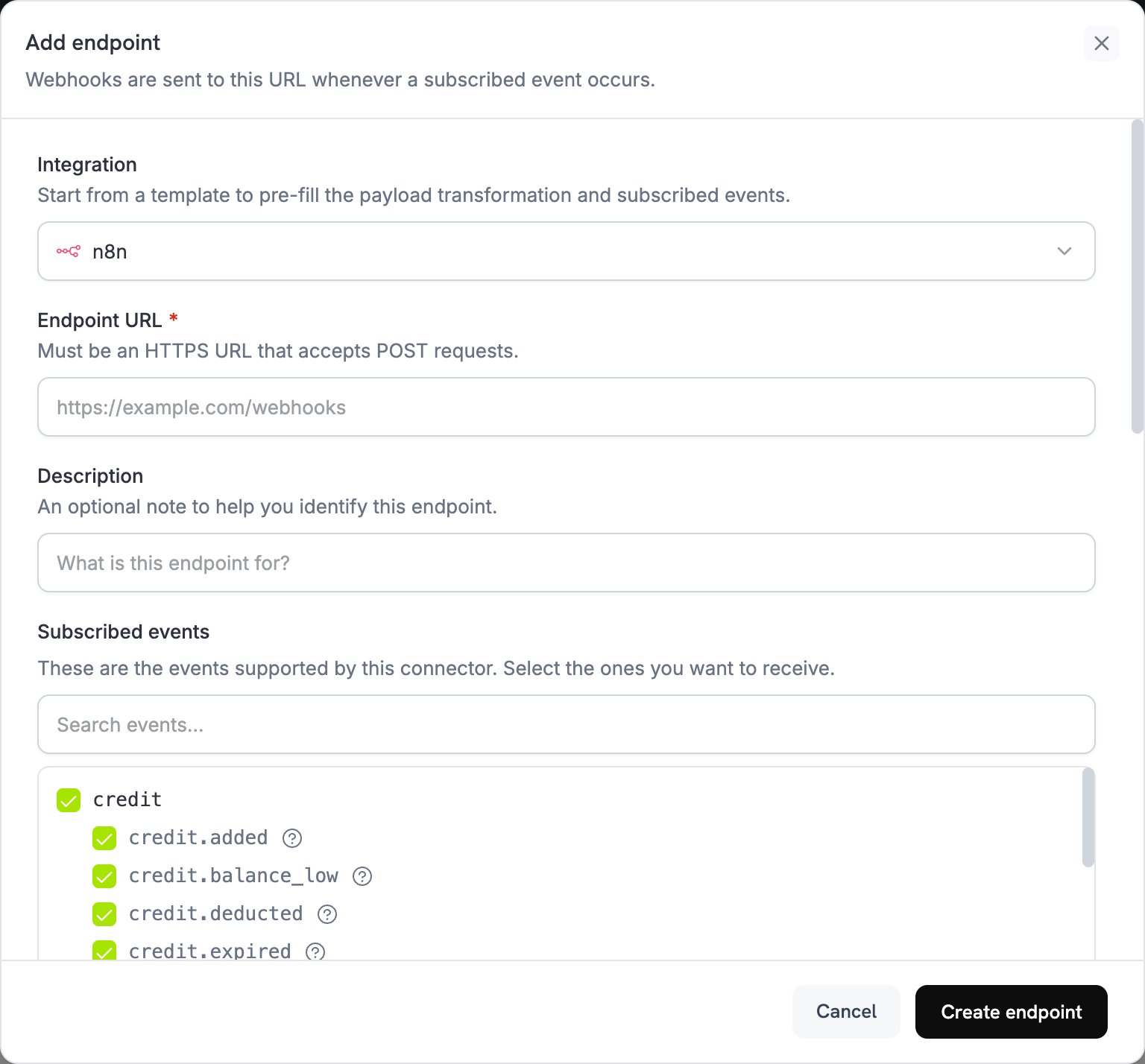
2
Select n8n
Integration 목록에서 n8n을 선택합니다.
3
Create Webhook in n8n
n8n에서 workflow를 생성하고 trigger로 Webhook node를 추가합니다. HTTP Method를
POST로 설정한 다음 Production URL을 복사합니다. test URL은 n8n이 test event를 수신하는 동안에만 event를 받습니다.4
Paste Webhook URL
n8n production URL을 Endpoint URL field에 붙여넣습니다.
5
Configure Transformation
Transformation code 아래의 code를 편집하여 n8n workflow에 맞게 data 형태를 지정합니다. 아래 예시를 참고하세요.
6
Test & Create
Test this code에서 sample payload를 사용해 transformation을 실행한 다음 Create endpoint를 클릭합니다.
7
Publish the Workflow
n8n에서 workflow를 publish합니다. n8n은 workflow가 publish된 경우에만 production webhook URL을 등록합니다.
8
Done
이제 payment event가 n8n workflow를 trigger합니다.
변환 코드 예제
각 예시는 Dodo Payments event를 n8n node가 직접 읽을 수 있는 작은 JSON object로 평면화합니다.기본 Webhook Payload
이 예시는 결제가 성공할 때 payment amount, currency, customer 및 payment method를 전송합니다.basic_webhook.js
Subscription Event Handler
이 예시는subscription_started 또는 subscription_cancelled event를 전송하므로, 하나의 workflow에서 event_type를 기준으로 분기할 수 있습니다.
subscription_webhook.js
Dispute Alert Handler
이 예시는 모든dispute.* event를 전송하며, dispute가 시작되면 urgent를 true로 설정합니다.
dispute_webhook.js
주요 N8N 사용 사례
다음은 merchant가 Dodo Payments event를 기반으로 구축하는 일반적인 workflow입니다.Email Notifications
Email Notifications
- payment confirmation을 위해 Gmail 또는 Outlook 이메일을 보냅니다.
- Mailchimp 또는 ConvertKit에서 email sequence를 생성합니다.
- webhook을 통해 Slack 또는 Discord 알림을 보냅니다.
- Google Sheets record를 생성합니다.
- Telegram 또는 WhatsApp message를 보냅니다.
CRM Updates
CRM Updates
- HubSpot 또는 Salesforce에 contact를 추가합니다.
- Pipedrive 또는 Close에서 deal을 생성합니다.
- Airtable에서 customer record를 업데이트합니다.
- Monday.com에 activity를 기록합니다.
- PostgreSQL 또는 MySQL database에 data를 동기화합니다.
Task Management
Task Management
- Asana 또는 Trello에서 task를 생성합니다.
- Notion에 to-do item을 추가합니다.
- Google Calendar에서 event를 생성합니다.
- Twilio를 통해 SMS notification을 보냅니다.
- dispute에 대한 GitHub issue를 생성합니다.
Data Processing
Data Processing
- payment data를 변환하고 보강합니다.
- PostgreSQL 또는 MongoDB와 같은 database에 event를 저장합니다.
- metric 및 analytics를 집계합니다.
- report 및 export를 생성합니다.
- multi-step workflow를 trigger합니다.
팁
- payload structure를 단순하게 유지하여 n8n node가 이를 parse할 수 있도록 합니다.
- 모든 event에서 동일한 field name을 사용합니다.
- workflow timing 및 scheduling을 위해 timestamp를 포함합니다.
- workflow를 publish하기 전에 sample data로 test합니다.
- conditional logic 및 routing에는 IF node를 사용합니다.
- custom data transformation에는 Code node를 사용합니다.
- 각 event type을 자체 path로 route하려면 Switch node를 사용합니다.
- 실패한 execution을 포착할 수 있도록 n8n에서 error workflow를 설정합니다.
문제 해결
Workflow Not Triggering
Workflow Not Triggering
- endpoint가 n8n production URL을 사용하는지, n8n에 인터넷에서 연결할 수 있는지 확인합니다.
- workflow가 n8n에서 publish되었는지 확인합니다.
- Webhook node의 HTTP Method가
POST인지 확인합니다. - workflow의 Executions tab에서 incoming request를 확인합니다.
- firewall 및 network 설정이 incoming webhook을 허용하는지 확인합니다.
- Webhook node에 authentication이 필요한 경우 Custom Headers의 endpoint에 해당 header를 추가합니다.
Data Not Mapping Correctly
Data Not Mapping Correctly
- n8n node configuration의 field name을 확인합니다.
- data type이 node에서 요구하는 format과 일치하는지 확인합니다.
- n8n test URL을 사용하여 incoming data를 확인합니다.
- transformation code가 유효한 JSON을 반환하는지 확인합니다.
- Webhook node의 response 설정을 확인합니다.
- field name을 변경하거나 structure를 재구성하려면 Edit Fields (Set) node를 사용합니다.
Workflow Execution Errors
Workflow Execution Errors
- 자세한 error message를 확인하려면 n8n의 execution log를 검토합니다.
- node connection 설정 및 credential을 확인합니다.
- payload에 필요한 모든 field가 포함되어 있는지 확인합니다.
- sample data로 개별 node를 test합니다.
- 실패를 포착하고 처리할 수 있도록 error workflow를 활성화합니다.
- 연결된 service의 rate limit 및 API quota를 확인합니다.