

소개
Segment integration은 Dodo Payments 이벤트를 Track 및 Identify 호출로 Segment의 HTTP Tracking API에 전송합니다. 그런 다음 Segment는 워크스페이스에 연결된 300개 이상의 destination 카탈로그에서 분석, 마케팅 및 warehouse 도구로 결제, 구독 및 고객 데이터를 전달합니다.이 integration에는 Segment 워크스페이스의 HTTP API source에 대한 Write Key가 필요합니다. 또한 Dodo Payments dashboard에서 Developer → Webhooks에 액세스할 수 있어야 합니다.
시작하기
1
Open the Webhook Section
Dodo Payments 대시보드에서 Developer → Webhooks로 이동한 다음 Add endpoint를 클릭합니다.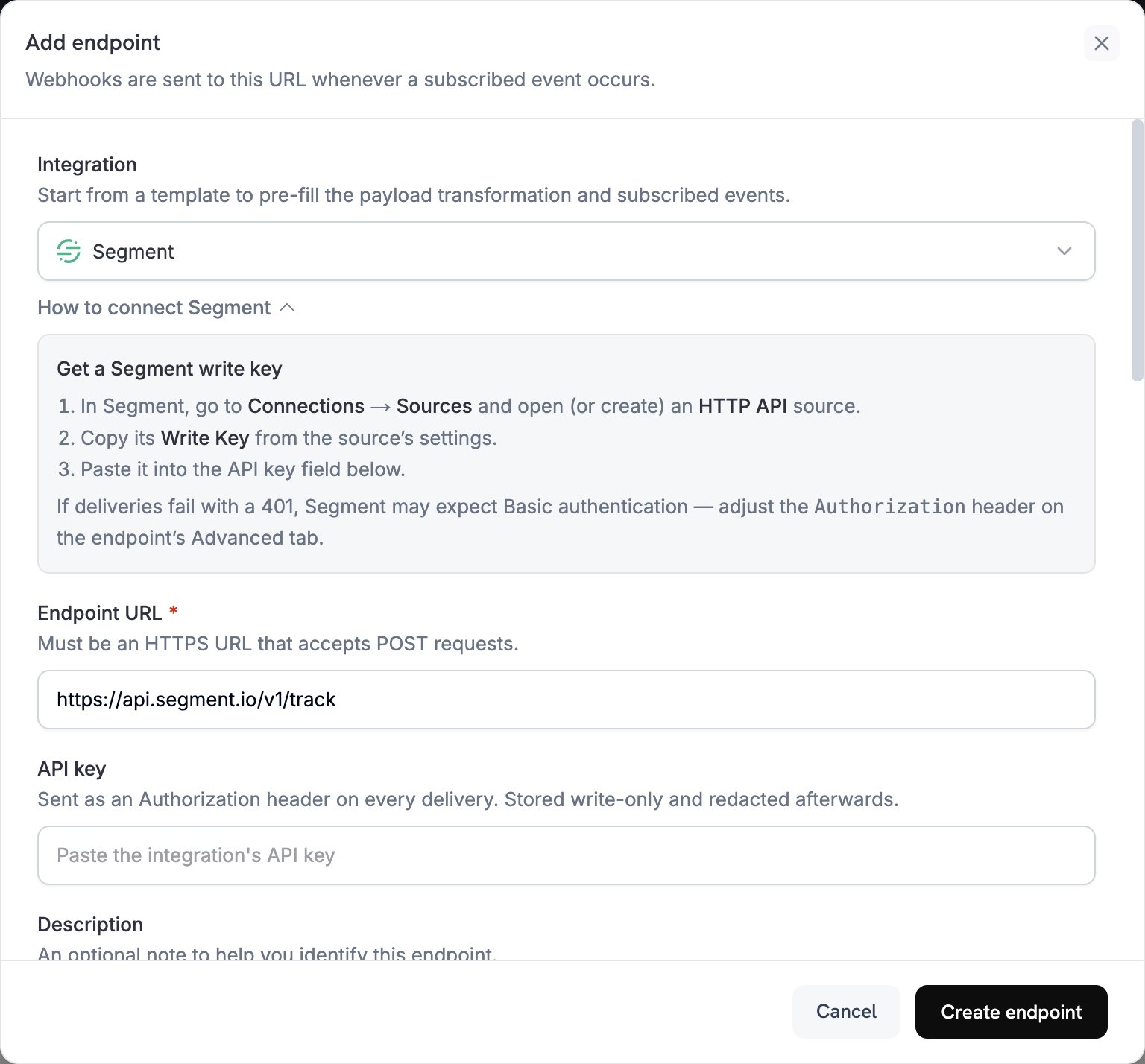
2
Select Segment
Integration에서 Segment를 선택합니다. dashboard가 Endpoint URL과 Segment용 transformation code를 자동으로 입력합니다.
3
Enter Write Key
Segment에서 Connections → Sources로 이동하여 HTTP API source를 열거나 생성합니다. source 설정에서 Write Key를 복사하여 API key에 붙여넣습니다.
4
Select Events
Subscribed events에서 transformation이 처리하는 이벤트만 선택합니다. 이 페이지의 예시에서는
payment.succeeded, subscription.active 및 subscription.cancelled를 사용합니다.5
Configure Transformation
Transformation code에서 handler를 편집하여 Segment의 Track 또는 Identify API에 맞는 형식으로 이벤트를 지정합니다. examples에서 시작할 수 있습니다.
6
Test & Create
Test this code에서 이벤트 유형을 선택하고 Simulate를 클릭하여 Segment로 전송될 호출을 미리 봅니다. 그런 다음 Create endpoint를 클릭합니다.
7
Switch to Basic Authentication
Dodo Payments는 API key 값을 bearer token으로 전송하지만, Segment의 HTTP API는 Basic authentication을 통한 Write Key 또는 요청 본문의
writeKey 필드를 허용합니다. endpoint를 생성한 직후 해당 endpoint의 Advanced 탭을 엽니다. Custom headers에서 숨겨진 Authorization 행에 새 값을 입력합니다: Basic, 공백 하나, 그리고 콜론을 추가한 Write Key의 Base64 인코딩 값입니다. 그런 다음 Save를 클릭합니다. 예를 들어 echo -n 'YOUR_WRITE_KEY:' | base64는 인코딩된 값을 출력합니다.8
Done
이제 Subscribed events가 Segment에 도달하고, Segment는 이를 연결된 destination으로 전달합니다.
Transformation Code Examples
각 handler는webhook.url를 Segment API endpoint로 설정하고 webhook.payload를 호출로 대체합니다. Dodo Payments 금액은 가장 작은 통화 단위로 표시되므로 예시에서는 100으로 나눕니다. JPY 및 KRW와 같은 소수점 없는 통화는 금액을 그대로 사용합니다.
Track Payment Events
결제가 성공하면Payment Completed 이벤트를 기록합니다:
track_payments.js
Track Subscription Lifecycle
Subscription Started 및 Subscription Cancelled 이벤트를 기록합니다:
track_subscriptions.js
Identify Customer Properties
각 결제가 성공한 후 고객의 traits를 업데이트합니다. 각 Identify 호출은 전송하는 값으로 traits를 설정하므로, 이러한 traits는 최신 결제를 나타냅니다:identify_customer.js
Tips
- integration 전체에서 일관된 이벤트 이름을 사용합니다. 예를 들어
Payment Completed에서 Segment의 object 및 action 형식을 사용할 수 있습니다. - 분석 및 segmentation에 필요한 properties를 포함합니다.
- 이벤트의
timestamp에서timestamp를 설정하여 Segment가 이벤트가 도착한 시간이 아니라 이벤트가 발생한 시간을 기록하도록 합니다. - Dodo Payments
customer_id를userId로 사용하여 고객에 대한 모든 호출이 동일한 Segment 사용자에 연결되도록 합니다.
Troubleshooting
Events Not Appearing in Segment
Events Not Appearing in Segment
- Write Key가 HTTP API source에 속하고
Authorizationheader가 Basic authentication을 사용하는지 확인합니다. - Segment는 대부분의 요청에 대해
200를 반환하며, 여기에는 수락하지 않는 요청도 포함됩니다. 따라서 Dodo Payments 로그에 성공적인 전송이 표시된다고 해서 이벤트가 도착했다는 의미는 아닙니다. Segment에서 source의 Debugger를 확인합니다. - 이벤트 이름이 Segment의 명명 규칙을 따르는지 확인합니다.
- 모든 호출에서
userId를 설정하는지 확인합니다.userId또는anonymousId가 없는 호출은 Segment가 거부합니다. - HTTP API에 대한 Segment의 rate limits를 확인합니다. Segment는 워크스페이스당 초당 1,000개 미만의 요청을 권장합니다.
- 워크스페이스에서 Segment의 EU region을 사용하는 경우 대신
https://events.eu1.segmentapis.com/v1/track및https://events.eu1.segmentapis.com/v1/identify로 호출을 전송합니다.
Transformation Errors
Transformation Errors
- payload가 Segment의 API 형식과 일치하는지 확인합니다.
- 필요한 모든 field가 있는지 확인합니다. Track에는
event가 필요하며, Track과 Identify 모두userId또는anonymousId가 필요합니다. - 이벤트 이름이 object가 아닌 문자열인지 확인합니다.