

简介
Rekomi 是一个 affiliate tracking and management platform,原生集成 Dodo Payments。Affiliate 分享链接后,Rekomi 会记录点击。当访客购买时,Dodo Payments 会将销售信息发送给 Rekomi,由 Rekomi 将销售归因给正确的 affiliate。Rekomi 会计算 commission,并代表你向 affiliates 付款,覆盖 150 多个国家/地区,且包含税务表单。 要进行连接,你只需将一个具有 write access 的 Dodo Payments API key 粘贴到 Rekomi 中。Rekomi 会验证该 key,在你的 Dodo Payments 账户中创建 webhook endpoint,并获取该 endpoint 的 signing secret。你无需填写 webhook 表单,也无需将任何内容粘贴回 Dodo Payments。当被推荐的客户完成一次性付款、开始付费订阅或支付续费时,Rekomi 会将销售归因给 affiliate。发生退款和争议时,commission 会自动追回。
工作原理
Dodo Payments 在自己的域名上托管 checkout,因此联盟推荐信息会作为 checkout metadata 进入销售记录:- 访客点击 affiliate 链接并进入你的网站,Rekomi script 会将推荐信息存储在其浏览器中。
- 在 checkout 时,你会将该推荐信息作为
rekomi_refmetadata 添加到 payment 中。 - Dodo Payments 处理 payment,并向 Rekomi 创建的 endpoint 发送带签名的
payment.succeededwebhook。 - Rekomi 将推荐信息与 affiliate 匹配,按未含税销售金额计算 commission,并记录该信息。
前提条件
在设置此集成之前,你需要:- 一个处于 live mode 的 Dodo Payments 账户
- 一个 Rekomi 账户
- 一个已启用 write access 的 Dodo Payments API key,因为 read-only keys 无法创建 webhooks
开始使用
1
Create an API Key with Write Access
在 Dodo Payments dashboard 中,前往 Developer → API Keys,然后点击 Add API Key。将 key 命名为
Rekomi,并保持勾选 Enable write access。详情请参阅 Authentication。2
Paste the Key into Rekomi
在 Rekomi 中打开 Setup → Connect payment processor,选择 Dodo Payments,然后粘贴 key。Rekomi 会验证该 key,在你的账户中创建 webhook endpoint,并获取该 endpoint 的 signing secret。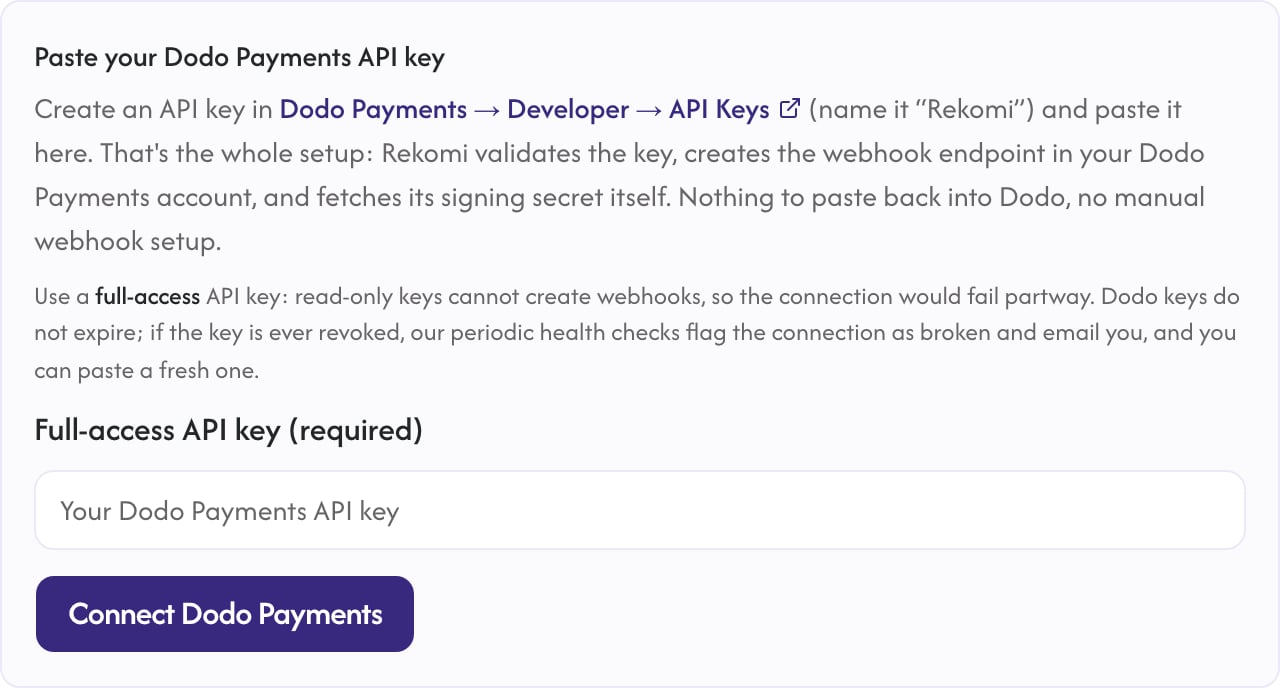
连接后,Rekomi 仅使用该 key 管理 webhook endpoint 并定期执行 health checks。你的销售数据会通过带签名的 webhook 到达,而不是通过 API 到达。
3
Install the Rekomi Script
将 Rekomi tracking script 添加到你的 marketing site,以捕获 affiliate clicks。Rekomi 会在 Setup → Install 下显示你的 snippet,并自动填入 program ID。
4
Pass the Referral into Checkout
将捕获的推荐信息作为
rekomi_ref metadata 添加到每个 payment 中。Implementation Guide 介绍了每种 checkout 类型的操作方式。5
Done
Sales、renewals、refunds 和 disputes 现在会自动为 affiliate credit 和 claw back commissions,Rekomi 会向你的 affiliates 付款。
实现指南
通过 API 使用 Checkout Sessions
在 frontend 中,使用window.Rekomi.getReferral() 读取推荐信息,并在 checkout request 中将其发送到 backend。在 backend 中,将其设置到 metadata:
Node.js
metadata.rekomi_ref field 也适用于 subscription products,因此首次收费和每次续费都会将销售归因给同一个 affiliate。
Payments API
下面的示例使用
POST /payments,该方式已被标记为 deprecated。它仍适用于现有集成。新集成应使用 Checkout Sessions(POST /checkouts),并以相同方式使用 metadata。Node.js
静态 Payment Links
将推荐信息作为扁平的metadata_rekomi_ref query parameter 添加到链接中,而不是使用括号形式:
metadata_* query parameters 添加到 payment 的 metadata 中,Rekomi 会从中读取这些参数。
跟踪内容
Rekomi 对每种 sale event 的处理方式如下:重要说明
- Rekomi 会仅使用所需的 events 注册 webhook endpoint。请勿在 Dodo Payments dashboard 中编辑该 endpoint 的 event list:如果移除 events,Rekomi 的 health checks 会将该连接标记为异常。
- Free trial 在试用结束前不会创建 payment,因此在首次收费前不会产生 commission。Paid trial 会预先收取试用金额。
- 在 Rekomi 中断开连接会从你的 Dodo Payments 账户中删除 webhook endpoint。
其他资源
Rekomi's Dodo Payments Guide
Rekomi 文档中的完整设置指南、故障排除和安全详情。
Affiliates Feature Guide
Dodo Payments 的所有 affiliate integration 选项。
如需集成帮助,请通过 support@rekomi.com 联系 Rekomi support,或通过 support@dodopayments.com 联系 Dodo Payments support。